reset VOLVO XC70 2015 Owner´s Manual
[x] Cancel search | Manufacturer: VOLVO, Model Year: 2015, Model line: XC70, Model: VOLVO XC70 2015Pages: 408, PDF Size: 11.26 MB
Page 229 of 408
05 Comfort and driving pleasure
Trip computer
05
}}
227
Information headings in the instrument panelDescription
Trip odometer T1 and total dist.•Press and hold
RESET to reset trip odometer T1.
Trip odometer T2 and total dist.•Press and hold
RESET to reset trip odometer T2.
Distance to emptySee Distance to empty on page 229.
Fuel consumptionCurrent fuel consumption.
Average speedPress and hold RESET to reset Average speed.
-No information will be displayed. This also indicates the beginning/end of the list of infor- mation headings.
Scroll among the trip computer information headings at any time by turning the thumb
wheel until the desired heading is displayed.
Trip computer in models with a digital instrument panel
The trip computer has two different menu groups:
• Trip computer functions
• Trip computer information headings in the instrument panel
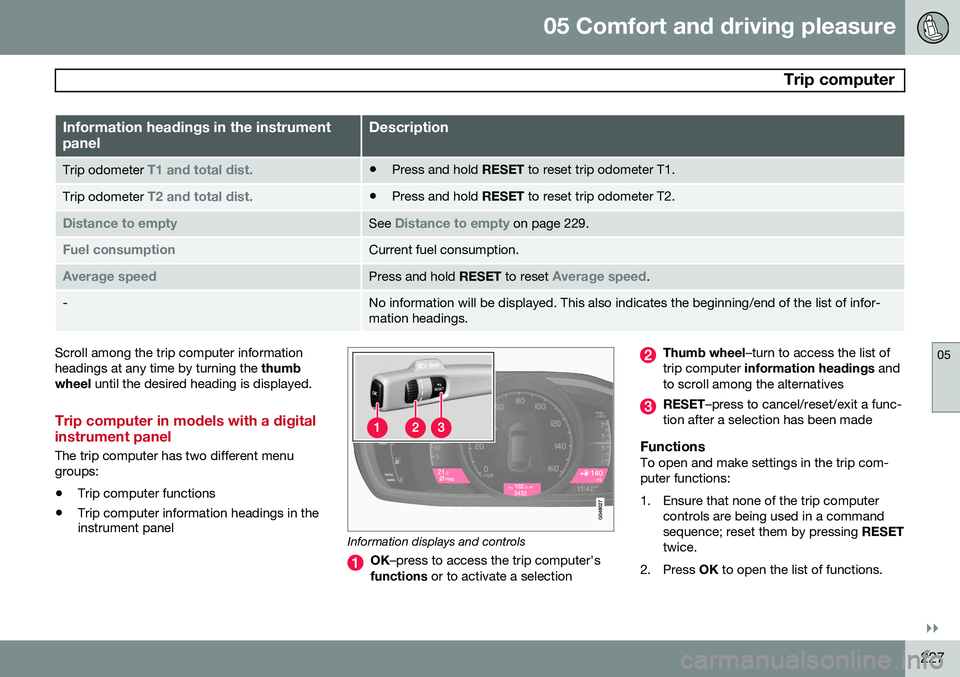
Information displays and controls
OK
–press to access the trip computer's
functions or to activate a selection
Thumb wheel –turn to access the list of
trip computer information headings and
to scroll among the alternatives
RESET –press to cancel/reset/exit a func-
tion after a selection has been made
FunctionsTo open and make settings in the trip com- puter functions:
1. Ensure that none of the trip computer controls are being used in a command sequence; reset them by pressing RESET
twice.
2. Press OK to open the list of functions.
Page 230 of 408
05 Comfort and driving pleasure
Trip computer
05
228* Option/accessory, for more information, see Introduction.
3. Use the thumb wheel to scroll among the
functions and select/confirm your choice by pressing OK. 4. After completing your selection, exit by
pressing RESET twice. The following table lists the digital trip com-puter's functions:
FunctionDescription
Trip computer reset
– Average fuel consumption – Average speedNOTE: This function does not reset the trip odometers, see page 230 for a description of how
this is done.
MessagesFor additional information, see page 207.
ThemesSet the way in which information is displayed in the instrument panel, see page 80.
Settings *Select Auto On or Off.
Contrast mode /Color modeAdjust the instrument panel's contrast and color.
Service statusShows the number of months and mileage until the next scheduled service.
Information headingsThree trip computer headings can be dis- played at the same time; one in each of thedisplays (see the previous illustration). One ofthe combinations of information headings inthe following table can be displayed. To doso: 1. Ensure that none of the trip computer
controls are being used in a commandsequence; reset them by pressing RESET
twice.
2. Turn the thumb wheel to begin display-
ing the combinations of information head-ings. Stop on the desired combination. 3. See the table for an explanation of the
heading or the actions that can be taken.
Scroll among the combinations of trip com-puter information headings at any time byturning the thumb wheel until the desired
combination is displayed.
Page 231 of 408
05 Comfort and driving pleasure
Trip computer
05
}}
* Option/accessory, for more information, see Introduction.229
Heading combinationsDescription
Average fuel consumptionTrip odometer T1 + mileageAverage speed• Press and hold
RESET to reset trip odometer T1.
Current fuel consumptionTrip odometer T2 + mileageDistance to empty•Press and hold
RESET to reset trip odometer T2.
Current fuel consumptionMileagemph<>kmhChange between mph<>kmh – see "Digital speed display" on page 229.
-No trip computer informa-
tion displayed-No information will be displayed. This also indicates the begin- ning/end of the list of information headings.
Scroll among the trip computer information headings at any time by turning the thumb
wheel until the desired heading is displayed.
Supplementary information
Average fuel consumptionFuel consumption since the last time this function was reset.
Average speedThe vehicle's average speed since the lasttime this function was reset.
Current fuel consumptionCurrent fuel consumption is calculatedapproximately once a second. When the vehi-cle is moving at low speed, fuel consumptionis displayed per unit of time. At higherspeeds, it is displayed in terms of distance. Miles or kilometers can be displayed, see theheading "Changing units" on page 230
Distance to emptyThis function shows the approximate dis-tance that can be driven on the fuel remaining in the tank. When
Distance to empty shows
"----", there is very little useable fuel remain- ing in that tank; refuel as soon as possible.The calculation is based on average fuel con-sumption during the last 20 miles (30 km) ofdriving and the amount of fuel remaining inthe tank (the accuracy of this figure may varyif your driving style changes). An economicaldriving style will generally increase this dis-tance. See page 284 for information about driving economically.
Digital speed display*Speed is expressed in the unit not used bythe instrument panel's speedometer e.g., ifthe normal speedometer is in mph, the tripcomputer will display in the speed in km/hand vice versa.
Resetting an analog instrument panel
Trip odometer(s) and average speed1. Display trip odometer T1 or T1, or Aver- age speed.
2. Press and hold RESET until selected
function is reset.
Each trip computer heading must be reset individually.
Page 232 of 408
05 Comfort and driving pleasure
Trip computer
05
230* Option/accessory, for more information, see Introduction.
Resetting a digital instrument panel
Trip odometer1. Turn the thumb wheel to select the com-
bination of headings containing the trip odometer to be reset.
2. Press and hold RESET until selected trip
odometer is reset.
Average speed and fuel consumption1. Select Trip computer reset and press
OK .
2. Select one of the following alternatives using the thumb wheel and press OK:
• mpg
• mph
• Reset both
3. Finish by pressing RESET.
Changing unitsTo change the unit (miles/km) used to meas- ure distance and speed, go to
MY CAR
SettingsSystem optionsDistance
and fuel units.
NOTE
In addition to changing units in the trip computer, this also changes the units usedin the Volvo Navigation System (VNS)*.
Trip statistics*
Trip information from previous trips regarding average fuel consumption and average speedis stored and can be displayed in the form ofa bar chart.
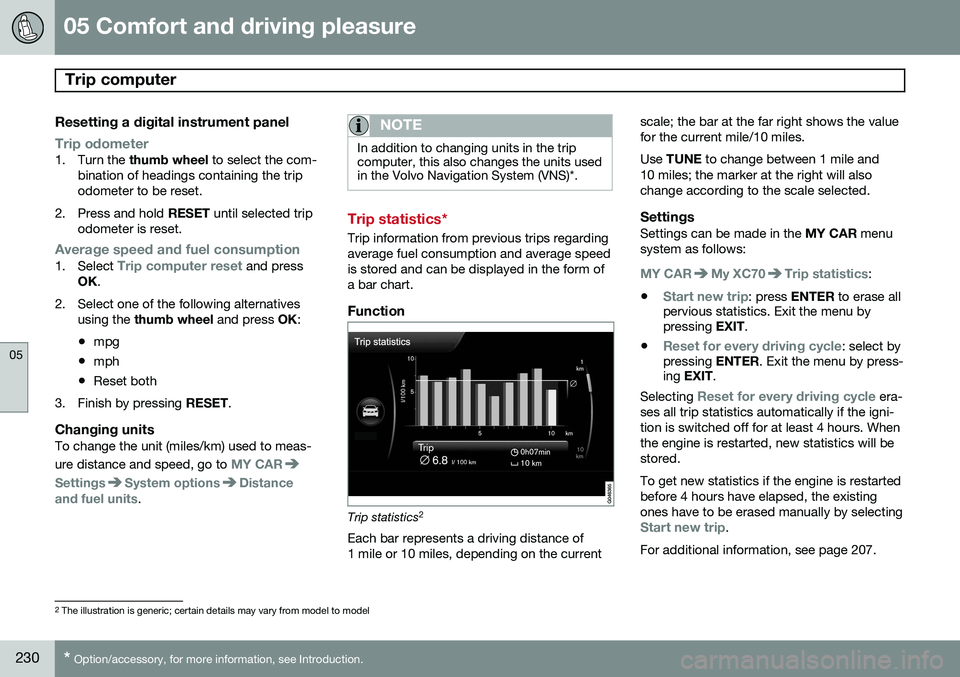
Function
Trip statistics 2
Each bar represents a driving distance of 1 mile or 10 miles, depending on the current scale; the bar at the far right shows the valuefor the current mile/10 miles. Use
TUNE to change between 1 mile and
10 miles; the marker at the right will also change according to the scale selected.
SettingsSettings can be made in the MY CAR menu
system as follows:
MY CARMy XC70Trip statistics:
•
Start new trip: press ENTER to erase all
pervious statistics. Exit the menu by pressing EXIT.
•
Reset for every driving cycle: select by
pressing ENTER. Exit the menu by press-
ing EXIT .
Selecting
Reset for every driving cycle era-
ses all trip statistics automatically if the igni- tion is switched off for at least 4 hours. Whenthe engine is restarted, new statistics will bestored. To get new statistics if the engine is restarted before 4 hours have elapsed, the existingones have to be erased manually by selecting
Start new trip.
For additional information, see page 207.
2 The illustration is generic; certain details may vary from model to model
Page 243 of 408
06 Infotainment
Introduction
06
}}
* Option/accessory, for more information, see Introduction.241
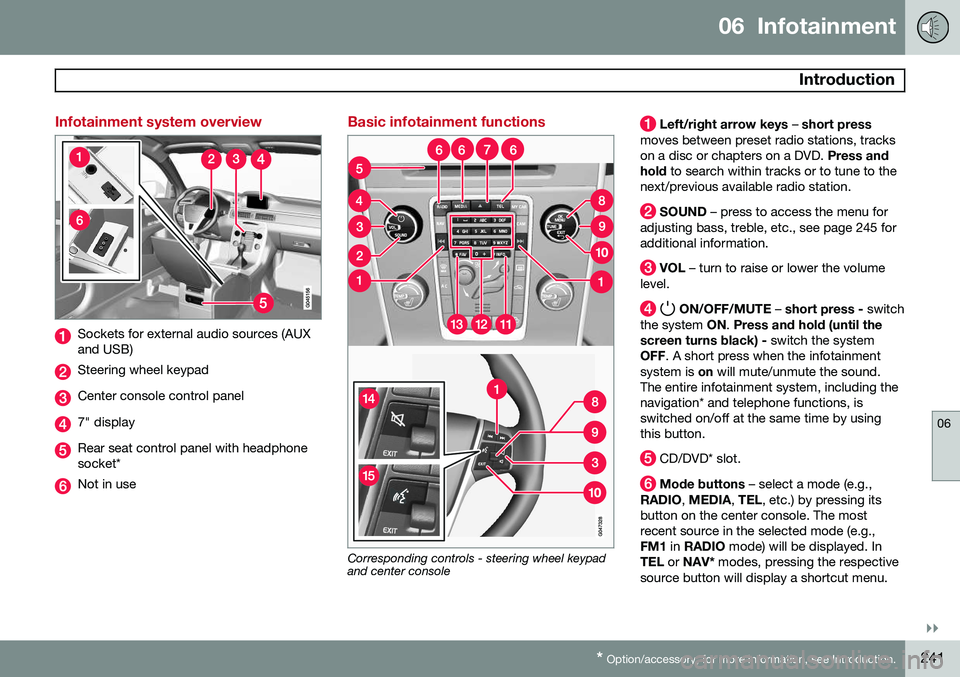
Infotainment system overview
Sockets for external audio sources (AUX and USB)
Steering wheel keypad
Center console control panel
7" display
Rear seat control panel with headphone socket*
Not in use
Basic infotainment functions
Corresponding controls - steering wheel keypad and center console
Left/right arrow keys – short press
moves between preset radio stations, tracks on a disc or chapters on a DVD. Press and
hold to search within tracks or to tune to the
next/previous available radio station.
SOUND – press to access the menu for
adjusting bass, treble, etc., see page 245 for additional information.
VOL – turn to raise or lower the volume
level.
ON/OFF/MUTE – short press - switch
the system ON. Press and hold (until the
screen turns black) - switch the system
OFF . A short press when the infotainment
system is on will mute/unmute the sound.
The entire infotainment system, including the navigation* and telephone functions, isswitched on/off at the same time by usingthis button.
CD/DVD* slot.
Mode buttons – select a mode (e.g.,
RADIO , MEDIA , TEL , etc.) by pressing its
button on the center console. The most recent source in the selected mode (e.g.,FM1 in RADIO mode) will be displayed. In
TEL or NAV* modes, pressing the respective
source button will display a shortcut menu.
Page 249 of 408
06 Infotainment
Introduction
06
}}
* Option/accessory, for more information, see Introduction.247
There is also a dynamic calibration that takes into consideration the volume level, radioreception, and the speed of the vehicle. The settings that are described in this man- ual, (
Bass, Treble, Equalizer etc.) are only
intended to enable the user to adapt sound reproduction to his/her personal tastes.
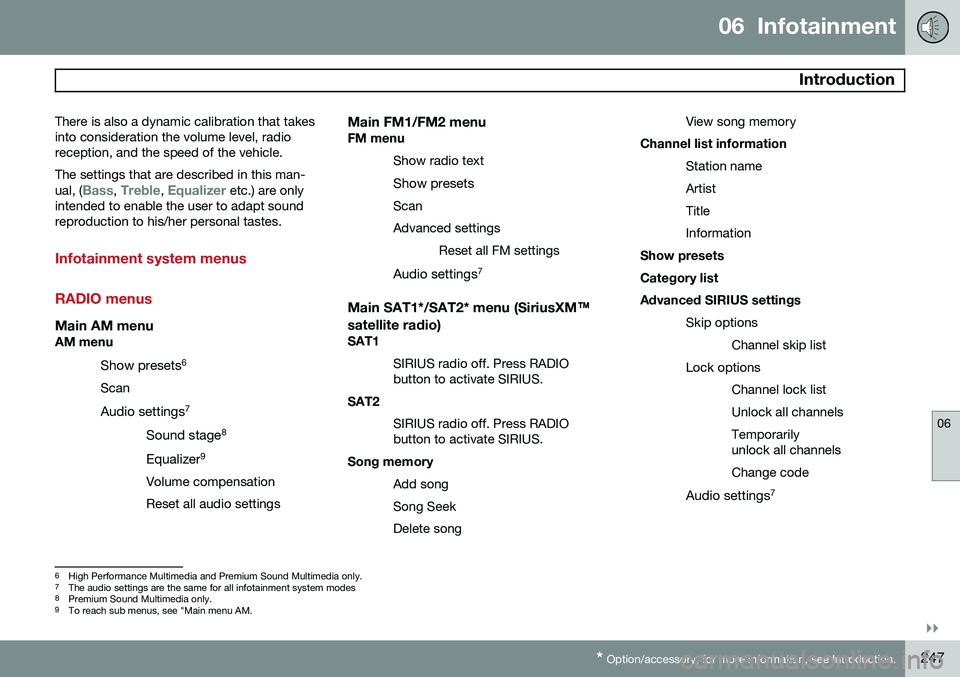
Infotainment system menus RADIO menus
Main AM menuAM menu
Show presets 6
Scan
Audio settings 7
Sound stage 8
Equalizer 9
Volume compensation Reset all audio settings
Main FM1/FM2 menuFM menu Show radio text
Show presets
ScanAdvanced settings Reset all FM settings
Audio settings 7
Main SAT1*/SAT2* menu (SiriusXM™
satellite radio)
SAT1
SIRIUS radio off. Press RADIO button to activate SIRIUS.
SAT2
SIRIUS radio off. Press RADIObutton to activate SIRIUS.
Song memory
Add song Song SeekDelete song View song memory
Channel list information
Station nameArtistTitleInformation
Show presetsCategory listAdvanced SIRIUS settings
Skip optionsChannel skip list
Lock options Channel lock listUnlock all channelsTemporarily unlock all channels Change code
Audio settings 7
6
High Performance Multimedia and Premium Sound Multimedia only.
7 The audio settings are the same for all infotainment system modes
8 Premium Sound Multimedia only.
9 To reach sub menus, see "Main menu AM.
Page 252 of 408
06 Infotainment
Radio
06
250* Option/accessory, for more information, see Introduction.
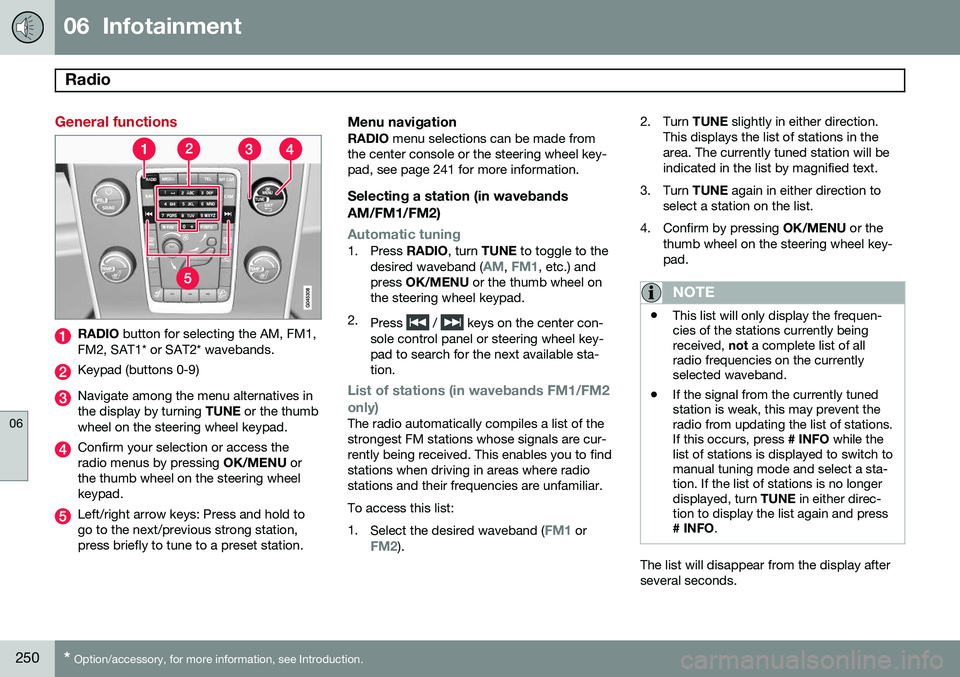
General functions
RADIO button for selecting the AM, FM1,
FM2, SAT1* or SAT2* wavebands.
Keypad (buttons 0-9)
Navigate among the menu alternatives in the display by turning TUNE or the thumb
wheel on the steering wheel keypad.
Confirm your selection or access the radio menus by pressing OK/MENU or
the thumb wheel on the steering wheelkeypad.
Left/right arrow keys: Press and hold to go to the next/previous strong station,press briefly to tune to a preset station.
Menu navigationRADIO menu selections can be made from
the center console or the steering wheel key-pad, see page 241 for more information.
Selecting a station (in wavebands AM/FM1/FM2)
Automatic tuning1. Press RADIO, turn TUNE to toggle to the
desired waveband (AM, FM1, etc.) and
press OK/MENU or the thumb wheel on
the steering wheel keypad.
2. Press
/ keys on the center con-
sole control panel or steering wheel key- pad to search for the next available sta-tion.
List of stations (in wavebands FM1/FM2 only)
The radio automatically compiles a list of the strongest FM stations whose signals are cur-rently being received. This enables you to findstations when driving in areas where radiostations and their frequencies are unfamiliar. To access this list:1. Select the desired waveband (
FM1 orFM2). 2. Turn
TUNE slightly in either direction.
This displays the list of stations in the area. The currently tuned station will beindicated in the list by magnified text.
3. Turn TUNE again in either direction to
select a station on the list.
4. Confirm by pressing OK/MENU or the
thumb wheel on the steering wheel key-pad.
NOTE
• This list will only display the frequen- cies of the stations currently beingreceived,
not a complete list of all
radio frequencies on the currentlyselected waveband.
• If the signal from the currently tunedstation is weak, this may prevent theradio from updating the list of stations.If this occurs, press
# INFO while the
list of stations is displayed to switch tomanual tuning mode and select a sta-tion. If the list of stations is no longerdisplayed, turn TUNE in either direc-
tion to display the list again and press
# INFO .
The list will disappear from the display after several seconds.
Page 253 of 408
06 Infotainment
Radio
06
}}
251
If the station list is no longer displayed, turn TUNE
in either direction and press
on
the keypad on the center console to switch to manual tuning (or to switch back from manualtuning to the "list of stations" function).
Manual tuningBy default, the list of stations of the strongest stations in the area will be displayed whenyou turn TUNE (see the preceding section,
"List of stations"). While the list of stations is displayed, press
on the center console
keypad to switch to manual tuning, which enables you to select a frequency from thecomplete list of all radio frequencies availa-
ble on the currently selected waveband. Inother words, in manual tuning mode, turningTUNE one step will change from e.g., 93.3 to
93.5, etc.). To manually tune a station:
1. Press RADIO. Turn TUNE to scroll to the
desired waveband (
AM, FM1, etc.) and
press OK/MENU or the thumb wheel on
the steering wheel keypad to confirm.
2. Turn TUNE or the thumb wheel to select
a frequency.
NOTE
The radio is initially set to automatically search for stations in the area in which youare driving (see the preceding section,"List of stations"). However, if you have switched to manual tuning (by pressing # INFO on the keypad
on the center console while the list of sta-tions is displayed), the radio will remain inmanual tuning mode the next time it isswitched on. To switch back to "list of sta-tions" mode, turn TUNE one step (to dis-
play the full list of stations) and press #
INFO .
Please note that if you press # INFO when
the list of stations is not displayed, this willactivate the INFO function.
Storing preset stationsTen preset stations can be stored for each waveband (AM, FM1, etc.).
Stored preset stations are selected using the buttons on the keypad on the center console.
Manually storing preset stations1. Tune to a station (see "Selecting a sta- tion" on page 250). 2. Press and hold one of the number key
buttons.
> The sound will be muted for severalseconds and when it returns, the sta- tion has been stored on the numberkey button used.
A list of preset stations can be displayed. Thisfunction can be activated/deactivated in AM/FM mode in
FM menuShow presets
or in AM menuShow presets
ScanThe function automatically searches the cur- rent waveband for radio stations. When a sta-tion is found, it is played for several secondsbefore scanning is resumed. While the stationis playing it can be stored as a preset in theusual way (see "Manually storing preset sta-tions").
–To start scanning in AM/FM mode, go to
FM menuScan or in AM menuScan.
Stop station scanning by pressing EXIT.
NOTE
Storing a station interrupts the SCAN func- tion.
Page 255 of 408
06 Infotainment
Radio
06
}}
253
strength), the receiver will determine which signal to receive.
Limitations
•
Main channel vs. sub-channels (FM only)
: The main channel is the only chan-
nel that can receive in hybrid mode (both digital and analogue). If a frequency hassub-channels, they are broadcast in digi-tal mode only. The main FM channel willbe displayed as, for example, 93.9 WNYC(Volvo uses the symbol ">" to indicatethere are sub-channels available) Thesub-FM channels will be displayed as93.9 – 2 WNYC, 93.9 - 3 WNYC, etc.
• Reception coverage area
: Due to cur-
rent IBOC transmitter power limitations,the reception coverage area in digitalmode is somewhat more limited than thestation's analogue coverage area. Pleasebe aware that as with any radio broadcasttechnology, terrain, time of day, foliagelevel and building location can have posi-tive or negative effects on radio recep-tion.
• Analogue to digital/digital to analogue blending
: Analogue to digital blending
will occur as the signal strength reaches a preset threshold in the receiver. This willbe noticeable in fringe areas (areas withweak reception) and is normal.
NOTE
There may be a noticeable difference in sound quality when a change from ana-logue to digital or digital to analogueoccurs, such as:
• Volume increase or decrease
• Equalizer settings, i.e., Bass/ Mid- range/Treble cut or boost
• Time alignment (Digital program mate-rial in extreme cases can be as muchas 8 seconds behind the analogue).This will noticeable as a "stuttering"effect.
The above items are dependant on the broadcaster's equipment settings and do not indicate a fault in the vehicle's radio receiver or antenna systems .
Switching HD on or offThe factory setting for HD radio is off. If acti-
vated when driving through areas with weak HD signals (fringe areas), you may experiencethat the radio repeatedly switches betweenanalogue/digital and digital/analogue recep-tion. If this happens, it may be desirable toswitch HD off. To do so: 1. Be sure the infotainment system is
switched on and in one of the AM or FM modes.
2. Press OK/MENU in the center console
control panel.
3. Turn TUNE and move the marker to
HD
Radio.
4. Press OK/MENU to turn HD off (the X will
disappear from the box on the display screen).
This will disable the radio's capability to receive digital broadcasts but it will continueto function as a conventional (analogue)AM/FM receiver. Please note that when HD isswitched off, it will not be possible to tune tosub-channels (see the following section for amore detailed explanation of sub-channels). Repeat steps 2-4 above to reactivate HD (an X will appear in the box on the displayscreen). Please note that this will only switchHD on or off for the selected waveband (AM,FM1, etc.).
Page 256 of 408
06 Infotainment
Radio
06
254* Option/accessory, for more information, see Introduction.
Sub-channels
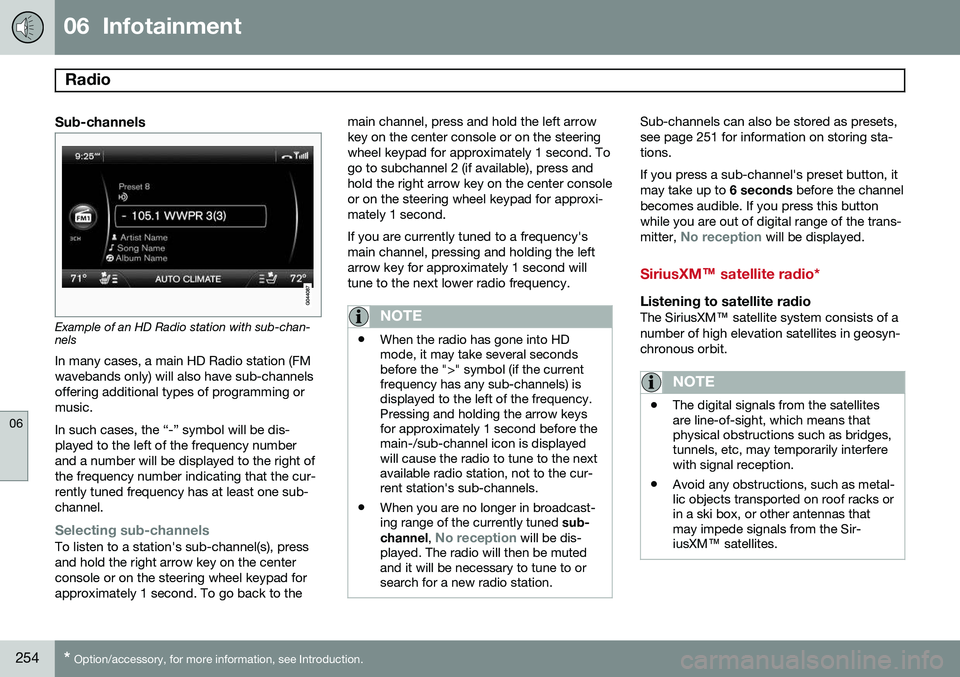
Example of an HD Radio station with sub-chan- nels
In many cases, a main HD Radio station (FM wavebands only) will also have sub-channelsoffering additional types of programming ormusic. In such cases, the “-” symbol will be dis- played to the left of the frequency numberand a number will be displayed to the right ofthe frequency number indicating that the cur-rently tuned frequency has at least one sub-channel.
Selecting sub-channelsTo listen to a station's sub-channel(s), press and hold the right arrow key on the centerconsole or on the steering wheel keypad forapproximately 1 second. To go back to the main channel, press and hold the left arrowkey on the center console or on the steeringwheel keypad for approximately 1 second. Togo to subchannel 2 (if available), press andhold the right arrow key on the center consoleor on the steering wheel keypad for approxi-mately 1 second. If you are currently tuned to a frequency's main channel, pressing and holding the leftarrow key for approximately 1 second willtune to the next lower radio frequency.
NOTE
•
When the radio has gone into HD mode, it may take several secondsbefore the ">" symbol (if the currentfrequency has any sub-channels) isdisplayed to the left of the frequency.Pressing and holding the arrow keysfor approximately 1 second before themain-/sub-channel icon is displayedwill cause the radio to tune to the nextavailable radio station, not to the cur-rent station's sub-channels.
• When you are no longer in broadcast-ing range of the currently tuned
sub-
channel ,
No reception will be dis-
played. The radio will then be muted and it will be necessary to tune to orsearch for a new radio station.
Sub-channels can also be stored as presets, see page 251 for information on storing sta-tions. If you press a sub-channel's preset button, it may take up to 6 seconds before the channel
becomes audible. If you press this buttonwhile you are out of digital range of the trans- mitter,
No reception will be displayed.
SiriusXM™ satellite radio*
Listening to satellite radioThe SiriusXM ™ satellite system consists of a
number of high elevation satellites in geosyn- chronous orbit.
NOTE
• The digital signals from the satellites are line-of-sight, which means thatphysical obstructions such as bridges,tunnels, etc, may temporarily interferewith signal reception.
• Avoid any obstructions, such as metal-lic objects transported on roof racks orin a ski box, or other antennas thatmay impede signals from the Sir-iusXM
™ satellites.