ECO mode VOLVO XC70 2016 Owner´s Manual
[x] Cancel search | Manufacturer: VOLVO, Model Year: 2016, Model line: XC70, Model: VOLVO XC70 2016Pages: 396, PDF Size: 10.01 MB
Page 99 of 396
03 Instruments and controls
03
97
Rear interior lighting
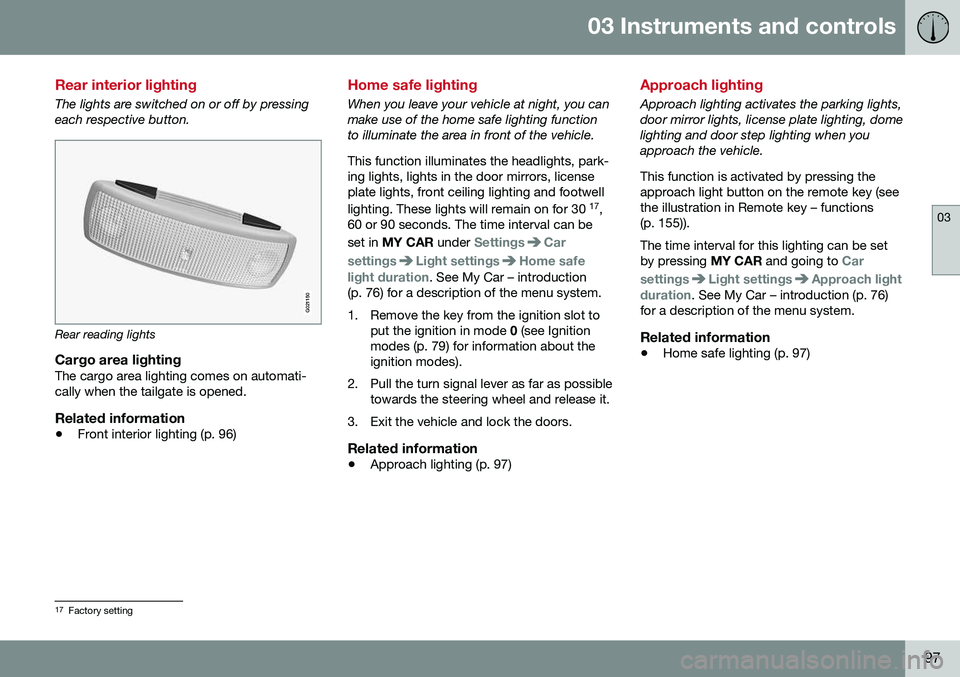
The lights are switched on or off by pressing each respective button.
G021150
Rear reading lights
Cargo area lightingThe cargo area lighting comes on automati- cally when the tailgate is opened.
Related information
•Front interior lighting (p. 96)
Home safe lighting
When you leave your vehicle at night, you can make use of the home safe lighting functionto illuminate the area in front of the vehicle. This function illuminates the headlights, park- ing lights, lights in the door mirrors, licenseplate lights, front ceiling lighting and footwell lighting. These lights will remain on for 30 17
,
60 or 90 seconds. The time interval can be set in MY CAR under
SettingsCar
settings
Light settingsHome safe
light duration. See My Car – introduction
(p. 76) for a description of the menu system.
1. Remove the key from the ignition slot to put the ignition in mode 0 (see Ignition
modes (p. 79) for information about the ignition modes).
2. Pull the turn signal lever as far as possible towards the steering wheel and release it.
3. Exit the vehicle and lock the doors.
Related information
• Approach lighting (p. 97)
Approach lighting
Approach lighting activates the parking lights, door mirror lights, license plate lighting, domelighting and door step lighting when youapproach the vehicle. This function is activated by pressing the approach light button on the remote key (see
the illustration in Remote key – functions(p. 155)). The time interval for this lighting can be set by pressing
MY CAR and going to
Car
settings
Light settingsApproach light
duration. See My Car – introduction (p. 76)
for a description of the menu system.
Related information
• Home safe lighting (p. 97)
17
Factory setting
Page 102 of 396
03 Instruments and controls
03
100
Tailgate wiper/washer
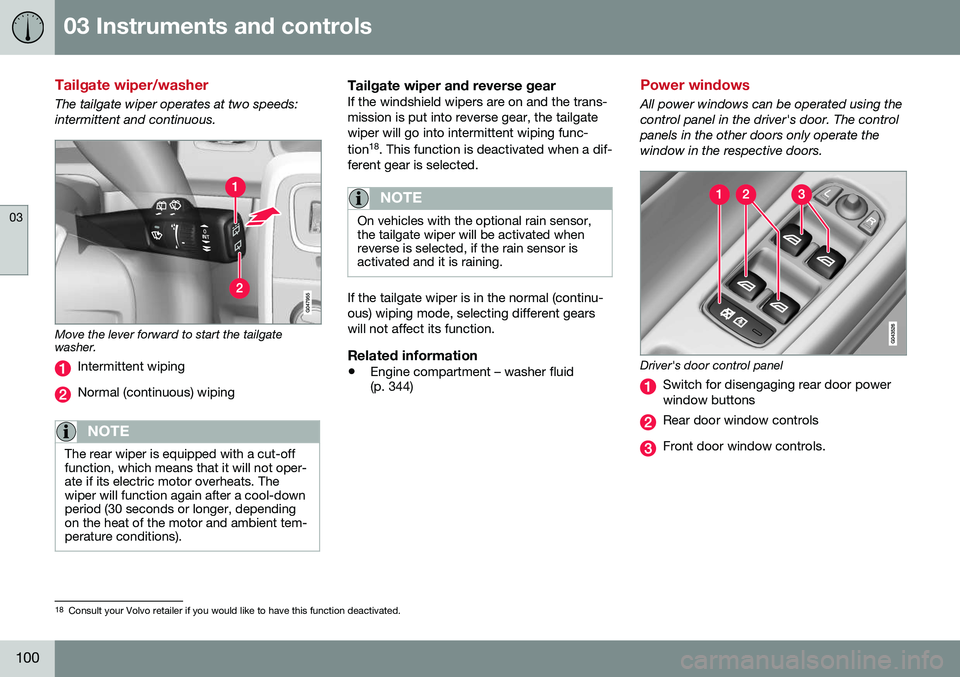
The tailgate wiper operates at two speeds: intermittent and continuous.
Move the lever forward to start the tailgate washer.
Intermittent wiping
Normal (continuous) wiping
NOTE
The rear wiper is equipped with a cut-off function, which means that it will not oper-ate if its electric motor overheats. Thewiper will function again after a cool-downperiod (30 seconds or longer, dependingon the heat of the motor and ambient tem-perature conditions).
Tailgate wiper and reverse gearIf the windshield wipers are on and the trans- mission is put into reverse gear, the tailgatewiper will go into intermittent wiping func- tion18
. This function is deactivated when a dif-
ferent gear is selected.
NOTE
On vehicles with the optional rain sensor, the tailgate wiper will be activated whenreverse is selected, if the rain sensor isactivated and it is raining.
If the tailgate wiper is in the normal (continu- ous) wiping mode, selecting different gearswill not affect its function.
Related information
• Engine compartment – washer fluid (p. 344)
Power windows
All power windows can be operated using the control panel in the driver's door. The controlpanels in the other doors only operate thewindow in the respective doors.
Driver's door control panel
Switch for disengaging rear door power window buttons
Rear door window controls
Front door window controls.
18
Consult your Volvo retailer if you would like to have this function deactivated.
Page 103 of 396
03 Instruments and controls
03
* Option/accessory, for more information, see Introduction.101
WARNING
• Always remove the ignition key when the vehicle is unattended to put theignition in mode
0 (see Ignition modes
(p. 79) for information about the igni-tion modes).
• Never leave children unattended in thevehicle.
• Make sure that the windows are com-pletely unobstructed before they areoperated.
Operating
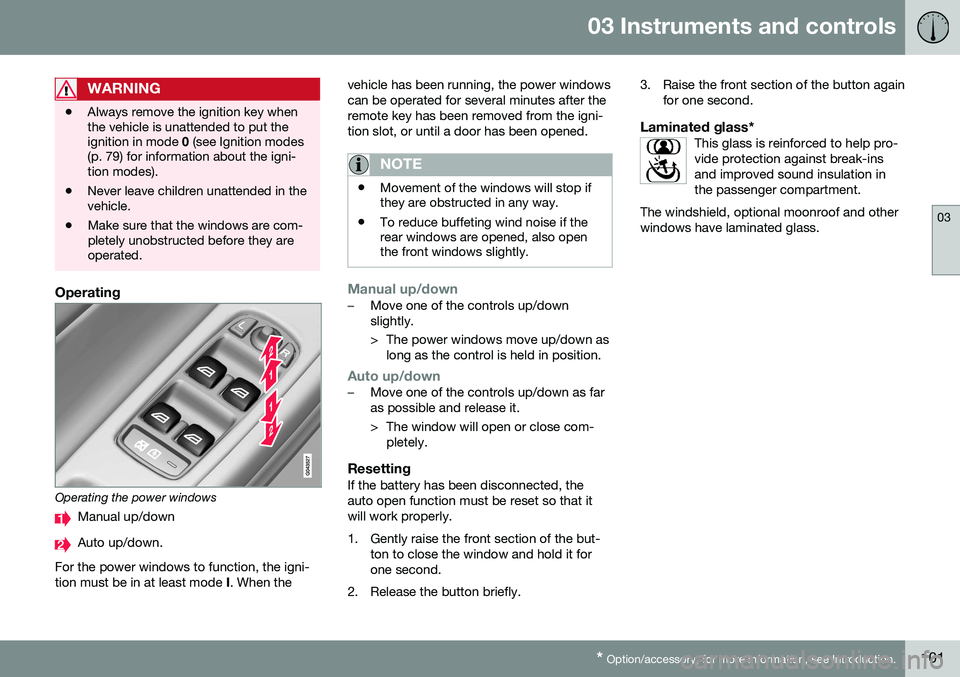
Operating the power windows
Manual up/down
Auto up/down.
For the power windows to function, the igni- tion must be in at least mode I. When the vehicle has been running, the power windowscan be operated for several minutes after theremote key has been removed from the igni-tion slot, or until a door has been opened.
NOTE
•
Movement of the windows will stop if they are obstructed in any way.
• To reduce buffeting wind noise if therear windows are opened, also openthe front windows slightly.
Manual up/down–Move one of the controls up/down slightly.
> The power windows move up/down as
long as the control is held in position.
Auto up/down–Move one of the controls up/down as far as possible and release it.
> The window will open or close com-pletely.
ResettingIf the battery has been disconnected, the auto open function must be reset so that itwill work properly.
1. Gently raise the front section of the but- ton to close the window and hold it for one second.
2. Release the button briefly. 3. Raise the front section of the button again
for one second.
Laminated glass*This glass is reinforced to help pro-vide protection against break-insand improved sound insulation inthe passenger compartment.
The windshield, optional moonroof and otherwindows have laminated glass.
Page 107 of 396
03 Instruments and controls
03
}}
* Option/accessory, for more information, see Introduction.105
Digital compass*
The rear-view mirror has an integrated display that shows the compass direction in whichthe vehicle is traveling.
Operation
G029737
Rearview mirror with compass.
Eight different directions are shown with the abbreviations:
N (north), NE (north east), E(east), SE (southeast), S (south), SW (south-
west), W (west) and NW (northwest).
The compass is displayed automatically when the vehicle is started or in ignition mode II. To
switch the compass on/off use a pen, paper-clip or similar object and press in the buttonon the rear side of the mirror.
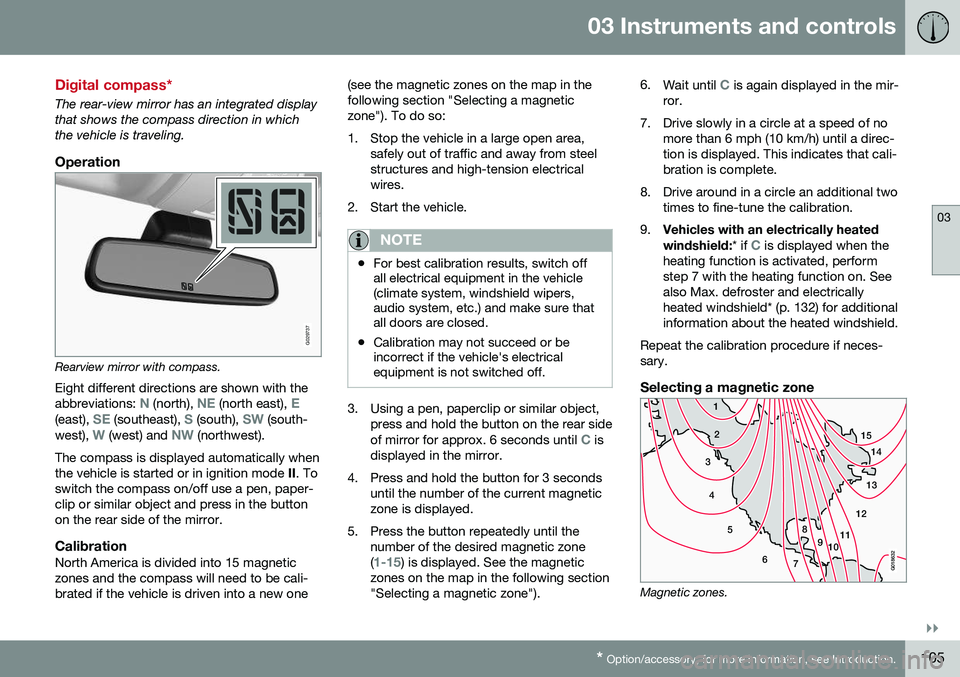
CalibrationNorth America is divided into 15 magneticzones and the compass will need to be cali-brated if the vehicle is driven into a new one (see the magnetic zones on the map in thefollowing section "Selecting a magneticzone"). To do so:
1. Stop the vehicle in a large open area,
safely out of traffic and away from steel structures and high-tension electricalwires.
2. Start the vehicle.
NOTE
• For best calibration results, switch off all electrical equipment in the vehicle(climate system, windshield wipers,audio system, etc.) and make sure thatall doors are closed.
• Calibration may not succeed or beincorrect if the vehicle's electricalequipment is not switched off.
3. Using a pen, paperclip or similar object,
press and hold the button on the rear side of mirror for approx. 6 seconds until
C is
displayed in the mirror.
4. Press and hold the button for 3 seconds until the number of the current magnetic zone is displayed.
5. Press the button repeatedly until the number of the desired magnetic zone (
1-15) is displayed. See the magnetic
zones on the map in the following section "Selecting a magnetic zone"). 6.
Wait until
C is again displayed in the mir-
ror.
7. Drive slowly in a circle at a speed of no more than 6 mph (10 km/h) until a direc- tion is displayed. This indicates that cali-bration is complete.
8. Drive around in a circle an additional two times to fine-tune the calibration.
9. Vehicles with an electrically heated windshield:
* if
C is displayed when the
heating function is activated, perform step 7 with the heating function on. Seealso Max. defroster and electricallyheated windshield* (p. 132) for additionalinformation about the heated windshield.
Repeat the calibration procedure if neces-sary.
Selecting a magnetic zone
15 14
13
12
11
9
8
7
6
5
4
3
2
1
10
G018632
Magnetic zones.
Page 108 of 396
03 Instruments and controls
03
106* Option/accessory, for more information, see Introduction.
The earth is divided into 15 magnetic zones. The correct zone must be selected for thecompass to work correctly.
1. Put the ignition in mode II.
2. Using a pen or similar object, press and hold the button on the rear side of mirror for at least 3 seconds. The number for thecurrent area will be shown.
3. Press the button repeatedly until the number for the required geographic area(1 – 15) is shown.
4. The display will revert to showing the compass direction after several seconds.Power moonroof* – introduction
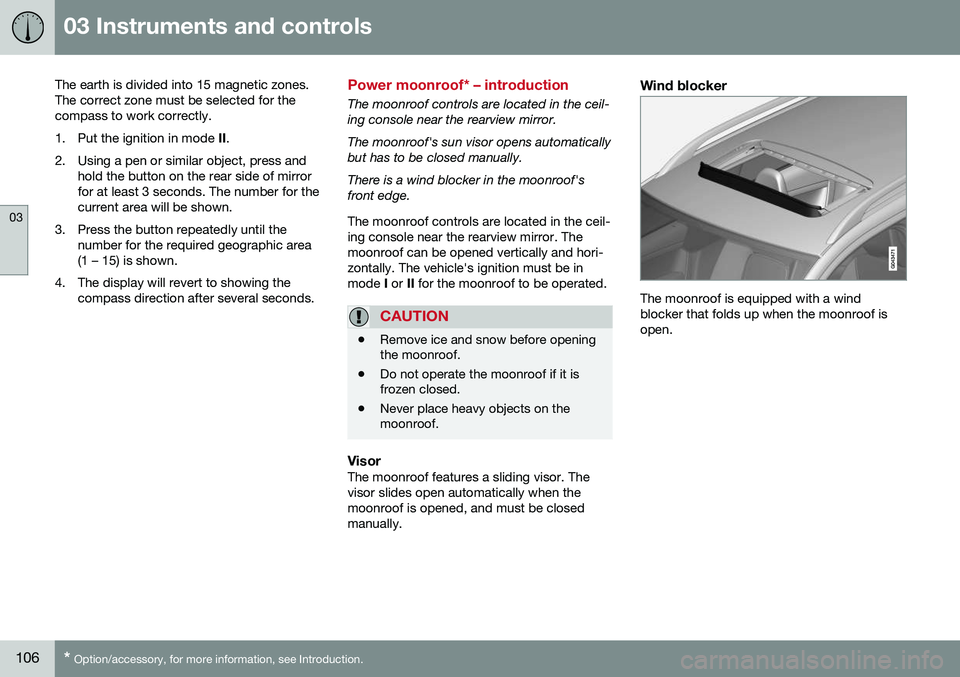
The moonroof controls are located in the ceil- ing console near the rearview mirror. The moonroof's sun visor opens automatically but has to be closed manually. There is a wind blocker in the moonroof's front edge. The moonroof controls are located in the ceil- ing console near the rearview mirror. Themoonroof can be opened vertically and hori-zontally. The vehicle's ignition must be inmode I or II for the moonroof to be operated.
CAUTION
• Remove ice and snow before opening the moonroof.
• Do not operate the moonroof if it isfrozen closed.
• Never place heavy objects on themoonroof.
VisorThe moonroof features a sliding visor. The visor slides open automatically when themoonroof is opened, and must be closedmanually.
Wind blocker
The moonroof is equipped with a wind blocker that folds up when the moonroof isopen.
Page 111 of 396
03 Instruments and controls
03
}}
* Option/accessory, for more information, see Introduction.109
Retain the original transmitter of the RF device you are programming for use in othervehicles as well as for future HomeLink pro-gramming. It is also suggested that upon thesale of the vehicle, the programmed Home-Link buttons be erased for security purposes.Refer to “Resetting HomeLink Buttons” in HomeLink
®
Wireless Control System* – pro-
gramming (p. 109).
Using HomeLinkTo operate, simply press and hold the pro- grammed HomeLink button until the traineddevice begins to operate (this may take sev-eral seconds). Activation will now occur forthe trained device (i.e., garage door opener,gate operator, security system, entry doorlock, home/office lighting, etc.). For conven-ience, the hand-held transmitter of the devicemay also be used at any time. In the eventthat there are still programming difficulties orquestions, contact HomeLink at:www.homelink.com/www.youtube.com/HomeLinkGentex or by phoning the hotline at1–800–355–3515.
NOTE
If the ignition is switched off, HomeLink will function for 30 minutes after the driv-er's door has been opened.
HomeLink ®
Wireless Control System*
– programming
The HomeLink Wireless Control System pro- vides a convenient way to replace up to threehand-held radio-frequency (RF) transmittersused to activate devices such as gate opera-tors, garage door openers, entry door locks,security systems, even home lighting. Addi-tional information can be found on the Inter-net atwww.homelink.com/www.youtube.com/HomeLinkGentex or by phoning the hotline at1–800–355–3515.
NOTE
Some vehicles may require the ignition to be switched on or be in the “accessories”position for programming and/or operationof HomeLink. It is also recommended thata new battery be placed in the hand-heldtransmitter of the device being pro-grammed to HomeLink for quicker trainingand accurate transmission of the radio-fre-quency signal. The HomeLink buttonsmust be reset first. When this has beencompleted, Homelink is in learning modeso that you can perform programming.
1. Position the end of your hand-held trans- mitter 1–3 inches (5–14 cm) away from the HomeLink button you wish to pro-gram while keeping the indicator light inview. 2. Simultaneously press and hold both the
chosen HomeLink and hand-held trans-mitter buttons until the HomeLink indica-tor light changes from a slow to a rapidlyblinking light. Now you may release boththe HomeLink and hand-held transmitterbuttons.
NOTE
Some devices may require you to replace this Programming Step 2 with proceduresnoted in the “Gate Operator / CanadianProgramming” section. If the HomeLinkindicator light does not change to a rapidlyblinking light after performing these steps,contact HomeLink at www.homelink.com/www.youtube.com/HomeLinkGentex or byphoning the hotline at 1–800–355–3515.
Page 113 of 396
03 Instruments and controls
03
}}
111
2. Release both buttons.
> HomeLink is now in the training (orlearning) mode and can be pro- grammed at any time beginning with“Programming” - step 1.
Reprogramming a Single HomeLink Button
To program a device to HomeLink using a HomeLink button previously trained, followthese steps:
1. Press and hold the desired HomeLink button. DO NOT release the button.
2. The indicator light will begin to flash after 20 seconds. Without releasing the Home- Link button, proceed with “Programming”- step 1.
For questions or comments, contact Home-Link at: www.homelink.com/www.youtube.com/HomeLinkGentex or byphoning the hotline at 1–800–355–3515. This device complies with FCC rules part 15 and Industry Canada (IC) RSS-210. Operationis subject to the following two conditions: (1)This device may not cause harmful interfer-ence, and (2) This device must accept anyinterference that may be received includinginterference that may cause undesired opera-tion.
NOTE
The transmitter has been tested and com- plies with FCC and IC rules. Changes ormodifications not expressly approved bythe party responsible for compliance couldvoid the user’s authority to operate the device. 20
Volvo Sensus
Volvo Sensus is the core of the contact inter- face with your vehicle. Sensus provides infor-mation, entertainment and offers access tofunctions that make owning and operating aVolvo easier.
Volvo Sensus is the operating system in your vehicle and it enables you to interact intui-tively with the vehicle’s various features andfunctions, including accessing the Internet,when it suits you. Volvo Sensus uses the center console screen to display information and menus, and tooffer a user interface that enables you tomake personalized settings for e.g., vehicle,infotainment and climate system functions. The buttons on the center console or the steering wheel keypad are used to activate/deactivate functions and change numeroussettings.
20
The term “IC:” before the certification/registration number only signifies that Industry Canada technical specifications were met.
Page 117 of 396
03 Instruments and controls
03
115
Trip computer – introduction
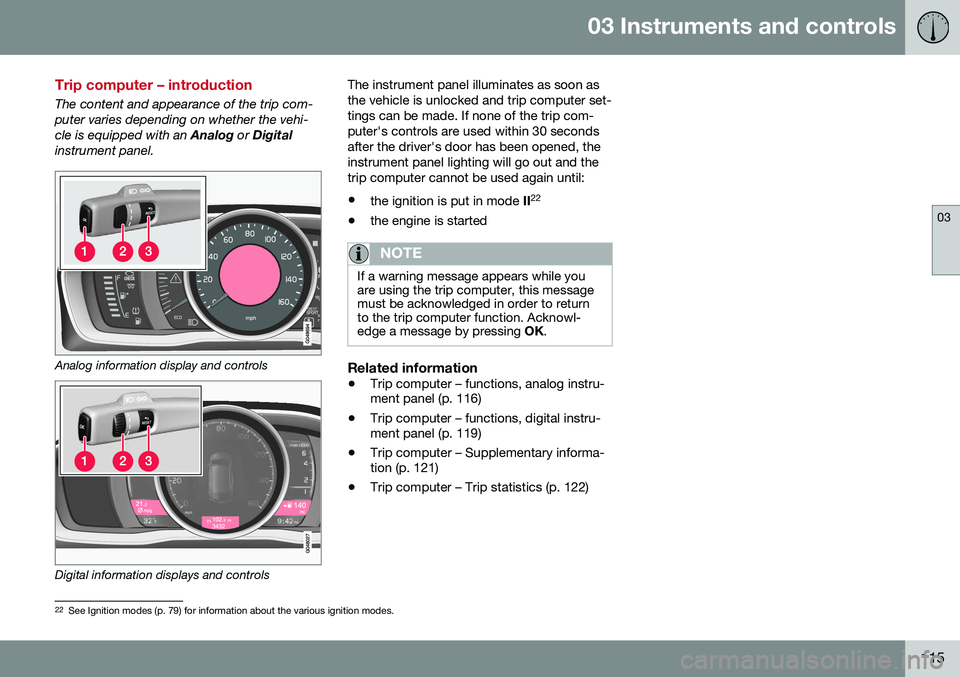
The content and appearance of the trip com- puter varies depending on whether the vehi-cle is equipped with an Analog or Digital
instrument panel.
Analog information display and controls
Digital information displays and controls The instrument panel illuminates as soon as the vehicle is unlocked and trip computer set-tings can be made. If none of the trip com-puter's controls are used within 30 secondsafter the driver's door has been opened, theinstrument panel lighting will go out and thetrip computer cannot be used again until: •
the ignition is put in mode II22
• the engine is started
NOTE
If a warning message appears while you are using the trip computer, this messagemust be acknowledged in order to returnto the trip computer function. Acknowl-edge a message by pressing
OK.
Related information
• Trip computer – functions, analog instru- ment panel (p. 116)
• Trip computer – functions, digital instru-ment panel (p. 119)
• Trip computer – Supplementary informa-tion (p. 121)
• Trip computer – Trip statistics (p. 122)
22
See Ignition modes (p. 79) for information about the various ignition modes.
Page 124 of 396
03 Instruments and controls
03
122* Option/accessory, for more information, see Introduction.
Trip computer – Trip statistics
Trip information from previous trips regarding average fuel consumption and average speedis stored and can be displayed in the form ofa bar chart.
Function
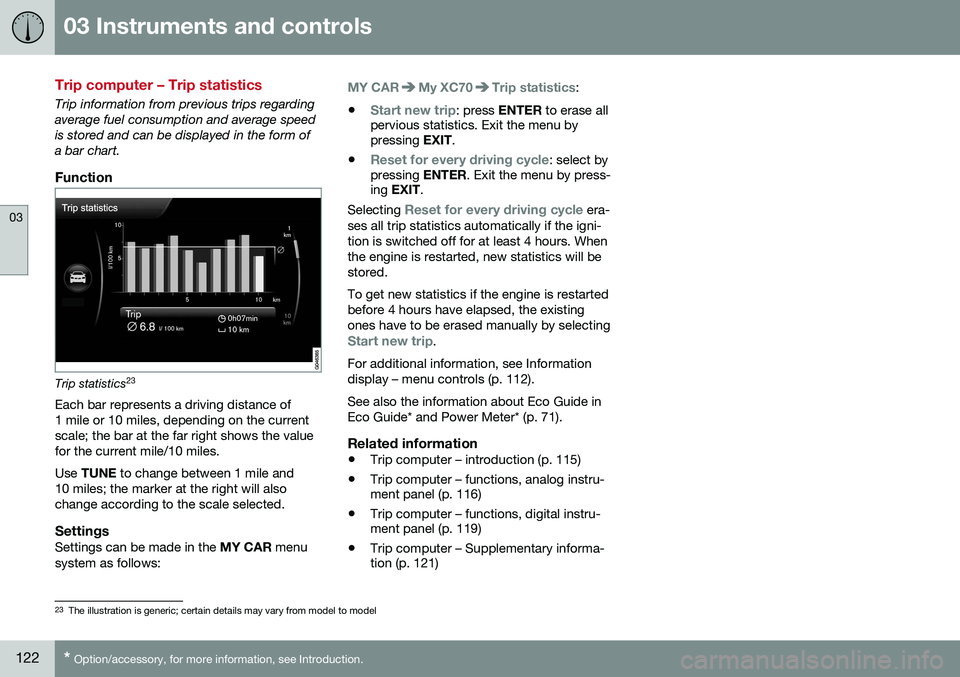
Trip statistics 23
Each bar represents a driving distance of 1 mile or 10 miles, depending on the currentscale; the bar at the far right shows the valuefor the current mile/10 miles. Use TUNE to change between 1 mile and
10 miles; the marker at the right will also change according to the scale selected.
SettingsSettings can be made in the MY CAR menu
system as follows:
MY CARMy XC70Trip statistics:
•
Start new trip: press ENTER to erase all
pervious statistics. Exit the menu by pressing EXIT.
•
Reset for every driving cycle: select by
pressing ENTER. Exit the menu by press-
ing EXIT .
Selecting
Reset for every driving cycle era-
ses all trip statistics automatically if the igni- tion is switched off for at least 4 hours. Whenthe engine is restarted, new statistics will bestored. To get new statistics if the engine is restarted before 4 hours have elapsed, the existingones have to be erased manually by selecting
Start new trip.
For additional information, see Information display – menu controls (p. 112). See also the information about Eco Guide in Eco Guide* and Power Meter* (p. 71).
Related information
• Trip computer – introduction (p. 115)
• Trip computer – functions, analog instru- ment panel (p. 116)
• Trip computer – functions, digital instru-ment panel (p. 119)
• Trip computer – Supplementary informa-tion (p. 121)
23
The illustration is generic; certain details may vary from model to model
Page 133 of 396
04 Climate
04
131
NOTE
If the blower is turned off completely, the air conditioning is disengaged, which mayresult in fogging on the windows.
Related information
•Climate – general information (p. 124)
• Electronic climate control (ECC) (p. 128)
• Air conditioning (p. 131)
• Climate – sensors (p. 124)
Automatic climate control
The Auto function automatically controls tem- perature (p. 130), air conditioning (p. 131),blower speed (p. 130), recirculation (p. 134)and air distribution (p. 126).
If you select one or moremanual functions, the otherfunctions continue to becontrolled automatically. Theair quality (p. 125) sensor isengaged and all manual set-tings are switched off when
AUTO is pressed. The display shows
AUTO
CLIMATE.
Blower speed in automatic mode can be set under
Climate settingsAutomatic blower
adjustment
. Choose between Low, Normalor High.
NOTE
Selecting the lowest blower speed may increases the risk of fog forming on thewindows.
Related information
• Climate – general information (p. 124)
Air conditioning
The air conditioning function cools and dehu- midifies the air in the passenger compart-ment.
When the indicator light inthe button is on, the air con-ditioning is controlled auto-matically. This cools/heatsand dehumidifies the incom-ing air. When the indicatorlight in the button is off, the
air conditioning is disengaged. Other func-tions are still controlled automatically. Whenmaximum defroster (p. 132) is selected, theair conditioning system is set for maximumblower speed and dehumidifies the cabin asquickly as possible.
Related information
• Climate – general information (p. 124)
• Automatic climate control (p. 131)