warning VOLVO XC70 2016 Owner´s Manual
[x] Cancel search | Manufacturer: VOLVO, Model Year: 2016, Model line: XC70, Model: VOLVO XC70 2016Pages: 396, PDF Size: 10.01 MB
Page 150 of 396
||
05 Loading and storage
05
148
With the backrests uprightThe net is pulled up from the cassette and locks in position after approximately 1minute.
Pull up the right side of the net by grasp- ing its strap.
Insert the net’s rod in the retaining bracket on the right side near the ceilingand press it forward. It will click intoplace.
Extend the left section of the rod and insert it in the bracket on the left side ofthe cargo compartment. Press it forwarduntil it clicks into place.
Pull up the left side of the cargo net and secure it on the rod.
NOTE
•The net can be fastened in the same way if the rear seat backrests arefolded down. In this case, use theretaining brackets near the ceiling,above the front seats.
• The front passenger's seat backrestcan also be folded down for carryinglong objects.
Removing the cargo net cassettes1. Retract the net(s) in the reverse order.
2. Fold the entire rear seat backrest down. 3. Slide the cassettes outward until they
release from the mounting brackets.
WARNING
•When not in use, return the cassettes to their storage compartment underthe cargo area floor.
• Objects in the cargo area should besecurely anchored, even if the cargonet is correctly installed and in use.
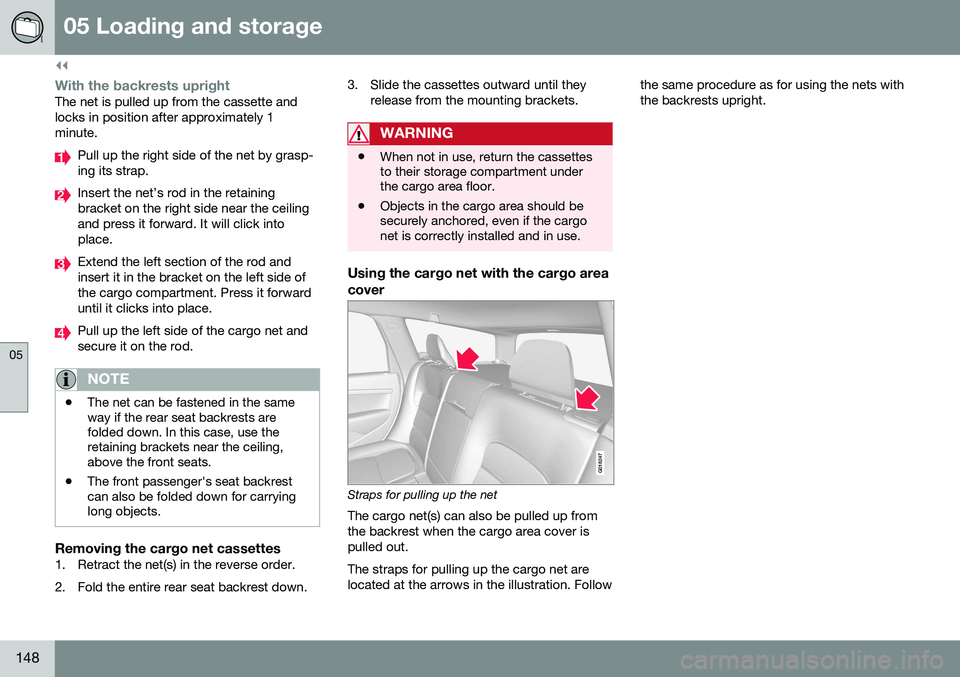
Using the cargo net with the cargo area cover
G018247
Straps for pulling up the net
The cargo net(s) can also be pulled up from the backrest when the cargo area cover ispulled out. The straps for pulling up the cargo net are located at the arrows in the illustration. Follow the same procedure as for using the nets withthe backrests upright.
Page 154 of 396
06 Locks and alarm
06
152
Remote key and key blade
Two remote keys are provided with your vehi- cle. They enable you to unlock the doors andtailgate, and also function as ignition keys tostart the vehicle or operate electrical compo-nents. The remote keys contain detachablemetal key blades for manually locking orunlocking the driver's door and the glovecompartment. The visible ends of these keyblades are unique to make it easier to identify"your" remote key. Up to six remotes can beprogrammed for use on the same vehicle.
WARNING
Never leave the remote key in the ignition slot if children are to remain in the vehicle.
For more information on the various ignition modes, see Ignition modes (p. 79).
Related information
•Remote key – functions (p. 155)
• Remote key – functions (p. 155)
• Remote key – range (p. 156)
Remote key – loss
If either of the remote keys (p. 152) is lost, the other should be taken with the vehicle to aVolvo retailer. As an anti-theft measure, thecode of the lost remote key must be erasedfrom the system.
NOTE
Additional or duplicate remote control keys can be obtained from any authorized Volvoretailer. You can also obtain additional or duplicate remote control keys from certain inde-pendent repair facilities and locksmithsthat are qualified to make remote controlkeys. Each key must be programmed towork with your vehicle. California Only: A list of independent repair facilities and/or locksmiths known to Volvo that can cutand code replacement keys can be found:
• on the Volvo website at http://www.volvocars.com/us/keys
• by calling Volvo Customer Care at1-800-458-1552
The number of registered keys for the vehicle can be found by pressing
MY CAR and going
into
SettingsInformationNumber of
keys. For a description of the menu system,
see My Car – introduction (p. 76). USA-5WK49264 FCC ID:KR55WK49264 + Siemens VDO 5WK49236 FCC ID:KR55WK49236, 5WK49266FCC ID:KR55WK49266 + Siemens VDO 5WK49233 FCC ID:KR55WK49233This device complies with part 15 of the FCC rules and RSS-210. Operation is subject tothe following conditions: (1) This device maynot cause harmful interference, and (2) thisdevice must accept any interferencereceived, including interference that maycause undesired operation. Canada-5WK49264IC:267T-5WK49264 + Siemens VDO 5WK49236 IC:267T-5WK49236, 5WK49266IC:267T-5WK49266 + Siemens VDO 5WK49233 IC:267T-5WK49233Operation is subject to the following condi- tions: (1) this device may not cause interfer-ence, and (2) this device must accept anyinterference, including interference that maycause undesired operation of the device.Related information
•
Remote key – functions (p. 155)
Page 167 of 396
06 Locks and alarm
06
* Option/accessory, for more information, see Introduction.165
WARNING
People with implanted pacemakers should not allow the pacemaker to come closerthan 9 inches (22 cm) to any of the keylessdrive system's antennas. This is to helpprevent interference between the pace-maker and the keyless drive system.
Related information
• Keyless drive*– locking/unlocking (p. 161)
Locking/unlocking – from the outside
The remote key (p. 152) is used to lock/unlock all of the doors and the tailgate at the sametime. Different settings for unlocking the vehi-cle can be selected, see Remote key – func-tions (p. 155). Before the vehicle can be locked from the outside with the remote key, the driver's doormust be closed. If the tailgate or any otherdoor is open, it will be locked and the alarmwill be armed.
NOTE
Be sure the remote key is outside of the vehicle before the other doors/tailgate areclosed to help avoid locking the remoteinside the vehicle.
If the vehicle is equipped with the optional keyless drive system, all doors/tailgate mustbe closed before the vehicle can be locked. The first press on the unlock button unlocks the driver's door and a second press unlocksthe other doors and the tailgate (see alsoremote key and key blade (p. 152)). This set-ting can be changed in the menu system. SeeMY CAR
(p. 76) for a description.
If the locks repeatedly do not react when theunlock button is pressed, it may be necessaryto replace the battery in the remote, seeRemote key – replacing the battery (p. 159). In this case the vehicle can be unlocked withthe detachable key blade (p. 158).
Related information
•
Locking/unlocking – from inside (p. 166)
Page 171 of 396
06 Locks and alarm
06
169
Power tailgate – automatic opening/ closing
The power tailgate can be opened/closed using a button on the lighting panel or on theremote key.
Automatic openingThe power tailgate can be opened automati-cally in the three ways:
• By pressing and holding the
but-
ton on the lighting panel until the tailgate begins to open.
• By pressing and holding the
but-
ton on the remote key until the tailgate begins to open.
• By pressing the rubber-covered buttonunder the outer handle on the tailgate.
The taillights illuminate automatically when the automatic open function is used.
CAUTION
Be sure that there is adequate space above and behind the vehicle before open-ing the tailgate automatically. The vehicle should not be driven or moved with the tailgate in the open position. How-ever, if the vehicle is moved with the tail-gate in the open position, the automaticclosing function will be inoperative untilone of the following occurs:
• The tailgate is closed manually
• The ignition is switched off and the key is removed for approximately 10minutes (the tailgate will function againafter restart).
NOTE
If the tailgate has been opened and closed continuously too long, the automatic func-tion will be deactivated to avoid overload-ing the electrical system. The automaticfunction can be used again after approxi-mately 2 minutes. If the vehicle's battery has been dis- charged or disconnected, or if the tailgatehas been open for more than 24 hours, thetailgate must be opened and closed oncemanually to reset the system.
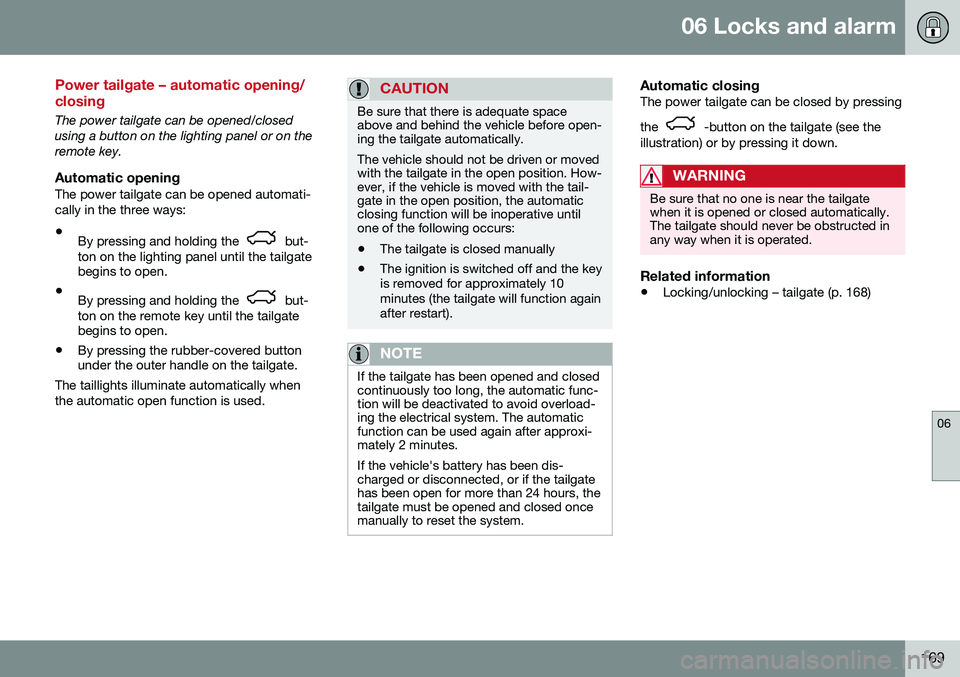
Automatic closingThe power tailgate can be closed by pressing the
-button on the tailgate (see the
illustration) or by pressing it down.
WARNING
Be sure that no one is near the tailgate when it is opened or closed automatically.The tailgate should never be obstructed inany way when it is operated.
Related information
• Locking/unlocking – tailgate (p. 168)
Page 173 of 396
06 Locks and alarm
06
171
Alarm – general information
The alarm system provides a warning if an attempt is made to break into the vehicle. The alarm is automatically armed (p. 172) whenever the vehicle is locked with theremote key. When armed, the alarm continuously monitors a number of points on the vehicle. The follow-ing conditions will trigger the alarm:• The hood is forced open.
• The tailgate is forced open.
• A door is forced open.
• The ignition slot is tampered with.
• An attempt is made to start the vehicle with a non-approved key (a key notcoded to the car's ignition).
• The battery is disconnected (while thealarm is armed).
• The siren is disconnected when the alarmis disarmed.
A message will appear in the information dis- play if a fault should occur in the alarm sys-tem. Contact a trained and qualified Volvoservice technician.
NOTE
Do not attempt to repair any of the compo- nents in the alarm system yourself. Thiscould affect the insurance policy on thevehicle.
Related information
• Alarm – turning off (p. 173)
• Alarm signal (p. 172)
• Alarm indicator (p. 171)
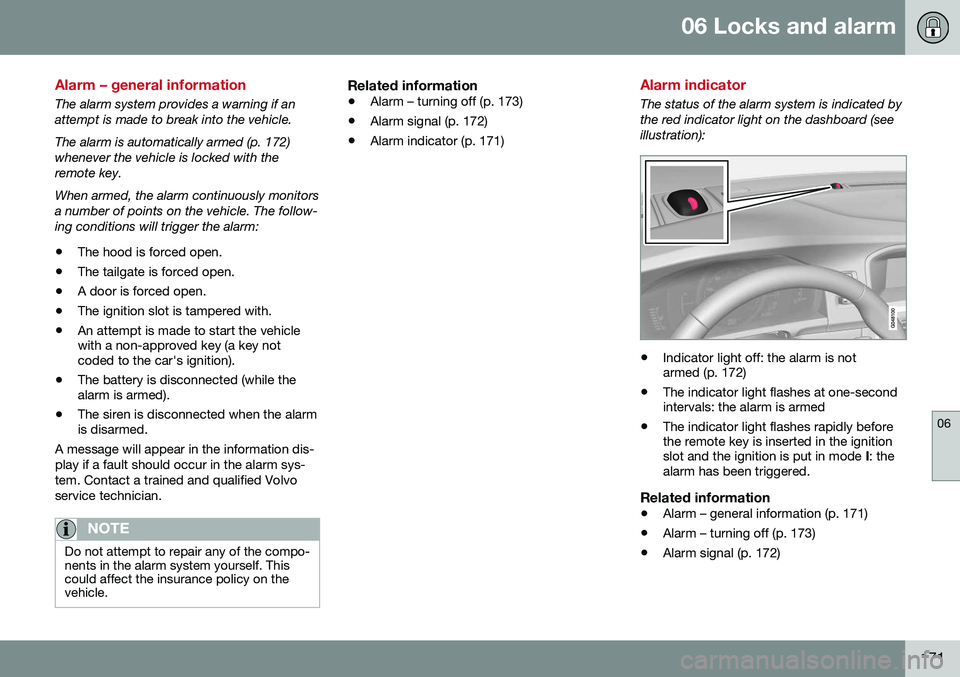
Alarm indicator
The status of the alarm system is indicated by the red indicator light on the dashboard (seeillustration):
•Indicator light off: the alarm is not armed (p. 172)
• The indicator light flashes at one-secondintervals: the alarm is armed
• The indicator light flashes rapidly beforethe remote key is inserted in the ignitionslot and the ignition is put in mode
I: the
alarm has been triggered.
Related information
• Alarm – general information (p. 171)
• Alarm – turning off (p. 173)
• Alarm signal (p. 172)
Page 174 of 396
06 Locks and alarm
06
172
Alarm – arming/disarming
The alarm system provides a warning if an attempt is made to break into the vehicle.
Arming the alarm–Press the Lock button on the remote key. One long flash of the turn signals will con-firm that the alarm (p. 171) is armed.
Alarm confirmation settings can be changed in MY CAR , under
Car settingsLock
settings
Keyless entry. For a description
of the menu system, see My Car – introduc- tion (p. 76).
USA FCC ID: MAYDA 5823(3) This device complies with part 15 of the FCCrules. Operation is subject to the followingconditions: (1) This device may not causeharmful interference, and (2) this device mustaccept any interference received, includinginterference that may cause undesired opera-tion. Canada IC: 4405A-DA 5823(3) This device is subject to the following condi- tions: (1) this device may not cause interfer-ence, and (2) this device must accept anyinterference, including interference that maycause undesired operation of the device.
Disarming the alarm–Press the Unlock button on the remote key.
> Two short flashes from the car's direc- tion indicators confirm that the alarm has been deactivated and that alldoors are unlocked.
Related information
• Alarm indicator (p. 171)
• Alarm signal (p. 172)
• Alarm – turning off (p. 173)
• Alarm-related functions (p. 173)
Alarm signal
An audible (p. 171) signal is given by a battery powered siren. The alarm cycle lasts for30 seconds. The visual alarm signal is given by flashing all turn signals for approximately 5 minutes oruntil the alarm is turned off.
Related information
•Alarm indicator (p. 171)
• Alarm – arming/disarming (p. 172)
• Alarm – turning off (p. 173)
Page 175 of 396
06 Locks and alarm
06
173
Alarm – turning off
The alarm system provides a warning if an attempt is made to break into the vehicle. If the alarm is sounding, it can be stopped by pressing the Unlock button on the remote keyor by inserting the remote key in the ignitionslot. Two short flashes from the car's turn sig-nals confirm that the alarm has been turnedoff.
Related information
•Alarm indicator (p. 171)
• Alarm – arming/disarming (p. 172)
• Remote key – replacing the battery (p. 159)
Alarm-related functions
The following is general information regarding the alarm system in your vehicle.
Automatic re-armingIf the doors are unlocked, the locks will auto-matically re-engage (re-lock) and the alarmwill re-arm after 2 minutes unless a door orthe tailgate has been opened.
Remote key not functioningIf the remote key is not functioning properly,the alarm can be turned off and the vehiclecan be started as follows:
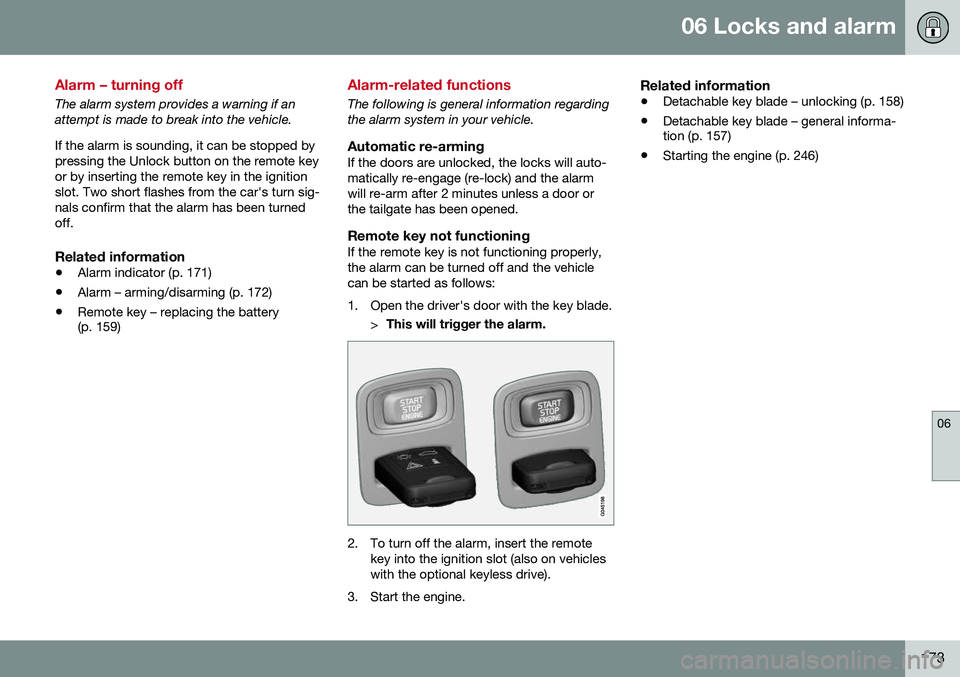
1. Open the driver's door with the key blade.
>This will trigger the alarm.
2. To turn off the alarm, insert the remote
key into the ignition slot (also on vehicles with the optional keyless drive).
3. Start the engine.
Related information
• Detachable key blade – unlocking (p. 158)
• Detachable key blade – general informa- tion (p. 157)
• Starting the engine (p. 246)
Page 177 of 396
07 Driver support
07
}}
* Option/accessory, for more information, see Introduction.175
Active chassis* (Four C)
Active chassis, Four-C (Continuously Controlled Chassis Concept), regulates thecharacteristics of the shock absorbers so thatthe vehicle's driving characteristics can beadjusted. There are three settings: Comfort,Sport and Advanced.
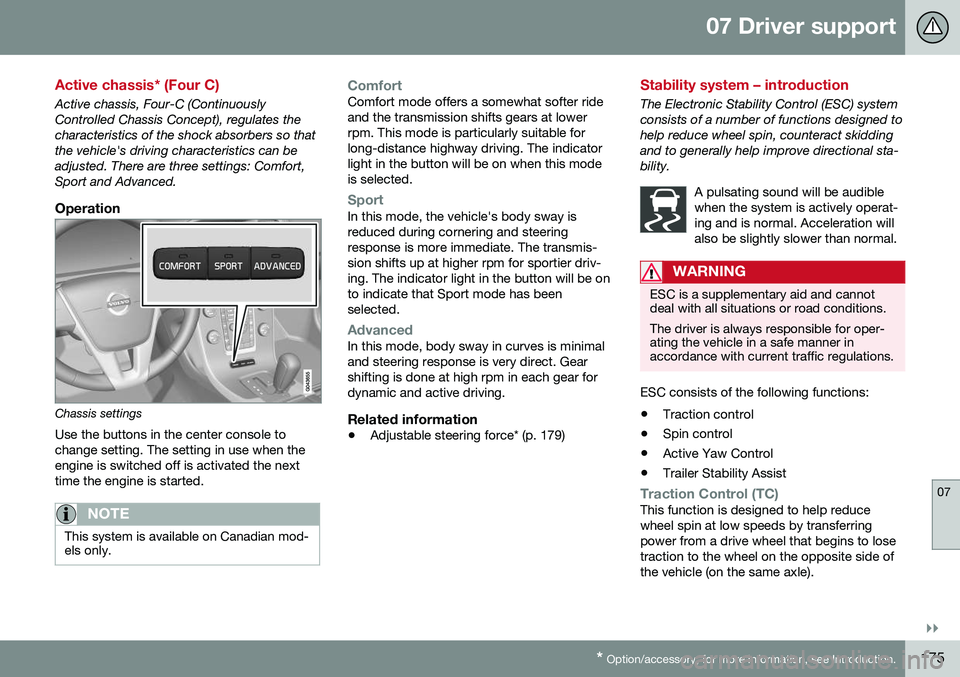
Operation
Chassis settings
Use the buttons in the center console to change setting. The setting in use when theengine is switched off is activated the nexttime the engine is started.
NOTE
This system is available on Canadian mod- els only.
ComfortComfort mode offers a somewhat softer ride and the transmission shifts gears at lowerrpm. This mode is particularly suitable forlong-distance highway driving. The indicatorlight in the button will be on when this modeis selected.
SportIn this mode, the vehicle's body sway is reduced during cornering and steeringresponse is more immediate. The transmis-sion shifts up at higher rpm for sportier driv-ing. The indicator light in the button will be onto indicate that Sport mode has beenselected.
AdvancedIn this mode, body sway in curves is minimal and steering response is very direct. Gearshifting is done at high rpm in each gear fordynamic and active driving.
Related information
• Adjustable steering force* (p. 179)
Stability system – introduction
The Electronic Stability Control (ESC) system consists of a number of functions designed tohelp reduce wheel spin, counteract skiddingand to generally help improve directional sta-bility.
A pulsating sound will be audiblewhen the system is actively operat-ing and is normal. Acceleration willalso be slightly slower than normal.
WARNING
ESC is a supplementary aid and cannot deal with all situations or road conditions. The driver is always responsible for oper- ating the vehicle in a safe manner inaccordance with current traffic regulations.
ESC consists of the following functions:
• Traction control
• Spin control
• Active Yaw Control
• Trailer Stability Assist
Traction Control (TC)This function is designed to help reduce wheel spin at low speeds by transferringpower from a drive wheel that begins to losetraction to the wheel on the opposite side ofthe vehicle (on the same axle).
Page 180 of 396
||
07 Driver support
07
178
SymbolMessageDescription
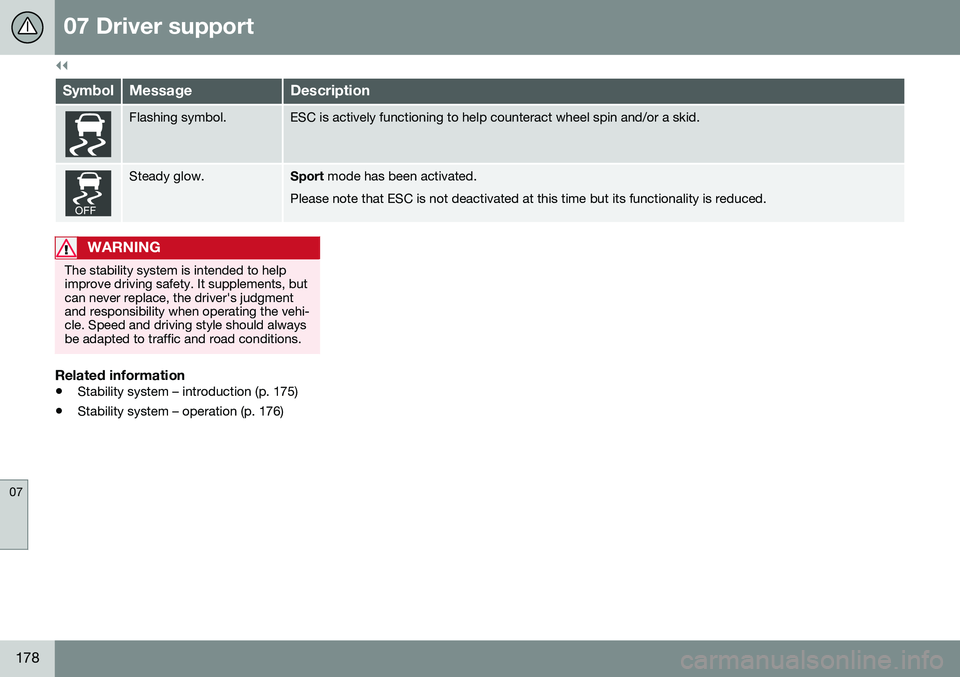
Flashing symbol.ESC is actively functioning to help counteract wheel spin and/or a skid.
Steady glow.Sport mode has been activated.
Please note that ESC is not deactivated at this time but its functionality is reduced.
WARNING
The stability system is intended to help improve driving safety. It supplements, butcan never replace, the driver's judgmentand responsibility when operating the vehi-cle. Speed and driving style should alwaysbe adapted to traffic and road conditions.
Related information
• Stability system – introduction (p. 175)
• Stability system – operation (p. 176)
Page 181 of 396
07 Driver support
07
* Option/accessory, for more information, see Introduction.179
Adjustable steering force*
Steering force increases with the speed of the vehicle to give the driver enhanced sense ofcontrol and stability. At low speed the vehicleis easy to steer in order to facilitate parking,etc.
Adjustable steering force*Steering force can be changed under MY
CAR
Car settingsSteering wheel
force
. Select Low, Medium or High. For a
description of the menu system, My Car – introduction (p. 76).
NOTE
This steering force level menu function cannot be accessed when the vehicle is inmotion.
NOTE
In certain situations, the power steering may become too warm and will have to betemporarily cooled down. While this ishappening, the power steering effect willbe reduced slightly and somewhat moreeffort may be required to turn the steeringwheel. If this occurs, a message will be displayed in the instrument panel.
Related information
• Active chassis* (Four C) (p. 175)
Road Sign Information (RSI)* – introduction
RSI is a feature that helps the driver see road signs with the posted speed limit.
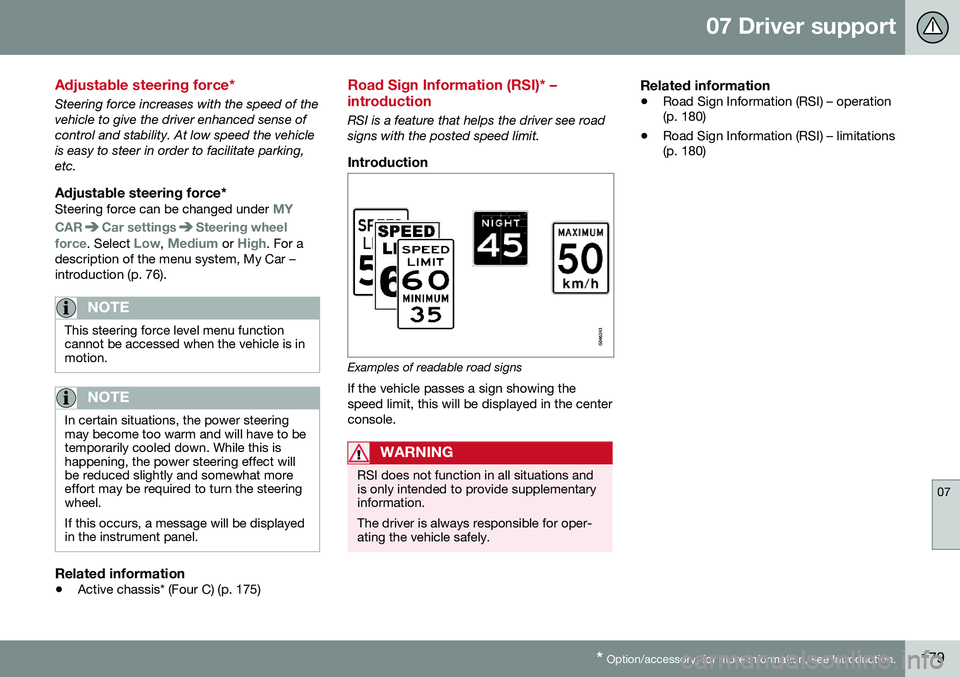
Introduction
Examples of readable road signs If the vehicle passes a sign showing the speed limit, this will be displayed in the centerconsole.
WARNING
RSI does not function in all situations and is only intended to provide supplementaryinformation. The driver is always responsible for oper- ating the vehicle safely.
Related information
•Road Sign Information (RSI) – operation (p. 180)
• Road Sign Information (RSI) – limitations(p. 180)