Glove compartment VOLVO XC70 2016 Owner´s Manual
[x] Cancel search | Manufacturer: VOLVO, Model Year: 2016, Model line: XC70, Model: VOLVO XC70 2016Pages: 396, PDF Size: 10.01 MB
Page 6 of 396
Contents
4* Option/accessory, for more information, see Introduction.
04
04 Climate
Climate – general information................. 124
Climate – sensors................................... 124
Air quality................................................ 125
Interior Air Quality System (IAQS)*.......... 125
Climate – menu settings......................... 126
Air distribution – general......................... 126
Electronic climate control (ECC)............. 128
Heated seats........................................... 129
Ventilated seats....................................... 130
Temperature and blower control............ 130
Automatic climate control....................... 131
Air conditioning....................................... 131Max. defroster and electrically heated
windshield*.............................................. 132
Air distribution – function........................ 133
Air distribution – recirculation................. 134
Air distribution – table............................. 135
05
05 Loading and storage
Storage spaces....................................... 138
Tunnel console........................................ 140
Tunnel console – 12-volt sockets........... 140
Glove compartment................................ 141
Vanity mirror............................................ 141
12-volt socket in the cargo area*............ 141
Loading – general................................... 142
Loading – roof load carriers.................... 142
Load anchoring eyelets........................... 143Floor rails and hooks – general informa-
tion.......................................................... 144
Floor rails and hooks – moving............... 144
Floor rails and hooks – removing............ 145
Floor rails and hooks – inserting............. 145
Grocery bag holder................................. 146
Cargo net – general information............. 147
Cargo area cover.................................... 149
Steel cargo grid....................................... 149
06
06 Locks and alarm
Remote key and key blade..................... 152
Remote key – loss................................... 152
Key memory............................................ 153
Locking/unlocking confirmation.............. 153
Immobilizer (start inhibitor)...................... 154
Remote key – functions.......................... 155
Remote key – range................................ 156Detachable key blade – general informa-
tion.......................................................... 157 Detachable key blade – detaching/rein-
serting..................................................... 157
Detachable key blade – unlocking.......... 158
Private locking........................................ 158
Remote key – replacing the battery........ 159
Keyless drive*– locking/unlocking.......... 161Keyless drive* – unlocking with key
blade....................................................... 162
Keyless drive* – key memory.................. 162
Keyless drive* – messages..................... 163
Keyless drive* – antenna locations......... 164
Locking/unlocking – from the outside..... 165
Manual locking........................................ 166
Locking/unlocking – from inside............. 166
Locking/unlocking – glove compartment 167
Page 10 of 396
Contents
8* Option/accessory, for more information, see Introduction.
09
Tire Pressure Monitoring System (TPMS)
– changing wheels.................................. 307 Tire Pressure Monitoring System (TPMS)
– recalibrating......................................... 308 Tire Pressure Monitoring System (TPMS)
– activating/deactivating......................... 308 Tire Pressure Monitoring System (TPMS)
– messages............................................. 309
Tire Monitor - introduction...................... 310
Calibrating Tire Monitor.......................... 310
Tire Monitor status information............... 311
Tire Monitor – messages......................... 312
Self-supporting run flat tires (SST).......... 313Tire sealing system* – general informa-
tion.......................................................... 313
Tire sealing system* – overview.............. 315
Tire sealing system* – sealing hole......... 316Tire sealing system – checking inflation
pressure.................................................. 318
Tire sealing system* – inflating tires........ 319Tire sealing system* – sealing compound
container................................................. 320
10
10 Maintenance and servicing
Maintenance – introduction.................... 322
Maintenance – owner maintenance........ 323
Maintenance – hoisting........................... 324
Onboard Diagnostic System................... 325
Booking service and repairs .................. 325
Maintenance – opening/closing hood..... 327
Engine compartment – overview............ 328
Engine compartment – engine oil........... 329
Engine compartment – coolant............... 331
Engine compartment – brake fluid.......... 332Engine compartment – power steering
fluid......................................................... 333
Bulbs – introduction................................ 334
Bulbs – headlight housing....................... 335
Bulbs – cover.......................................... 336
Bulbs – low beam, Halogen.................... 336
Bulbs – high beam, Halogen................... 337
Bulbs – extra high beam......................... 337
Bulbs – front turn signals........................ 338
Bulbs – front side marker lights.............. 339
Bulbs – location of taillight bulbs............ 339
Bulbs – brake lights and taillights........... 340
Bulbs – license plate lighting.................. 340
Bulbs – cargo area lighting..................... 340
10
Bulbs – vanity mirror lighting.................. 341
Bulbs – specifications............................. 341
Wiper blades – service position.............. 342
Wiper blades – windshield...................... 343
Wiper blades – tailgate........................... 344
Engine compartment – washer fluid....... 344
Battery – symbols................................... 345
Battery – handling................................... 345
Battery – maintenance............................ 346
Battery – changing.................................. 347
Fuses – introduction............................... 348
Fuses – engine compartment................. 350
Fuses – glove compartment................... 354
Fuses – cargo area/trunk........................ 357Fuses – engine compartment cold zone
(Start/Stop only)...................................... 358
Washing the car...................................... 360
Automatic car wash................................ 361
Polishing and waxing.............................. 361
Cleaning the interior................................ 362
Touching up paintwork........................... 364
Page 35 of 396
02 Safety
02
}}
33
Location of the passenger's side front airbagAs the movement of the seats' occupants compresses the airbags, some of the gas isexpelled at a controlled rate to provide bettercushioning. Both seat belt pretensioners alsodeploy, minimizing seat belt slack. The entireprocess, including inflation and deflation ofthe airbags, takes approximately one fifth of asecond. The location of the front airbags is indicated by SRS AIRBAG embossed on the steering
wheel pad and above the glove compartment,and by decals on both sun visors and on thefront and far right side of the dash. The driver's side front airbag is folded and located in the steering wheel hub. The passenger's side front airbag is folded behind a panel located above the glove com-partment.
WARNING
• The airbags in the vehicle are designed to be a SUPPLEMENT to–not areplacement for–the three-point seatbelts. For maximum protection, wearseat belts at all times. Be aware thatno system can prevent all possibleinjuries that may occur in an accident.
• Never drive with your hands on thesteering wheel pad/airbag housing.
• The front airbags are designed to helpprevent serious injury. Deploymentoccurs very quickly and with consider-able force. During normal deploymentand depending on variables such asseating position, one may experienceabrasions, bruises, swellings, or otherinjuries as a result from deployment ofone or both of the airbags.
• When installing any accessory equip-ment, make sure that the front airbagsystem is not damaged. Any interfer-ence in the system could cause mal-function.
Front airbag deployment
•
The front airbags are designed to deploy during certain frontal or front-angular col-lisions, impacts, or decelerations,depending on the crash severity, angle,speed and object impacted. The airbagsmay also deploy in certain non-frontal collisions where rapid decelerationoccurs.
• The SRS (p. 31) sensors, which triggerthe front airbags, are designed to react toboth the impact of the collision and theinertial forces generated by it, and todetermine if the intensity of the collision issufficient for the seat belt pretensionersand/or airbags to be deployed.
However, not all frontal collisions activate the front airbags.
• If the collision involves a nonrigid object (e.g., a snow drift or bush), or a rigid,fixed object at a low speed, the front air-bags will not necessarily deploy.
• Front airbags do not normally deploy in aside impact collision, in a collision fromthe rear or in a rollover situation.
• The amount of damage to the bodyworkdoes not reliably indicate if the airbagsshould have deployed or not.
WARNING
If any of the airbags have deployed:
• Do not attempt to drive the vehicle. Have it towed to a qualified repairfacility.
• If necessary seek medical attentIon.
Page 37 of 396
02 Safety
02
35
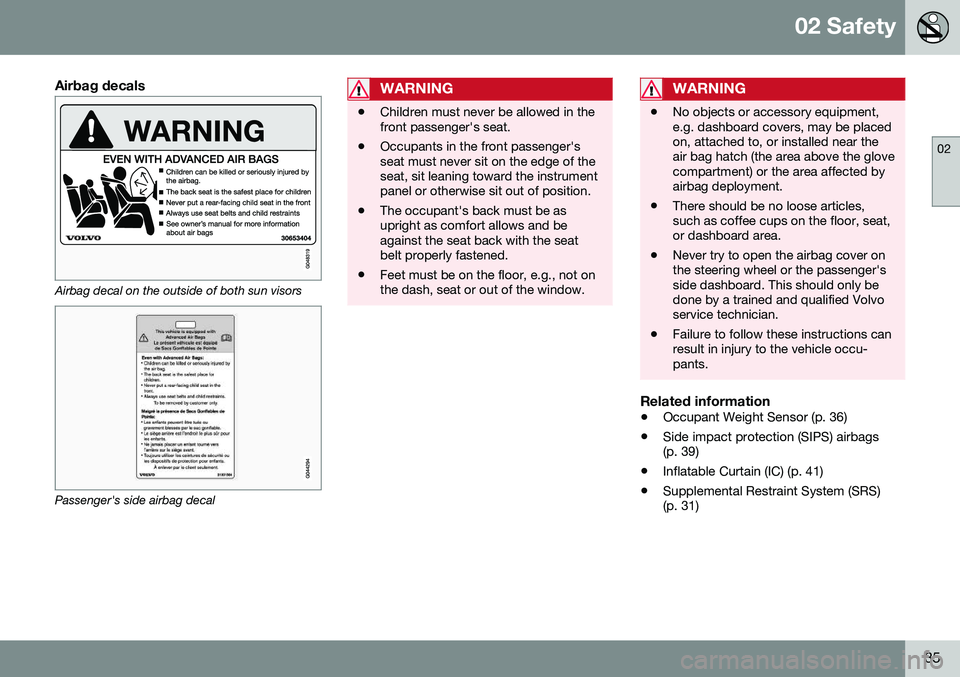
Airbag decals
Airbag decal on the outside of both sun visors
Passenger's side airbag decal
WARNING
•Children must never be allowed in the front passenger's seat.
• Occupants in the front passenger'sseat must never sit on the edge of theseat, sit leaning toward the instrumentpanel or otherwise sit out of position.
• The occupant's back must be asupright as comfort allows and beagainst the seat back with the seatbelt properly fastened.
• Feet must be on the floor, e.g., not onthe dash, seat or out of the window.
WARNING
•
No objects or accessory equipment, e.g. dashboard covers, may be placedon, attached to, or installed near theair bag hatch (the area above the glovecompartment) or the area affected byairbag deployment.
• There should be no loose articles,such as coffee cups on the floor, seat,or dashboard area.
• Never try to open the airbag cover onthe steering wheel or the passenger'sside dashboard. This should only bedone by a trained and qualified Volvoservice technician.
• Failure to follow these instructions canresult in injury to the vehicle occu-pants.
Related information
•
Occupant Weight Sensor (p. 36)
• Side impact protection (SIPS) airbags (p. 39)
• Inflatable Curtain (IC) (p. 41)
• Supplemental Restraint System (SRS)(p. 31)
Page 83 of 396
03 Instruments and controls
03
}}
* Option/accessory, for more information, see Introduction.81
Front seats – folding backrest*
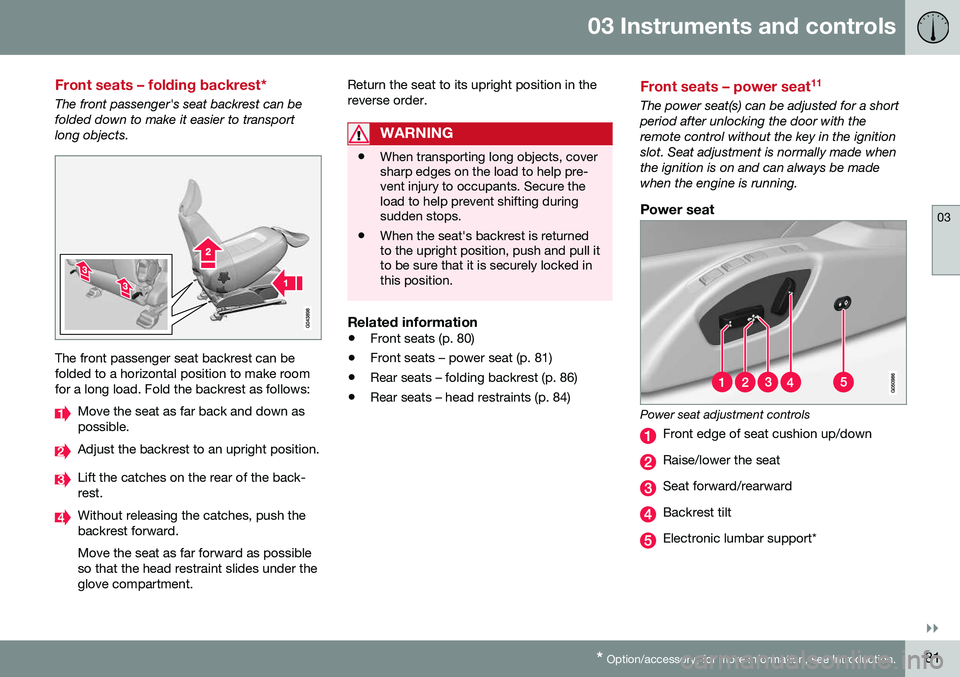
The front passenger's seat backrest can be folded down to make it easier to transportlong objects.
The front passenger seat backrest can be folded to a horizontal position to make roomfor a long load. Fold the backrest as follows:
Move the seat as far back and down as possible.
Adjust the backrest to an upright position.
Lift the catches on the rear of the back- rest.
Without releasing the catches, push the backrest forward. Move the seat as far forward as possible so that the head restraint slides under theglove compartment. Return the seat to its upright position in thereverse order.
WARNING
•
When transporting long objects, cover sharp edges on the load to help pre-vent injury to occupants. Secure theload to help prevent shifting duringsudden stops.
• When the seat's backrest is returnedto the upright position, push and pull itto be sure that it is securely locked inthis position.
Related information
•
Front seats (p. 80)
• Front seats – power seat (p. 81)
• Rear seats – folding backrest (p. 86)
• Rear seats – head restraints (p. 84)
Front seats – power seat 11
The power seat(s) can be adjusted for a short period after unlocking the door with theremote control without the key in the ignitionslot. Seat adjustment is normally made whenthe ignition is on and can always be madewhen the engine is running.
Power seat
Power seat adjustment controls
Front edge of seat cushion up/down
Raise/lower the seat
Seat forward/rearward
Backrest tilt
Electronic lumbar support*
Page 98 of 396
03 Instruments and controls
03
96* Option/accessory, for more information, see Introduction.
Front interior lighting
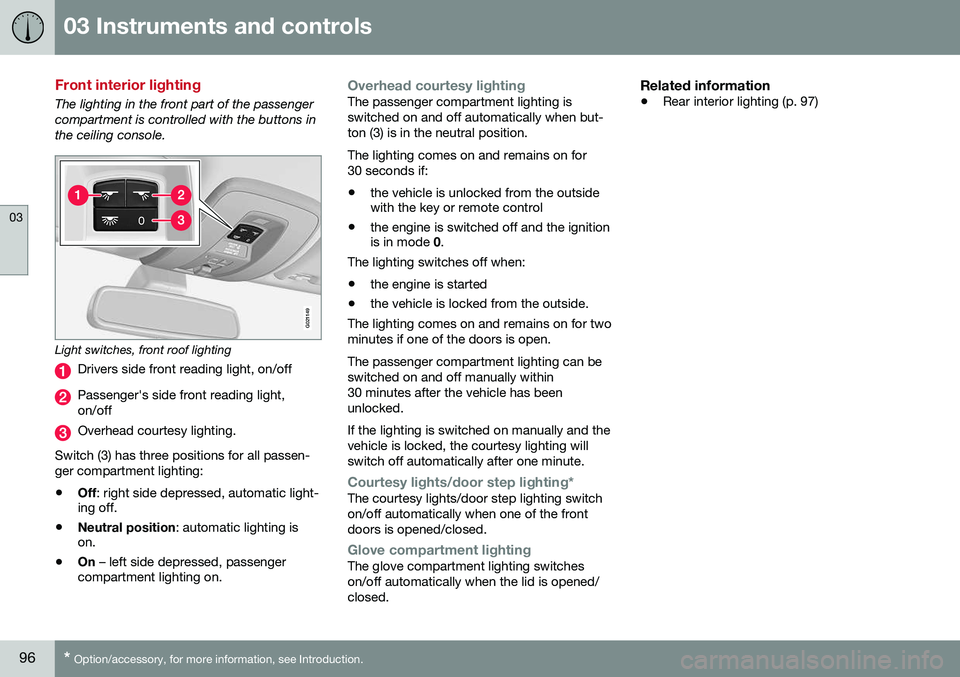
The lighting in the front part of the passenger compartment is controlled with the buttons inthe ceiling console.
G021149
Light switches, front roof lighting
Drivers side front reading light, on/off
Passenger's side front reading light, on/off
Overhead courtesy lighting.
Switch (3) has three positions for all passen- ger compartment lighting:
• Off
: right side depressed, automatic light-
ing off.
• Neutral position
: automatic lighting is
on.
• On
– left side depressed, passenger
compartment lighting on.
Overhead courtesy lightingThe passenger compartment lighting is switched on and off automatically when but-ton (3) is in the neutral position. The lighting comes on and remains on for 30 seconds if:
• the vehicle is unlocked from the outside with the key or remote control
• the engine is switched off and the ignitionis in mode
0.
The lighting switches off when:
• the engine is started
• the vehicle is locked from the outside.
The lighting comes on and remains on for two minutes if one of the doors is open. The passenger compartment lighting can be switched on and off manually within30 minutes after the vehicle has beenunlocked. If the lighting is switched on manually and the vehicle is locked, the courtesy lighting willswitch off automatically after one minute.
Courtesy lights/door step lighting*The courtesy lights/door step lighting switch on/off automatically when one of the frontdoors is opened/closed.
Glove compartment lightingThe glove compartment lighting switches on/off automatically when the lid is opened/closed.
Related information
• Rear interior lighting (p. 97)
Page 141 of 396
05 Loading and storage
05
* Option/accessory, for more information, see Introduction.139
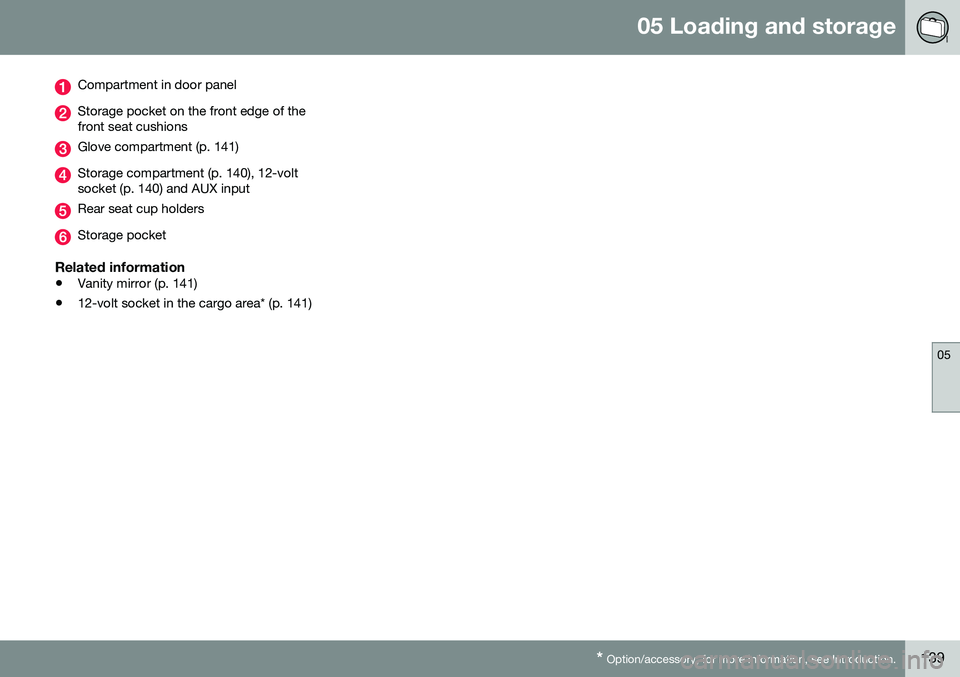
Compartment in door panel
Storage pocket on the front edge of the front seat cushions
Glove compartment (p. 141)
Storage compartment (p. 140), 12-volt socket (p. 140) and AUX input
Rear seat cup holders
Storage pocket
Related information
• Vanity mirror (p. 141)
• 12-volt socket in the cargo area* (p. 141)
Page 143 of 396
05 Loading and storage
05
* Option/accessory, for more information, see Introduction.141
Glove compartment
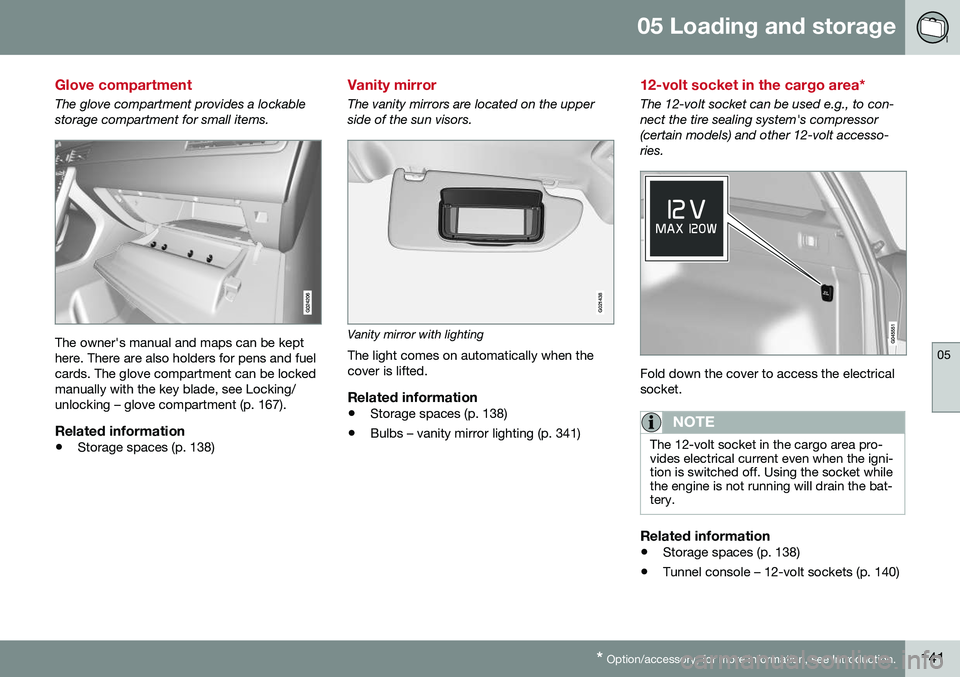
The glove compartment provides a lockable storage compartment for small items.
The owner's manual and maps can be kept here. There are also holders for pens and fuelcards. The glove compartment can be lockedmanually with the key blade, see Locking/unlocking – glove compartment (p. 167).
Related information
• Storage spaces (p. 138)
Vanity mirror
The vanity mirrors are located on the upper side of the sun visors.
G021438
Vanity mirror with lighting
The light comes on automatically when the cover is lifted.
Related information
• Storage spaces (p. 138)
• Bulbs – vanity mirror lighting (p. 341)
12-volt socket in the cargo area*
The 12-volt socket can be used e.g., to con- nect the tire sealing system's compressor(certain models) and other 12-volt accesso-ries.
Fold down the cover to access the electrical socket.
NOTE
The 12-volt socket in the cargo area pro- vides electrical current even when the igni-tion is switched off. Using the socket whilethe engine is not running will drain the bat-tery.
Related information
• Storage spaces (p. 138)
• Tunnel console – 12-volt sockets (p. 140)
Page 154 of 396
06 Locks and alarm
06
152
Remote key and key blade
Two remote keys are provided with your vehi- cle. They enable you to unlock the doors andtailgate, and also function as ignition keys tostart the vehicle or operate electrical compo-nents. The remote keys contain detachablemetal key blades for manually locking orunlocking the driver's door and the glovecompartment. The visible ends of these keyblades are unique to make it easier to identify"your" remote key. Up to six remotes can beprogrammed for use on the same vehicle.
WARNING
Never leave the remote key in the ignition slot if children are to remain in the vehicle.
For more information on the various ignition modes, see Ignition modes (p. 79).
Related information
•Remote key – functions (p. 155)
• Remote key – functions (p. 155)
• Remote key – range (p. 156)
Remote key – loss
If either of the remote keys (p. 152) is lost, the other should be taken with the vehicle to aVolvo retailer. As an anti-theft measure, thecode of the lost remote key must be erasedfrom the system.
NOTE
Additional or duplicate remote control keys can be obtained from any authorized Volvoretailer. You can also obtain additional or duplicate remote control keys from certain inde-pendent repair facilities and locksmithsthat are qualified to make remote controlkeys. Each key must be programmed towork with your vehicle. California Only: A list of independent repair facilities and/or locksmiths known to Volvo that can cutand code replacement keys can be found:
• on the Volvo website at http://www.volvocars.com/us/keys
• by calling Volvo Customer Care at1-800-458-1552
The number of registered keys for the vehicle can be found by pressing
MY CAR and going
into
SettingsInformationNumber of
keys. For a description of the menu system,
see My Car – introduction (p. 76). USA-5WK49264 FCC ID:KR55WK49264 + Siemens VDO 5WK49236 FCC ID:KR55WK49236, 5WK49266FCC ID:KR55WK49266 + Siemens VDO 5WK49233 FCC ID:KR55WK49233This device complies with part 15 of the FCC rules and RSS-210. Operation is subject tothe following conditions: (1) This device maynot cause harmful interference, and (2) thisdevice must accept any interferencereceived, including interference that maycause undesired operation. Canada-5WK49264IC:267T-5WK49264 + Siemens VDO 5WK49236 IC:267T-5WK49236, 5WK49266IC:267T-5WK49266 + Siemens VDO 5WK49233 IC:267T-5WK49233Operation is subject to the following condi- tions: (1) this device may not cause interfer-ence, and (2) this device must accept anyinterference, including interference that maycause undesired operation of the device.Related information
•
Remote key – functions (p. 155)
Page 159 of 396
06 Locks and alarm
06
157
Detachable key blade – general information
Each remote key contains a detachable metal key blade (p. 152) for mechanically locking orunlocking the driver's door and the glovecompartment, and to enable the private lock-ing(p. 158) function. For more information onthe key blade. The key blades have a uniquecode, which is used if new ones need to beproduced. This code is available at an author-ized Volvo retailer. The visible ends of these key blades are unique to make it easier to identify "your"remote key.
Related information
•Detachable key blade – unlocking (p. 158)
• Detachable key blade – detaching/rein-serting (p. 157)
Detachable key blade – detaching/ reinserting
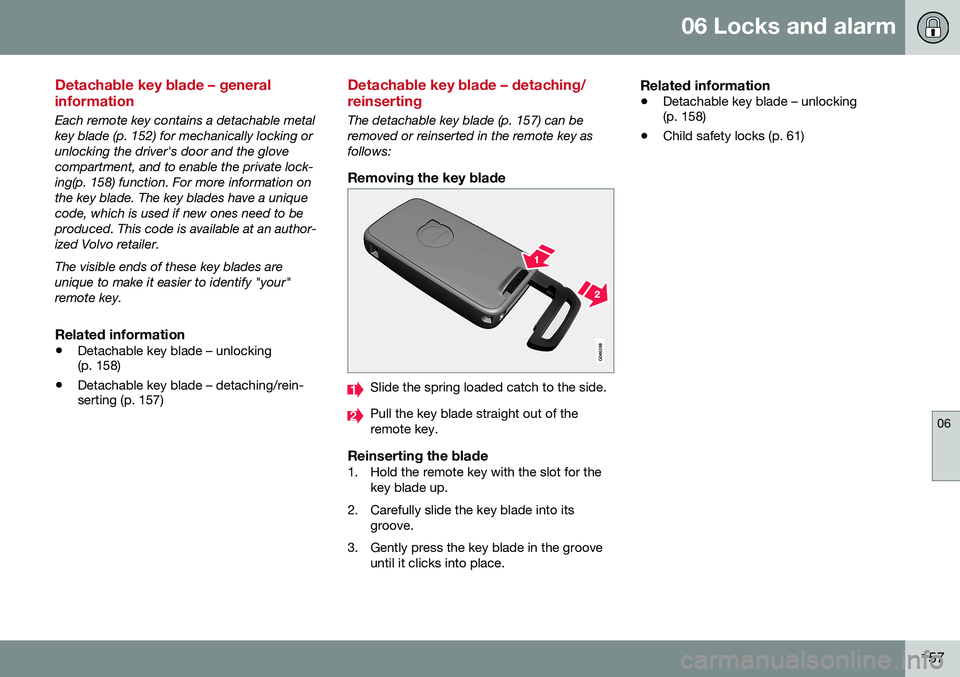
The detachable key blade (p. 157) can be removed or reinserted in the remote key asfollows:
Removing the key blade
Slide the spring loaded catch to the side.
Pull the key blade straight out of the remote key.
Reinserting the blade1. Hold the remote key with the slot for the
key blade up.
2. Carefully slide the key blade into its groove.
3. Gently press the key blade in the groove until it clicks into place.
Related information
• Detachable key blade – unlocking (p. 158)
• Child safety locks (p. 61)