towing VOLVO XC70 2016 Owner´s Manual
[x] Cancel search | Manufacturer: VOLVO, Model Year: 2016, Model line: XC70, Model: VOLVO XC70 2016Pages: 396, PDF Size: 10.01 MB
Page 4 of 396
Contents
2
01
01 Introduction
On-board owner's manual........................ 11
Owner's information.................................. 13
Contacting Volvo....................................... 13
About this manual..................................... 14
Change of ownership................................ 18
Crash event data....................................... 18
Volvo Structural Parts Statement.............. 19
Information on the Internet....................... 20
Volvo ID..................................................... 21
Open Source Software Notice.................. 21
Volvo and the environment....................... 22
Important warnings................................... 23
Volvo On Call Roadside Assistance.......... 24
Technician certification............................. 24
02
02 Safety
Occupant safety........................................ 26
Recall information..................................... 26
Reporting safety defects........................... 27
Seat belts – general.................................. 28
Seat belts – buckling/unbuckling.............. 29
Seat belt reminder..................................... 30
Seat belts – pregnancy............................. 30
Supplemental Restraint System (SRS)..... 31
Front airbags............................................. 32
Occupant Weight Sensor.......................... 36
Side impact protection (SIPS) airbags...... 39
Inflatable Curtain (IC)................................ 41
Whiplash Protection System (WHIPS)...... 42
Crash mode – general information............ 44
Crash mode – starting the vehicle............ 45
Crash mode – moving the vehicle............. 45
Child safety............................................... 45
Child restraints.......................................... 47
Infant seats............................................... 49
Convertible seats...................................... 51
Booster cushions...................................... 53
ISOFIX/LATCH lower anchors.................. 54
Top tether anchors.................................... 56
02
Integrated booster cushion – general
information................................................ 57
Integrated booster cushion – using.......... 59
Integrated booster cushion – stowing...... 60
Child safety locks...................................... 61
Page 9 of 396
Contents
7
08
Brakes – general..................................... 265
Brakes – symbols ................................... 267
Anti-lock braking system (ABS).............. 267
Brake lights............................................. 267
Emergency Brake Assistance (EBA)....... 268
Parking brake – general information....... 268
Parking brake – applying........................ 269
Parking brake – releasing........................ 270
Parking brake – symbols and messages 271
Driving through water.............................. 272
Engine and cooling system..................... 273
Conserving electrical current.................. 273
Before a long distance trip...................... 273
Driving in cold weather........................... 274
Refueling – fuel requirements................. 275
Refueling – octane rating........................ 276Refueling – opening/closing fuel filler
door......................................................... 277
Refueling – opening/closing fuel cap...... 278
Emission controls.................................... 279
Economical driving.................................. 279
Towing a trailer....................................... 281
Detachable trailer hitch........................... 282
Trailer Stability Assist (TSA).................... 283
08
Towing the vehicle.................................. 284
Towing eyelet.......................................... 284
Towing by tow truck............................... 285
09
09 Wheels and tires
Tires – general information...................... 288
Tires – storage and age.......................... 289
Tires – tread wear indicator.................... 290
Tires – tire economy................................ 290
Changing a wheel – direction of rotation 291
Changing a wheel – removing wheel...... 291
Changing a wheel – spare wheel............ 294Changing a wheel – accessing the spare
wheel....................................................... 295
Changing a wheel – installing a wheel.... 295
Tire inflation – general information.......... 296
Tire inflation – checking pressure........... 297
Tire specifications................................... 298
Tire inflation – pressure table.................. 300
Loading specifications............................ 301
Loading specifications – load limit.......... 301
Tire specifications – terminology............ 302Tire specifications – Uniform Tire Quality
Grading................................................... 303
Snow chains............................................ 304
Snow tires/studded tires......................... 305
Tire pressure monitoring - introduction.. 305Tire Pressure Monitoring System (TPMS)
– general information.............................. 306
Page 62 of 396
||
02 Safety
02
60
Related information
•Integrated booster cushion – stowing (p. 60)
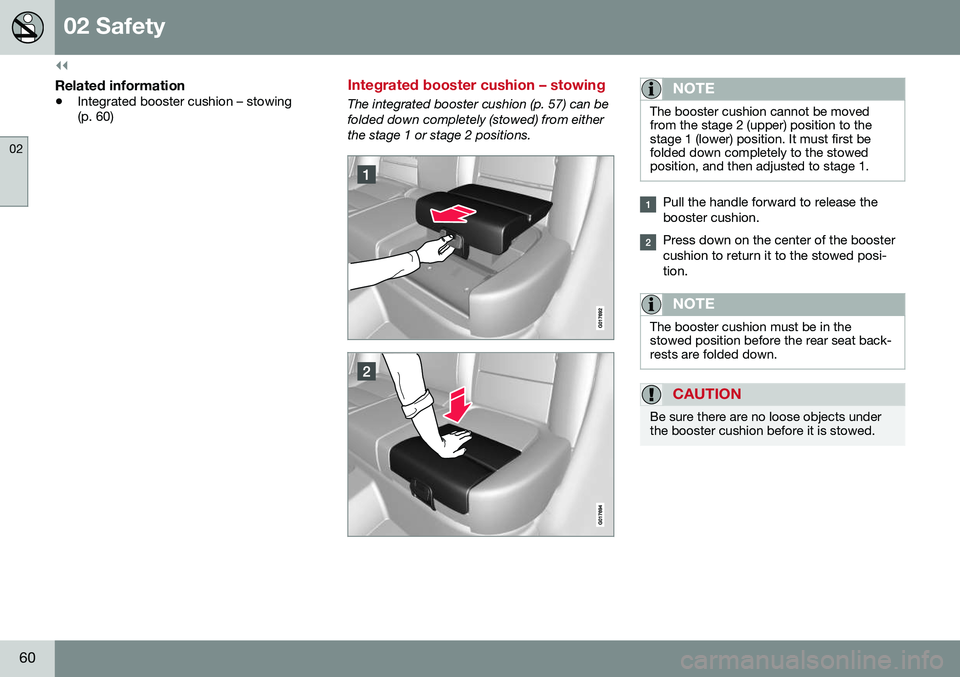
Integrated booster cushion – stowing
The integrated booster cushion (p. 57) can be folded down completely (stowed) from eitherthe stage 1 or stage 2 positions.NOTE
The booster cushion cannot be moved from the stage 2 (upper) position to thestage 1 (lower) position. It must first befolded down completely to the stowedposition, and then adjusted to stage 1.
Pull the handle forward to release the booster cushion.
Press down on the center of the booster cushion to return it to the stowed posi-tion.
NOTE
The booster cushion must be in the stowed position before the rear seat back-rests are folded down.
CAUTION
Be sure there are no loose objects under the booster cushion before it is stowed.
Page 77 of 396
03 Instruments and controls
03
}}
75
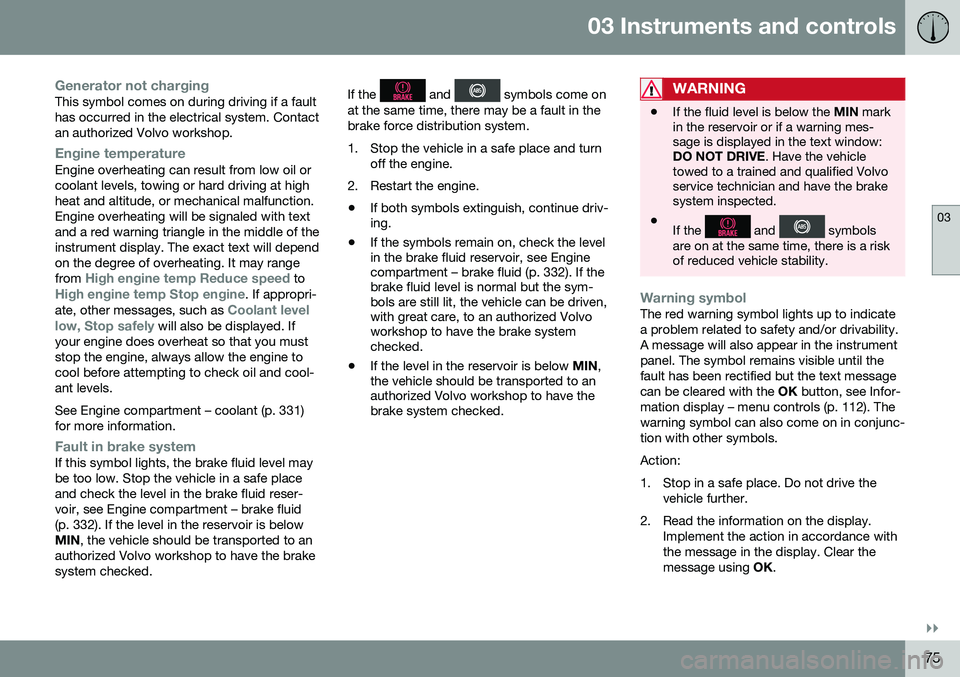
Generator not chargingThis symbol comes on during driving if a fault has occurred in the electrical system. Contactan authorized Volvo workshop.
Engine temperatureEngine overheating can result from low oil or coolant levels, towing or hard driving at highheat and altitude, or mechanical malfunction.Engine overheating will be signaled with textand a red warning triangle in the middle of theinstrument display. The exact text will dependon the degree of overheating. It may range from
High engine temp Reduce speed toHigh engine temp Stop engine. If appropri-
ate, other messages, such as Coolant level
low, Stop safely will also be displayed. If
your engine does overheat so that you must stop the engine, always allow the engine tocool before attempting to check oil and cool-ant levels. See Engine compartment – coolant (p. 331) for more information.
Fault in brake systemIf this symbol lights, the brake fluid level may be too low. Stop the vehicle in a safe placeand check the level in the brake fluid reser-voir, see Engine compartment – brake fluid(p. 332). If the level in the reservoir is belowMIN , the vehicle should be transported to an
authorized Volvo workshop to have the brakesystem checked. If the
and symbols come on
at the same time, there may be a fault in the brake force distribution system.
1. Stop the vehicle in a safe place and turn off the engine.
2. Restart the engine.
• If both symbols extinguish, continue driv- ing.
• If the symbols remain on, check the levelin the brake fluid reservoir, see Enginecompartment – brake fluid (p. 332). If thebrake fluid level is normal but the sym-bols are still lit, the vehicle can be driven,with great care, to an authorized Volvoworkshop to have the brake systemchecked.
• If the level in the reservoir is below
MIN,
the vehicle should be transported to anauthorized Volvo workshop to have thebrake system checked.WARNING
• If the fluid level is below the
MIN mark
in the reservoir or if a warning mes- sage is displayed in the text window:DO NOT DRIVE . Have the vehicle
towed to a trained and qualified Volvoservice technician and have the brakesystem inspected.
• If the
and symbols
are on at the same time, there is a risk of reduced vehicle stability.
Warning symbolThe red warning symbol lights up to indicate a problem related to safety and/or drivability.A message will also appear in the instrumentpanel. The symbol remains visible until thefault has been rectified but the text messagecan be cleared with the OK button, see Infor-
mation display – menu controls (p. 112). Thewarning symbol can also come on in conjunc-tion with other symbols. Action:
1. Stop in a safe place. Do not drive the vehicle further.
2. Read the information on the display. Implement the action in accordance with the message in the display. Clear themessage using OK.
Page 82 of 396
||
03 Instruments and controls
03
80* Option/accessory, for more information, see Introduction.
Ignition mode I–With the remote key fully pressed into the ignition slot 8
, press START/STOP
ENGINE briefly.
Ignition mode II–With the remote key fully pressed into the ignition slot 8
, press START/STOP
ENGINE for approximately 2 seconds.
Returning to mode 0To return to mode 0 from mode II or I, press
START/STOP ENGINE briefly.
Starting and stopping the engineSee Starting the engine (p. 246) and Switch- ing off the engine (p. 248) for information onstarting the engine and switching it off.
Emergency towingSee Towing the vehicle (p. 284) for importantinformation about the remote key when thevehicle is being towed.
Related information
•Inserting/removing remote key (p. 78)
Front seats
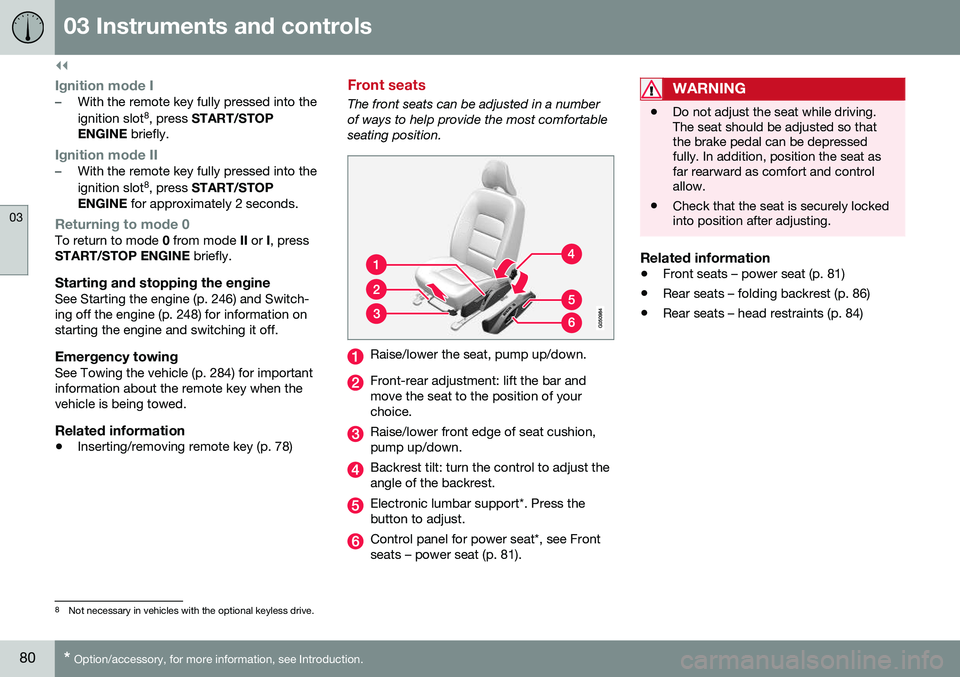
The front seats can be adjusted in a number of ways to help provide the most comfortableseating position.
Raise/lower the seat, pump up/down.
Front-rear adjustment: lift the bar and move the seat to the position of yourchoice.
Raise/lower front edge of seat cushion, pump up/down.
Backrest tilt: turn the control to adjust the angle of the backrest.
Electronic lumbar support*. Press the button to adjust.
Control panel for power seat*, see Front seats – power seat (p. 81).
WARNING
•Do not adjust the seat while driving. The seat should be adjusted so thatthe brake pedal can be depressedfully. In addition, position the seat asfar rearward as comfort and controlallow.
• Check that the seat is securely lockedinto position after adjusting.
Related information
•
Front seats – power seat (p. 81)
• Rear seats – folding backrest (p. 86)
• Rear seats – head restraints (p. 84)
8
Not necessary in vehicles with the optional keyless drive.
Page 189 of 396
07 Driver support
07
187
WARNING
Adaptive Cruise Control only warns of vehicles detected by the radar sensor, seeAdaptive Cruise Control – limitations(p. 193). In some cases there may be nowarning or the warning may be delayed.The driver should always apply the brakeswhen necessary.
Steep inclines and/or heavy loadsACC is primarily intended for use on fairly level roads. The system may have difficultymaintaining the correct distance to a vehicleahead on steep inclines, if the vehicle is car-rying a heavy load or is towing a trailer. Inthese situations, the driver should always beprepared to apply the brakes if necessary.
Related information
•Adaptive Cruise Control – introduction (p. 184)
Adaptive Cruise Control – engaging
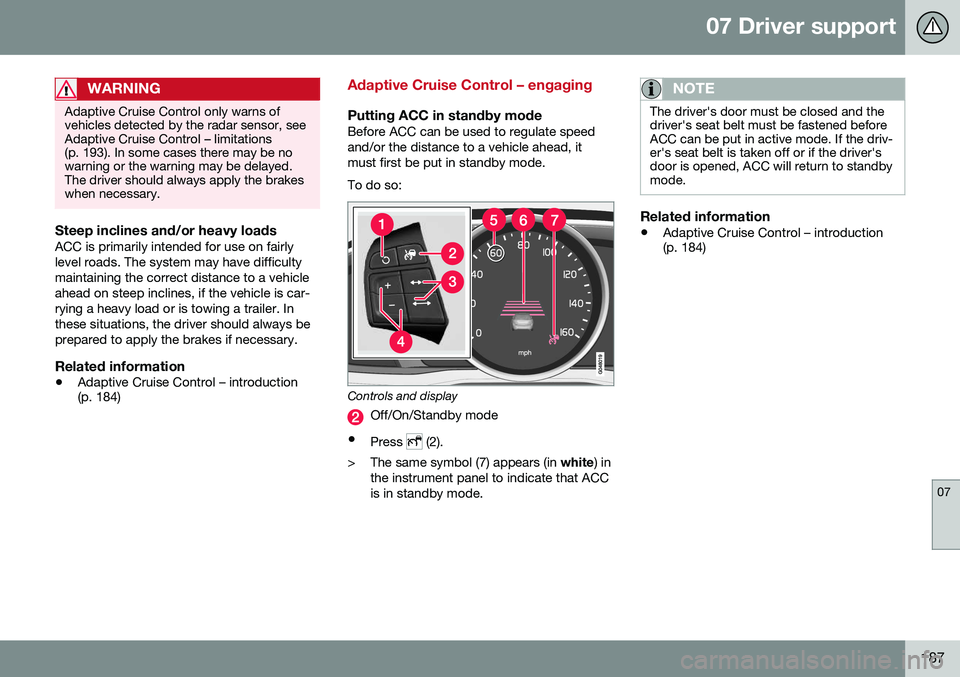
Putting ACC in standby modeBefore ACC can be used to regulate speed and/or the distance to a vehicle ahead, itmust first be put in standby mode. To do so:
Controls and display
Off/On/Standby mode
• Press
(2).
> The same symbol (7) appears (in white) in
the instrument panel to indicate that ACC is in standby mode.
NOTE
The driver's door must be closed and the driver's seat belt must be fastened beforeACC can be put in active mode. If the driv-er's seat belt is taken off or if the driver'sdoor is opened, ACC will return to standbymode.
Related information
• Adaptive Cruise Control – introduction (p. 184)
Page 235 of 396
07 Driver support
07
}}
233
Audible signalThe Park Assist system uses an intermittent tone that pulses faster as you come close toan object, and becomes constant when youare within approximately 1 ft (30 cm) of anobject in front of or behind the vehicle. Ifthere are objects within this distance bothbehind and in front of the vehicle, the tonealternates between front and rear speakers.
NOTE
The level of the audible signal can be low- ered/raised with the infotainment volumecontrol. The level can also be set in the MYCAR menu system. See My Car – introduc-tion (p. 76) for a description of the menusystem.
If the volume of another source from the audio system is high, this will be automati-cally lowered.
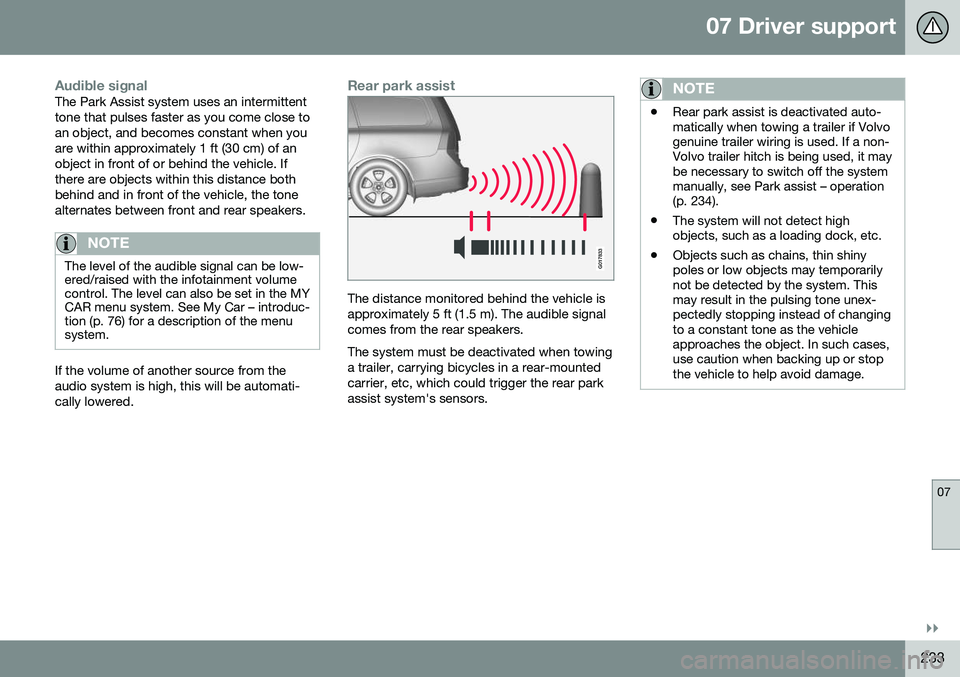
Rear park assist
G017833
The distance monitored behind the vehicle is approximately 5 ft (1.5 m). The audible signalcomes from the rear speakers. The system must be deactivated when towing a trailer, carrying bicycles in a rear-mountedcarrier, etc, which could trigger the rear parkassist system's sensors.
NOTE
•Rear park assist is deactivated auto- matically when towing a trailer if Volvogenuine trailer wiring is used. If a non-Volvo trailer hitch is being used, it maybe necessary to switch off the systemmanually, see Park assist – operation(p. 234).
• The system will not detect highobjects, such as a loading dock, etc.
• Objects such as chains, thin shinypoles or low objects may temporarilynot be detected by the system. Thismay result in the pulsing tone unex-pectedly stopping instead of changingto a constant tone as the vehicleapproaches the object. In such cases,use caution when backing up or stopthe vehicle to help avoid damage.
Page 243 of 396
07 Driver support
07
* Option/accessory, for more information, see Introduction.241
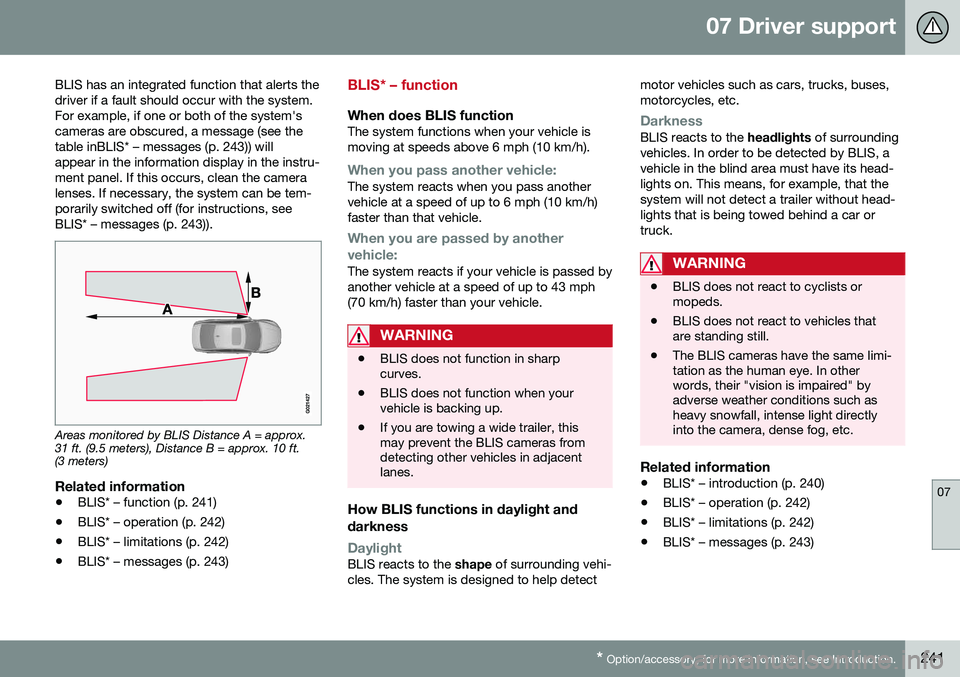
BLIS has an integrated function that alerts the driver if a fault should occur with the system.For example, if one or both of the system'scameras are obscured, a message (see thetable inBLIS* – messages (p. 243)) willappear in the information display in the instru-ment panel. If this occurs, clean the cameralenses. If necessary, the system can be tem-porarily switched off (for instructions, seeBLIS* – messages (p. 243)).
Areas monitored by BLIS Distance A = approx. 31 ft. (9.5 meters), Distance B = approx. 10 ft.(3 meters)
Related information
•
BLIS* – function (p. 241)
• BLIS* – operation (p. 242)
• BLIS* – limitations (p. 242)
• BLIS* – messages (p. 243)
BLIS* – function
When does BLIS functionThe system functions when your vehicle is moving at speeds above 6 mph (10 km/h).
When you pass another vehicle:The system reacts when you pass another vehicle at a speed of up to 6 mph (10 km/h)faster than that vehicle.
When you are passed by another
vehicle:
The system reacts if your vehicle is passed by another vehicle at a speed of up to 43 mph(70 km/h) faster than your vehicle.
WARNING
• BLIS does not function in sharp curves.
• BLIS does not function when yourvehicle is backing up.
• If you are towing a wide trailer, thismay prevent the BLIS cameras fromdetecting other vehicles in adjacentlanes.
How BLIS functions in daylight and darkness
DaylightBLIS reacts to the
shape of surrounding vehi-
cles. The system is designed to help detect motor vehicles such as cars, trucks, buses, motorcycles, etc.
DarknessBLIS reacts to the
headlights of surrounding
vehicles. In order to be detected by BLIS, a vehicle in the blind area must have its head-lights on. This means, for example, that thesystem will not detect a trailer without head-lights that is being towed behind a car ortruck.
WARNING
• BLIS does not react to cyclists or mopeds.
• BLIS does not react to vehicles thatare standing still.
• The BLIS cameras have the same limi-tation as the human eye. In otherwords, their "vision is impaired" byadverse weather conditions such asheavy snowfall, intense light directlyinto the camera, dense fog, etc.
Related information
•
BLIS* – introduction (p. 240)
• BLIS* – operation (p. 242)
• BLIS* – limitations (p. 242)
• BLIS* – messages (p. 243)
Page 268 of 396
||
08 Starting and driving
08
266
WARNING
•Use the jack intended for the vehicle when changing a tire. For any otherjob, use stands to support the vehicle.
• The jack should be kept well-greasedand clean, and should not be dam-aged.
• Be sure the jack is on a firm, level,non-slippery surface.
• No objects should be placed betweenthe base of jack and the ground, orbetween the jack and the attachmentbar on the vehicle.
• The jack must correctly engage thejack attachment.
• Never allow any part of your body tobe extended under a vehicle suppor-ted by a jack.
Power brakes function only when the engine is running
The power brakes utilize vacuum pressure which is only created when the engine is run-ning. Never let the vehicle roll to a stop withthe engine switched off. If the power brakes are not working, consid- erably higher pressure will be required on thebrake pedal to compensate for the lack ofpower assistance. This can happen for exam-ple when towing your vehicle or if the engineis switched off when the vehicle is rolling. Thebrake pedal feels harder than usual.
Water on brake discs and brake pads affects braking
Driving in rain and slush or passing through an automatic car wash can cause water tocollect on the brake discs and pads. This willcause a delay in braking effect when thepedal is depressed. To avoid such a delaywhen the brakes are needed, depress thepedal occasionally when driving through rain,slush, etc. This will remove the water from thebrakes. Check that brake application feelsnormal. This should also be done after wash-ing or starting in very damp or cold weather.
Severe strain on the brake systemThe brakes will be subject to severe strainwhen driving in mountains or hilly areas, orwhen towing a trailer. Vehicle speed is usuallyslower, which means that the cooling of thebrakes is less efficient than when driving onlevel roads. To reduce the strain on thebrakes, shift into a lower gear and let theengine help with the braking. Do not forgetthat if you are towing a trailer, the brakes willbe subjected to a greater than normal load.
Cleaning the brake discsCoatings of dirt and water on the brake discsmay result in delayed brake function. Thisdelay is minimized by cleaning the brake lin-ings. Cleaning the brake pads is advisable in wet weather, prior to long-term parking, and afterthe vehicle has been washed. Do this by braking gently for a short period while thevehicle is moving.
Related information
•
Parking brake – general information (p. 268)
• Emergency Brake Assistance (EBA)(p. 268)
• Brakes – general (p. 265)
• Anti-lock braking system (ABS) (p. 267)
• Hill Descent Control (HDC) – introduction(p. 263)
Page 274 of 396
08 Starting and driving
08
272
Driving through water
The vehicle should be driven with extreme caution if it is necessary to drive throughstanding water. The vehicle can be driven through water up to a depth of approximately 11 in. (30 cm) atwalking speed to help prevent water fromentering the differential and the transmission.Water reduces the oil's lubricating capacityand may shorten the service life of thesecomponents.
• Take particular care when driving through flowing water.
• Clean the electrical connections for trailerwiring after driving in mud or water.
• When driving through water, maintain lowspeed and do not stop in the water.WARNING
•Avoid driving through standing or rushing water. Doing so can be dan-gerous and it may also be difficult todetermine the actual depth of thewater.
• If water cannot be avoided, after driv-ing through the water, press lightly onthe brake pedal to ensure that thebrakes are functioning normally. Wateror mud can make the brake liningsslippery, resulting in delayed brakingeffect.
CAUTION
•
Engine damage will occur if water is drawn into the air cleaner.
• If the vehicle is driven through waterdeeper than approximately 11 in.(30 cm), water may enter the differen-tial and the transmission. This reducesthe oil's lubricating capacity and mayshorten the service life of these com-ponents.
• Damage to any components, theengine, transmission, turbo-charger,differential or its internal componentscaused by flooding, vapor lock orinsufficient oil is not covered underwarranty.
• Do not allow the vehicle to stand inwater up to the door sills longer thanabsolutely necessary. This could resultin electrical malfunctions.
• If the engine has been stopped whilethe vehicle is in water, do not attemptto restart it. Have the vehicle towedout of the water.
Related information
•
Towing the vehicle (p. 284)
• Towing by tow truck (p. 285)