stop start VOLVO XC90 2003 User Guide
[x] Cancel search | Manufacturer: VOLVO, Model Year: 2003, Model line: XC90, Model: VOLVO XC90 2003Pages: 242, PDF Size: 6.5 MB
Page 121 of 242

2003 VOLVO XC90
If the BRAKE and ABS warning lights come on at the same time, this could\
indicate a fault in the brake
system.
l Stop the vehicle in a suitable place and switch off the engine.
l Restart the engine.
l If both warning lights go off, no further action is required.
l If both lights are still on after the engine has been restarted, switch \
off the engine again and check the
brake fluid level (see
page 128 for the location of the brake fluid reservoir).
l If the brake fluid level is above the MIN mark, drive carefully to an au\
thorized Volvo retailer and
have the brake system inspected.
WARNING!
If the fluid level is below the MIN mark in the reservoir or if a "Brake\
failure - Service urgent"
message is displayed in the text window: DO NOT DRIVE. Have the vehicle \
towed to a Volvo
retailer and have the brake system inspected.
pg. 97 Starting and driving
Dynamic Stability Traction Control (DSTC)
The DSTC system on the Volvo XC90 consists of a number of functions:
1. Traction control (TC)
This function is designed to help reduce wheel spin by transferring powe\
r from a drive wheel that begins
to lose traction to the wheel on the opposite side of the vehicle (on t\
he same axle). TC monitors and
compares the rotational speed of the drive wheels. If one of the drive w\
heels shows a tendency to spin,
the difference in speed is immediately detected. This triggers the Anti-\
lock Brake System, which brakes
the spinning wheel until the difference in rotational speed is corrected\
.
TC is most active at low speeds, and a pulsating sound will be audible w\
hen the system is regulating
wheel spin. This is quite normal.
This is one of the DSTC system's permanent functions and is not affected\
when the DSTC button on the
center control panel is pressed.
2. Spin control (SC)
The spin control function is designed to help prevent the drive wheels f\
rom spinning while the vehicle is
accelerating. This is done by temporarily reducing engine torque to the \
drive wheels, which helps
file:///K|/ownersdocs/2003/2003_XC90/03xc90_06b.htm (3 of 17)12/30/200\
6 4:18:59 PM
Page 129 of 242

2003 VOLVO XC90
pg. 103 Starting and driving
Towing a trailer
Volvo recommends the use of Volvo trailer hitches that are specially des\
igned for the vehicle.
l Maximum trailer weights recommended by Volvo are:
All models - trailers without brakes: 1,650 lbs (750 kg)
Models with all wheel drive - trailers with brakes: 4,960 lbs (2250 kg)\
Models with front wheel drive - trailers with brakes: 3,970 lbs (1800 k\
g)
Observe the legal requirements of the state/province in which the vehicl\
es are registered.
l All Volvo models are equipped with energy-absorbing shock-mounted bumper\
s. Trailer hitch
installation should not interfere with the proper operation of this bump\
er system.
Trailer towing does not normally present any particular problems, but ta\
ke into consideration:
l Increase tire pressure to recommended full. See section "Wheels and tire\
s."
l When your vehicle is new, avoid towing heavy trailers during the first 6\
20 miles (1,000 km).
l Recommended hitch tongue load is: Trailer weights below 2,650 lbs (1,200 kg) - 110 lbs (50 kg)
Trailer weights above 2,650 lbs (1,200 kg) - 198 lbs (90 kg)
l Maximum speed when towing a trailer: 50 mph (80 km/h).
l Engine and transmission are subject to increased loads. Therefore, engin\
e coolant temperature should
be closely watched when driving in hot climates or hilly terrain. Use a \
lower gear and turn off the air
conditioner if the temperature gauge needle enters the red range.
l If the automatic transmission begins to overheat, a message will be disp\
layed in the text window.
l Avoid overload and other abusive operation.
l Hauling a trailer affects handling, durability, and economy.
l It is necessary to balance trailer brakes with the towing vehicle brakes\
to provide a safe stop (check
and observe state/local regulations).
l Do not connect the trailer's brake system directly to the vehicle's brak\
e system.
l More frequent vehicle maintenance is required.
l Remove the ball and drawbar assembly when the hitch is not being used.
l Volvo recommends the use of synthetic engine oil when towing a trailer o\
ver long distances or in
mountainous areas.
file:///K|/ownersdocs/2003/2003_XC90/03xc90_06b.htm (11 of 17)12/30/20\
06 4:18:59 PM
Page 161 of 242

Checking the oil level
The oil level should be checked every time the vehicle is refueled. This\
is especially important
during the period up to the first ma")
2003 VOLVO XC90
Oil and fluids (contd)
Checking the oil level
The oil level should be checked every time the vehicle is refueled. This\
is especially important
during the period up to the first maintenance. CAUTION
Not checking the oil level regularly can result in serious engine damage\
if the oil level becomes too
low.
Park the vehicle on a level surface and wait for at least 5 minutes afte\
r the engine has been switched
off. Be sure the oil level is maintained between the upper and lower mar\
ks on the dipstick. Low oil
level can cause internal damage to the engine and overfilling can result\
in high oil consumption. The
distance between the dipstick marks represents approx. 1.6 US qt (1.5 l\
iter). The oil should preferably
be checked when cold, before the engine has been started.
NOTE: The engine must be stopped when checking the oil.
WARNING!
Do not allow oil to spill onto or come into contact with hot exhaust pip\
e
surfaces.
Adding oil (topping up)
l Add oil of the same kind as already used.
file:///K|/ownersdocs/2003/2003_XC90/03xc90_09a.htm (9 of 15)12/30/200\
6 4:19:02 PM
Page 211 of 242
2003 VOLVO XC90
audible station and then stop.
3. Press one of the buttons again to start a new search.
Manually search for a known frequency
1. Press and hold the
or button (or the corresponding buttons on the steering wheel
keypad). MAN will be shown in the display. The radio will slowly scroll\
in the desired direction and
then increase speed after a few seconds.
2. Release the button when the desired frequency is displayed.
3. If you need to adjust the frequency, press briefly on
or .
4. The manual search function is available for five seconds after you la\
st pressed the button.
pg. 169 Audio
Storing stations
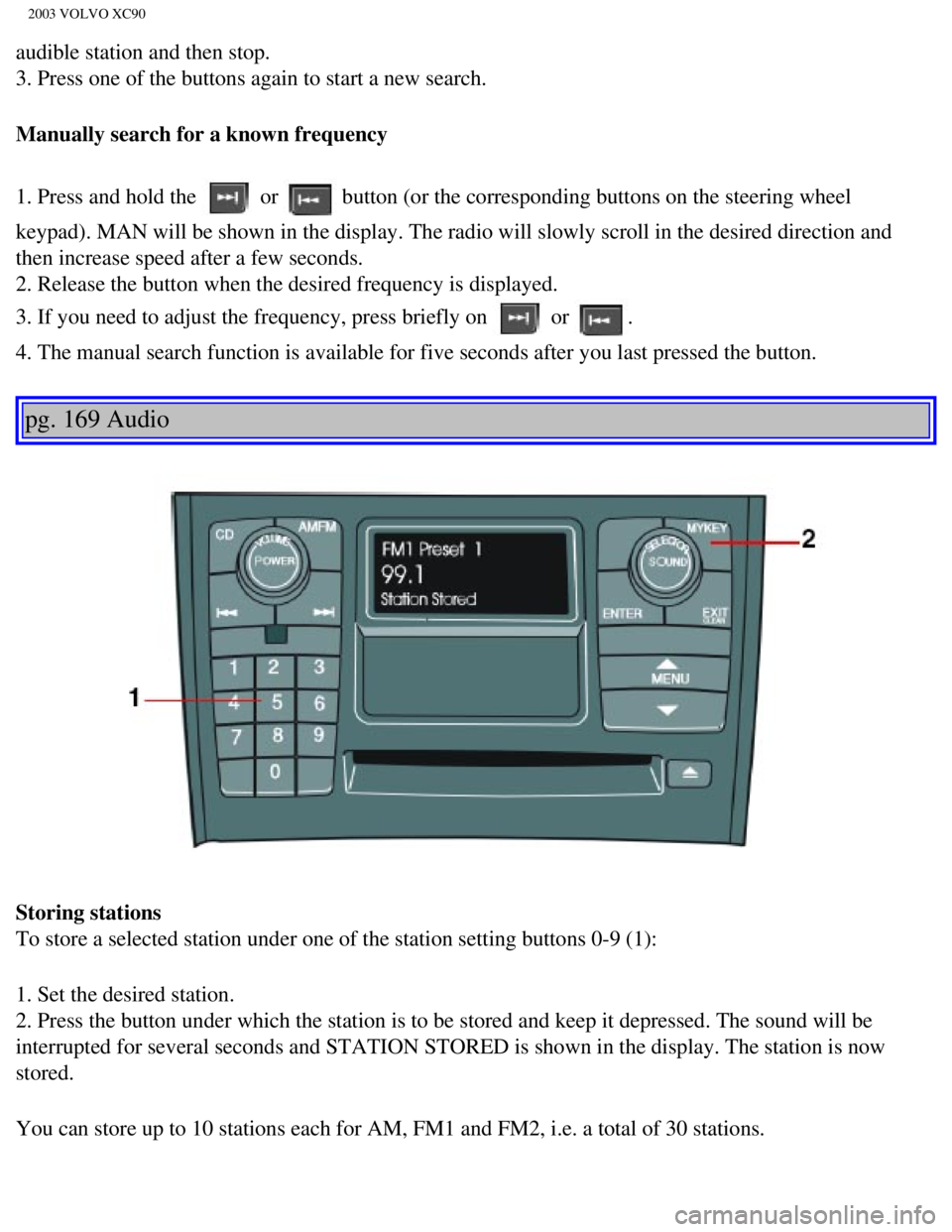
To store a selected station under one of the station setting buttons 0-9\
(1):
1. Set the desired station.
2. Press the button under which the station is to be stored and keep it \
depressed. The sound will be
interrupted for several seconds and STATION STORED is shown in the displ\
ay. The station is now
stored.
You can store up to 10 stations each for AM, FM1 and FM2, i.e. a total o\
f 30 stations.
file:///K|/ownersdocs/2003/2003_XC90/03xc90_11a.htm (11 of 17)12/30/20\
06 4:19:06 PM
Page 213 of 242
2003 VOLVO XC90
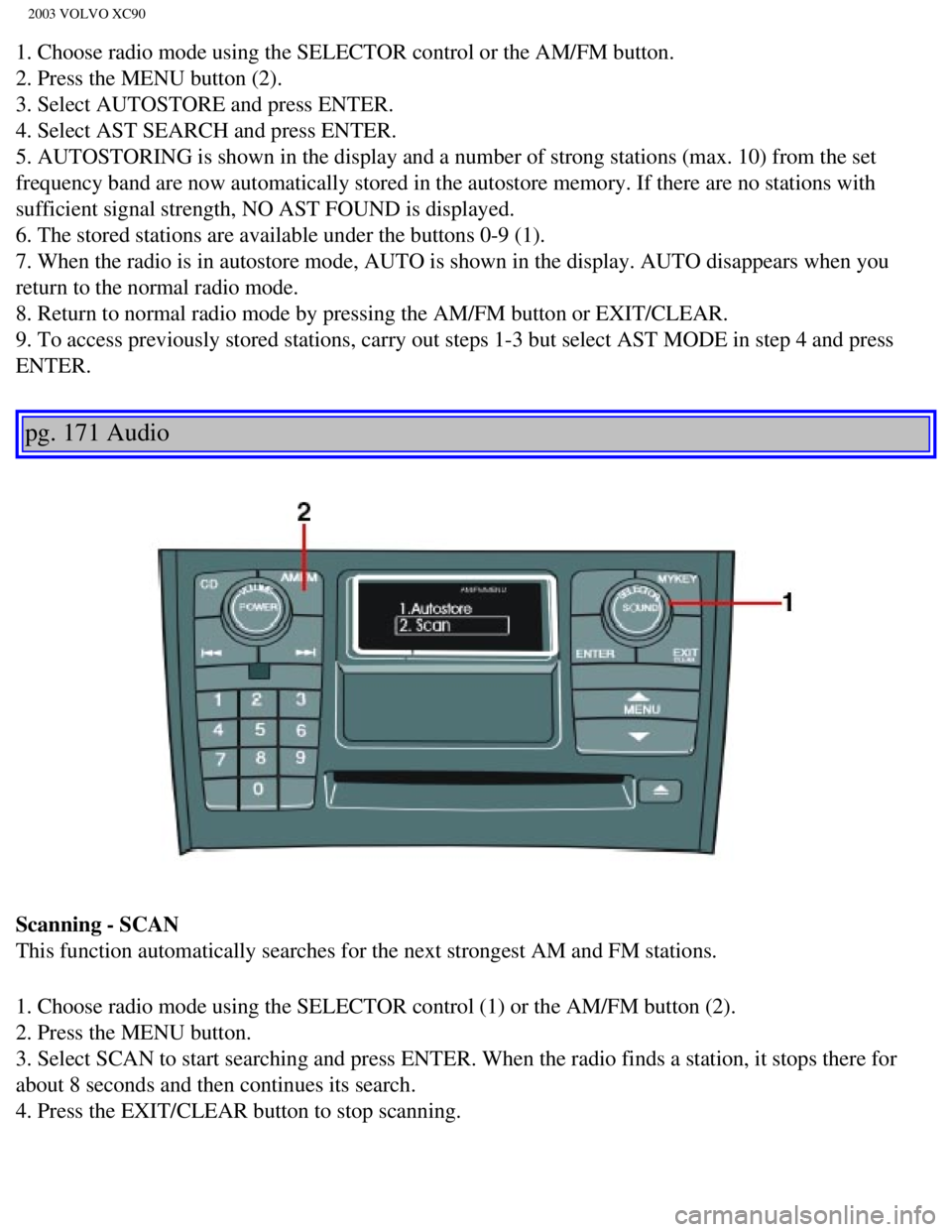
1. Choose radio mode using the SELECTOR control or the AM/FM button.
2. Press the MENU button (2).
3. Select AUTOSTORE and press ENTER.
4. Select AST SEARCH and press ENTER.
5. AUTOSTORING is shown in the display and a number of strong stations (\
max. 10) from the set
frequency band are now automatically stored in the autostore memory. If \
there are no stations with
sufficient signal strength, NO AST FOUND is displayed.
6. The stored stations are available under the buttons 0-9 (1).
7. When the radio is in autostore mode, AUTO is shown in the display. AU\
TO disappears when you
return to the normal radio mode.
8. Return to normal radio mode by pressing the AM/FM button or EXIT/CLEA\
R.
9. To access previously stored stations, carry out steps 1-3 but select \
AST MODE in step 4 and press
ENTER.
pg. 171 Audio
Scanning - SCAN
This function automatically searches for the next strongest AM and FM st\
ations.
1. Choose radio mode using the SELECTOR control (1) or the AM/FM butto\
n (2).
2. Press the MENU button.
3. Select SCAN to start searching and press ENTER. When the radio finds \
a station, it stops there for
about 8 seconds and then continues its search.
4. Press the EXIT/CLEAR button to stop scanning.
file:///K|/ownersdocs/2003/2003_XC90/03xc90_11a.htm (13 of 17)12/30/20\
06 4:19:06 PM
Page 220 of 242
 or the CD button \
(2).
2. Insert a CD into the player.
Changing tracks
Press
to go to the next track or to g")
2003 VOLVO XC90
Starting the CD
1. Select the CD mode using the SELECTOR control (1) or the CD button \
(2).
2. Insert a CD into the player.
Changing tracks
Press
to go to the next track or to go to the previous track. The track number is shown in the
display. If you have a keypad in the steering wheel, you can use the arr\
ow keys in the same way.
Searching within a track
Press and hold down
or to search within a track or the whole disc. The search continues as
long as the buttons are depressed. If you have a keypad in the steering \
wheel, you can use the arrow keys
in the same way.
Random play
This function plays the tracks on a CD in random order (shuffle).
1. Press the MENU button.
2. Select RANDOM and press ENTER.
3. RND is shown in the display as long as the function is activated.
4. Go into the menu and select RANDOM OFF to stop random play, or press \
EXIT.
pg. 176 Audio
CD player (contd)
file:///K|/ownersdocs/2003/2003_XC90/03xc90_11b.htm (3 of 11)12/30/200\
6 4:19:07 PM
Page 236 of 242

2003 VOLVO XC90
Service 124
Service key
74
Service reminder
27
SERVICE REQUIRED
28
SERVICE URGENT
28
Shiftlock
ii, 87
Side airbags
10
Sideview mirrors
42
SIPS airbags
10
Snow chains
115
Snow tires
115
Spare tire - accessing
119
Spare tires
116
Spark plugs
155
Specifications
149
Speedometer
24
Spoiler lights
31
SRS
4
Start inhibitor (immobilizer)
74
Starting the car
87
Steering
88
Steering wheel adjustment
30
Steering wheel lock
88
Stone chips
112
STOP
28
STOP ENGINE
28
Storage compartments
64
Studded tires
115
Supplemental Restraint System (SRS)
4
Supplemental Restraint System (SRS) - warning light
27
Suspension
153, 155
Switches in the center console
29
file:///K|/ownersdocs/2003/2003_XC90/03xc90_12.htm (8 of 14)12/30/2006\
4:19:09 PM