ECO mode VOLVO XC90 2003 Owner's Manual
[x] Cancel search | Manufacturer: VOLVO, Model Year: 2003, Model line: XC90, Model: VOLVO XC90 2003Pages: 242, PDF Size: 6.5 MB
Page 204 of 242
 to enter menu mode. Use the menus as follows\
:
l Use the menu keys (3) to navigate up or down in the menus.")
2003 VOLVO XC90
menu alternatives are shown in the display.
Press the menu button (2) to enter menu mode. Use the menus as follows\
:
l Use the menu keys (3) to navigate up or down in the menus. Dots in the\
display indicated that there
are more menu selections from which to choose.
l One long press on EXIT/CLEAR exits menu mode.
l A short press on the EXIT/CLEAR enables you to cancel, undo, or answer n\
o to a menu selection, or
to go back in the menu structure.
l Pressing ENTER confirms a menu selection, or takes you to the next subme\
nu.
pg. 162 Audio
Audio system controls (contd)
Rear headphone connectors and controls (option)
The door panels behind the second row of seats can be equipped with head\
phone connectors for
passengers in the second and optional third row of seats. Several people\
can listen to different sound
sources, such as CDs or the radio at the same time without disturbing ea\
ch other. Two sets of
headphones can be plugged into each connector.
l Use the SEL button (1) to step between the sound sources.
l Press the arrow keys (2) briefly to change CD tracks or switch between\
preset stations.
l Hold down the arrow keys to fast forward/reverse, or search for the prev\
ious/next strong radio station.
l Hold down the SEL button to turn off the sound.
For the best sound reproduction, we recommend headphones with impedance \
between 16-32 ohm. The
sensitivity of these should be equal to or greater than 102 dB. The head\
phone connections are intended
file:///K|/ownersdocs/2003/2003_XC90/03xc90_11a.htm (4 of 17)12/30/200\
6 4:19:06 PM
Page 209 of 242
 wo\
rks in CD and FM mode. 3-
channel stereo (3-CH) is recommended for AM radio broadcasts. DPL2 is \
only availabl")
2003 VOLVO XC90
the resonance of a concert hall. Dolby Surround Pro Logic II (DPL2) wo\
rks in CD and FM mode. 3-
channel stereo (3-CH) is recommended for AM radio broadcasts. DPL2 is \
only available on the highest
level audio system -Premium Sound. Use the following instructions to sel\
ect PRO LOGIC II, 3-
CHANNEL, or to turn these functions off.
1. Select AUDIO SETTINGS in the menu.
2. Press ENTER.
3. Select SURROUND MODE
4. Press ENTER.
5. Select PRO LOGIC II, 3-CHANNEL, or OFF.
The symbol
PL II is shown in the display. 3-CH is shown when 3-channel stereo is s\
elected.
Dolby noise reduction is manufactured under license from Dolby Laborator\
ies Licensing Corporation.
"Dolby", "Pro Logic" and the double-D symbol
are trademarks of Dolby Laboratories Licensing
Corporation. The Dolby Pro Logic Surround System is manufactured under l\
icence from Dolby
Laboratories Licensing Corporation.
pg. 167 Audio
Bass speaker - SUBWOOFER (option)
The subwoofer helps the system provide fuller sound and deeper bass.
1. Select AUDIO SETTINGS in the menu and press ENTER.
2. Select SUBWOOFER and press ENTER. See
page 165 for information on setting the subwoofer level.
Equalizer FR
file:///K|/ownersdocs/2003/2003_XC90/03xc90_11a.htm (9 of 17)12/30/200\
6 4:19:06 PM
Page 213 of 242
2003 VOLVO XC90
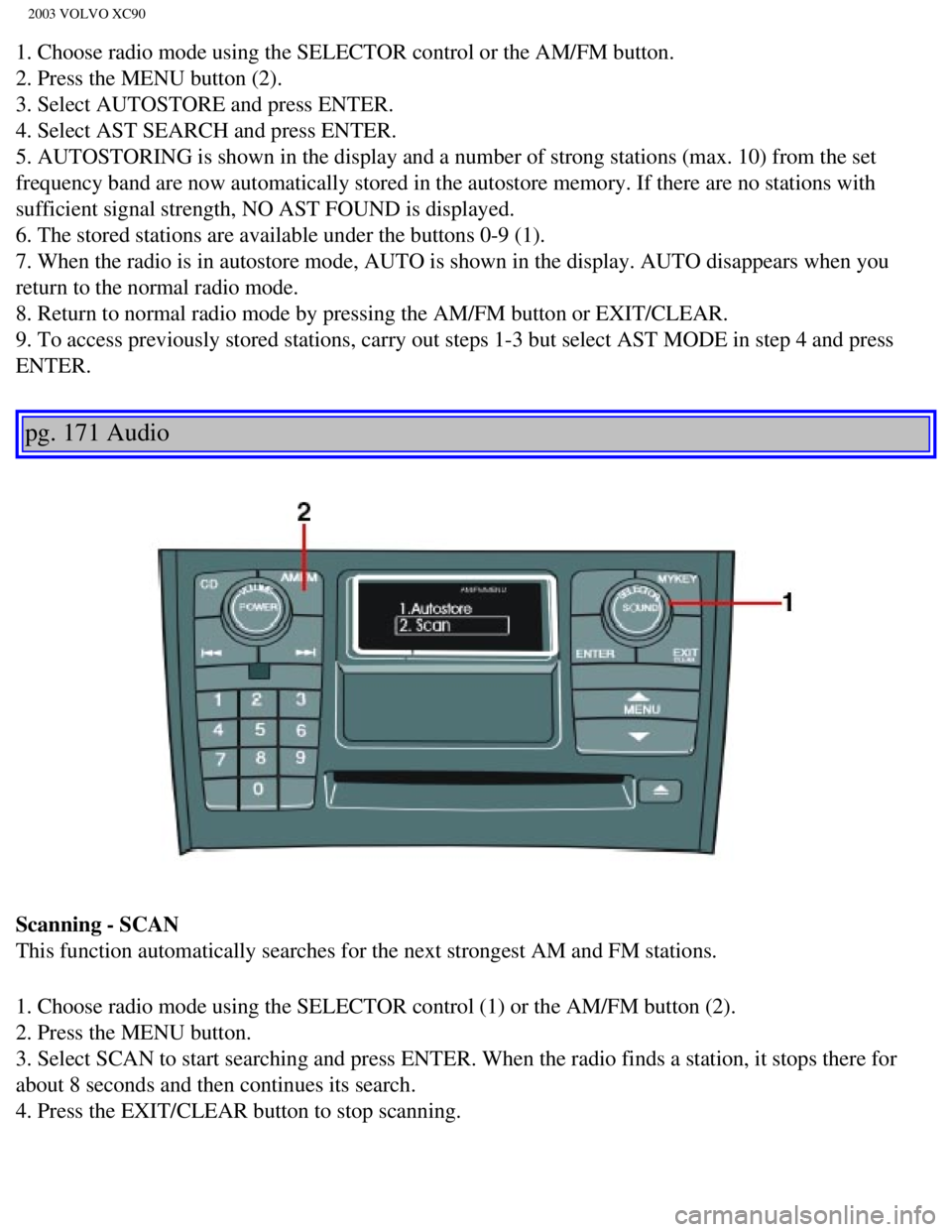
1. Choose radio mode using the SELECTOR control or the AM/FM button.
2. Press the MENU button (2).
3. Select AUTOSTORE and press ENTER.
4. Select AST SEARCH and press ENTER.
5. AUTOSTORING is shown in the display and a number of strong stations (\
max. 10) from the set
frequency band are now automatically stored in the autostore memory. If \
there are no stations with
sufficient signal strength, NO AST FOUND is displayed.
6. The stored stations are available under the buttons 0-9 (1).
7. When the radio is in autostore mode, AUTO is shown in the display. AU\
TO disappears when you
return to the normal radio mode.
8. Return to normal radio mode by pressing the AM/FM button or EXIT/CLEA\
R.
9. To access previously stored stations, carry out steps 1-3 but select \
AST MODE in step 4 and press
ENTER.
pg. 171 Audio
Scanning - SCAN
This function automatically searches for the next strongest AM and FM st\
ations.
1. Choose radio mode using the SELECTOR control (1) or the AM/FM butto\
n (2).
2. Press the MENU button.
3. Select SCAN to start searching and press ENTER. When the radio finds \
a station, it stops there for
about 8 seconds and then continues its search.
4. Press the EXIT/CLEAR button to stop scanning.
file:///K|/ownersdocs/2003/2003_XC90/03xc90_11a.htm (13 of 17)12/30/20\
06 4:19:06 PM
Page 222 of 242
2003 VOLVO XC90
CD changer (option)
The CD changer can hold up to six discs.
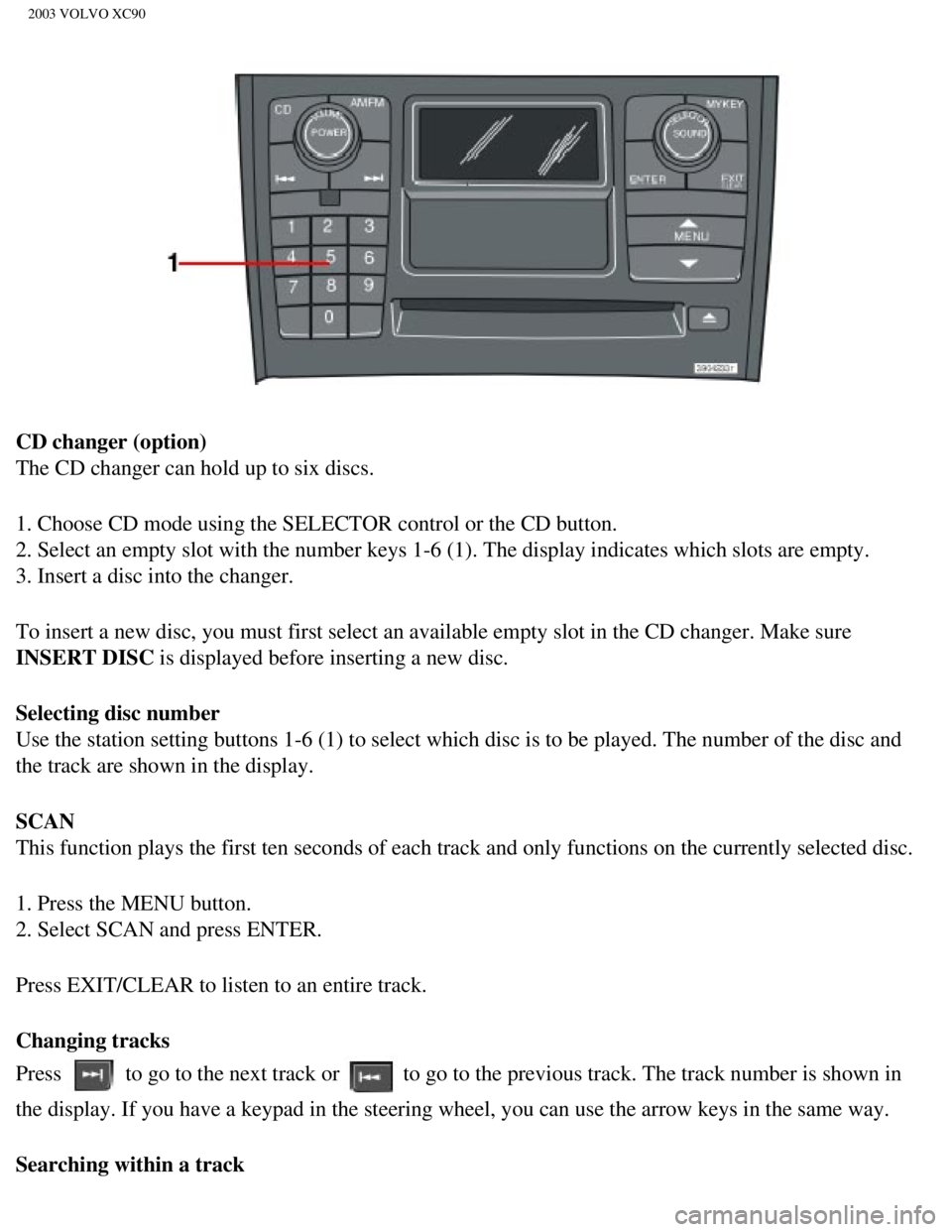
1. Choose CD mode using the SELECTOR control or the CD button.
2. Select an empty slot with the number keys 1-6 (1). The display indi\
cates which slots are empty.
3. Insert a disc into the changer.
To insert a new disc, you must first select an available empty slot in t\
he CD changer. Make sure
INSERT DISC is displayed before inserting a new disc.
Selecting disc number
Use the station setting buttons 1-6 (1) to select which disc is to be \
played. The number of the disc and
the track are shown in the display.
SCAN
This function plays the first ten seconds of each track and only functio\
ns on the currently selected disc.
1. Press the MENU button.
2. Select SCAN and press ENTER.
Press EXIT/CLEAR to listen to an entire track.
Changing tracks
Press
to go to the next track or to go to the previous track. The track number is shown in
the display. If you have a keypad in the steering wheel, you can use the\
arrow keys in the same way.
Searching within a track
file:///K|/ownersdocs/2003/2003_XC90/03xc90_11b.htm (5 of 11)12/30/200\
6 4:19:07 PM
Page 226 of 242
,
refer to \"Programming rolling codes\" on the next page to complete the pr\
og")
2003 VOLVO XC90
5. If you are programming a rolling code-equipped device (e.g., garage \
door opener or entry door lock),
refer to "Programming rolling codes" on the next page to complete the pr\
ogramming process.
Repeat steps 3 and 4 to program the other two transceiver buttons.
If, after several attempts, you are unable to successfully train the Hom\
eLink® Universal Transceiver to
learn your hand-held transmitter's signal, contact HomeLink® toll-fre\
e 1-800-355-3515 (Internet:
www.
HomeLink.com).
pg. 181 Audio
WARNING!
- If you use HomeLink® to open a garage door or gate, be sure no one \
is near the gate or door while it
is in motion.
- Do not use the HomeLink® Universal Transceiver with any garage door\
opener that lacks safety
"stop" and "reverse" features as required by federal safety standards. (\
This includes any garage door
opener model manufactured before April 1, 1982) A garage door opener th\
at cannot "detect" an
object, signalling the door to "stop" and "reverse" does not meet curren\
t federal safety standards.
Using a garage door opener without these features increases the risk of \
serious injury or death. For
more information on this matter, call toll-free 1-800-355-3515 (Interne\
t:
www.HomeLink.com).
NOTE: Canadian residents: During programming, your hand-held transmitter may automatically stop
transmitting. To successfully train HomeLink®, continue to hold the H\
omeLink® button. At the same
time, repeatedly press and hold your hand-held transmitter's button at t\
wo-second intervals until
HomeLink® has learned your transmitter's code. The HomeLink® indic\
ator light will flash first slowly,
and then rapidly to indicate that the button has been successfully progr\
ammed.
Determining if your garage door uses a rolling code
Determine, in one of the following ways, if your garage door uses a roll\
ing code system and is
manufactured after 1996:
l Refer to the garage door opener owner's manual for verification.
l If your hand-held transmitter appears to program the HomeLink® Univer\
sal Transceiver but the
programmed button does not activate the garage door, your garage door op\
ener may have a rolling code.
l Press the programmed HomeLink® button. If the garage door opener has \
the rolling code feature, the
HomeLink® indicator light flashes rapidly and then glows steadily aft\
er approximately 2 seconds.
To train a rolling code garage door opener,
follow these instructions after programming the desired transceiver butt\
on according to "Programming
file:///K|/ownersdocs/2003/2003_XC90/03xc90_11b.htm (9 of 11)12/30/200\
6 4:19:07 PM
Page 238 of 242
2003 VOLVO XC90
Vanity mirror 62
Vehicle Identification Number (VIN)
150
Vehicle loading
116
VIN (Vehicle Identification Number)
150
Volvo and the environment
iii
W
W - Winter
93
Warning symbol in center of dashboard
25
Warranties
124
Washer fluid reservoir
128, 131
Washing the car
110
Waxing
111
Weights
151
Wheels
114
WHIPS
15
Windows
40
Windshield washer
34
Windshield washer fluid reservoir
131
Windshield wipers
34
Windshield wipers (rain sensor function)
34
Winter tires
114
Winter/Wet driving mode
107
Wiper blades
133
Back cover
Accessory Installation - Important Warning
l We strongly recommend that Volvo owners install only genuine, Volvo-appr\
oved accessories, and
that accessory installations be performed only by the factory-trained te\
chnicians at your authorized
Volvo retailer.
l Genuine Volvo accessories are tested to ensure compatibility with the pe\
rformance, safety, and
emission systems in your vehicle. Additionally, your authorized Volvo re\
tailer knows where accessories
may and may not be safely installed in your Volvo. In all cases, please \
consult your authorized Volvo
file:///K|/ownersdocs/2003/2003_XC90/03xc90_12.htm (10 of 14)12/30/200\
6 4:19:09 PM