audio VOLVO XC90 2003 Owner's Manual
[x] Cancel search | Manufacturer: VOLVO, Model Year: 2003, Model line: XC90, Model: VOLVO XC90 2003Pages: 242, PDF Size: 6.5 MB
Page 218 of 242

2003 VOLVO XC90
pg. 174 Audio
Menu settings and selections
Main menus/submenus
RADIO (FM)
1. AUTOSTORE*
1.1. AST MODE
1.2. AST SEARCH
2. SCAN*
3. RADIO TEXT
4. RADIO SETTINGS
4.1. PTY
4.1.1. SELECT PTY
4.1.2. SEARCH PTY
4.1.3. SHOW PTY
4.2. AF (default setting is OFF)
4.3. RESET ALL
5. AUDIO SETTINGS
5.1. SURROUND MODE* (option)
5.1.1. Pro Logic II (default)
5.1.2. 3CH
5.1.3. OFF
5.2. SUBWOOFER* (option)
5.3. EQ FRONT (option)
5.4. EQ REAR (option)
5.5. RESET ALL
RADIO (AM)
1. AUTOSTORE
1.1. AST MODE
1.2. AST SEARCH
2. SCAN*
3. AUDIO SETTINGS
3.1. SURROUND MODE (option)
3.1.1. Pro Logic II
3.1.2. 3CH
3.1.3. OFF
3.2. SUBWOOFER (option)
3.3. EQ FRONT (option)
3.4. EQ REAR (option)
3.5. RESET ALL
file:///K|/ownersdocs/2003/2003_XC90/03xc90_11b.htm (1 of 11)12/30/200\
6 4:19:07 PM
Page 219 of 242

2003 VOLVO XC90
CD (single disc)
1. RANDOM*
2. SCAN*
3. AUDIO SETTINGS*
3.1. SURROUND MODE* (option)
3.1.1. Pro Logic II (default)
3.1.2. 3CH
3.1.3. OFF
3.2. SUBWOOFER* (option)
3.3. EQ FRONT (option)
3.4. EQ REAR (option)
3.5. RESET ALL
CDX (CD changer - option)
1. RANDOM*
1.1. OFF
1.2. SINGLE DISC
1.3. ALL DISCS
2. SCAN*
3. DISC TEXT
4. AUDIO SETTINGS*
4.1. SURROUND MODE* (option)
4.1.1. Pro Logic II (default)
4.1.2. 3CH
4.1.3. OFF
4.2. SUBWOOFER* (option)
4.3. EQ FRONT (option)
4.4. EQ REAR (option)
4.5. RESET ALL
* These functions can be programmed with MY KEY (see
page 169).
pg. 175 Audio
CD player
file:///K|/ownersdocs/2003/2003_XC90/03xc90_11b.htm (2 of 11)12/30/200\
6 4:19:07 PM
Page 220 of 242
 or the CD button \
(2).
2. Insert a CD into the player.
Changing tracks
Press
to go to the next track or to g")
2003 VOLVO XC90
Starting the CD
1. Select the CD mode using the SELECTOR control (1) or the CD button \
(2).
2. Insert a CD into the player.
Changing tracks
Press
to go to the next track or to go to the previous track. The track number is shown in the
display. If you have a keypad in the steering wheel, you can use the arr\
ow keys in the same way.
Searching within a track
Press and hold down
or to search within a track or the whole disc. The search continues as
long as the buttons are depressed. If you have a keypad in the steering \
wheel, you can use the arrow keys
in the same way.
Random play
This function plays the tracks on a CD in random order (shuffle).
1. Press the MENU button.
2. Select RANDOM and press ENTER.
3. RND is shown in the display as long as the function is activated.
4. Go into the menu and select RANDOM OFF to stop random play, or press \
EXIT.
pg. 176 Audio
CD player (contd)
file:///K|/ownersdocs/2003/2003_XC90/03xc90_11b.htm (3 of 11)12/30/200\
6 4:19:07 PM
Page 221 of 242
2003 VOLVO XC90
SCAN This function plays the first ten seconds of each track.
1. Press the MENU button.
2. Select SCAN and press ENTER.
3. Press EXIT/CLEAR to listen to an entire track.
Disctext
Certain CDs contain information about the disc, such as the titles of th\
e tracks, etc. This information can
be shown in the display by activating the DISCTEXT function.
1. Press the MENU button.
2. Select DISCTEXT in the menu and press ENTER.
3. Any information that may be stored on the disc will be displayed.
4. To deactivate this function, select DISCTEXT and press ENTER.
NOTE: This function is only available on the CD changer.
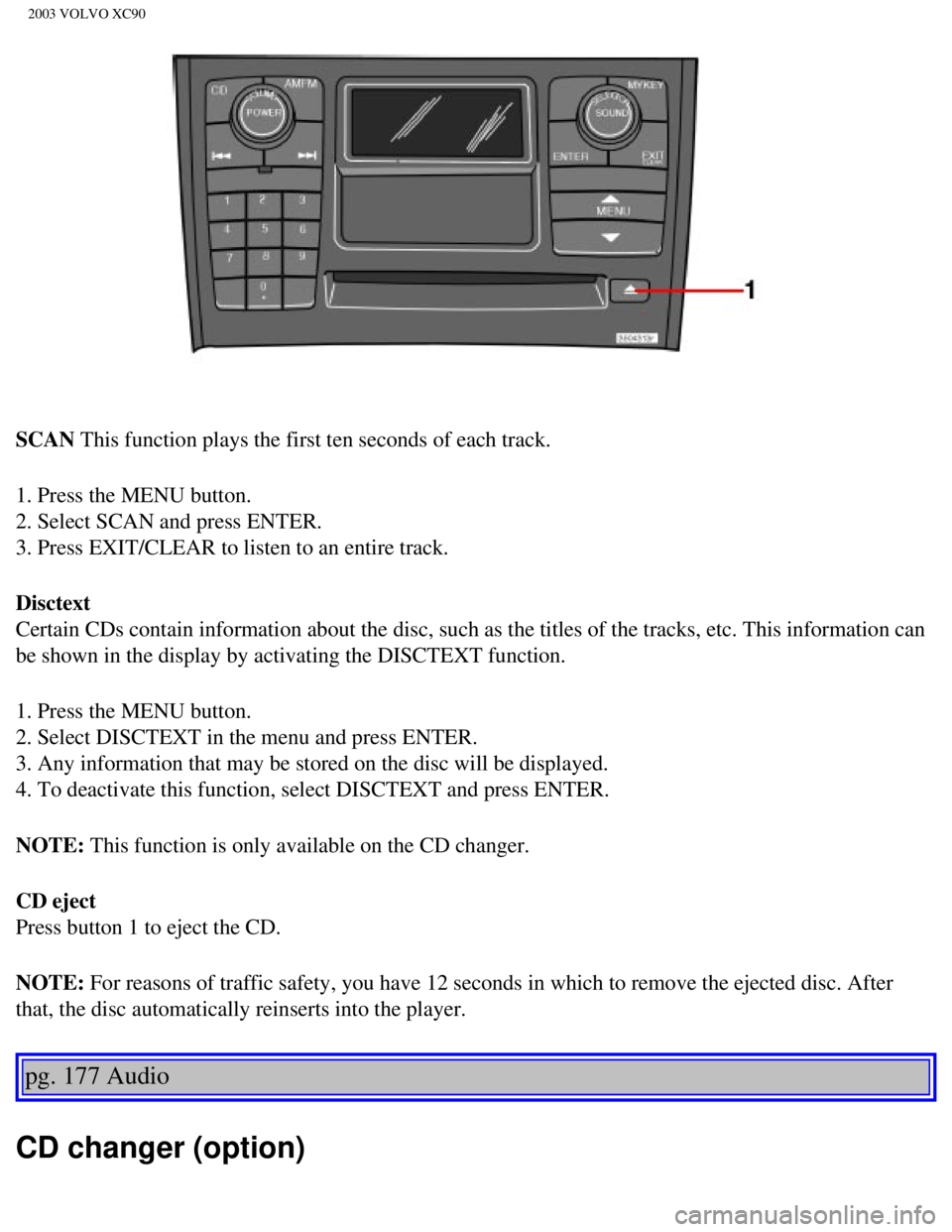
CD eject
Press button 1 to eject the CD.
NOTE: For reasons of traffic safety, you have 12 seconds in which to remove th\
e ejected disc. After
that, the disc automatically reinserts into the player.
pg. 177 Audio
CD changer (option)
file:///K|/ownersdocs/2003/2003_XC90/03xc90_11b.htm (4 of 11)12/30/200\
6 4:19:07 PM
Page 223 of 242

2003 VOLVO XC90
Press and hold down or to search within a track or the whole disc. The search continues as
long as the buttons are depressed. If you have a keypad in the steering \
wheel, you can use the arrow keys
in the same way.
pg. 178 Audio
CD changer (option) (contd)
Random play
This function offers two alternatives for playing the tracks on the disc\
(s) in the CD changer in random
order (shuffle).
l Random one (random order on the currently selected disc)
l Random all (random order on all of the CD's in the changer)
To play tracks in random order:
1. Press the MENU button.
2. Select RANDOM and press ENTER.
3. Select SINGLE DISCS or ALL DISCS to play tracks randomly from one or \
all of the discs in the CD
changer.
4. RND or RND ALL is shown in the display for as long as the function is\
activated.
NOTE: Press
to play the next randomly selected track. This can only be done on the \
currently
selected disc.
5. Press EXIT to stop random play.
file:///K|/ownersdocs/2003/2003_XC90/03xc90_11b.htm (6 of 11)12/30/200\
6 4:19:07 PM
Page 224 of 242
 will eject the CD that is currently playing. \
NOTE: For reasons of traffic safety, you have 12 seconds in which to remove th")
2003 VOLVO XC90
Ejecting one disc
A short press on the EJECT button (1) will eject the CD that is currently playing. \
NOTE: For reasons of traffic safety, you have 12 seconds in which to remove th\
e ejected disc. After
that, the disc automatically reinserts into the player.
Ejecting all discs
A long press on the EJECT button (1) starts the EJECT ALL function.
The text EJECTING ALL will be displayed and the entire magazine will be \
emptied disc by disc.
NOTE: - The EJECT ALL function can only be used while the vehicle is at a stan\
dstill and will be
cancelled if the vehicle begins to move.
- For reasons of traffic safety, you have 12 seconds in which to remove \
the ejected disc. After that, the
disc automatically reinserts into the player.
pg. 179 Audio
Audio systems - general information
Compact disc care
l Before using a new CD for the first time, remove any burrs in the center\
/outer edge by running the
stem of a pen or similar object around the hole/edge of the disc.
l Use CD standard EN 60908 discs only. Discs not meeting this standard may\
cause problems with
system (poor sound). CDR discs can cause listening problems due to the\
quality of the disc or recording
equipment used.
l Keep the discs clean. Wipe them with a soft, clean, lint-free cloth, wor\
king from the center outwards.
If necessary, dampen the cloth with a neutral soap solution. Dry thoroug\
hly before using.
l Never use cleaning spray or antistatic liquid. Use only cleaners specifi\
cally made for CD's.
l Use discs of the correct size only (3.5" discs should never be used). \
l Do not put tape or labels on the disc itself. They could become stuck in\
the player.
l Volvo does not recommend the use of plastic outer rings on the disc.
l Condensation may occur on discs/optical components of the changer in col\
d winter weather. The disc
can be dried with a clean, lint-free cloth. Optical components in the CD\
changer may, however, take up
to one hour to dry off.
l Never attempt to play a disc which is damaged in any way.
l When not in use, the discs should be stored in their covers. Avoid stori\
ng discs in excessive heat,
direct sunlight or dusty locations.
pg. 180 Audio
file:///K|/ownersdocs/2003/2003_XC90/03xc90_11b.htm (7 of 11)12/30/200\
6 4:19:07 PM
Page 226 of 242
,
refer to \"Programming rolling codes\" on the next page to complete the pr\
og")
2003 VOLVO XC90
5. If you are programming a rolling code-equipped device (e.g., garage \
door opener or entry door lock),
refer to "Programming rolling codes" on the next page to complete the pr\
ogramming process.
Repeat steps 3 and 4 to program the other two transceiver buttons.
If, after several attempts, you are unable to successfully train the Hom\
eLink® Universal Transceiver to
learn your hand-held transmitter's signal, contact HomeLink® toll-fre\
e 1-800-355-3515 (Internet:
www.
HomeLink.com).
pg. 181 Audio
WARNING!
- If you use HomeLink® to open a garage door or gate, be sure no one \
is near the gate or door while it
is in motion.
- Do not use the HomeLink® Universal Transceiver with any garage door\
opener that lacks safety
"stop" and "reverse" features as required by federal safety standards. (\
This includes any garage door
opener model manufactured before April 1, 1982) A garage door opener th\
at cannot "detect" an
object, signalling the door to "stop" and "reverse" does not meet curren\
t federal safety standards.
Using a garage door opener without these features increases the risk of \
serious injury or death. For
more information on this matter, call toll-free 1-800-355-3515 (Interne\
t:
www.HomeLink.com).
NOTE: Canadian residents: During programming, your hand-held transmitter may automatically stop
transmitting. To successfully train HomeLink®, continue to hold the H\
omeLink® button. At the same
time, repeatedly press and hold your hand-held transmitter's button at t\
wo-second intervals until
HomeLink® has learned your transmitter's code. The HomeLink® indic\
ator light will flash first slowly,
and then rapidly to indicate that the button has been successfully progr\
ammed.
Determining if your garage door uses a rolling code
Determine, in one of the following ways, if your garage door uses a roll\
ing code system and is
manufactured after 1996:
l Refer to the garage door opener owner's manual for verification.
l If your hand-held transmitter appears to program the HomeLink® Univer\
sal Transceiver but the
programmed button does not activate the garage door, your garage door op\
ener may have a rolling code.
l Press the programmed HomeLink® button. If the garage door opener has \
the rolling code feature, the
HomeLink® indicator light flashes rapidly and then glows steadily aft\
er approximately 2 seconds.
To train a rolling code garage door opener,
follow these instructions after programming the desired transceiver butt\
on according to "Programming
file:///K|/ownersdocs/2003/2003_XC90/03xc90_11b.htm (9 of 11)12/30/200\
6 4:19:07 PM
Page 227 of 242

2003 VOLVO XC90
the transceiver." The help of a second person may make training easier.
1. Locate the training button on the garage door opener motor head unit.\
The location and color of the
training button may vary. If you encounter difficulty, refer to the gara\
ge door opener owner's manual or
call toll-free 1-800-355-3515 (Internet:
www.HomeLink.com).
2. Press the "training" button on the garage door opener motor head unit\
until the "training" light comes
on.
3. Press and release the programmed HomeLink® button. Press and relea\
se the programmed
HomeLink® button a second time to complete the training process.
4. Some garage door openers may require you to do this procedure a third\
time to complete the training.
5. The programmed button on your HomeLink® Universal Transceiver shou\
ld now operate your garage
door opener. The original hand-held transmitter can also be used, as des\
ired, to operate the garage door.
The remaining two HomeLink® buttons can be programmed in the same way\
. In the event of any
problems in programming the HomeLink® Universal Transceiver, call tol\
l-free 1-800-355-3515
(Internet:
www.HomeLink.com).
Operating the HomeLink® Universal Transceiver
Once programmed, the HomeLink® Universal Transceiver can be used in p\
lace of your handheld
transmitters.
To operate, the key must be turned to the "accessory" position (II) or\
the engine must be running. Press
the programmed HomeLink® button to activate the garage door, driveway\
gate, security lighting, home
security system, etc.
pg. 182 Audio
Your original hand-held transmitters may, of course, be used at any time\
.
Erasing programmed buttons
Individual buttons cannot be erased. To erase all three programmed butto\
ns:
1. Turn the ignition key to the "accessory" position (II).
2. Hold down the two outside buttons on the HomeLink® Universal Trans\
ceiver for about 20 seconds,
until HomeLink®'s indicator light begins to flash.
3. Release both buttons. The HomeLink® buttons can be reprogrammed us\
ing the procedures described
on the previous page.
Reprogramming a single HomeLink® button
1. Press and hold the desired HomeLink® button. Do not release the bu\
tton until step 3 has been
completed.
2. When the indicator light begins to flash slowly (after approximately\
20 seconds), position your hand-
held transmitter 2 to 5 in. (5 to 12 cm) away from the HomeLink® su\
rface.
file:///K|/ownersdocs/2003/2003_XC90/03xc90_11b.htm (10 of 11)12/30/20\
06 4:19:07 PM
Page 229 of 242
2003 VOLVO XC90
2 0 0 3
VOLVO XC90
Index
pg. 183-186 Index
12-volt sockets
39
A
A/C (air conditioning)
50
ABS
ii, 25, 96
Adjustable steering wheel
30
Advanced user functions
172
Air bags - dual threshold/stage
5
Air cleaner
128
Air distribution
47, 50
Air Quality sensor
51
Air vents
47
Airbag - Side Impact (SIPS)
10
Airbags (front)
4
Alarm
73, 80
All Wheel Drive
94
All Wheel Drive - towing
101
Anti-lock Brake System (ABS)
ii, 25
Approach lighting
33
Ashtray
39, 64
Audio
159
AUTO (climate control)
49
Automatic climate control, ECC
48
Automatic gearbox
89
file:///K|/ownersdocs/2003/2003_XC90/03xc90_12.htm (1 of 14)12/30/2006\
4:19:09 PM
Page 239 of 242

2003 VOLVO XC90
retailer before installing any accessory in or on your vehicle.
l Accessories that have not been approved by Volvo may or may not be speci\
fically tested for
compatibility with your vehicle. Additionally, an inexperienced installe\
r may not be familiar with some
of your vehicle's systems.
l Any of your vehicle's performance and safety systems could be adversely \
affected if you install
accessories that Volvo has not tested, or if you allow accessories to be\
installed by someone unfamiliar
with your vehicle.
l Damage caused by unapproved or improperly installed accessories may not \
be covered by your new
vehicle warranty. See your Warranty and Service Records Information book\
let for more warranty
information. Volvo assumes no responsibility for death, injury, or expen\
ses that may result from the
installation of nongenuine accessories.
Driver Distraction
l Driver distraction results from driver activities that are not directly \
related to controlling the vehicle in
the driving environment. Your new Volvo is, or can be, equipped with man\
y feature-rich entertainment
and communication systems. These include hands-free cellular telephones,\
navigation systems, and
multipurpose audio systems. You may also own other portable electronic d\
evices for your own
convenience. When used properly and safely, they enrich the driving expe\
rience. Improperly used, any
of these could cause a distraction.
l For all of these systems, we want to provide the following warning that \
reflects the strong Volvo
concern for your safety:
l Never use these devices or any feature of your vehicle in a way that dis\
tracts you from the task of
driving safely. Distraction can lead to a serious accident.In addition t\
o this general warning, we offer the
following guidance regarding specific newer features that may be found i\
n your vehicle:
l Never use a hand-held cellular telephone while driving. Some jurisdictio\
ns prohibit cellular telephone
use by a driver while the vehicle is moving.
l If your vehicle is equipped with a navigation system, set and make chang\
es to your travel itinerary
only with the vehicle parked.
l Never program your audio system while the vehicle is moving. Program rad\
io presets with the vehicle
parked, and use your programmed presets to make radio use quicker and si\
mpler.
l Never use portable computers or personal digital assistants while the ve\
hicle is moving. A driver has a
responsibility to do everything possible to ensure his or her own safety\
and the safety of passengers in
the vehicle and others sharing the roadway. Avoiding distractions is par\
t of that responsibility.
file:///K|/ownersdocs/2003/2003_XC90/03xc90_12.htm (11 of 14)12/30/200\
6 4:19:09 PM