light VOLVO XC90 2003 Manual Online
[x] Cancel search | Manufacturer: VOLVO, Model Year: 2003, Model line: XC90, Model: VOLVO XC90 2003Pages: 242, PDF Size: 6.5 MB
Page 189 of 242
2003 VOLVO XC90
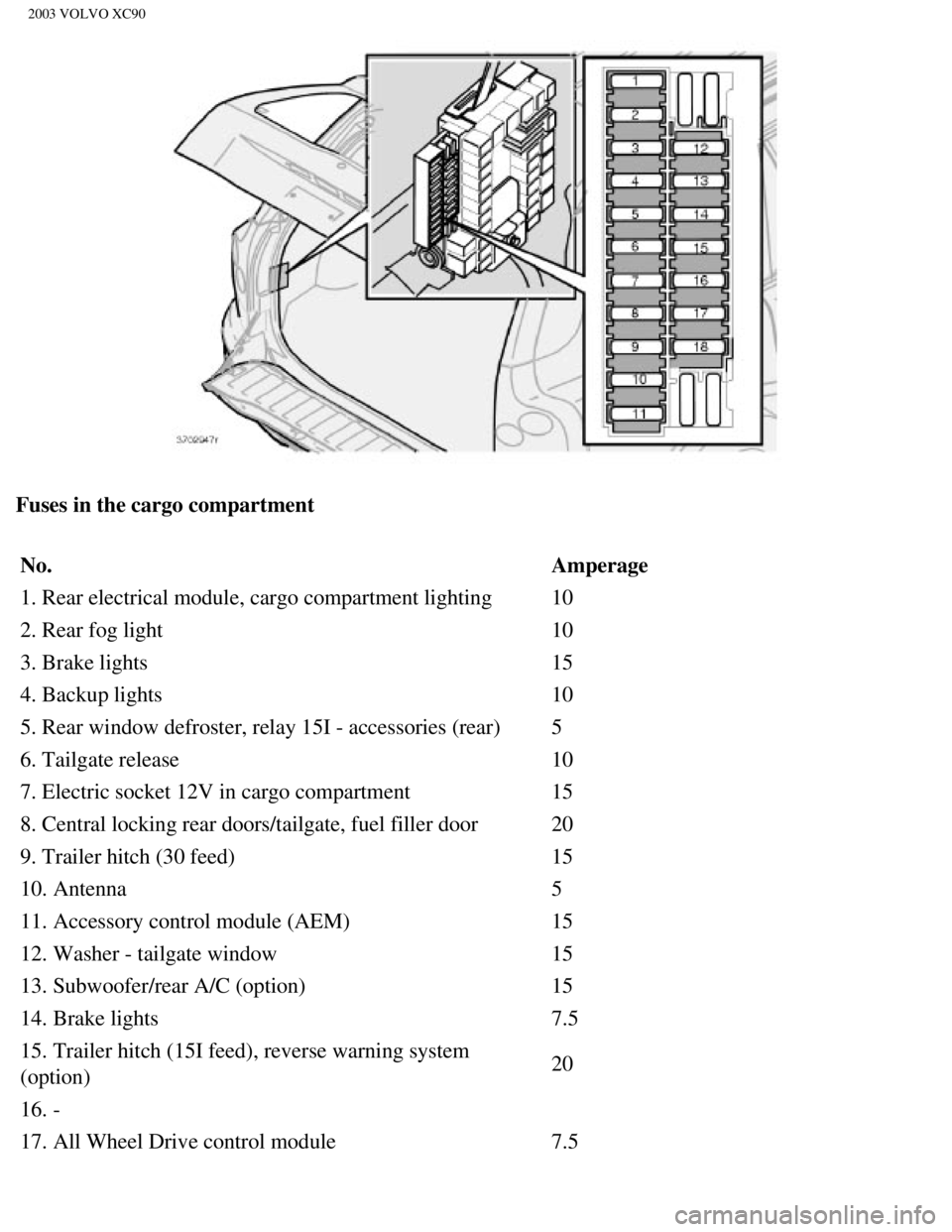
Fuses in the cargo compartment No. Amperage
1. Rear electrical module, cargo compartment lighting 10
2. Rear fog light 10
3. Brake lights 15
4. Backup lights 10
5. Rear window defroster, relay 15I - accessories (rear) 5
6. Tailgate release 10
7. Electric socket 12V in cargo compartment 15
8. Central locking rear doors/tailgate, fuel filler door 20
9. Trailer hitch (30 feed) 15
10. Antenna 5
11. Accessory control module (AEM) 15
12. Washer - tailgate window 15
13. Subwoofer/rear A/C (option) 15
14. Brake lights 7.5
15. Trailer hitch (15I feed), reverse warning system
(option) 20
16. -
17. All Wheel Drive control module 7.5
file:///K|/ownersdocs/2003/2003_XC90/03xc90_09b.htm (22 of 23)12/30/20\
06 4:19:04 PM
Page 198 of 242
 520 A
600 A
Reserve capacity (RC) 90
min 115 min
If you must replace your battery, be sure to replace it with a battery o\
f the same cold start capacity")
2003 VOLVO XC90
Cold start capacity
(CCA) 520 A
600 A
Reserve capacity (RC) 90
min 115 min
If you must replace your battery, be sure to replace it with a battery o\
f the same cold start capacity and
reserve capacity as the original (See the decal on the battery). Generator max. current 140 A*160 A
Starter motor, power 1.4 kW 1.7 kW
Spark plugs P/N272313-8 or equivalent
Gap 0.028-0.032 in.0.7-0.8
mm
Tightening torque 22 ft. lbs. (30 Nm)
Firing order 1-2-4-5-3 1-5-3-6-2-4
* Models equipped with the optional rear A/C unit have 160 A generators.\
pg. 156 Specifications
Bulbs
Bulbs OutputSocket
Low beam 55 W H7
High beam 55 W H7
Bi-Xenon headlights
(option) 35 W
D2R
Fog lights, front 55 W H 1
Parking lights, front 5W5 W2.1x9.5d
Turn signals, front 21 W PY (amber)
Turn signals, rear 21 W PY (amber)
Parking lights, rear 5 W BA15
Brake light 21 W BA15
Back up lights 21 W BA15
Fog light, left rear 5 W BA15
License plate lighting 5 W W 2.1x9.5 d
file:///K|/ownersdocs/2003/2003_XC90/03xc90_10.htm (8 of 10)12/30/2006\
4:19:05 PM
Page 199 of 242

2003 VOLVO XC90
Courtesy lighting, front5 W SV 8.5
Cargo compartment lighting 5 W SV 8.5
Glove compartment lighting 3 W BA 9
Vanity mirror 1.2 W SV 5.5
pg. 157 Specifications
Engine specifications, Transmission
B5254T2 B6294T
Output (kW/rps) 154/83 200/85
- (hp/rpm) 208/5000 268/5100
Torque (Nm/rps) 320/25-75 380/30-83
- (ft. lbs./rpm) 236/1500-4500 280/1800-5000
No. of cylinders 5 6
Bore (mm) 83 83
Stroke (mm) 93.2 90
Cylinder displacement,
liters 2.52 (153.8 cu
in)
2.92 (178.3 cu in)
Compression ratio 9.0:1 8.5:1
Charge air cooler (Intercooler)
Turbocharged engines employ a turbocompressor to force air into the engi\
ne inlet manifold and a charge
air cooler to cool the compressed inlet air. The resulting increase in a\
ir flow raises pressure in the intake
manifold and increases engine power over that developed by the normally-\
aspirated engine. The charge
air cooler (which resembles a radiator) is located between the turbo-c\
ompressor and inlet manifold.
Fuel system
The engine is equipped with a multiport fuel injection system.
Gear ratios Gear AW55-51 5-speed GM4T65 4-speed
1st 4.66:1 3.28:1
2nd 3.03:1 1.76:1
3rd 1.98:1 1.12:1
file:///K|/ownersdocs/2003/2003_XC90/03xc90_10.htm (9 of 10)12/30/2006\
4:19:05 PM
Page 216 of 242

2003 VOLVO XC90
Search for a specific program type - PTY
This functions enables you to search for a certain type of program by se\
arching through the entire
waveband.
1. Select FM1 or FM2 and press the MENU button.
2. Select RADIO SETTINGS and press ENTER.
3. Select PTY and press ENTER.
4. Choose SELECT PTY and press ENTER.
5. Press ENTER for one or more of the listed program types to select. Th\
e PTY symbol is displayed and
lights up when you make your first selection and the radio goes into PTY\
mode.
6. When you have made all of your selections, press EXIT/CLEAR to exit t\
he PTY list.
7. Select SEARCH PTY and press ENTER. If the radio finds a station with \
the selected program type,
this station will be played.
8. If the radio finds a station that does not match your selections, con\
tinue the search with the
and
buttons.
9. If no station with the selected program type is found, the radio will\
return to the previously tuned
frequency. PTY will remain in standby mode.
10. To deactivate the PTY standby mode, select CLEAR PTY and press ENTER\
. The PTY symbol then
disappears and the radio returns to the normal operating mode.
PTY standby
To set the radio in PTY standby, repeat steps 1-6.
file:///K|/ownersdocs/2003/2003_XC90/03xc90_11a.htm (16 of 17)12/30/20\
06 4:19:06 PM
Page 224 of 242
 will eject the CD that is currently playing. \
NOTE: For reasons of traffic safety, you have 12 seconds in which to remove th")
2003 VOLVO XC90
Ejecting one disc
A short press on the EJECT button (1) will eject the CD that is currently playing. \
NOTE: For reasons of traffic safety, you have 12 seconds in which to remove th\
e ejected disc. After
that, the disc automatically reinserts into the player.
Ejecting all discs
A long press on the EJECT button (1) starts the EJECT ALL function.
The text EJECTING ALL will be displayed and the entire magazine will be \
emptied disc by disc.
NOTE: - The EJECT ALL function can only be used while the vehicle is at a stan\
dstill and will be
cancelled if the vehicle begins to move.
- For reasons of traffic safety, you have 12 seconds in which to remove \
the ejected disc. After that, the
disc automatically reinserts into the player.
pg. 179 Audio
Audio systems - general information
Compact disc care
l Before using a new CD for the first time, remove any burrs in the center\
/outer edge by running the
stem of a pen or similar object around the hole/edge of the disc.
l Use CD standard EN 60908 discs only. Discs not meeting this standard may\
cause problems with
system (poor sound). CDR discs can cause listening problems due to the\
quality of the disc or recording
equipment used.
l Keep the discs clean. Wipe them with a soft, clean, lint-free cloth, wor\
king from the center outwards.
If necessary, dampen the cloth with a neutral soap solution. Dry thoroug\
hly before using.
l Never use cleaning spray or antistatic liquid. Use only cleaners specifi\
cally made for CD's.
l Use discs of the correct size only (3.5" discs should never be used). \
l Do not put tape or labels on the disc itself. They could become stuck in\
the player.
l Volvo does not recommend the use of plastic outer rings on the disc.
l Condensation may occur on discs/optical components of the changer in col\
d winter weather. The disc
can be dried with a clean, lint-free cloth. Optical components in the CD\
changer may, however, take up
to one hour to dry off.
l Never attempt to play a disc which is damaged in any way.
l When not in use, the discs should be stored in their covers. Avoid stori\
ng discs in excessive heat,
direct sunlight or dusty locations.
pg. 180 Audio
file:///K|/ownersdocs/2003/2003_XC90/03xc90_11b.htm (7 of 11)12/30/200\
6 4:19:07 PM
Page 225 of 242

2003 VOLVO XC90
HomeLink® Universal Transceiver
Hand-held transmitter
HomeLink® Universal Transceiver
HomeLink® is an advanced system that can be programmed to learn the c\
odes of three different remote
controlled-devices (e.g., garage door openers, remote lighting, entry d\
oor lock). HomeLink®'s sun visor-
mounted transceiver, powered by your vehicle's electrical system, may th\
en be used in place of your
hand-held remote controls.
NOTE: For your security, the HomeLink® Universal Transceiver is designed to\
not function if you lock
your vehicle from the outside.
Programming the transceiver
1. The ignition switch must be turned to the "accessory" position (II)\
before programming the
HomeLink® Universal Transceiver.
2. Begin by erasing all 3 factory default channels. Hold down the two ou\
tside buttons (buttons 1 and 3 in
the illustration) on the HomeLink® Universal Transceiver for about 2\
0 seconds, until HomeLink®'s
indicator light begins to flash. Then release the buttons.
3. Hold your hand-held transmitter (garage door opener, for example) 2\
to 5 in. (5 to 12 cm) away from
the HomeLink® surface, keeping the indicator light in view. For place\
ment questions, contact
HomeLink® toll-free 1-800-355-3515 (Internet:
www.HomeLink.com).
4. Using two hands, push and hold both your hand-held transmitter's butt\
on and the transceiver button
you wish to program. The indicator light will flash first slowly, then r\
apidly. Rapid flashing tells you the
HomeLink® button has been successfully programmed. Release both butto\
ns.
file:///K|/ownersdocs/2003/2003_XC90/03xc90_11b.htm (8 of 11)12/30/200\
6 4:19:07 PM
Page 226 of 242
,
refer to \"Programming rolling codes\" on the next page to complete the pr\
og")
2003 VOLVO XC90
5. If you are programming a rolling code-equipped device (e.g., garage \
door opener or entry door lock),
refer to "Programming rolling codes" on the next page to complete the pr\
ogramming process.
Repeat steps 3 and 4 to program the other two transceiver buttons.
If, after several attempts, you are unable to successfully train the Hom\
eLink® Universal Transceiver to
learn your hand-held transmitter's signal, contact HomeLink® toll-fre\
e 1-800-355-3515 (Internet:
www.
HomeLink.com).
pg. 181 Audio
WARNING!
- If you use HomeLink® to open a garage door or gate, be sure no one \
is near the gate or door while it
is in motion.
- Do not use the HomeLink® Universal Transceiver with any garage door\
opener that lacks safety
"stop" and "reverse" features as required by federal safety standards. (\
This includes any garage door
opener model manufactured before April 1, 1982) A garage door opener th\
at cannot "detect" an
object, signalling the door to "stop" and "reverse" does not meet curren\
t federal safety standards.
Using a garage door opener without these features increases the risk of \
serious injury or death. For
more information on this matter, call toll-free 1-800-355-3515 (Interne\
t:
www.HomeLink.com).
NOTE: Canadian residents: During programming, your hand-held transmitter may automatically stop
transmitting. To successfully train HomeLink®, continue to hold the H\
omeLink® button. At the same
time, repeatedly press and hold your hand-held transmitter's button at t\
wo-second intervals until
HomeLink® has learned your transmitter's code. The HomeLink® indic\
ator light will flash first slowly,
and then rapidly to indicate that the button has been successfully progr\
ammed.
Determining if your garage door uses a rolling code
Determine, in one of the following ways, if your garage door uses a roll\
ing code system and is
manufactured after 1996:
l Refer to the garage door opener owner's manual for verification.
l If your hand-held transmitter appears to program the HomeLink® Univer\
sal Transceiver but the
programmed button does not activate the garage door, your garage door op\
ener may have a rolling code.
l Press the programmed HomeLink® button. If the garage door opener has \
the rolling code feature, the
HomeLink® indicator light flashes rapidly and then glows steadily aft\
er approximately 2 seconds.
To train a rolling code garage door opener,
follow these instructions after programming the desired transceiver butt\
on according to "Programming
file:///K|/ownersdocs/2003/2003_XC90/03xc90_11b.htm (9 of 11)12/30/200\
6 4:19:07 PM
Page 227 of 242

2003 VOLVO XC90
the transceiver." The help of a second person may make training easier.
1. Locate the training button on the garage door opener motor head unit.\
The location and color of the
training button may vary. If you encounter difficulty, refer to the gara\
ge door opener owner's manual or
call toll-free 1-800-355-3515 (Internet:
www.HomeLink.com).
2. Press the "training" button on the garage door opener motor head unit\
until the "training" light comes
on.
3. Press and release the programmed HomeLink® button. Press and relea\
se the programmed
HomeLink® button a second time to complete the training process.
4. Some garage door openers may require you to do this procedure a third\
time to complete the training.
5. The programmed button on your HomeLink® Universal Transceiver shou\
ld now operate your garage
door opener. The original hand-held transmitter can also be used, as des\
ired, to operate the garage door.
The remaining two HomeLink® buttons can be programmed in the same way\
. In the event of any
problems in programming the HomeLink® Universal Transceiver, call tol\
l-free 1-800-355-3515
(Internet:
www.HomeLink.com).
Operating the HomeLink® Universal Transceiver
Once programmed, the HomeLink® Universal Transceiver can be used in p\
lace of your handheld
transmitters.
To operate, the key must be turned to the "accessory" position (II) or\
the engine must be running. Press
the programmed HomeLink® button to activate the garage door, driveway\
gate, security lighting, home
security system, etc.
pg. 182 Audio
Your original hand-held transmitters may, of course, be used at any time\
.
Erasing programmed buttons
Individual buttons cannot be erased. To erase all three programmed butto\
ns:
1. Turn the ignition key to the "accessory" position (II).
2. Hold down the two outside buttons on the HomeLink® Universal Trans\
ceiver for about 20 seconds,
until HomeLink®'s indicator light begins to flash.
3. Release both buttons. The HomeLink® buttons can be reprogrammed us\
ing the procedures described
on the previous page.
Reprogramming a single HomeLink® button
1. Press and hold the desired HomeLink® button. Do not release the bu\
tton until step 3 has been
completed.
2. When the indicator light begins to flash slowly (after approximately\
20 seconds), position your hand-
held transmitter 2 to 5 in. (5 to 12 cm) away from the HomeLink® su\
rface.
file:///K|/ownersdocs/2003/2003_XC90/03xc90_11b.htm (10 of 11)12/30/20\
06 4:19:07 PM
Page 228 of 242

2003 VOLVO XC90
3. Press and hold the hand-held transmitter button. The HomeLink® ind\
icator light will flash first
slowly, then rapidly. When the indicator light flashes rapidly, release \
both buttons.
The previously programmed device has now been erased and the new device \
can be activated by
pressing the HomeLink® button that has just been programmed. This pro\
cedure will not affect any other
programmed HomeLink® buttons.
NOTE:
l Retain the original transmitter(s) for future programming procedures (\
e.g., if you purchase a new
vehicle).
l For your own security, erase all programmed buttons on the HomeLink® \
Universal Transceiver when
you sell your vehicle.
l Metallic sun protection films should not be used on any windows in a veh\
icle equipped with
HomeLink® Universal Transceiver. This could interfere with the transc\
eiver's function.
Contents | Top of Page
file:///K|/ownersdocs/2003/2003_XC90/03xc90_11b.htm (11 of 11)12/30/20\
06 4:19:07 PM
Page 229 of 242
2003 VOLVO XC90
2 0 0 3
VOLVO XC90
Index
pg. 183-186 Index
12-volt sockets
39
A
A/C (air conditioning)
50
ABS
ii, 25, 96
Adjustable steering wheel
30
Advanced user functions
172
Air bags - dual threshold/stage
5
Air cleaner
128
Air distribution
47, 50
Air Quality sensor
51
Air vents
47
Airbag - Side Impact (SIPS)
10
Airbags (front)
4
Alarm
73, 80
All Wheel Drive
94
All Wheel Drive - towing
101
Anti-lock Brake System (ABS)
ii, 25
Approach lighting
33
Ashtray
39, 64
Audio
159
AUTO (climate control)
49
Automatic climate control, ECC
48
Automatic gearbox
89
file:///K|/ownersdocs/2003/2003_XC90/03xc90_12.htm (1 of 14)12/30/2006\
4:19:09 PM