ESP VOLVO XC90 2004 User Guide
[x] Cancel search | Manufacturer: VOLVO, Model Year: 2004, Model line: XC90, Model: VOLVO XC90 2004Pages: 245, PDF Size: 7.14 MB
Page 150 of 245
Downloaded from www.Manualslib.com manuals search engine ProCarManuals.com
2004 VOLVO XC90
Treadwear 200 Traction AA Temperature A
TREADWEAR
The treadwear grade is a comparative rating based on the wear rate of th\
e tire when tested under
controlled conditions on a specified government test course. For example\
, a tire graded 150 would wear
one and one half (1 1/2) times as well on the government course as a t\
ire graded 100. The relative
performance of tires depends upon the actual conditions of their use, ho\
wever, and many depart
significantly from the norm due to variation in driving habits, maintena\
nce practices and differences in
road characteristics and climate.
TRACTION
The traction grades, from highest to lowest, are AA, A, B, and C, as mea\
sured under controlled
conditions on specified government test surfaces of asphalt and concrete\
. A tire marked C may have
poor traction performance.
WARNING!
The traction grade assigned to this tire is based on braking (straight-\
ahead) traction tests and is not a
measure of cornering (turning) traction.
TEMPERATURE
The temperature grades are AA (the highest), A, B, and C, representing\
the tire's resistance to the
generation of heat and its ability to dissipate heat when tested under c\
ontrolled conditions on specified
indoor laboratory test wheel. Sustained high temperature can cause the m\
aterial of the tire to degenerate
and reduce tire life, and excessive temperature can lead to sudden tire \
failure. The grade C corresponds
to minimum level of performance that all passenger vehicle tires must me\
et under the Federal Motor
Safety Standard No. 109. Grades B and A represent higher levels of perfo\
rmance on the laboratory test
wheel than the minimum required by law.
WARNING!
The temperature grade for this tire is established for a tire that is pr\
operly inflated and not overloaded.
Excessive speed, under-inflation, or excessive loading, either separatel\
y or in combination, can cause
heat buildup and possible tire failure.
pg. 113 Wheels and tires
Changing wheels
file:///K|/ownersdocs/2004/2004_XC90/04xc90_08.htm (7 of 13)12/30/2006\
4:35:25 PM
Page 165 of 245

Downloaded from www.Manualslib.com manuals search engine ProCarManuals.com
2004 VOLVO XC90
Oil and fluids (contd)
Checking the oil level
The oil level should be checked every time the vehicle is refueled. This\
is especially important
during the period up to the first maintenance. CAUTION
Not checking the oil level regularly can result in serious engine damage\
if the oil level becomes too
low.
Park the vehicle on a level surface and wait for at least 5 minutes afte\
r the engine has been switched
off. Be sure the oil level is maintained between the upper and lower mar\
ks on the dipstick. Low oil
level can cause internal damage to the engine and overfilling can result\
in high oil consumption. The
distance between the dipstick marks represents approx. 1.6 US qt (1.5 l\
iter). The oil should preferably
be checked when cold, before the engine has been started.
NOTE: The engine must be stopped when checking the oil.
WARNING!
Do not allow oil to spill onto or come into contact with hot exhaust pip\
e
surfaces.
Adding oil (topping up)
l Add oil of the same kind as already used.
file:///K|/ownersdocs/2004/2004_XC90/04xc90_09a.htm (9 of 14)12/30/200\
6 4:35:26 PM
Page 181 of 245
Downloaded from www.Manualslib.com manuals search engine ProCarManuals.com
2004 VOLVO XC90
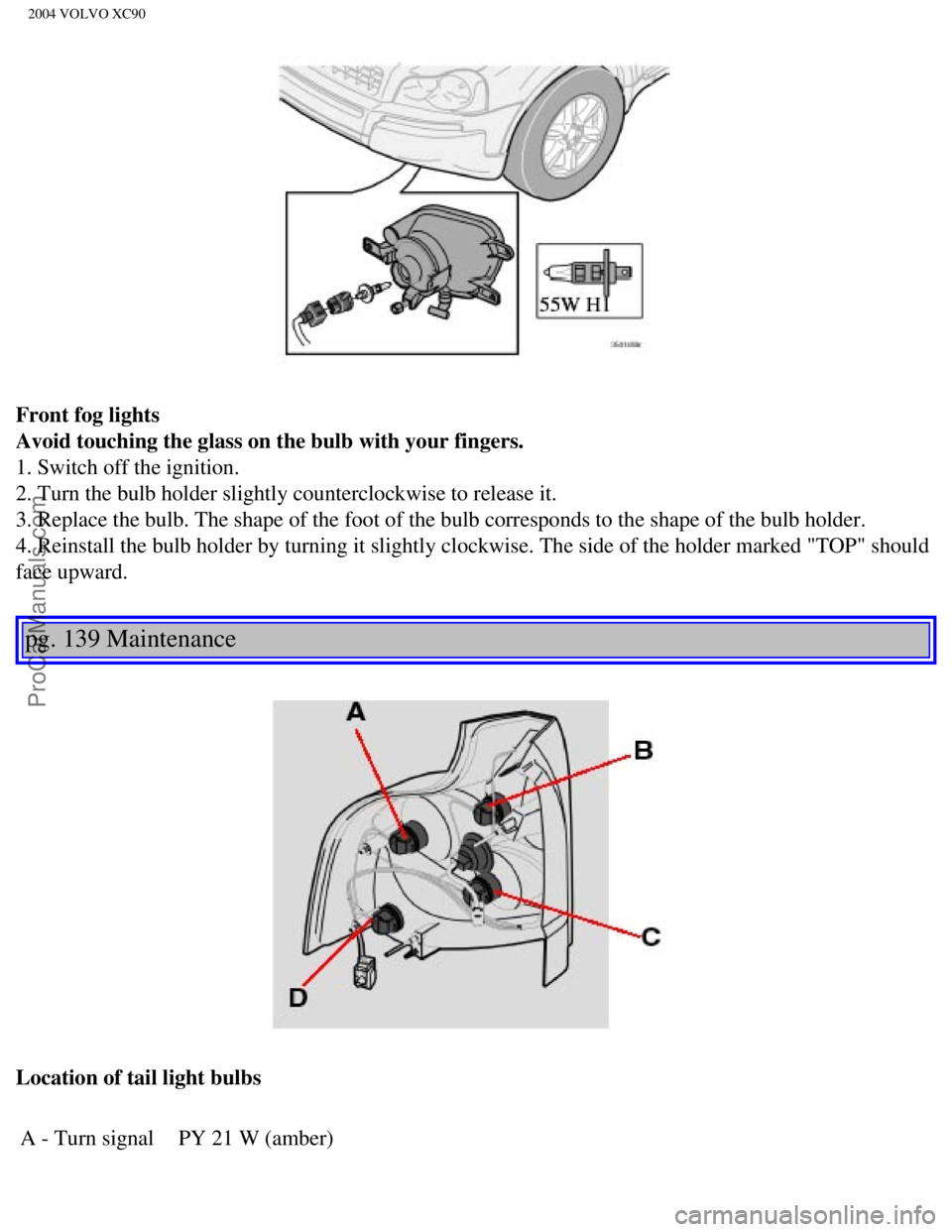
Front fog lights
Avoid touching the glass on the bulb with your fingers.
1. Switch off the ignition.
2. Turn the bulb holder slightly counterclockwise to release it.
3. Replace the bulb. The shape of the foot of the bulb corresponds to th\
e shape of the bulb holder.
4. Reinstall the bulb holder by turning it slightly clockwise. The side \
of the holder marked "TOP" should
face upward.
pg. 139 Maintenance
Location of tail light bulbs A - Turn signal PY 21 W (amber)
file:///K|/ownersdocs/2004/2004_XC90/04xc90_09b.htm (11 of 23)12/30/20\
06 4:35:28 PM
Page 196 of 245

Downloaded from www.Manualslib.com manuals search engine ProCarManuals.com
2004 VOLVO XC90
5 Vehicle Identification Number (VIN) *
The VIN plate is located on the top left surface of the dashboard. The V\
IN is also stamped on the right
hand door pillar.
6 Federal Motor Vehicle Safety Standards (FMVSS) specifications (USA)\
and Ministry of
Transport (CMVSS) standards (Canada)
Your Volvo is designed to meet all applicable safety standards, as evide\
nced by the certification label on
the facing side of the driverÕs door. For further information regardi\
ng these regulations, please consult
your Volvo retailer.
7 Child safety latch label
*The Vehicle Identification Number (VIN) should always be quoted in al\
l correspondence concerning
your vehicle with the retailer and when ordering parts.
pg. 149 Specifications
Dimensions and weights
Dimensions Length 188.9 in (479.8 cm)
Width 74.7 in (189.8 cm)
Height 70.2 in (178.4 cm)
Wheelbase 112.5 in (285.7 cm)
Front track 64.3 in (163.4 cm)
Rear track 63.9 (162.4 cm)
Turning
circle 39-40 ft. (11.9-12.3 m)
Cargo capacity
With optional 3rd row of seats folded down:
5-seat: 41.6 cu ft (1178 litres)
7-seat: 43.3 cu ft (1225 litres)
Behind 1st row of seats, with 2nd (and optional 3rd) row of seats fold\
ed down:
5-seat: 84.9 cu ft (2403 litres)
7-seat: 85.1 cu ft (2410 litres)
file:///K|/ownersdocs/2004/2004_XC90/04xc90_10.htm (3 of 11)12/30/2006\
4:35:29 PM
Page 215 of 245
 or the \
AM/FM button (2).
2.")
Downloaded from www.Manualslib.com manuals search engine ProCarManuals.com
2004 VOLVO XC90
Station search
1. Choose radio mode AM/FM1/FM2 using the SELECTOR control (1) or the \
AM/FM button (2).
2. Press briefly on
or to search for the next strong station. The radio will search for the ne\
xt
audible station and then stop.
3. Press one of the buttons again to start a new search.
Manually search for a known frequency
1. Press and hold the
or button (or the corresponding buttons on the steering wheel
keypad). MAN will be shown in the display. The radio will slowly scroll\
in the desired direction and
then increase speed after a few seconds.
2. Release the button when the desired frequency is displayed.
3. If you need to adjust the frequency, press briefly on
or .
4. The manual search function is available for five seconds after you la\
st pressed the button.
pg. 169 Audio
file:///K|/ownersdocs/2004/2004_XC90/04xc90_11a.htm (11 of 17)12/30/20\
06 4:35:31 PM
Page 217 of 245

Downloaded from www.Manualslib.com manuals search engine ProCarManuals.com
2004 VOLVO XC90
NOTE: The MY KEY buttons can only be programmed for one shortcut function at a\
time.
pg. 170 Audio
Radio functions (contd)
Automatically storing stations - AUTOSTORE
This function automatically searches for, and stores up to 10 strong AM \
or FM stations in a separate
memory. If more than 10 stations are found, the 10 strongest ones will b\
e stored. The function is
especially useful in areas in which you are not acquainted with radio st\
ations or their frequencies.
1. Choose radio mode using the SELECTOR control or the AM/FM button.
2. Select AUTOSTORE in the menu and press ENTER.
3. Select AST SEARCH and press ENTER.
4. AUTOSTORING is shown in the display and a number of strong stations (\
max. 10) from the set
frequency band are now automatically stored in the autostore memory. If \
there are no stations with
sufficient signal strength, NO AST FOUND is displayed.
5. The stored stations are available under the buttons 0-9 (1).
6. When the radio is in autostore mode, AUTO is shown in the display. AU\
TO disappears when you
return to the normal radio mode.
7. Return to normal radio mode by pressing the AM/FM button or EXIT/CLEA\
R.
8. To access previously stored stations, carry out steps 1-2 but select \
AST MODE in step 3 and press
ENTER.
file:///K|/ownersdocs/2004/2004_XC90/04xc90_11a.htm (13 of 17)12/30/20\
06 4:35:31 PM
Page 243 of 245

Downloaded from www.Manualslib.com manuals search engine ProCarManuals.com
2004 VOLVO XC90
l We strongly recommend that Volvo owners install only genuine, Volvo-appr\
oved accessories, and
that accessory installations be performed only by the factory-trained te\
chnicians at your authorized
Volvo retailer.
l Genuine Volvo accessories are tested to ensure compatibility with the pe\
rformance, safety, and
emission systems in your vehicle. Additionally, your authorized Volvo re\
tailer knows where accessories
may and may not be safely installed in your Volvo. In all cases, please \
consult your authorized Volvo
retailer before installing any accessory in or on your vehicle.
l Accessories that have not been approved by Volvo may or may not be speci\
fically tested for
compatibility with your vehicle. Additionally, an inexperienced installe\
r may not be familiar with some
of your vehicle's systems.
l Any of your vehicle's performance and safety systems could be adversely \
affected if you install
accessories that Volvo has not tested, or if you allow accessories to be\
installed by someone unfamiliar
with your vehicle.
l Damage caused by unapproved or improperly installed accessories may not \
be covered by your new
vehicle warranty. See your Warranty and Service Records Information book\
let for more warranty
information. Volvo assumes no responsibility for death, injury, or expen\
ses that may result from the
installation of non-genuine accessories.
Driver Distraction
l Driver distraction results from driver activities that are not directly \
related to controlling the vehicle in
the driving environment. Your new Volvo is, or can be, equipped with man\
y feature-rich entertainment
and communication systems. These include hands-free cellular telephones,\
navigation systems, and
multipurpose audio systems. You may also own other portable electronic d\
evices for your own
convenience. When used properly and safely, they enrich the driving expe\
rience. Improperly used, any
of these could cause a distraction.
l For all of these systems, we want to provide the following warning that \
reflects the strong Volvo
concern for your safety:
l Never use these devices or any feature of your vehicle in a way that dis\
tracts you from the task of
driving safely. Distraction can lead to a serious accident.In addition t\
o this general warning, we offer the
following guidance regarding specific newer features that may be found i\
n your vehicle:
l Never use a hand-held cellular telephone while driving. Some jurisdictio\
ns prohibit cellular telephone
use by a driver while the vehicle is moving.
l If your vehicle is equipped with a navigation system, set and make chang\
es to your travel itinerary
only with the vehicle parked.
l Never program your audio system while the vehicle is moving. Program rad\
io presets with the vehicle
parked, and use your programmed presets to make radio use quicker and si\
mpler.
l Never use portable computers or personal digital assistants while the ve\
hicle is moving. A driver has a
responsibility to do everything possible to ensure his or her own safety\
and the safety of passengers in
the vehicle and others sharing the roadway. Avoiding distractions is par\
t of that responsibility.
The following should be checked regularly:*
1. Washer fluid reservoir should be filled with water and solvent (wint\
ertime: windshield washer anti-
freeze). See
page 129.
file:///K|/ownersdocs/2004/2004_XC90/04xc90_12.htm (11 of 13)12/30/200\
6 4:35:33 PM