ignition VOLVO XC90 2004 User Guide
[x] Cancel search | Manufacturer: VOLVO, Model Year: 2004, Model line: XC90, Model: VOLVO XC90 2004Pages: 245, PDF Size: 7.14 MB
Page 61 of 245
Downloaded from www.Manualslib.com manuals search engine ProCarManuals.com
2004 VOLVO XC90
window at any time, press the button down.
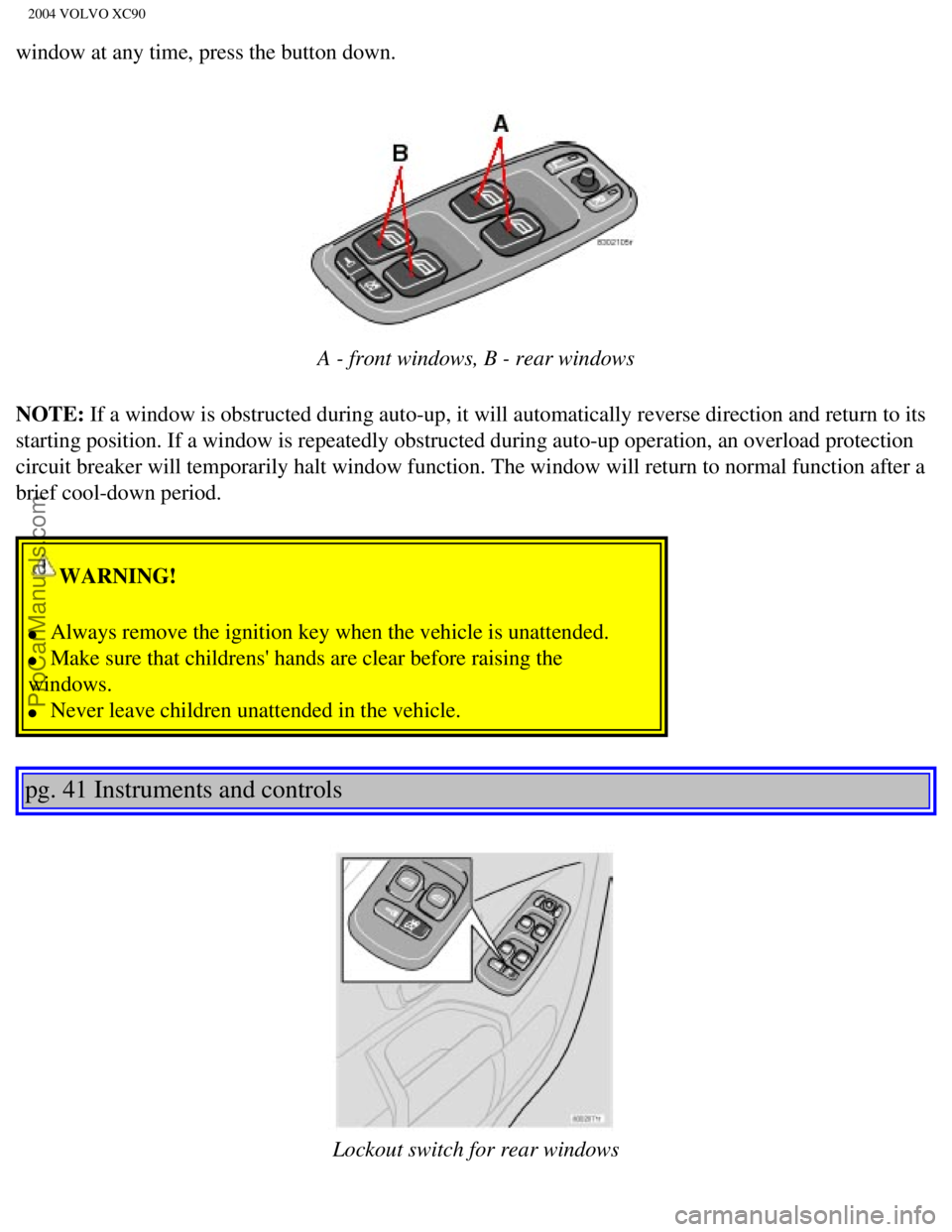
A - front windows, B - rear windows
NOTE: If a window is obstructed during auto-up, it will automatically reverse \
direction and return to its
starting position. If a window is repeatedly obstructed during auto-up o\
peration, an overload protection
circuit breaker will temporarily halt window function. The window will r\
eturn to normal function after a
brief cool-down period.
WARNING!
l Always remove the ignition key when the vehicle is unattended.
l Make sure that childrens' hands are clear before raising the
windows.
l Never leave children unattended in the vehicle.
pg. 41 Instruments and controls
Lockout switch for rear windows
file:///K|/ownersdocs/2004/2004_XC90/04xc90_02b.htm (10 of 16)12/30/20\
06 4:35:15 PM
Page 64 of 245
Downloaded from www.Manualslib.com manuals search engine ProCarManuals.com
2004 VOLVO XC90
The mirror control switches are located on the driver's door armrest.
Driver's side: Press the L button (a light in the switch will go on) to activate the \
adjustment control. Use
this control to adjust the driver's door mirror.
Passenger's side: Press the R switch (a light in the switch will go on) to activate the \
adjustment control.
Use this control to adjust the passenger's door mirror. After you have a\
djusted the mirror(s), press the L
or R switch again (the LED will go out) to deactivate the adjustment c\
ontrol.
WARNING!
The mirrors should always be adjusted prior to driving. Objects seen in \
the passenger's side wide-
angle sideview mirror are closer than they appear to be.
Mirror memory function (with the central locking system) - option
If you lock the vehicle and later unlock it with the same remote control and open the driver's door, the
sideview mirrors (and the driver's seat) will automatically move to th\
e position they were in when you
left the vehicle. This feature will work in the same way with all of the\
remote control transmitters (up to
3) that you use with your vehicle. This feature will not function if yo\
u lock your vehicle with the key.
pg. 43 Instruments and controls
Power moonroof (option)
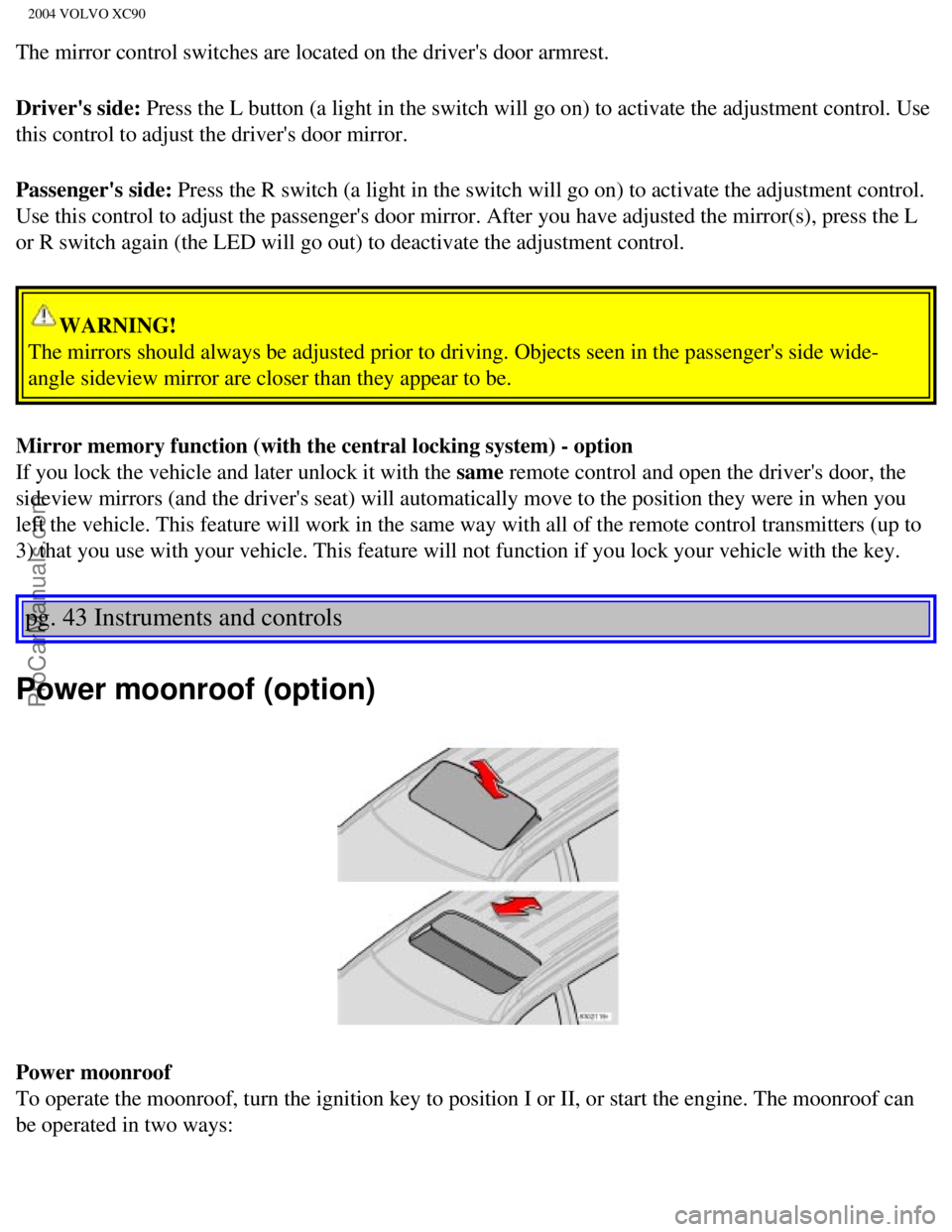
Power moonroof
To operate the moonroof, turn the ignition key to position I or II, or s\
tart the engine. The moonroof can
be operated in two ways:
file:///K|/ownersdocs/2004/2004_XC90/04xc90_02b.htm (13 of 16)12/30/20\
06 4:35:15 PM
Page 66 of 245

Downloaded from www.Manualslib.com manuals search engine ProCarManuals.com
2004 VOLVO XC90
WARNING!
l Never open/close the moonroof if it is obstructed in any way when in ope\
ration.
l Never allow a child to operate the moonroof.
l Never extend any object or body part though the open moonroof, even if t\
he vehicle's ignition is
completely switched off.
l Never leave a child alone in a vehicle.
* A position where the moonroof is not quite fully open, which helps all\
eviate "rumbling" wind noise.
pg. 44 Instruments and controls
Power moonroof (option) (contd)
If the moonroof is obstructed during auto-close operation, it will autom\
atically reverse direction and
return to its starting position. If the moonroof is repeatedly obstructe\
d during auto-close operation, an
overload circuit breaker will temporarily halt moonroof function. The mo\
onroof will return to normal
function after a brief cool-down period.
Visor
The optional moonroof also features a sliding visor. The visor slides op\
en automatically when the
moonroof is opened, and must be closed manually.
file:///K|/ownersdocs/2004/2004_XC90/04xc90_02b.htm (15 of 16)12/30/20\
06 4:35:15 PM
Page 69 of 245

Downloaded from www.Manualslib.com manuals search engine ProCarManuals.com
2004 VOLVO XC90
Acceleration
The air conditioning is momentarily disengaged during full-throttle acce\
leration.
Climate control maintenance
All maintenance on the climate control systems should be carried out by \
an authorized Volvo service technician only.
Refrigerant
Volvo cares about the environment. The air conditioning system in your v\
ehicle contains a CFC-free refrigerant - R134a.
This substance will not deplete the ozone layer. The system contains 2.2\
lbs (1000 g) R134a and uses PAG oil.
Passenger compartment blower
Approximately 50 minutes after the ignition is turned off, the blower ma\
y come on automatically, and run for seven
minutes, to remove condensation in the A/C evaporator.
Blower function to reduce battery drain
The climate system's blower functions normally while the engine is runni\
ng.
However, when the engine is switched off (even if the ignition is switc\
hed to positions I or II), the blower control will be
automatically switched off to avoid unnecessary battery drain. The follo\
wing points pertain if the ignition key is on but the
engine is not running:
l To restart the blower, turn the control knob to the setting of your choi\
ce.
l After approximately 2 minutes, the blower speed will be reduced to avoid\
battery drain.
You can reset the blower speed at any time. Please be aware that the sys\
tem has been designed to reduce the blower's speed
again after 2 minutes, until the engine is started. If the battery becom\
es drained:
l LOW BATTERY, FAN IS REDUCED will be displayed in the text window in the \
instrument panel.
l The yellow warning light in the instrument panel (see page 25) will also light up.
pg. 47 Climate control
Air distribution
Air distribution
The incoming air is distributed through the ventilation points in the pa\
ssenger compartment shown above.
file:///K|/ownersdocs/2004/2004_XC90/04xc90_03.htm (2 of 7)12/30/2006 \
4:35:16 PM
Page 77 of 245
Downloaded from www.Manualslib.com manuals search engine ProCarManuals.com
2004 VOLVO XC90
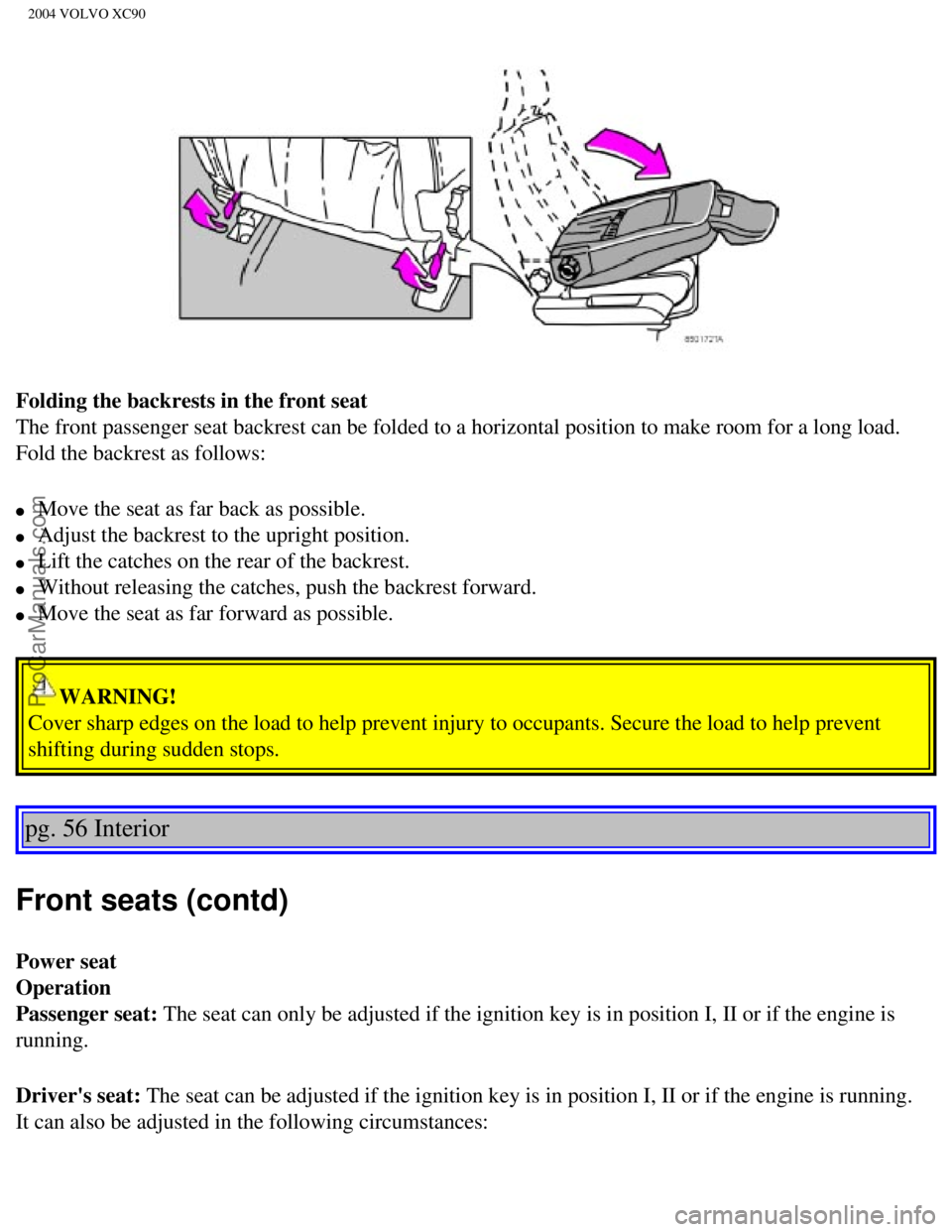
Folding the backrests in the front seat
The front passenger seat backrest can be folded to a horizontal position\
to make room for a long load.
Fold the backrest as follows:
l Move the seat as far back as possible.
l Adjust the backrest to the upright position.
l Lift the catches on the rear of the backrest.
l Without releasing the catches, push the backrest forward.
l Move the seat as far forward as possible.
WARNING!
Cover sharp edges on the load to help prevent injury to occupants. Secur\
e the load to help prevent
shifting during sudden stops.
pg. 56 Interior
Front seats (contd)
Power seat
Operation
Passenger seat: The seat can only be adjusted if the ignition key is in position I, II \
or if the engine is
running.
Driver's seat: The seat can be adjusted if the ignition key is in position I, II or if\
the engine is running.
It can also be adjusted in the following circumstances:
file:///K|/ownersdocs/2004/2004_XC90/04xc90_04a.htm (3 of 11)12/30/200\
6 4:35:19 PM
Page 78 of 245

Downloaded from www.Manualslib.com manuals search engine ProCarManuals.com
2004 VOLVO XC90
1. Within 40 seconds of the ignition key being turned to position 0 or r\
emoved from the ignition switch.
2. After you have unlocked the driver's door with the key or remote cont\
rol, the driver's seat can be
adjusted during a 10 minute period if the door remains open. If the door is closed, the seat can be
adjusted for 40 seconds. The ignition key can be in position 0 or not yet inserted in the ignition switch.
Remote keyless entry system and driver's seat
The remote control transmitter also controls the electrically operated d\
river's seat in the following way:
l Adjust the seat to your preferences.
l When you leave your vehicle, lock it using the remote control.
Power seat control panel
The next time you unlock the driver's door with the same remote control \
(the one you used to lock the
doors with) and open the driver's door, the driver's seat will automati\
cally move to the position in which
you left it.
The seat will move to this position even if someone else has adjusted it\
since you last unlocked the
vehicle with the same remote control.
NOTE: This feature will work in the same way with all of the remote control tr\
ansmitters (up to 3) that
you use with your vehicle. This feature will not function if you lock yo\
ur vehicle with the key.
Seat adjustment
Adjust the power seat(s) with the two switches at the side of the seat\
as follows:
A - Front edge of seat (raise/lower)
B - Forward - rearward
C - Rear edge of seat (raise/lower)
D - Backrest tilt
NOTE: The power seats have an overload protector that activates if a seat is b\
locked by any object. If
this occurs, switch off the ignition (key in position 0) and wait abou\
t 20 seconds before operating the
seat again.
Please refer to the following page for information on programming the me\
mory function in the
driver's seat.
file:///K|/ownersdocs/2004/2004_XC90/04xc90_04a.htm (4 of 11)12/30/200\
6 4:35:19 PM
Page 79 of 245

Downloaded from www.Manualslib.com manuals search engine ProCarManuals.com
2004 VOLVO XC90
Emergency stop
If the seat accidentally begins to move, press one of the buttons to sto\
p the seat.
pg. 57 Interior
WARNING!
- Because the driver's seat can be adjusted with the ignition off, child\
ren should never be left
unattended in the vehicle.
- Movement of the seat can be STOPPED at any time by pressing any button\
on the power seat
control panel.
- Do not adjust the seat while driving.
- The seat should be adjusted so that the brake pedal can be depressed f\
ully. In addition, position the
seat as far rearward as comfort and control allow.
- The seat rails on the floor must not be obstructed in any way when the\
seat is in motion.
Programming the memory
Please note that only the driver's seat is equipped with the memory func\
tion.
Three seat positions can be programmed. To program a seat position:
1. Adjust the seat to the desired position.
2. Hold down the MEM button.
3. While holding down the MEM button, press button 1 to program the curr\
ent position of the seat.
Buttons 2 and 3 can be programmed in the same way.
To move the seat to a programmed position, press and hold down button 1,\
2 or 3 until the seat moves to
the preset position and stops.
As a safety precaution, the seat will stop automatically if the button i\
s released before the seat has
reached the programmed position.
file:///K|/ownersdocs/2004/2004_XC90/04xc90_04a.htm (5 of 11)12/30/200\
6 4:35:19 PM
Page 83 of 245

Downloaded from www.Manualslib.com manuals search engine ProCarManuals.com
2004 VOLVO XC90
Folding the backrests - third row of seats (option)
Folding down the backrest
If necessary, fold in the load anchorage eyelets before folding down the\
backrests.
1. Move the seats in the second row forward, see
page 58.
2. Pull up the handle in illustration 1 above.
3. Push the seat cushion firmly rearward, under the backrest.
4. Fold down the backrests* (the head restraints fold down automaticall\
y) to the horizontal position.
Returning the backrest to the upright position
l Fold up the backrest to the upright position.
l Grasp the strap (see illustration 3 above) and pull the seat cushion o\
ut until it locks in place. This also
locks the backrest in the upright position.
* Please note that the head restraints in this row cannot be vertically \
adjusted.
pg. 61 Interior
Interior lighting
Courtesy light/front reading lights
The courtesy/reading lights can be turned on or off by pressing the resp\
ective buttons.
The courtesy light has a timer function which turns the light on for 30 \
seconds if:
l You unlock the vehicle from the outside with the key or remote control. \
l You switch off the ignition (turn the key to position 0).
The courtesy light stays on for 10 minutes if one of the doors is left o\
pen after the vehicle is unlocked.
file:///K|/ownersdocs/2004/2004_XC90/04xc90_04a.htm (9 of 11)12/30/200\
6 4:35:19 PM
Page 96 of 245
 key. The master")
Downloaded from www.Manualslib.com manuals search engine ProCarManuals.com
2004 VOLVO XC90
Keys
Two types of keys are provided with your vehicle; master keys and a serv\
ice (valet) key. The master
key, the remote control, and the central locking button may all be used \
to lock and unlock all of your
vehicle's locks.
The service key will operate only the driver's door and the ignition swi\
tch. It is intended to help deter
unwanted entry into the glove compartment.
To use your keys:
l Turn the key once to unlock the driver's door only.
l Turn the key again (within 10 seconds) to unlock all doors and the tai\
lgate.
l One turn with the key towards lock in the drivers door locks all doors, \
tailgate.
l Use the switch on the driver's door armrest to lock/unlock the vehicle f\
rom the inside.
file:///K|/ownersdocs/2004/2004_XC90/04xc90_05.htm (2 of 12)12/30/2006\
4:35:20 PM
Page 97 of 245

Downloaded from www.Manualslib.com manuals search engine ProCarManuals.com
2004 VOLVO XC90
WARNING!
If the doors are locked while driving, this may hinder rapid access to t\
he occupants of the vehicle in
the event of an accident. (Also see information on "Child safety locks"\
).
NOTE: To help prevent accidentally locking the keys in the vehicle, the centra\
l locking system is
designed to unlock the doors immediately if the key is left in the ignit\
ion switch, the vehicle is locked
using the lock button on the door and the door is then closed. A sound f\
rom the lock will be audible at
this time.
Please note that this function will not unlock the doors if the engine i\
s running.
Immobilizer (start inhibitor)
Each of the keys supplied with your vehicle contains a coded transmitter\
. The code in the key is
transmitted to an antenna in the ignition switch where it is compared to\
the code stored in the start
inhibitor module. The vehicle will start only with a properly coded key.\
If you misplace a key, take the other keys to an authorized Volvo retail\
er for reprogramming as an
antitheft measure.
NOTE: If two of the keys to your vehicle are close together, e.g., on the same\
key ring, when you try to
start the vehicle, this could cause interference in the immobilizer syst\
em and result in the vehicle not
starting. If this should occur, remove one of the keys from the key ring\
before trying to start the vehicle
again.
This device complies with part 15 of the FCC rules. Operation is subject\
to the following condition: (1)
This device may not cause harmful interference, and (2) this device mu\
st accept any interference
received, including interference that may cause undesired operation.
pg. 73 Locks and Alarms
file:///K|/ownersdocs/2004/2004_XC90/04xc90_05.htm (3 of 12)12/30/2006\
4:35:20 PM