steering VOLVO XC90 2004 Owner's Guide
[x] Cancel search | Manufacturer: VOLVO, Model Year: 2004, Model line: XC90, Model: VOLVO XC90 2004Pages: 245, PDF Size: 7.14 MB
Page 215 of 245
 or the \
AM/FM button (2).
2.")
Downloaded from www.Manualslib.com manuals search engine ProCarManuals.com
2004 VOLVO XC90
Station search
1. Choose radio mode AM/FM1/FM2 using the SELECTOR control (1) or the \
AM/FM button (2).
2. Press briefly on
or to search for the next strong station. The radio will search for the ne\
xt
audible station and then stop.
3. Press one of the buttons again to start a new search.
Manually search for a known frequency
1. Press and hold the
or button (or the corresponding buttons on the steering wheel
keypad). MAN will be shown in the display. The radio will slowly scroll\
in the desired direction and
then increase speed after a few seconds.
2. Release the button when the desired frequency is displayed.
3. If you need to adjust the frequency, press briefly on
or .
4. The manual search function is available for five seconds after you la\
st pressed the button.
pg. 169 Audio
file:///K|/ownersdocs/2004/2004_XC90/04xc90_11a.htm (11 of 17)12/30/20\
06 4:35:31 PM
Page 224 of 245
 or the CD button \
(2).
2. Insert a CD")
Downloaded from www.Manualslib.com manuals search engine ProCarManuals.com
2004 VOLVO XC90
Starting the CD
1. Select the CD mode using the SELECTOR control (1) or the CD button \
(2).
2. Insert a CD into the player.
NOTE: To pause CD playback, turn the volume all the way down. "CD paused" wil\
l be displayed. This
will not occur if someone in the rear seat is listening to the CD throug\
h the optional headphones.
Play will resume when the volume is turned up again.
Changing tracks
Press
to go to the next track or to go to the previous track. The track number is shown in the
display. If you have a keypad in the steering wheel, you can use the arr\
ow keys in the same way.
Searching within a track
Press and hold down
or to search within a track or the whole disc. The search continues as
long as the buttons are depressed. If you have a keypad in the steering \
wheel, you can use the arrow keys
in the same way.
Random play
This function plays the tracks on a CD in random order (shuffle).
1. Press the MENU button.
2. Select RANDOM and press ENTER.
3. RND is shown in the display as long as the function is activated.
4. Go into the menu and select RANDOM OFF to stop random play, or press \
EXIT.
pg. 176 Audio
file:///K|/ownersdocs/2004/2004_XC90/04xc90_11b.htm (3 of 11)12/30/200\
6 4:35:32 PM
Page 227 of 245
Downloaded from www.Manualslib.com manuals search engine ProCarManuals.com
2004 VOLVO XC90
Press to go to the next track or to go to the previous track. The track number is shown in
the display. If you have a keypad in the steering wheel, you can use the\
arrow keys in the same way.
Searching within a track
Press and hold down
or to search within a track or the whole disc. The search continues as
long as the buttons are depressed. If you have a keypad in the steering \
wheel, you can use the arrow keys
in the same way.
pg. 178 Audio
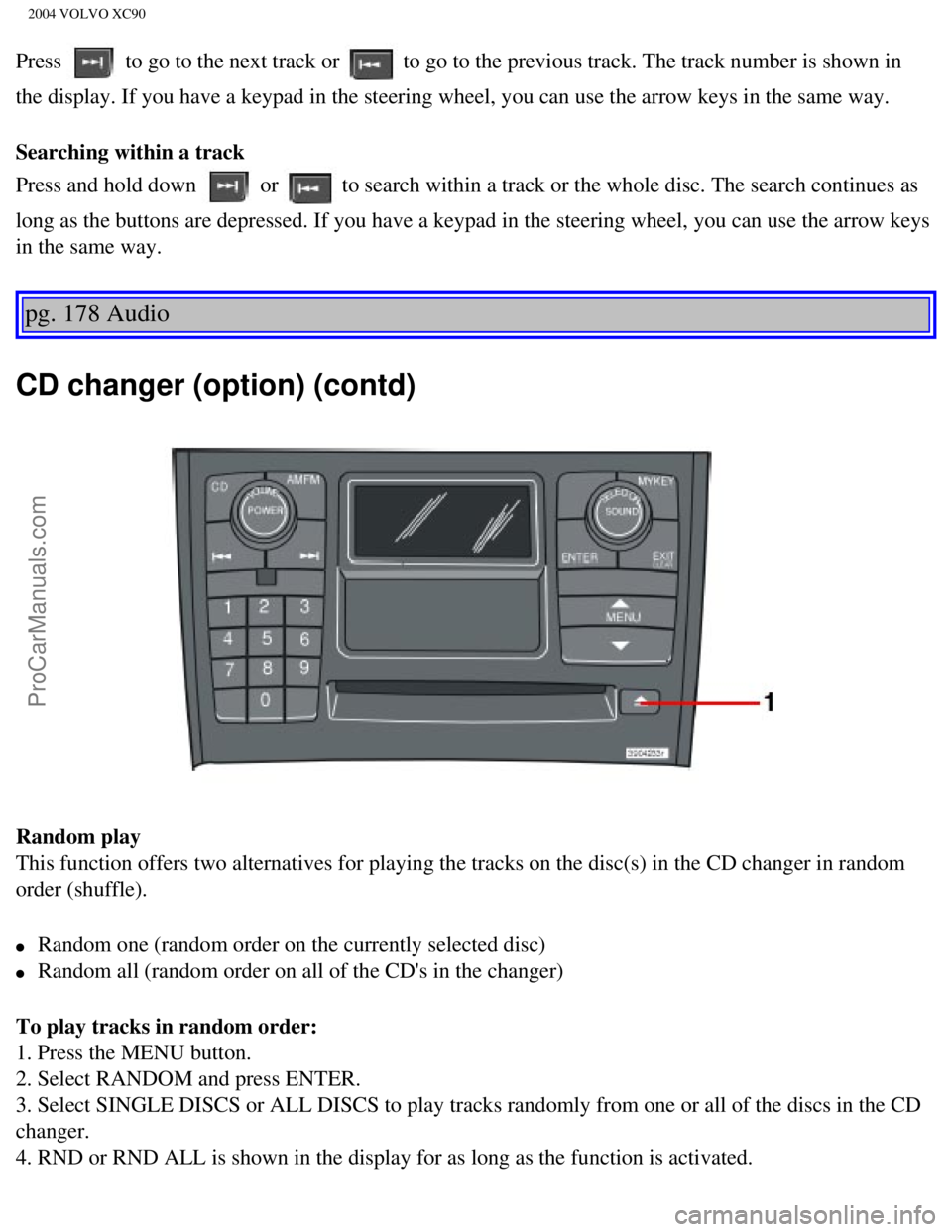
CD changer (option) (contd)
Random play
This function offers two alternatives for playing the tracks on the disc\
(s) in the CD changer in random
order (shuffle).
l Random one (random order on the currently selected disc)
l Random all (random order on all of the CD's in the changer)
To play tracks in random order:
1. Press the MENU button.
2. Select RANDOM and press ENTER.
3. Select SINGLE DISCS or ALL DISCS to play tracks randomly from one or \
all of the discs in the CD
changer.
4. RND or RND ALL is shown in the display for as long as the function is\
activated.
file:///K|/ownersdocs/2004/2004_XC90/04xc90_11b.htm (6 of 11)12/30/200\
6 4:35:32 PM
Page 233 of 245
Downloaded from www.Manualslib.com manuals search engine ProCarManuals.com
2004 VOLVO XC90
2 0 0 4
VOLVO XC90
Index
pg. 183-186 Index
A
A/C (air conditioning)
50
ABS
ii, 25, 96
Adjustable steering wheel
30
Advanced user functions
172
Air bags - dual threshold/stage
5
Air cleaner
128
Air distribution
47, 50
Air Quality sensor
51
Air vents
47
Airbag - Side Impact (SIPS)
10
Airbags
4
Airbags (front)
4
Alarm
73, 80
All Wheel Drive
94
All Wheel Drive - towing
101
Anti-lock Brake System (ABS)
ii, 25
Approach lighting
33
Ashtray
39, 64
Audio
159
AUTO
49
AUTO (climate control)
49
file:///K|/ownersdocs/2004/2004_XC90/04xc90_12.htm (1 of 13)12/30/2006\
4:35:33 PM
Page 238 of 245

Downloaded from www.Manualslib.com manuals search engine ProCarManuals.com
2004 VOLVO XC90
Jump starting 102
K
Keylock
ii, 87
Keys
74
L
LED illumination
33
Lighting panel
31
Locking
77
Locking steering wheel
88
Locks
73
Long distance trips
108
Lubricants
153
M
Maintenance services
124
Malfunction indicator light
27
Messages in the display
28
Moonroof (electrically operated)
43
Multifilter with air quality sensor
51
O
Occupant safety
21
Octane rating
84
Odometer
24
Oil pressure
27
Oil quality
129
Oil viscosity
129
Opening the hood
38
Opening the tailgate
39
P
P Park
91
Paint
120
Paint - color code
120
Paintwork damage
120
file:///K|/ownersdocs/2004/2004_XC90/04xc90_12.htm (6 of 13)12/30/2006\
4:35:33 PM
Page 239 of 245

Downloaded from www.Manualslib.com manuals search engine ProCarManuals.com
2004 VOLVO XC90
Parking brake 27, 38
Parking lamps
31
Parking lights
31
Polishing
119
Power seat
56
Power steering fluid
130
Power moonroof
43
PROPOSITION 65 WARNING
102, 136
R
Radiator
128
Rain sensor
34
Rain sensor - windshield wipers
34
Reading lamps
61
Rear fog lamps
31
Rear seat air condition
29
Rear suspension
153
Rear window defroster
35
Rearview mirror/door mirrors
42
Recirculation
50
REDUCE SPEED
28
Refrigerant (A/C system)
46
Refueling
84, 86
Remote control - central locking system
75
Reporting safety defects
21
Reverse warning system
29
Roadholding
90
Roll Stability Control (RSC)
97
S
Safety
1
Safety defects - reporting
21
Seat belt
2
Seat belt maintenance
21
file:///K|/ownersdocs/2004/2004_XC90/04xc90_12.htm (7 of 13)12/30/2006\
4:35:33 PM
Page 240 of 245

Downloaded from www.Manualslib.com manuals search engine ProCarManuals.com
2004 VOLVO XC90
Seat belt reminder 42
Seat belts (keeping child seats in place)
20
SEL button
162
Service
124
Service key
74
Service reminder
27
SERVICE REQUIRED
28
SERVICE URGENT
28
Shiftlock
ii, 87
Side airbags
10
Sideview mirrors
42
SIPS airbags
10
Snow chains
111
Snow tires
111
Spare tire - accessing
115
Spare tires
112
Spark plugs
155
Specifications
149
Speedometer
24
Spoiler lamps
31
SRS
4
Start inhibitor (immobilizer)
74
Starting the car
87
Steering
88
Steering wheel adjustment
30
Steering wheel lock
88
Stone chips
120
STOP
28
STOP ENGINE
28
Storage compartments
64
Studded tires
111
Supplemental Restraint System (SRS)
4
file:///K|/ownersdocs/2004/2004_XC90/04xc90_12.htm (8 of 13)12/30/2006\
4:35:33 PM
Page 244 of 245

Downloaded from www.Manualslib.com manuals search engine ProCarManuals.com
2004 VOLVO XC90
2. Power steering - When cold, the level must not be above the COLD mark\
and when hot it must not be
above the HOT mark. Top up if the level drops to the ADD mark with ATF f\
luid. See
page 130.
3. Coolant level should be between the expansion tank marks. Mixture: 50\
% antifreeze and 50% water.
See
page 125.
4. Engine oil should be checked each time the vehicle is refueled. The o\
il level should be between the
dipstick marks. The distance between the marks represents approx. 1.6 US\
qt. (1.5 liter). See
page 128.
5. Brake fluid - check, without removing the cap, that the level is abov\
e the MIN mark. Use brake fluid
DOT 4+. See
page 130.
Fuel octane rating, see
page 82.
Tire pressure, see
page 110, and the label located on the inside of the fuel tank cover.
1 Turn signal H21W amber
2 High beam 55W H7
3 Parking light W5W
4 Low beam 55W H7
5 Fog light, front 55W H1
6 Fog light, rear 21W BA5
7 Back-up light 21W BA15
8 Parking light/tail
light P21 4W
9 Turn signal PY21W amber
10 Brake light 21W BA15
file:///K|/ownersdocs/2004/2004_XC90/04xc90_12.htm (12 of 13)12/30/200\
6 4:35:33 PM