clock VOLVO XC90 2004 User Guide
[x] Cancel search | Manufacturer: VOLVO, Model Year: 2004, Model line: XC90, Model: VOLVO XC90 2004Pages: 245, PDF Size: 6.36 MB
Page 181 of 245
2004 VOLVO XC90
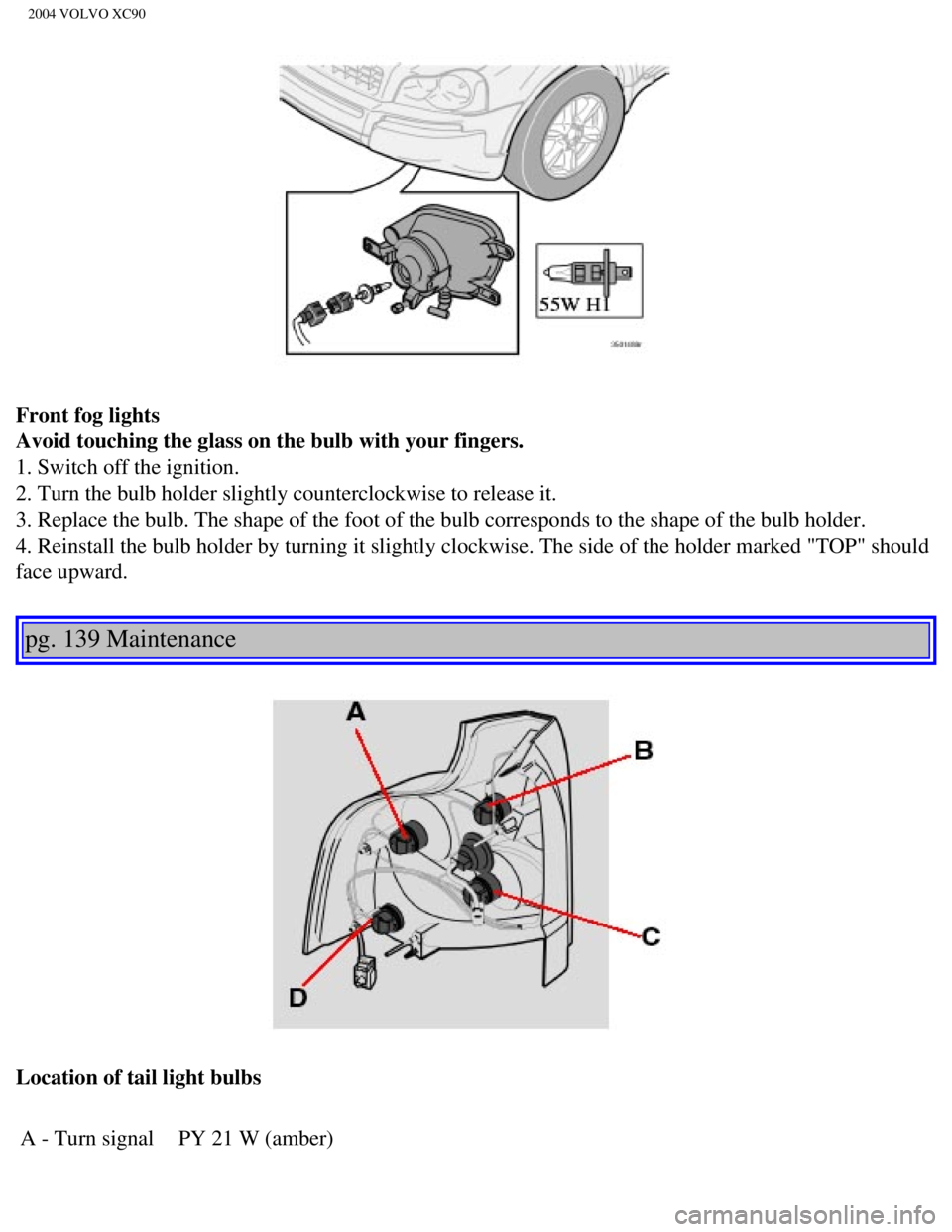
Front fog lights
Avoid touching the glass on the bulb with your fingers.
1. Switch off the ignition.
2. Turn the bulb holder slightly counterclockwise to release it.
3. Replace the bulb. The shape of the foot of the bulb corresponds to th\
e shape of the bulb holder.
4. Reinstall the bulb holder by turning it slightly clockwise. The side \
of the holder marked "TOP" should
face upward.
pg. 139 Maintenance
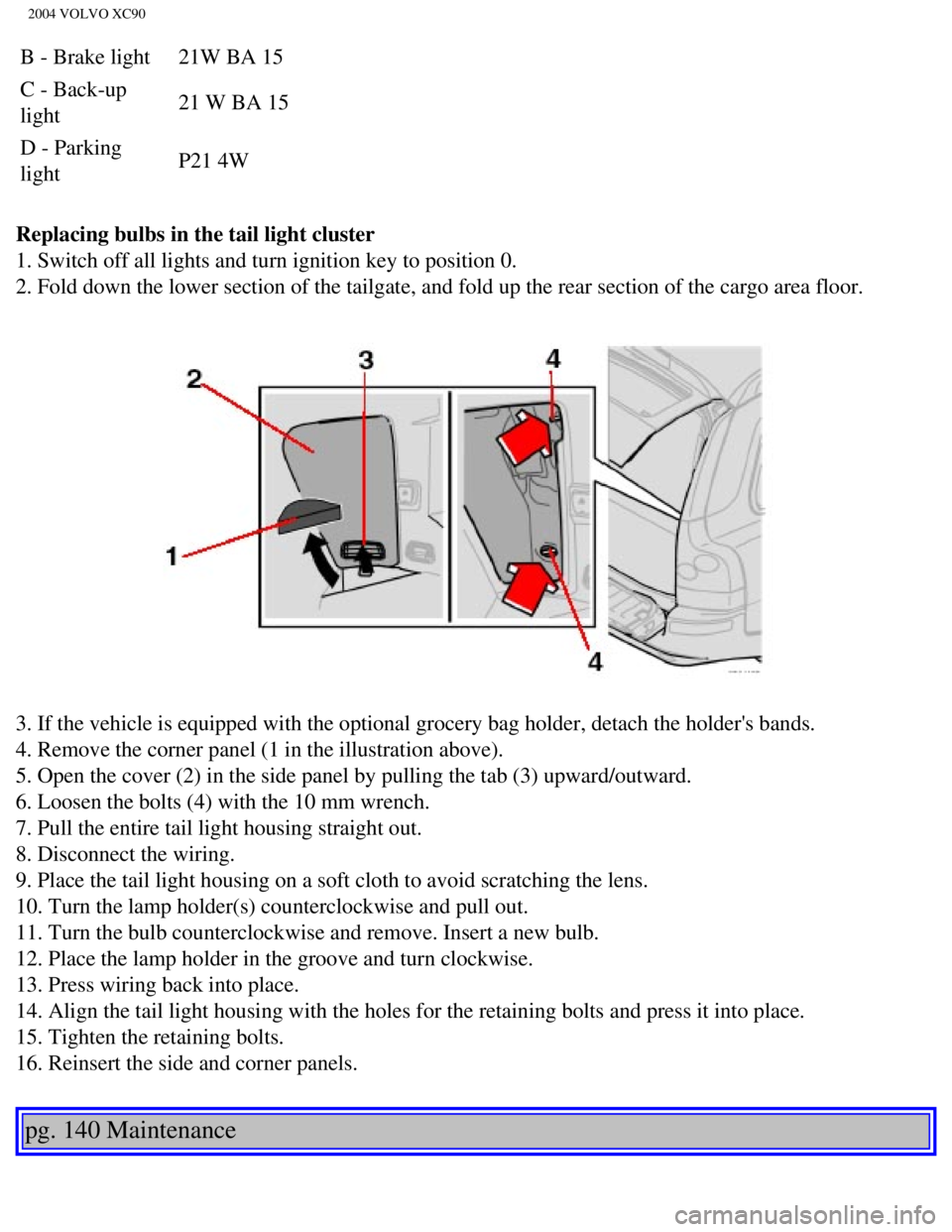
Location of tail light bulbs A - Turn signal PY 21 W (amber)
file:///K|/ownersdocs/2004/2004_XC90/04xc90_09b.htm (11 of 23)12/30/20\
06 4:35:28 PM
Page 182 of 245
2004 VOLVO XC90
B - Brake light 21W BA 15
C - Back-up
light 21 W BA 15
D - Parking
light P21 4W
Replacing bulbs in the tail light cluster
1. Switch off all lights and turn ignition key to position 0.
2. Fold down the lower section of the tailgate, and fold up the rear sec\
tion of the cargo area floor.
3. If the vehicle is equipped with the optional grocery bag holder, deta\
ch the holder's bands.
4. Remove the corner panel (1 in the illustration above).
5. Open the cover (2) in the side panel by pulling the tab (3) upwar\
d/outward.
6. Loosen the bolts (4) with the 10 mm wrench.
7. Pull the entire tail light housing straight out.
8. Disconnect the wiring.
9. Place the tail light housing on a soft cloth to avoid scratching the \
lens.
10. Turn the lamp holder(s) counterclockwise and pull out.
11. Turn the bulb counterclockwise and remove. Insert a new bulb.
12. Place the lamp holder in the groove and turn clockwise.
13. Press wiring back into place.
14. Align the tail light housing with the holes for the retaining bolts \
and press it into place.
15. Tighten the retaining bolts.
16. Reinsert the side and corner panels.
pg. 140 Maintenance
file:///K|/ownersdocs/2004/2004_XC90/04xc90_09b.htm (12 of 23)12/30/20\
06 4:35:28 PM
Page 183 of 245
2004 VOLVO XC90
Bulbs (contd)
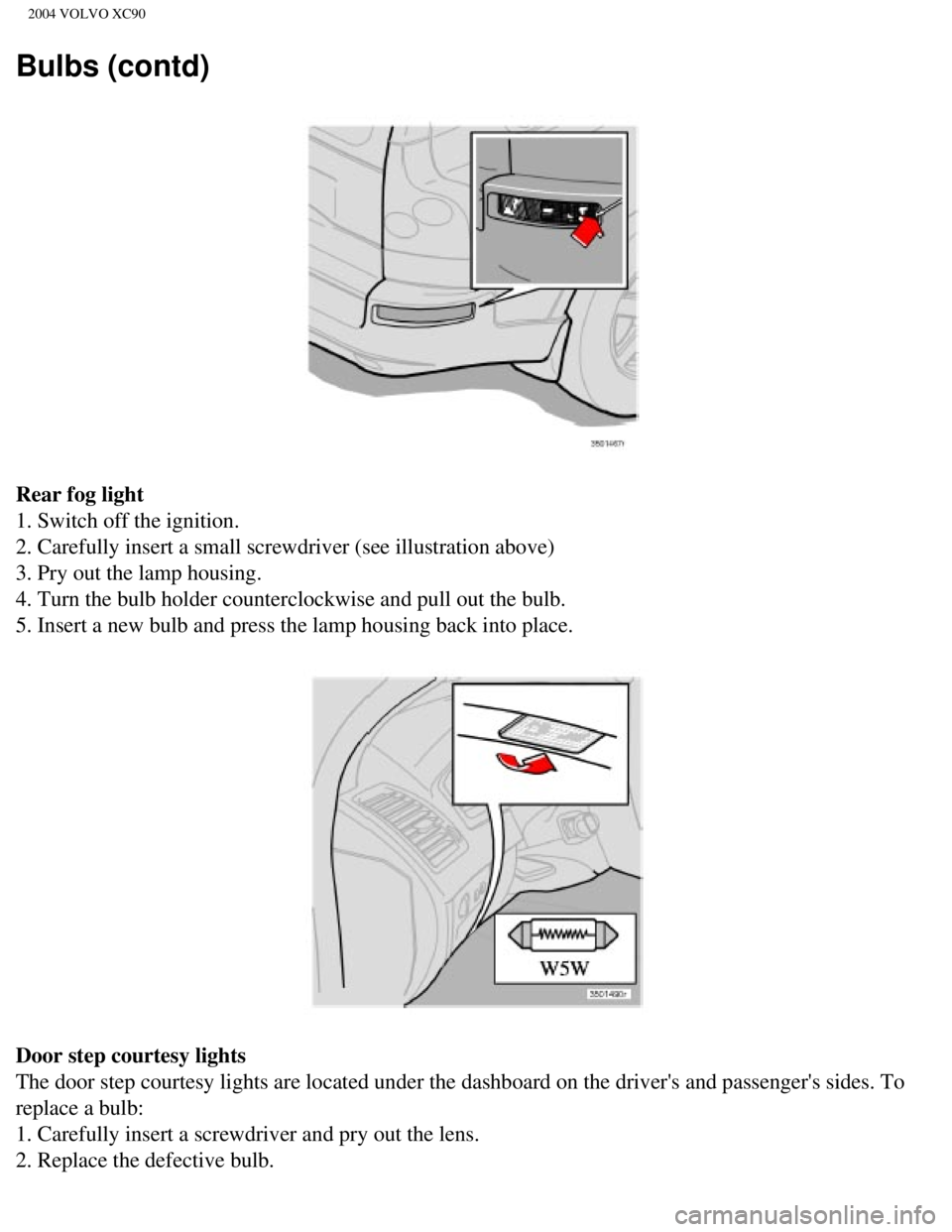
Rear fog light
1. Switch off the ignition.
2. Carefully insert a small screwdriver (see illustration above)
3. Pry out the lamp housing.
4. Turn the bulb holder counterclockwise and pull out the bulb.
5. Insert a new bulb and press the lamp housing back into place.
Door step courtesy lights
The door step courtesy lights are located under the dashboard on the dri\
ver's and passenger's sides. To
replace a bulb:
1. Carefully insert a screwdriver and pry out the lens.
2. Replace the defective bulb.
file:///K|/ownersdocs/2004/2004_XC90/04xc90_09b.htm (13 of 23)12/30/20\
06 4:35:28 PM
Page 186 of 245
2004 VOLVO XC90
Bulbs (contd)
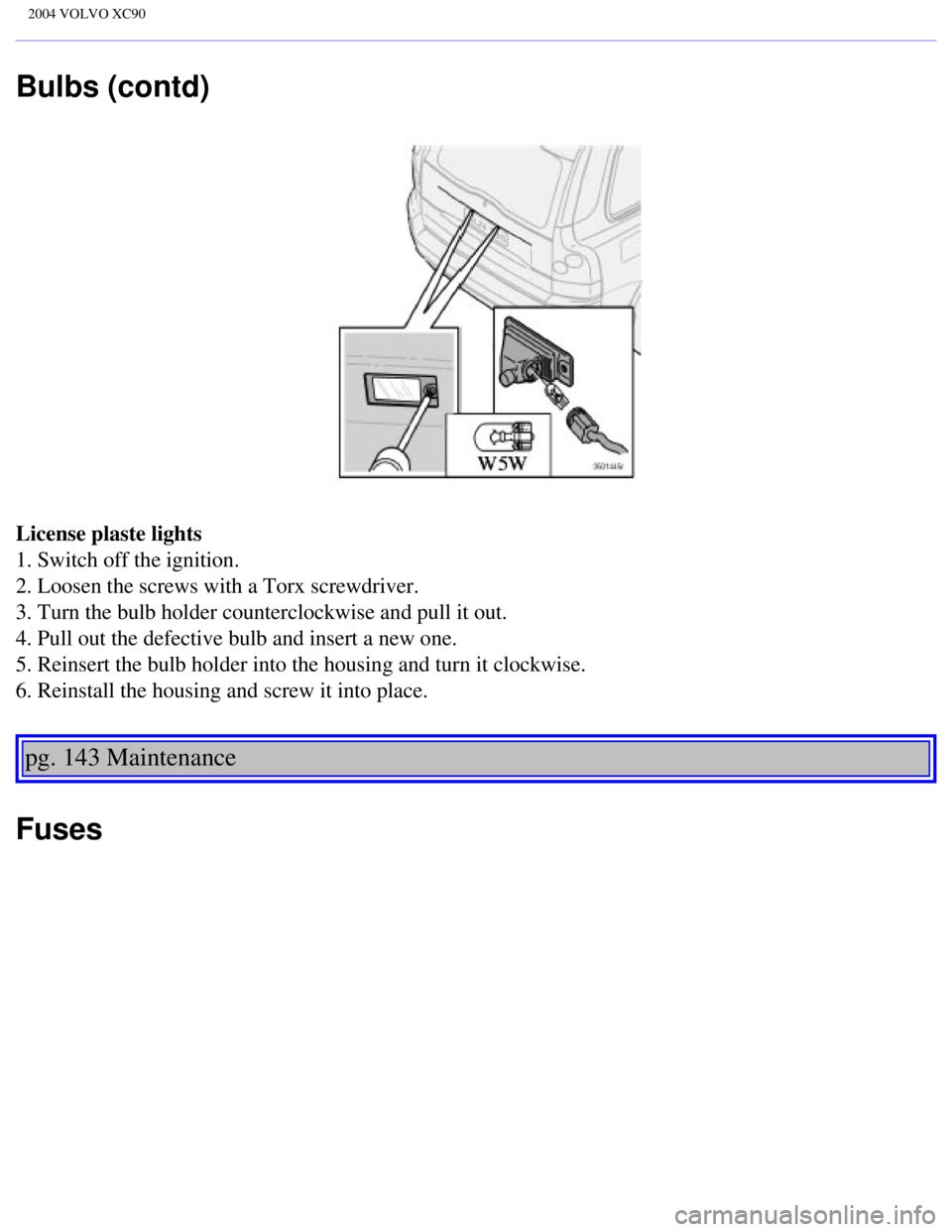
License plaste lights
1. Switch off the ignition.
2. Loosen the screws with a Torx screwdriver.
3. Turn the bulb holder counterclockwise and pull it out.
4. Pull out the defective bulb and insert a new one.
5. Reinsert the bulb holder into the housing and turn it clockwise.
6. Reinstall the housing and screw it into place.
pg. 143 Maintenance
Fuses
file:///K|/ownersdocs/2004/2004_XC90/04xc90_09b.htm (16 of 23)12/30/20\
06 4:35:28 PM
Page 211 of 245
 clockwise or counterclockwise to raise or lower the \
volume. The volume control is
electronic and has no end position. Volume can also be raised (+")
2004 VOLVO XC90
Volume control
Turn the knob (2) clockwise or counterclockwise to raise or lower the \
volume. The volume control is
electronic and has no end position. Volume can also be raised (+) or l\
owered (-) using the optional
steering wheel keypad.
Pause mode
If the volume is turned off, the CD player will go into pause mode. Re-a\
ctivate the player by turning up
the volume.
Selecting a sound source
A sound source can be selected either with the function buttons (3) - \
CD, AM/FM, or with the
SELECTOR control (4).
To select a sound source:
l Turn the SELECTOR control to choose FM1, FM2, AM, CD, CD changer (optio\
n)
l Press the AM/FM button repeatedly to choose between FM1, FM2, AM
l Press the CD button to change to the CD player or optional CD changer
The selected sound source will be shown in the display.
pg. 165 Audio
Sound settings
1. Press the SOUND button (1) repeatedly until you come to the setting\
that you wish to change. Choose
BASS, TREBLE, FADER, BALANCE, SUBWOOFER (option), CENTER (option) or\
SURROUND
(option).
2. Use the SELECTOR control (2) to adjust the level of the setting you\
have selected. The display shows
file:///K|/ownersdocs/2004/2004_XC90/04xc90_11a.htm (7 of 17)12/30/200\
6 4:35:31 PM
Page 235 of 245

2004 VOLVO XC90
Climate control systems - general information 46
Clock
24
Coat hanger
66
Coin compartment
64
Cold weather precautions
105
Coolant
131
Coolant - changing
127, 131
Coolant - checking level of
127
Cooling system
153
Courtesy light
61
Cruise control
37
Cup holder
64, 65
Cup holder in rear seat
64
Current fuel consumption
36
D
Defroster
49
Dimension designation (tires)
110
Direction indicators
33
Dolby Pro Logic II (DPL II)
165
Door mirror defroster
35
Driving economically
89
DSTC
29, 97
Dual-threshold air bags
5
E
ECC
48
Economical driving
89
Electric socket
29
Electrical current - conserving
90
Electrical system
155
Engine
128
Engine - starting
87
Engine compartment
128
file:///K|/ownersdocs/2004/2004_XC90/04xc90_12.htm (3 of 13)12/30/2006\
4:35:33 PM