wheel VOLVO XC90 2004 User Guide
[x] Cancel search | Manufacturer: VOLVO, Model Year: 2004, Model line: XC90, Model: VOLVO XC90 2004Pages: 245, PDF Size: 6.36 MB
Page 46 of 245

2004 VOLVO XC90
Headlights, parking lights, license plate lights and instrument panel il\
lumination are on if the
ignition key is in position II.
The headlight switch must be in this position before the high beams will\
function (this also applies on
models equipped with the optional Bi-Xenon headlights).
Switch from high to low beams and vice versa by pulling the turn signal \
switch lever on the left side of
steering column toward you.
B - Instrument lighting
Move the thumb wheel up to increase brightness or down to decrease brigh\
tness. There is also an
instrument panel illumination sensor (see illustration on
page 46) which automatically adjusts the level
of illumination. The symbols have maximum illumination in daylight (onl\
y the background lighting can
be adjusted). At night, both the symbol light and background lighting c\
an be adjusted.
C - Unlocking the fuel filler door
Press this button when the vehicle is at a standstill to unlock the fuel\
filler door. Please note that the fuel
filler door will remain unlocked until the vehicle begins to move forwar\
d. An audible click will be heard
when the fuel filler door relocks. See also
page 84.
NOTE: If the fuel filler door does not unlock after the button has been press\
ed, please see
page 31 for
information on manually unlocking this door.
D - Front fog lights
The front fog lights will function only in combination with the low beam\
headlights. The fog lights turn
off when the ignition is switched off.
A light in the switch indicates when the front fog lights are on.
file:///K|/ownersdocs/2004/2004_XC90/04xc90_02a.htm (11 of 16)12/30/20\
06 4:35:14 PM
Page 48 of 245
 in the side panel by pulling the tab (3) upwar\
d/outward.
5. Pull down the insulating material (4) to access the fuel filler doo\
r motor (5).
6. Move the catch")
2004 VOLVO XC90
4. Open the cover (2) in the side panel by pulling the tab (3) upwar\
d/outward.
5. Pull down the insulating material (4) to access the fuel filler doo\
r motor (5).
6. Move the catch (6) rearward to unlock the fuel filler door lock, or\
move it forward to lock the filler
door.
pg. 32 Instruments and controls
Turn signals, Steering wheel adjustment
1. Lane change
In maneuvers such as lane changing, the driver can flash the turn signal\
s by moving the turn signal lever
to the first stop and holding it there. The lever will return to the neu\
tral position when released.
2. Signal lever engaged for normal turns
3. High/low beam switch (headlights on).
file:///K|/ownersdocs/2004/2004_XC90/04xc90_02a.htm (13 of 16)12/30/20\
06 4:35:14 PM
Page 49 of 245
.
Move the lever towards the steering wheel. The headlight high beam will \
be on until the lever is
released.
4. Exterior courtesy lights.
Move")
2004 VOLVO XC90
Headlight flasher (headlights off).
Move the lever towards the steering wheel. The headlight high beam will \
be on until the lever is
released.
4. Exterior courtesy lights.
Move the lever towards the steering wheel and release it.
NOTE: If the turn signal indicator flashes faster than normal, check for a bur\
ned-out turn signal bulb.
Home safe lighting
When you leave your vehicle at night, you can make use of the courtesy l\
ighting function:
l Remove the key from the ignition switch.
l Pull the turn signal lever towards the steering wheel (as when using th\
e headlight flasher function).
l Exit the vehicle and lock the doors.
The headlights, parking lights, license plate lights and the lights in t\
he sideview mirrors will now come
on and remain on for 30, 60 or 90 seconds (the time interval is at your\
discretion and can be changed by
an authorized Volvo retailer).
Approach lighting
When approaching the vehicle at night, press the yellow button in the ce\
ntral locking remote control (see
illustration on
page 73). This lights up the interior courtesy lights, parking lights, license\
plate lights and
the lights in the sideview mirrors.
Steering wheel adjustment
Steering wheel adjustment
Both the height and the reach of the steering wheel can be adjusted to a\
comfortable position for the
driver. Pull down the lever on the left of the steering column. Adjust t\
he steering wheel to a suitable
position and press the lever back into place to lock the steering wheel \
in the new position. Check that the
steering wheel is locked in the new position.
file:///K|/ownersdocs/2004/2004_XC90/04xc90_02a.htm (14 of 16)12/30/20\
06 4:35:14 PM
Page 50 of 245

2004 VOLVO XC90
WARNING!
The Never adjust the steering wheel while
driving.
pg. 33 Instruments and controls
Windshield wipers
Windshield wipers off
If the lever is in the 0 position and you move it upwards, the wipers wi\
ll sweep one stroke at a time for
as long as you hold the lever up.
"Single sweep" position
Move the lever slightly upward from the 0 position for one sweep of the \
wipers. The lever return
automatically to 0 when released.
Intermittent wiper function
With the lever in this position, you can set the wiper interval by twist\
ing the control ring (A) upward to
increase wiper speed or downward to decrease the speed.
Rain sensor (option)
The rain sensor replaces the intermittent wiper function and automatical\
ly regulates wiper speed
according to the amount of water on the windshield. The sensitivity of the sensor can be adjusted by
twisting collar A upward or downward.
file:///K|/ownersdocs/2004/2004_XC90/04xc90_02a.htm (15 of 16)12/30/20\
06 4:35:14 PM
Page 56 of 245

2004 VOLVO XC90
Cruise control
The cruise control panel is located on the left side of the steering whe\
el hub.
Engaging cruise control/setting speed
l Press the CRUISE button. The word CRUISE will be displayed in the window\
in the lower section of
the speedometer.
l Press + or - to set the current speed
l Increase or decrease speed as desired
NOTE: Cruise control will not function at speeds below 22 mph (35 km/h).
Braking
Cruise control is automatically disengaged when the brake pedal is depre\
ssed. The currently set speed is
stored in memory. Quickly pressing "resume"
will return the vehicle to the previously set speed.
Acceleration
l Momentary acceleration, such as when passing another vehicle, does not a\
ffect cruise control
operation. The vehicle will automatically return to the previously set s\
peed when you release the
accelerator pedal.
l When the cruise control is already engaged, the vehicle's speed can be i\
ncreased or decreased by
holding down + or - until the vehicle reaches the desired speed. One sho\
rt press on either symbol
corresponds to a speed change of approximately 1 mph (1.6 km/h).
Disengaging cruise control
Cruise control can also be disengaged by:
l Pressing the CRUISE button.
l Putting the gear selector in (N)eutral.
NOTE: Cruise control is automatically disengaged if the engine is switched off\
, if the gear selector is
placed in (N)eutral, if the vehicle's speed drops to under 70% of the \
currently set speed or if the wheels
file:///K|/ownersdocs/2004/2004_XC90/04xc90_02b.htm (5 of 16)12/30/200\
6 4:35:15 PM
Page 57 of 245
2004 VOLVO XC90
start to spin.
Temporarily disengaging cruise control
l Press 0 to temporarily disengage cruise control. Press "resume" to return to the previously set
speed.
l Press the brake pedal. Press "resume" to return to the previously set speed.
WARNING!
The Cruise control should not be used in heavy traffic or when driving o\
n wet or slippery roads, or
when driving on unpaved or uneven road surfaces. Cruise control may not \
maintain set speed on steep
downgrades.
pg. 38 Instruments and controls
Parking brake, Opening/closing the hood
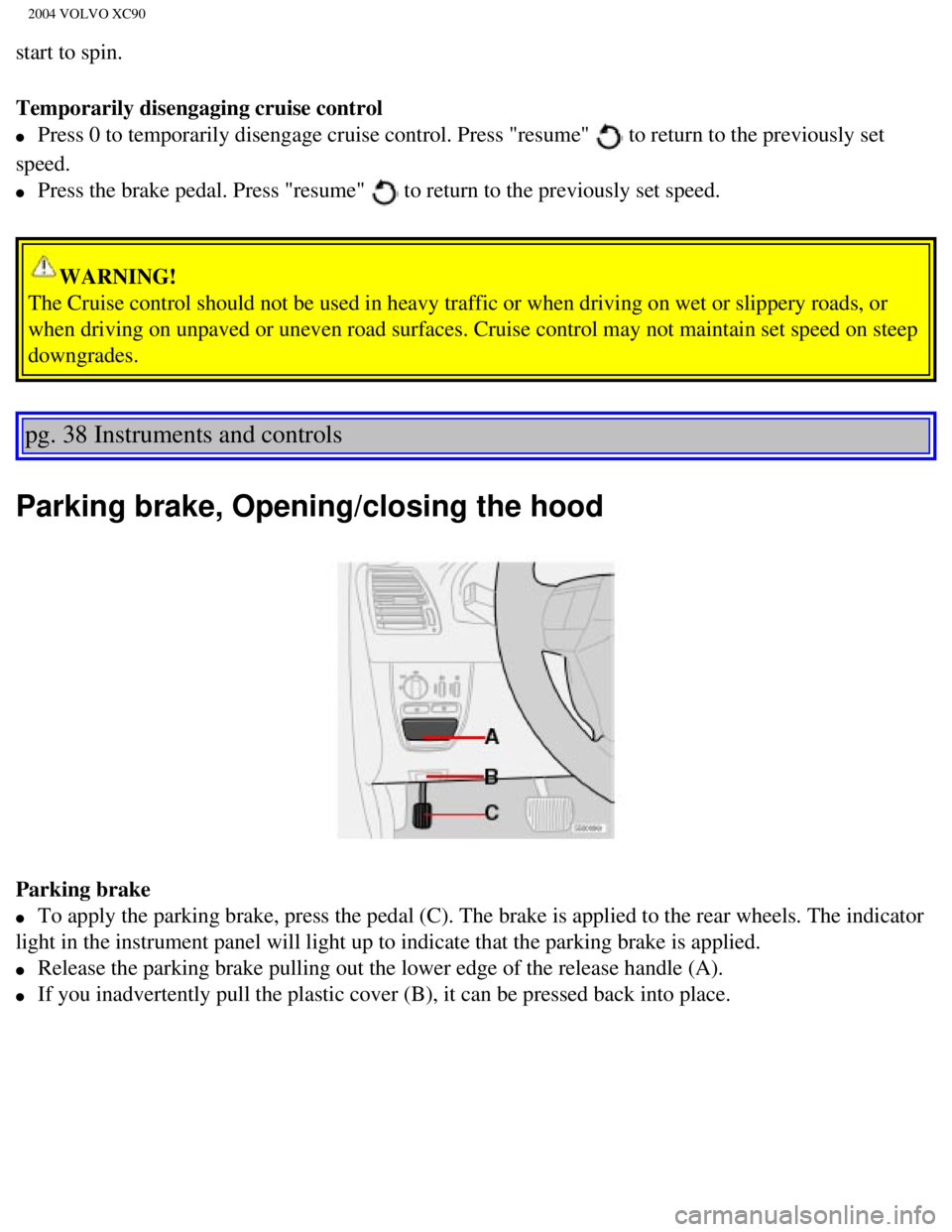
Parking brake
l To apply the parking brake, press the pedal (C). The brake is applied \
to the rear wheels. The indicator
light in the instrument panel will light up to indicate that the parking\
brake is applied.
l Release the parking brake pulling out the lower edge of the release hand\
le (A).
l If you inadvertently pull the plastic cover (B), it can be pressed bac\
k into place.
file:///K|/ownersdocs/2004/2004_XC90/04xc90_02b.htm (6 of 16)12/30/200\
6 4:35:15 PM
Page 58 of 245

2004 VOLVO XC90
WARNING!
Always use the parking brake when parking. On hills, also turn the front\
wheels toward the curb.The
indicator light in the instrument panel will light up even if the parkin\
g brake is applied only slightly.
Be sure to press down on the pedal sufficiently.
Opening the hood
Opening/closing the hood
1. Pull the lever (1) located under the left side of the dashboard to \
release the hood lock.
2. Lift the hood slightly.
3. Press up the release control (2) located under the front edge of th\
e hood and lift.
To close the hood, place your hand on it and press down until the hood l\
ocks in the closed position.
WARNING!
l Do not grasp the ribs in the grille when closing the hood. If your finge\
rs protrude through the
grille, they could be injured on components in the engine compartment as\
the grille closes. We
recommend pressing down on the hood to close it.
l Check that the hood locks properly when closed!
pg. 39 Instruments and controls
Opening the tailgate, Auxiliary 12-volt sockets
file:///K|/ownersdocs/2004/2004_XC90/04xc90_02b.htm (7 of 16)12/30/200\
6 4:35:15 PM
Page 107 of 245
2004 VOLVO XC90
2 0 0 4
VOLVO XC90
Starting and driving
pg. 81 Starting and driving
Refueling82
Starting the vehicle85
General information87
Automatic transmission with Geartronic89
All Wheel Drive92
Brake system93
Dynamic Stability Traction Control (DSTC)95
Rear Parking Assistance97
Towing 98
Jump starting 100
Towing a trailer 101
Detachable trailer hitch - installing/
removing 103
Load carriers 104
Cold weather precautions 105
Before a long distance trip106
file:///K|/ownersdocs/2004/2004_XC90/04xc90_06a.htm (1 of 15)12/30/200\
6 4:35:22 PM
Page 111 of 245

2004 VOLVO XC90
as possible when the needle nears the red zone, or when the fuel warning\
light comes on.
WARNING!
Never carry a cell phone that is switched on while refueling your vehicl\
e. If the phone rings, this may
cause a spark that could ignite gasoline fumes, resulting in fire and in\
jury.
CAUTION
- Do not refuel with the engine running *. Turn the ignition off or to p\
osition I. If the ignition is on,
an incorrect reading could occur in the fuel gauge
- After refueling, close the fuel filler cap by turning it clockwise unt\
il it clicks into place*.
- Allow for fuel expansion by not overfilling the tank. Overfilling coul\
d also cause damage to the
emission control systems.
- Avoid spilling gasoline during refueling. In addition to causing damag\
e to the environment,
gasolines containing alcohol can cause damage to painted surfaces, which\
may not be covered under
the New Vehicle Limited Warranty.
- Do not use gasolines containing methanol (methyl alcohol, wood alcoho\
l). This practice can result
in vehicle performance deterioration and can damage critical parts in th\
e fuel system. Such damage
may not be covered under the New Vehicle Limited Warranty.
* If the fuel filler cap is not closed tightly or if the engine is runni\
ng when the vehicle is refueled, the
Check Engine Light (malfunction indicator lamp) may indicate a fault. \
However, your vehicle's
performance will not be affected. Use only Volvo original or approved fu\
el filler caps.
pg. 85 Starting and driving
Starting the engine
1. Fasten the seat belt.
WARNING!
Before starting, check that the seat, steering wheel and mirrors are adj\
usted properly. Make sure the
brake pedal can be depressed completely. Adjust the seat if necessary. S\
ee
pages 54, 56.
2. Apply the parking brake if not already set. The gear selector is lock\
ed in the (P)ark position
(Shiftlock).
Manual transmission: the clutch must be fully depressed.
3. Without touching the accelerator pedal, turn the ignition key* to the\
starting position. Allow the
file:///K|/ownersdocs/2004/2004_XC90/04xc90_06a.htm (5 of 15)12/30/200\
6 4:35:22 PM
Page 113 of 245

2004 VOLVO XC90
WARNING!
Always place the gear selector in Park and apply the parking brake befor\
e leaving the vehicle. Never
leave the vehicle unattended with the engine running.
Always open garage doors fully before starting the engine inside a garag\
e to ensure adequate
ventilation. The exhaust gases contain carbon monoxide, which is invisib\
le and odorless but very
poisonous.
pg. 86 Starting and driving
Steering wheel lock
The steering wheel lock might be under tension when the vehicle is parke\
d.
file:///K|/ownersdocs/2004/2004_XC90/04xc90_06a.htm (7 of 15)12/30/200\
6 4:35:22 PM