lock VOLVO XC90 2004 Owner's Manual
[x] Cancel search | Manufacturer: VOLVO, Model Year: 2004, Model line: XC90, Model: VOLVO XC90 2004Pages: 245, PDF Size: 6.36 MB
Page 64 of 245
 to activate the \
adjustment control. Use")
2004 VOLVO XC90
The mirror control switches are located on the driver's door armrest.
Driver's side: Press the L button (a light in the switch will go on) to activate the \
adjustment control. Use
this control to adjust the driver's door mirror.
Passenger's side: Press the R switch (a light in the switch will go on) to activate the \
adjustment control.
Use this control to adjust the passenger's door mirror. After you have a\
djusted the mirror(s), press the L
or R switch again (the LED will go out) to deactivate the adjustment c\
ontrol.
WARNING!
The mirrors should always be adjusted prior to driving. Objects seen in \
the passenger's side wide-
angle sideview mirror are closer than they appear to be.
Mirror memory function (with the central locking system) - option
If you lock the vehicle and later unlock it with the same remote control and open the driver's door, the
sideview mirrors (and the driver's seat) will automatically move to th\
e position they were in when you
left the vehicle. This feature will work in the same way with all of the\
remote control transmitters (up to
3) that you use with your vehicle. This feature will not function if yo\
u lock your vehicle with the key.
pg. 43 Instruments and controls
Power moonroof (option)
Power moonroof
To operate the moonroof, turn the ignition key to position I or II, or s\
tart the engine. The moonroof can
be operated in two ways:
file:///K|/ownersdocs/2004/2004_XC90/04xc90_02b.htm (13 of 16)12/30/20\
06 4:35:15 PM
Page 72 of 245

2004 VOLVO XC90
Set the control to the temperature you prefer.
Defroster
This function defrosts/de-ices the windshield and front side windows. Th\
e LED in the switch will light up to indicate that
the defrost function is engaged. Blower speed increases automatically an\
d the air in the passenger compartment is
dehumidified. Recirculation will not function while defrost is engaged. \
Blower control*
Turn the control clockwise to increase or counterclockwise to decrease t\
he blower speed. Pressing the AUTO switch will
automatically regulate blower speed and override manual adjustment.
NOTE: Turning the blower control counterclockwise until an orange LED comes on\
will turn both the blower and the air
conditioning off.
* See also
page 46.
pg. 50 Climate control
Electronic Climate Control (ECC) (contd)
Air distribution
Press AUTO to automatically regulate air flow or press any combination of the cont\
rols shown in the illustration to
manually adjust air flow. An LED in the switch will light up if an air f\
low control has been pressed.
Heated front seats (option)
l Press the switch once for maximum seat heating. Both LEDs in the switch \
will be lit.
l Press the switch a second time for comfort heating. One LED in the switc\
h will be lit.
l Press the switch a third time to turn the heating off completely. The LE\
D will go off.
The seat heating for the passenger seat should be switched off when the \
seat is not occupied.
file:///K|/ownersdocs/2004/2004_XC90/04xc90_03.htm (5 of 7)12/30/2006 \
4:35:16 PM
Page 76 of 245

2004 VOLVO XC90
Manual height adjustment - front seat
The front edges of passenger seat cushions can be adjusted to seven diff\
erent settings and the rear edges
to nine different settings.
Lever (A) - adjusting the front edge of the seat.
Lever (B) - adjusting the rear edge of the seat.
Manual front-rear adjustment
The seat can be moved forward or rearward by pulling up on the front-rea\
r adjustment bar. Check that
the seat is securely locked into position after adjusting.
WARNING!
Do not adjust the seat while driving. The seat should be adjusted so tha\
t the brake pedal can be
depressed fully. In addition, position the seat as far rearward as comfo\
rt and control allow.
pg. 55 Interior
file:///K|/ownersdocs/2004/2004_XC90/04xc90_04a.htm (2 of 11)12/30/200\
6 4:35:19 PM
Page 78 of 245

2004 VOLVO XC90
1. Within 40 seconds of the ignition key being turned to position 0 or r\
emoved from the ignition switch.
2. After you have unlocked the driver's door with the key or remote cont\
rol, the driver's seat can be
adjusted during a 10 minute period if the door remains open. If the door is closed, the seat can be
adjusted for 40 seconds. The ignition key can be in position 0 or not yet inserted in the ignition switch.
Remote keyless entry system and driver's seat
The remote control transmitter also controls the electrically operated d\
river's seat in the following way:
l Adjust the seat to your preferences.
l When you leave your vehicle, lock it using the remote control.
Power seat control panel
The next time you unlock the driver's door with the same remote control \
(the one you used to lock the
doors with) and open the driver's door, the driver's seat will automati\
cally move to the position in which
you left it.
The seat will move to this position even if someone else has adjusted it\
since you last unlocked the
vehicle with the same remote control.
NOTE: This feature will work in the same way with all of the remote control tr\
ansmitters (up to 3) that
you use with your vehicle. This feature will not function if you lock yo\
ur vehicle with the key.
Seat adjustment
Adjust the power seat(s) with the two switches at the side of the seat\
as follows:
A - Front edge of seat (raise/lower)
B - Forward - rearward
C - Rear edge of seat (raise/lower)
D - Backrest tilt
NOTE: The power seats have an overload protector that activates if a seat is b\
locked by any object. If
this occurs, switch off the ignition (key in position 0) and wait abou\
t 20 seconds before operating the
seat again.
Please refer to the following page for information on programming the me\
mory function in the
driver's seat.
file:///K|/ownersdocs/2004/2004_XC90/04xc90_04a.htm (4 of 11)12/30/200\
6 4:35:19 PM
Page 82 of 245

2004 VOLVO XC90
WARNING!
- Please note that the lowest head restraint position is only intended f\
or use when the backrest is to be
folded down, or when the seat is not occupied.
- The head restraint is intended to help protect the head/neck in a coll\
ision. Ensure that it is properly
adjusted for the occupant of the seat.
pg. 60 Interior
Rear seats (contd)
Folding the backrests - second row of seats
1. Move the seat(s) to their rearmost position (seven-seat models onl\
y).
2. Pull the loop (A) to fold down an outboard head restraint. Press do\
wn the center head restraint if
necessary (see
page 59).
3. Pull the handle (B) outward to release the backrest. The backrests \
are designed to lock at a 45 degree
angle. Pull the handle again to continue pressing it down until it locks\
in the horizontal position.
To return the backrests to the upright position, pull handle B and pull \
the backrest up.
file:///K|/ownersdocs/2004/2004_XC90/04xc90_04a.htm (8 of 11)12/30/200\
6 4:35:19 PM
Page 83 of 245

Folding down the backrest
If necessary, fold in the load anchorage eyelets before folding down the\
backrests.
1. Move the seat")
2004 VOLVO XC90
Folding the backrests - third row of seats (option)
Folding down the backrest
If necessary, fold in the load anchorage eyelets before folding down the\
backrests.
1. Move the seats in the second row forward, see
page 58.
2. Pull up the handle in illustration 1 above.
3. Push the seat cushion firmly rearward, under the backrest.
4. Fold down the backrests* (the head restraints fold down automaticall\
y) to the horizontal position.
Returning the backrest to the upright position
l Fold up the backrest to the upright position.
l Grasp the strap (see illustration 3 above) and pull the seat cushion o\
ut until it locks in place. This also
locks the backrest in the upright position.
* Please note that the head restraints in this row cannot be vertically \
adjusted.
pg. 61 Interior
Interior lighting
Courtesy light/front reading lights
The courtesy/reading lights can be turned on or off by pressing the resp\
ective buttons.
The courtesy light has a timer function which turns the light on for 30 \
seconds if:
l You unlock the vehicle from the outside with the key or remote control. \
l You switch off the ignition (turn the key to position 0).
The courtesy light stays on for 10 minutes if one of the doors is left o\
pen after the vehicle is unlocked.
file:///K|/ownersdocs/2004/2004_XC90/04xc90_04a.htm (9 of 11)12/30/200\
6 4:35:19 PM
Page 84 of 245
2004 VOLVO XC90
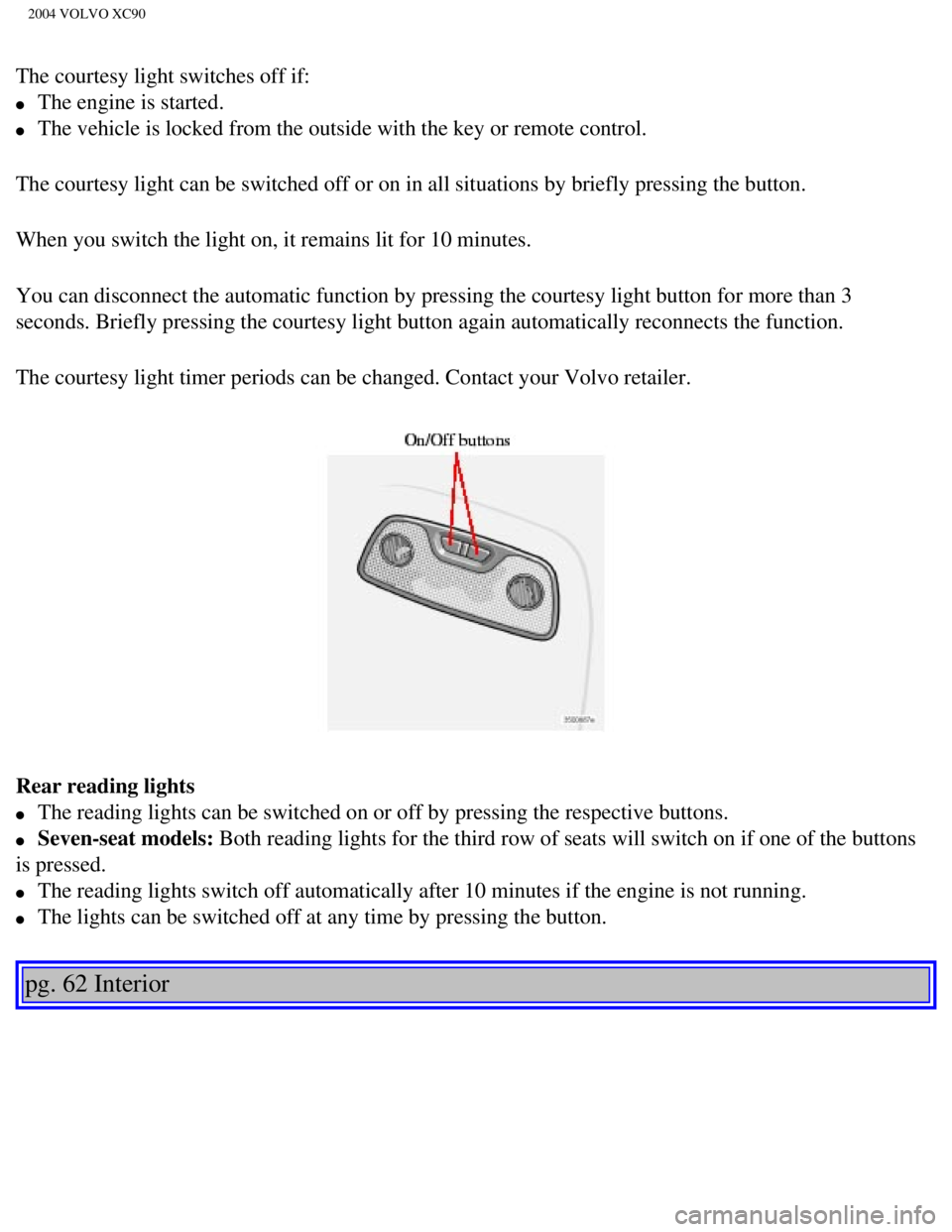
The courtesy light switches off if:
l The engine is started.
l The vehicle is locked from the outside with the key or remote control.
The courtesy light can be switched off or on in all situations by briefl\
y pressing the button.
When you switch the light on, it remains lit for 10 minutes.
You can disconnect the automatic function by pressing the courtesy light\
button for more than 3
seconds. Briefly pressing the courtesy light button again automatically \
reconnects the function.
The courtesy light timer periods can be changed. Contact your Volvo reta\
iler.
Rear reading lights
l The reading lights can be switched on or off by pressing the respective \
buttons.
l Seven-seat models: Both reading lights for the third row of seats will switch on if one of \
the buttons
is pressed.
l The reading lights switch off automatically after 10 minutes if the engi\
ne is not running.
l The lights can be switched off at any time by pressing the button.
pg. 62 Interior
file:///K|/ownersdocs/2004/2004_XC90/04xc90_04a.htm (10 of 11)12/30/20\
06 4:35:19 PM
Page 91 of 245

The Volvo XC90 can be equipped with a cargo net made of strong nylon fab\
ric.
This net can be installed in two places:
l Behind the rear seat backrests")
2004 VOLVO XC90
Nylon cargo net (option)
The Volvo XC90 can be equipped with a cargo net made of strong nylon fab\
ric.
This net can be installed in two places:
l Behind the rear seat backrests (the second row of seats in seven-seat m\
odels)
l Behind the front seat backrests if the rear seat backrests (the second \
row of seats in seven-seat models) have been folded
down.
If the vehicle is equipped with the cargo area cover, lift the cover out\
of the vehicle before installing the cargo net.
1. The upper and lower rods of the cargo net are hinged. Position the ro\
ds so that they are straight and lock in position.
2. Insert the end of the upper rod in one of the attachment brackets (s\
ee illustration above).
3. Insert the other end of the rod in the attachment bracket on the oppo\
site side of the vehicle.
4. Attach the lower straps to the eyelets on the floor if the net has be\
en installed in the rear attachment brackets.
Use the eyelets in the front seat rails if the net has been installed in\
the forward attachment brackets.
NOTE: On seven-seat models: When using the net in the rear attachment brackets\
, be sure it is installed in front of the side
armrests.
5. Adjust the straps to pull the net taut.
file:///K|/ownersdocs/2004/2004_XC90/04xc90_04b.htm (6 of 9)12/30/2006\
4:35:19 PM
Page 92 of 245
 \
and fold the net.
The cargo net can be stored under the floor of the cargo")
2004 VOLVO XC90
Folding and storing the cargo net
Press the release buttons on the hinges (1 in the illustration above) \
and fold the net.
The cargo net can be stored under the floor of the cargo area on five-se\
at models.
WARNING!
Be sure the cargo net is properly inserted in the attachment brackets an\
d the straps are correctly attached to the eyelets
and pulled taut.
Do not use the net if it is damaged in any way.
When it is not in use, store the net so that it cannot be thrown forward\
in the event of sudden braking, etc.
pg. 69 Interior
Steel grid (accessory)
To install the grid:
Upper attachments
1. Lift in the grid through the tailgate or through one of the rear pass\
enger doors (in this case, fold down the rear seat
backrests/backrests in second row of seats in seven-seat models).
2. Insert one of the grid's upper attachments into an attachment bracket\
above one of the rear passenger doors (see
illustration above).
3. Push the grid's attachment into the forward position in the attachmen\
t bracket (see inset illustration above) to lock the
attachment in place.
4. Insert the grid's other upper attachment in the attachment bracket ab\
ove the opposite rear passenger door, and press the
attachment into the forward position in the attachment bracket to lock i\
t in place.
file:///K|/ownersdocs/2004/2004_XC90/04xc90_04b.htm (7 of 9)12/30/2006\
4:35:19 PM
Page 95 of 245
2004 VOLVO XC90
2 0 0 4
VOLVO XC90
Locks and Alarms
pg. 71 Locks and Alarms
Keys and remote controls72
Locking and unlocking75
Child safety locks77
Alarm78
pg. 72 Locks and Alarms
Keys and remote controls
file:///K|/ownersdocs/2004/2004_XC90/04xc90_05.htm (1 of 12)12/30/2006\
4:35:20 PM