reset VOLVO XC90 2004 Owners Manual
[x] Cancel search | Manufacturer: VOLVO, Model Year: 2004, Model line: XC90, Model: VOLVO XC90 2004Pages: 245, PDF Size: 6.36 MB
Page 37 of 245
2004 VOLVO XC90
pg. 24 Instruments and controls
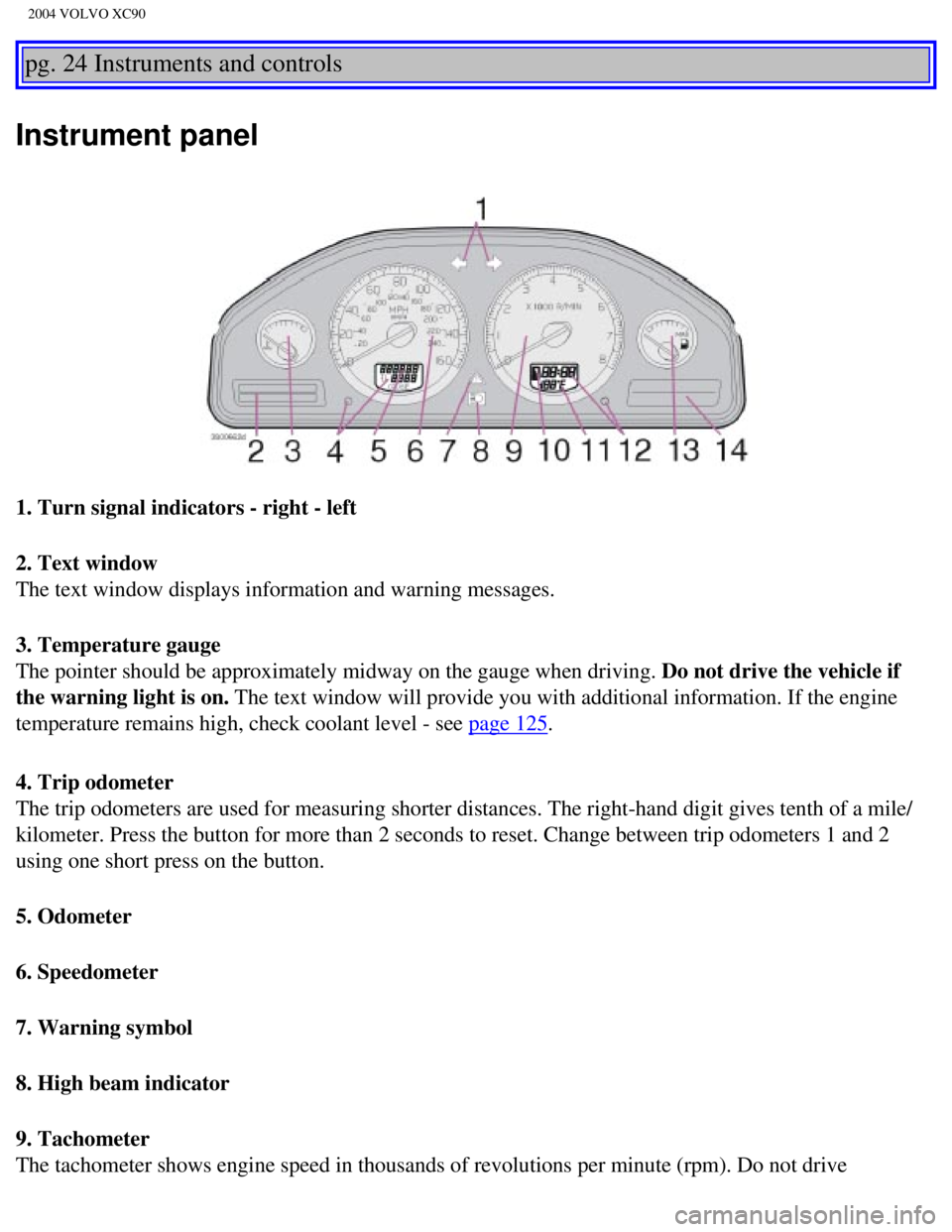
Instrument panel
1. Turn signal indicators - right - left
2. Text window
The text window displays information and warning messages.
3. Temperature gauge
The pointer should be approximately midway on the gauge when driving. Do not drive the vehicle if
the warning light is on. The text window will provide you with additional information. If the en\
gine
temperature remains high, check coolant level - see
page 125.
4. Trip odometer
The trip odometers are used for measuring shorter distances. The right-h\
and digit gives tenth of a mile/
kilometer. Press the button for more than 2 seconds to reset. Change bet\
ween trip odometers 1 and 2
using one short press on the button.
5. Odometer
6. Speedometer
7. Warning symbol
8. High beam indicator
9. Tachometer
The tachometer shows engine speed in thousands of revolutions per minute\
(rpm). Do not drive
file:///K|/ownersdocs/2004/2004_XC90/04xc90_02a.htm (2 of 16)12/30/200\
6 4:35:14 PM
Page 43 of 245

2004 VOLVO XC90
When a warning light in the instrument panel comes on, a message is also\
displayed in the text window.
After you have read the message, you can erase it by pressing button A (\
see illustration).
NOTE: Certain messages cannot be erased until the condition has been correcte\
d.
If a warning message is displayed when e.g. you are using the trip compu\
ter, this message must be
erased before you can access the function of your choice. Press button A\
to erase the warning message.
You can scroll through the stored messages by pressing button A (see il\
lustration). The text window can
be cleared (the message will be returned to memory) by pressing button\
A again. Message Meaning:
STOP SAFELY: Stop and switch off the engine - to help prevent serious risk of
damage.
STOP ENGINE: Stop and switch off the engine - to help prevent serious risk of
damage.
SERVICE URGENT: Take your vehicle to an authorized Volvo retailer for inspection as
soon as possible.
SEE MANUAL: Refer to your owner's manual. For additional information, please
contact your Volvo retailer.
SERVICE REQUIRED: Take your vehicle to an authorized Volvo retailer for inspection at
your convenience (but preferably before the next scheduled
maintenance).
FIX NEXT SERVICE: Have the system affected inspected at the next scheduled
maintenance.
TIME FOR REGULAR
SERVICE This light will come on at 7,500 mile (12,000 km) intervals, after
750 hours of driving or after 12 months, whichever occurs first, to
remind the driver that the maintenance interval has been exceeded.
The light will stay on for 2 minutes after start until reset by the
servicing retailer.
pg. 29 Instruments and controls
Switches in center console
file:///K|/ownersdocs/2004/2004_XC90/04xc90_02a.htm (8 of 16)12/30/200\
6 4:35:14 PM
Page 44 of 245

This system provides an audible warning if you back t")
2004 VOLVO XC90
The positions of these buttons may vary, depending on the specifications\
of your vehicle
1. Rear Parking Assistants (option)
This system provides an audible warning if you back the vehicle to withi\
n approximately 5 feet (1.5
meters) of an object. See
page 97 for more information.
NOTE: The system activates automatically when the engine is started, and can b\
e deactivated by
pressing this button (e.g. when towing a trailer) or reactivated if ne\
cessary.
2. Folding sideview mirrors (option)
Press the button and release it to fold the sideview mirrors in or out. \
On certain models, when the button
is pressed, there may be a long pause before the mirrors move. Pressing \
the button again during this
pause may erase your first button press. If this happens, wait ten secon\
ds and press the button one more
time. The mirrors cannot be adjusted during the first ten seconds after \
they have been folded out. NOTE:
If the sideview mirrors have been inadvertently pushed out of position (\
in a car wash, parking lot, etc.)
manually return them to normal position. If mirror adjustment does not s\
eem to operate after manual
folding, reset the folding mirrors as follows:
l Turn the ignition key to position II.
l Manually fold the mirror(s) to the normal position.
l Press the button to fold both mirrors in.
l Press the button again to fold the mirrors out to their normal position.\
3. Auxiliary lights
This button is used to switch on auxiliary lights (if installed). An L\
ED in the switch will light up to
indicate that the auxiliary lights are illuminated.
4. Dynamic Stability Traction Control system (DSTC)
This button is used to switch off DSTC's stability Control function. Whe\
n the LED in the button is ON,
all DSTC functions are active. See
pages 95 and 96 for additional information.
WARNING!
The Please be aware that the vehicle's handling characteristics may be a\
ffected if the Stability Control
function is switched off.
file:///K|/ownersdocs/2004/2004_XC90/04xc90_02a.htm (9 of 16)12/30/200\
6 4:35:14 PM
Page 54 of 245

2004 VOLVO XC90
l The front seat heating can be switched on and off as required.
l Press the switch once for maximum seat heating. Both LED's in the switch\
will be lit.
l Press the switch a second time for comfort heating. One LED in the switc\
h will be lit.
l Press the switch a third time to turn the heating off completely.
The seat heating for the passenger seat should be switched off when the \
seat is not occupied.
pg. 36 Instruments and controls
Trip computer (option)
The trip computer stores information gathered from several systems in yo\
ur vehicle and has four menus
that can be displayed in the text window.
l Driving distance on current fuel reserve
l Average fuel consumption
l Current fuel consumption
l Average speed
l Current speed in mph (Canadian models only)
NOTE: Warning messages from the vehicle's monitoring systems will override the\
trip computer
function. If a warning message is displayed in the text window while you\
are using the trip computer,
you must acknowledge the message by pressing button A. Press button A ag\
ain to return to the trip
computer function.
Trip computer controls and functions.
The four* trip computer functions can be accessed by twisting control B \
one step at a time in either
direction. Twisting a fifth** time returns you to the original function.\
The trip computer can be reset (current data will be erased from system\
memory) by pressing RESET
file:///K|/ownersdocs/2004/2004_XC90/04xc90_02b.htm (3 of 16)12/30/200\
6 4:35:15 PM
Page 55 of 245
.
1. Driving distance on current fuel reserve
This function shows the approximate distance that can be driven on the f\
uel remaining in the tank. This
calculation is base")
2004 VOLVO XC90
(button C).
1. Driving distance on current fuel reserve
This function shows the approximate distance that can be driven on the f\
uel remaining in the tank. This
calculation is based on average fuel consumption during the last 12 mile\
s (20 km) of driving and the
amount of fuel remaining in the tank when the reading was taken.
When the driving distance on current fuel reserve is less than 12 miles \
(20 km), "----" will be displayed
in the text window.
2. Average fuel consumption
This value indicates fuel consumption since the last time the trip compu\
ter was reset (by pressing
RESET, button C). When the engine is switched off, information on fuel \
consumption is stored and
remains in system memory until the RESET (button C) is pressed again.
3. Current fuel consumption
This value indicates the current fuel consumption, based on readings tak\
en once per second. When the
vehicle is not moving, "----" will be displayed.
4. Average speed
This value indicates average speed since the last time the trip computer\
was reset (by pressing RESET,
button C). When the engine is switched off, information on average spee\
d is stored and remains in
system memory until the RESET (button C) is pressed again.
5. Current speed in miles per hour (Canadian models only)
This function provides the driver with an instantaneous conversion of th\
e vehicle's current speed from
km/h to mph.
NOTE: Trip computer readings may vary slightly depending on the circumfe\
rence of the tires on the
vehicle.
* Five functions on Canadian models
** A sixth time on Canadian models
pg. 37 Instruments and controls
Cruise control
file:///K|/ownersdocs/2004/2004_XC90/04xc90_02b.htm (4 of 16)12/30/200\
6 4:35:15 PM
Page 69 of 245

2004 VOLVO XC90
Acceleration
The air conditioning is momentarily disengaged during full-throttle acce\
leration.
Climate control maintenance
All maintenance on the climate control systems should be carried out by \
an authorized Volvo service technician only.
Refrigerant
Volvo cares about the environment. The air conditioning system in your v\
ehicle contains a CFC-free refrigerant - R134a.
This substance will not deplete the ozone layer. The system contains 2.2\
lbs (1000 g) R134a and uses PAG oil.
Passenger compartment blower
Approximately 50 minutes after the ignition is turned off, the blower ma\
y come on automatically, and run for seven
minutes, to remove condensation in the A/C evaporator.
Blower function to reduce battery drain
The climate system's blower functions normally while the engine is runni\
ng.
However, when the engine is switched off (even if the ignition is switc\
hed to positions I or II), the blower control will be
automatically switched off to avoid unnecessary battery drain. The follo\
wing points pertain if the ignition key is on but the
engine is not running:
l To restart the blower, turn the control knob to the setting of your choi\
ce.
l After approximately 2 minutes, the blower speed will be reduced to avoid\
battery drain.
You can reset the blower speed at any time. Please be aware that the sys\
tem has been designed to reduce the blower's speed
again after 2 minutes, until the engine is started. If the battery becom\
es drained:
l LOW BATTERY, FAN IS REDUCED will be displayed in the text window in the \
instrument panel.
l The yellow warning light in the instrument panel (see page 25) will also light up.
pg. 47 Climate control
Air distribution
Air distribution
The incoming air is distributed through the ventilation points in the pa\
ssenger compartment shown above.
file:///K|/ownersdocs/2004/2004_XC90/04xc90_03.htm (2 of 7)12/30/2006 \
4:35:16 PM
Page 79 of 245

2004 VOLVO XC90
Emergency stop
If the seat accidentally begins to move, press one of the buttons to sto\
p the seat.
pg. 57 Interior
WARNING!
- Because the driver's seat can be adjusted with the ignition off, child\
ren should never be left
unattended in the vehicle.
- Movement of the seat can be STOPPED at any time by pressing any button\
on the power seat
control panel.
- Do not adjust the seat while driving.
- The seat should be adjusted so that the brake pedal can be depressed f\
ully. In addition, position the
seat as far rearward as comfort and control allow.
- The seat rails on the floor must not be obstructed in any way when the\
seat is in motion.
Programming the memory
Please note that only the driver's seat is equipped with the memory func\
tion.
Three seat positions can be programmed. To program a seat position:
1. Adjust the seat to the desired position.
2. Hold down the MEM button.
3. While holding down the MEM button, press button 1 to program the curr\
ent position of the seat.
Buttons 2 and 3 can be programmed in the same way.
To move the seat to a programmed position, press and hold down button 1,\
2 or 3 until the seat moves to
the preset position and stops.
As a safety precaution, the seat will stop automatically if the button i\
s released before the seat has
reached the programmed position.
file:///K|/ownersdocs/2004/2004_XC90/04xc90_04a.htm (5 of 11)12/30/200\
6 4:35:19 PM
Page 206 of 245
2004 VOLVO XC90
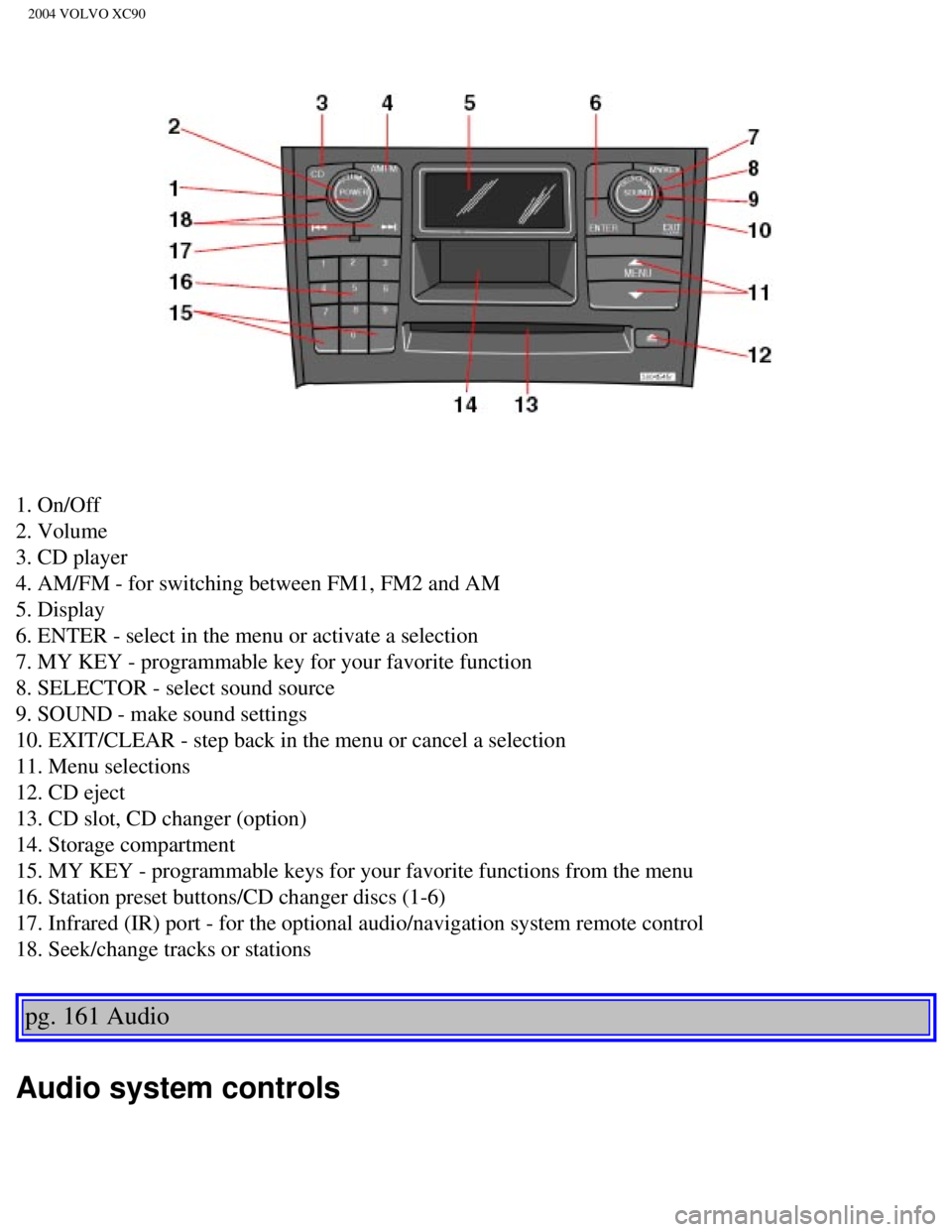
1. On/Off
2. Volume
3. CD player
4. AM/FM - for switching between FM1, FM2 and AM
5. Display
6. ENTER - select in the menu or activate a selection
7. MY KEY - programmable key for your favorite function
8. SELECTOR - select sound source
9. SOUND - make sound settings
10. EXIT/CLEAR - step back in the menu or cancel a selection
11. Menu selections
12. CD eject
13. CD slot, CD changer (option)
14. Storage compartment
15. MY KEY - programmable keys for your favorite functions from the menu\
16. Station preset buttons/CD changer discs (1-6)
17. Infrared (IR) port - for the optional audio/navigation system remo\
te control
18. Seek/change tracks or stations
pg. 161 Audio
Audio system controls
file:///K|/ownersdocs/2004/2004_XC90/04xc90_11a.htm (2 of 17)12/30/200\
6 4:35:31 PM
Page 207 of 245

The four buttons on the steering wheel keypad can be used to control the\
audio system. The steering
wheel keypad can be used to adjust volume, shift")
2004 VOLVO XC90
Steering wheel keypad (option)
The four buttons on the steering wheel keypad can be used to control the\
audio system. The steering
wheel keypad can be used to adjust volume, shift between preset stations\
and change CD tracks.
l Press the or buttons briefly to search for a radio station, or to go to the next/pre\
vious
track on a CD
l Press and hold down these buttons to search within a track.
Display
The display (1) shows the currently selected function, menu selections\
, etc.
Clean the display with a dry, soft, lint-free cloth. Do not use cleaning\
agents.
Accessing and using menus
In menu mode, you can change settings and program new functions in the a\
udio system. The various
file:///K|/ownersdocs/2004/2004_XC90/04xc90_11a.htm (3 of 17)12/30/200\
6 4:35:31 PM
Page 208 of 245
 to enter menu mode. Use the menus as follows\
:
l Use the menu keys (3) to navigate up or down in the menus.")
2004 VOLVO XC90
menu alternatives are shown in the display.
Press the menu button (2) to enter menu mode. Use the menus as follows\
:
l Use the menu keys (3) to navigate up or down in the menus. Dots in the\
display indicated that there
are more menu selections from which to choose.
l One long press on EXIT/CLEAR exits menu mode.
l A short press on the EXIT/CLEAR enables you to cancel, undo, or answer n\
o to a menu selection, or
to go back in the menu structure.
l Pressing ENTER confirms a menu selection, or takes you to the next subme\
nu.
pg. 162 Audio
Audio system controls (contd)
Rear headphone connectors and controls (option)
The door panels behind the second row of seats can be equipped with head\
phone connectors for
passengers in the second and optional third row of seats. Several people\
can listen to different sound
sources, such as CDs or the radio at the same time without disturbing ea\
ch other. Two sets of
headphones can be plugged into each connector.
l Use the SEL button (1) to step between the sound sources.
l Press the arrow keys (2) briefly to change CD tracks or switch between\
preset stations.
l Hold down the arrow keys to fast forward/reverse, or search for the prev\
ious/next strong radio station.
l Hold down the SEL button to turn off the sound.
For the best sound reproduction, we recommend headphones with impedance \
between 16-32 ohm. The
sensitivity of these should be equal to or greater than 102 dB. The head\
phone connections are intended
file:///K|/ownersdocs/2004/2004_XC90/04xc90_11a.htm (4 of 17)12/30/200\
6 4:35:31 PM