radio VOLVO XC90 2005 User Guide
[x] Cancel search | Manufacturer: VOLVO, Model Year: 2005, Model line: XC90, Model: VOLVO XC90 2005Pages: 263, PDF Size: 6.99 MB
Page 232 of 263
:
1. Set the desired station.
2. Press the button under which the station is to be sto")
2005 VOLVO XC90
Storing stations
To store a selected station under one of the station setting buttons 0-9\
(1):
1. Set the desired station.
2. Press the button under which the station is to be stored and keep it \
depressed. The sound will be
interrupted for several seconds and STATION STORED is shown in the displ\
ay. The station is now
stored.
You can store up to 10 stations each for AM, FM1 and FM2, i.e. a total o\
f 30 stations. Radio Frequency band
FM 87.7 - 107.9 MHz
AM 530 - 1710 kHz
MY KEY - programming a shortcut
Use the MY KEY buttons (2, 3) to program a favorite function from the \
menu, such as SCAN,
AUTOSTORE, etc. See
page 190 for the functions that can be programmed with the MY KEY button.
1. Use the MENU buttons to scroll among the functions.
2. Select the desired function from the menu by holding one of the MY KE\
Y buttons depressed for more
than two seconds.
3. When MY KEY STORED is shown in the display, the function has been sto\
red.
4. Activate the function by briefly pressing the MY KEY button with whic\
h the functions was stored.
Repeat steps 1-4 to store new functions on the MY KEY buttons.
file:///K|/ownersdocs/2005/2005_XC90/05xc90_11a.htm (12 of 18)12/30/20\
06 4:42:43 PM
Page 233 of 263

Automatically storing stations - AUTOSTORE
This functio")
2005 VOLVO XC90
NOTE: The MY KEY buttons can only be programmed for one shortcut function at a\
time.
pg. 186 Audio
Radio functions (contd)
Automatically storing stations - AUTOSTORE
This function automatically searches for, and stores up to 10 strong AM \
or FM stations in a separate
memory. If more than 10 stations are found, the 10 strongest ones will b\
e stored. The function is
especially useful in areas in which you are not acquainted with radio st\
ations or their frequencies.
1. Choose radio mode using the SELECTOR control or the AM/FM button.
2. Select AUTOSTORE in the menu and press ENTER.
3. Select AST SEARCH and press ENTER.
4. AUTOSTORING is shown in the display and a number of strong stations (\
max. 10) from the set
frequency band are now automatically stored in the autostore memory. If \
there are no stations with
sufficient signal strength, NO AST FOUND is displayed.
5. The stored stations are available under the buttons 0-9 (1).
6. When the radio is in autostore mode, AUTO is shown in the display. AU\
TO disappears when you
return to the normal radio mode.
7. Return to normal radio mode by pressing the AM/FM button or EXIT/CLEA\
R.
8. To access previously stored stations, carry out steps 1-2 but select \
AST MODE in step 3 and press
ENTER.
file:///K|/ownersdocs/2005/2005_XC90/05xc90_11a.htm (13 of 18)12/30/20\
06 4:42:43 PM
Page 234 of 263

This feature, which may not be available in your area, functions only wi\
th FM broadcasts.
The radio in your car is equipped with a")
2005 VOLVO XC90
pg. 187 Audio
Radio Broadcast Data System (RBDS)
This feature, which may not be available in your area, functions only wi\
th FM broadcasts.
The radio in your car is equipped with an advanced system allowing infor\
mation from broadcasters to be
transmitted visually, as text, together with the audio signal. This info\
rmation is then decoded by the
radio and made available for several new and unique features. The RBDS or Radio Broad\
cast Data
System operates in the FM band only, and the information transmitted is \
supplied exclusively by
participating broadcasters. Volvo has no control over the accuracy of the data or information.
Coverage by local broadcasters may be limited at this time, but as the t\
echnology and benefits grow, you
will find the radio in your car is equipped to take advantage of this sy\
stem.
NOTE: PI (Program Information) Seek: When an FM station has been stored as \
a preset, the radio also
stores RBDS program information if it is available. When the preset is s\
elected at a later time, the radio
tries to access updated program information. In weak signal areas, there\
may be a delay before the
station becomes audible. During this delay, there will be no sound and t\
he text "PI seek. Press EXIT to
cancel." will be displayed. You may press EXIT to immediately tune in th\
e station without RBDS
program information.
Scanning - SCAN
This function automatically searches for the next strongest AM and FM st\
ations. When the radio finds a
station, it will pause for approximately 8 seconds, after which it will \
continue scanning.
1. Choose radio mode using the SELECTOR control (1) or the AM/FM butto\
n (2).
file:///K|/ownersdocs/2005/2005_XC90/05xc90_11a.htm (14 of 18)12/30/20\
06 4:42:43 PM
Page 235 of 263
2005 VOLVO XC90
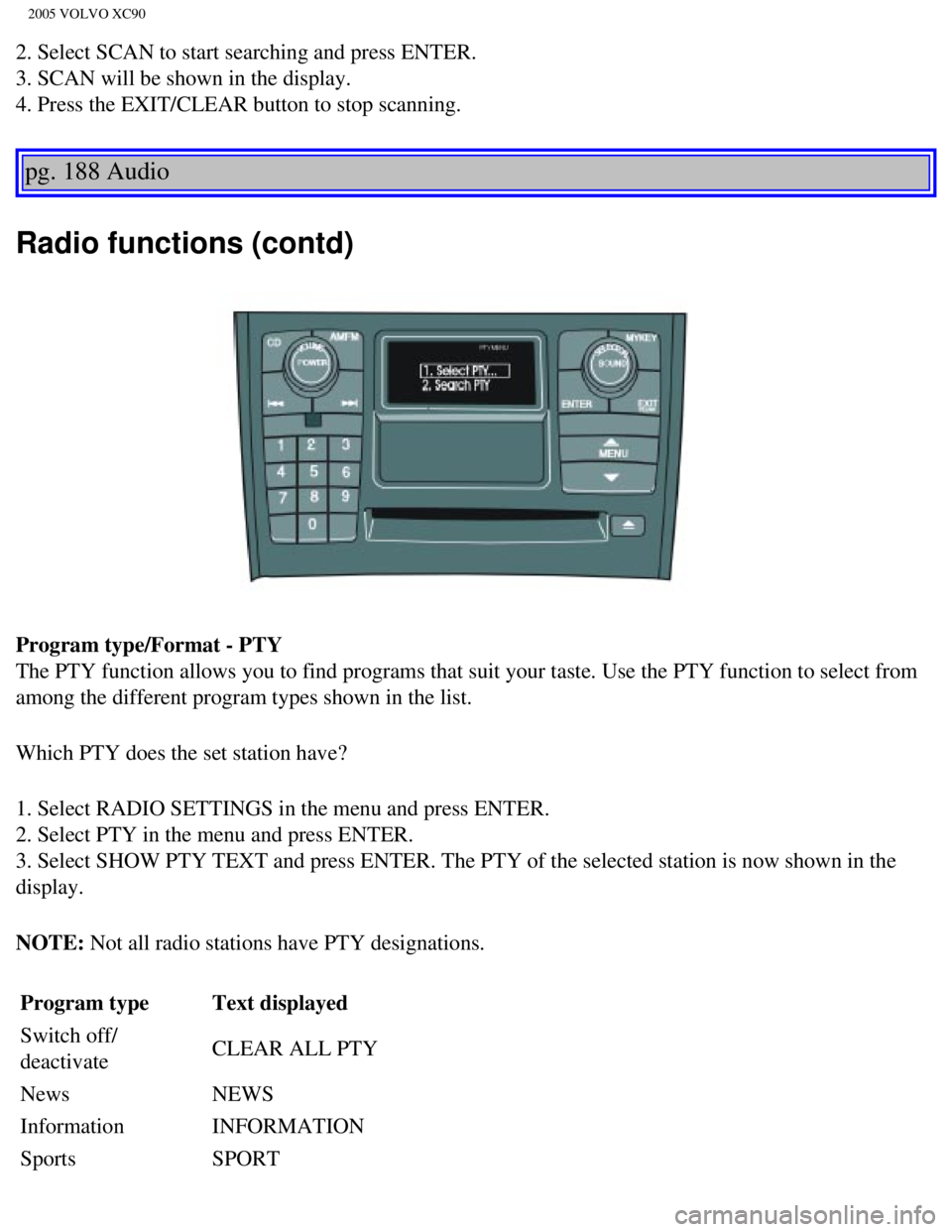
2. Select SCAN to start searching and press ENTER.
3. SCAN will be shown in the display.
4. Press the EXIT/CLEAR button to stop scanning.
pg. 188 Audio
Radio functions (contd)
Program type/Format - PTY
The PTY function allows you to find programs that suit your taste. Use t\
he PTY function to select from
among the different program types shown in the list.
Which PTY does the set station have?
1. Select RADIO SETTINGS in the menu and press ENTER.
2. Select PTY in the menu and press ENTER.
3. Select SHOW PTY TEXT and press ENTER. The PTY of the selected station\
is now shown in the
display.
NOTE: Not all radio stations have PTY designations. Program type Text displayed
Switch off/
deactivate CLEAR ALL PTY
News NEWS
Information INFORMATION
Sports SPORT
file:///K|/ownersdocs/2005/2005_XC90/05xc90_11a.htm (15 of 18)12/30/20\
06 4:42:43 PM
Page 236 of 263

2005 VOLVO XC90
Talk TALK
Rock ROCK
Classic rock CLASSIC ROCK
Adult hits ADULT HITS
Soft rock SOFT ROCK
Top 40 TOP 40
Country COUNTRY
Oldies OLDIES
Soft SOFT
Nostalgia NOSTALGIA
Jazz JAZZ
Classical CLASSICAL
Rhythm & Blues RHYTHM & BLUES
Soft R&B SOFT R&B
Language LANGUAGE
Religious music RELIGIOUS MUSIC
Religious talk RELIGION TALK
Personality PERSONALITY
Public PUBLIC
College COLLEGE
Weather WEATHER
Radio text
Certain stations broadcast program information, which can be shown in th\
e display.
1. Press the MENU button.
2. Select RADIOTEXT in the menu and press ENTER.
3. Select RADIOTEXT again to deactivate.
pg. 189 Audio
file:///K|/ownersdocs/2005/2005_XC90/05xc90_11a.htm (16 of 18)12/30/20\
06 4:42:43 PM
Page 237 of 263

2005 VOLVO XC90
Search for a specific program type - PTY
This functions enables you to search for a certain type of program by se\
arching through the entire
waveband.
1. Select FM1 or FM2 and press the MENU button.
2. Select RADIO SETTINGS and press ENTER.
3. Select PTY and press ENTER.
4. Choose SELECT PTY and press ENTER.
5. Press ENTER for one or more of the listed program types to select. Th\
e PTY symbol is displayed and
lights up when you make your first selection and the radio goes into PTY\
mode.
6. When you have made all of your selections, press EXIT/CLEAR to exit t\
he PTY list.
7. Select SEARCH PTY and press ENTER. If the radio finds a station with \
the selected program type,
this station will be played.
8. If the radio finds a station that does not match your selections, con\
tinue the search with the
and
buttons.
9. If no station with the selected program type is found, the radio will\
return to the previously tuned
frequency. PTY will remain in standby mode.
10. To deactivate the PTY standby mode, select CLEAR ALL PTY and press E\
NTER. The PTY symbol
then disappears and the radio returns to the normal operating mode.
PTY standby
To set the radio in PTY standby, repeat steps 1-6.
file:///K|/ownersdocs/2005/2005_XC90/05xc90_11a.htm (17 of 18)12/30/20\
06 4:42:43 PM
Page 239 of 263

2005 VOLVO XC90
pg. 190 Audio
Menu settings and selections
Main menus/submenus
RADIO
1. AUTOSTORE*
1.1. AST MODE
1.2. AST SEARCH
1.2.1 AUTOSTORING
2. SCAN* ON/OFF**
3. RADIOTEXT* ON/OFF**
4. RADIO SETTINGS
4.1. PTY
4.1.1. SELECT PTY
4.1.2. SEARCH PTY*
4.1.3. SHOWPTY ON/OFF**
4.2. AF* ON**/OFF
4.3. RESET ALL
5. AUDIO SETTINGS
5.1. Dolby AM/FM
5.1.1. Pro Logic II
5.1.2. 3CH
5.1.3. OFF**
5.2. Dolby CD
5.2.1. Pro Logic II**
5.2.2. 3CH
5.2.3. OFF
5.3. SUBWOOFER* ON/OFF** (certain audio systems)
5.4. EQ FRONT (certain audio systems)
5.5. EQ REAR (option)
5.6. RESET ALL
CD (single disc)
1. RANDOM*
2. SCAN*
3. AUDIO SETTINGS*
3.1. Dolby AM/FM
3.1.1. Pro Logic II
3.1.2. 3CH
3.1.3. OFF**
file:///K|/ownersdocs/2005/2005_XC90/05xc90_11b.htm (1 of 11)12/30/200\
6 4:42:44 PM
Page 257 of 263

2005 VOLVO XC90
R
Radiator
140
Radio Broadcast Data System (RBDS)
187
Rain sensor - windshield wipers
36
Reading lamps
65
Rear fog light
34
Rear park assist
101
Rear seat air conditioning
31
Rear suspension
169
Rear window defroster
38
Rearview mirror/door mirrors
46
Recirculation
54
REDUCE SPEED
30
Refrigerant (A/C system)
50
Refueling
86, 88
Remote control - central locking system
77
Reporting safety defects
23
Restraint anchorages, for child seats
21
Roadholding
92
Roll Stability Control (RSC)
99
S
Safety
1
Safety defects - reporting
23
Safety system warning light
6
Seat belt
2
Seat belt maintenance
23
Seat belt reminder
46
Seat belts (keeping child seats in place)
22
Service
136
Service key
76
Service reminder
29
SERVICE REQUIRED
30
file:///K|/ownersdocs/2005/2005_XC90/05xc90_12.htm (8 of 14)12/30/2006\
4:42:46 PM
Page 261 of 263

2005 VOLVO XC90
accessories that Volvo has not tested, or if you allow accessories to be\
installed by someone unfamiliar
with your vehicle.
l Damage caused by unapproved or improperly installed accessories may not \
be covered by your new
vehicle warranty. See your Warranty and Service Records Information book\
let for more warranty
information. Volvo assumes no responsibility for death, injury, or expen\
ses that may result from the
installation of non-genuine accessories.
Driver Distraction
l Driver distraction results from driver activities that are not directly \
related to controlling the vehicle in
the driving environment. Your new Volvo is, or can be, equipped with man\
y feature-rich entertainment
and communication systems. These include hands-free cellular telephones,\
navigation systems, and
multipurpose audio systems. You may also own other portable electronic d\
evices for your own
convenience. When used properly and safely, they enrich the driving expe\
rience. Improperly used, any
of these could cause a distraction.
l For all of these systems, we want to provide the following warning that \
reflects the strong Volvo
concern for your safety:
l Never use these devices or any feature of your vehicle in a way that dis\
tracts you from the task of
driving safely. Distraction can lead to a serious accident.In addition t\
o this general warning, we offer the
following guidance regarding specific newer features that may be found i\
n your vehicle:
l Never use a hand-held cellular telephone while driving. Some jurisdictio\
ns prohibit cellular telephone
use by a driver while the vehicle is moving.
l If your vehicle is equipped with a navigation system, set and make chang\
es to your travel itinerary
only with the vehicle parked.
l Never program your audio system while the vehicle is moving. Program rad\
io presets with the vehicle
parked, and use your programmed presets to make radio use quicker and si\
mpler.
l Never use portable computers or personal digital assistants while the ve\
hicle is moving. A driver has a
responsibility to do everything possible to ensure his or her own safety\
and the safety of passengers in
the vehicle and others sharing the roadway. Avoiding distractions is par\
t of that responsibility.
The following should be checked regularly:*
1. Washer fluid reservoir should be filled with water and solvent (wint\
ertime: windshield washer anti-
freeze). See
page 143.
2. Power steering - When cold, the level must not be above the COLD mark\
and when hot it must not be
above the HOT mark. Top up if the level drops to the ADD mark with ATF f\
luid. See
page 144.
3. Coolant level should be between the expansion tank marks. Mixture: 50\
% antifreeze and 50% water.
See
page 139.
4. Engine oil should be checked each time the vehicle is refueled. The o\
il level should be between the
dipstick marks. The distance between the marks represents approx. 1.6 US\
qt. (1.5 liter). See
page 141.
5. Brake fluid - check, without removing the cap, that the level is abov\
e the MIN mark. Use brake fluid
DOT 4+. See
page 144.
Fuel octane rating, see
page 86.
file:///K|/ownersdocs/2005/2005_XC90/05xc90_12.htm (12 of 14)12/30/200\
6 4:42:46 PM