Ignition key VOLVO XC90 2005 Owner's Manual
[x] Cancel search | Manufacturer: VOLVO, Model Year: 2005, Model line: XC90, Model: VOLVO XC90 2005Pages: 263, PDF Size: 6.99 MB
Page 120 of 263

2005 VOLVO XC90
3. Without touching the accelerator pedal, turn the ignition key* to the\
starting position. Allow the
starter to operate for up to 10 seconds. Release the key as soon as the \
engine starts. If the engine fails to
start, repeat this step.
NOTE:
- On certain models, when the vehicle is started, idle speed may be noti\
ceably higher than normal for a
short period, depending on the temperature of the engine.
This has been done to help bring components in the emission control syst\
em to their normal operating
temperature as quickly as possible, which enables them to function norma\
lly.
- For cold starts at altitudes above 6000 ft (1800 meters), depress th\
e accelerator pedal halfway and turn
the key to the starting position. Release the pedal slowly when the engi\
ne starts.
4. To release the gear selector from the (P)ark position, the engine must be running (or the ignition key
must be in position II) and the brake pedal must be depressed.
5. Select the desired gear. The gear engages after a very slight delay w\
hich is especially noticeable when
selecting R.
NOTE: Your vehicle is equipped with a Keylock system. When the engine is switc\
hed off, the gear
selector must be in the (P)ark position before the key can be removed from the ignition switch.
When starting in cold weather, the transmission may shift up at slightly\
higher engine speeds than
normal until the automatic transmission fluid reaches normal operating t\
emperature.
Do not race a cold engine immediately after starting. Oil flow may not r\
each some lubrication points fast
enough to prevent engine damage.
* If two of the keys to your vehicle are close together, e.g., on the sa\
me key ring, when you try to start
the vehicle, this could cause interference in the immobilizer system and\
result in the vehicle not starting.
If this should occur, remove one of the keys from the key ring before tr\
ying to start the vehicle again.
file:///K|/ownersdocs/2005/2005_XC90/05xc90_06a.htm (6 of 16)12/30/200\
6 4:42:33 PM
Page 122 of 263

2005 VOLVO XC90
Steering wheel lock
The steering wheel lock might be under tension when the vehicle is parke\
d.
Turn the steering wheel slightly to free the ignition key.
In order to help reduce vehicle theft, make sure the steering wheel lock\
is engaged before leaving
the vehicle.
WARNING!
Never switch off the ignition (turn the ignition key to position 0) or\
remove the key from the ignition
switch while the vehicle is in motion. This could cause the steering whe\
el to lock, which would make
the vehicle impossible to steer.
file:///K|/ownersdocs/2005/2005_XC90/05xc90_06a.htm (8 of 16)12/30/200\
6 4:42:33 PM
Page 125 of 263

2005 VOLVO XC90
NOTE: Avoid driving on steep inclines if the fuel tank is nearly empty. If the\
flow of fuel to the engine
is interrupted due to the vehicle's angle of inclination, this could res\
ult in damage to the three-way
catalytic converter. We recommend keeping the fuel tank at least half fu\
ll when driving on steep inclines.
Driving through water
l The vehicle should not be driven through water that is deeper than 18 in\
ches (48 cm). Driving through
deeper water could result in damage to transmission components or the di\
fferential, or to the engine if
excess water is drawn in through the air intake system.
l Drive slowly and avoid stopping when driving through water.
l After having driven through water, apply the brakes lightly several time\
s to remove water, mud, etc
from the brake discs.
l Never allow the vehicle to stand in water above the door sills. This cou\
ld result in damage to the
electrical system.
Conserving electrical current
Keep the following in mind to help minimize battery drain:
l When the engine is not running, avoid turning the ignition key to positi\
on II (see page 90). Many
electrical systems (the audio system, the optional infotainment/navigat\
ion systems, power windows, etc)
will function with the ignition key in position I. This position reduces\
drain on the battery.
l Please keep in mind that using systems, accessories, etc that consume a \
great deal of current when the
engine is not running could result in the battery being completely drain\
ed.
NOTE: A warning message will be displayed in the text window in the instrument\
panel when the
battery charge is low.
pg. 93 Starting and driving
Automatic transmission with Geartronic
5-cylinder turbo models
file:///K|/ownersdocs/2005/2005_XC90/05xc90_06a.htm (11 of 16)12/30/20\
06 4:42:33 PM
Page 138 of 263
.
B Screw the towing eyelet (C) in place (B), first by hand and then us\
ing the tire iron until")
2005 VOLVO XC90
To attach the towing eyelet:
A Use a coin to pry open the lower edge of the cover (A).
B Screw the towing eyelet (C) in place (B), first by hand and then us\
ing the tire iron until it is securely
in place.
After the vehicle has been towed, the eyelet should be removed and retur\
ned to the tool bag. Press the
cover back into position.
Precautions when the vehicle is in tow
l The steering wheel must be unlocked. Turn the ignition key to position I\
or II.
l The gear selector must be in position N.
l Maximum speed: 50 mph (80 km/h). Do not exceed the maximum allowable t\
owing speed.
l Maximum distance with front wheels on ground: 50 miles (80 km).
l While the vehicle is being towed, try to keep the tow rope taut at all t\
imes.
l The vehicle should only be towed in forward direction.
CAUTION
- Please check with state and local authorities before attempting this t\
ype of towing, as vehicles being
towed are subject to regulations regarding maximum towing speed, length \
and type of towing device,
lighting, etc.
- If the vehicle's battery is dead, do not attempt to start the vehicle \
by pushing or pulling it as this will
damage the three-way catalytic converter(s). The engine must be jump s\
tarted using an auxiliary
battery (see
page 104).
- If the vehicle is being towed on a flat bed truck, the towing eyelets \
must not be used to secure the
vehicle on the flat bed. Consult the tow truck operator.
WARNING!
- Remember that the power brakes and power steering will not function wh\
en engine is not running.
The braking and steering systems will function but the brake pedal press\
ure required is 3 - 4 times
above normal and greater steering effort must be exerted.
- The towing eyelets must not be used for pulling the vehicle out of a d\
itch or for any similar purpose
involving severe strain. Do not use the towing eyelets to pull the vehic\
le up onto a flat bed tow truck.
pg. 103 Starting and driving
file:///K|/ownersdocs/2005/2005_XC90/05xc90_06b.htm (8 of 18)12/30/200\
6 4:42:35 PM
Page 146 of 263
\
, including the weight of the
load carriers and any other load carrying equipment (ski boxes, bicycl")
2005 VOLVO XC90
WARNING!
Loads carried on the vehicle's roof should not exceed 220 lbs (100 kg)\
, including the weight of the
load carriers and any other load carrying equipment (ski boxes, bicycle\
racks, etc.). Excessive loads
on the roof can adversely affect the handling and roadholding characteri\
stics of the vehicle.
Load carrier cover
The vehicle's ignition key or the stud on the edge of the supplied torqu\
e wrench can be used to undo or
tighten the cover. Turn a quarter turn (90 degrees). See illustration.\
pg. 109 Starting and driving
Cold weather precautions
If you wish to check your vehicle before the approach of cold weather, t\
he following advice is worth
noting:
l Make sure that the engine coolant contains 50 percent antifreeze. Any ot\
her mixture will reduce
freeze protection. This gives protection against freezing down to -31°\
F (-35°C). See section "Coolant".
The use of "recycled" antifreeze is not approved by Volvo. Different typ\
es of antifreeze must not
be mixed.
l Volvo recommends using only genuine Volvo antifreeze in your vehicle's r\
adiator. Your Volvo
retailer stocks plenty of Volvo engine coolant to help protect your vehi\
cle during cold weather.
l Try to keep the fuel tank well filled - this prevents the formation of condensation in the tank. \
In
addition, in extremely cold weather conditions it is worthwhile to add f\
uel line de-icer before refueling.
l The viscosity of the engine oil is important. Oil with low viscosity (thinner oil) improves cold-
weather starting as well as decreasing fuel consumption while the engine\
is warming up. For winter use,
5W-30 oil, particularly the synthetic type*, is recommended. Be sure to \
use good quality oil but do not
use cold-weather oil for hard driving or in warm weather. See section "E\
ngine oil" for more information.
l The load placed on the battery is greater during the winter since the windshield wipers, lighting, etc\
.
file:///K|/ownersdocs/2005/2005_XC90/05xc90_06b.htm (16 of 18)12/30/20\
06 4:42:35 PM
Page 197 of 263

2005 VOLVO XC90
C - Back-up light
D - Parking light
Replacing bulbs in the tail light cluster
1. Switch off all lights and turn ignition key to position 0.
2. Fold down the lower section of the tailgate, and fold up the rear sec\
tion of the cargo area floor.
3. If the vehicle is equipped with the optional grocery bag holder, deta\
ch the holder's bands.
4. Remove the corner panel (1 in the illustration above).
5. Open the cover (2) in the side panel by pulling the tab (3) upwar\
d/outward.
6. Loosen the bolts (4) with the 10 mm wrench.
7. Pull the entire tail light housing straight out.
8. Disconnect the wiring.
9. Place the tail light housing on a soft cloth to avoid scratching the \
lens.
10. Turn the lamp holder(s) counterclockwise and pull out.
11. Turn the bulb counterclockwise and remove. Insert a new bulb.
12. Place the lamp holder in the groove and turn clockwise.
13. Press wiring back into place.
14. Align the tail light housing with the holes for the retaining bolts \
and press it into place.
15. Tighten the retaining bolts.
16. Reinsert the side and corner panels.
pg. 154 Maintenance
Bulbs (contd)
file:///K|/ownersdocs/2005/2005_XC90/05xc90_09b.htm (12 of 25)12/30/20\
06 4:42:40 PM
Page 225 of 263

2005 VOLVO XC90
sensitivity of these should be equal to or greater than 102 dB. The head\
phone connections are intended
for 3.5 mm contacts and are located under the lower edge of the socket.
All headphones are automatically turned off when the ignition is switche\
d off. They must be manually
restarted when the ignition is switched on again.
Headphones - limitations
l The headphones will only work when the ignition key is in position I or \
higher.
l If a set of headphones is connected to the same source that is being sen\
t through the speakers, the
headphone controls cannot be used to change track or station. This is to\
prevent the driver from being
distracted by an unexpected change in music.
l If the driver selects the same sound source as someone listening to this\
source through headphones,
the driver takes control of the sound source.
l Only one disc in the optional CD changer, and one track on the CD can be\
played at a time.
l Headphone users can choose from among the preset radio stations (AM, FM\
1, FM2) previously set by
the driver.
l If FM is played in the speakers, AM is not available and vice versa.
pg. 179 Audio
Remote control (option)
1. Memory - stores radio stations that have been found by a search
To store a station:
- Press the memory button (1). The preset station number will flash 4 \
times in the display
- While the preset number is flashing, use the + or - buttons (5) to s\
elect a position at which to store the
station
file:///K|/ownersdocs/2005/2005_XC90/05xc90_11a.htm (5 of 18)12/30/200\
6 4:42:43 PM
Page 226 of 263
2005 VOLVO XC90
- Press button 1 again to store the station
2. Volume
3. Forward/back - fast forward or back
4. Source - step between sound sources
5. Preset/disc - selects among CD's (in the optional CD changer) or pr\
eset radio stations
6. Auto store - searches for and stores the strongest radio stations
7. Not in use
8. Not in use
9. Power - off/on
Point the remote control toward the IR port on the radio panel (see the\
illustration on
page 176).
NOTE: If the remote control does not function properly, check the batteries (\
AAA or R03).
pg. 180 Audio
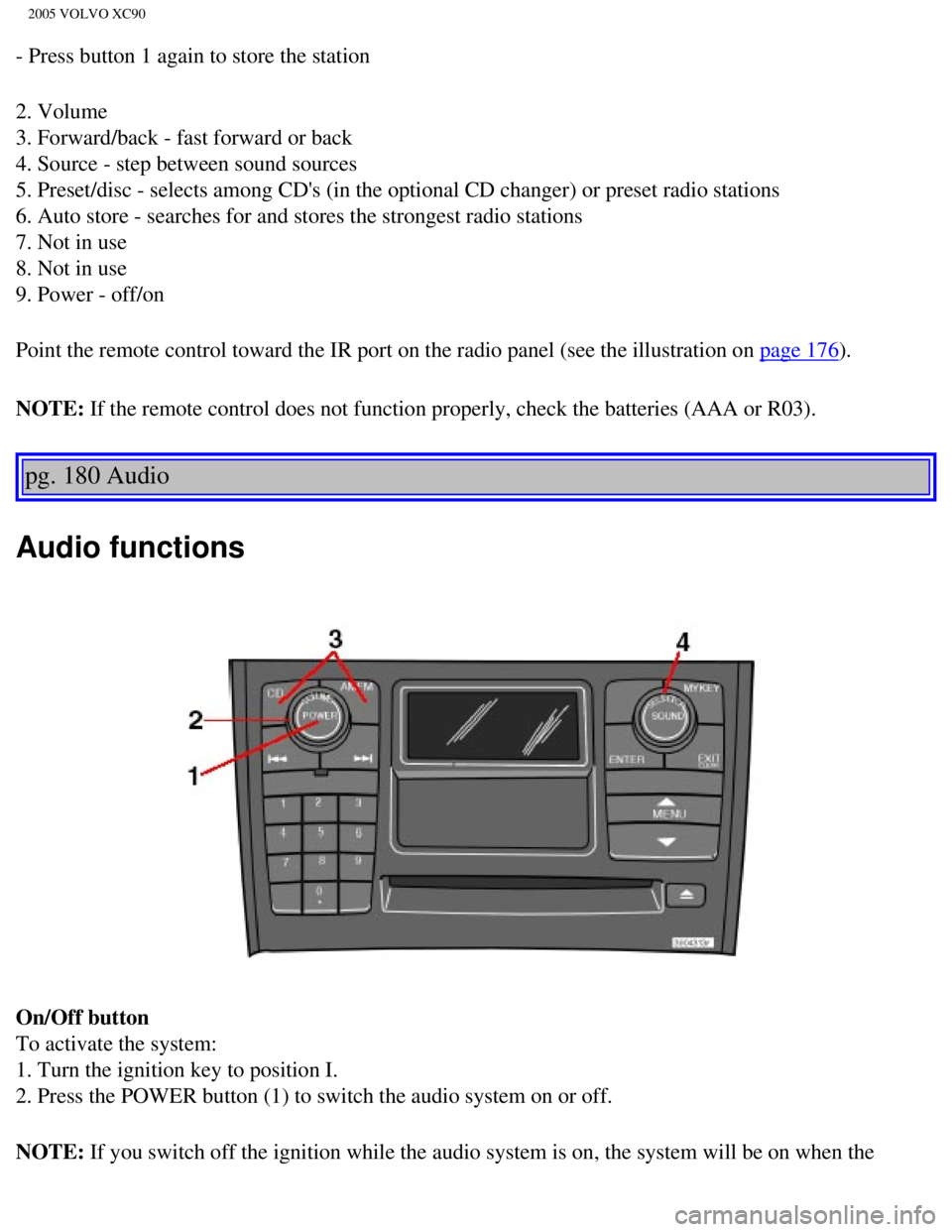
Audio functions
On/Off button
To activate the system:
1. Turn the ignition key to position I.
2. Press the POWER button (1) to switch the audio system on or off.
NOTE: If you switch off the ignition while the audio system is on, the system \
will be on when the
file:///K|/ownersdocs/2005/2005_XC90/05xc90_11a.htm (6 of 18)12/30/200\
6 4:42:43 PM
Page 227 of 263
 clockwise or counterclockwise to raise or lower the \
volume. The volume control is
electronic and has no end positio")
2005 VOLVO XC90
ignition is switched on again.
Volume control
Turn the knob (2) clockwise or counterclockwise to raise or lower the \
volume. The volume control is
electronic and has no end position. Volume can also be raised (+) or l\
owered (-) using the optional
steering wheel keypad.
Pause mode
If the volume is turned off, the CD player will go into pause mode. Re-a\
ctivate the player by turning up
the volume.
Selecting a sound source
A sound source can be selected either with the function buttons (3) - \
CD, AM/FM, or with the
SELECTOR control (4).
To select a sound source:
l Turn the SELECTOR control to choose FM1, FM2, AM, CD, CD changer (optio\
n)
l Press the AM/FM button repeatedly to choose between FM1, FM2, AM
l Press the CD button to change to the CD player or optional CD changer
The selected sound source will be shown in the display.
pg. 181 Audio
Sound settings
1. Press the SOUND button (1) repeatedly until you come to the setting\
that you wish to change. Choose
BASS, TREBLE, FADER, BALANCE, SUBWOOFER (option), CENTER (option) or\
SURROUND
file:///K|/ownersdocs/2005/2005_XC90/05xc90_11a.htm (7 of 18)12/30/200\
6 4:42:43 PM
Page 248 of 263

2005 VOLVO XC90
l Refer to the garage door opener owner's manual for verification.
l If your hand-held transmitter appears to program the HomeLink® Univer\
sal Transceiver but the
programmed button does not activate the garage door, your garage door op\
ener may have a rolling code.
l Press the programmed HomeLink® button. If the garage door opener has \
the rolling code feature, the
HomeLink® indicator light flashes rapidly and then glows steadily aft\
er approximately 2 seconds.
To train a rolling code garage door opener,
follow these instructions after programming the desired transceiver butt\
on according to "Programming
the transceiver." The help of a second person may make training easier.
1. Locate the training button on the garage door opener motor head unit.\
The location and color of the
training button may vary. If you encounter difficulty, refer to the gara\
ge door opener owner's manual or
call toll-free 1-800-355-3515 (Internet:
www.HomeLink.com).
2. Press the "training" button on the garage door opener motor head unit\
until the "training" light comes
on.
3. Press and release the programmed HomeLink® button. Press and relea\
se the programmed
HomeLink® button a second time to complete the training process.
4. Some garage door openers may require you to do this procedure a third\
time to complete the training.
5. The programmed button on your HomeLink® Universal Transceiver shou\
ld now operate your garage
door opener. The original hand-held transmitter can also be used, as des\
ired, to operate the garage door.
The remaining two HomeLink® buttons can be programmed in the same way\
. In the event of any
problems in programming the HomeLink® Universal Transceiver, call tol\
l-free 1-800-355-3515
(Internet:
www.HomeLink.com).
Operating the HomeLink® Universal Transceiver
Once programmed, the HomeLink® Universal Transceiver can be used in p\
lace of your handheld
transmitters.
To operate, the key must be turned to the "accessory" position (II) or\
the engine must be running. Press
the programmed HomeLink® button to activate the garage door, driveway\
gate, security lighting, home
security system, etc.
pg. 198 Audio
Your original hand-held transmitters may, of course, be used at any time\
.
Erasing programmed buttons
Individual buttons cannot be erased. To erase all three programmed butto\
ns:
1. Turn the ignition key to the "accessory" position (II).
2. Hold down the two outside buttons on the HomeLink® Universal Trans\
ceiver for about 20 seconds,
until HomeLink®'s indicator light begins to flash.
file:///K|/ownersdocs/2005/2005_XC90/05xc90_11b.htm (10 of 11)12/30/20\
06 4:42:44 PM