warning VOLVO XC90 2005 Owner's Guide
[x] Cancel search | Manufacturer: VOLVO, Model Year: 2005, Model line: XC90, Model: VOLVO XC90 2005Pages: 263, PDF Size: 6.99 MB
Page 48 of 263

2005 VOLVO XC90
manual folding, reset the folding mirrors as follows:
l Turn the ignition key to position II.
l Manually fold the mirror(s) to the normal position.
l Press the button to fold both mirrors in.
l Press the button again to fold the mirrors out to their normal position.\
pg. 32 Instruments and controls
Park Assist (option/accessory as available)
This system provides an audible warning when the vehicle is being parked\
or if it is driven close to a
person or object. See
page 101 for more information.
NOTE: The system activates automatically when the engine is started, and can \
be deactivated by
pressing this button (e.g. when towing a trailer) or reactivated if ne\
cessary.
Temporarily disconnecting the alarm sensors (option)
See
page 83 for more details.
Auxiliary lights
This button is used to switch on auxiliary lights (if installed). An L\
ED in the switch will light up to
indicate that the auxiliary lights are illuminated.
file:///K|/ownersdocs/2005/2005_XC90/05xc90_02a.htm (10 of 17)12/30/20\
06 4:42:27 PM
Page 54 of 263
2005 VOLVO XC90
WARNING!
The Never adjust the steering wheel while
driving.
pg. 36 Instruments and controls
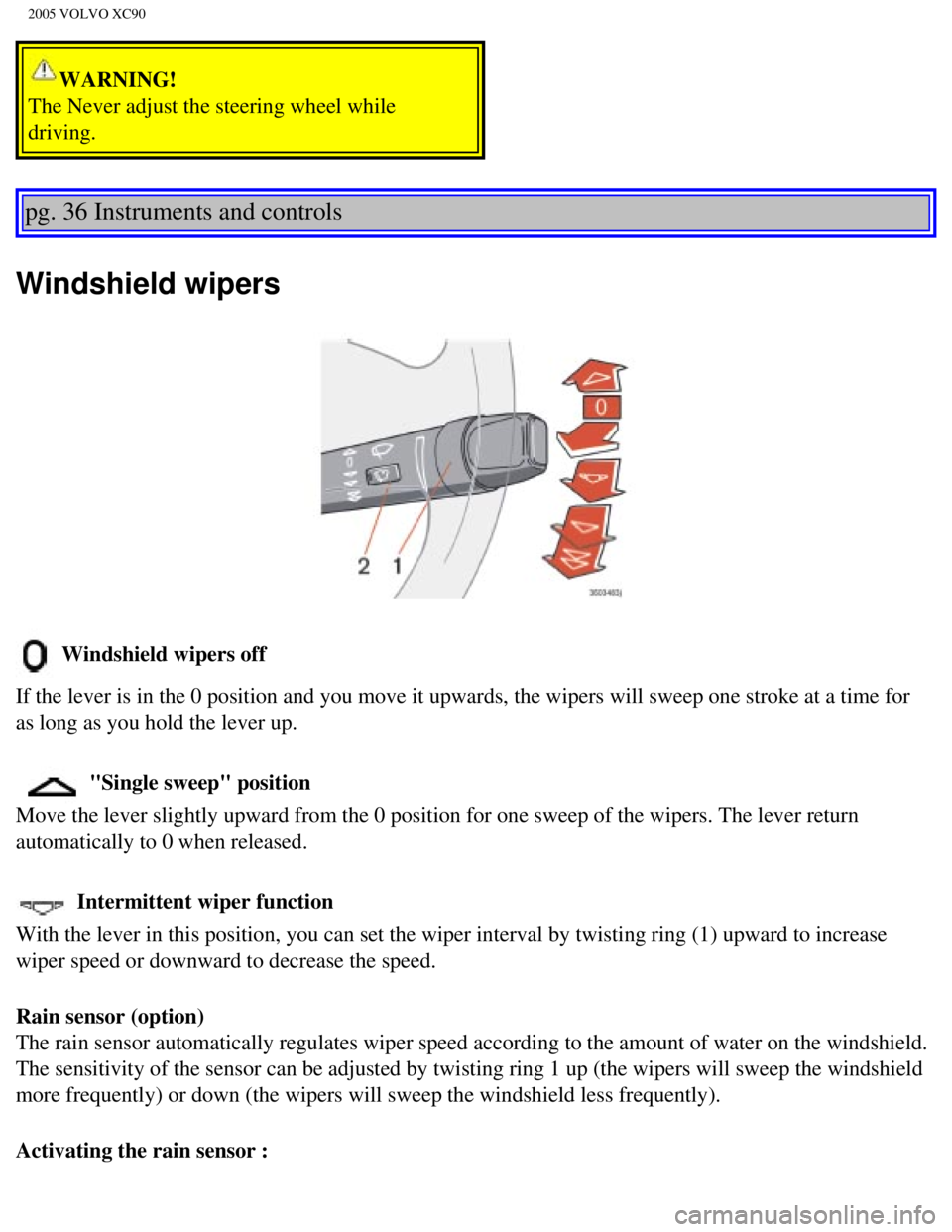
Windshield wipers
Windshield wipers off
If the lever is in the 0 position and you move it upwards, the wipers wi\
ll sweep one stroke at a time for
as long as you hold the lever up.
"Single sweep" position
Move the lever slightly upward from the 0 position for one sweep of the \
wipers. The lever return
automatically to 0 when released.
Intermittent wiper function
With the lever in this position, you can set the wiper interval by twist\
ing ring (1) upward to increase
wiper speed or downward to decrease the speed.
Rain sensor (option)
The rain sensor automatically regulates wiper speed according to the amo\
unt of water on the windshield.
The sensitivity of the sensor can be adjusted by twisting ring 1 up (th\
e wipers will sweep the windshield
more frequently) or down (the wipers will sweep the windshield less fr\
equently).
Activating the rain sensor :
file:///K|/ownersdocs/2005/2005_XC90/05xc90_02a.htm (16 of 17)12/30/20\
06 4:42:27 PM
Page 57 of 263
2005 VOLVO XC90
pg. 38 Instruments and controls
Hazard warning flashers, rear window/sideview mirror
defroster, heated front seats
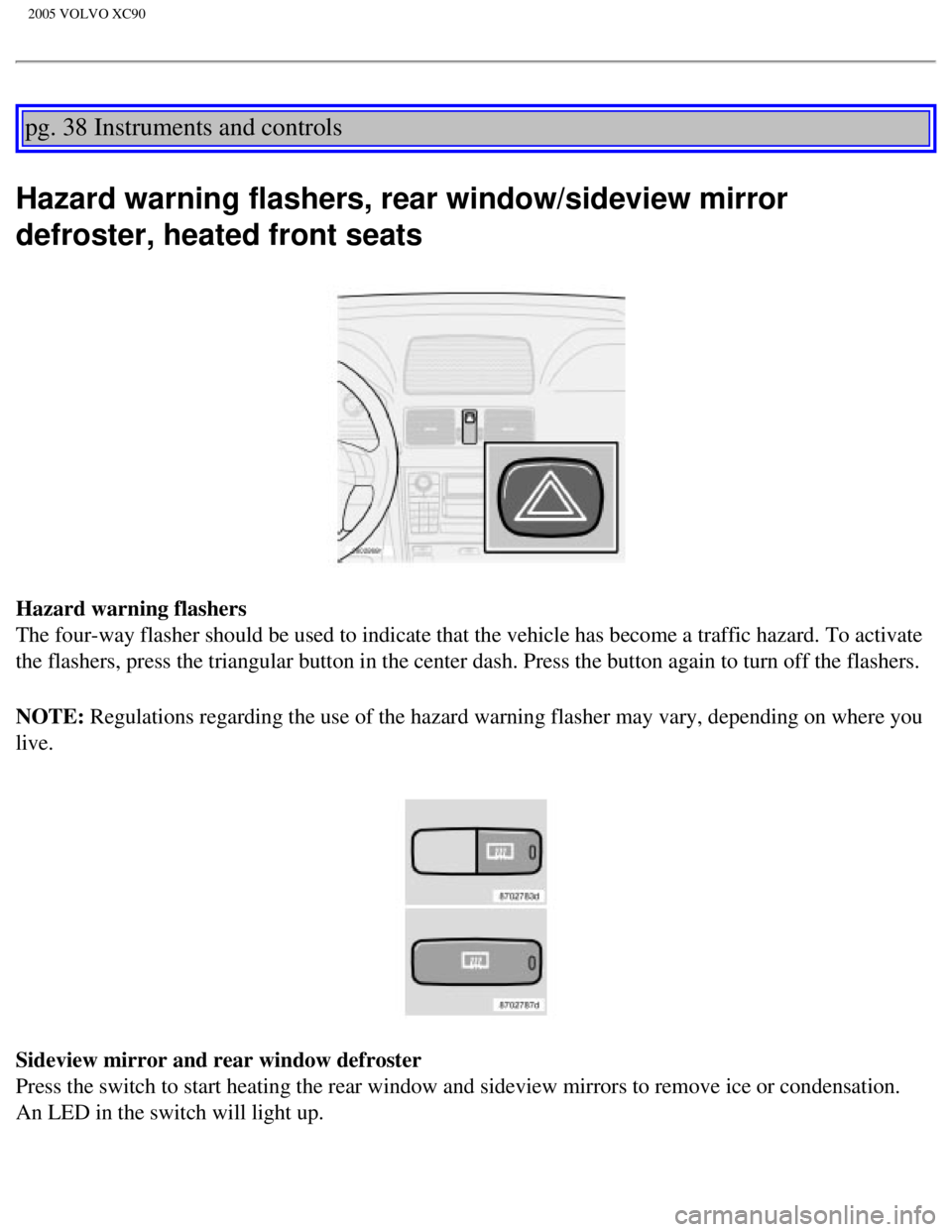
Hazard warning flashers
The four-way flasher should be used to indicate that the vehicle has bec\
ome a traffic hazard. To activate
the flashers, press the triangular button in the center dash. Press the \
button again to turn off the flashers.
NOTE: Regulations regarding the use of the hazard warning flasher may vary, de\
pending on where you
live.
Sideview mirror and rear window defroster
Press the switch to start heating the rear window and sideview mirrors t\
o remove ice or condensation.
An LED in the switch will light up.
file:///K|/ownersdocs/2005/2005_XC90/05xc90_02b.htm (2 of 17)12/30/200\
6 4:42:28 PM
Page 58 of 263

2005 VOLVO XC90
A timer automatically switches off the heating to the sideview mirrors a\
fter approximately 4 minutes and
to the rear window after approximately 12 minutes. The LED will go out c\
orrespondingly.
Heated front seats (option)
l The front seat heating can be switched on and off as required.
l Press the switch once for maximum seat heating. Both LED's in the switch\
will be lit.
l Press the switch a second time for comfort heating. One LED in the switc\
h will be lit.
l Press the switch a third time to turn the heating off completely.
The seat heating for the passenger seat should be switched off when the \
seat is not occupied.
pg. 39 Instruments and controls
Trip computer (option)
The trip computer stores information gathered from several systems in yo\
ur vehicle and has four menus
that can be displayed in the text window.
l Driving distance on current fuel reserve
l Average fuel consumption
l Current fuel consumption
l Average speed
l Current speed in mph (Canadian models only)
NOTE: Warning messages from the vehicle's monitoring systems will override the\
trip computer
function. If a warning message is displayed in the text window while you\
are using the trip computer,
file:///K|/ownersdocs/2005/2005_XC90/05xc90_02b.htm (3 of 17)12/30/200\
6 4:42:28 PM
Page 62 of 263

2005 VOLVO XC90
WARNING!
The Cruise control should not be used in heavy traffic or when driving o\
n wet or slippery roads, or
when driving on unpaved or uneven road surfaces. Cruise control may not \
maintain set speed on steep
downgrades.
pg. 42 Instruments and controls
Parking brake, Opening/closing the hood
Parking brake
l To apply the parking brake, press the pedal (C). The brake is applied \
to the rear wheels. The indicator
light in the instrument panel will light up to indicate that the parking\
brake is applied.
NOTE: There is also an audible signal that will sound if the car is driven wi\
th the parking brake
engaged.
l Release the parking brake pulling out the lower edge of the release hand\
le (A).
l If you inadvertently pull the plastic cover (B), it can be pressed bac\
k into place.
WARNING!
Always use the parking brake when parking. On hills, also turn the front\
wheels toward the curb.The
indicator light in the instrument panel will light up even if the parkin\
g brake is applied only slightly.
Be sure to press down on the pedal sufficiently.
file:///K|/ownersdocs/2005/2005_XC90/05xc90_02b.htm (7 of 17)12/30/200\
6 4:42:28 PM
Page 63 of 263
 located under the left side of the dashboard to \
release the hood lock.
2. Lift the hood slightly.
3. Press up th")
2005 VOLVO XC90
Opening the hood
Opening/closing the hood
1. Pull the lever (1) located under the left side of the dashboard to \
release the hood lock.
2. Lift the hood slightly.
3. Press up the release control (2) located under the front edge of th\
e hood and lift.
To close the hood, place your hand on it and press down until the hood l\
ocks in the closed position.
WARNING!
l Do not grasp the ribs in the grille when closing the hood. If your finge\
rs protrude through the
grille, they could be injured on components in the engine compartment as\
the grille closes. We
recommend pressing down on the hood to close it.
l Check that the hood locks properly when closed!
pg. 43 Instruments and controls
Opening the tailgate, Auxiliary 12-volt sockets
file:///K|/ownersdocs/2005/2005_XC90/05xc90_02b.htm (8 of 17)12/30/200\
6 4:42:28 PM
Page 65 of 263

2005 VOLVO XC90
12-volt socket in the cargo compartment
l If the ignition is switched off and a device drawing more than 0.1A is c\
onnected to a socket, a battery
warning will be displayed in the text window.
l The covers should be kept on when the auxiliary sockets are not in use. \
l Maximum current from the sockets is 15A.
Ashtrays/cigarette lighter
The auxiliary sockets can also be used for cigarette lighters.
Ashtrays and lighters are available as accessories. Please contact your \
Volvo retailer.
pg. 44 Instruments and controls
Electrically operated windows
The electrically operated windows are controlled by buttons in the arm r\
ests.
l The ignition switch must be ON* (ignition key in position I, II or the \
engine running) for the
electrically operated windows to function.
l To lower: Press down the front edge of the button to the first detent (\
"stop").
l To raise: Lightly pull up the front edge of the button to the first dete\
nt ("stop").
* The electrically operated windows will also function after the ignitio\
n has been switched off as long as
neither of the front doors has been opened.
Auto up/down function (front doors only):
Either front door window can be opened or closed automatically.
Auto down: Press the front part of the button as far down as possible and release i\
t immediately. To
stop the window at any time, pull the button up.
Auto up: Pull the front part of the button up as far as possible and release it i\
mmediately. To stop the
file:///K|/ownersdocs/2005/2005_XC90/05xc90_02b.htm (10 of 17)12/30/20\
06 4:42:28 PM
Page 66 of 263

2005 VOLVO XC90
window at any time, press the button down.
A - front windows, B - rear windows
NOTE: If a window is obstructed during auto-up, it will automatically reverse \
direction and return to its
starting position. If a window is repeatedly obstructed during auto-up o\
peration, an overload protection
circuit breaker will temporarily halt window function. The window will r\
eturn to normal function after a
brief cool-down period.
WARNING!
l Always remove the ignition key when the vehicle is unattended.
l Make sure that childrens' hands are clear before raising the
windows.
l Never leave children unattended in the vehicle.
pg. 45 Instruments and controls
Lockout switch for rear windows
file:///K|/ownersdocs/2005/2005_XC90/05xc90_02b.htm (11 of 17)12/30/20\
06 4:42:28 PM
Page 69 of 263
 to activate the \
adjustment control. Use")
2005 VOLVO XC90
The mirror control switches are located on the driver's door armrest.
Driver's side: Press the L button (a light in the switch will go on) to activate the \
adjustment control. Use
this control to adjust the driver's door mirror.
Passenger's side: Press the R switch (a light in the switch will go on) to activate the \
adjustment control.
Use this control to adjust the passenger's door mirror.
CAUTION:
Use the mirror heating function (see
page 53) to remove ice or snow from the mirrors. An ice scraper
could damage the surface of the mirror.
After you have adjusted the mirror(s), press the L or R switch again (\
the LED will go out) to deactivate
the adjustment control.
WARNING!
The mirrors should always be adjusted prior to driving. Objects seen in \
the passenger's side wide-
angle sideview mirror are closer than they appear to be.
Mirror memory function (with the central locking system) - option
If you lock the vehicle and later unlock it with the same remote control and open the driver's door, the
sideview mirrors (and the driver's seat) will automatically move to th\
e position they were in when you
left the vehicle. This feature will work in the same way with all of the\
remote control transmitters (up to
3) that you use with your vehicle. This feature will not function if yo\
u lock your vehicle with the key.
pg. 47 Instruments and controls
Power moonroof (option)
file:///K|/ownersdocs/2005/2005_XC90/05xc90_02b.htm (14 of 17)12/30/20\
06 4:42:28 PM
Page 71 of 263

2005 VOLVO XC90
the moonroof to the "comfort"* position. Pull the switch rearward again \
to open the moonroof
completely.
Manual close: Push the switch to position 2 and hold it until the moonroof has closed\
completely or to
the position of your choice.
Auto close: Push the switch forward as far as possible (position 1) and release i\
t to automatically close
the moonroof. CAUTION
l Remove ice and snow before opening the
moonroof.
l Do not operate the moonroof if it is frozen closed.
l Never place heavy objects on the moonroof.
WARNING!
l Never open/close the moonroof if it is obstructed in any way when in ope\
ration.
l Never allow a child to operate the moonroof.
l Never extend any object or body part though the open moonroof, even if t\
he vehicle's ignition is
completely switched off.
l Never leave a child alone in a vehicle.
* A position where the moonroof is not quite fully open, which helps all\
eviate "rumbling" wind noise.
pg. 48 Instruments and controls
If the moonroof is obstructed during auto-close operation, it will autom\
atically reverse direction and
return to its starting position. If the moonroof is repeatedly obstructe\
d during auto-close operation, an
overload circuit breaker will temporarily halt moonroof function. The mo\
onroof will return to normal
function after a brief cool-down period.
file:///K|/ownersdocs/2005/2005_XC90/05xc90_02b.htm (16 of 17)12/30/20\
06 4:42:28 PM