ignition VOLVO XC90 2005 Service Manual
[x] Cancel search | Manufacturer: VOLVO, Model Year: 2005, Model line: XC90, Model: VOLVO XC90 2005Pages: 263, PDF Size: 6.99 MB
Page 204 of 263

2005 VOLVO XC90
A-To open, press the plastice catches on the rear side of the fuse box c\
over and lift.
Fuse box in the engine compartment
When replacing fuses, be sure to replace a blown fuse with a new one of \
the same color and amperage
(written on the fuse). Fuses in positions marked X are replacement fus\
es.
Fuses in the engine compartment
No. Amperage
1. -
2. Auxiliary lights (accessory) 20A
3. -
4. Oxygen sensors 20A
5. Crankcase ventilation heater, solenoid valves, fuel tank leakage moni\
tor 10A
6. Mass air flow sensor, engine control module, injectors 15A
7. -
8. A/C compressor, accelerator pedal position sensor, E-box fan 10A
9. -
10. -
11. Ignition coils 20A
12. -
13. Windshield wipers 25A
14. ABS 30A
file:///K|/ownersdocs/2005/2005_XC90/05xc90_09b.htm (19 of 25)12/30/20\
06 4:42:40 PM
Page 206 of 263

2005 VOLVO XC90
5. Driver's door - central locking, power windows, door mirror25A
6. Front passenger's door - central locking, power windows, door mirror \
25A
7. -
8. -
9. Audio, navigation system (option) 10A
10. On-board diagnostics, headlight switch, steering wheel angle sensor,\
steering wheel
module 5A
11. Ignition switch, SRS, engine control module, immobilizer 7.5A
12. Ceiling lighting, upper electronic control module 10A
13. Moonroof (option) 15A
14. -
15. -
16. -
17. -
18. -
19. -
20. -
21. -
22. -
23. -
24. -
25. -
26. -
27. -
28. -
29. -
30. -
31. -
32. -
33. -
34. -
35. -
36. -
37. -
38.-
file:///K|/ownersdocs/2005/2005_XC90/05xc90_09b.htm (21 of 25)12/30/20\
06 4:42:40 PM
Page 218 of 263

2005 VOLVO XC90
l Keep your engine properly tuned. Certain engine malfunctions, particular\
ly involving the electrical,
fuel or distributor ignition systems, may cause unusually high three-way\
catalytic converter
temperatures. Do not continue to operate your vehicle if you detect engi\
ne misfire, noticeable loss of
power or other unusual operating conditions, such as engine overheating \
or backfiring. A properly tuned
engine will help avoid malfunctions that could damage the three-way cata\
lytic converter.
l Do not park your vehicle over combustible materials, such as grass or le\
aves, which can come into
contact with the hot exhaust system and cause such materials to ignite u\
nder certain wind and weather
conditions.
l Excessive starter cranking (in excess of one minute), or an intermitte\
ntly firing or flooded engine can
cause three-way catalytic converter or exhaust system overheating.
l Remember that tampering or unauthorized modifications to the engine, the\
Electronic Control
Module, or the vehicle may be illegal and can cause three-way catalytic \
converter or exhaust system
overheating. This includes:
- Altering fuel injection setting or components.
- Altering emission system components or location or removing components\
.
- Repeated use of leaded fuel.
NOTE: Unleaded fuel is required for vehicles with three-way catalytic converte\
rs.
pg. 171 Specifications
Electrical system
12-volt system with voltage controlled generator. Single wire system in \
which the chassis and engine
block are used as conductors, grounded on the chassis.
Battery 2.5TT6
Voltage 12 V12 V
Cold start capacity
(CCA) 520 A
600 A
Reserve capacity (RC) 90
min 115 min
If you must replace your battery, be sure to replace it with a battery o\
f the same cold start capacity and
reserve capacity as the original (See the decal on the battery). Generator max. current 140 A*160 A
Starter motor, power 1.4 kW 1.7 kW
Spark plugs P/N272313-8 or equivalent
file:///K|/ownersdocs/2005/2005_XC90/05xc90_10.htm (8 of 10)12/30/2006\
4:42:41 PM
Page 225 of 263

2005 VOLVO XC90
sensitivity of these should be equal to or greater than 102 dB. The head\
phone connections are intended
for 3.5 mm contacts and are located under the lower edge of the socket.
All headphones are automatically turned off when the ignition is switche\
d off. They must be manually
restarted when the ignition is switched on again.
Headphones - limitations
l The headphones will only work when the ignition key is in position I or \
higher.
l If a set of headphones is connected to the same source that is being sen\
t through the speakers, the
headphone controls cannot be used to change track or station. This is to\
prevent the driver from being
distracted by an unexpected change in music.
l If the driver selects the same sound source as someone listening to this\
source through headphones,
the driver takes control of the sound source.
l Only one disc in the optional CD changer, and one track on the CD can be\
played at a time.
l Headphone users can choose from among the preset radio stations (AM, FM\
1, FM2) previously set by
the driver.
l If FM is played in the speakers, AM is not available and vice versa.
pg. 179 Audio
Remote control (option)
1. Memory - stores radio stations that have been found by a search
To store a station:
- Press the memory button (1). The preset station number will flash 4 \
times in the display
- While the preset number is flashing, use the + or - buttons (5) to s\
elect a position at which to store the
station
file:///K|/ownersdocs/2005/2005_XC90/05xc90_11a.htm (5 of 18)12/30/200\
6 4:42:43 PM
Page 226 of 263
2005 VOLVO XC90
- Press button 1 again to store the station
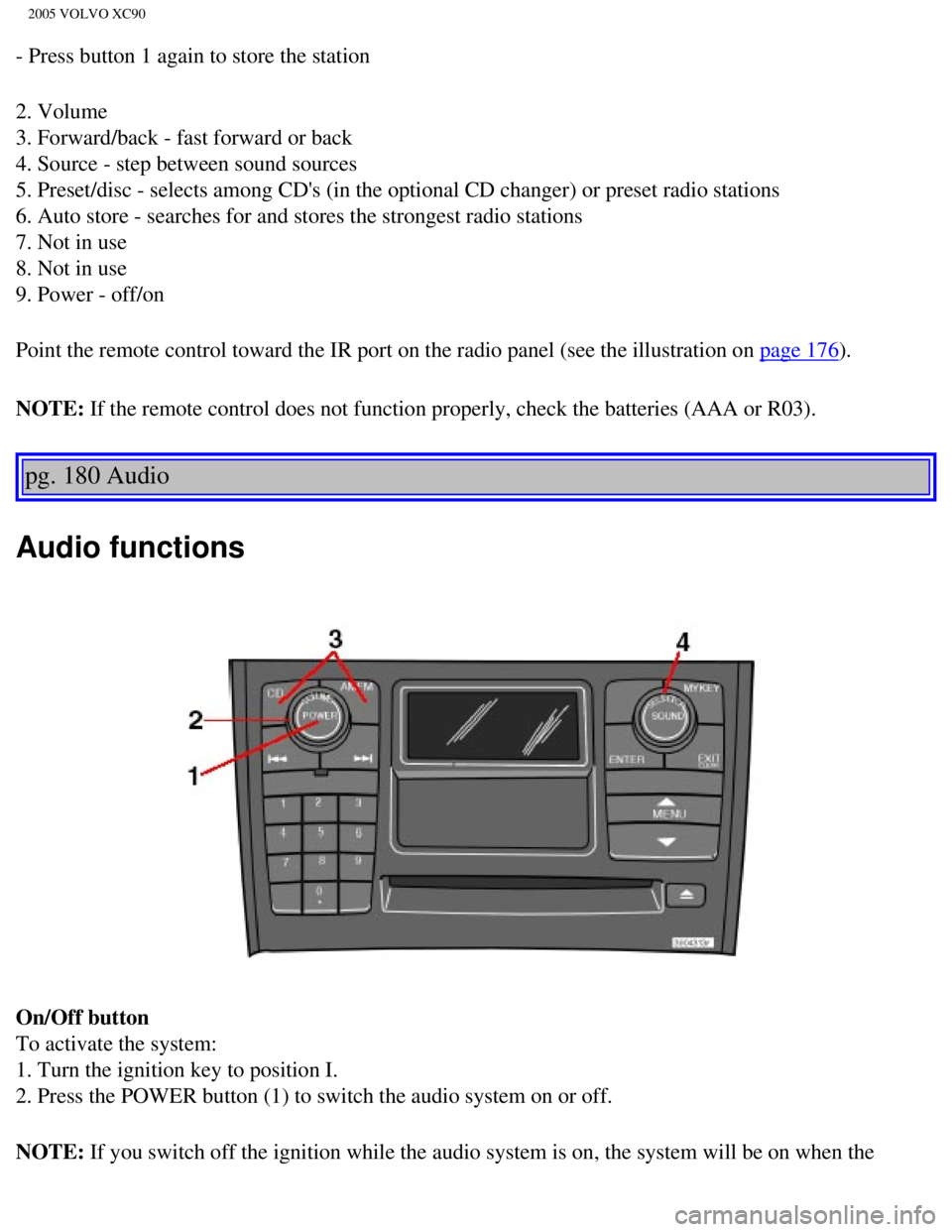
2. Volume
3. Forward/back - fast forward or back
4. Source - step between sound sources
5. Preset/disc - selects among CD's (in the optional CD changer) or pr\
eset radio stations
6. Auto store - searches for and stores the strongest radio stations
7. Not in use
8. Not in use
9. Power - off/on
Point the remote control toward the IR port on the radio panel (see the\
illustration on
page 176).
NOTE: If the remote control does not function properly, check the batteries (\
AAA or R03).
pg. 180 Audio
Audio functions
On/Off button
To activate the system:
1. Turn the ignition key to position I.
2. Press the POWER button (1) to switch the audio system on or off.
NOTE: If you switch off the ignition while the audio system is on, the system \
will be on when the
file:///K|/ownersdocs/2005/2005_XC90/05xc90_11a.htm (6 of 18)12/30/200\
6 4:42:43 PM
Page 227 of 263
 clockwise or counterclockwise to raise or lower the \
volume. The volume control is
electronic and has no end positio")
2005 VOLVO XC90
ignition is switched on again.
Volume control
Turn the knob (2) clockwise or counterclockwise to raise or lower the \
volume. The volume control is
electronic and has no end position. Volume can also be raised (+) or l\
owered (-) using the optional
steering wheel keypad.
Pause mode
If the volume is turned off, the CD player will go into pause mode. Re-a\
ctivate the player by turning up
the volume.
Selecting a sound source
A sound source can be selected either with the function buttons (3) - \
CD, AM/FM, or with the
SELECTOR control (4).
To select a sound source:
l Turn the SELECTOR control to choose FM1, FM2, AM, CD, CD changer (optio\
n)
l Press the AM/FM button repeatedly to choose between FM1, FM2, AM
l Press the CD button to change to the CD player or optional CD changer
The selected sound source will be shown in the display.
pg. 181 Audio
Sound settings
1. Press the SOUND button (1) repeatedly until you come to the setting\
that you wish to change. Choose
BASS, TREBLE, FADER, BALANCE, SUBWOOFER (option), CENTER (option) or\
SURROUND
file:///K|/ownersdocs/2005/2005_XC90/05xc90_11a.htm (7 of 18)12/30/200\
6 4:42:43 PM
Page 246 of 263

2005 VOLVO XC90
can be dried with a clean, lint-free cloth. Optical components in the CD\
changer may, however, take up
to one hour to dry off.
l Never attempt to play a disc which is damaged in any way.
l When not in use, the discs should be stored in their covers. Avoid stori\
ng discs in excessive heat,
direct sunlight or dusty locations.
pg. 196 Audio
HomeLink® Universal Transceiver
Hand-held transmitter
HomeLink® Universal Transceiver
HomeLink® is an advanced system that can be programmed to learn the c\
odes of three different remote
controlled-devices (e.g., garage door openers, remote lighting, entry d\
oor lock). HomeLink®'s sun visor-
mounted transceiver, powered by your vehicle's electrical system, may th\
en be used in place of your
hand-held remote controls.
NOTE: For your security, the HomeLink® Universal Transceiver is designed to\
not function if you lock
your vehicle from the outside.
Programming the transceiver
1. The ignition switch must be turned to the "accessory" position (II)\
before programming the
HomeLink® Universal Transceiver.
2. Begin by erasing all 3 factory default channels. Hold down the two ou\
tside buttons (buttons 1 and 3 in
the illustration) on the HomeLink® Universal Transceiver for about 2\
0 seconds, until HomeLink®'s
indicator light begins to flash. Then release the buttons.
file:///K|/ownersdocs/2005/2005_XC90/05xc90_11b.htm (8 of 11)12/30/200\
6 4:42:44 PM
Page 248 of 263

2005 VOLVO XC90
l Refer to the garage door opener owner's manual for verification.
l If your hand-held transmitter appears to program the HomeLink® Univer\
sal Transceiver but the
programmed button does not activate the garage door, your garage door op\
ener may have a rolling code.
l Press the programmed HomeLink® button. If the garage door opener has \
the rolling code feature, the
HomeLink® indicator light flashes rapidly and then glows steadily aft\
er approximately 2 seconds.
To train a rolling code garage door opener,
follow these instructions after programming the desired transceiver butt\
on according to "Programming
the transceiver." The help of a second person may make training easier.
1. Locate the training button on the garage door opener motor head unit.\
The location and color of the
training button may vary. If you encounter difficulty, refer to the gara\
ge door opener owner's manual or
call toll-free 1-800-355-3515 (Internet:
www.HomeLink.com).
2. Press the "training" button on the garage door opener motor head unit\
until the "training" light comes
on.
3. Press and release the programmed HomeLink® button. Press and relea\
se the programmed
HomeLink® button a second time to complete the training process.
4. Some garage door openers may require you to do this procedure a third\
time to complete the training.
5. The programmed button on your HomeLink® Universal Transceiver shou\
ld now operate your garage
door opener. The original hand-held transmitter can also be used, as des\
ired, to operate the garage door.
The remaining two HomeLink® buttons can be programmed in the same way\
. In the event of any
problems in programming the HomeLink® Universal Transceiver, call tol\
l-free 1-800-355-3515
(Internet:
www.HomeLink.com).
Operating the HomeLink® Universal Transceiver
Once programmed, the HomeLink® Universal Transceiver can be used in p\
lace of your handheld
transmitters.
To operate, the key must be turned to the "accessory" position (II) or\
the engine must be running. Press
the programmed HomeLink® button to activate the garage door, driveway\
gate, security lighting, home
security system, etc.
pg. 198 Audio
Your original hand-held transmitters may, of course, be used at any time\
.
Erasing programmed buttons
Individual buttons cannot be erased. To erase all three programmed butto\
ns:
1. Turn the ignition key to the "accessory" position (II).
2. Hold down the two outside buttons on the HomeLink® Universal Trans\
ceiver for about 20 seconds,
until HomeLink®'s indicator light begins to flash.
file:///K|/ownersdocs/2005/2005_XC90/05xc90_11b.htm (10 of 11)12/30/20\
06 4:42:44 PM