AUX VOLVO XC90 2007 User Guide
[x] Cancel search | Manufacturer: VOLVO, Model Year: 2007, Model line: XC90, Model: VOLVO XC90 2007Pages: 268, PDF Size: 8.57 MB
Page 250 of 268

2007 Volvo XC90
Temp. unlock all ch.
This function will temporarily unlock all channels and make them availab\
le for selection. The channels
remain on the locked list and will again be locked the next time the ign\
ition is switched on.
CHANGE CODE
This function makes it possible to change the channel access code. The d\
efault code is 0000.
To change the code:
- Select CHANGE CODE and press ENTER.
- Enter the current code and press ENTER.
- Enter the new code and press ENTER.
- Confirm the new code and press ENTER.
If an incorrect code is entered, the text "Incorrect code!" is displayed\
.
If you have forgotten the access code:
Select "SIRIUS ID" in the Sirius settings menu and press ENTER.
Press and hold the ENTER button for 2 seconds.
The current code will be displayed.
Your Volvo retailer can also provide you with assistance.
1. The default code is 0000. If you have changed the code and forgotten \
it, see the section "If you have forgotten
the access code" on the following page.
pg. 232 Audio
Auxiliary equipment
AUX (option)
The AUX (auxiliary) port can be used to connect, for example, an mp3 p\
layer.
If the player is being charged through a 12- volt socket while it is con\
nect to the AUX port, sound
file:///K|/ownersdocs/2007/2007_XC90/07xc90_11.htm (17 of 26)12/30/200\
6 5:53:54 PM
Page 251 of 268

2007 Volvo XC90
quality may be impaired.
The volume of the external sound source AUX may be different from the vo\
lume of the internal sound
sources such as the CD player or the radio.
Auxiliary sound level
If the external sound source's volume is too high, the quality of the so\
und may be impaired.
This can be prevented by adjusting the external sound source's input vol\
ume.
- Select AUX VOLUME in the menu and press ENTER.
- Adjust the volume with SELECTOR (1) or with the up/down arrows (2)\
and press ENTER.
NOTE:
l This cannot be done with the optional steering wheel keypad.
l The cover over the cup holders should be open when an auxiliary device i\
s connected.
pg. 233 Audio
CD functions
Playing a CD
file:///K|/ownersdocs/2007/2007_XC90/07xc90_11.htm (18 of 26)12/30/200\
6 5:53:54 PM
Page 256 of 268
2007 Volvo XC90
See Audio Settings in the FM Menu.
AUX Menu (option)
1. AUX input vol
2. Audio Settings
1
See Audio Settings in the FM Menu
1. Certain audio systems
pg. 237 Audio
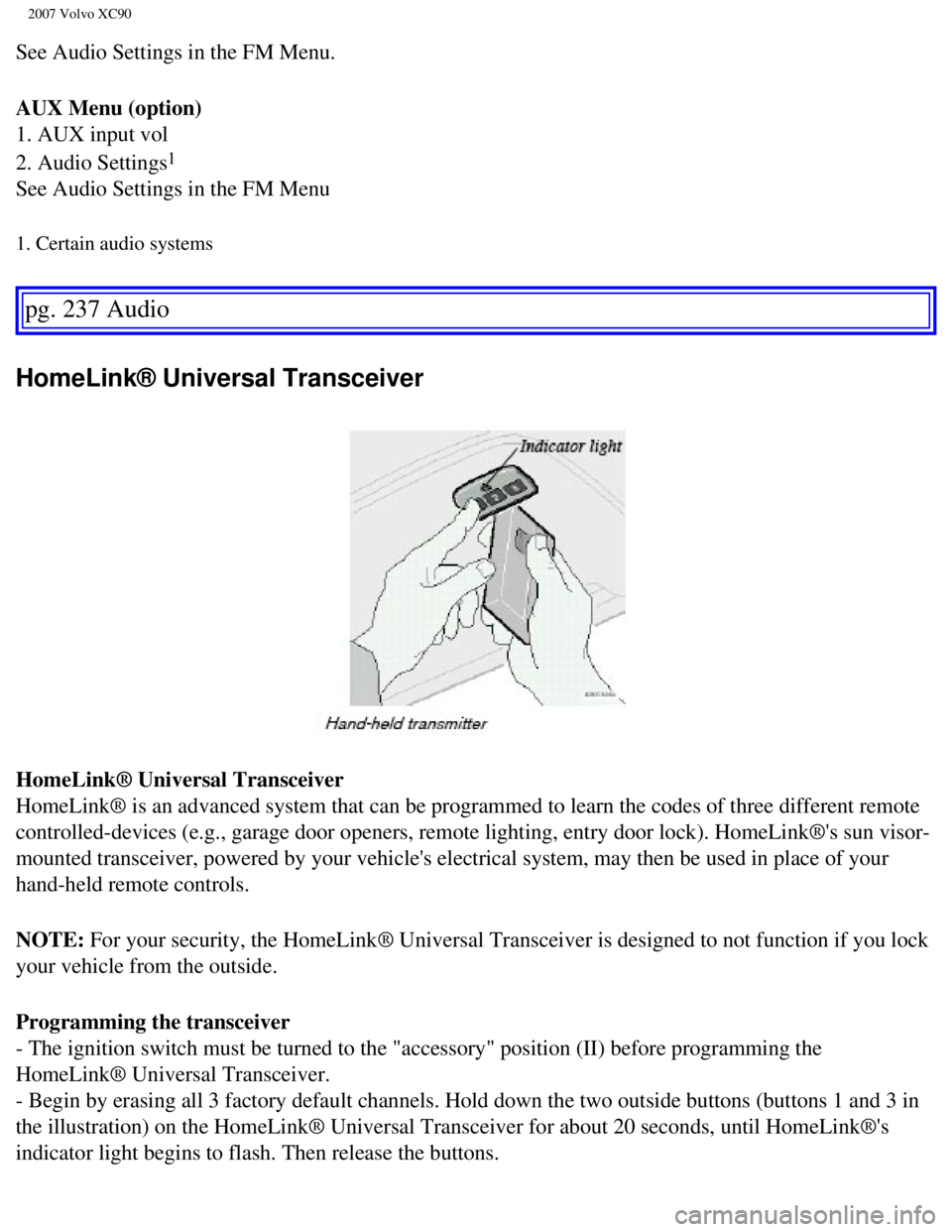
HomeLink® Universal Transceiver
HomeLink® Universal Transceiver
HomeLink® is an advanced system that can be programmed to learn the c\
odes of three different remote
controlled-devices (e.g., garage door openers, remote lighting, entry d\
oor lock). HomeLink®'s sun visor-
mounted transceiver, powered by your vehicle's electrical system, may th\
en be used in place of your
hand-held remote controls.
NOTE: For your security, the HomeLink® Universal Transceiver is designed t\
o not function if you lock
your vehicle from the outside.
Programming the transceiver
- The ignition switch must be turned to the "accessory" position (II) \
before programming the
HomeLink® Universal Transceiver.
- Begin by erasing all 3 factory default channels. Hold down the two out\
side buttons (buttons 1 and 3 in
the illustration) on the HomeLink® Universal Transceiver for about 2\
0 seconds, until HomeLink®'s
indicator light begins to flash. Then release the buttons.
file:///K|/ownersdocs/2007/2007_XC90/07xc90_11.htm (23 of 26)12/30/200\
6 5:53:54 PM
Page 260 of 268

2007 Volvo XC90
2 0 0 7
VOLVO XC90
Index
pg. 241-244 Index
A
A/C (air conditioning)
81
ABS
2, 49, 128
Accessory installation (special warnings)
5
Active Bi-Xenon headlights (ABL)
52, 55
Air cleaner
185
Air conditioning
76
Air distribution
78, 81
Air quality sensor
82
Air vents
78
Alarm
111
All Wheel Drive
126
All Wheel Drive - towing
135
Anti-lock Brake System (ABS)
2, 49
Ashtray
65, 94
Audio system
219
AUTO (climate control)
80
Autostart
119, 121
AUX (audio system)
232
Average speed
62
AWD
126
B
Bass
225
file:///K|/ownersdocs/2007/2007_XC90/07xc90_12.htm (1 of 9)12/30/2006 \
5:53:56 PM