2007 Volvo XC90
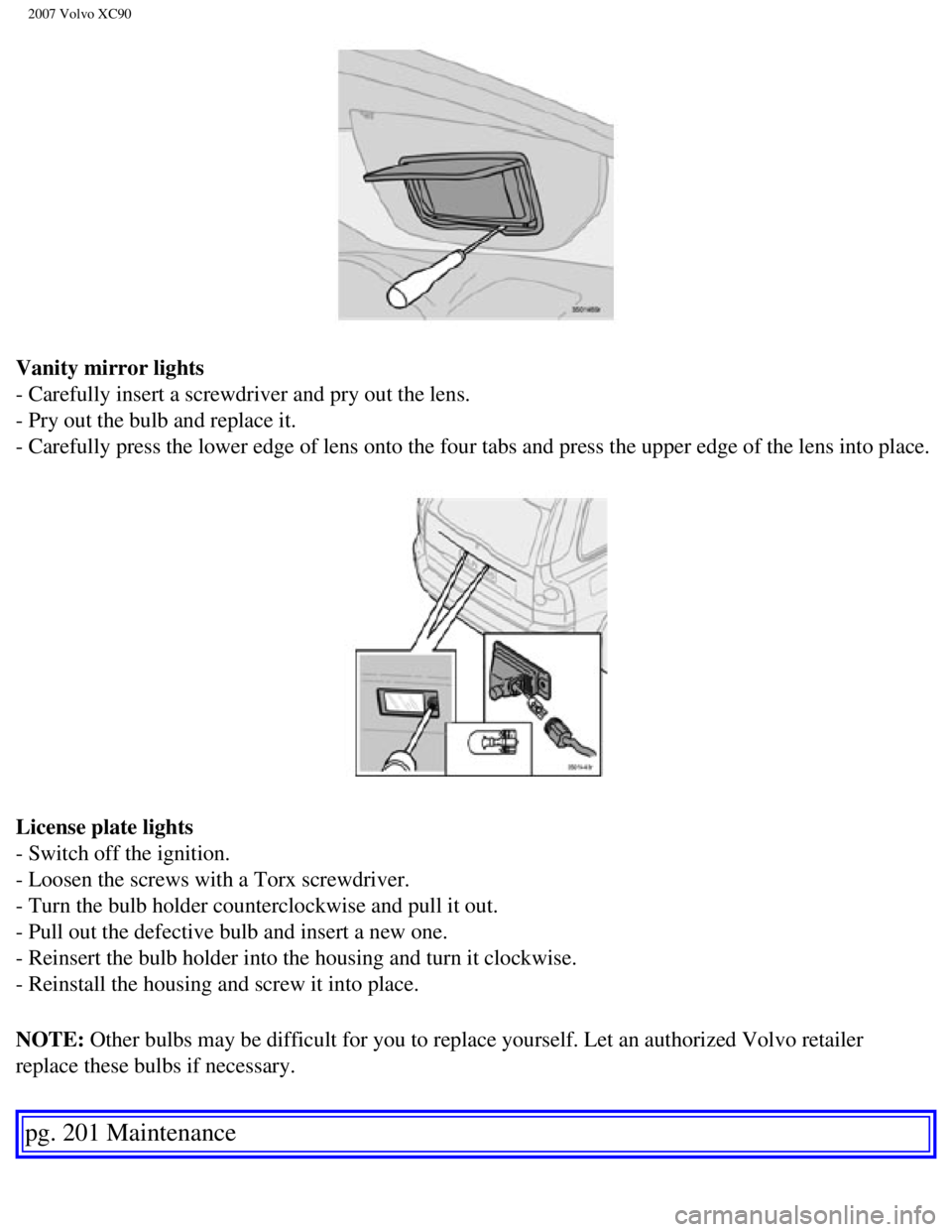
Vanity mirror lights
- Carefully insert a screwdriver and pry out the lens.
- Pry out the bulb and replace it.
- Carefully press the lower edge of lens onto the four tabs and press th\
e upper edge of the lens into place.
License plate lights
- Switch off the ignition.
- Loosen the screws with a Torx screwdriver.
- Turn the bulb holder counterclockwise and pull it out.
- Pull out the defective bulb and insert a new one.
- Reinsert the bulb holder into the housing and turn it clockwise.
- Reinstall the housing and screw it into place.
NOTE: Other bulbs may be difficult for you to replace yourself. Let an author\
ized Volvo retailer
replace these bulbs if necessary.
pg. 201 Maintenance
file:///K|/ownersdocs/2007/2007_XC90/07xc90_09.htm (28 of 37)12/30/200\
6 5:53:50 PM
2007 Volvo XC90
pg. 224 Audio
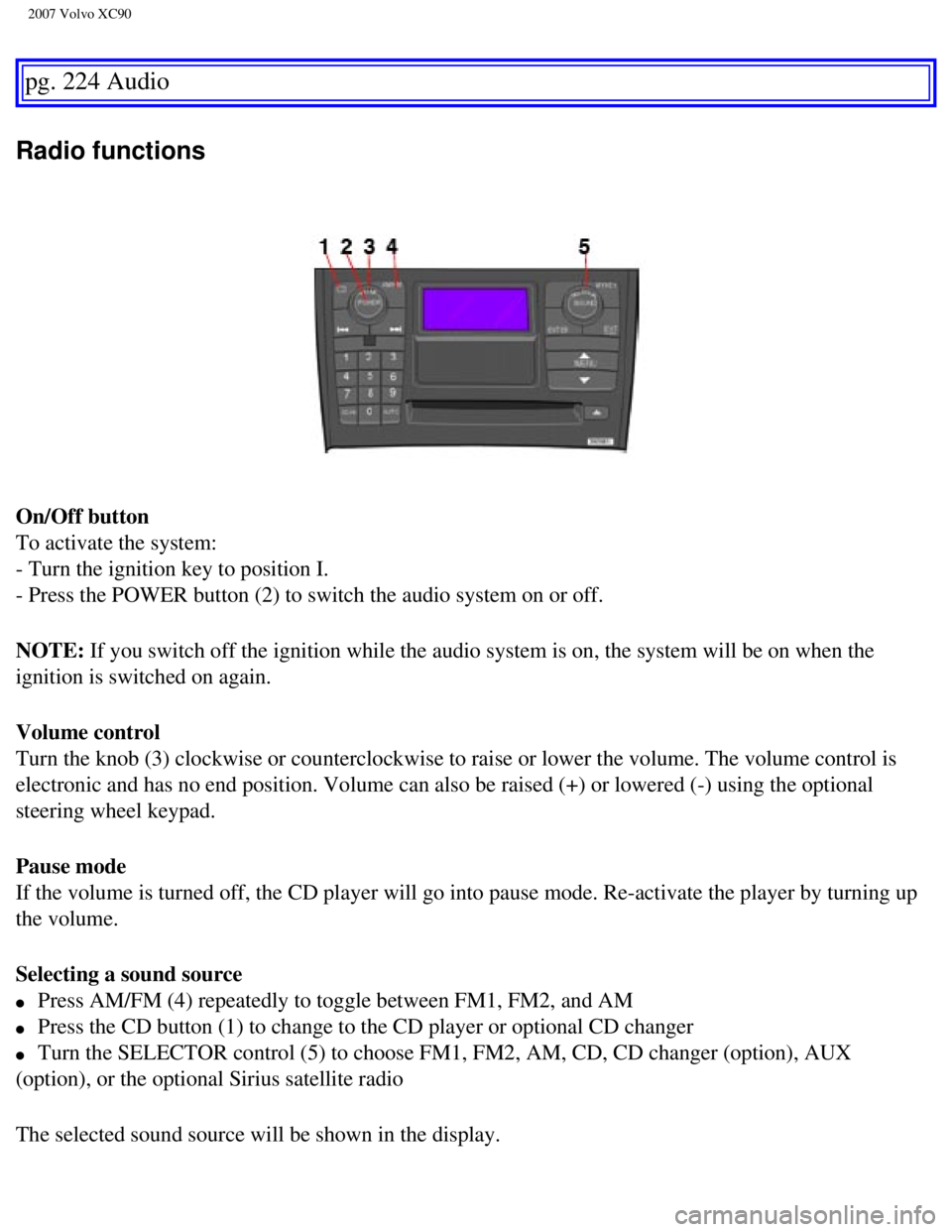
Radio functions
On/Off button
To activate the system:
- Turn the ignition key to position I.
- Press the POWER button (2) to switch the audio system on or off.
NOTE: If you switch off the ignition while the audio system is on, the system \
will be on when the
ignition is switched on again.
Volume control
Turn the knob (3) clockwise or counterclockwise to raise or lower the \
volume. The volume control is
electronic and has no end position. Volume can also be raised (+) or l\
owered (-) using the optional
steering wheel keypad.
Pause mode
If the volume is turned off, the CD player will go into pause mode. Re-a\
ctivate the player by turning up
the volume.
Selecting a sound source
l Press AM/FM (4) repeatedly to toggle between FM1, FM2, and AM
l Press the CD button (1) to change to the CD player or optional CD chan\
ger
l Turn the SELECTOR control (5) to choose FM1, FM2, AM, CD, CD changer (\
option), AUX
(option), or the optional Sirius satellite radio
The selected sound source will be shown in the display.
file:///K|/ownersdocs/2007/2007_XC90/07xc90_11.htm (7 of 26)12/30/2006\
5:53:54 PM
2007 Volvo XC90
Battery 183, 191, 216
Battery - replacing
192
Battery drain - avoiding
116
Belt check
184
Black Box (Vehicle Event Data)
180
Blind Spot Information System (BLIS)
145
Blower (fan)
80
Booster cushion (integrated)
40
Brake circuit
127
Brake fluid
189
Brake system
48, 127
Bulbs
194
Bulbs, list of
211
Bulbs, replacing
194
C
Capacity weight
161
Carbon Monoxide - Important Warning
115
Cargo capacity
210
CD functions
233
CD Pause
233
Central locking system - remote control
105
Changing a wheel
168
Changing coolant
184
Check Engine warning light
48
Child restraints
31
Child safety
28
Climate system
76
Clock
46
Coat hanger
96
Cold weather precautions
143
Compact disc care CD care
235
Coolant
188
file:///K|/ownersdocs/2007/2007_XC90/07xc90_12.htm (2 of 9)12/30/2006 \
5:53:56 PM