lock VOLVO XC90 2007 User Guide
[x] Cancel search | Manufacturer: VOLVO, Model Year: 2007, Model line: XC90, Model: VOLVO XC90 2007Pages: 268, PDF Size: 8.57 MB
Page 45 of 268
2007 Volvo XC90
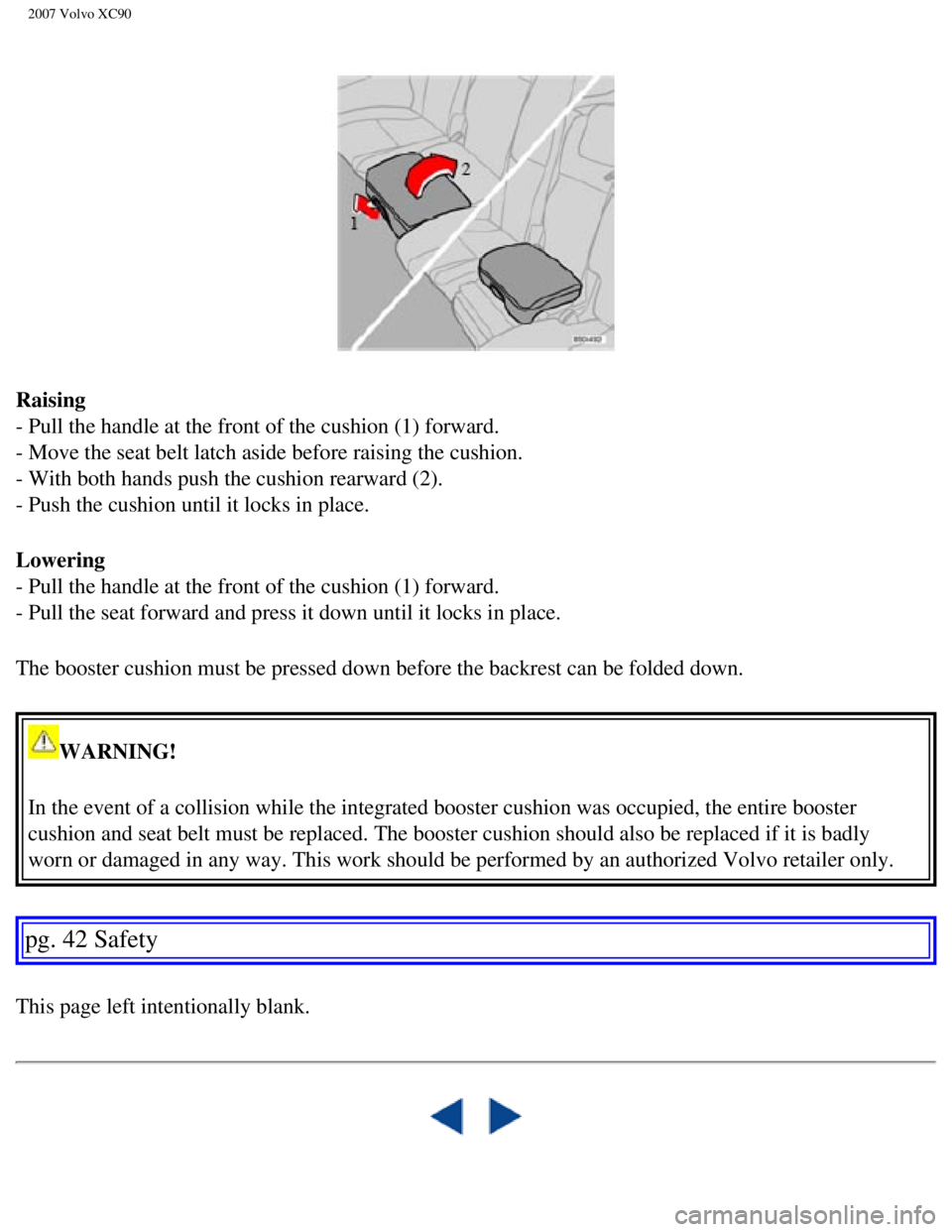
Raising
- Pull the handle at the front of the cushion (1) forward.
- Move the seat belt latch aside before raising the cushion.
- With both hands push the cushion rearward (2).
- Push the cushion until it locks in place.
Lowering
- Pull the handle at the front of the cushion (1) forward.
- Pull the seat forward and press it down until it locks in place.
The booster cushion must be pressed down before the backrest can be fold\
ed down.
WARNING!
In the event of a collision while the integrated booster cushion was occ\
upied, the entire booster
cushion and seat belt must be replaced. The booster cushion should also \
be replaced if it is badly
worn or damaged in any way. This work should be performed by an authoriz\
ed Volvo retailer only.
pg. 42 Safety
This page left intentionally blank.
file:///K|/ownersdocs/2007/2007_XC90/07xc90_01.htm (38 of 39)12/30/200\
6 5:53:34 PM
Page 49 of 268

2007 Volvo XC90
3. Panel vents78
4. Text window
46
5. Temperature gauge
46
6. Odometer/Trip odometer/Cruise control indicator
46, 63
7. Speedometer
46
8. Turn signal indicator lights
46
9. Tachometer
46
10. Ambient temperature gauge, clock, gear indicator
46
11. Fuel gauge
46
12. Indicator and warning symbols
47
13. Panel vents
78
14. Glove compartment
94
15. Hazard warning flashers
61
16. Audio system
219
17. Switches in the center console
52
18. Climate system controls
79
19. Windshield wiper/washer lever
59
20. Audio control buttons in steering wheel
224
21. Instrument panel
46
22. Horn
44
23. Cruise control buttons in steering wheel
63
24. Turn signals, High/low beams
58
25. Front fog lights, Rear fog light
55
26. Parking brake pedal
66
27. Parking brake release handle
66
28. Button for unlocking fuel filler door
55
29. Hood open lever
67
30. Reading lights
91
31. Courtesy light
91
32. Moonroof control (option)
73
33. Seat belt reminder
11
34. Rearview mirror
70
file:///K|/ownersdocs/2007/2007_XC90/07xc90_02.htm (3 of 40)12/30/2006\
5:53:37 PM
Page 50 of 268
2007 Volvo XC90
35. Central locking button45
36. Lockout switch for rear seat power windows
45
37. Power window controls
45
38. Sideview mirror controls
45
pg. 46 Instruments and controls
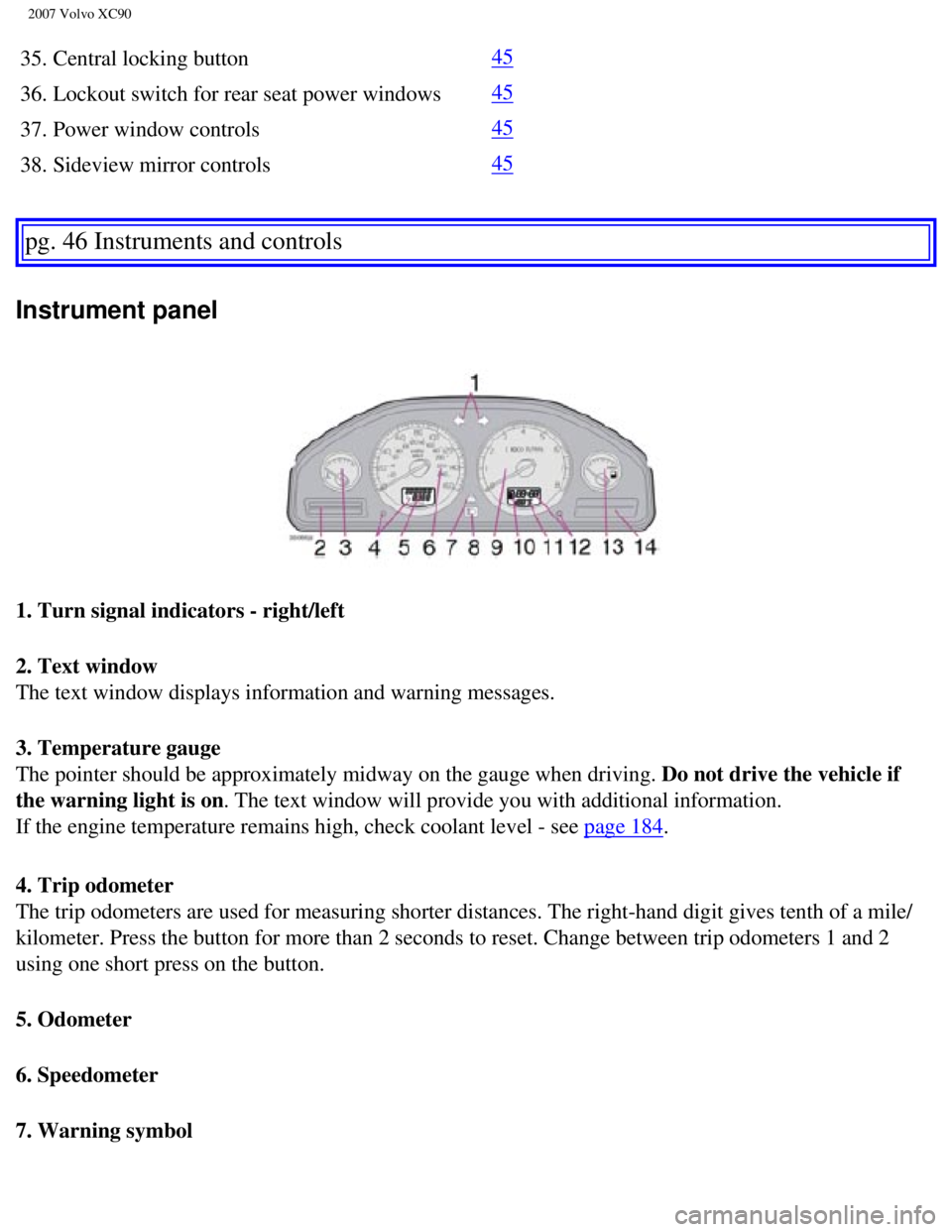
Instrument panel
1. Turn signal indicators - right/left
2. Text window
The text window displays information and warning messages.
3. Temperature gauge
The pointer should be approximately midway on the gauge when driving. Do not drive the vehicle if
the warning light is on. The text window will provide you with additional information.
If the engine temperature remains high, check coolant level - see
page 184.
4. Trip odometer
The trip odometers are used for measuring shorter distances. The right-h\
and digit gives tenth of a mile/
kilometer. Press the button for more than 2 seconds to reset. Change bet\
ween trip odometers 1 and 2
using one short press on the button.
5. Odometer
6. Speedometer
7. Warning symbol
file:///K|/ownersdocs/2007/2007_XC90/07xc90_02.htm (4 of 40)12/30/2006\
5:53:37 PM
Page 51 of 268
. Do not drive
continuously with the needle in the red area of")
2007 Volvo XC90
8. High beam indicator
9. Tachometer
The tachometer shows engine speed in thousands of revolutions per minute\
(rpm). Do not drive
continuously with the needle in the red area of the dial, which indicate\
s maximum allowable engine rpm
range. Instead, shift to a higher gear or slow the vehicle down. The eng\
ine management system will
automatically prevent excessively high engines speeds. This will be noti\
ceable as a pronounced
unevenness in engine speed.
10. Gear and driving mode indicator
The currently selected driving mode is displayed here. If you use the Ge\
artronic function on the
automatic transmission, the currently selected gear will be displayed.
11. Ambient temperature gauge
This display indicates the air temperature outside your vehicle. A "snow\
flake" symbol in the text
window is displayed when the temperature is in the range of 23 - 36 °\
F (-5 - +2 °C). Please note that this
symbol does not indicate a fault with your vehicle. At low speeds or whe\
n the vehicle is not moving, the
temperature readings may be slightly higher than the actual ambient temp\
erature.
12. Clock/set button
Turn the button to set the clock.
13. Fuel gauge
The fuel tank holds approximately 21.1 US gals. (80 liters).
When the warning light in the gauge comes on, there are approximately 2.\
1 US gal. (8 liters) of fuel
remaining in the tank.
14. Indicator and warning symbols
pg. 47 Instruments and controls
Indicator and warning symbols
file:///K|/ownersdocs/2007/2007_XC90/07xc90_02.htm (5 of 40)12/30/2006\
5:53:37 PM
Page 52 of 268
 before starting. This shows that the symbols are functio\
ning. Whe")
2007 Volvo XC90
The indicator and warning symbols light up when you turn the ignition ke\
y to the driving position
(position II) before starting. This shows that the symbols are functio\
ning. When the engine starts, all
symbols go out. If the engine is not started within 5 seconds, all symbo\
ls except CHECK ENGINE and
go out. Certain symbols may not have their functions illustrated, depen\
ding on the vehicle's
equipment. The symbol for the parking brake goes out when the parking br\
ake is released.
Warning symbol
in center of the instrument panel
This symbol shines as a red or yellow light depending on the severity of\
the discovered fault.
Red symbol - Stop the vehicle as soon as possible in a suitable location and read t\
he message shown in
the text window. The symbol and accompanying text will remain on until t\
he fault has been corrected.
Yellow symbol - Follow the instructions shown in the text window. The text can be eras\
ed by pressing
the READ button (see
page 50), or will disappear automatically after two minutes.
NOTE: When the message "TIME FOR REGULAR SERVICE" is displayed, the text can \
be erased and
the yellow symbol light can be turned off by pressing the READ button. T\
he text will disappear and the
symbol light will go out automatically after two minutes.
Seat belt reminder
This symbol lights up to indicate that the driver has not fastened his/h\
er seat belt.
Supplemental Restraint System SRS
If this light comes on while the vehicle is being driven, or remains on \
for longer than approximately 10
seconds after the vehicle has been started, the SRS system's diagnostic \
functions have detected a fault in
a seat belt lock or tensioner, a front airbag, side impact airbag, and/o\
r an inflatable curtain. Have the
system(s) inspected by a trained and qualified Volvo service technicia\
n as soon as possible.
file:///K|/ownersdocs/2007/2007_XC90/07xc90_02.htm (6 of 40)12/30/2006\
5:53:37 PM
Page 54 of 268

2007 Volvo XC90
Generator warning light
If the light comes on while the engine is running, have the charging sys\
tem checked.
Rear fog light
This light indicates that the fog light is on.
CHECK ENGINE Malfunction indicator light
On-Board Diagnostics II (OBDII): As you drive, a computer called "OBDI\
I" monitors your vehicle's
engine, transmission, electrical and emission systems. The CHECK ENGINE \
light will light up if the
computer senses a condition that potentially may need correcting. When t\
his happens, please have your
vehicle checked by a Volvo retailer as soon as possible.
A CHECK ENGINE light may have many causes. Sometimes, you may not notice\
a change in your
vehicle's behavior. Even so, an uncorrected condition could hurt fuel ec\
onomy, emission cleanliness, and
driveability. Extended driving without correcting the cause could even d\
amage other components in
your vehicle.
Canadian models are equipped with this warning light.
pg. 49 Instruments and controls
Indicator and warning symbols
Anti-lock brake system ABS
If the warning light comes on, there is a malfunction of the ABS system \
(the standard braking system
will still function). The vehicle should be driven to a Volvo retailer \
for inspection. See
page 128 for
additional information.
DSTC system
The Dynamic Stability and Traction Control system (DSTC) is explained \
in greater detail on
page 130.
Tire pressure monitoring light
See
page 154 for more information on this function.
Turn signal indicator - trailer (certain models)
If you are towing a trailer, this light will flash simultaneously with t\
he turn signals on the trailer. If the
light does not flash when signaling, neither the trailer's turn signals \
nor the vehicle's turn signals are
functioning.
file:///K|/ownersdocs/2007/2007_XC90/07xc90_02.htm (8 of 40)12/30/2006\
5:53:37 PM
Page 58 of 268
 or reactivated if ne\
cessary.
pg")
2007 Volvo XC90
NOTE: The system activates automatically when the engine is started, and can \
be deactivated by
pressing this button (e.g. when towing a trailer) or reactivated if ne\
cessary.
pg. 53 Instruments and controls
Switches in the center console
Temporarily disconnecting the alarm sensors (option)
See
page 112 for more details.
Auxiliary lights
This button is used to switch on auxiliary lights (if installed). A li\
ght in the button will light up to
indicate that the auxiliary lights are illuminated.
12 volt socket
This 12 volt socket can be used to plug in certain accessories such as c\
ellular telephones, etc. The
ignition key must be in position I (or higher) for the auxiliary socke\
t to function.
NOTE: The auxiliary sockets can also be used for cigarette lighters, which ar\
e available as accessories
at your Volvo retailer.
Power child locks (option)
See
page 110 for more information on this function.
file:///K|/ownersdocs/2007/2007_XC90/07xc90_02.htm (12 of 40)12/30/200\
6 5:53:37 PM
Page 59 of 268

2007 Volvo XC90
pg. 54 Instruments and controls
Steering wheel adjustment
Both the height and the reach of the steering wheel can be adjusted to a\
comfortable position for the
driver. Pull down the lever on the left of the steering column. Adjust t\
he steering wheel to a suitable
position and press the lever back into place to lock the steering wheel \
in the new position. Check that the
steering wheel is locked in the new position.
WARNING!
Never adjust the steering wheel while
driving.
pg. 55 Instruments and controls
Lighting panel
file:///K|/ownersdocs/2007/2007_XC90/07xc90_02.htm (13 of 40)12/30/200\
6 5:53:37 PM
Page 60 of 268
2007 Volvo XC90
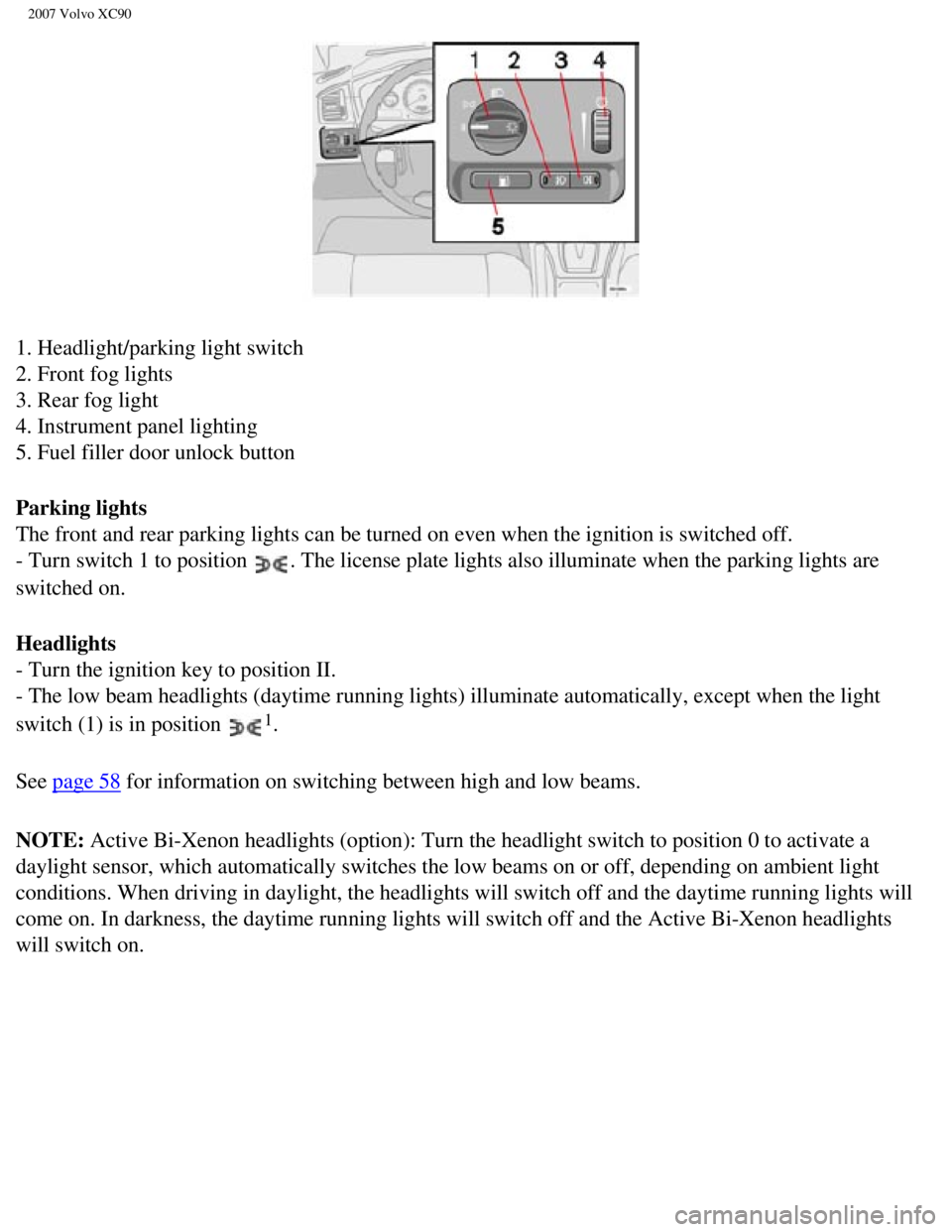
1. Headlight/parking light switch
2. Front fog lights
3. Rear fog light
4. Instrument panel lighting
5. Fuel filler door unlock button
Parking lights
The front and rear parking lights can be turned on even when the ignitio\
n is switched off.
- Turn switch 1 to position
. The license plate lights also illuminate when the parking lights are
switched on.
Headlights
- Turn the ignition key to position II.
- The low beam headlights (daytime running lights) illuminate automati\
cally, except when the light
switch (1) is in position
1.
See
page 58 for information on switching between high and low beams.
NOTE: Active Bi-Xenon headlights (option): Turn the headlight switch to pos\
ition 0 to activate a
daylight sensor, which automatically switches the low beams on or off, d\
epending on ambient light
conditions. When driving in daylight, the headlights will switch off and\
the daytime running lights will
come on. In darkness, the daytime running lights will switch off and the\
Active Bi-Xenon headlights
will switch on.
file:///K|/ownersdocs/2007/2007_XC90/07xc90_02.htm (14 of 40)12/30/200\
6 5:53:37 PM
Page 62 of 268
.
Instrument panel lighting
The instrument panel ligh")
2007 Volvo XC90
when conditions such as fog, rain, snow, smoke or dust reduce visibility\
for other vehicles to less than
500 ft. (150 meters).
Instrument panel lighting
The instrument panel lighting illuminates when the ignition key is in po\
sition II and the light switch (1)
is in either position
or .
- Move the thumb wheel (4) up to increase brightness or down to decrea\
se brightness.
Unlocking the fuel filler door
Press button 5 when the vehicle is at a standstill to unlock the fuel fi\
ller door. Please note that the fuel
filler door will remain unlocked until the vehicle begins to move forwar\
d. An audible click will be heard
when the fuel filler door relocks.
NOTE: If the fuel filler door does not unlock after the button has been press\
ed, drive the vehicle at a
speed of at least 5 mph (8 km/h), stop the vehicle, and press the butt\
on again.
See
page 57 for information on unlocking the fuel filler door manually.
pg. 57 Instruments and controls
Lighting panel
Manually unlocking the fuel filler door
- Open the upper and lower sections of the tailgate, and fold up the rea\
r section of the cargo area floor.
- If the vehicle is equipped with the optional grocery bag holder, detac\
h the holder's bands.
- Remove the corner panel (1) from the floor of the cargo area.
- Open the cover (2) in the side panel by pulling the tab (3) upward\
/outward.
- Pull down the insulating material (4) to access the fuel filler door\
motor (5).
file:///K|/ownersdocs/2007/2007_XC90/07xc90_02.htm (16 of 40)12/30/200\
6 5:53:37 PM