remote control VOLVO XC90 2007 User Guide
[x] Cancel search | Manufacturer: VOLVO, Model Year: 2007, Model line: XC90, Model: VOLVO XC90 2007Pages: 268, PDF Size: 8.57 MB
Page 205 of 268

2007 Volvo XC90
NOTE: After the battery has been disconnected or replaced, lock and unlock th\
e vehicle with the central
locking system's remote control to reactivate such features as the power\
windows, moonroof, courtesy
lighting, etc.
WARNING!
Ventilation hose:
l The battery generates hydrogen gas, which is flammable and explosive. Th\
e battery is fitted with a
ventilation hose which vents hydrogen gas out of the battery compartment\
through a ventilation
opening in the bottom of this compartment. If the battery must be replac\
ed, it is essential that the
ventilation hose is properly connected to the battery and that it is rou\
ted through the ventilation
opening provided (see illustration).
l Be sure the ventilation hose is free of debris.
l Only use replacement batteries equipped with a ventilation hose. Consult\
your Volvo retailer.
pg. 194 Maintenance
Replacing bulbs
When replacing bulbs, keep the following points in mind:
l Never touch the glass of bulbs with your fingers. Grease and oils from y\
our fingers vaporize in the
heat and will leave a deposit on the reflector, which will damage it.
l The optional Active Bi-Xenon headlight bulbs contain trace amounts of me\
rcury. These bulbs should
always be disposed of by an authorized Volvo retailer.
l The following bulbs should only be replaced by a trained and qualified V\
olvo service technician:
- Active Bi-Xenon headlights,
- Courtesy (dome) lighting,
- Reading lights,
- Glove compartment lights
- Turn signals and courtesy lights in the side door mirrors
- High-mounted brake lights
file:///K|/ownersdocs/2007/2007_XC90/07xc90_09.htm (19 of 37)12/30/200\
6 5:53:50 PM
Page 239 of 268
. The preset station number will flash 4 \
times")
2007 Volvo XC90
Remote control
1. Memory - stores radio stations that have been found by a search
To store a station:
- Press the memory button (1). The preset station number will flash 4 \
times in the display
- While the preset number is flashing, use the + or - buttons (5) to s\
elect a position at which to store the
station
- Press button 1 again to store the station
2. Volume
3. Forward/back - fast forward or back
4. Source - step between sound sources
5. Preset/disc - selects among CD's (in the optional CD changer) or pr\
eset radio stations
6. Auto store - searches for and stores the strongest radio stations
7. Not in use
8. Not in use
9. Power - off/on
Point the remote control toward the IR port on the radio panel (see the\
illustration on
page 220).
NOTE: If the remote control does not function properly, check the batteries \
(AAA or R03).
file:///K|/ownersdocs/2007/2007_XC90/07xc90_11.htm (6 of 26)12/30/2006\
5:53:54 PM
Page 256 of 268
2007 Volvo XC90
See Audio Settings in the FM Menu.
AUX Menu (option)
1. AUX input vol
2. Audio Settings
1
See Audio Settings in the FM Menu
1. Certain audio systems
pg. 237 Audio
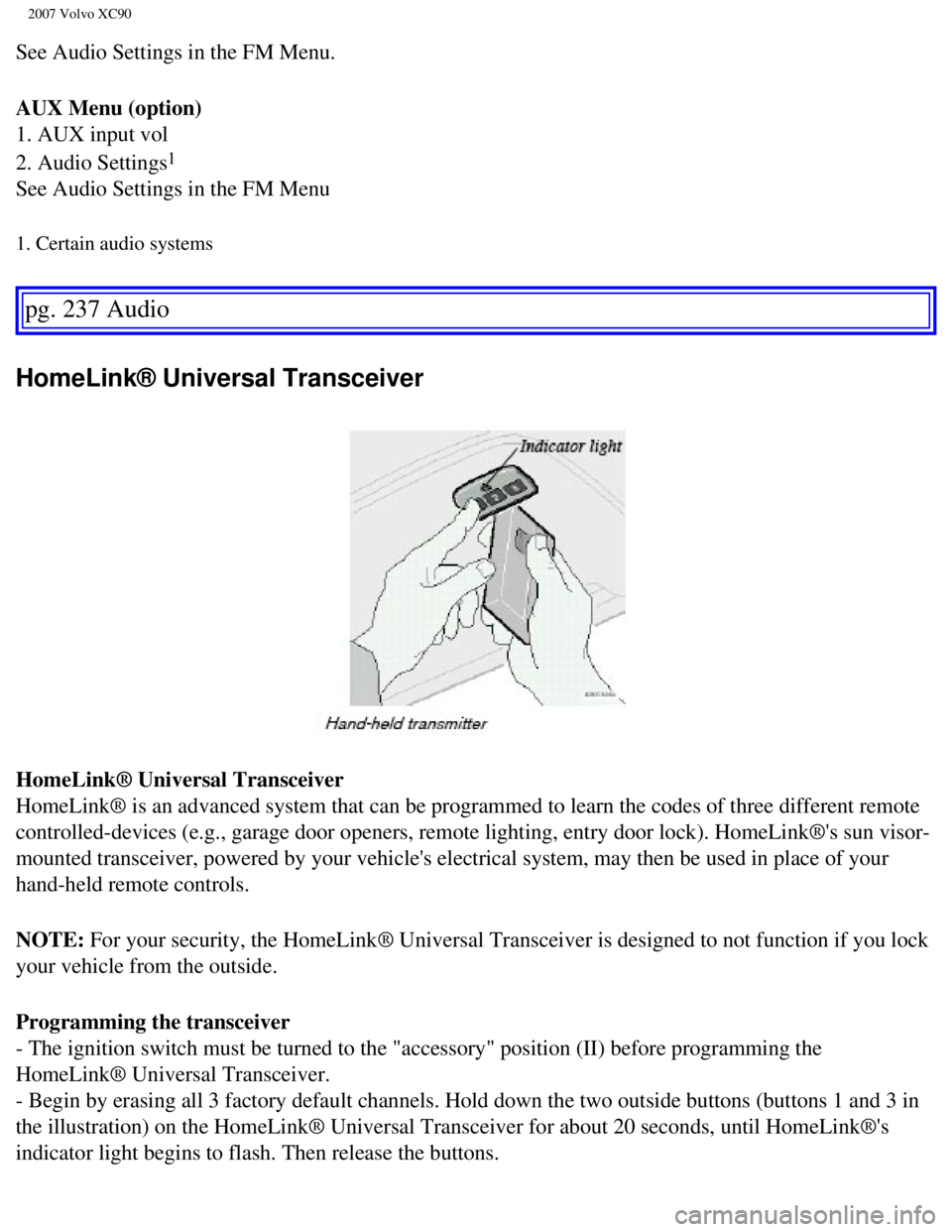
HomeLink® Universal Transceiver
HomeLink® Universal Transceiver
HomeLink® is an advanced system that can be programmed to learn the c\
odes of three different remote
controlled-devices (e.g., garage door openers, remote lighting, entry d\
oor lock). HomeLink®'s sun visor-
mounted transceiver, powered by your vehicle's electrical system, may th\
en be used in place of your
hand-held remote controls.
NOTE: For your security, the HomeLink® Universal Transceiver is designed t\
o not function if you lock
your vehicle from the outside.
Programming the transceiver
- The ignition switch must be turned to the "accessory" position (II) \
before programming the
HomeLink® Universal Transceiver.
- Begin by erasing all 3 factory default channels. Hold down the two out\
side buttons (buttons 1 and 3 in
the illustration) on the HomeLink® Universal Transceiver for about 2\
0 seconds, until HomeLink®'s
indicator light begins to flash. Then release the buttons.
file:///K|/ownersdocs/2007/2007_XC90/07xc90_11.htm (23 of 26)12/30/200\
6 5:53:54 PM
Page 261 of 268

2007 Volvo XC90
Battery 183, 191, 216
Battery - replacing
192
Battery drain - avoiding
116
Belt check
184
Black Box (Vehicle Event Data)
180
Blind Spot Information System (BLIS)
145
Blower (fan)
80
Booster cushion (integrated)
40
Brake circuit
127
Brake fluid
189
Brake system
48, 127
Bulbs
194
Bulbs, list of
211
Bulbs, replacing
194
C
Capacity weight
161
Carbon Monoxide - Important Warning
115
Cargo capacity
210
CD functions
233
CD Pause
233
Central locking system - remote control
105
Changing a wheel
168
Changing coolant
184
Check Engine warning light
48
Child restraints
31
Child safety
28
Climate system
76
Clock
46
Coat hanger
96
Cold weather precautions
143
Compact disc care CD care
235
Coolant
188
file:///K|/ownersdocs/2007/2007_XC90/07xc90_12.htm (2 of 9)12/30/2006 \
5:53:56 PM