reset VOLVO XC90 2007 User Guide
[x] Cancel search | Manufacturer: VOLVO, Model Year: 2007, Model line: XC90, Model: VOLVO XC90 2007Pages: 268, PDF Size: 8.57 MB
Page 166 of 268

2007 Volvo XC90
1. Canadian models only
pg. 158 Wheels and tires
Tire Pressure Monitoring System (TPMS) - option
Deactivating (turning off) TPMS1
The system can be switched off if necessary, for example if winter tires\
without TPMS sensors are
mounted on the vehicle. To do so:
- Switch off the engine.
- Turn the ignition key to position I or II.
- Turn the thumbwheel on the left steering wheel lever until the text TI\
RE PRESS SYST ON is
displayed.
- Press in and hold the Reset button (see the illustration on
page 50) until TIRE PRESS SYST OFF is
displayed.
Repeat steps 1-4 to reactivate the system.
NOTE: If TPMS is switched off, it will remain off until it is reactivated acc\
ording to the steps described
above. The text TIRE PRESS SYST ON will then be displayed.
pg. 159 Wheels and tires
Tire designations
Federal law mandates that tire manufacturers place standardized informat\
ion on the sidewall of all tires
(see the illustration).
The following information is listed on the tire sidewall:
The tire designation (the following figures are examples of a tire desi\
gnation):
1. 215: the width of the tire (in millimeters) from sidewall edge to s\
idewall edge. The larger the number,
file:///K|/ownersdocs/2007/2007_XC90/07xc90_07.htm (10 of 23)12/30/200\
6 5:53:47 PM
Page 235 of 268
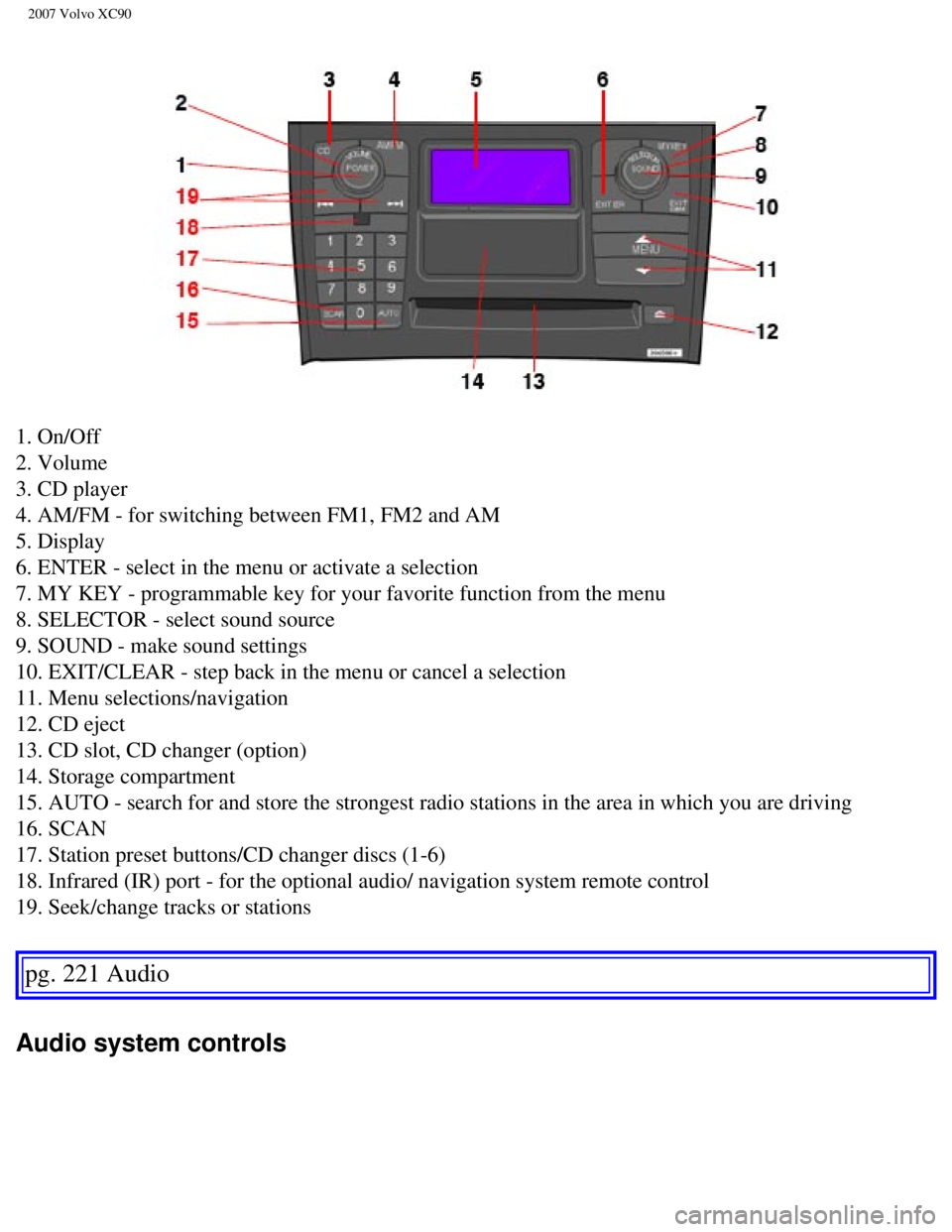
2007 Volvo XC90
1. On/Off
2. Volume
3. CD player
4. AM/FM - for switching between FM1, FM2 and AM
5. Display
6. ENTER - select in the menu or activate a selection
7. MY KEY - programmable key for your favorite function from the menu
8. SELECTOR - select sound source
9. SOUND - make sound settings
10. EXIT/CLEAR - step back in the menu or cancel a selection
11. Menu selections/navigation
12. CD eject
13. CD slot, CD changer (option)
14. Storage compartment
15. AUTO - search for and store the strongest radio stations in the area\
in which you are driving
16. SCAN
17. Station preset buttons/CD changer discs (1-6)
18. Infrared (IR) port - for the optional audio/ navigation system rem\
ote control
19. Seek/change tracks or stations
pg. 221 Audio
Audio system controls
file:///K|/ownersdocs/2007/2007_XC90/07xc90_11.htm (2 of 26)12/30/2006\
5:53:54 PM
Page 236 of 268

The four buttons on the steering wheel keypad can be used to control the\
audio system. The steering
wheel keypad can be used to adjust volume, shif")
2007 Volvo XC90
Steering wheel keypad (option)
The four buttons on the steering wheel keypad can be used to control the\
audio system. The steering
wheel keypad can be used to adjust volume, shift between preset stations\
and change CD tracks.
l Press the buttons briefly to search for a radio station, or to go to the next/pre\
vious track
on a CD
l Press and hold down these buttons to search within a track.
Display
The display (1) shows the currently selected function, menu selections\
, etc.
Clean the display with a dry, soft, lint-free cloth. Do not use cleaning\
agents.
Accessing and using menus
In menu mode, you can change settings and program new functions in the a\
udio system. The various
menu alternatives are shown in the display, and the current level in the\
menu structure is shown at the
upper right corner of the display.
Press the menu button (2) to enter menu mode.
file:///K|/ownersdocs/2007/2007_XC90/07xc90_11.htm (3 of 26)12/30/2006\
5:53:54 PM
Page 238 of 268

2007 Volvo XC90
passengers in the second and optional third row of seats. Several people\
can listen to different sound
sources, such as CDs or the radio at the same time without disturbing ea\
ch other.
Two sets of headphones can be plugged into each connector.
l With the audio system switched on, use the SEL button (1) to select a \
sound source.
l Press the arrow keys (2) briefly to change CD tracks or switch between\
preset stations.
l Hold down the arrow keys to fast forward/reverse, or search for the prev\
ious/next strong radio station.
l Hold down the SEL button to turn off the sound.
NOTE: For the best sound reproduction, we recommend headphones with impedance\
between 16-32
ohm. The sensitivity of these should be equal to or greater than 102 dB.\
The headphone connections are
intended for 3.5 mm contacts and are located under the lower edge of the\
socket All headphones are
automatically turned off when the ignition is switched off. They must be\
manually restarted when the
ignition is switched on again.
Headphones - limitations
l The headphones will only work when the ignition key is in position I or \
higher.
l If a set of headphones is connected to the same source that is being sen\
t through the speakers, the
headphone controls cannot be used to change track or station. This is to\
prevent the driver from being
distracted by an unexpected change in music.
l If the driver selects the same sound source as someone listening to this\
pg. 223 Audio
Audio system controls
source through headphones, the driver takes control of the sound source.\
l Only one disc in the optional CD changer, and one track on the CD can be\
played at a time.
l Headphone users can choose from among the preset radio stations (AM, FM\
1, FM2) previously set by
the driver.
l If FM is played in the speakers, AM is not available and vice versa.
file:///K|/ownersdocs/2007/2007_XC90/07xc90_11.htm (5 of 26)12/30/2006\
5:53:54 PM
Page 239 of 268
. The preset station number will flash 4 \
times")
2007 Volvo XC90
Remote control
1. Memory - stores radio stations that have been found by a search
To store a station:
- Press the memory button (1). The preset station number will flash 4 \
times in the display
- While the preset number is flashing, use the + or - buttons (5) to s\
elect a position at which to store the
station
- Press button 1 again to store the station
2. Volume
3. Forward/back - fast forward or back
4. Source - step between sound sources
5. Preset/disc - selects among CD's (in the optional CD changer) or pr\
eset radio stations
6. Auto store - searches for and stores the strongest radio stations
7. Not in use
8. Not in use
9. Power - off/on
Point the remote control toward the IR port on the radio panel (see the\
illustration on
page 220).
NOTE: If the remote control does not function properly, check the batteries \
(AAA or R03).
file:///K|/ownersdocs/2007/2007_XC90/07xc90_11.htm (6 of 26)12/30/2006\
5:53:54 PM
Page 245 of 268
 until AUTOSTORING is shown i\
n the display.
When AUTOSTORING is no longer displayed, the")
2007 Volvo XC90
- Choose a frequency band with the AM/ FM button.
- Press and hold down the AUTO button (2) until AUTOSTORING is shown i\
n the display.
When AUTOSTORING is no longer displayed, the autostore process is comple\
te. If there are no stations
with sufficient signal strength, NO AST FOUND is displayed.
Stopping autostore
- Press EXIT.
Selecting an autostored station
- Press AUTO (2) briefly. AUTO will be displayed.
- Press one of the preset buttons.
The radio will remain in Autostore mode until AUTO, EXIT, or AM/FM is pr\
essed.
SCAN
This function automatically searches the currently selected waveband (A\
M, FM1, or FM2) for strong
stations. When the radio finds a station, it will pause for approximatel\
y 8 seconds, after which it will
continue scanning.
Activating/deactivating Scan
- Choose a waveband by pressing the AM/ FM button.
- Press SCAN (1). SCAN will be shown in the display.
- Press EXIT to stop scanning.
Storing a station found by SCAN
Stations can be stored on the preset buttons while the SCAN function is \
activated.
- Press a preset button and hold it down until Station stored is display\
ed.
- This deactivates SCAN and the stored station can be selected by pressi\
ng the preset button.
Radio text
Certain stations broadcast program information, which can be shown in th\
e display.
- Press the MENU button.
- Select RADIOTEXT in the menu and press ENTER.
Select RADIOTEXT again to deactivate.
pg. 229 Audio
Sirius satellite radio (option or retailer-installed accessory)
Listening to satellite radio
file:///K|/ownersdocs/2007/2007_XC90/07xc90_11.htm (12 of 26)12/30/200\
6 5:53:54 PM
Page 247 of 268

2007 Volvo XC90
l By pressing and holding the buttons to start the scroll function. The scrolling function
begins slowly and increases speed after approximately 5 seconds. Release\
the button to listen to the
currently displayed channel.
l Through direct channel entry
Direct channel entry
The Sirius satellite channels are numbered consecutively throughout all \
of the categories. To access a
channel directly:
- Press MENU and scroll to "Direct channel entry."
- Use the numerical keypad to enter the channel's number. Press EXIT if \
necessary to erase a digit.
- Press ENTER. The radio will tune to this channel, even if it belongs t\
o a category other than the
currently selected one.
NOTE:
l The numbers of skipped or locked channels will not be displayed.
l If a channel is locked, the access code must be entered before the chann\
el can
pg. 230 Audio
Sirius satellite radio (option or retailer-installed accessory)
be selected. See "Unlocking a channel" on page 231.
Scanning
SCAN automatically searches through the list of satellite channels. Storing a channel
A total of 20 satellite channels can be stored; 10 channels each for Sir\
ius 1 and 2.
l A long press on one of the number keys stores the currently tuned channel on t\
hat key.
l A short press on a number key while the radio is in Sirius 1or 2 mode will tune\
to the preset satellite
channel stored on that button, regardless of the currently selected chan\
nel category.
Song Seek and Song Memory
The Song Seek and Song Memory functions provide both audio and visual no\
tification when Sirius is
broadcasting your favorite songs. Song Seek enables you to store the nam\
e of the song for future
advance notification when that song is being played. The Song Memory fea\
ture makes it possible to
view all of the current songs that are stored in memory.
Song memory
Up to ten songs can be saved in the system's memory.
- Press MENU.
- Scroll to "Add song to song mem." and follow the instructions shown in\
the display.
If a new song is selected when the memory is full, you will be prompted \
to press ENTER to delete the
file:///K|/ownersdocs/2007/2007_XC90/07xc90_11.htm (14 of 26)12/30/200\
6 5:53:54 PM
Page 255 of 268

2007 Volvo XC90
Compact disc care
l Do not put tape or labels on the disc itself. They could become stuck in\
the player.
l Use CD standard EN 60908 discs only. Discs not meeting this standard may\
cause problems with
system (poor sound). CDR discs can cause listening problems due to the\
quality of the disc or recording
equipment used.
l DualDisc: The audio side of a DualDisc (combined CD/DVD) does not meet\
CD specifications and
may not play in your audio system.
l Keep the discs clean. Wipe them with a soft, clean, lint-free cloth, wor\
king from the center outwards.
If necessary, dampen the cloth with a neutral soap solution. Dry thoroug\
hly before using.
l Never use cleaning spray or antistatic liquid. Use only cleaners specifi\
cally made for CD's.
l Use discs of the correct size only (3.5" discs should never be used). \
l Volvo does not recommend the use of plastic outer rings on the disc.
l Condensation may occur on discs/ optical components of the changer in co\
ld winter weather. The disc
can be dried with a clean, lint-free cloth. Optical components in the CD\
changer may, however, take up
to one hour to dry off.
l Never attempt to play a disc which is damaged in any way.
When not in use, the discs should be stored in their covers. Avoid stori\
ng discs in excessive heat, direct
sunlight or dusty locations.
pg. 236 Audio
Menu structure
FM Menu
1. Radio Text
2. Audio Settings
1
1. Surround
2. Subwoofer (option)
3. Equalizer Fr
4. Equalizer Rr
5. Reset All
AM Menu
See Audio Settings i the FM Menu.
CD Menu
1. Random
2. Disc Text
3. Audio Settings
file:///K|/ownersdocs/2007/2007_XC90/07xc90_11.htm (22 of 26)12/30/200\
6 5:53:54 PM