AUX VOLVO XC90 2009 Owner´s Manual
[x] Cancel search | Manufacturer: VOLVO, Model Year: 2009, Model line: XC90, Model: VOLVO XC90 2009Pages: 282, PDF Size: 8.76 MB
Page 239 of 282
10 Audio
Audio system controls
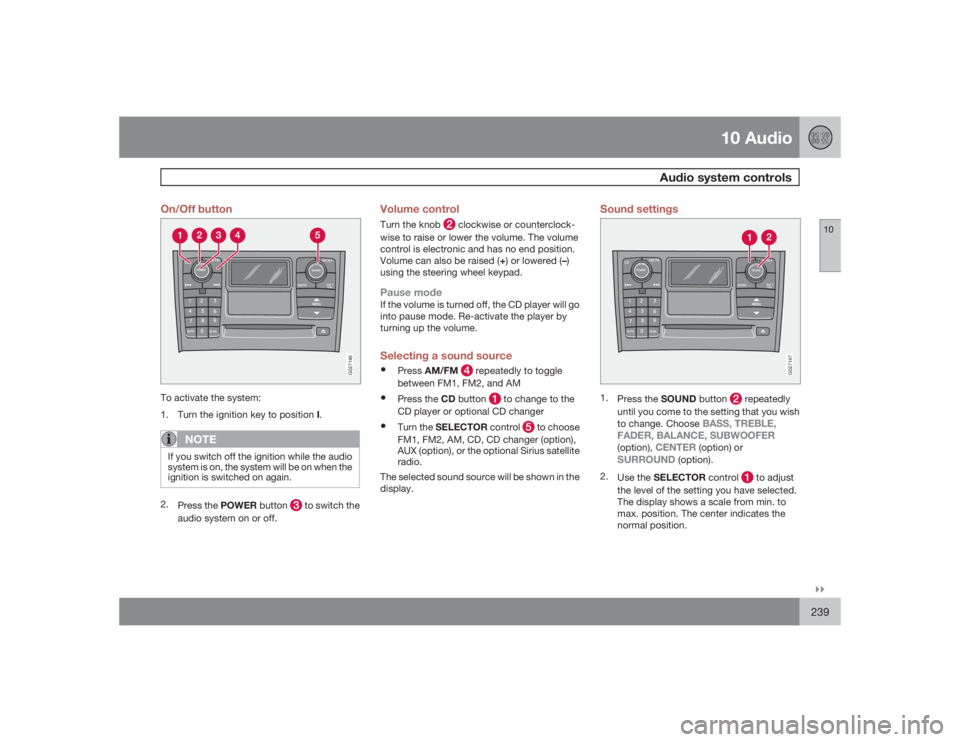
10``239 On/Off button
G027146
To activate the system:
1.
Turn the ignition key to position I.
NOTE
If you switch off the ignition while the audio
system is on, the system will be on when the
ignition is switched on again.2.
Press the POWER button
to switch the
audio system on or off.
Volume controlTurn the knob
clockwise or counterclock-
wise to raise or lower the volume. The volume
control is electronic and has no end position.
Volume can also be raised (+) or lowered (–)
using the steering wheel keypad.
Pause modeIf the volume is turned off, the CD player will go
into pause mode. Re-activate the player by
turning up the volume.Selecting a sound source•
PressAM/FM
repeatedly to toggle
between FM1, FM2, and AM
•
Press the CD button
to change to the
CD player or optional CD changer
•
Turn the SELECTOR control
to choose
FM1, FM2, AM, CD, CD changer (option),
AUX (option), or the optional Sirius satellite
radio.
The selected sound source will be shown in the
display.
Sound settings
G027147
1.
Press the SOUND button
repeatedly
until you come to the setting that you wish
to change. Choose
BASS, TREBLE,
FADER, BALANCE, SUBWOOFER
(option),
CENTER
(option) or
SURROUND
(option).
2.
Use the SELECTOR control
to adjust
the level of the setting you have selected.
The display shows a scale from min. to
max. position. The center indicates the
normal position.
Page 248 of 282
10 AudioAuxiliary equipment
10248
G027029
Auxiliary connector portAUX (option)TheAUX(auxiliary) port can be used to con-
nect, for example, an mp3 player.
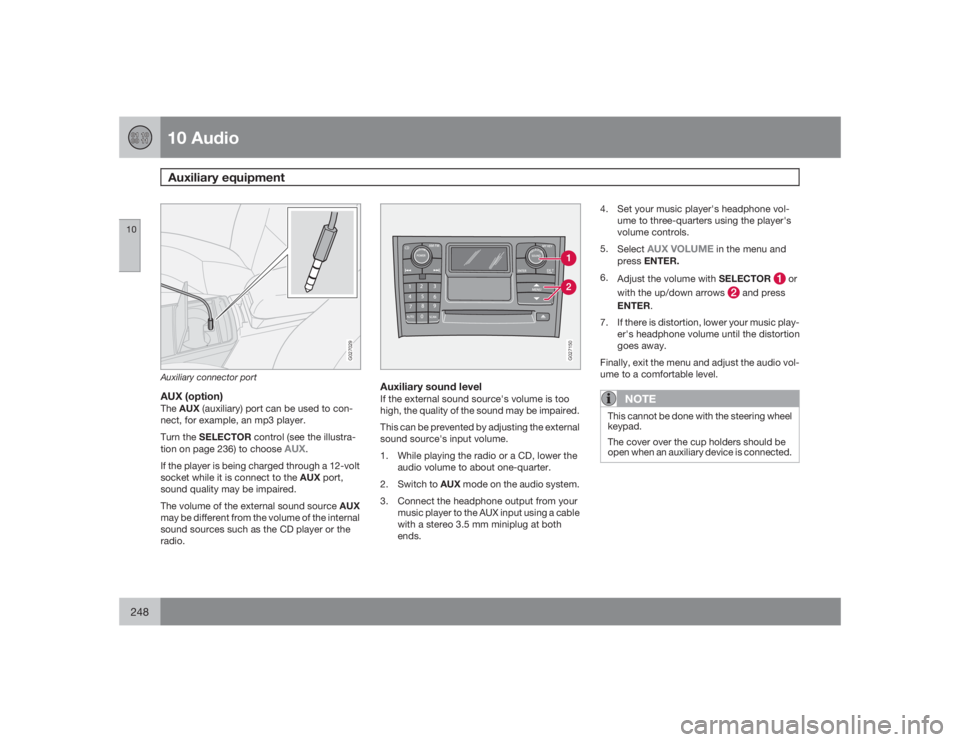
Turn the SELECTOR control (see the illustra-
tion on page 236) to choose
AUX
.
If the player is being charged through a 12-volt
socket while it is connect to the AUX port,
sound quality may be impaired.
The volume of the external sound source AUX
may be different from the volume of the internal
sound sources such as the CD player or the
radio.
G027150
Auxiliary sound levelIf the external sound source's volume is too
high, the quality of the sound may be impaired.
This can be prevented by adjusting the external
sound source's input volume.
1. While playing the radio or a CD, lower the
audio volume to about one-quarter.
2.
Switch to AUX mode on the audio system.
3. Connect the headphone output from your
music player to the AUX input using a cable
with a stereo 3.5 mm miniplug at both
ends.4. Set your music player's headphone vol-
ume to three-quarters using the player's
volume controls.
5.
Select
AUX VOLUME
in the menu and
pressENTER.
6.
Adjust the volume with SELECTOR
or
with the up/down arrows
and press
ENTER.
7. If there is distortion, lower your music play-
er's headphone volume until the distortion
goes away.
Finally, exit the menu and adjust the audio vol-
ume to a comfortable level.
NOTE
This cannot be done with the steering wheel
keypad.
The cover over the cup holders should be
open when an auxiliary device is connected.
Page 252 of 282
10 AudioMenu structure
10252
FM Menu1. Radio Text
2. Audio Settings
1
1. Surround
2. Subwoofer (option)
3. Equalizer Fr
4. Equalizer Rr
5. Reset All
AM MenuSee Audio Settings i the FM Menu.CD Menu1. Random
2. Disc Text
3. Audio Settings
See Audio Settings in the FM Menu.AUX Menu (option)1. AUX input vol
2. Audio Settings
See Audio Settings in the FM Menu1Certain audio systems
Page 253 of 282
10 Audio
Rear Seat Entertainment - Dual Screen (RSE)–option
10``253 Introduction
The RSE system can be used at the same time
as the vehicle’s audio system.
When the rear seat passengers play a DVD,
connect an external device to the RSE AUX
connectors, etc., and listen to the audio
through the cordless headphones, the driver
and front seat passenger can still use the vehi-
cle's audio system to listen to the radio, a CD,
music stored on an MP3 player, etc.
Please also refer to the Quick Guide provided
with the RSE system for additional information.Electrical current - ignition keyThe RSE system can be activated with the igni-
tion in position I or II (see page 135 for infor-
mation on the ignition positions), or when the
engine is running. While the engine is being
started, a film or music that is currently being
played will pause momentarily and resume
playing when the engine has started.
When the RSE system has been used once
when the ignition is switched off, it will be then
be blocked for further use. RSE can be restar-
ted by turning the ignition key to position I.
NOTE
Using RSE for more than approximately
10 minutes with the engine switched off may
drain the vehicle’s battery and make it diffi-
cult or impossible to start the engine.
If this occurs, a message will be displayed
on the RSE system’s screens.MusicListening to a music CD1. Insert a CD into the RSE player’s slot with
the disc’s label facing upward.
> The CD will begin to play automatically.
2. Switch on the cordless headphones and
selectCH A for the left screen or CH B for
the right screen.
> This will direct the sound to the head-
phones.
3. Adjust the headphone volume by using the
thumb wheel on the headphones.
To listen through the vehicle’s audio sys-
tem speakers, press MODE on the audio
system control panel and select
AUX
.
Press
A B
on the RSE remote to route
the sound through the speakers.
Selecting a folder on the CD1. Insert the CD in the player.
2.
Press
.
3. Use the navigation buttons (the arrow keys
surrounding the OK button on the RSE
remote control) to highlight a folder and/or
a specific track.
4.
Press to select a sub-folder.
Playback alternativesThe CD can be played in several different ways.
Use the navigation buttons to select one of the
alternatives.
With the dialogue box displayed:
1. Press the right navigation button to access
the menu to the right..
2. Use the navigation keys to select one of the
alternatives.
3.
Confirm your choice by pressing
.
Changing tracks on the CD±
Change tracks on the CD by pressing
or
. Hold the respective
buttons down for fast forward or reverse.
Page 254 of 282
10 AudioRear Seat Entertainment - Dual Screen (RSE)–option
10254
Pause1. Pause and restart the CD by pressing
.
2.
Stop the CD by pressing
.
3.
Press
again to eject the CD.
Home-burned CDsCDs burned on a home computer can be
played. However, the quality of the sound may
be affected by the type of source file and for-
mat used, and by the condition of the disc.RSE-AUX connectors and 12-volt
socketThe three color-coded (yellow-white-red) RSE-
AUX connectors can be used to connect an
auxiliary device to the RSE system. Always fol-
low the connection instructions provided with
the auxiliary device. Devices connected to
RSE-AUX can use the RSE screens, cordless
headphones, the headphone sockets or the
vehicle’s audio system speakers.
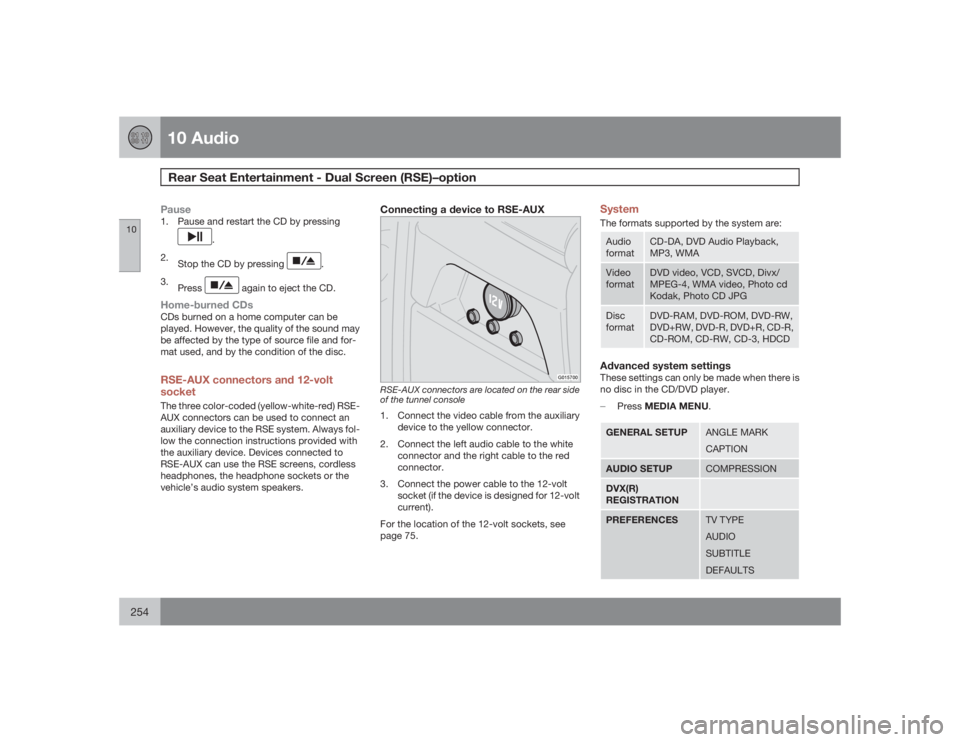
Connecting a device to RSE-AUX
G015700
RSE-AUX connectors are located on the rear side
of the tunnel console1. Connect the video cable from the auxiliary
device to the yellow connector.
2. Connect the left audio cable to the white
connector and the right cable to the red
connector.
3. Connect the power cable to the 12-volt
socket (if the device is designed for 12-volt
current).
For the location of the 12-volt sockets, see
page 75.
SystemThe formats supported by the system are:Audio
format
CD-DA, DVD Audio Playback,
MP3, WMA
Video
format
DVD video, VCD, SVCD, Divx/
MPEG-4, WMA video, Photo cd
Kodak, Photo CD JPG
Disc
format
DVD-RAM, DVD-ROM, DVD-RW,
DVD+RW, DVD-R, DVD+R, CD-R,
CD-ROM, CD-RW, CD-3, HDCD
Advanced system settingsThese settings can only be made when there is
no disc in the CD/DVD player.
±
PressMEDIA MENU.GENERAL SETUP
ANGLE MARK
CAPTION
AUDIO SETUP
COMPRESSION
DVX(R)
REGISTRATIONPREFERENCES
TV TYPE
AUDIO
SUBTITLE
DEFAULTS
Page 274 of 282
12 Index
12274
1, 2, 3 ...12-volt sockets.......................................... 75AA/C (air conditioning)...........................93, 94
ABS.......................................................... 143
Active Bi-Xenon headlights (ABL)........60, 64
Airbag system............................................ 20
Air cleaner................................................ 207
Air conditioning.......................................... 90
Air distribution...................................... 92, 94
Air quality sensor....................................... 93
Air vents..................................................... 92
Alarm........................................................ 125
All Wheel Drive......................................... 142
All Wheel Drive – towing.......................... 150
Anti-lock brake system
warning light......................................... 56
Anti-lock Brake System (ABS)................. 143
Ashtray..................................................... 109Audio
system introduction............................ 236
Audio system
Rear seat entertainment (option)........ 253
AUTO (climate control)......................... 94, 95
Automatic transmission........................... 138
Autostart..........................................133, 135
AUX (audio system).................................248
Average speed........................................... 71
AWD......................................................... 142
BBass......................................................... 239
Battery..................................................... 205
maintenance....................................... 214
specifications...................................... 270
Battery – replacing................................... 215
Belt check................................................ 206
Black Box (Vehicle Event Data)............... 202
Blind Spot Information System (BLIS)..... 159
Blower (fan)................................................ 95Booster cushion
accessory............................................. 42
integrated.............................................. 47
Brake fluid................................................ 212
Brake system........................................... 143
Bulbs........................................................ 217
Bulbs, replacing....................................... 217
CCapacities, fluids..................................... 265
Capacity weight....................................... 175
Cargo area cover..................................... 115
Cargo grid................................................ 114
Cargo net................................................. 112
Catalytic converter, three-way................. 272
CD Pause................................................. 249
Central locking system - remote control. 119
Changing a wheel.................................... 182
Changing coolant..................................... 206
Charge air cooler..................................... 269
Check Engine warning light....................... 57
Child restraint anchors......................... 43, 45