engine VOLVO XC90 2009 Owner´s Manual
[x] Cancel search | Manufacturer: VOLVO, Model Year: 2009, Model line: XC90, Model: VOLVO XC90 2009Pages: 282, PDF Size: 8.76 MB
Page 60 of 282
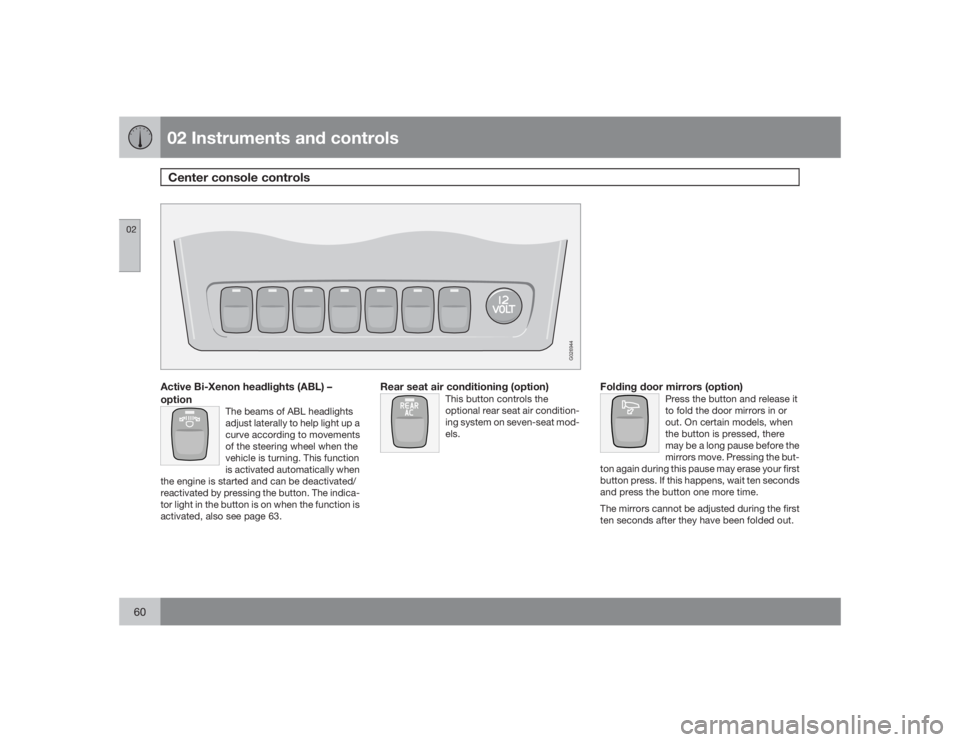
02 Instruments and controlsCenter console controls
0260
G026944
Active Bi-Xenon headlights (ABL) –
option
The beams of ABL headlights
adjust laterally to help light up a
curve according to movements
of the steering wheel when the
vehicle is turning. This function
is activated automatically when
the engine is started and can be deactivated/
reactivated by pressing the button. The indica-
tor light in the button is on when the function is
activated, also see page 63.
Rear seat air conditioning (option)
This button controls the
optional rear seat air condition-
ing system on seven-seat mod-
els.
Folding door mirrors (option)
Press the button and release it
to fold the door mirrors in or
out. On certain models, when
the button is pressed, there
may be a long pause before the
mirrors move. Pressing the but-
ton again during this pause may erase your first
button press. If this happens, wait ten seconds
and press the button one more time.
The mirrors cannot be adjusted during the first
ten seconds after they have been folded out.
Page 61 of 282
02 Instruments and controls
Center console controls
0261
NOTE
If the door mirrors have been inadvertently
pushed out of position (in a car wash, park-
ing lot, etc.) manually return them to normal
position. If mirror adjustment does not seem
to operate after manual folding, reset the
folding mirrors as follows:•
Turn the ignition key to position II.
•
Manually fold the mirror(s) to the normal
position.
•
Press the button to fold both mirrors in.
•
Press the button again to fold the mir-
rors out to their normal position.
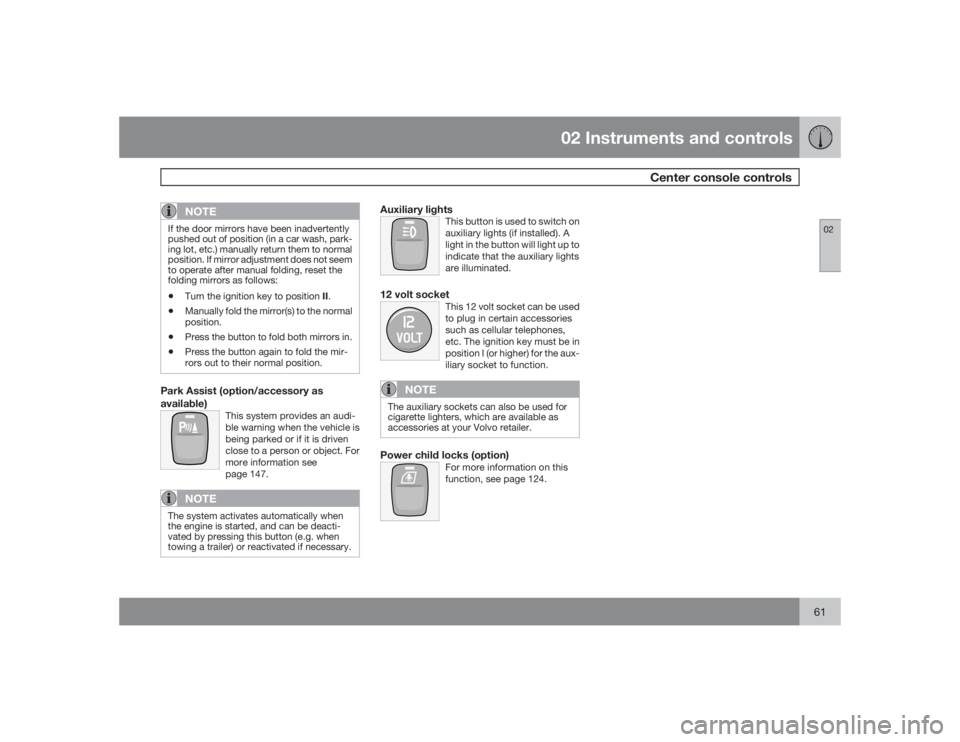
Park Assist (option/accessory as
available)
This system provides an audi-
ble warning when the vehicle is
being parked or if it is driven
close to a person or object. For
more information see
page 147.
NOTE
The system activates automatically when
the engine is started, and can be deacti-
vated by pressing this button (e.g. when
towing a trailer) or reactivated if necessary.
Auxiliary lights
This button is used to switch on
auxiliary lights (if installed). A
light in the button will light up to
indicate that the auxiliary lights
are illuminated.
12 volt socket
This 12 volt socket can be used
to plug in certain accessories
such as cellular telephones,
etc. The ignition key must be in
position I (or higher) for the aux-
iliary socket to function.
NOTE
The auxiliary sockets can also be used for
cigarette lighters, which are available as
accessories at your Volvo retailer.Power child locks (option)
For more information on this
function, see page 124.
Page 64 of 282
02 Instruments and controlsLighting panel
0264
Active Bi-Xenon
Ÿ headlights (ABL)—
option
When the ABL function is activated, the head-
light beams adjust laterally to help light up a
curve according to movements of the steering
wheel (see the right-pointing beam in the illus-
tration).
This function is activated automatically when
the engine is started and can be deactivated/
reactivated by pressing the ABL button (see
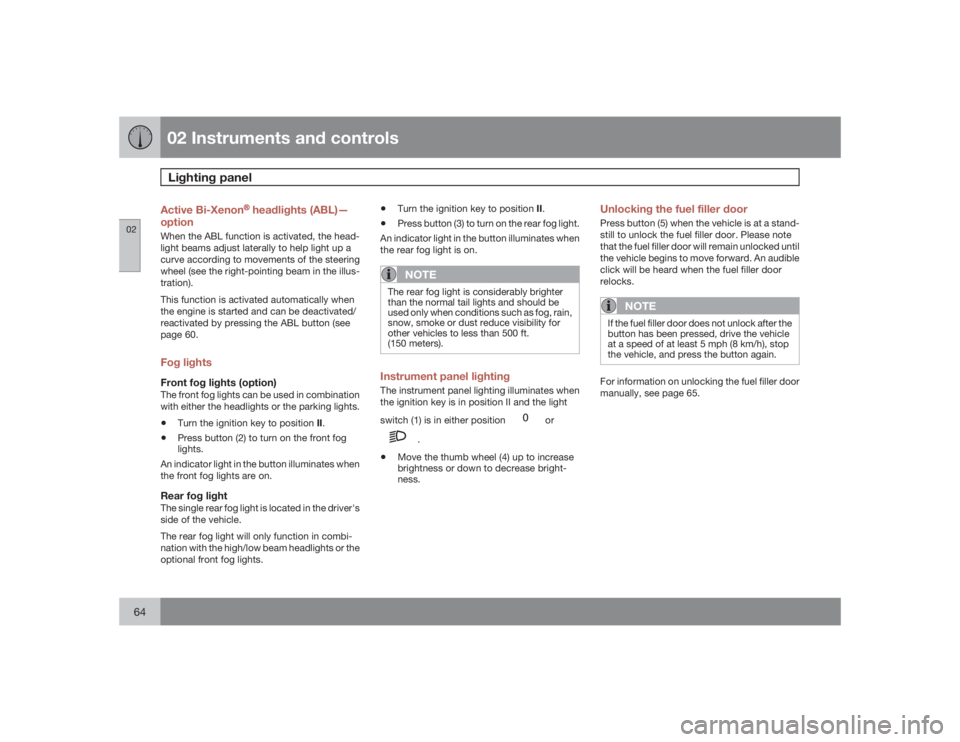
page 60.Fog lightsFront fog lights (option)The front fog lights can be used in combination
with either the headlights or the parking lights.•
Turn the ignition key to position II.
•
Press button (2) to turn on the front fog
lights.
An indicator light in the button illuminates when
the front fog lights are on.
Rear fog lightThe single rear fog light is located in the driver's
side of the vehicle.
The rear fog light will only function in combi-
nation with the high/low beam headlights or the
optional front fog lights.
•
Turn the ignition key to position II.
•
Press button (3) to turn on the rear fog light.
An indicator light in the button illuminates when
the rear fog light is on.NOTE
The rear fog light is considerably brighter
than the normal tail lights and should be
used only when conditions such as fog, rain,
snow, smoke or dust reduce visibility for
other vehicles to less than 500 ft.
(150 meters).Instrument panel lightingThe instrument panel lighting illuminates when
the ignition key is in position II and the light
switch (1) is in either position
or
.
•
Move the thumb wheel (4) up to increase
brightness or down to decrease bright-
ness.
Unlocking the fuel filler doorPress button (5) when the vehicle is at a stand-
still to unlock the fuel filler door. Please note
that the fuel filler door will remain unlocked until
the vehicle begins to move forward. An audible
click will be heard when the fuel filler door
relocks.
NOTE
If the fuel filler door does not unlock after the
button has been pressed, drive the vehicle
at a speed of at least 5 mph (8 km/h), stop
the vehicle, and press the button again.For information on unlocking the fuel filler door
manually, see page 65.
Page 71 of 282
02 Instruments and controls
Trip computer
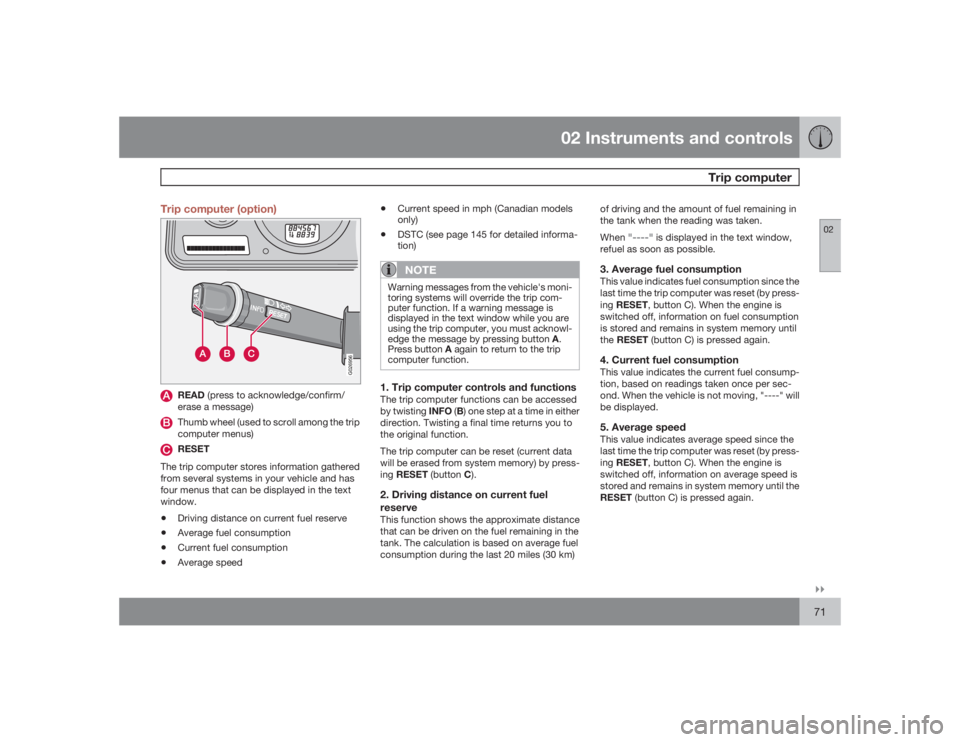
02``71 Trip computer (option)
G026956
READ (press to acknowledge/confirm/
erase a message)Thumb wheel (used to scroll among the trip
computer menus)RESET
The trip computer stores information gathered
from several systems in your vehicle and has
four menus that can be displayed in the text
window.
•
Driving distance on current fuel reserve
•
Average fuel consumption
•
Current fuel consumption
•
Average speed
•
Current speed in mph (Canadian models
only)
•
DSTC (see page 145 for detailed informa-
tion)NOTE
Warning messages from the vehicle's moni-
toring systems will override the trip com-
puter function. If a warning message is
displayed in the text window while you are
using the trip computer, you must acknowl-
edge the message by pressing button A.
Press button A again to return to the trip
computer function.1. Trip computer controls and functionsThe trip computer functions can be accessed
by twisting INFO (B) one step at a time in either
direction. Twisting a final time returns you to
the original function.
The trip computer can be reset (current data
will be erased from system memory) by press-
ing RESET (button C).2. Driving distance on current fuel
reserveThis function shows the approximate distance
that can be driven on the fuel remaining in the
tank. The calculation is based on average fuel
consumption during the last 20 miles (30 km)of driving and the amount of fuel remaining in
the tank when the reading was taken.
When
"----"
is displayed in the text window,
refuel as soon as possible.
3. Average fuel consumptionThis value indicates fuel consumption since the
last time the trip computer was reset (by press-
ingRESET, button C). When the engine is
switched off, information on fuel consumption
is stored and remains in system memory until
theRESET (button C) is pressed again.4. Current fuel consumptionThis value indicates the current fuel consump-
tion, based on readings taken once per sec-
ond. When the vehicle is not moving, "----" will
be displayed.5. Average speedThis value indicates average speed since the
last time the trip computer was reset (by press-
ingRESET, button C). When the engine is
switched off, information on average speed is
stored and remains in system memory until the
RESET (button C) is pressed again.
Page 73 of 282
02 Instruments and controls
Cruise control
02``73 Engaging the cruise control function
G027098
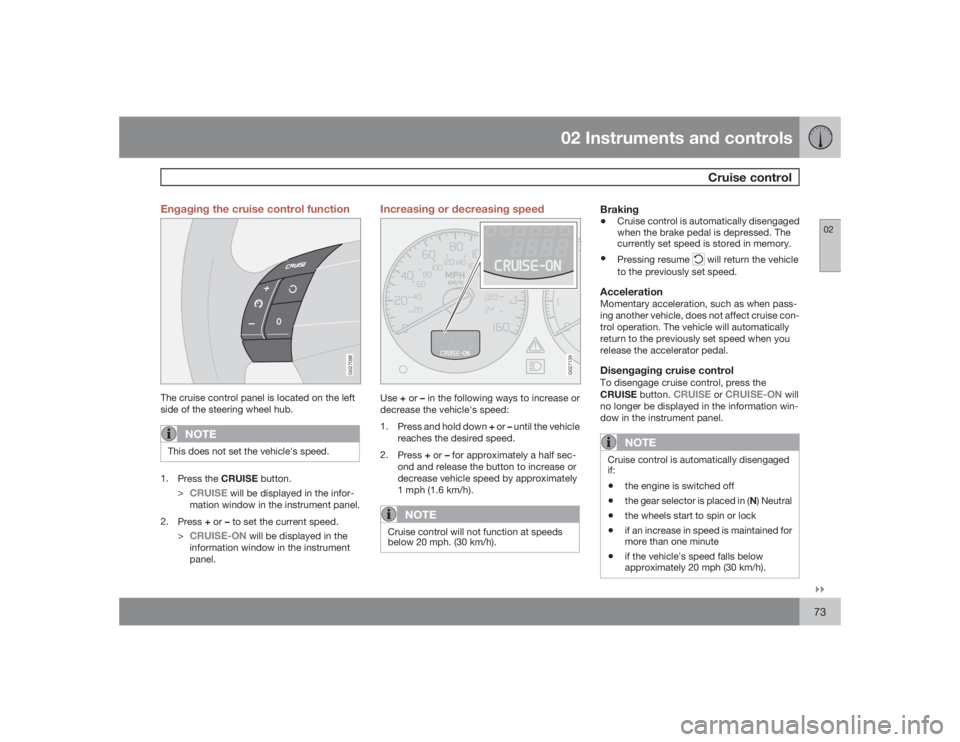
The cruise control panel is located on the left
side of the steering wheel hub.
NOTE
This does not set the vehicle's speed.1.
Press the CRUISE button.
>
CRUISE
will be displayed in the infor-
mation window in the instrument panel.
2.
Press+ or –to set the current speed.
>
CRUISE-ON
will be displayed in the
information window in the instrument
panel.
Increasing or decreasing speed
G027139
Use+ or – in the following ways to increase or
decrease the vehicle's speed:
1.
Press and hold down + or – until the vehicle
reaches the desired speed.
2.
Press+ or – for approximately a half sec-
ond and release the button to increase or
decrease vehicle speed by approximately
1 mph (1.6 km/h).
NOTE
Cruise control will not function at speeds
below 20 mph. (30 km/h).
Braking•
Cruise control is automatically disengaged
when the brake pedal is depressed. The
currently set speed is stored in memory.
•
Pressing resume
will return the vehicle
to the previously set speed.
AccelerationMomentary acceleration, such as when pass-
ing another vehicle, does not affect cruise con-
trol operation. The vehicle will automatically
return to the previously set speed when you
release the accelerator pedal.Disengaging cruise controlTo disengage cruise control, press the
CRUISE button.
CRUISE
or
CRUISE-ON
will
no longer be displayed in the information win-
dow in the instrument panel.
NOTE
Cruise control is automatically disengaged
if:•
the engine is switched off
•
the gear selector is placed in (N) Neutral
•
the wheels start to spin or lock
•
if an increase in speed is maintained for
more than one minute
•
if the vehicle's speed falls below
approximately 20 mph (30 km/h).
Page 75 of 282
02 Instruments and controls
12-volt sockets
0275
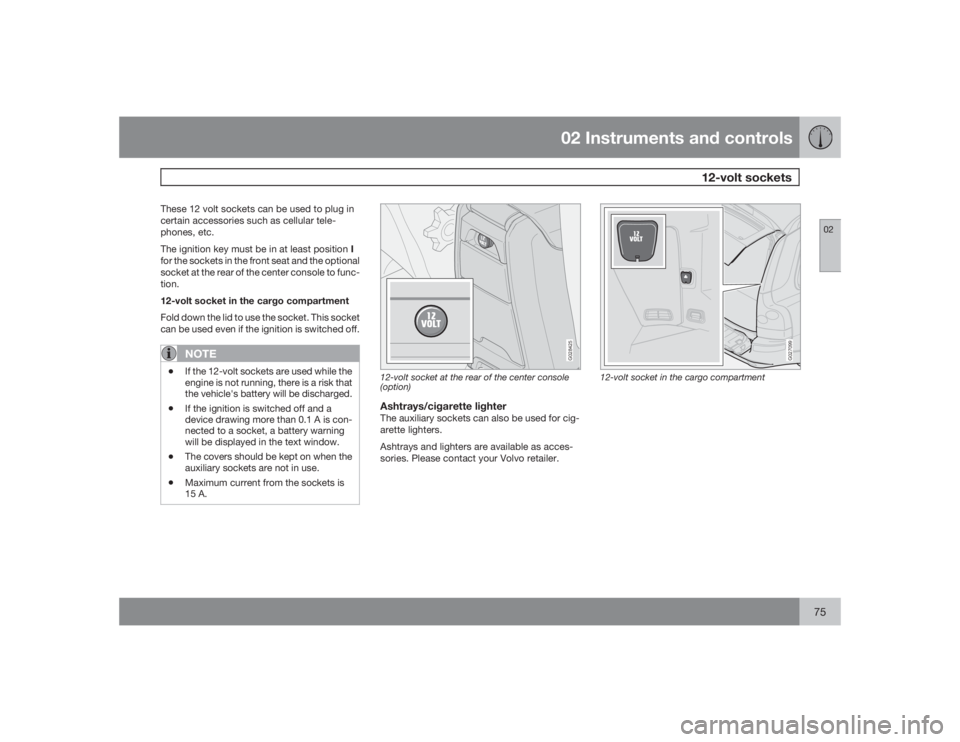
These 12 volt sockets can be used to plug in
certain accessories such as cellular tele-
phones, etc.
The ignition key must be in at least position I
for the sockets in the front seat and the optional
socket at the rear of the center console to func-
tion.
12-volt socket in the cargo compartment
Fold down the lid to use the socket. This socket
can be used even if the ignition is switched off.
NOTE
•
If the 12-volt sockets are used while the
engine is not running, there is a risk that
the vehicle's battery will be discharged.
•
If the ignition is switched off and a
device drawing more than 0.1 A is con-
nected to a socket, a battery warning
will be displayed in the text window.
•
The covers should be kept on when the
auxiliary sockets are not in use.
•
Maximum current from the sockets is
15 A.
G028425
12-volt socket at the rear of the center console
(option)Ashtrays/cigarette lighterThe auxiliary sockets can also be used for cig-
arette lighters.
Ashtrays and lighters are available as acces-
sories. Please contact your Volvo retailer.
G027099
12-volt socket in the cargo compartment
Page 77 of 282
02 Instruments and controls
Hood/tailgate
0277 Opening/closing the hood
G026995
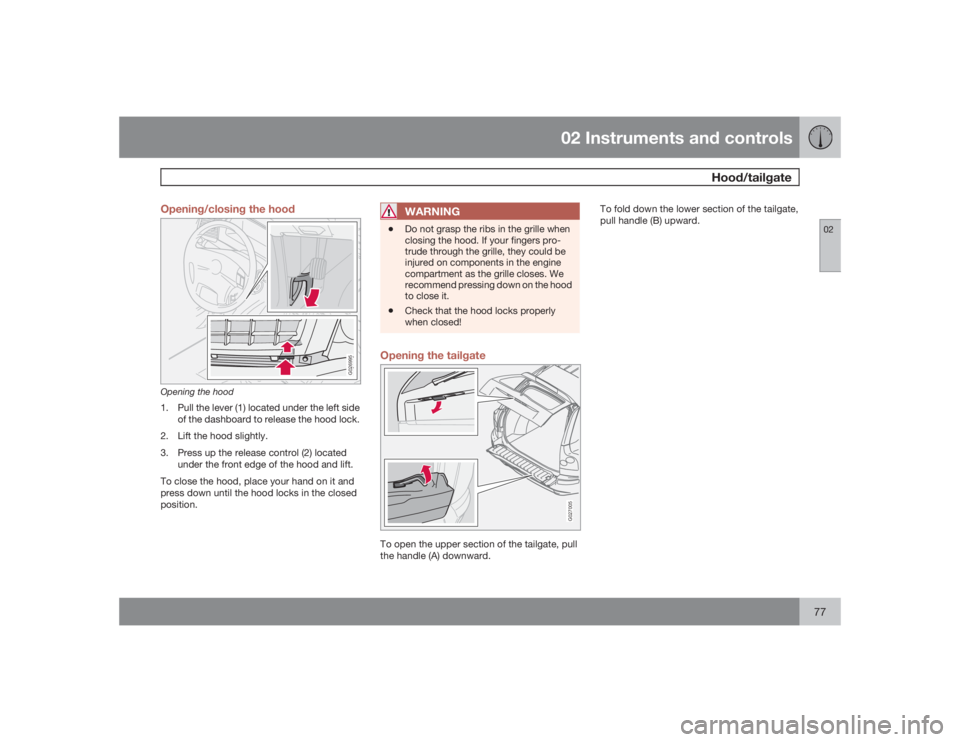
Opening the hood1. Pull the lever (1) located under the left side
of the dashboard to release the hood lock.
2. Lift the hood slightly.
3. Press up the release control (2) located
under the front edge of the hood and lift.
To close the hood, place your hand on it and
press down until the hood locks in the closed
position.
WARNING
•
Do not grasp the ribs in the grille when
closing the hood. If your fingers pro-
trude through the grille, they could be
injured on components in the engine
compartment as the grille closes. We
recommend pressing down on the hood
to close it.
•
Check that the hood locks properly
when closed!
Opening the tailgate
G027005
To open the upper section of the tailgate, pull
the handle (A) downward.To fold down the lower section of the tailgate,
pull handle (B) upward.
Page 78 of 282
02 Instruments and controlsPower windows
0278
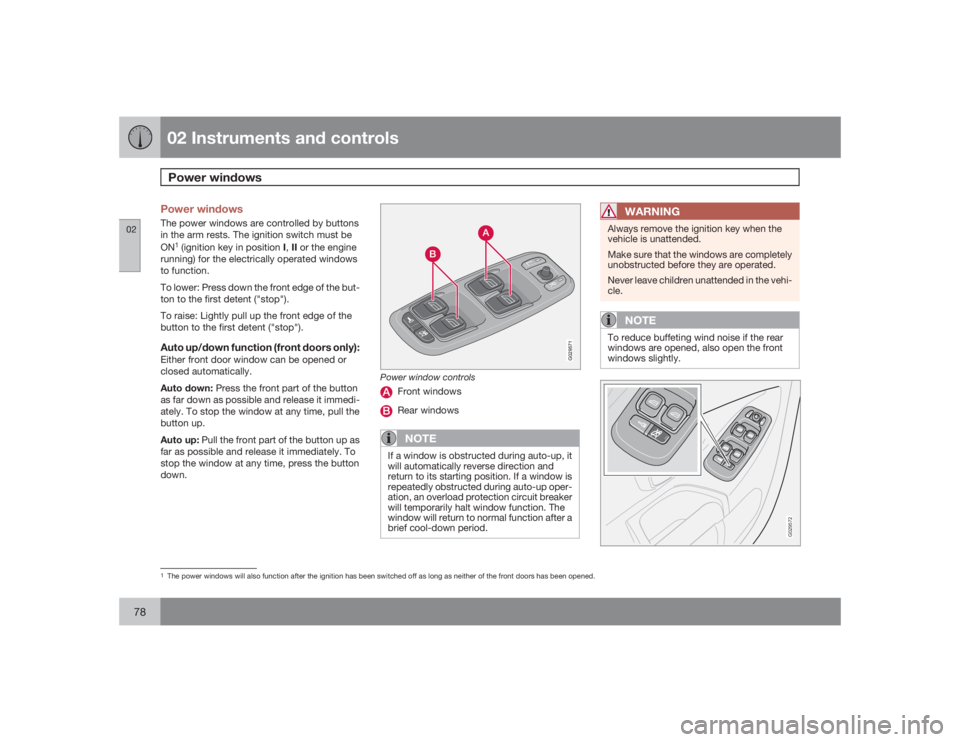
Power windowsThe power windows are controlled by buttons
in the arm rests. The ignition switch must be
ON
1 (ignition key in position I,II or the engine
running) for the electrically operated windows
to function.
To lower: Press down the front edge of the but-
ton to the first detent ("stop").
To raise: Lightly pull up the front edge of the
button to the first detent ("stop").
Auto up/down function (front doors only):Either front door window can be opened or
closed automatically.
Auto down: Press the front part of the button
as far down as possible and release it immedi-
ately. To stop the window at any time, pull the
button up.
Auto up: Pull the front part of the button up as
far as possible and release it immediately. To
stop the window at any time, press the button
down.
G029571
Power window controls
Front windowsRear windowsNOTE
If a window is obstructed during auto-up, it
will automatically reverse direction and
return to its starting position. If a window is
repeatedly obstructed during auto-up oper-
ation, an overload protection circuit breaker
will temporarily halt window function. The
window will return to normal function after a
brief cool-down period.
WARNING
Always remove the ignition key when the
vehicle is unattended.
Make sure that the windows are completely
unobstructed before they are operated.
Never leave children unattended in the vehi-
cle.
NOTE
To reduce buffeting wind noise if the rear
windows are opened, also open the front
windows slightly.
G029572
1The power windows will also function after the ignition has been switched off as long as neither of the front doors has been opened.
Page 80 of 282
02 Instruments and controlsMirrors
0280
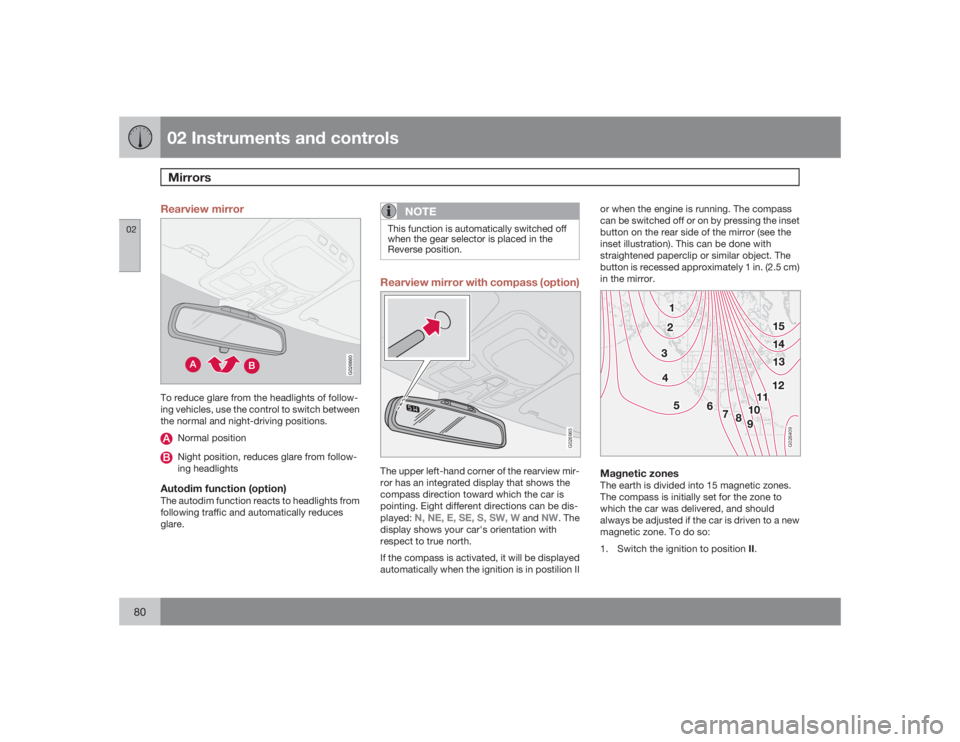
Rearview mirror
G026660
To reduce glare from the headlights of follow-
ing vehicles, use the control to switch between
the normal and night-driving positions.
Normal positionNight position, reduces glare from follow-
ing headlights
Autodim function (option)The autodim function reacts to headlights from
following traffic and automatically reduces
glare.
NOTE
This function is automatically switched off
when the gear selector is placed in the
Reverse position.Rearview mirror with compass (option)
G026965
The upper left-hand corner of the rearview mir-
ror has an integrated display that shows the
compass direction toward which the car is
pointing. Eight different directions can be dis-
played:
N, NE, E, SE, S, SW, W
and
NW
. The
display shows your car's orientation with
respect to true north.
If the compass is activated, it will be displayed
automatically when the ignition is in postilion IIor when the engine is running. The compass
can be switched off or on by pressing the inset
button on the rear side of the mirror (see the
inset illustration). This can be done with
straightened paperclip or similar object. The
button is recessed approximately 1 in. (2.5 cm)
in the mirror.
G026409
Magnetic zonesThe earth is divided into 15 magnetic zones.
The compass is initially set for the zone to
which the car was delivered, and should
always be adjusted if the car is driven to a new
magnetic zone. To do so:
1.
Switch the ignition to position II.
Page 83 of 282
02 Instruments and controls
Power moonroof
02``83 Power moonroof
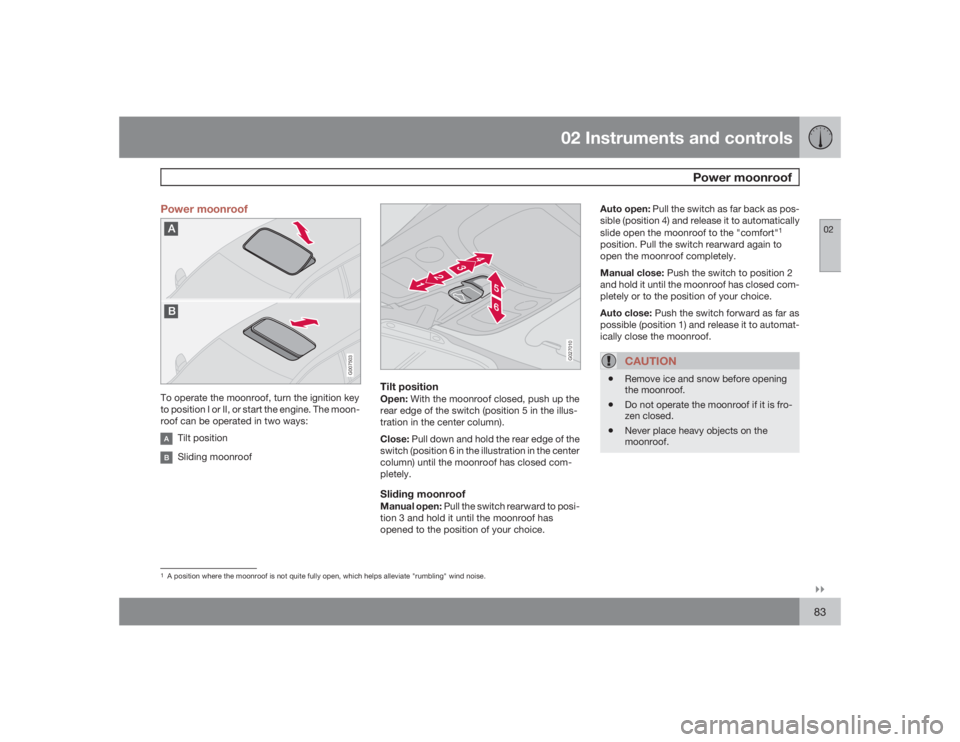
G007503
To operate the moonroof, turn the ignition key
to position I or II, or start the engine. The moon-
roof can be operated in two ways:
Tilt positionSliding moonroof
G027010
Tilt positionOpen: With the moonroof closed, push up the
rear edge of the switch (position 5 in the illus-
tration in the center column).
Close: Pull down and hold the rear edge of the
switch (position 6 in the illustration in the center
column) until the moonroof has closed com-
pletely.Sliding moonroofManual open: Pull the switch rearward to posi-
tion 3 and hold it until the moonroof has
opened to the position of your choice.Auto open: Pull the switch as far back as pos-
sible (position 4) and release it to automatically
slide open the moonroof to the "comfort"
1
position. Pull the switch rearward again to
open the moonroof completely.
Manual close: Push the switch to position 2
and hold it until the moonroof has closed com-
pletely or to the position of your choice.
Auto close: Push the switch forward as far as
possible (position 1) and release it to automat-
ically close the moonroof.
CAUTION
•
Remove ice and snow before opening
the moonroof.
•
Do not operate the moonroof if it is fro-
zen closed.
•
Never place heavy objects on the
moonroof.
1A position where the moonroof is not quite fully open, which helps alleviate "rumbling" wind noise.