radio controls VOLVO XC90 2009 Owner´s Manual
[x] Cancel search | Manufacturer: VOLVO, Model Year: 2009, Model line: XC90, Model: VOLVO XC90 2009Pages: 282, PDF Size: 8.76 MB
Page 241 of 282

10 Audio
Audio system controls
10
241 Bass speaker – SUBWOOFER (option)
The subwoofer helps the system provide fuller
sound and deeper bass.
1.
Select
AUDIO SETTINGS
in the menu and
pressENTER.
2.
Select
SUBWOOFER
and press ENTER.
See page 239 for information on setting the
subwoofer level.
Equalizer FREQ – FRONT (certain audio systems)
This function is used to fine-tune the sound
from the front speakers.
1.
Select
AUDIO SETTINGS
in the menu and
press
ENTER
.
2.
Select
Equalizer FR
and press ENTER.
3. Use the menu selection buttons to set the
level or use the SELECTOR control.
4.
Press ENTER to select the next frequency.
You can select five frequencies.
5.
Press ENTER until you come to the menu
mode to save the changes you have made.
Equalizer RREQ – REAR (certain audio systems)
This function is used to fine-tune the sound
from the rear speakers.1.
Select
AUDIO SETTINGS
in the menu and
pressENTER.
2.
Select
EQ- REAR
and press ENTER.
3. Use the menu selection buttons to set the
level or use the SELECTOR control.
4.
PressENTER to select the next frequency.
You can select five frequencies
5.
Press ENTER until you come to the menu
mode to save the changes you have made.
Optimal sound reproductionThe audio system is calibrated for optimal
sound reproduction through the use of digital
signal processing. This calibration takes into
account the speakers, amplifier, cabin acous-
tics, the seating position of the listener, etc., for
each combination of vehicle and audio system.
There is also dynamic calibration that takes
into account the setting of the volume control,
radio reception, and the vehicle's speed. The
sound settings described in this manual, such
as
BASS
,TREBLE
, and
EQUALIZER
are only
intended to enable the user to adapt sound
reproduction to his/her personal preferences.
Page 248 of 282
10 AudioAuxiliary equipment
10248
G027029
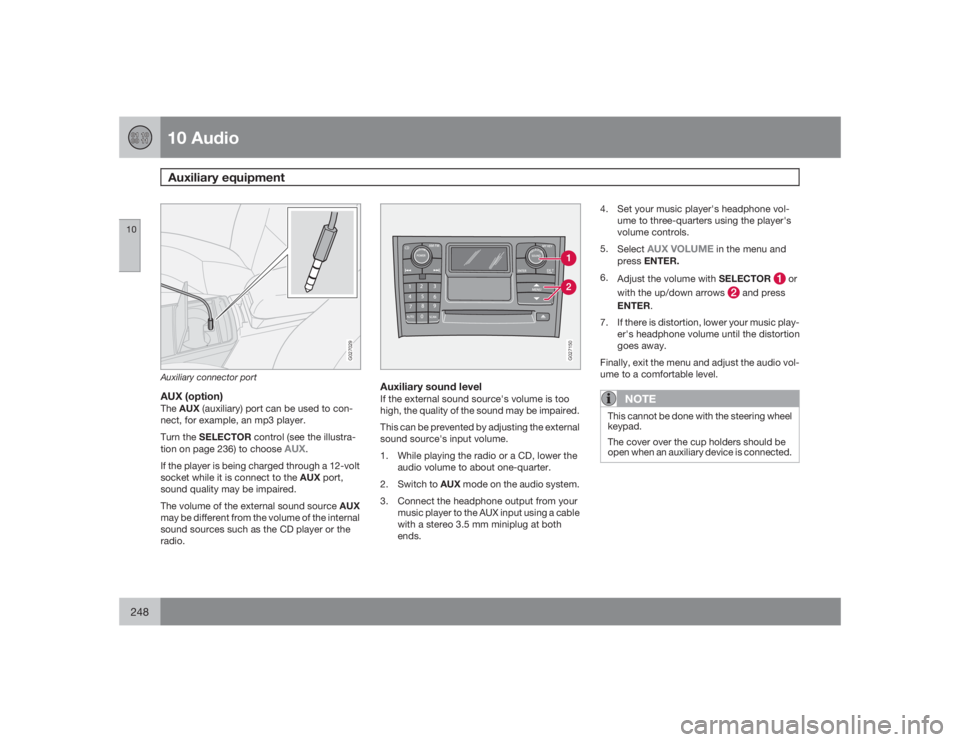
Auxiliary connector portAUX (option)TheAUX(auxiliary) port can be used to con-
nect, for example, an mp3 player.
Turn the SELECTOR control (see the illustra-
tion on page 236) to choose
AUX
.
If the player is being charged through a 12-volt
socket while it is connect to the AUX port,
sound quality may be impaired.
The volume of the external sound source AUX
may be different from the volume of the internal
sound sources such as the CD player or the
radio.
G027150
Auxiliary sound levelIf the external sound source's volume is too
high, the quality of the sound may be impaired.
This can be prevented by adjusting the external
sound source's input volume.
1. While playing the radio or a CD, lower the
audio volume to about one-quarter.
2.
Switch to AUX mode on the audio system.
3. Connect the headphone output from your
music player to the AUX input using a cable
with a stereo 3.5 mm miniplug at both
ends.4. Set your music player's headphone vol-
ume to three-quarters using the player's
volume controls.
5.
Select
AUX VOLUME
in the menu and
pressENTER.
6.
Adjust the volume with SELECTOR
or
with the up/down arrows
and press
ENTER.
7. If there is distortion, lower your music play-
er's headphone volume until the distortion
goes away.
Finally, exit the menu and adjust the audio vol-
ume to a comfortable level.
NOTE
This cannot be done with the steering wheel
keypad.
The cover over the cup holders should be
open when an auxiliary device is connected.