roof VOLVO XC90 2009 Owner´s Manual
[x] Cancel search | Manufacturer: VOLVO, Model Year: 2009, Model line: XC90, Model: VOLVO XC90 2009Pages: 282, PDF Size: 8.76 MB
Page 194 of 282
08 Car careWashing and cleaning the vehicle
08194
Washing•
The vehicle should be washed at regular
intervals since dirt, dust, insects and tar
spots adhere to the paint and may cause
damage. It is particularly important to wash
the vehicle frequently in the wintertime to
prevent corrosion, when salt has been
used on the roads.
•
When washing the vehicle, do not expose
it to direct sunlight. Use lukewarm water to
soften the dirt before you wash with a
sponge, and plenty of water, to avoid
scratching.
•
Bird droppings: Remove from paintwork as
soon as possible. Otherwise the finish may
be permanently damaged.
•
A detergent can be used to facilitate the
softening of dirt and oil.
•
A water-soluble grease solvent may be
used in cases of sticky dirt. However, use
a wash place equipped with a drainage
separator.CAUTION
Chromed wheels: Clean chrome-plated
wheels using the same detergents used for
the body of the vehicle. Aggressive wheel
cleaning agents can permanently stain
chrome-plated wheels.
•
Dry the vehicle with a clean chamois and
remember to clean the drain holes in the
doors and rocker panels.
•
Tar spots can be removed with kerosene
or tar remover after the vehicle has been
washed.
•
A stiff-bristle brush and lukewarm soapy
water can be used to clean the wiper
blades. Frequent cleaning of the wind-
shield and wiper blades improves visibility
considerably and also helps prolong the
service life of the wiper blades.
•
Wash off the dirt from the underside (wheel
housings, fenders, etc.).
•
In areas of high industrial fallout, more fre-
quent washing is recommended.
•
After cleaning the engine, the spark plug
wells should be inspected for water and
blown dry if necessary.
Suitable detergentsSpecial vehicle washing detergents should be
used. A suitable mixture is about 2.5 fl. oz.
(8.5 cl) of detergent to 2.6 US gal. (10 liters) of
warm water. After washing with a detergent the
vehicle should be well rinsed with clean water.
CAUTION
•
When washing or steam cleaning the
engine, avoid spraying water or steam
directly on the electrical components or
toward the rear side of the engine.
•
Dirt, snow, etc., on the headlights can
reduce lighting capacity considerably.
Clean the headlights regularly, for
example when refueling.
•
During high pressure washing, the
spray mouthpiece must never be closer
to the vehicle than 13 " (30 cm). Do not
spray into the locks.
Special moonroof cautions:
•
Always close the moonroof and sun
shade before washing your vehicle.
•
Never use abrasive cleaning agents on
the moonroof.
•
Never use wax on the rubber seals
around the moonroof.
Exterior componentsVolvo recommends the use of special cleaning
products, available at your Volvo retailer, for
cleaning colored plastic, rubber, or ornamental
components such as chromed strips on the
exterior of your vehicle. The instructions for
using these products should be followed care-
Page 216 of 282
09 Maintenance and servicingBattery
09216
1. Switch off the ignition.
2.
Wait at least 5 minutes after switching
off the ignition before disconnecting the
battery so that all information in the vehi-
cle's electrical system can be stored in the
control modules.
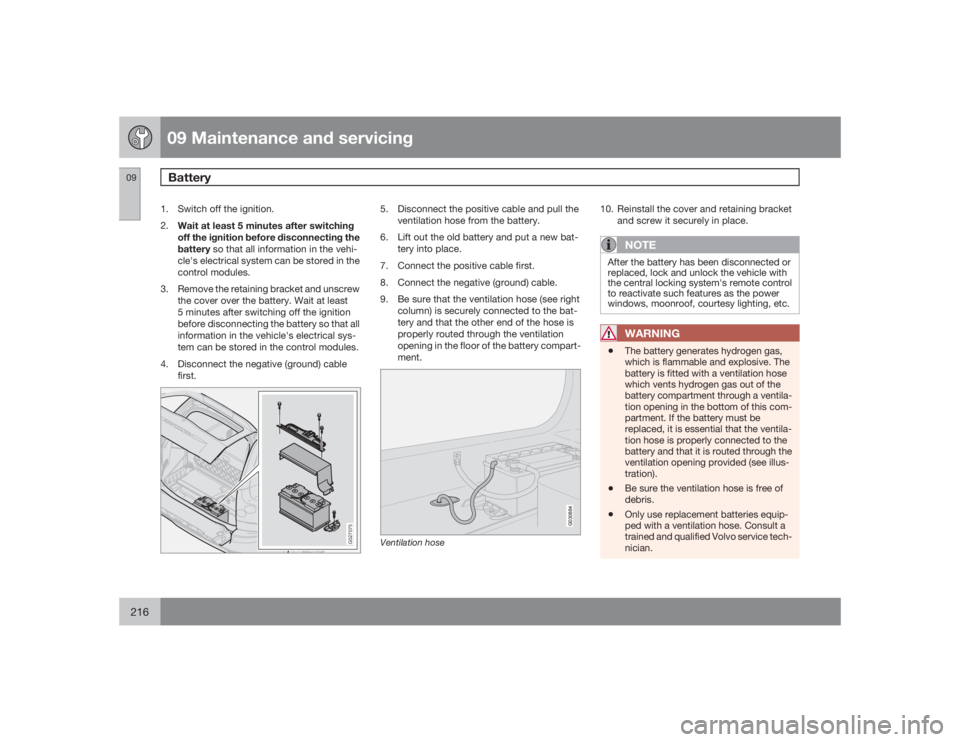
3. Remove the retaining bracket and unscrew
the cover over the battery. Wait at least
5 minutes after switching off the ignition
before disconnecting the battery so that all
information in the vehicle's electrical sys-
tem can be stored in the control modules.
4. Disconnect the negative (ground) cable
first.
G027075
5. Disconnect the positive cable and pull the
ventilation hose from the battery.
6. Lift out the old battery and put a new bat-
tery into place.
7. Connect the positive cable first.
8. Connect the negative (ground) cable.
9. Be sure that the ventilation hose (see right
column) is securely connected to the bat-
tery and that the other end of the hose is
properly routed through the ventilation
opening in the floor of the battery compart-
ment.
G030884
Ventilation hose
10. Reinstall the cover and retaining bracket
and screw it securely in place.
NOTE
After the battery has been disconnected or
replaced, lock and unlock the vehicle with
the central locking system's remote control
to reactivate such features as the power
windows, moonroof, courtesy lighting, etc.
WARNING
•
The battery generates hydrogen gas,
which is flammable and explosive. The
battery is fitted with a ventilation hose
which vents hydrogen gas out of the
battery compartment through a ventila-
tion opening in the bottom of this com-
partment. If the battery must be
replaced, it is essential that the ventila-
tion hose is properly connected to the
battery and that it is routed through the
ventilation opening provided (see illus-
tration).
•
Be sure the ventilation hose is free of
debris.
•
Only use replacement batteries equip-
ped with a ventilation hose. Consult a
trained and qualified Volvo service tech-
nician.
Page 228 of 282
09 Maintenance and servicingFuses
09228
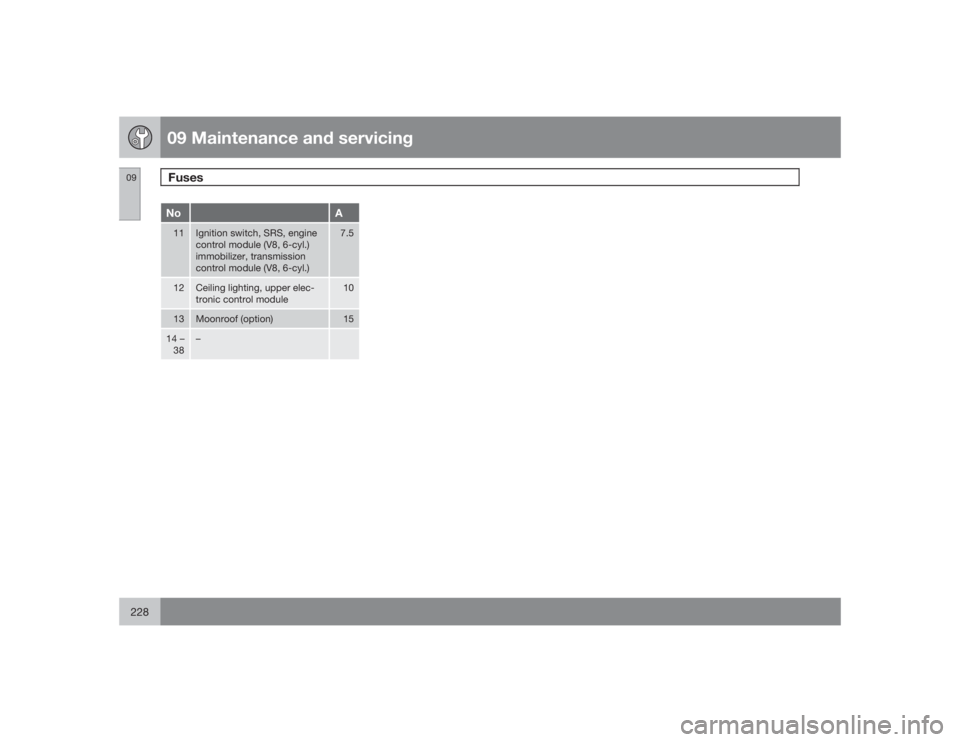
No
A
11
Ignition switch, SRS, engine
control module (V8, 6-cyl.)
immobilizer, transmission
control module (V8, 6-cyl.)
7.5
12
Ceiling lighting, upper elec-
tronic control module
10
13
Moonroof (option)
15
14 –
38
–
Page 244 of 282

10 AudioSirius satellite radio
10244
Listening to satellite radioThe optional Sirius satellite system consists of
a number of high elevation satellites in geo-
synchronous orbit.
NOTE
•
The digital signals from the Sirius satel-
lites are line-of-sight, which means that
physical obstructions such as bridges,
tunnels, etc, may temporarily interfere
with signal reception.
•
Avoid any obstructions, such as metal-
lic objects transported on roof racks or
in a ski box, or other antennas that may
impede signals from the SIRIUS satel-
lites.
Selecting Sirius radio mode1.
PressPower to switch on the audio sys-
tem (see page 236 for information on the
standard radio functions).
2.
Turn the SELECTOR dial until Sirius 1 or 2
is displayed.Activating Sirius radio1. Tune to a satellite channel that has no
audio, which means that the channel is
unsubscribed and the text "
Call 888-539-
SIRIUS TO SUBSCRIBE" is displayed(see also "Selecting a channel" in the right
column).
2. Call Sirius at 1-888-539-SIRIUS (7474).
3. When asked for the Sirius ID number press
AUTO to display this number. It is also
possible to retrieve the Sirius ID from the
MENU.
4.
"
UPDATING SUBSCRIPTION
" will be
displayed while the subscription is being
updated, after which the display will return
to the normal view.
SIRUS IDThe SIRIUS ID is required when contacting the
Sirius Call Center. It is used to activate your
account and when making any account trans-
actions. The SIRIUS ID is sometimes referred
to as the Electronic Serial Number (ESN).
This function displays the 12-digit SIRIUS ID.Selecting a channel category1. Select Sirius radio mode as described
above.
2.
PressENTER.
3. Use the up/down arrow keys to scroll
through the list of categories.
4.
PressENTER to select a category.5.
Use the
and
buttons to
select a channel in the currently chosen
category.
NOTE
The category "All" is default, which enables
you to scroll through the entire list of avail-
able satellite channels.
The channel categories are automatically
updated several times a year. This takes
approximately two minutes and will inter-
rupt normal broadcasting. A message will
be displayed while updating is in progress.
Information on channel or feature updates is
available at www.sirius.com.Selecting a channelThere are two ways of tuning in a channel:•
By pressing and holding the
and
buttons to start the scroll function.
The scrolling function begins slowly and
increases speed after approximately
5 seconds. Release the button to listen to
the currently displayed channel.
•
Through direct channel entry
Direct channel entryThe Sirius satellite channels are numbered
consecutively throughout all of the categories.
To access a channel directly:
Page 263 of 282
11 Specifications
Weights
11``263
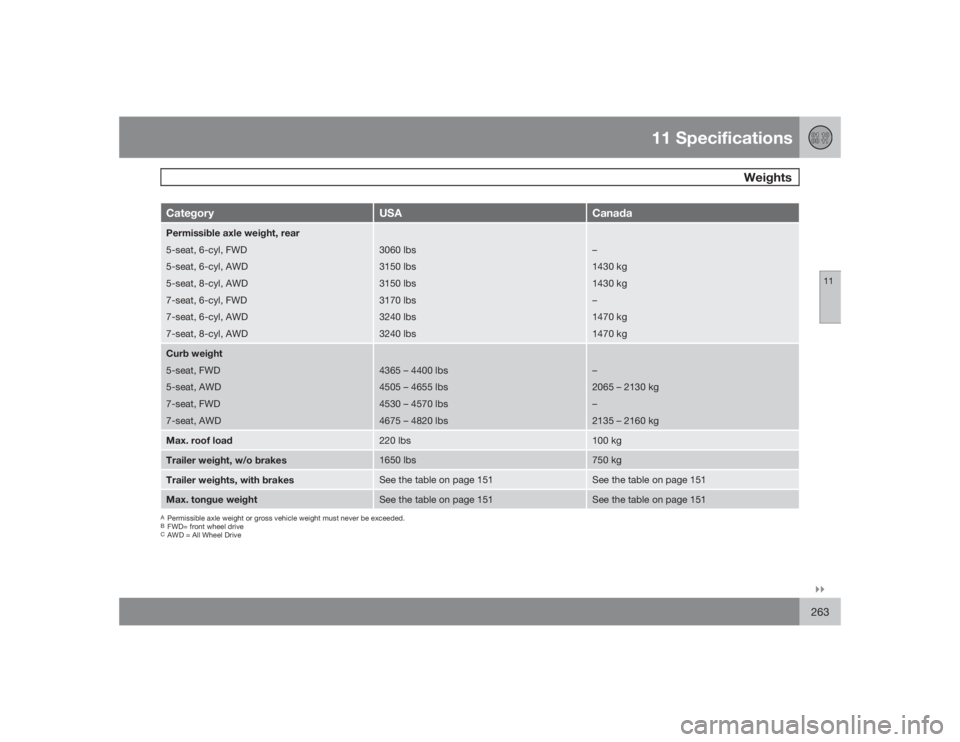
Category
USA
Canada
Permissible axle weight, rear
5-seat, 6-cyl, FWD
5-seat, 6-cyl, AWD
5-seat, 8-cyl, AWD
7-seat, 6-cyl, FWD
7-seat, 6-cyl, AWD
7-seat, 8-cyl, AWD
3060 lbs
3150 lbs
3150 lbs
3170 lbs
3240 lbs
3240 lbs
–
1430 kg
1430 kg
–
1470 kg
1470 kg
Curb weight
5-seat, FWD
5-seat, AWD
7-seat, FWD
7-seat, AWD
4365 – 4400 lbs
4505 – 4655 lbs
4530 – 4570 lbs
4675 – 4820 lbs
–
2065 – 2130 kg
–
2135 – 2160 kg
Max. roof load
220 lbs
100 kg
Trailer weight, w/o brakes
1650 lbs
750 kg
Trailer weights, with brakes
See the table on page 151
See the table on page 151
Max. tongue weight
See the table on page 151
See the table on page 151
APermissible axle weight or gross vehicle weight must never be exceeded.BFWD= front wheel driveCAWD = All Wheel Drive
Page 275 of 282
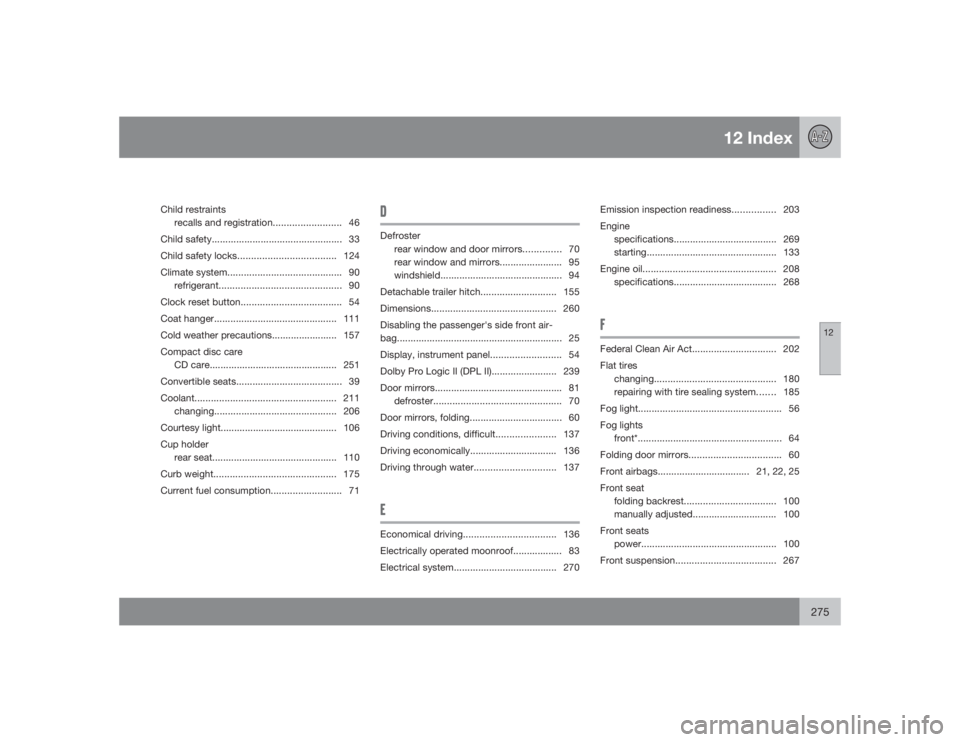
12 Index
12
275
Child restraints
recalls and registration......................... 46
Child safety................................................ 33
Child safety locks....................................124
Climate system.......................................... 90
refrigerant............................................. 90
Clock reset button..................................... 54
Coat hanger............................................. 111
Cold weather precautions........................ 157
Compact disc care
CD care............................................... 251
Convertible seats....................................... 39
Coolant.................................................... 211
changing............................................. 206
Courtesy light........................................... 106
Cup holder
rear seat.............................................. 110
Curb weight............................................. 175
Current fuel consumption.......................... 71
DDefroster
rear window and door mirrors.............. 70
rear window and mirrors....................... 95
windshield............................................. 94
Detachable trailer hitch............................ 155
Dimensions.............................................. 260
Disabling the passenger's side front air-
bag............................................................. 25
Display, instrument panel.......................... 54
Dolby Pro Logic II (DPL II)........................ 239
Door mirrors............................................... 81
defroster............................................... 70
Door mirrors, folding.................................. 60
Driving conditions, difficult......................137
Driving economically................................ 136
Driving through water..............................137EEconomical driving..................................136
Electrically operated moonroof.................. 83
Electrical system...................................... 270Emission inspection readiness................ 203
Engine
specifications...................................... 269
starting................................................ 133
Engine oil................................................. 208
specifications...................................... 268
FFederal Clean Air Act............................... 202
Flat tires
changing............................................. 180
repairing with tire sealing system....... 185
Fog light..................................................... 56
Fog lights
front*.....................................................64
Folding door mirrors.................................. 60
Front airbags.................................. 21, 22, 25
Front seat
folding backrest.................................. 100
manually adjusted............................... 100
Front seats
power.................................................. 100
Front suspension..................................... 267
Page 277 of 282
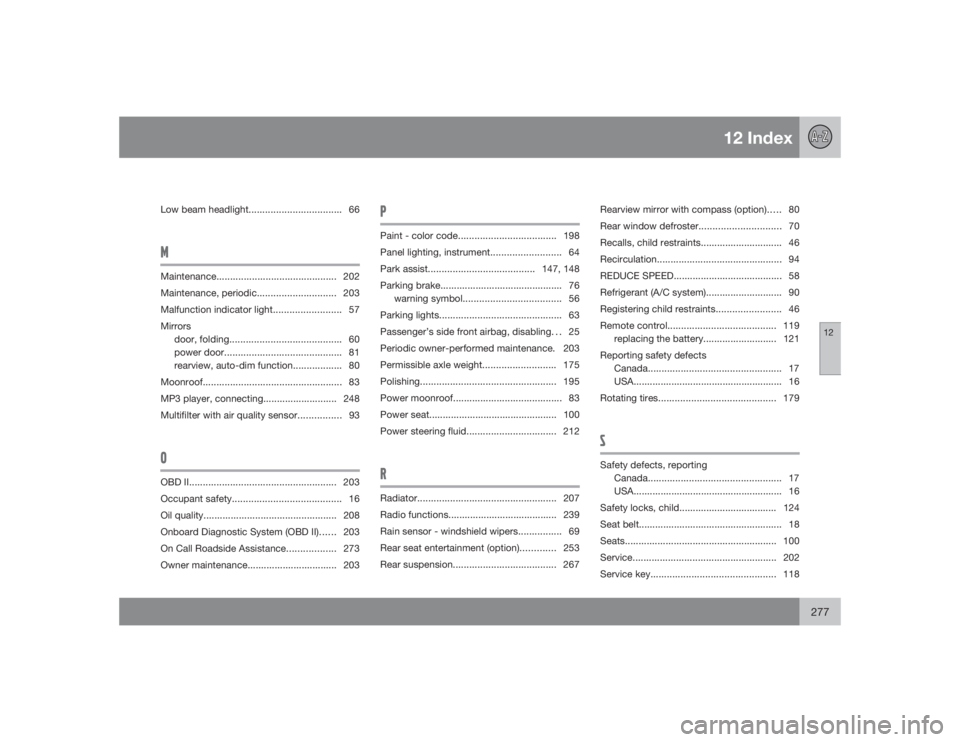
12 Index
12
277
Low beam headlight.................................. 66MMaintenance............................................ 202
Maintenance, periodic............................. 203
Malfunction indicator light......................... 57
Mirrors
door, folding......................................... 60
power door........................................... 81
rearview, auto-dim function.................. 80
Moonroof................................................... 83
MP3 player, connecting........................... 248
Multifilter with air quality sensor................ 93OOBD II...................................................... 203
Occupant safety........................................ 16
Oil quality................................................. 208
Onboard Diagnostic System (OBD II)...... 203
On Call Roadside Assistance.................. 273
Owner maintenance................................. 203
PPaint - color code....................................198
Panel lighting, instrument.......................... 64
Park assist.......................................147, 148
Parking brake............................................. 76
warning symbol.................................... 56
Parking lights............................................. 63
Passenger’s side front airbag, disabling. . . 25
Periodic owner-performed maintenance. 203
Permissible axle weight........................... 175
Polishing.................................................. 195
Power moonroof........................................ 83
Power seat............................................... 100
Power steering fluid................................. 212RRadiator................................................... 207
Radio functions........................................ 239
Rain sensor - windshield wipers................ 69
Rear seat entertainment (option)............. 253
Rear suspension...................................... 267Rearview mirror with compass (option)..... 80
Rear window defroster.............................. 70
Recalls, child restraints.............................. 46
Recirculation.............................................. 94
REDUCE SPEED........................................ 58
Refrigerant (A/C system)............................ 90
Registering child restraints........................ 46
Remote control........................................ 119
replacing the battery........................... 121
Reporting safety defects
Canada................................................. 17
USA....................................................... 16
Rotating tires........................................... 179
SSafety defects, reporting
Canada................................................. 17
USA....................................................... 16
Safety locks, child.................................... 124
Seat belt..................................................... 18
Seats........................................................ 100
Service.....................................................202
Service key.............................................. 118