key VOLVO XC90 2009 Owner´s Manual
[x] Cancel search | Manufacturer: VOLVO, Model Year: 2009, Model line: XC90, Model: VOLVO XC90 2009Pages: 282, PDF Size: 8.76 MB
Page 149 of 282
06 Starting and driving
Towing
06``149
G027042
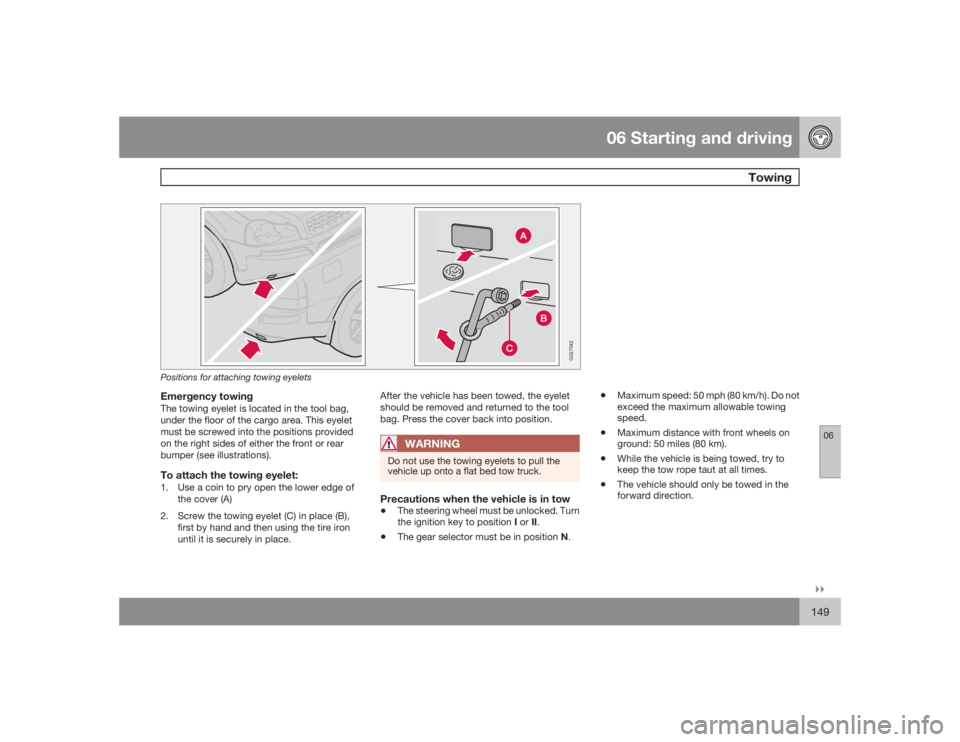
Positions for attaching towing eyeletsEmergency towingThe towing eyelet is located in the tool bag,
under the floor of the cargo area. This eyelet
must be screwed into the positions provided
on the right sides of either the front or rear
bumper (see illustrations).To attach the towing eyelet:1. Use a coin to pry open the lower edge of
the cover (A)
2. Screw the towing eyelet (C) in place (B),
first by hand and then using the tire iron
until it is securely in place.After the vehicle has been towed, the eyelet
should be removed and returned to the tool
bag. Press the cover back into position.
WARNING
Do not use the towing eyelets to pull the
vehicle up onto a flat bed tow truck.Precautions when the vehicle is in tow•
The steering wheel must be unlocked. Turn
the ignition key to position I or II.
•
The gear selector must be in position N.
•
Maximum speed: 50 mph (80 km/h). Do not
exceed the maximum allowable towing
speed.
•
Maximum distance with front wheels on
ground: 50 miles (80 km).
•
While the vehicle is being towed, try to
keep the tow rope taut at all times.
•
The vehicle should only be towed in the
forward direction.
Page 162 of 282
06 Starting and drivingBlind Spot Information System
06162
System status
Text in the dis-
play
BLIS NOT FUNC-
TIONING PROP-
ERLY
BLIND-SPOT
SYST SERVICE
REQUIRED
RIGHT CAMERA
OBSCURED
BLIND-SPOT
SYST R CAMERA
BLOCKED
LEFT CAMERA
OBSCURED
BLIND-SPOT
SYST L CAMERA
BLOCKED
BOTH CAMERAS
OBSCURED
BLIND-SPOT
SYST CAMERAS
BLOCKED
BLIS SYSTEM OFF
BLIND-SPOT INFO
SYSTEM OFF
BLIS SYSTEM ON
BLIND-SPOT INFO
SYSTEM ON
BLIS FUNCTION
REDUCED
BLIND-SPOT
SYST FUNCTION
REDUCED
The messages listed above can only be dis-
played if the ignition key is in position II (or if
the engine is running) and if BLIS is active (i.e.if the system has not been turned off by press-
ing the BLIS button).
Page 221 of 282
09 Maintenance and servicing
Replacing bulbs
09``221 Replacing bulbs in the taillight cluster
G027077
1. Switch off all lights and turn ignition key to
position0.
2. Fold down the lower section of the tailgate,
and fold up the rear section of the cargo
area floor.
3. If the vehicle is equipped with the optional
grocery bag holder, detach the holder's
bands.
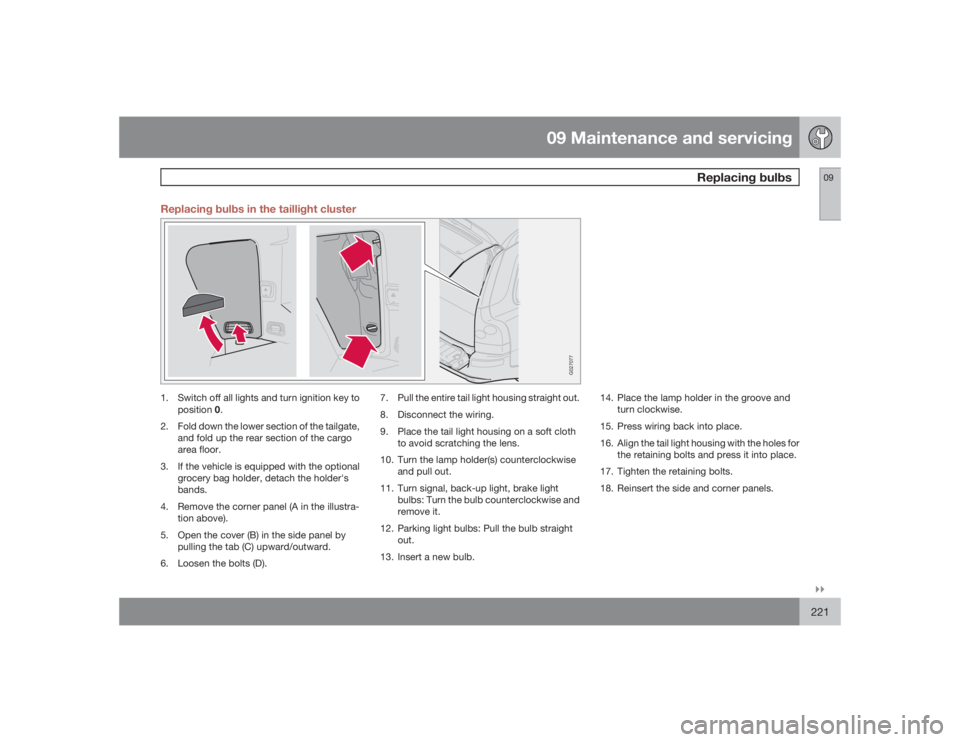
4. Remove the corner panel (A in the illustra-
tion above).
5. Open the cover (B) in the side panel by
pulling the tab (C) upward/outward.
6. Loosen the bolts (D).7. Pull the entire tail light housing straight out.
8. Disconnect the wiring.
9. Place the tail light housing on a soft cloth
to avoid scratching the lens.
10. Turn the lamp holder(s) counterclockwise
and pull out.
11. Turn signal, back-up light, brake light
bulbs: Turn the bulb counterclockwise and
remove it.
12. Parking light bulbs: Pull the bulb straight
out.
13. Insert a new bulb.14. Place the lamp holder in the groove and
turn clockwise.
15. Press wiring back into place.
16. Align the tail light housing with the holes for
the retaining bolts and press it into place.
17. Tighten the retaining bolts.
18. Reinsert the side and corner panels.
Page 236 of 282
10 AudioAudio system overview
10236
G027144
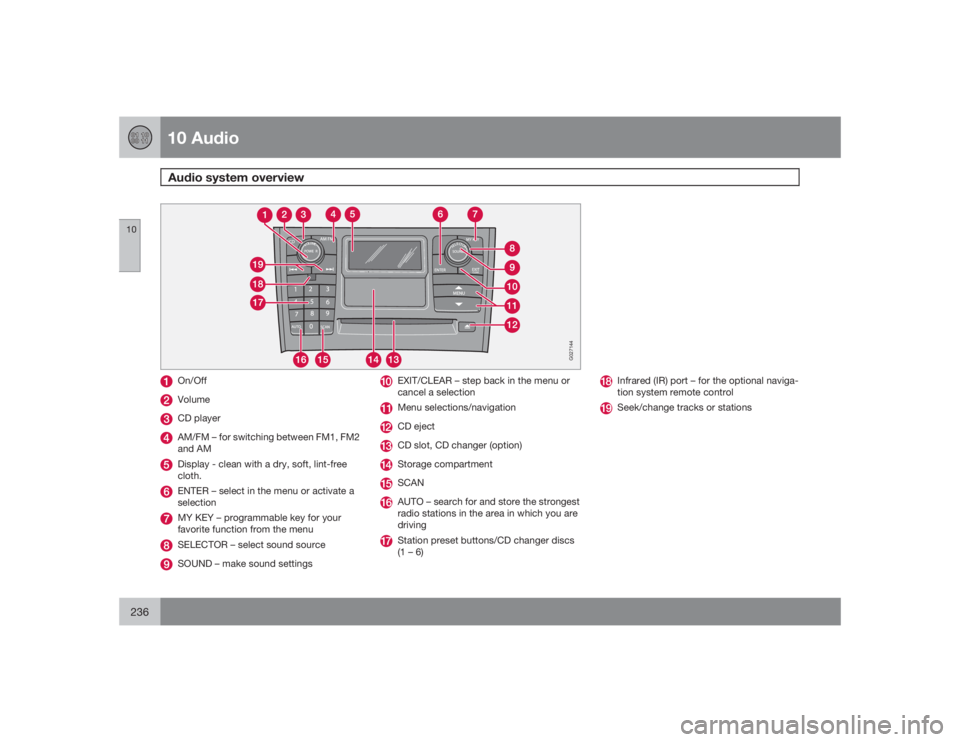
On/OffVolumeCD playerAM/FM – for switching between FM1, FM2
and AMDisplay - clean with a dry, soft, lint-free
cloth.ENTER – select in the menu or activate a
selectionMY KEY – programmable key for your
favorite function from the menuSELECTOR – select sound sourceSOUND – make sound settings
EXIT/CLEAR – step back in the menu or
cancel a selectionMenu selections/navigationCD ejectCD slot, CD changer (option)Storage compartmentSCANAUTO – search for and store the strongest
radio stations in the area in which you are
drivingStation preset buttons/CD changer discs
(1 – 6)
Infrared (IR) port – for the optional naviga-
tion system remote controlSeek/change tracks or stations
Page 237 of 282
10 Audio
Audio system controls
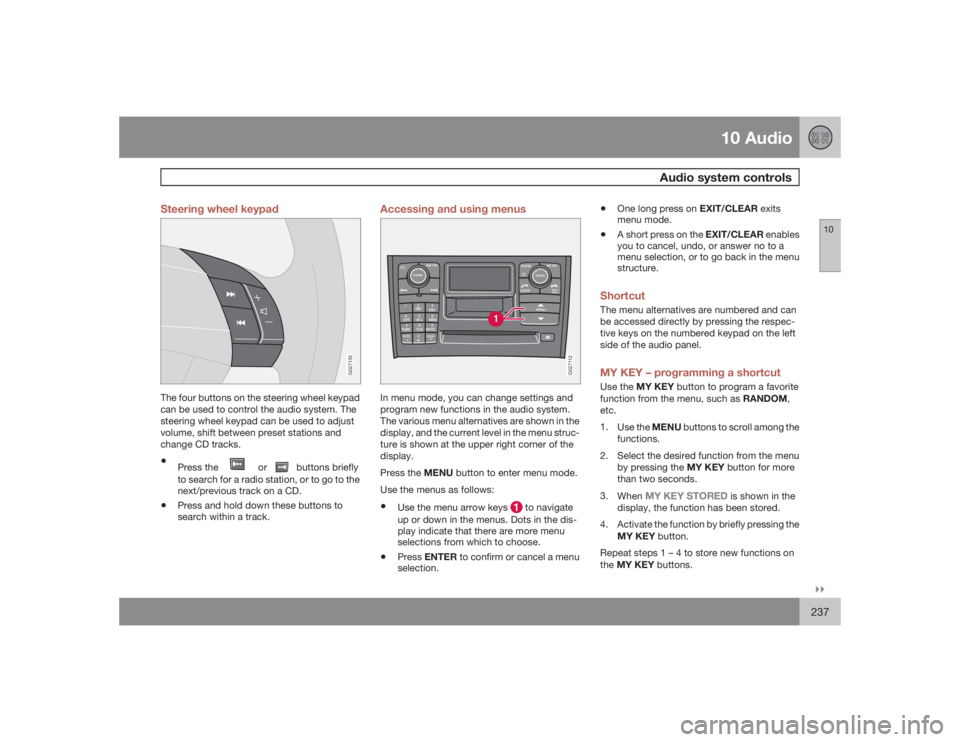
10``237 Steering wheel keypad
G027135
The four buttons on the steering wheel keypad
can be used to control the audio system. The
steering wheel keypad can be used to adjust
volume, shift between preset stations and
change CD tracks.•
Press the
or
buttons briefly
to search for a radio station, or to go to the
next/previous track on a CD.
•
Press and hold down these buttons to
search within a track.
Accessing and using menus
G027112
In menu mode, you can change settings and
program new functions in the audio system.
The various menu alternatives are shown in the
display, and the current level in the menu struc-
ture is shown at the upper right corner of the
display.
Press the MENU button to enter menu mode.
Use the menus as follows:•
Use the menu arrow keys
to navigate
up or down in the menus. Dots in the dis-
play indicate that there are more menu
selections from which to choose.
•
PressENTER to confirm or cancel a menu
selection.
•
One long press on EXIT/CLEAR exits
menu mode.
•
A short press on the EXIT/CLEAR enables
you to cancel, undo, or answer no to a
menu selection, or to go back in the menu
structure.
ShortcutThe menu alternatives are numbered and can
be accessed directly by pressing the respec-
tive keys on the numbered keypad on the left
side of the audio panel.MY KEY – programming a shortcutUse the MY KEY button to program a favorite
function from the menu, such as RANDOM,
etc.
1.
Use the MENU buttons to scroll among the
functions.
2. Select the desired function from the menu
by pressing the MY KEY button for more
than two seconds.
3.
When
MY KEY STORED
is shown in the
display, the function has been stored.
4. Activate the function by briefly pressing the
MY KEY button.
Repeat steps 1 – 4 to store new functions on
theMY KEY buttons.
Page 238 of 282
10 AudioAudio system controls
10238
NOTE
TheMY KEY buttons can only be pro-
grammed for one shortcut function at a
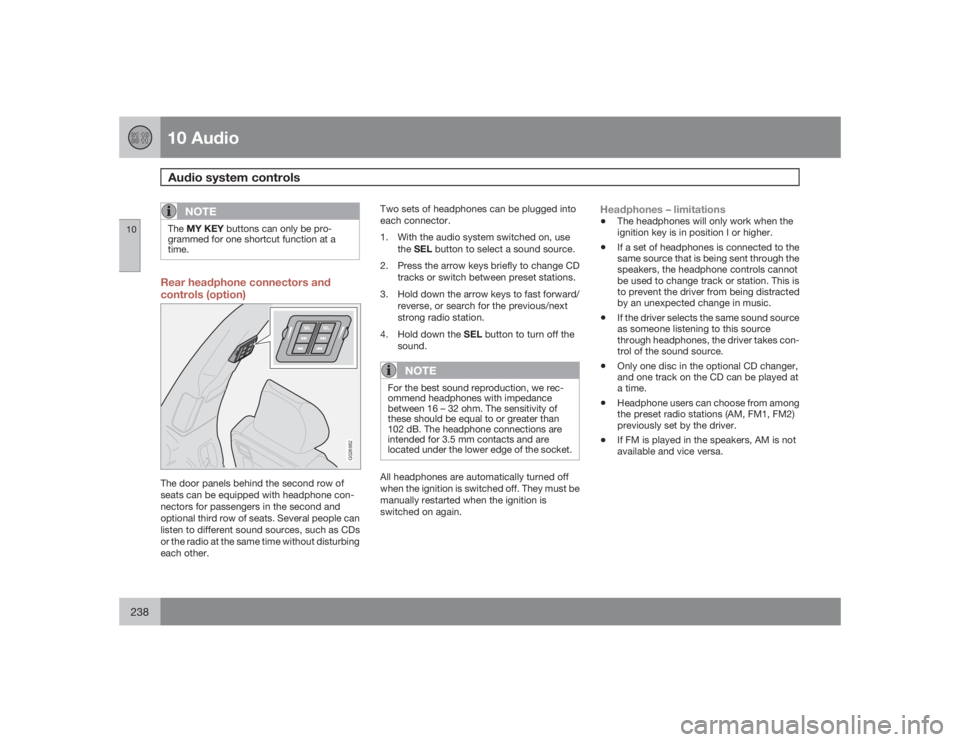
time.Rear headphone connectors and
controls (option)
G026982
The door panels behind the second row of
seats can be equipped with headphone con-
nectors for passengers in the second and
optional third row of seats. Several people can
listen to different sound sources, such as CDs
or the radio at the same time without disturbing
each other.Two sets of headphones can be plugged into
each connector.
1. With the audio system switched on, use
theSEL button to select a sound source.
2. Press the arrow keys briefly to change CD
tracks or switch between preset stations.
3. Hold down the arrow keys to fast forward/
reverse, or search for the previous/next
strong radio station.
4.
Hold down the SEL button to turn off the
sound.
NOTE
For the best sound reproduction, we rec-
ommend headphones with impedance
between 16 – 32 ohm. The sensitivity of
these should be equal to or greater than
102 dB. The headphone connections are
intended for 3.5 mm contacts and are
located under the lower edge of the socket.All headphones are automatically turned off
when the ignition is switched off. They must be
manually restarted when the ignition is
switched on again.
Headphones – limitations•
The headphones will only work when the
ignition key is in position I or higher.
•
If a set of headphones is connected to the
same source that is being sent through the
speakers, the headphone controls cannot
be used to change track or station. This is
to prevent the driver from being distracted
by an unexpected change in music.
•
If the driver selects the same sound source
as someone listening to this source
through headphones, the driver takes con-
trol of the sound source.
•
Only one disc in the optional CD changer,
and one track on the CD can be played at
a time.
•
Headphone users can choose from among
the preset radio stations (AM, FM1, FM2)
previously set by the driver.
•
If FM is played in the speakers, AM is not
available and vice versa.
Page 239 of 282
10 Audio
Audio system controls
10``239 On/Off button
G027146
To activate the system:
1.
Turn the ignition key to position I.
NOTE
If you switch off the ignition while the audio
system is on, the system will be on when the
ignition is switched on again.2.
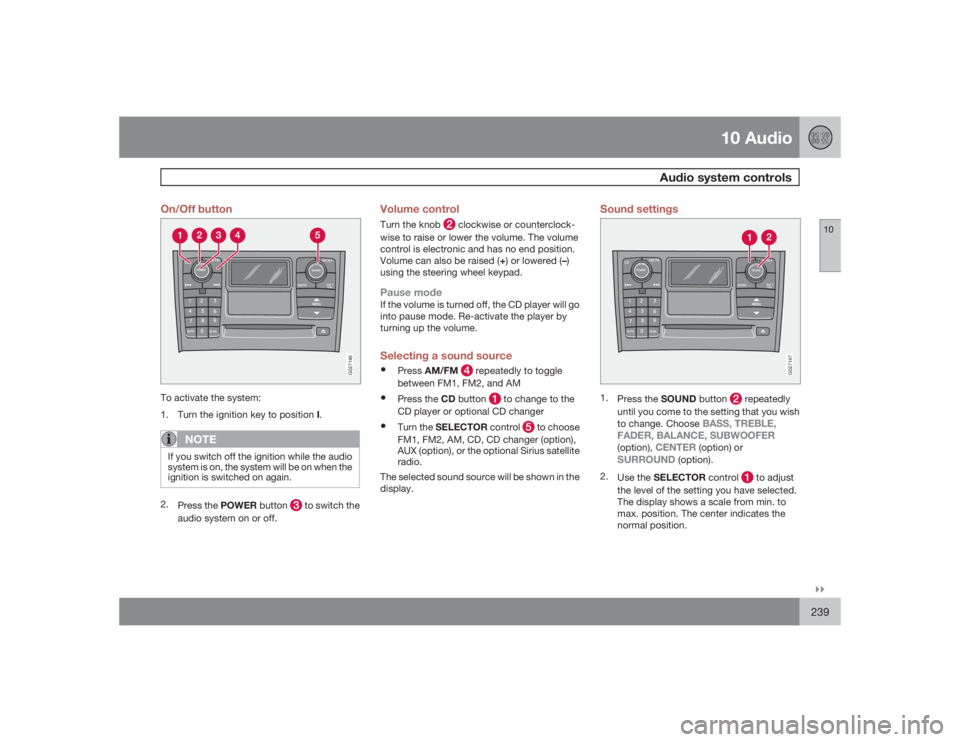
Press the POWER button
to switch the
audio system on or off.
Volume controlTurn the knob
clockwise or counterclock-
wise to raise or lower the volume. The volume
control is electronic and has no end position.
Volume can also be raised (+) or lowered (–)
using the steering wheel keypad.
Pause modeIf the volume is turned off, the CD player will go
into pause mode. Re-activate the player by
turning up the volume.Selecting a sound source•
PressAM/FM
repeatedly to toggle
between FM1, FM2, and AM
•
Press the CD button
to change to the
CD player or optional CD changer
•
Turn the SELECTOR control
to choose
FM1, FM2, AM, CD, CD changer (option),
AUX (option), or the optional Sirius satellite
radio.
The selected sound source will be shown in the
display.
Sound settings
G027147
1.
Press the SOUND button
repeatedly
until you come to the setting that you wish
to change. Choose
BASS, TREBLE,
FADER, BALANCE, SUBWOOFER
(option),
CENTER
(option) or
SURROUND
(option).
2.
Use the SELECTOR control
to adjust
the level of the setting you have selected.
The display shows a scale from min. to
max. position. The center indicates the
normal position.
Page 242 of 282
10 AudioRadio functions
10242
Station search
G027148
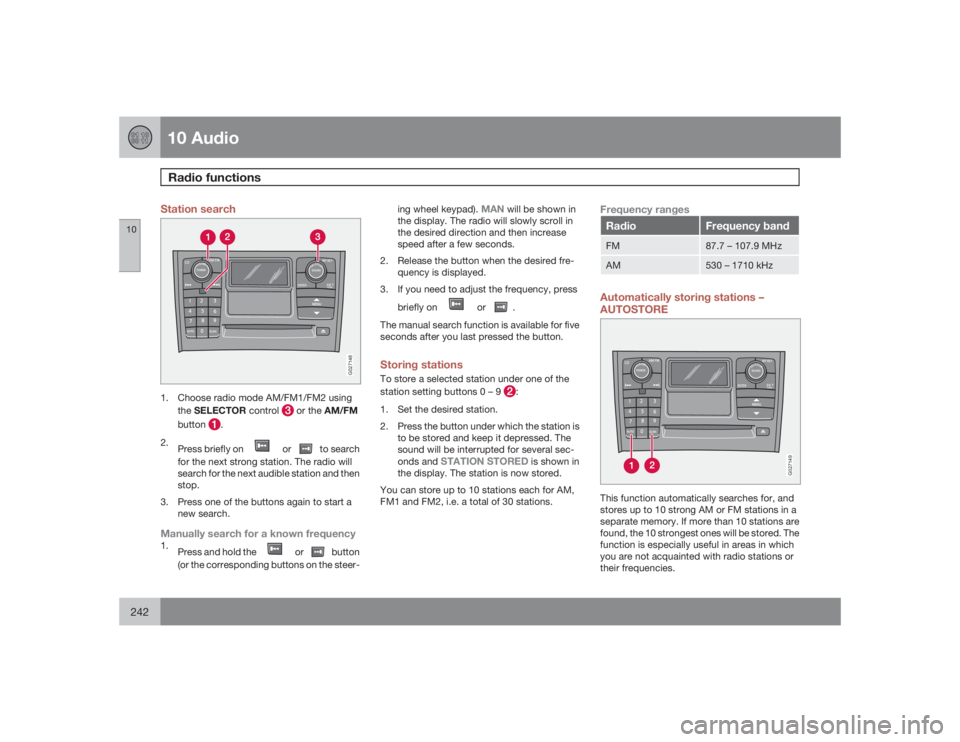
1. Choose radio mode AM/FM1/FM2 using
theSELECTOR control
or the AM/FM
button
.
2.
Press briefly on
or
to search
for the next strong station. The radio will
search for the next audible station and then
stop.
3. Press one of the buttons again to start a
new search.
Manually search for a known frequency1.
Press and hold the
or
button
(or the corresponding buttons on the steer-ing wheel keypad).
MAN
will be shown in
the display. The radio will slowly scroll in
the desired direction and then increase
speed after a few seconds.
2. Release the button when the desired fre-
quency is displayed.
3. If you need to adjust the frequency, press
briefly on
or
.
The manual search function is available for five
seconds after you last pressed the button.
Storing stationsTo store a selected station under one of the
station setting buttons 0 – 9
:
1. Set the desired station.
2. Press the button under which the station is
to be stored and keep it depressed. The
sound will be interrupted for several sec-
onds and
STATION STORED
is shown in
the display. The station is now stored.
You can store up to 10 stations each for AM,
FM1 and FM2, i.e. a total of 30 stations.
Frequency rangesRadio
Frequency band
FM
87.7 – 107.9 MHz
AM
530 – 1710 kHz
Automatically storing stations –
AUTOSTORE
G027149
This function automatically searches for, and
stores up to 10 strong AM or FM stations in a
separate memory. If more than 10 stations are
found, the 10 strongest ones will be stored. The
function is especially useful in areas in which
you are not acquainted with radio stations or
their frequencies.
Page 243 of 282
10 Audio
Radio functions
10
243
Starting autostore1.
Choose a frequency band with the AM/
FM button.
2.
Press and hold down the AUTO button
until
AUTOSTORING
is shown in the
display.
When
AUTOSTORING
is no longer displayed,
the autostore process is complete. The auto-
matically stored stations can be selected withe
the preset (number) keys If there are no stations
with sufficient signal strength,
NO AST
FOUND
is displayed.
Stopping autostorePressEXIT.Selecting an autostored station1.
PressAUTO (1) briefly. AUTOwill be dis-
played.
2. Press one of the preset buttons (0 – 9).
The radio will remain in Autostore mode until
AUTO, EXIT, or AM/FM is pressed.
SCANThis function automatically searches the cur-
rently selected waveband (AM, FM1, or FM2)
for strong stations. When the radio finds a sta-
tion, it will pause for approximately 8 seconds,
after which it will continue scanning.Activating/deactivating Scan1.
Choose a waveband by pressing the AM/
FM button.
2.
PressSCAN
.SCAN will be shown in the
display.
3.
PressEXIT to stop scanning.
Storing a station found by SCANStations can be stored on the preset buttons
while the SCAN function is activated.•
Press a preset button and hold it down until
Station stored is displayed.
This deactivates SCAN and the stored station
can be selected by pressing the preset button.
Radio textCertain stations broadcast program informa-
tion, which can be shown in the display.
1.
Press the MENU button.
2.
Select
RADIOTEXT
in the menu and press
ENTER.
Select
RADIOTEXT
again to deactivate.
Page 244 of 282

10 AudioSirius satellite radio
10244
Listening to satellite radioThe optional Sirius satellite system consists of
a number of high elevation satellites in geo-
synchronous orbit.
NOTE
•
The digital signals from the Sirius satel-
lites are line-of-sight, which means that
physical obstructions such as bridges,
tunnels, etc, may temporarily interfere
with signal reception.
•
Avoid any obstructions, such as metal-
lic objects transported on roof racks or
in a ski box, or other antennas that may
impede signals from the SIRIUS satel-
lites.
Selecting Sirius radio mode1.
PressPower to switch on the audio sys-
tem (see page 236 for information on the
standard radio functions).
2.
Turn the SELECTOR dial until Sirius 1 or 2
is displayed.Activating Sirius radio1. Tune to a satellite channel that has no
audio, which means that the channel is
unsubscribed and the text "
Call 888-539-
SIRIUS TO SUBSCRIBE" is displayed(see also "Selecting a channel" in the right
column).
2. Call Sirius at 1-888-539-SIRIUS (7474).
3. When asked for the Sirius ID number press
AUTO to display this number. It is also
possible to retrieve the Sirius ID from the
MENU.
4.
"
UPDATING SUBSCRIPTION
" will be
displayed while the subscription is being
updated, after which the display will return
to the normal view.
SIRUS IDThe SIRIUS ID is required when contacting the
Sirius Call Center. It is used to activate your
account and when making any account trans-
actions. The SIRIUS ID is sometimes referred
to as the Electronic Serial Number (ESN).
This function displays the 12-digit SIRIUS ID.Selecting a channel category1. Select Sirius radio mode as described
above.
2.
PressENTER.
3. Use the up/down arrow keys to scroll
through the list of categories.
4.
PressENTER to select a category.5.
Use the
and
buttons to
select a channel in the currently chosen
category.
NOTE
The category "All" is default, which enables
you to scroll through the entire list of avail-
able satellite channels.
The channel categories are automatically
updated several times a year. This takes
approximately two minutes and will inter-
rupt normal broadcasting. A message will
be displayed while updating is in progress.
Information on channel or feature updates is
available at www.sirius.com.Selecting a channelThere are two ways of tuning in a channel:•
By pressing and holding the
and
buttons to start the scroll function.
The scrolling function begins slowly and
increases speed after approximately
5 seconds. Release the button to listen to
the currently displayed channel.
•
Through direct channel entry
Direct channel entryThe Sirius satellite channels are numbered
consecutively throughout all of the categories.
To access a channel directly: