ignition VOLVO XC90 2009 Owner´s Manual
[x] Cancel search | Manufacturer: VOLVO, Model Year: 2009, Model line: XC90, Model: VOLVO XC90 2009Pages: 282, PDF Size: 8.76 MB
Page 221 of 282
09 Maintenance and servicing
Replacing bulbs
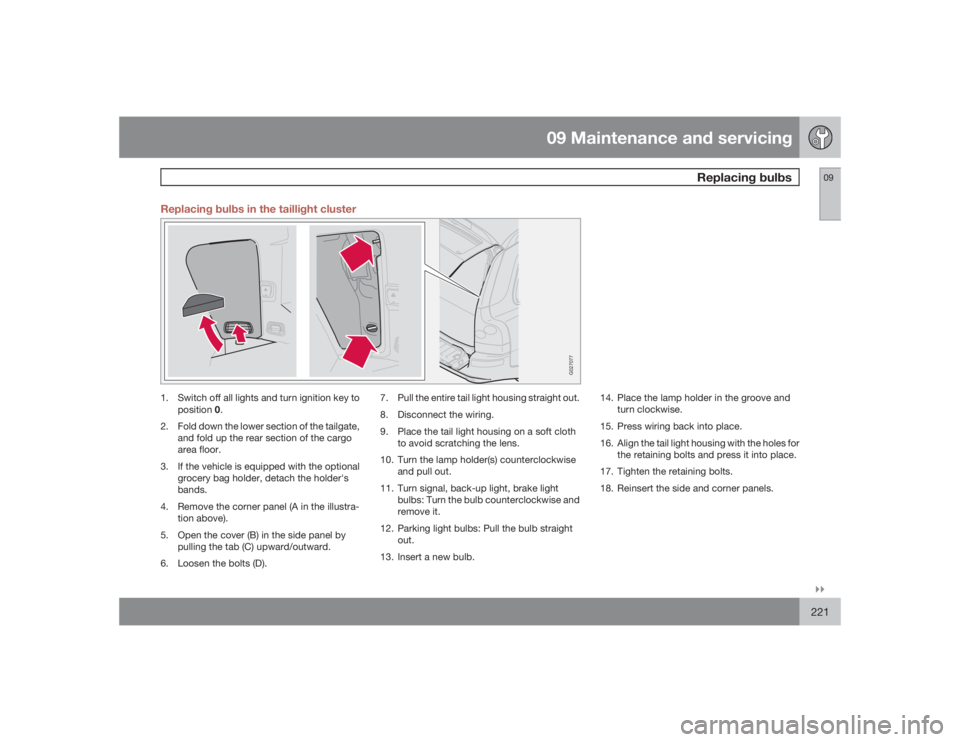
09``221 Replacing bulbs in the taillight cluster
G027077
1. Switch off all lights and turn ignition key to
position0.
2. Fold down the lower section of the tailgate,
and fold up the rear section of the cargo
area floor.
3. If the vehicle is equipped with the optional
grocery bag holder, detach the holder's
bands.
4. Remove the corner panel (A in the illustra-
tion above).
5. Open the cover (B) in the side panel by
pulling the tab (C) upward/outward.
6. Loosen the bolts (D).7. Pull the entire tail light housing straight out.
8. Disconnect the wiring.
9. Place the tail light housing on a soft cloth
to avoid scratching the lens.
10. Turn the lamp holder(s) counterclockwise
and pull out.
11. Turn signal, back-up light, brake light
bulbs: Turn the bulb counterclockwise and
remove it.
12. Parking light bulbs: Pull the bulb straight
out.
13. Insert a new bulb.14. Place the lamp holder in the groove and
turn clockwise.
15. Press wiring back into place.
16. Align the tail light housing with the holes for
the retaining bolts and press it into place.
17. Tighten the retaining bolts.
18. Reinsert the side and corner panels.
Page 222 of 282
09 Maintenance and servicingReplacing bulbs
09222
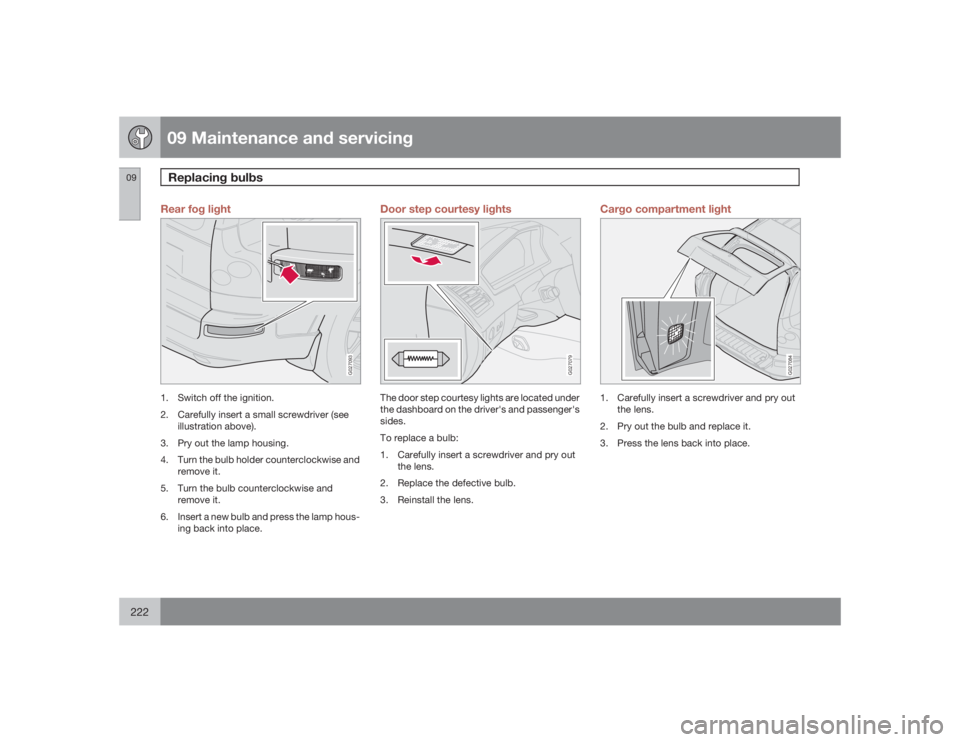
Rear fog light
G027093
1. Switch off the ignition.
2. Carefully insert a small screwdriver (see
illustration above).
3. Pry out the lamp housing.
4. Turn the bulb holder counterclockwise and
remove it.
5. Turn the bulb counterclockwise and
remove it.
6. Insert a new bulb and press the lamp hous-
ing back into place.
Door step courtesy lights
G027079
The door step courtesy lights are located under
the dashboard on the driver's and passenger's
sides.
To replace a bulb:
1. Carefully insert a screwdriver and pry out
the lens.
2. Replace the defective bulb.
3. Reinstall the lens.
Cargo compartment light
G027084
1. Carefully insert a screwdriver and pry out
the lens.
2. Pry out the bulb and replace it.
3. Press the lens back into place.
Page 223 of 282
09 Maintenance and servicing
Replacing bulbs
09
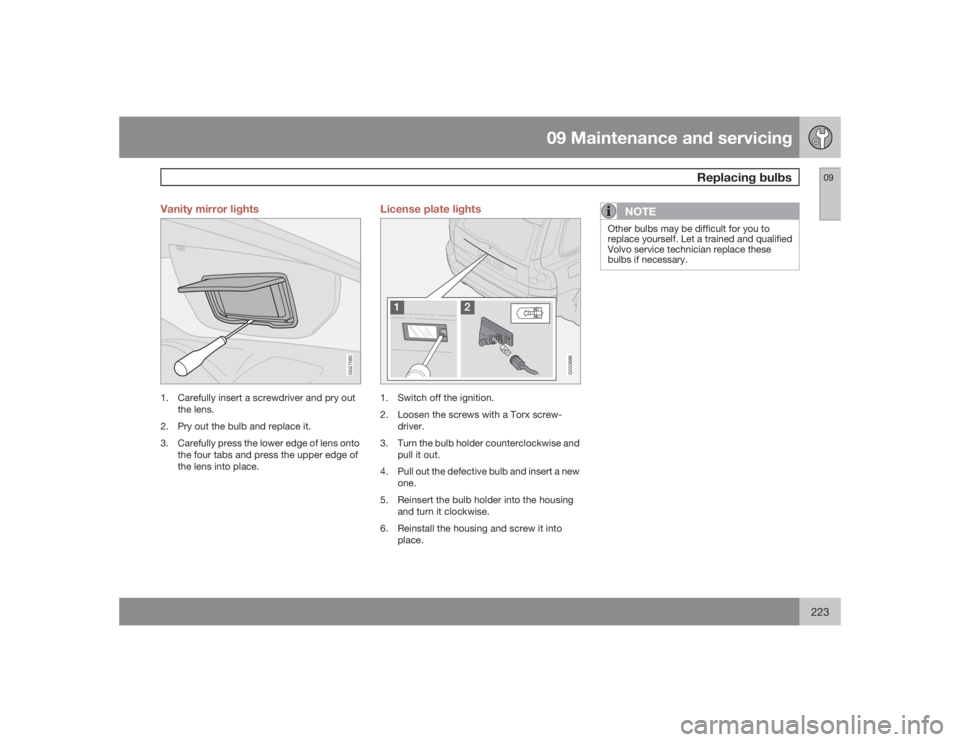
223 Vanity mirror lights
G027080
1. Carefully insert a screwdriver and pry out
the lens.
2. Pry out the bulb and replace it.
3. Carefully press the lower edge of lens onto
the four tabs and press the upper edge of
the lens into place.
License plate lights
G030886
1. Switch off the ignition.
2. Loosen the screws with a Torx screw-
driver.
3. Turn the bulb holder counterclockwise and
pull it out.
4. Pull out the defective bulb and insert a new
one.
5. Reinsert the bulb holder into the housing
and turn it clockwise.
6. Reinstall the housing and screw it into
place.
NOTE
Other bulbs may be difficult for you to
replace yourself. Let a trained and qualified
Volvo service technician replace these
bulbs if necessary.
Page 225 of 282
09 Maintenance and servicing
Fuses
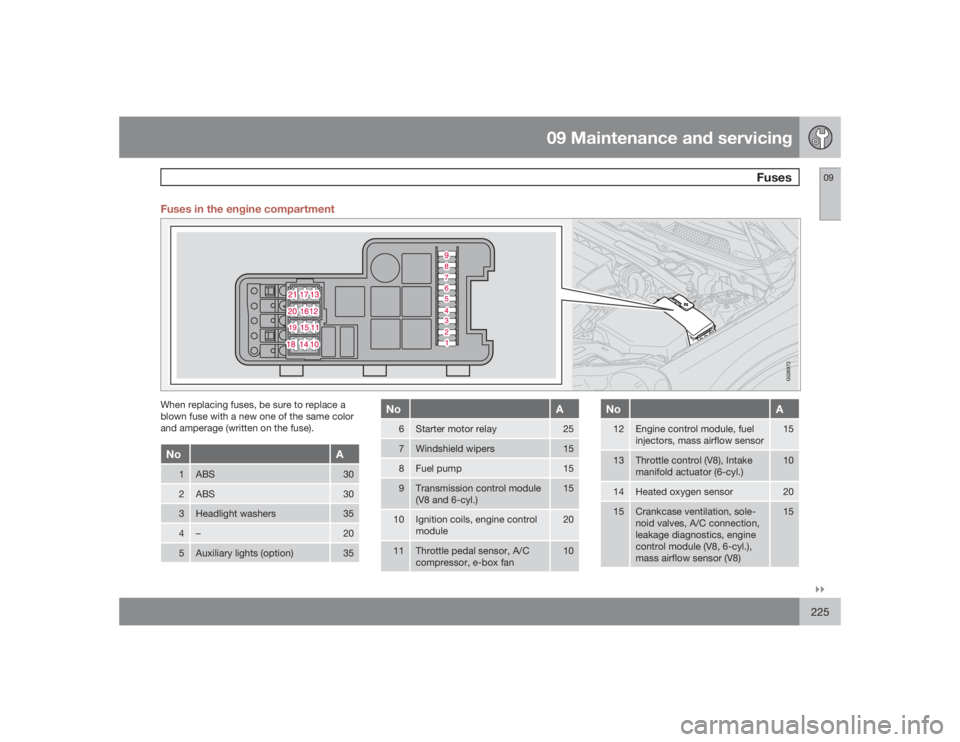
09``225 Fuses in the engine compartment
G026972
When replacing fuses, be sure to replace a
blown fuse with a new one of the same color
and amperage (written on the fuse).No
A
1
ABS
30
2
ABS
30
3
Headlight washers
35
4
–
20
5
Auxiliary lights (option)
35
No
A
6
Starter motor relay
25
7
Windshield wipers
15
8
Fuel pump
15
9
Transmission control module
(V8 and 6-cyl.)
15
10
Ignition coils, engine control
module
20
11
Throttle pedal sensor, A/C
compressor, e-box fan
10
No
A
12
Engine control module, fuel
injectors, mass airflow sensor
15
13
Throttle control (V8), Intake
manifold actuator (6-cyl.)
10
14
Heated oxygen sensor
20
15
Crankcase ventilation, sole-
noid valves, A/C connection,
leakage diagnostics, engine
control module (V8, 6-cyl.),
mass airflow sensor (V8)
15
Page 228 of 282
09 Maintenance and servicingFuses
09228
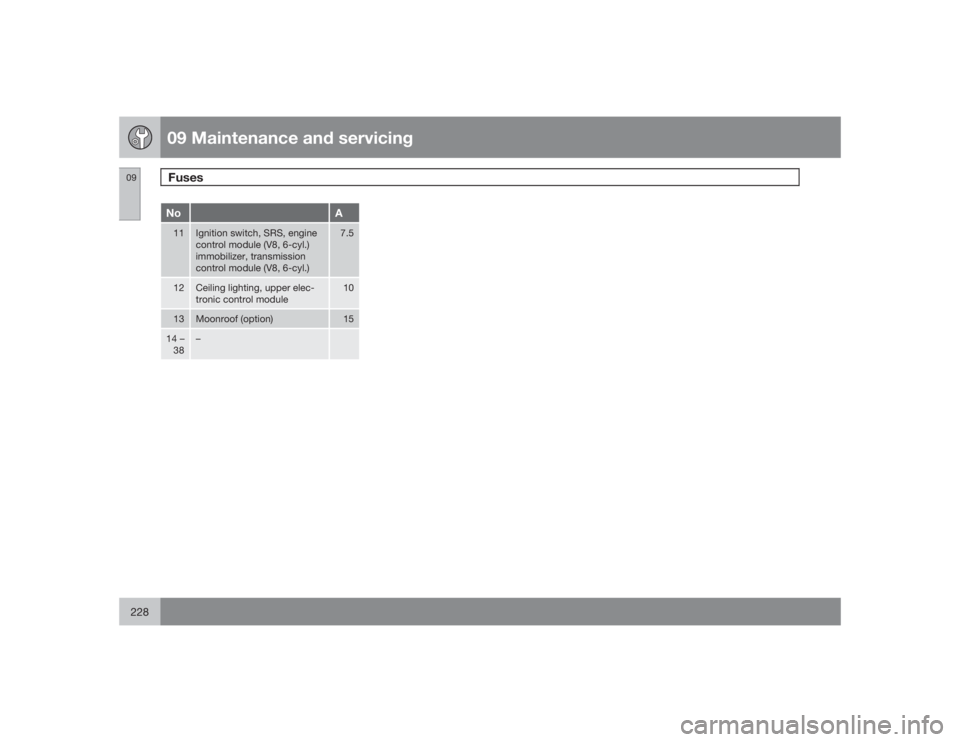
No
A
11
Ignition switch, SRS, engine
control module (V8, 6-cyl.)
immobilizer, transmission
control module (V8, 6-cyl.)
7.5
12
Ceiling lighting, upper elec-
tronic control module
10
13
Moonroof (option)
15
14 –
38
–
Page 238 of 282
10 AudioAudio system controls
10238
NOTE
TheMY KEY buttons can only be pro-
grammed for one shortcut function at a
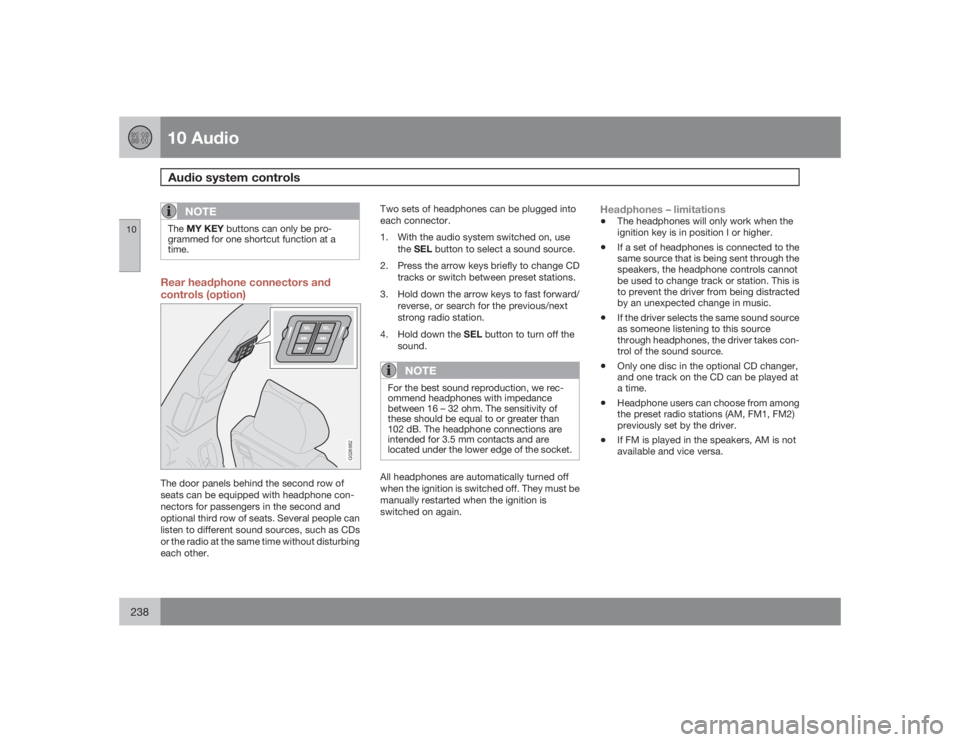
time.Rear headphone connectors and
controls (option)
G026982
The door panels behind the second row of
seats can be equipped with headphone con-
nectors for passengers in the second and
optional third row of seats. Several people can
listen to different sound sources, such as CDs
or the radio at the same time without disturbing
each other.Two sets of headphones can be plugged into
each connector.
1. With the audio system switched on, use
theSEL button to select a sound source.
2. Press the arrow keys briefly to change CD
tracks or switch between preset stations.
3. Hold down the arrow keys to fast forward/
reverse, or search for the previous/next
strong radio station.
4.
Hold down the SEL button to turn off the
sound.
NOTE
For the best sound reproduction, we rec-
ommend headphones with impedance
between 16 – 32 ohm. The sensitivity of
these should be equal to or greater than
102 dB. The headphone connections are
intended for 3.5 mm contacts and are
located under the lower edge of the socket.All headphones are automatically turned off
when the ignition is switched off. They must be
manually restarted when the ignition is
switched on again.
Headphones – limitations•
The headphones will only work when the
ignition key is in position I or higher.
•
If a set of headphones is connected to the
same source that is being sent through the
speakers, the headphone controls cannot
be used to change track or station. This is
to prevent the driver from being distracted
by an unexpected change in music.
•
If the driver selects the same sound source
as someone listening to this source
through headphones, the driver takes con-
trol of the sound source.
•
Only one disc in the optional CD changer,
and one track on the CD can be played at
a time.
•
Headphone users can choose from among
the preset radio stations (AM, FM1, FM2)
previously set by the driver.
•
If FM is played in the speakers, AM is not
available and vice versa.
Page 239 of 282
10 Audio
Audio system controls
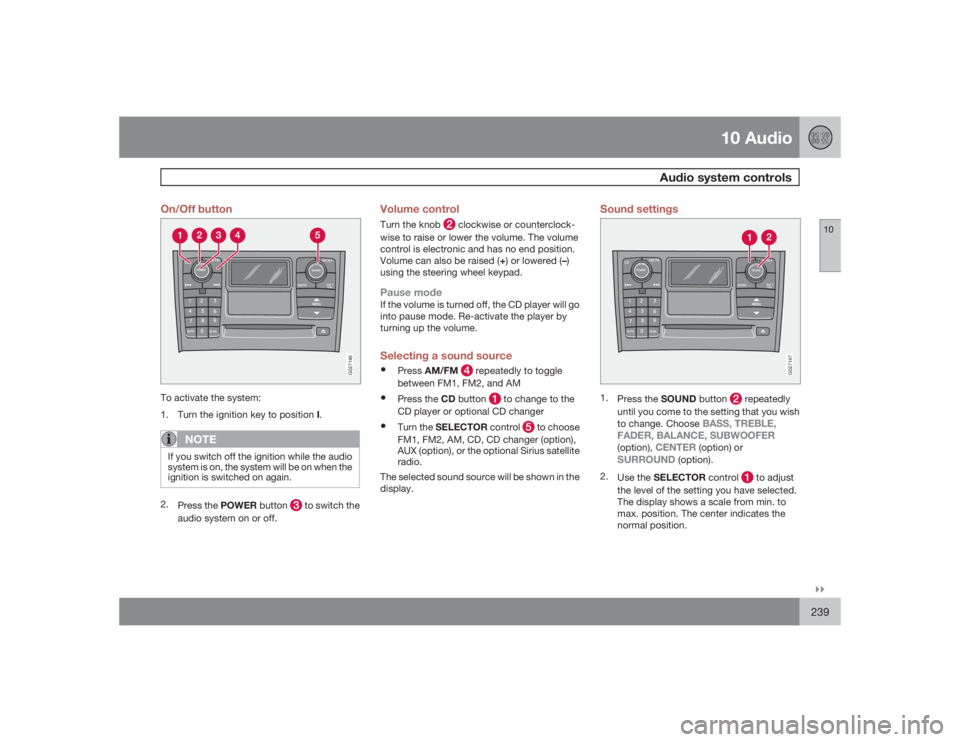
10``239 On/Off button
G027146
To activate the system:
1.
Turn the ignition key to position I.
NOTE
If you switch off the ignition while the audio
system is on, the system will be on when the
ignition is switched on again.2.
Press the POWER button
to switch the
audio system on or off.
Volume controlTurn the knob
clockwise or counterclock-
wise to raise or lower the volume. The volume
control is electronic and has no end position.
Volume can also be raised (+) or lowered (–)
using the steering wheel keypad.
Pause modeIf the volume is turned off, the CD player will go
into pause mode. Re-activate the player by
turning up the volume.Selecting a sound source•
PressAM/FM
repeatedly to toggle
between FM1, FM2, and AM
•
Press the CD button
to change to the
CD player or optional CD changer
•
Turn the SELECTOR control
to choose
FM1, FM2, AM, CD, CD changer (option),
AUX (option), or the optional Sirius satellite
radio.
The selected sound source will be shown in the
display.
Sound settings
G027147
1.
Press the SOUND button
repeatedly
until you come to the setting that you wish
to change. Choose
BASS, TREBLE,
FADER, BALANCE, SUBWOOFER
(option),
CENTER
(option) or
SURROUND
(option).
2.
Use the SELECTOR control
to adjust
the level of the setting you have selected.
The display shows a scale from min. to
max. position. The center indicates the
normal position.
Page 246 of 282
10 AudioSirius satellite radio
10246
Radio textThe text that is displayed about the song cur-
rently playing can be changed. Use the AUTO
button to switch between Artist, Title, Com-
poser, or to switch radio text off, or use the
menu to display and select among these cate-
gories.Advanced settingsThis menu function enables you to make set-
tings on certain Sirius satellite radio functions.
To access this menu:
1.
PressMENU.
2.
Select
Adv. settings
.
WARNING
Settings should be made when the vehicle
is at a standstill.The following settings can be made in the Sir-
ius menu.•
Songs can be added to the song list
•
Channel skip settings can be made
•
Channel lock settings can be made
•
The channel access code can be displayed
or changed
•
Your Sirius ID can be displayed
Skip optionsThis function is used to remove a channel from
the list of available channels.Skip current channel1.
Select
CHANNEL SKIP LIST
and press
ENTER.
2.
Select a category in the list and press
ENTER.
3. Skip channels in the list presented by
pressingENTER.
Unskip all channelsThis permanently removes all channels from
the skip list and makes them available for
selection.Temp. unskip all ch.This function will temporarily unskip all chan-
nels and make them available for selection. The
channels remain on the skip list and will again
be skipped the next time the ignition is
switched on.Channel lockAccess to specific channels can be restricted
(locked). A locked channel will not provide
audio, song titles, or artist information.
NOTE
All channels are initially unlocked at deliv-
ery.Locking a channel:
1.
Select "
Adv. settings
" in the menu and
select
LOCK OPTIONS
and press
ENTER.
2.
Select
CHANNEL LOCK LIST
and press
ENTER
3.
Enter the channel access code1 and press
ENTER.
4.
Select a category in the list and press
ENTER.
5. Lock channels in the list presented by
pressingENTER.
The channel is now locked and a checked box
will be displayed to indicate this. It will be nec-
essary to enter the channel access code. See
the section "Unlocking a channel" in order to
listen to a locked channel.
Unlocking a channelA channel's access code
1 is required to unlock
a channel.
1The default code is 0000. If you have changed the code and forgotten it, see the section "If you have forgotten the access code."
Page 247 of 282
10 Audio
Sirius satellite radio
10
247
Unlock all channelsThis permanently removes all channels from
the locked list and makes them available for
selection.Temp. unlock all ch.This function will temporarily unlock all chan-
nels and make them available for selection. The
channels remain on the locked list and will
again be locked the next time the ignition is
switched on.CHANGE CODEThis function makes it possible to change the
channel access code. The default code is
0000.
To change the code:
1.
Select
CHANGE CODE
and press
ENTER.
2.
Enter the current code and press ENTER.
3.
Enter the new code and press ENTER.
4.
Confirm the new code and press ENTER.
If an incorrect code is entered, the text
"
Incorrect code!
" is displayed.
If you have forgotten the access code1.
Select "
SIRIUS ID
" in the Sirius settings
menu and press ENTER.2.
Press and hold the ENTER button for
2 seconds.
The current code will be displayed.
Your Volvo retailer can also provide you with
assistance.
Page 253 of 282
10 Audio
Rear Seat Entertainment - Dual Screen (RSE)–option
10``253 Introduction
The RSE system can be used at the same time
as the vehicle’s audio system.
When the rear seat passengers play a DVD,
connect an external device to the RSE AUX
connectors, etc., and listen to the audio
through the cordless headphones, the driver
and front seat passenger can still use the vehi-
cle's audio system to listen to the radio, a CD,
music stored on an MP3 player, etc.
Please also refer to the Quick Guide provided
with the RSE system for additional information.Electrical current - ignition keyThe RSE system can be activated with the igni-
tion in position I or II (see page 135 for infor-
mation on the ignition positions), or when the
engine is running. While the engine is being
started, a film or music that is currently being
played will pause momentarily and resume
playing when the engine has started.
When the RSE system has been used once
when the ignition is switched off, it will be then
be blocked for further use. RSE can be restar-
ted by turning the ignition key to position I.
NOTE
Using RSE for more than approximately
10 minutes with the engine switched off may
drain the vehicle’s battery and make it diffi-
cult or impossible to start the engine.
If this occurs, a message will be displayed
on the RSE system’s screens.MusicListening to a music CD1. Insert a CD into the RSE player’s slot with
the disc’s label facing upward.
> The CD will begin to play automatically.
2. Switch on the cordless headphones and
selectCH A for the left screen or CH B for
the right screen.
> This will direct the sound to the head-
phones.
3. Adjust the headphone volume by using the
thumb wheel on the headphones.
To listen through the vehicle’s audio sys-
tem speakers, press MODE on the audio
system control panel and select
AUX
.
Press
A B
on the RSE remote to route
the sound through the speakers.
Selecting a folder on the CD1. Insert the CD in the player.
2.
Press
.
3. Use the navigation buttons (the arrow keys
surrounding the OK button on the RSE
remote control) to highlight a folder and/or
a specific track.
4.
Press to select a sub-folder.
Playback alternativesThe CD can be played in several different ways.
Use the navigation buttons to select one of the
alternatives.
With the dialogue box displayed:
1. Press the right navigation button to access
the menu to the right..
2. Use the navigation keys to select one of the
alternatives.
3.
Confirm your choice by pressing
.
Changing tracks on the CD±
Change tracks on the CD by pressing
or
. Hold the respective
buttons down for fast forward or reverse.