battery VOLVO XC90 2011 Owner´s Manual
[x] Cancel search | Manufacturer: VOLVO, Model Year: 2011, Model line: XC90, Model: VOLVO XC90 2011Pages: 302, PDF Size: 8.33 MB
Page 7 of 302
Contents
* Option/accessory, for more information, see Introduction.7
09
09 Maintenance and servicing
Volvo service........................................... 208
Maintaining your vehicle.........................209
Working on your vehicle......................... 211
Engine compartment............................... 213
Engine oil................................................ 214
Fluids...................................................... 217
Wiper blades........................................... 219
Battery..................................................... 220
Replacing bulbs...................................... 223
Fuses...................................................... 230
10
10 Audio
Audio system overview........................... 244
Audio system controls............................245
Radio functions....................................... 250
Sirius satellite radio................................. 255
Auxiliary equipment................................259
CD player/changer.................................. 261
Menu structure........................................ 264
Bluetooth
® hands-free connection......... 265
Rear Seat Entertainment – Dual Screen
(RSE)*......................................................270
11
11 Specifications
Label information.................................... 276
Dimensions ............................................ 278
Weights .................................................. 280
Fluids...................................................... 282
Suspension............................................. 284
Engine oil................................................ 285
Engine specifications.............................. 286
Electrical system..................................... 287
Three-way catalytic converter................. 289
Overview of information and warning sym-
bols ........................................................290
Volvo programs....................................... 292
Page 23 of 302
01 Safety
Supplemental Restraint System01
23 Supplemental Restraint System (SRS)
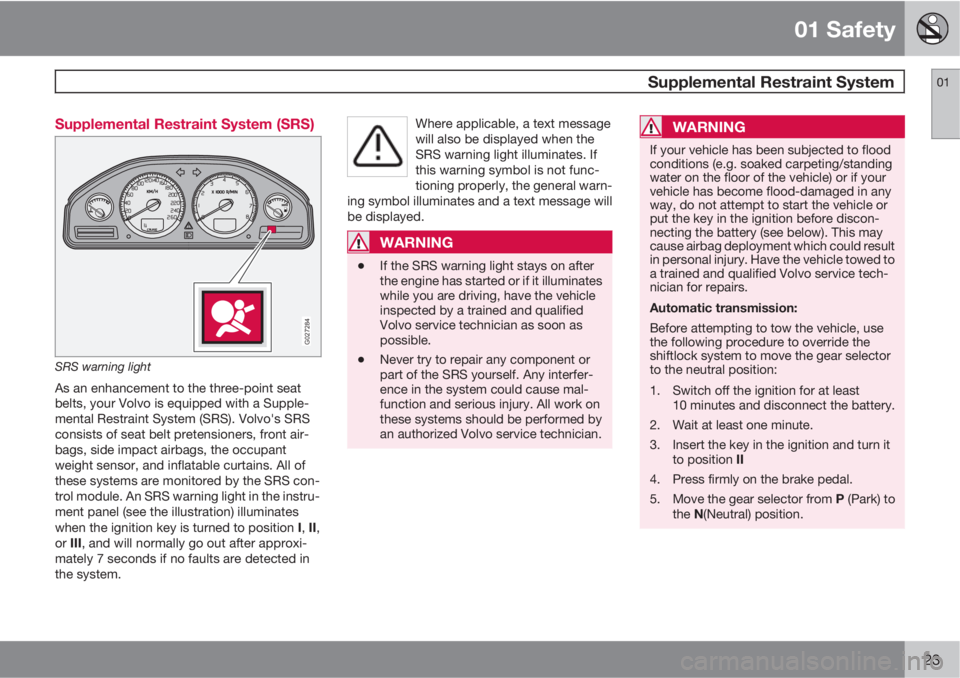
G027284
SRS warning light
As an enhancement to the three-point seat
belts, your Volvo is equipped with a Supple-
mental Restraint System (SRS). Volvo's SRS
consists of seat belt pretensioners, front air-
bags, side impact airbags, the occupant
weight sensor, and inflatable curtains. All of
these systems are monitored by the SRS con-
trol module. An SRS warning light in the instru-
ment panel (see the illustration) illuminates
when the ignition key is turned to position I, II,
or III, and will normally go out after approxi-
mately 7 seconds if no faults are detected in
the system.Where applicable, a text message
will also be displayed when the
SRS warning light illuminates. If
this warning symbol is not func-
tioning properly, the general warn-
ing symbol illuminates and a text message will
be displayed.
WARNING
•If the SRS warning light stays on after
the engine has started or if it illuminates
while you are driving, have the vehicle
inspected by a trained and qualified
Volvo service technician as soon as
possible.
•Never try to repair any component or
part of the SRS yourself. Any interfer-
ence in the system could cause mal-
function and serious injury. All work on
these systems should be performed by
an authorized Volvo service technician.
WARNING
If your vehicle has been subjected to flood
conditions (e.g. soaked carpeting/standing
water on the floor of the vehicle) or if your
vehicle has become flood-damaged in any
way, do not attempt to start the vehicle or
put the key in the ignition before discon-
necting the battery (see below). This may
cause airbag deployment which could result
in personal injury. Have the vehicle towed to
a trained and qualified Volvo service tech-
nician for repairs.
Automatic transmission:
Before attempting to tow the vehicle, use
the following procedure to override the
shiftlock system to move the gear selector
to the neutral position:
1. Switch off the ignition for at least
10 minutes and disconnect the battery.
2. Wait at least one minute.
3. Insert the key in the ignition and turn it
to position II
4. Press firmly on the brake pedal.
5.
Move the gear selector from P (Park) to
the N(Neutral) position.
Page 79 of 302
02 Instruments and controls
12-volt sockets
02
* Option/accessory, for more information, see Introduction.79
These 12 volt sockets can be used to plug in
certain accessories such as cellular tele-
phones, etc.
The ignition key must be in at least position I
for the sockets in the front seat and the optional
socket at the rear of the center console to func-
tion.
12-volt socket in the cargo compartment
Fold down the lid to use the socket. This socket
can be used even if the ignition is switched off.
NOTE
•If the 12-volt sockets are used while the
engine is not running, there is a risk that
the vehicle's battery will be discharged.
•If the ignition is switched off and a
device drawing more than 0.1 A is con-
nected to a socket, a battery warning
will be displayed in the text window.
•The covers should be kept on when the
auxiliary sockets are not in use.
•Maximum current from the sockets is
15 A.
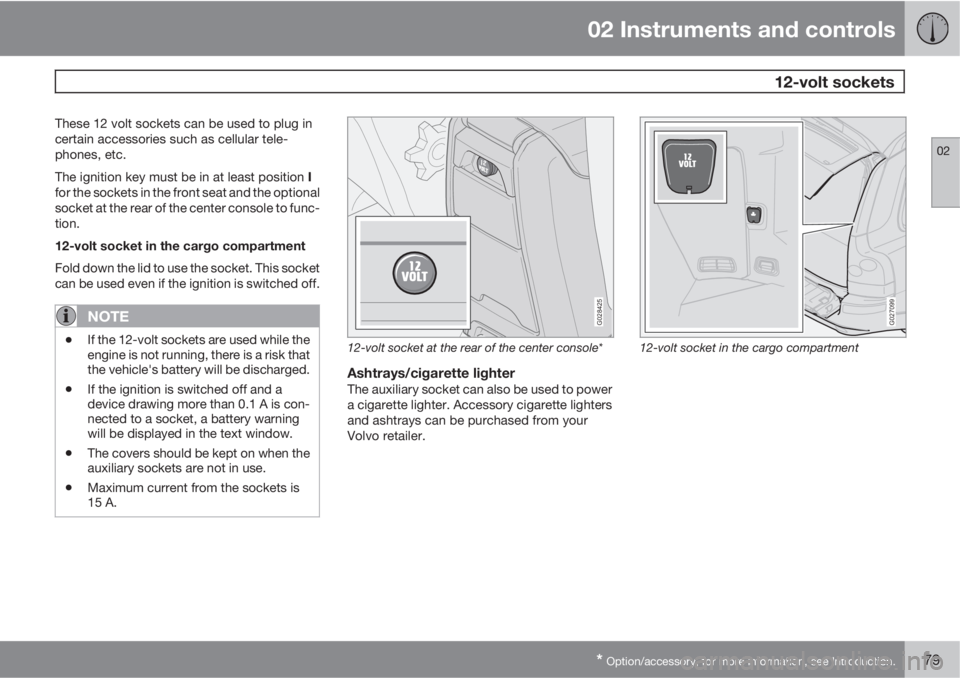
G028425
12-volt socket at the rear of the center console*
Ashtrays/cigarette lighterThe auxiliary socket can also be used to power
a cigarette lighter. Accessory cigarette lighters
and ashtrays can be purchased from your
Volvo retailer.
G027099
12-volt socket in the cargo compartment
Page 88 of 302
02 Instruments and controls
HomeLink® Wireless Control System*
02
88* Option/accessory, for more information, see Introduction.
Introduction
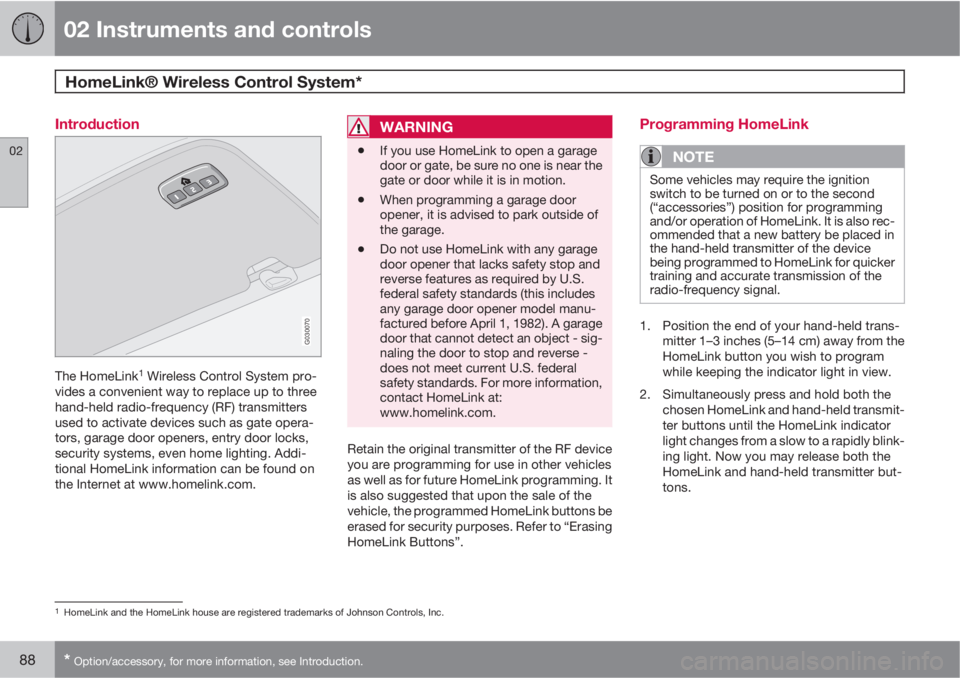
G030070
The HomeLink1 Wireless Control System pro-
vides a convenient way to replace up to three
hand-held radio-frequency (RF) transmitters
used to activate devices such as gate opera-
tors, garage door openers, entry door locks,
security systems, even home lighting. Addi-
tional HomeLink information can be found on
the Internet at www.homelink.com.
WARNING
•If you use HomeLink to open a garage
door or gate, be sure no one is near the
gate or door while it is in motion.
•When programming a garage door
opener, it is advised to park outside of
the garage.
•Do not use HomeLink with any garage
door opener that lacks safety stop and
reverse features as required by U.S.
federal safety standards (this includes
any garage door opener model manu-
factured before April 1, 1982). A garage
door that cannot detect an object - sig-
naling the door to stop and reverse -
does not meet current U.S. federal
safety standards. For more information,
contact HomeLink at:
www.homelink.com.
Retain the original transmitter of the RF device
you are programming for use in other vehicles
as well as for future HomeLink programming. It
is also suggested that upon the sale of the
vehicle, the programmed HomeLink buttons be
erased for security purposes. Refer to “Erasing
HomeLink Buttons”.
Programming HomeLink
NOTE
Some vehicles may require the ignition
switch to be turned on or to the second
(“accessories”) position for programming
and/or operation of HomeLink. It is also rec-
ommended that a new battery be placed in
the hand-held transmitter of the device
being programmed to HomeLink for quicker
training and accurate transmission of the
radio-frequency signal.
1. Position the end of your hand-held trans-
mitter 1–3 inches (5–14 cm) away from the
HomeLink button you wish to program
while keeping the indicator light in view.
2. Simultaneously press and hold both the
chosen HomeLink and hand-held transmit-
ter buttons until the HomeLink indicator
light changes from a slow to a rapidly blink-
ing light. Now you may release both the
HomeLink and hand-held transmitter but-
tons.
1HomeLink and the HomeLink house are registered trademarks of Johnson Controls, Inc.
Page 95 of 302
03 Climate
Climate control system – general information
03
95 Climate system blower
The climate system blower will be automati-
cally switched off when the engine is not run-
ning (even if the ignition key is in position I or
II) to avoid unnecessary battery drain. To acti-
vate the blower, turn the control to the desired
setting.
The climate system blower may start automat-
ically during a period of up to approximately
50 minutes after the ignition has been turned
off to remove condensation in the A/C evapo-
rator. It will run for 15 minutes and switch off
automatically.
Passenger compartment blower
Approximately 50 minutes after the ignition is
turned off, the blower may come on automati-
cally, and run for seven minutes, to remove
condensation in the A/C evaporator.
Blower function to reduce battery drain
The climate system's blower functions nor-
mally while the engine is running.
However, when the engine is switched off
(even if the ignition is switched to positions I or
II), the blower control will be automatically
switched off to avoid unnecessary battery
drain.The following points pertain if the ignition is on
but the engine in not running:
•To restart the blower, turn the control knob
to the setting of your choice.
•After approximately 2 minutes, the blower
speed will be reduced to avoid battery
drain.
You can reset the blower speed at any time.
Please be aware that the system has been
designed to reduce the blower's speed again
after 2 minutes, until the engine is started.
If the battery becomes drained:
•LOW BATTERY, FAN IS REDUCED will
be displayed in the text window in the
instrument panel.
•The yellow warning light in the instrument
panel (see page 58) will also light up.
Page 127 of 302
05 Locks and alarm
Remote keys and key blades
05
127
WARNING
Never use the transmitter to lock the doors
from inside the vehicle.
•Doing so would ACTIVATE:
•the break-in alarm, which would sound
if one of the doors were opened
•the optional interior motion and inclina-
tion alarm sensors.
•Doing so would DEACTIVATE:
•the moonroof and interior courtesy light
controls.
•the central locking buttons on the front
door armrests, although the interior
door handles would still function to
allow occupants to leave the vehicle.
•Disabled features would remain disa-
bled until the remote is used again to
unlock the vehicle.
•In addition, locking an occupied vehicle
would hinder rapid access to the occu-
pants in an accident or emergency.
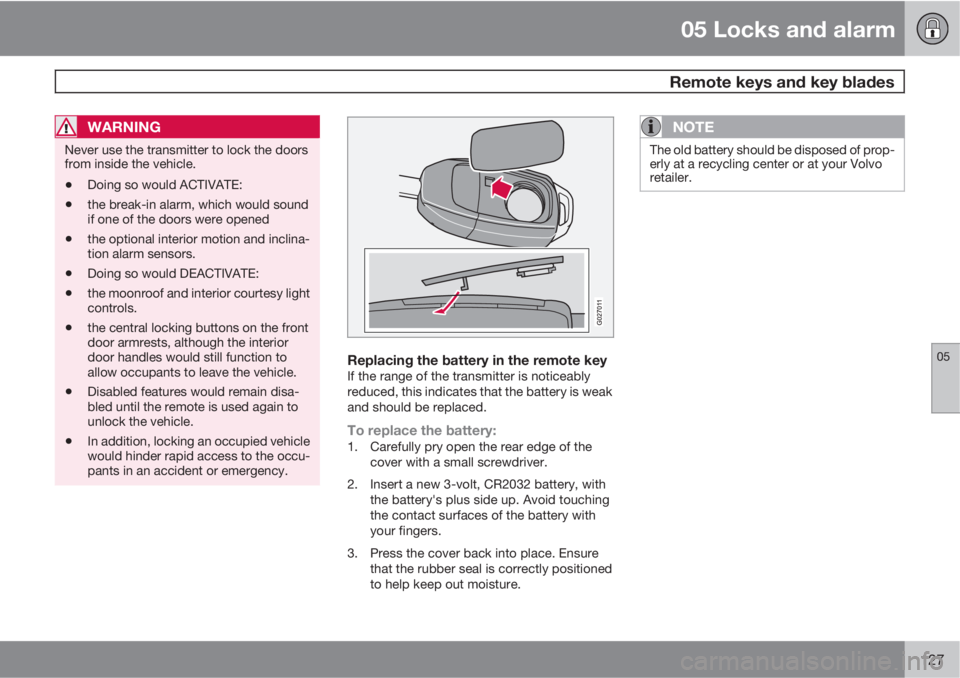
Replacing the battery in the remote keyIf the range of the transmitter is noticeably
reduced, this indicates that the battery is weak
and should be replaced.
To replace the battery:1. Carefully pry open the rear edge of the
cover with a small screwdriver.
2. Insert a new 3-volt, CR2032 battery, with
the battery's plus side up. Avoid touching
the contact surfaces of the battery with
your fingers.
3. Press the cover back into place. Ensure
that the rubber seal is correctly positioned
to help keep out moisture.
NOTE
The old battery should be disposed of prop-
erly at a recycling center or at your Volvo
retailer.
Page 131 of 302
05 Locks and alarm
Alarm
05
131
The alarm is automatically armed whenever
you lock your vehicle.
When armed, the alarm continuously monitors
a number of points on the vehicle. The follow-
ing conditions will set off the alarm:
•The hood is forced open.
•The tailgate is forced open.
•A door is forced open.
•The ignition switch is tampered with.
•If there is movement in the passenger com-
partment (if the vehicle is equipped with
the optional movement sensor).
•The vehicle is lifted or towed (if the vehicle
is equipped with the optional inclination
sensor).
•The battery is disconnected (while the
alarm is armed).
•The siren is disconnected when the alarm
is disarmed.
Arming the alarm1.
Press the LOCK button on the remote key.
2. Lock the vehicle using the key blade in the
driver's door or press the central lock but-
ton on the driver's door with the door open.
One long flash of the turn signals will confirm
that the alarm is armed.
Disarming the alarmPress the UNLOCK button on the remote key
or unlock the doors with the key blade.
Turning off (stopping) the alarmIf the alarm is sounding, it can be stopped by
pressing the UNLOCK button on the remote
key or by unlocking the driver's door with the
key blade.
Visual alarm signalThe visual alarm signal is given by flashing all
turn signals and turning on the interior lighting
for approximately 5 minutes.
Audible alarm signalAn audible alarm signal is given by a battery
powered siren. One alarm cycle lasts for
25 seconds.
"Panic" buttonIn an emergency situation, this feature can be
used to attract attention.
Activate the "panic" button by pressing the red
button on the remote key ( see page 125 for
illustration) for at least 3 seconds or by press-
ing this button twice within 3 seconds. The turn
signals will flash, and the vehicle's horn will
sound.
The function can be turned off by pressing any
of the buttons on the remote key or will stopautomatically after 25 seconds. When a button
is pressed, there is a 5 second delay before the
panic alarm is deactivated.
NOTE
This button will NOT unlock the vehicle.
LED alarm status signalsThe status of the alarm system is indicated by
the red LED at the top of the dash:
•LED off – the alarm is not armed
•LED flashes once per second – the alarm
is armed
•LED flashes rapidly before the ignition is
switched on – the alarm has been triggered
•Fault in the alarm system: If a fault has
been detected in the alarm system, a mes-
sage will be displayed in the text window.
Contact a trained and qualified Volvo serv-
ice technician.
Automatic re-lock/re-arm systemIf the vehicle is unlocked with the remote, the
vehicle will re-lock and the alarm will re-arm
after 2 minutes unless a door or the tailgate has
been opened.
Page 136 of 302
06 Starting and driving
Fuel requirements
06
136
WARNING
Driving with the tailgate open: Driving with
the tailgate open could lead to poisonous
exhaust gases entering the passenger com-
partment.
•If the tailgate must be kept open for any
reason, proceed as follows:
•Close the windows
•Set the ventilation system control to air
flow to floor, windshield and side win-
dows and blower control to its highest
setting.
Weight distribution affects handlingAt the specified curb weight your vehicle has a
tendency to understeer, which means that the
steering wheel has to be turned more than
might seem appropriate for the curvature of a
bend.
This ensures good stability and reduces the
risk of rear wheel skid. Remember that these
properties can alter with the vehicle load.
The heavier the load in the cargo area, the less
the tendency to understeer.
Handling, roadholdingVehicle load, tire design and inflation pressure
all affect vehicle handling. Therefore, check
that the tires are inflated to the recommendedpressure according to the vehicle load. See
"Tire pressure" section.
Loads should be distributed so that capacity
weight or maximum permissible axle loads are
not exceeded.
Conserving electrical currentKeep the following in mind to help minimize
battery drain:
•When the engine is not running, avoid turn-
ing the ignition key to position II (see
page 141). Many electrical systems (the
audio system, the optional infotainment/
navigation systems, power windows, etc)
will function with the ignition key in position
I. This position reduces drain on the bat-
tery.
•Please keep in mind that using systems,
accessories, etc that consume a great deal
of current when the engine is not running
could result in the battery being completely
drained. Driving or having the engine run-
ning for approximately 15 minutes will help
keep the battery charged.
NOTE
A warning message will be displayed in the
text window in the instrument panel when
the battery charge is low.
Page 141 of 302
06 Starting and driving
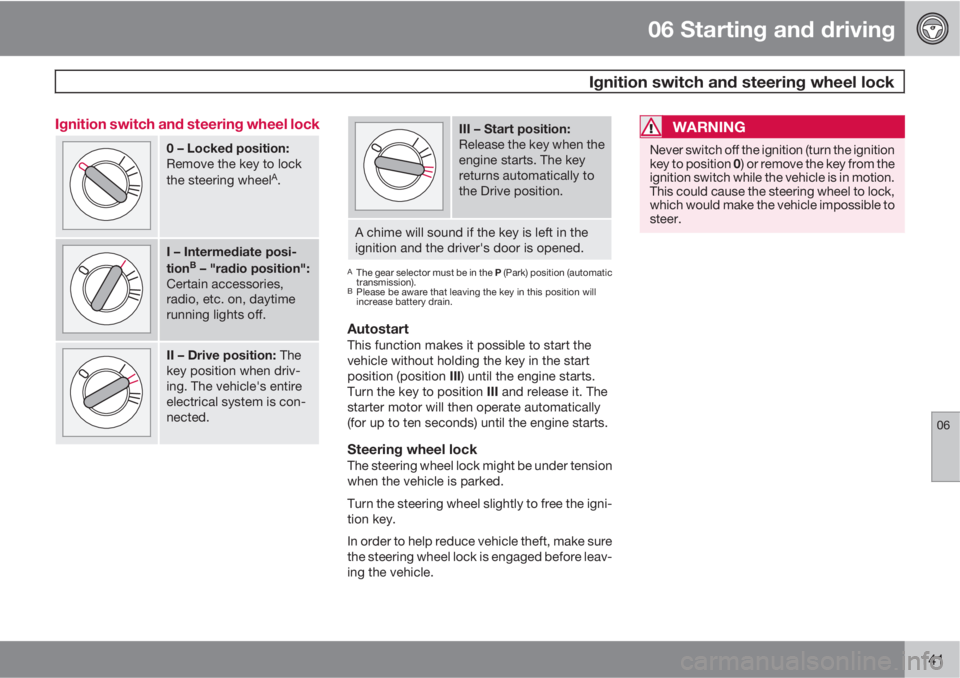
Ignition switch and steering wheel lock
06
141 Ignition switch and steering wheel lock
0 – Locked position:
Remove the key to lock
the steering wheel
A.
I – Intermediate posi-
tionB – "radio position":
Certain accessories,
radio, etc. on, daytime
running lights off.
II – Drive position: The
key position when driv-
ing. The vehicle's entire
electrical system is con-
nected.
III – Start position:
Release the key when the
engine starts. The key
returns automatically to
the Drive position.
A chime will sound if the key is left in the
ignition and the driver's door is opened.
AThe gear selector must be in the P (Park) position (automatic
transmission).
BPlease be aware that leaving the key in this position will
increase battery drain.
AutostartThis function makes it possible to start the
vehicle without holding the key in the start
position (position III) until the engine starts.
Turn the key to position III and release it. The
starter motor will then operate automatically
(for up to ten seconds) until the engine starts.
Steering wheel lockThe steering wheel lock might be under tension
when the vehicle is parked.
Turn the steering wheel slightly to free the igni-
tion key.
In order to help reduce vehicle theft, make sure
the steering wheel lock is engaged before leav-
ing the vehicle.
WARNING
Never switch off the ignition (turn the ignition
key to position 0) or remove the key from the
ignition switch while the vehicle is in motion.
This could cause the steering wheel to lock,
which would make the vehicle impossible to
steer.
Page 147 of 302

06 Starting and driving
Jump starting
06
147
G030860
Follow these instructions to jump start your
vehicle's dead battery or to jump start another
vehicle's dead battery using your vehicle.
Although your vehicle's battery is located
under the floor of the cargo area, jumper cables
should be connected in the engine compart-
ment, to the points shown in the illustrations.
If the 12-volt auxiliary battery to be used is in
another vehicle, check that the vehicles are not
touching to prevent premature completion of a
circuit. Be sure to follow jump starting instruc-
tions provided for the other vehicle.
To jump start your vehicle:1. Switch off the ignition.2. First connect the auxiliary battery positive
(+) terminal (1) to the positive (+) terminal in
your vehicle's engine compartment (2),
located under a small black plastic cover
attached to the fuse box cover, marked
with a "+" sign. Remove the cover on the
main fuse box if necessary to access this
terminal. Then connect the auxiliary bat-
tery's negative (–) terminal (3) to the ground
point in your vehicle's engine compartment
(4).
3. Start the engine in the assisting vehicle,
then start the engine in the vehicle with
dead battery.
4. After the engine has started, first remove
the negative (–) terminal jumper cable.
Then remove the positive (+) terminal
jumper cable.
WARNING
PROPOSITION 65 WARNING!
Battery posts, terminals, and related acces-
sories contain lead and lead compounds,
chemicals known to the state of California
to cause cancer and reproductive harm.
Wash hands after handling.
WARNING
•Do not connect the jumper cable to any
part of the fuel system or to any moving
parts. Avoid touching hot manifolds.
•Never expose the battery to open flame
or electric spark.
•Do not smoke near the battery.
•Batteries generate hydrogen gas, which
is flammable and explosive.
•Battery fluid contains sulfuric acid. Do
not allow battery fluid to contact eyes,
skin, fabrics or painted surfaces. If con-
tact occurs, flush the affected area
immediately with water. Obtain medical
help immediately if eyes are affected.
•Failure to follow the instructions for
jump starting can lead to personal
injury.