CD player VOLVO XC90 2013 Owner´s Manual
[x] Cancel search | Manufacturer: VOLVO, Model Year: 2013, Model line: XC90, Model: VOLVO XC90 2013Pages: 310, PDF Size: 8.62 MB
Page 272 of 310
10 Audio
CD player/changer
10
270
DisctextCertain CDs contain information about the
disc, such as the titles of the tracks, etc. This
information can be shown in the display by
activating the
DISCTEXT function.
1.
Press the MENU button.
2.
Select
DISCTEXT in the menu and press
ENTER.
3. Any information that may be stored on the
disc will be displayed.
To deactivate this function, select
DISCTEXTand press ENTER.
Compact disc care
•Do not put tape or labels on the disc itself.
They could become stuck in the player.
•Use CD standard EN 60908 discs only.
Discs not meeting this standard may cause
problems with system (poor sound). CDR
discs can cause listening problems due to
the quality of the disc or recording equip-
ment used.
•DualDisc: The audio side of a DualDisc
(combined CD/DVD) does not meet CD
specifications and may not play in your
audio system.
•Keep the discs clean. Wipe them with a
soft, clean, lint-free cloth, working from the
center outwards. If necessary, dampen thecloth with a neutral soap solution. Dry thor-
oughly before using.
•Never use cleaning spray or antistatic liq-
uid. Use only cleaners specifically made for
CD's.
•Use discs of the correct size only (3.5"
discs should never be used).
•Volvo does not recommend the use of
plastic outer rings on the disc.
•Condensation may occur on discs/optical
components of the changer in cold winter
weather. The disc can be dried with a
clean, lint-free cloth. Optical components
in the CD changer may, however, take up
to one hour to dry off.
•Never attempt to play a disc which is dam-
aged in any way.
•When not in use, the discs should be
stored in their covers. Avoid storing discs
in excessive heat, direct sunlight or dusty
locations.
Page 280 of 310
10 Audio
Rear Seat Entertainment – Dual Screen (RSE)*
10
278* Option/accessory, for more information, see Introduction.
Introduction
The RSE system can be used at the same time
as the vehicle’s audio system.
When the rear seat passengers play a DVD,
connect an external device to the RSE AUX
connectors, etc., and listen to the audio
through the cordless headphones, the driver
and front seat passenger can still use the vehi-
cle's audio system to listen to the radio, a CD,
music stored on an MP3 player, etc.
Please also refer to the Quick Guide provided
with the RSE system for additional information.
Electrical current - ignition keyThe RSE system can be activated with the igni-
tion in position I or II (see page 145 for infor-
mation on the ignition positions), or when the
engine is running. While the engine is being
started, a film or music that is currently being
played will pause momentarily and resume
playing when the engine has started.
When the RSE system has been used once
when the ignition is switched off, it will be then
be blocked for further use. RSE can be restar-
ted by turning the ignition key to position I.
NOTE
Using RSE for more than approximately
10 minutes with the engine switched off may
drain the vehicle’s battery and make it diffi-
cult or impossible to start the engine.
If this occurs, a message will be displayed
on the RSE system’s screens.
Music
Listening to a music CD1. Insert a CD into the RSE player’s slot with
the disc’s label facing upward.
> The CD will begin to play automatically.
2. Switch on the cordless headphones and
select CH A for the left screen or CH B for
the right screen.
> This will direct the sound to the head-
phones.
3. Adjust the headphone volume by using the
thumb wheel on the headphones.
To listen through the vehicle’s audio sys-
tem speakers, press MODE on the audio
system control panel and select
No new
ph. found. ENTER to retry. EXIT to
cancel.
. Press on the RSE remote to
route the sound through the speakers.
Selecting a folder on the CD1. Insert the CD in the player.
2.
Press
.
3. Use the navigation buttons (the arrow keys
surrounding the OK button on the RSE
remote control) to highlight a folder and/or
a specific track.
4.
Press
to select a sub-folder.
Playback alternativesThe CD can be played in several different ways.
Use the navigation buttons to select one of the
alternatives.
With the dialogue box displayed:
1. Press the right navigation button to access
the menu to the right..
2. Use the navigation keys to select one of the
alternatives.
3.
Confirm your choice by pressing
.
Changing tracks on the CD–Change tracks on the CD by pressing
or . Hold the respective buttons
down for fast forward or reverse.
Pause1. Pause and restart the CD by pressing
.
2.
Stop the CD by pressing
.
Page 281 of 310
10 Audio
Rear Seat Entertainment – Dual Screen (RSE)*
10
* Option/accessory, for more information, see Introduction.279
3.
Press again to eject the CD.
Home-burned CDsCDs burned on a home computer can be
played. However, the quality of the sound may
be affected by the type of source file and for-
mat used, and by the condition of the disc.
RSE-AUX connectors and 12-volt
socket
The three color-coded (yellow-white-red) RSE-
AUX connectors can be used to connect an
auxiliary device to the RSE system. Always fol-
low the connection instructions provided with
the auxiliary device. Devices connected to
RSE-AUX can use the RSE screens, cordless
headphones, the headphone sockets or the
vehicle’s audio system speakers.
NOTE
In order to hear sound from the audio sys-
tem's speakers, the AUX/RSE switch must
be set to RSE, see page 265.
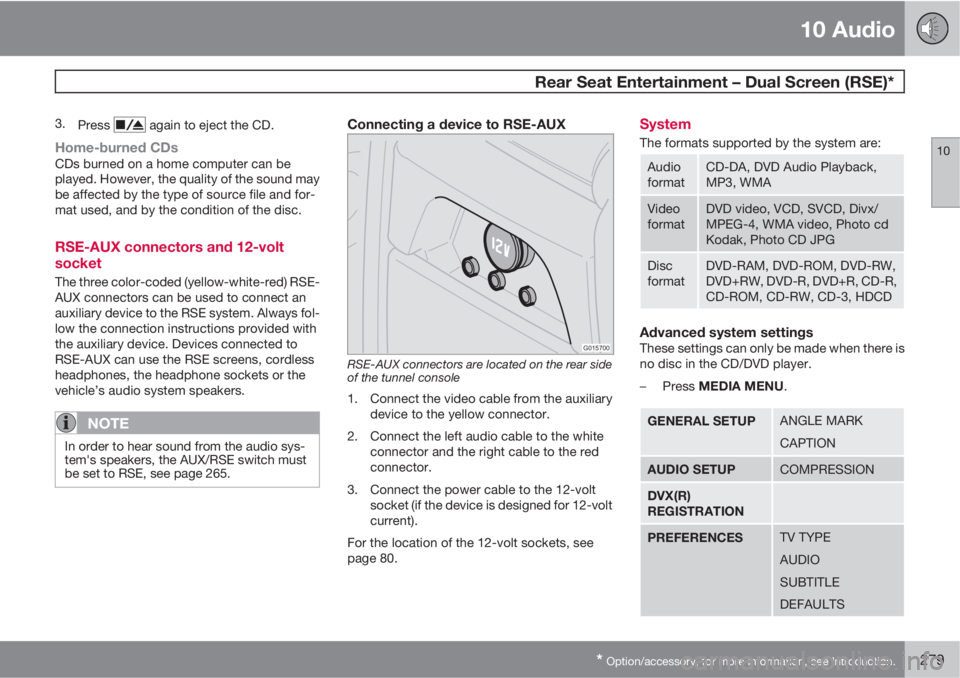
Connecting a device to RSE-AUX
G015700
RSE-AUX connectors are located on the rear side
of the tunnel console
1. Connect the video cable from the auxiliary
device to the yellow connector.
2. Connect the left audio cable to the white
connector and the right cable to the red
connector.
3. Connect the power cable to the 12-volt
socket (if the device is designed for 12-volt
current).
For the location of the 12-volt sockets, see
page 80.
System
The formats supported by the system are:
Audio
formatCD-DA, DVD Audio Playback,
MP3, WMA
Video
formatDVD video, VCD, SVCD, Divx/
MPEG-4, WMA video, Photo cd
Kodak, Photo CD JPG
Disc
formatDVD-RAM, DVD-ROM, DVD-RW,
DVD+RW, DVD-R, DVD+R, CD-R,
CD-ROM, CD-RW, CD-3, HDCD
Advanced system settingsThese settings can only be made when there is
no disc in the CD/DVD player.
–
Press MEDIA MENU.
GENERAL SETUPANGLE MARK
CAPTION
AUDIO SETUPCOMPRESSION
DVX(R)
REGISTRATION
PREFERENCESTV TYPE
AUDIO
SUBTITLE
DEFAULTS
Page 305 of 310
12 Index
12
303
J
Jack.........................................................195
Jump starting........................................... 151
K
Key (ignition switch) positions................. 145
Keylock...................................................... 11
Keys......................................................... 126
L
Label information..................................... 284
Lighting panel...................................... 67, 68
Load carriers............................................ 167
Locking steering wheel............................ 145
Locking the car........................................ 130
Locks, child safety................................... 132
Long distance trips.................................. 168
Low beam headlight.................................. 71
M
Maintenance............................................ 214
Maintenance, periodic............................. 215
Malfunction indicator light......................... 61
Mirrors
door, folding......................................... 64
power door........................................... 85
rearview, auto-dim function.................. 84
Moonroof................................................... 87
Motor oil
checking............................................. 220
MP3 player, connecting........................... 265
Multifilter with air quality sensor................ 98
O
OBD II...................................................... 215
Occupant safety........................................ 18
Oil
checking............................................. 220
Oil quality................................................. 220
Onboard Diagnostic System (OBD II)...... 215
On Call Roadside Assistance.................. 299Owner maintenance................................. 215
P
Paint - color code....................................210
Panel lighting, instrument.......................... 69
Park assist.......................................159, 160
Parking brake........................................... 156
warning symbol.................................... 60
Parking lights............................................. 69
Passenger’s side front airbag, disabling. . . 28
Periodic owner-performed maintenance. 215
Permissible axle weight........................... 185
Polishing.................................................. 207
Power moonroof........................................ 87
Power seat............................................... 105
Power steering fluid................................. 223
R
Radiator................................................... 219
Radio
SiriusXM
E satellite radio.................... 261