display VOLVO XC90 2013 Owner´s Manual
[x] Cancel search | Manufacturer: VOLVO, Model Year: 2013, Model line: XC90, Model: VOLVO XC90 2013Pages: 310, PDF Size: 8.62 MB
Page 65 of 310
02 Instruments and controls
Information display
02
63
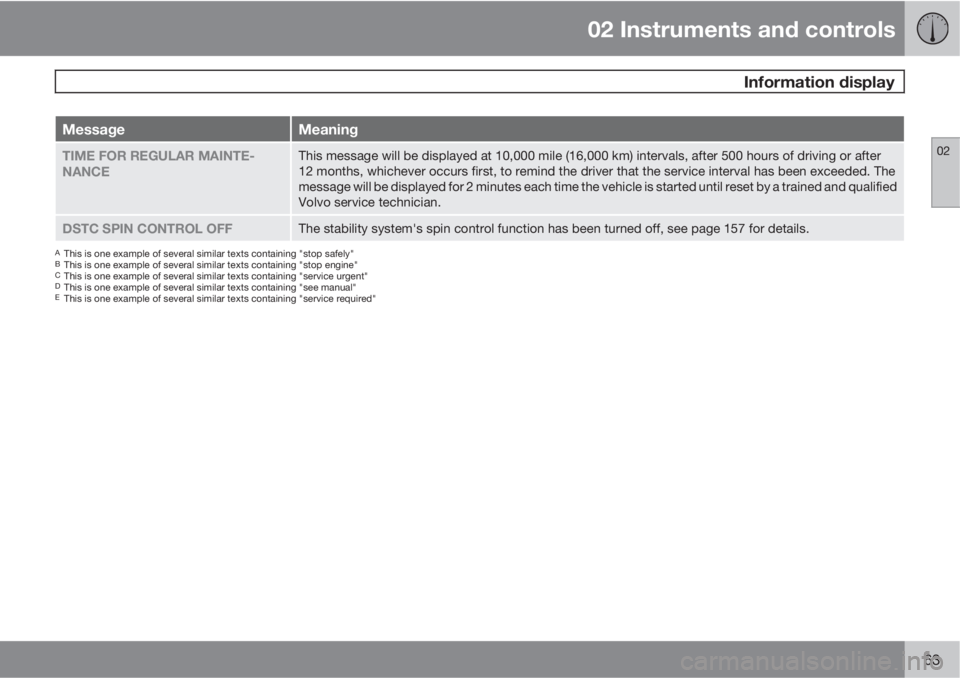
MessageMeaning
TIME FOR REGULAR MAINTE-
NANCEThis message will be displayed at 10,000 mile (16,000 km) intervals, after 500 hours of driving or after
12 months, whichever occurs first, to remind the driver that the service interval has been exceeded. The
message will be displayed for 2 minutes each time the vehicle is started until reset by a trained and qualified
Volvo service technician.
DSTC SPIN CONTROL OFFThe stability system's spin control function has been turned off, see page 157 for details.
AThis is one example of several similar texts containing "stop safely"BThis is one example of several similar texts containing "stop engine"CThis is one example of several similar texts containing "service urgent"DThis is one example of several similar texts containing "see manual"EThis is one example of several similar texts containing "service required"
Page 74 of 310
02 Instruments and controls
Right-side steering wheel lever
02
72
Windshield wipers
G026953
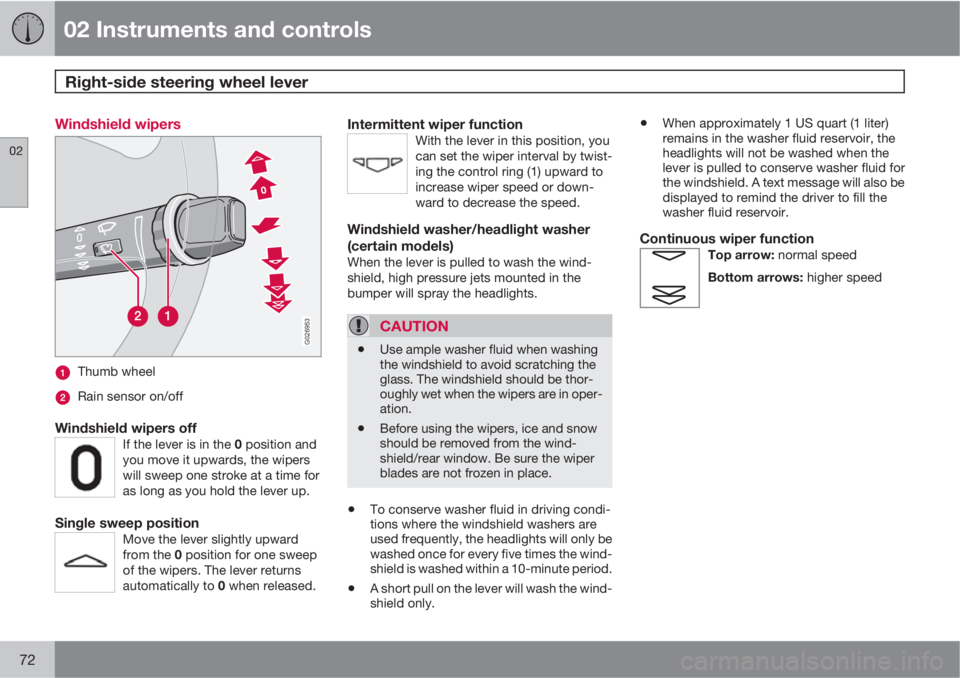
Thumb wheel
Rain sensor on/off
Windshield wipers offIf the lever is in the 0 position and
you move it upwards, the wipers
will sweep one stroke at a time for
as long as you hold the lever up.
Single sweep positionMove the lever slightly upward
from the 0 position for one sweep
of the wipers. The lever returns
automatically to 0 when released.
Intermittent wiper functionWith the lever in this position, you
can set the wiper interval by twist-
ing the control ring (1) upward to
increase wiper speed or down-
ward to decrease the speed.
Windshield washer/headlight washer
(certain models)
When the lever is pulled to wash the wind-
shield, high pressure jets mounted in the
bumper will spray the headlights.
CAUTION
•Use ample washer fluid when washing
the windshield to avoid scratching the
glass. The windshield should be thor-
oughly wet when the wipers are in oper-
ation.
•Before using the wipers, ice and snow
should be removed from the wind-
shield/rear window. Be sure the wiper
blades are not frozen in place.
•To conserve washer fluid in driving condi-
tions where the windshield washers are
used frequently, the headlights will only be
washed once for every five times the wind-
shield is washed within a 10-minute period.
•A short pull on the lever will wash the wind-
shield only.
•When approximately 1 US quart (1 liter)
remains in the washer fluid reservoir, the
headlights will not be washed when the
lever is pulled to conserve washer fluid for
the windshield. A text message will also be
displayed to remind the driver to fill the
washer fluid reservoir.
Continuous wiper functionTop arrow: normal speed
Bottom arrows: higher speed
Page 78 of 310
02 Instruments and controls
Trip computer
02
76* Option/accessory, for more information, see Introduction.
Trip computer*
G026956
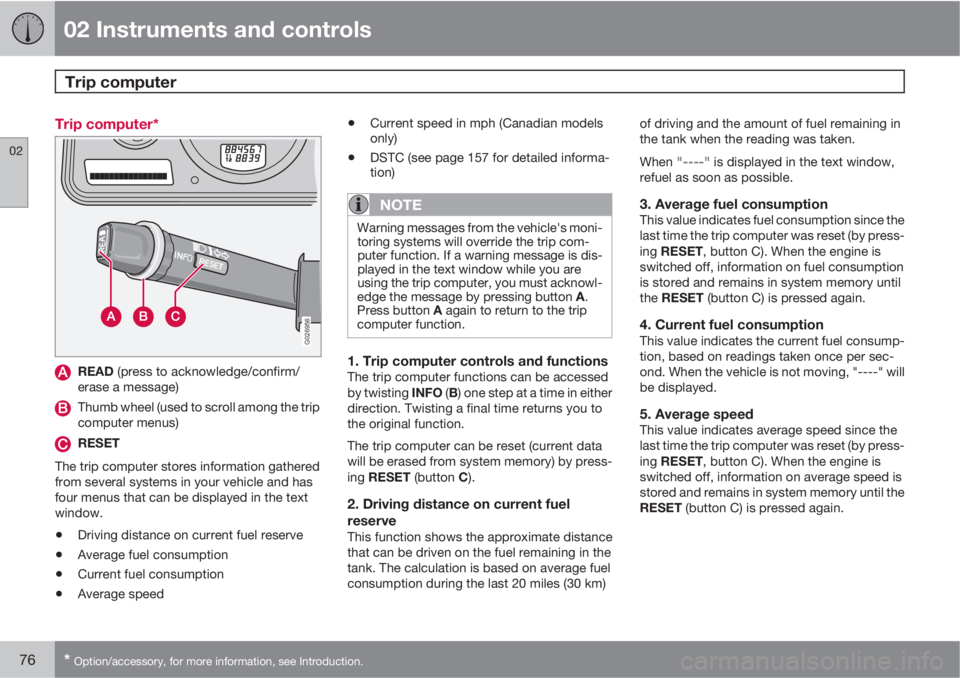
READ (press to acknowledge/confirm/
erase a message)
Thumb wheel (used to scroll among the trip
computer menus)
RESET
The trip computer stores information gathered
from several systems in your vehicle and has
four menus that can be displayed in the text
window.
•Driving distance on current fuel reserve
•Average fuel consumption
•Current fuel consumption
•Average speed
•Current speed in mph (Canadian models
only)
•DSTC (see page 157 for detailed informa-
tion)
NOTE
Warning messages from the vehicle's moni-
toring systems will override the trip com-
puter function. If a warning message is dis-
played in the text window while you are
using the trip computer, you must acknowl-
edge the message by pressing button A.
Press button A again to return to the trip
computer function.
1. Trip computer controls and functionsThe trip computer functions can be accessed
by twisting INFO (B) one step at a time in either
direction. Twisting a final time returns you to
the original function.
The trip computer can be reset (current data
will be erased from system memory) by press-
ing RESET (button C).
2. Driving distance on current fuel
reserve
This function shows the approximate distance
that can be driven on the fuel remaining in the
tank. The calculation is based on average fuel
consumption during the last 20 miles (30 km)of driving and the amount of fuel remaining in
the tank when the reading was taken.
When
"----" is displayed in the text window,
refuel as soon as possible.
3. Average fuel consumptionThis value indicates fuel consumption since the
last time the trip computer was reset (by press-
ing RESET, button C). When the engine is
switched off, information on fuel consumption
is stored and remains in system memory until
the RESET (button C) is pressed again.
4. Current fuel consumptionThis value indicates the current fuel consump-
tion, based on readings taken once per sec-
ond. When the vehicle is not moving, "----" will
be displayed.
5. Average speedThis value indicates average speed since the
last time the trip computer was reset (by press-
ing RESET, button C). When the engine is
switched off, information on average speed is
stored and remains in system memory until the
RESET (button C) is pressed again.
Page 80 of 310
02 Instruments and controls
Cruise control
02
78
Engaging the cruise control function
G027098
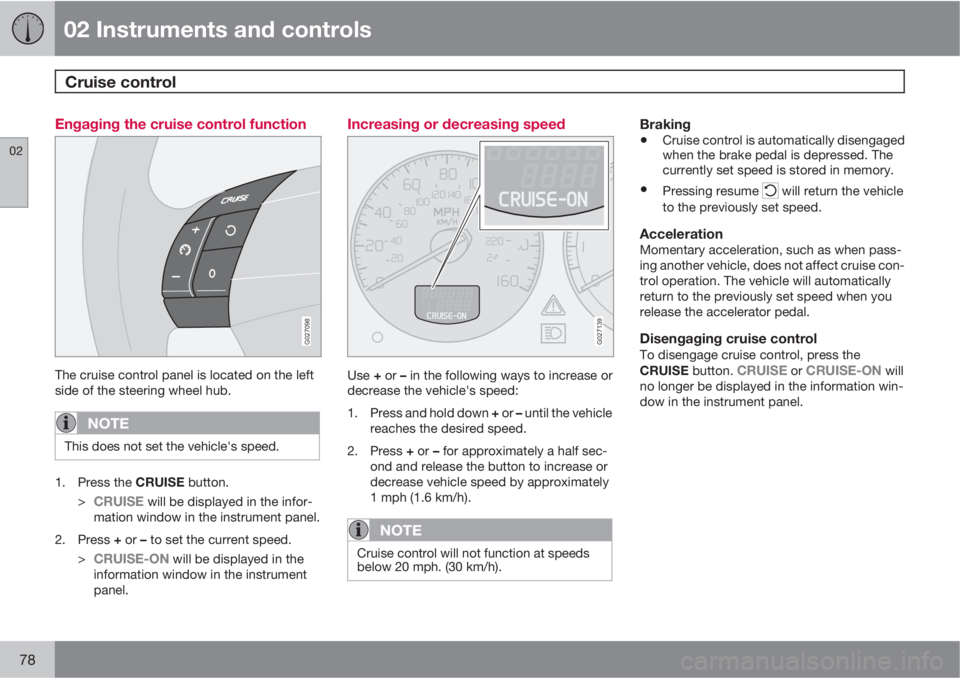
The cruise control panel is located on the left
side of the steering wheel hub.
NOTE
This does not set the vehicle's speed.
1.
Press the CRUISE button.
>
CRUISE will be displayed in the infor-
mation window in the instrument panel.
2.
Press + or – to set the current speed.
>
CRUISE-ON will be displayed in the
information window in the instrument
panel.
Increasing or decreasing speed
G027139
Use + or – in the following ways to increase or
decrease the vehicle's speed:
1.
Press and hold down + or – until the vehicle
reaches the desired speed.
2.
Press + or – for approximately a half sec-
ond and release the button to increase or
decrease vehicle speed by approximately
1 mph (1.6 km/h).
NOTE
Cruise control will not function at speeds
below 20 mph. (30 km/h).
Braking
•Cruise control is automatically disengaged
when the brake pedal is depressed. The
currently set speed is stored in memory.
•Pressing resume will return the vehicle
to the previously set speed.
AccelerationMomentary acceleration, such as when pass-
ing another vehicle, does not affect cruise con-
trol operation. The vehicle will automatically
return to the previously set speed when you
release the accelerator pedal.
Disengaging cruise controlTo disengage cruise control, press the
CRUISE button. CRUISE or CRUISE-ON will
no longer be displayed in the information win-
dow in the instrument panel.
Page 81 of 310
02 Instruments and controls
Cruise control
02
79
NOTE
Cruise control is automatically disengaged
if:
•When the brake pedal is depressed.
•the engine is switched off
•the gear selector is placed in (N) Neutral
•the wheels start to spin or lock
•if an increase in speed is maintained for
more than one minute
•if the vehicle's speed falls below
approximately 20 mph (30 km/h).
Temporarily disengaging the cruise
control
1.
Press 0 to temporarily disengage cruise
control.
>
CRUISE will be displayed in the infor-
mation window in the instrument panel.
2. Depress the brake pedal.
Pressing "resume"
causes the vehicle to
return to the previously set speed.
WARNING
Cruise control should not be used in heavy
traffic or when driving on wet or slippery
roads, or when driving on unpaved or
uneven road surfaces. Cruise control may
not maintain set speed on steep down-
grades.
Page 82 of 310
02 Instruments and controls
12-volt sockets
02
80* Option/accessory, for more information, see Introduction.
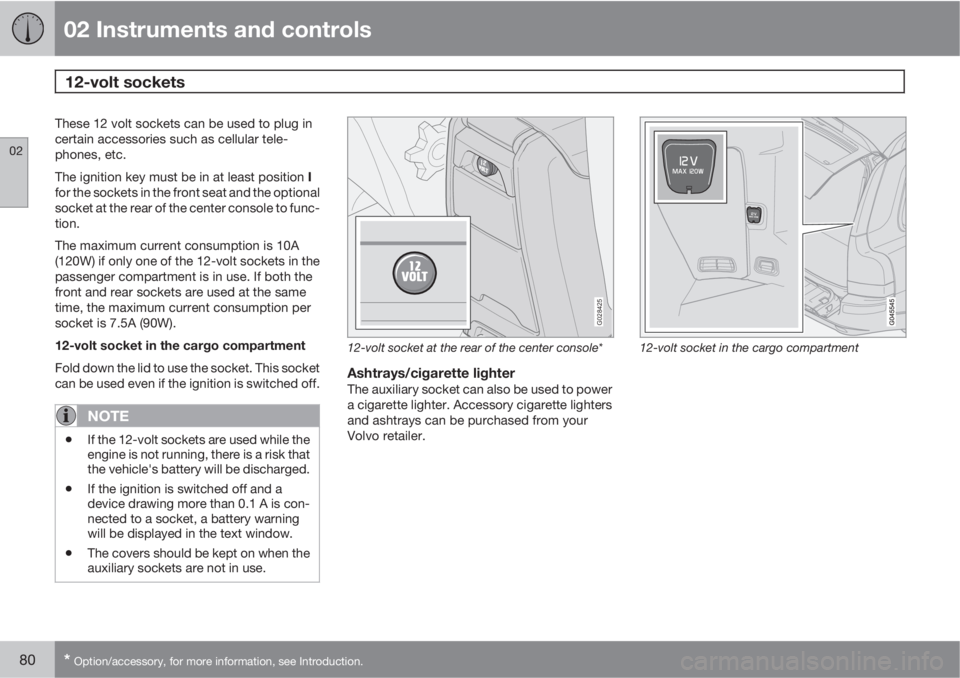
These 12 volt sockets can be used to plug in
certain accessories such as cellular tele-
phones, etc.
The ignition key must be in at least position I
for the sockets in the front seat and the optional
socket at the rear of the center console to func-
tion.
The maximum current consumption is 10A
(120W) if only one of the 12-volt sockets in the
passenger compartment is in use. If both the
front and rear sockets are used at the same
time, the maximum current consumption per
socket is 7.5A (90W).
12-volt socket in the cargo compartment
Fold down the lid to use the socket. This socket
can be used even if the ignition is switched off.
NOTE
•If the 12-volt sockets are used while the
engine is not running, there is a risk that
the vehicle's battery will be discharged.
•If the ignition is switched off and a
device drawing more than 0.1 A is con-
nected to a socket, a battery warning
will be displayed in the text window.
•The covers should be kept on when the
auxiliary sockets are not in use.
G028425
12-volt socket at the rear of the center console*
Ashtrays/cigarette lighterThe auxiliary socket can also be used to power
a cigarette lighter. Accessory cigarette lighters
and ashtrays can be purchased from your
Volvo retailer.
12-volt socket in the cargo compartment
Page 86 of 310
02 Instruments and controls
Mirrors
02
84* Option/accessory, for more information, see Introduction.
Rearview mirror
G026660
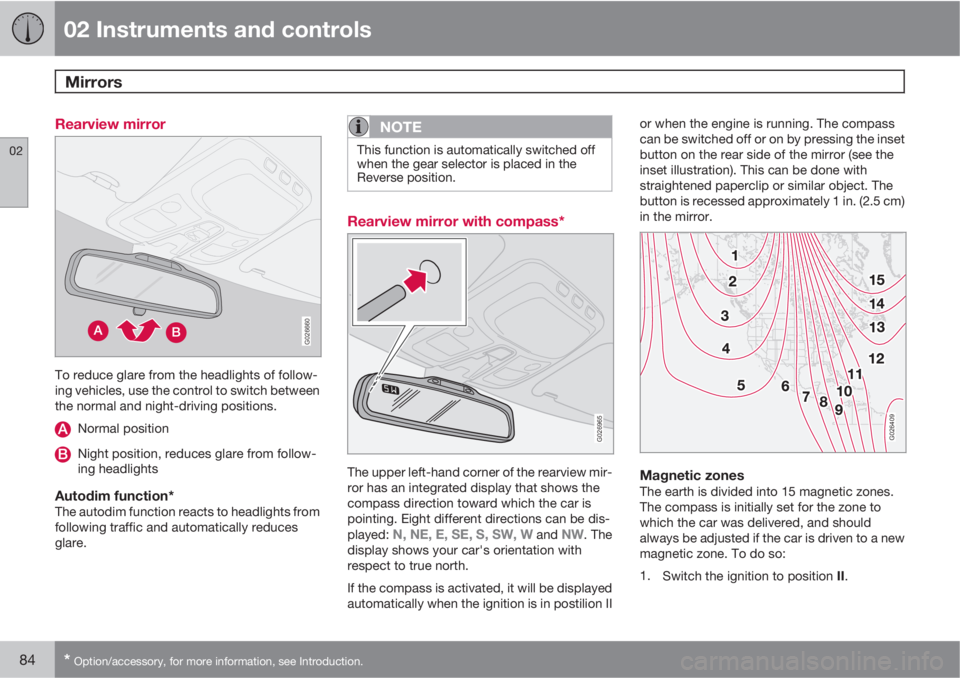
To reduce glare from the headlights of follow-
ing vehicles, use the control to switch between
the normal and night-driving positions.
Normal position
Night position, reduces glare from follow-
ing headlights
Autodim function*The autodim function reacts to headlights from
following traffic and automatically reduces
glare.
NOTE
This function is automatically switched off
when the gear selector is placed in the
Reverse position.
Rearview mirror with compass*
G026965
The upper left-hand corner of the rearview mir-
ror has an integrated display that shows the
compass direction toward which the car is
pointing. Eight different directions can be dis-
played:
N, NE, E, SE, S, SW, W and NW. The
display shows your car's orientation with
respect to true north.
If the compass is activated, it will be displayed
automatically when the ignition is in postilion IIor when the engine is running. The compass
can be switched off or on by pressing the inset
button on the rear side of the mirror (see the
inset illustration). This can be done with
straightened paperclip or similar object. The
button is recessed approximately 1 in. (2.5 cm)
in the mirror.
G026409
Magnetic zonesThe earth is divided into 15 magnetic zones.
The compass is initially set for the zone to
which the car was delivered, and should
always be adjusted if the car is driven to a new
magnetic zone. To do so:
1.
Switch the ignition to position II.
Page 87 of 310
02 Instruments and controls
Mirrors
02
85
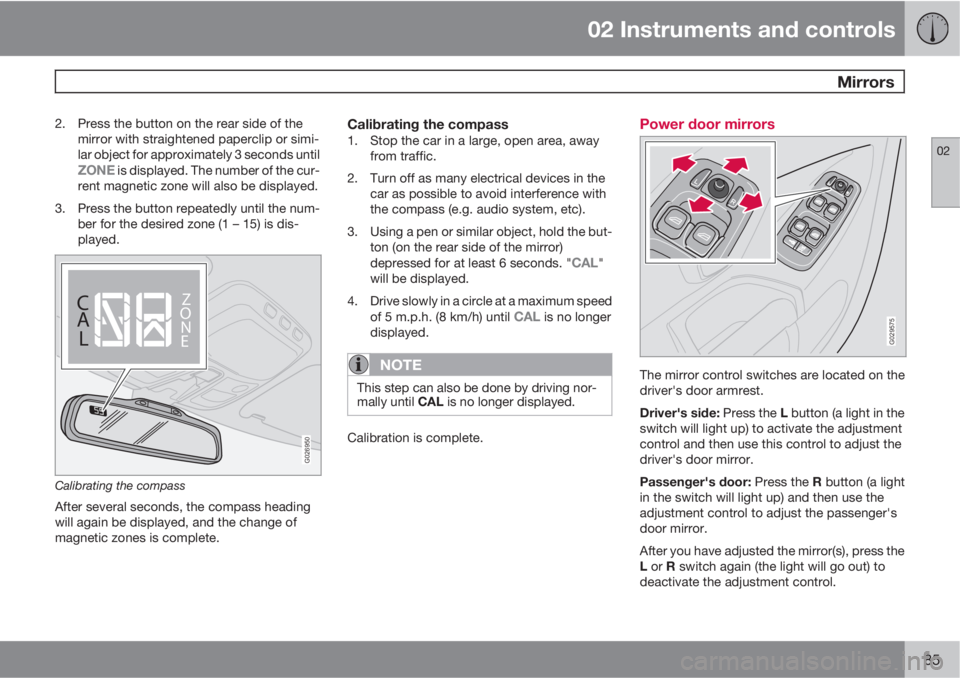
2. Press the button on the rear side of the
mirror with straightened paperclip or simi-
lar object for approximately 3 seconds until
ZONE is displayed. The number of the cur-
rent magnetic zone will also be displayed.
3. Press the button repeatedly until the num-
ber for the desired zone (1 – 15) is dis-
played.
C
A
LZ
O
N
E
C
A
LZ
O
N
E
G026950
Calibrating the compass
After several seconds, the compass heading
will again be displayed, and the change of
magnetic zones is complete.
Calibrating the compass1. Stop the car in a large, open area, away
from traffic.
2. Turn off as many electrical devices in the
car as possible to avoid interference with
the compass (e.g. audio system, etc).
3. Using a pen or similar object, hold the but-
ton (on the rear side of the mirror)
depressed for at least 6 seconds. "
CAL"
will be displayed.
4. Drive slowly in a circle at a maximum speed
of 5 m.p.h. (8 km/h) until
CAL is no longer
displayed.
NOTE
This step can also be done by driving nor-
mally until CAL is no longer displayed.
Calibration is complete.
Power door mirrors
G029575
The mirror control switches are located on the
driver's door armrest.
Driver's side: Press the L button (a light in the
switch will light up) to activate the adjustment
control and then use this control to adjust the
driver's door mirror.
Passenger's door: Press the R button (a light
in the switch will light up) and then use the
adjustment control to adjust the passenger's
door mirror.
After you have adjusted the mirror(s), press the
L or R switch again (the light will go out) to
deactivate the adjustment control.
Page 97 of 310
03 Climate
Climate control system – general information
03
95 Climate system blower
The climate system blower will be automati-
cally switched off when the engine is not run-
ning (even if the ignition key is in position I or
II) to avoid unnecessary battery drain. To acti-
vate the blower, turn the control to the desired
setting.
The climate system blower may start automat-
ically during a period of up to approximately
50 minutes after the ignition has been turned
off to remove condensation in the A/C evapo-
rator. It will run for 15 minutes and switch off
automatically.
Passenger compartment blower
Approximately 50 minutes after the ignition is
turned off, the blower may come on automati-
cally, and run for seven minutes, to remove
condensation in the A/C evaporator.
Blower function to reduce battery drain
The climate system's blower functions nor-
mally while the engine is running.
However, when the engine is switched off
(even if the ignition is switched to positions I or
II), the blower control will be automatically
switched off to avoid unnecessary battery
drain.The following points pertain if the ignition is on
but the engine in not running:
•To restart the blower, turn the control knob
to the setting of your choice.
•After approximately 2 minutes, the blower
speed will be reduced to avoid battery
drain.
You can reset the blower speed at any time.
Please be aware that the system has been
designed to reduce the blower's speed again
after 2 minutes, until the engine is started.
If the battery becomes drained:
•LOW BATTERY, FAN IS REDUCED will
be displayed in the text window in the
instrument panel.
•The yellow warning light in the instrument
panel (see page 58) will also light up.
Page 132 of 310
05 Locks and alarm
Locking and unlocking
05
130
G029646
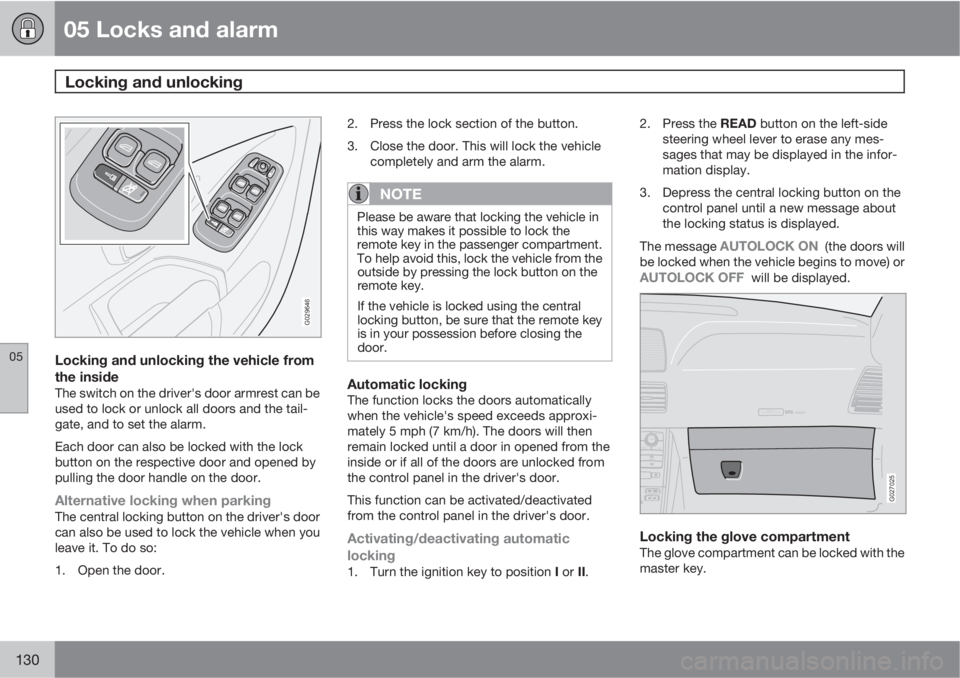
Locking and unlocking the vehicle from
the inside
The switch on the driver's door armrest can be
used to lock or unlock all doors and the tail-
gate, and to set the alarm.
Each door can also be locked with the lock
button on the respective door and opened by
pulling the door handle on the door.
Alternative locking when parkingThe central locking button on the driver's door
can also be used to lock the vehicle when you
leave it. To do so:
1. Open the door.2. Press the lock section of the button.
3. Close the door. This will lock the vehicle
completely and arm the alarm.
NOTE
Please be aware that locking the vehicle in
this way makes it possible to lock the
remote key in the passenger compartment.
To help avoid this, lock the vehicle from the
outside by pressing the lock button on the
remote key.
If the vehicle is locked using the central
locking button, be sure that the remote key
is in your possession before closing the
door.
Automatic lockingThe function locks the doors automatically
when the vehicle's speed exceeds approxi-
mately 5 mph (7 km/h). The doors will then
remain locked until a door in opened from the
inside or if all of the doors are unlocked from
the control panel in the driver's door.
This function can be activated/deactivated
from the control panel in the driver's door.
Activating/deactivating automatic
locking
1.
Turn the ignition key to position I or II.2.
Press the READ button on the left-side
steering wheel lever to erase any mes-
sages that may be displayed in the infor-
mation display.
3. Depress the central locking button on the
control panel until a new message about
the locking status is displayed.
The message
AUTOLOCK ON (the doors will
be locked when the vehicle begins to move) or
AUTOLOCK OFF will be displayed.
ATTENTIONPakjdskdl ioiuip kjöpp opoodidåuswi
CSOUND
MENU
80
ENTERLSEEEXITMY KEYRTO
AIRBAG
G027025
Locking the glove compartmentThe glove compartment can be locked with the
master key.