remote control VOLVO XC90 2013 Owner´s Manual
[x] Cancel search | Manufacturer: VOLVO, Model Year: 2013, Model line: XC90, Model: VOLVO XC90 2013Pages: 310, PDF Size: 8.62 MB
Page 269 of 310
10 Audio
Auxiliary equipment
10
267
possible to change tracks from the phone
itself.
In order to listen streaming audio, BT must be
selected as a sound source (see page 253) and
a Bluetooth
Ÿ cell phone must be connected
(paired) with the audio system. See page 273
for more information.
NOTE
Any Bluetooth cell phones used must sup-
port Audio/Video Remote Control Profile
(AVRCP) and Advanced Audio Distribution
Profile (A2DP). The phone must use AVRCP
version 1.3 and A2DP 1.2. If older versions
of these standards are used, certain fea-
tures (e.g., scan or random) may not func-
tion.
Not all cell phones are fully compatible with
the vehicle's Bluetooth system. A list of
compatible phones is available at you Volvo
retailer or at www.volvocars.us.
Listening to streaming audioTurn SELECTOR to select BT as the sound
source.
The
/ buttons can be used to fast-
forward/back or change tracks:
•Press briefly to change tracks.
•Press and hold to go fast-forward/back.The buttons in the steering wheel keypad can
be used in the same way.
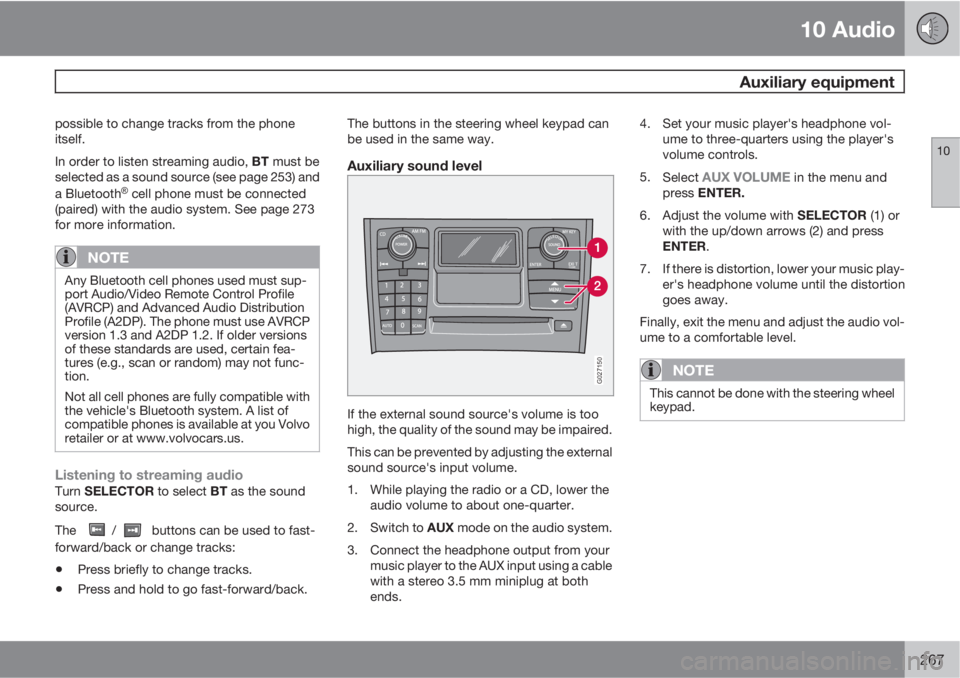
Auxiliary sound level
G027150
If the external sound source's volume is too
high, the quality of the sound may be impaired.
This can be prevented by adjusting the external
sound source's input volume.
1. While playing the radio or a CD, lower the
audio volume to about one-quarter.
2.
Switch to AUX mode on the audio system.
3. Connect the headphone output from your
music player to the AUX input using a cable
with a stereo 3.5 mm miniplug at both
ends.4. Set your music player's headphone vol-
ume to three-quarters using the player's
volume controls.
5.
Select
AUX VOLUME in the menu and
press ENTER.
6.
Adjust the volume with SELECTOR (1) or
with the up/down arrows (2) and press
ENTER.
7. If there is distortion, lower your music play-
er's headphone volume until the distortion
goes away.
Finally, exit the menu and adjust the audio vol-
ume to a comfortable level.
NOTE
This cannot be done with the steering wheel
keypad.
Page 274 of 310
10 Audio
Bluetooth® hands-free connection
10
272
Introduction
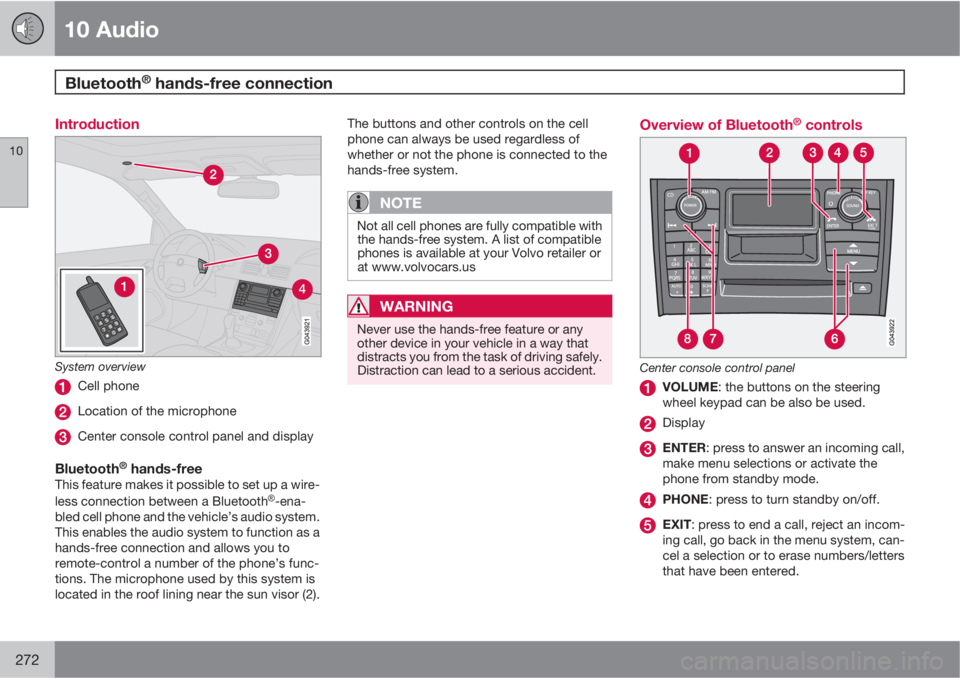
System overview
Cell phone
Location of the microphone
Center console control panel and display
Bluetooth® hands-freeThis feature makes it possible to set up a wire-
less connection between a BluetoothŸ-ena-
bled cell phone and the vehicle’s audio system.
This enables the audio system to function as a
hands-free connection and allows you to
remote-control a number of the phone’s func-
tions. The microphone used by this system is
located in the roof lining near the sun visor (2).The buttons and other controls on the cell
phone can always be used regardless of
whether or not the phone is connected to the
hands-free system.
NOTE
Not all cell phones are fully compatible with
the hands-free system. A list of compatible
phones is available at your Volvo retailer or
at www.volvocars.us
WARNING
Never use the hands-free feature or any
other device in your vehicle in a way that
distracts you from the task of driving safely.
Distraction can lead to a serious accident.
Overview of Bluetooth® controls
Center console control panel
VOLUME: the buttons on the steering
wheel keypad can be also be used.
Display
ENTER: press to answer an incoming call,
make menu selections or activate the
phone from standby mode.
PHONE: press to turn standby on/off.
EXIT: press to end a call, reject an incom-
ing call, go back in the menu system, can-
cel a selection or to erase numbers/letters
that have been entered.
Page 280 of 310
10 Audio
Rear Seat Entertainment – Dual Screen (RSE)*
10
278* Option/accessory, for more information, see Introduction.
Introduction
The RSE system can be used at the same time
as the vehicle’s audio system.
When the rear seat passengers play a DVD,
connect an external device to the RSE AUX
connectors, etc., and listen to the audio
through the cordless headphones, the driver
and front seat passenger can still use the vehi-
cle's audio system to listen to the radio, a CD,
music stored on an MP3 player, etc.
Please also refer to the Quick Guide provided
with the RSE system for additional information.
Electrical current - ignition keyThe RSE system can be activated with the igni-
tion in position I or II (see page 145 for infor-
mation on the ignition positions), or when the
engine is running. While the engine is being
started, a film or music that is currently being
played will pause momentarily and resume
playing when the engine has started.
When the RSE system has been used once
when the ignition is switched off, it will be then
be blocked for further use. RSE can be restar-
ted by turning the ignition key to position I.
NOTE
Using RSE for more than approximately
10 minutes with the engine switched off may
drain the vehicle’s battery and make it diffi-
cult or impossible to start the engine.
If this occurs, a message will be displayed
on the RSE system’s screens.
Music
Listening to a music CD1. Insert a CD into the RSE player’s slot with
the disc’s label facing upward.
> The CD will begin to play automatically.
2. Switch on the cordless headphones and
select CH A for the left screen or CH B for
the right screen.
> This will direct the sound to the head-
phones.
3. Adjust the headphone volume by using the
thumb wheel on the headphones.
To listen through the vehicle’s audio sys-
tem speakers, press MODE on the audio
system control panel and select
No new
ph. found. ENTER to retry. EXIT to
cancel.
. Press on the RSE remote to
route the sound through the speakers.
Selecting a folder on the CD1. Insert the CD in the player.
2.
Press
.
3. Use the navigation buttons (the arrow keys
surrounding the OK button on the RSE
remote control) to highlight a folder and/or
a specific track.
4.
Press
to select a sub-folder.
Playback alternativesThe CD can be played in several different ways.
Use the navigation buttons to select one of the
alternatives.
With the dialogue box displayed:
1. Press the right navigation button to access
the menu to the right..
2. Use the navigation keys to select one of the
alternatives.
3.
Confirm your choice by pressing
.
Changing tracks on the CD–Change tracks on the CD by pressing
or . Hold the respective buttons
down for fast forward or reverse.
Pause1. Pause and restart the CD by pressing
.
2.
Stop the CD by pressing
.
Page 282 of 310
10 Audio
Rear Seat Entertainment – Dual Screen (RSE)*
10
280* Option/accessory, for more information, see Introduction.
Replacing batteries in the remote
control and cordless headphones
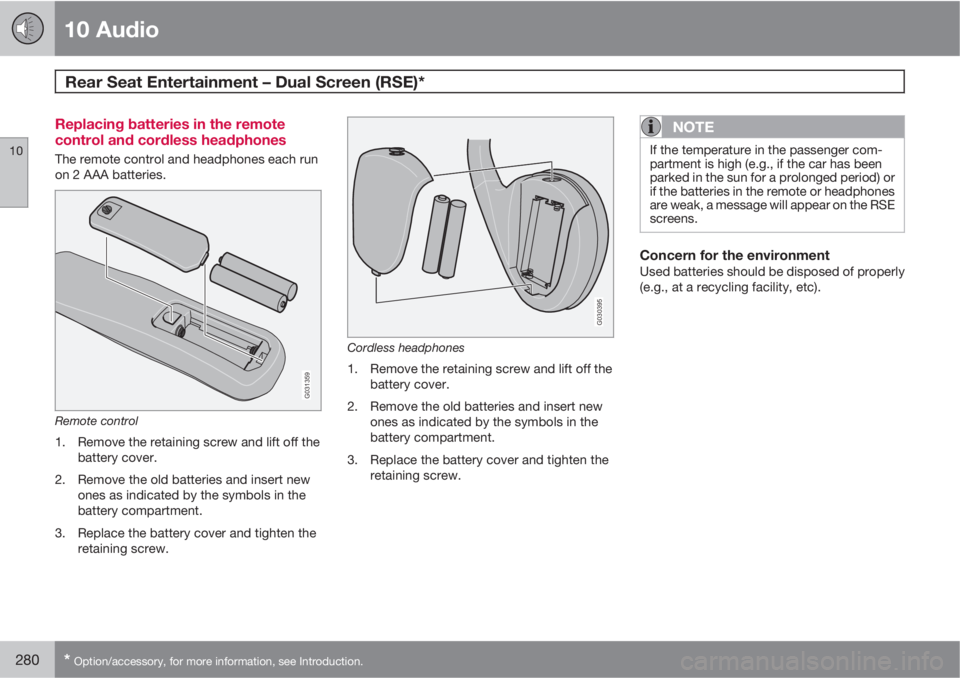
The remote control and headphones each run
on 2 AAA batteries.
G031359
Remote control
1. Remove the retaining screw and lift off the
battery cover.
2. Remove the old batteries and insert new
ones as indicated by the symbols in the
battery compartment.
3. Replace the battery cover and tighten the
retaining screw.
G030395
Cordless headphones
1. Remove the retaining screw and lift off the
battery cover.
2. Remove the old batteries and insert new
ones as indicated by the symbols in the
battery compartment.
3. Replace the battery cover and tighten the
retaining screw.
NOTE
If the temperature in the passenger com-
partment is high (e.g., if the car has been
parked in the sun for a prolonged period) or
if the batteries in the remote or headphones
are weak, a message will appear on the RSE
screens.
Concern for the environmentUsed batteries should be disposed of properly
(e.g., at a recycling facility, etc).
Page 306 of 310
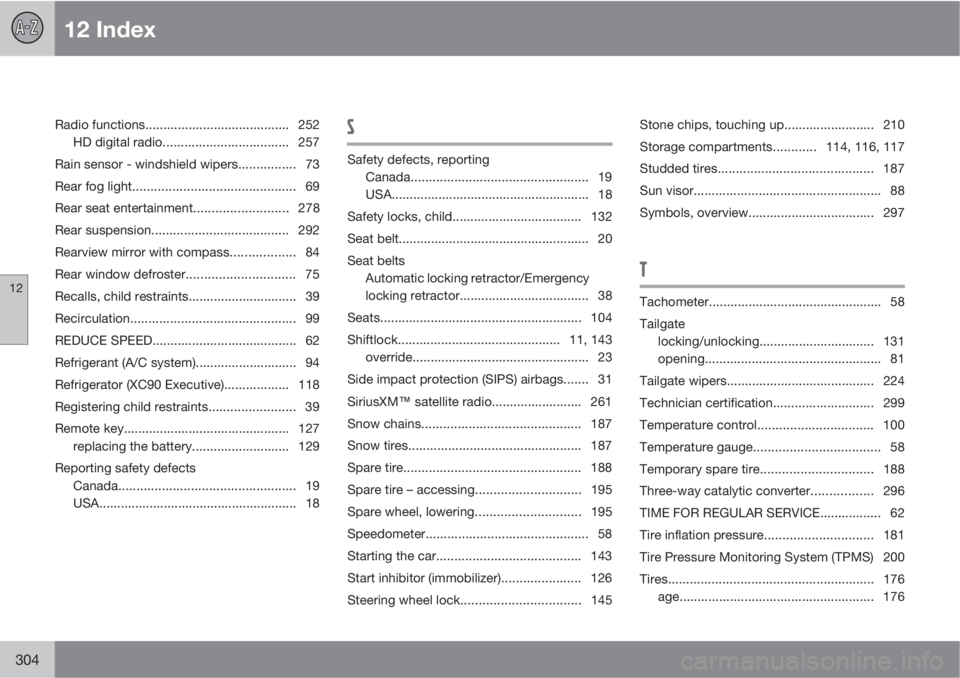
12 Index
12
304
Radio functions........................................ 252
HD digital radio................................... 257
Rain sensor - windshield wipers................ 73
Rear fog light............................................. 69
Rear seat entertainment..........................278
Rear suspension...................................... 292
Rearview mirror with compass.................. 84
Rear window defroster.............................. 75
Recalls, child restraints.............................. 39
Recirculation.............................................. 99
REDUCE SPEED........................................ 62
Refrigerant (A/C system)............................ 94
Refrigerator (XC90 Executive).................. 118
Registering child restraints........................ 39
Remote key.............................................. 127
replacing the battery........................... 129
Reporting safety defects
Canada................................................. 19
USA....................................................... 18S
Safety defects, reporting
Canada................................................. 19
USA....................................................... 18
Safety locks, child.................................... 132
Seat belt..................................................... 20
Seat belts
Automatic locking retractor/Emergency
locking retractor.................................... 38
Seats........................................................ 104
Shiftlock.............................................11, 143
override................................................. 23
Side impact protection (SIPS) airbags....... 31
SiriusXM
E satellite radio......................... 261
Snow chains............................................ 187
Snow tires................................................ 187
Spare tire................................................. 188
Spare tire – accessing.............................195
Spare wheel, lowering.............................195
Speedometer............................................. 58
Starting the car........................................ 143
Start inhibitor (immobilizer)...................... 126
Steering wheel lock.................................145Stone chips, touching up......................... 210
Storage compartments............114, 116, 117
Studded tires........................................... 187
Sun visor.................................................... 88
Symbols, overview................................... 297
T
Tachometer................................................ 58
Tailgate
locking/unlocking................................ 131
opening................................................. 81
Tailgate wipers......................................... 224
Technician certification............................ 299
Temperature control................................ 100
Temperature gauge................................... 58
Temporary spare tire...............................188
Three-way catalytic converter................. 296
TIME FOR REGULAR SERVICE................. 62
Tire inflation pressure..............................181
Tire Pressure Monitoring System (TPMS) 200
Tires.........................................................176
age...................................................... 176