center console VOLVO XC90 2013 Owner´s Manual
[x] Cancel search | Manufacturer: VOLVO, Model Year: 2013, Model line: XC90, Model: VOLVO XC90 2013Pages: 310, PDF Size: 8.62 MB
Page 277 of 310
10 Audio
Bluetooth® hands-free connection
10
275
Ringing volume
Go to PHONE MENUPHONE SETTINGS
SOUNDS AND VOLUMERing volume
and adjust the volume with the
/ keys on
the center console.
Ringing tonesThe hands-free system’s integrated ringing
tones can be selected in PHONE MENU
PHONE SETTINGSSOUNDS AND
VOLUME
Ring signalsRing signal 1,
etc.
NOTE
The connected cell phone’s ring tone may
not be switched off when one of the hands-
free system's ringing tones is used.
If you prefer to use the connected cell phone’s
ring tone1, go to PHONE MENUPHONE
SETTINGS
SOUNDS AND VOLUME
Ring signalsUse cell phone signal
More information about registering
and connecting cell phones
A maximum of 5 cell phones can be registered
in the hands-free system. Registration only
needs to be done once for each phone. After
registration, the cell phones can then be found
in the list of registered phones. Only one cell
phone can be connected to hands-free at a
time. Phones can be unregistered in PHONE
MENU
BLUETOOTHRemove phone.
Automatic connectionWhen the hands-free system is active and the
most recently connected cell phone is within
range, it is detected automatically. When the
audio system searches for the most recently
connected phone, this phone’s name appears
in the display. To manually connect a different
cell phone, press EXIT.
Manual connectionTo connect a phone other than the one that
was most recently connected or to switch
between cell phones that are already regis-
tered in the hands-free system:
Put the audio system in telephone mode
(
Phone) and follow the instructions in the dis-
play or change the connected cell by going into
the menu system under PHONE MENU
BLUETOOTHChange phoneAdd
phone.
Phone book
In order to use the hands-free system’s phone
book (list of contacts), PHONE must be dis-
played at the top of the center console display
and the
symbol must be visible.
The audio system stores a copy of the phone
book of each registered cell phone. The phone
book is automatically copied each time a
phone is connected. This function can be acti-
vated in PHONE SETTINGS
Sync ph
book. Searches for contacts are only made in
the phone book of the currently connected cell
phone.
NOTE
If a particular cell phone does not support
copying of the phone book, List is emptywill be displayed when copying has been
completed.
If the phone book contains information about
someone who is trying to call you, this infor-
mation will be shown in the display.
1Not supported by all cell phones.
Page 278 of 310
10 Audio
Bluetooth® hands-free connection
10
276
Searching for contactsThe easiest way to search for a contact in the
phone book is to press and hold any of the
buttons 2–9 in the center console (no. 8 in the
illustration on page 272). This starts a search
based on the first letter on the button that has
been pressed.
The phone book can also be accessed by
pressing the navigation buttons
/ on the
center console or by pressing
/ on
the steering wheel keypad. A search can also
be made in the phone book’s search menu in
PHONE BOOK
Search:
1. Enter the first letter of the contact’s name
and press ENTER or simply press ENTER.
2. Select the desired contact and press
ENTER to make a call to that person.
Voice mail numberThe phone number to your voice mail can be
changed in the menu CALL OPTIONS
Voice mail no.. If no number has been stored,
this menu can be accessed by a prolonged
press on button 1. Once a phone number has
been stored, press and hold 1 to dial this num-
ber.
Call listsLists of calls in a particular cell phone are cop-
ied to the hands-free system each time that
phone is connected. These lists are then upda-
ted while the phone is connected. Press
ENTER to show the most recently dialed num-
bers. Other call lists can be found under
Call
register….
NOTE
Certain cell phones display the list of the
most recently dialed numbers in reverse
order.
Entering textText is entered by using the number buttons in
the center console. Press a button once to
enter the first letter on the button, twice to enter
the second letter, etc. Continue to press the
button to display other characters.
Press EXIT briefly to erase a character. Press
and hold EXIT to erase all of the characters that
have been entered. Use the
/ buttons on
the center console to navigate among the char-
acters.
Bluetooth® menus
1. CALL REGISTER
1.1. Last 10 missed calls
1.2. Last 10 received calls
1.3. Last 10 dialed calls
2. PHONE BOOK
2.1. Search
2.2. Copy to cell phone
3. BLUETOOTH
3.1. Change phone
3.1.1. Add phone
3.1.2–4.
Added phones
2
3.2. Remove phone
3.3. Connect fr. cell phone
3.4. Car Bluetooth info
4. CALL OPTIONS
4.1. Automatic answer
4.2. Voice mail number
5. PHONE SETTINGS
5.1. SOUNDS AND VOLUME
5.1.1. Ring volume
2Max. 3 phones
Page 300 of 310
11 Specifications
Overview of information and warning symbols
11
298
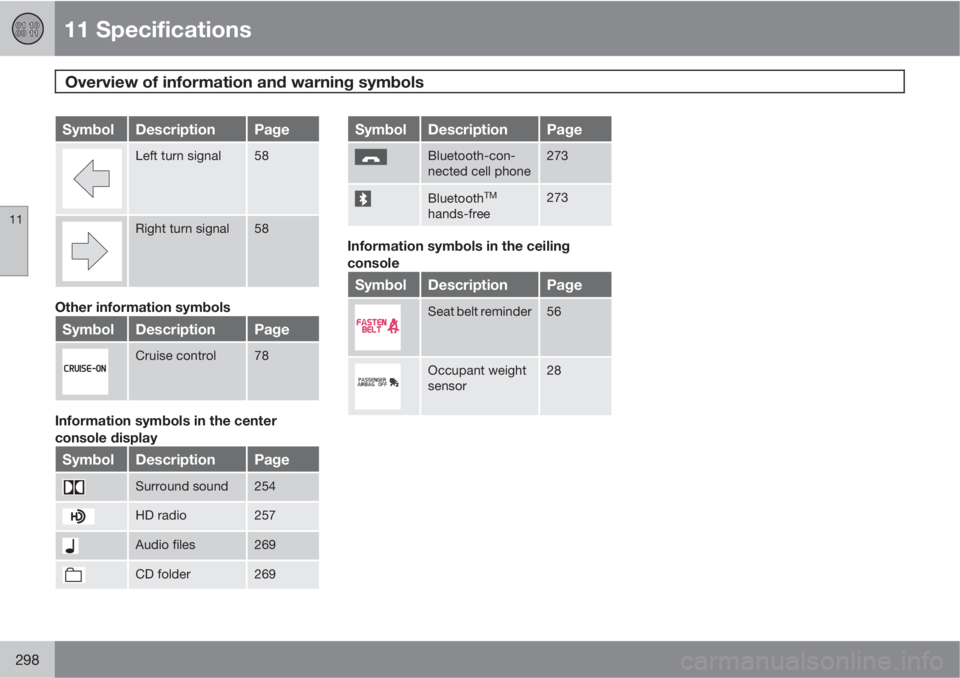
SymbolDescriptionPage
Left turn signal58
Right turn signal58
Other information symbols
SymbolDescriptionPage
Cruise control78
Information symbols in the center
console display
SymbolDescriptionPage
Surround sound254
HD radio257
Audio files269
CD folder269
SymbolDescriptionPage
Bluetooth-con-
nected cell phone273
BluetoothTM
hands-free
273
Information symbols in the ceiling
console
SymbolDescriptionPage
Seat belt reminder56
Occupant weight
sensor28
Page 303 of 310
12 Index
12
301
Center console buttons............................. 64
Central locking system - remote key....... 127
Changing a wheel.................................... 197
Changing coolant....................................218
Charge air cooler..................................... 294
Check Engine warning light....................... 61
Child restraint anchors......................... 48, 50
Child restraints
recalls and registration......................... 39
Child restraint systems.............................. 40
Child safety................................................ 37
Child safety locks....................................132
Climate system.......................................... 94
refrigerant............................................. 94
Clock reset button..................................... 58
Coat hanger............................................. 117
Cold weather precautions........................ 168
Compact disc care
CD care............................................... 270
Convertible seats....................................... 44
Coolant.................................................... 222
changing............................................. 218
Courtesy light........................................... 111Cup holder
rear seat.............................................. 116
Curb weight............................................. 185
Current fuel consumption.......................... 76
D
Daytime running lights............................... 68
Defroster
rear window and door mirrors.............. 75
rear window and mirrors..................... 100
windshield............................................. 99
Detachable trailer hitch............................ 166
Dimensions.............................................. 286
Disabling the passenger's side front airbag 28
Display, instrument panel.......................... 58
Dolby Pro Logic II (DPL II)........................ 253
Door mirrors............................................... 85
defroster............................................... 75
Door mirrors, folding.................................. 64
Driver distraction warning.......................... 14
Driving conditions, difficult......................147
Driving economically................................ 146
Driving through water..............................147
E
Economical driving.................................. 146
Electrically operated moonroof.................. 87
Electrical system...................................... 295
Emergency locking retractor...................... 38
Emission inspection readiness................ 215
Engine
specifications...................................... 294
starting................................................ 143
Engine oil................................................. 220
checking............................................. 220
specifications...................................... 293
Environment............................................... 13
F
Federal Clean Air Act............................... 214
Flat tires
changing............................................. 195
repairing with tire sealing system....... 189
Floor mats
cleaning.............................................. 209
placing correctly................................. 143
Fog light...............................................60, 69