radio VOLVO XC90 2013 Owner´s Manual
[x] Cancel search | Manufacturer: VOLVO, Model Year: 2013, Model line: XC90, Model: VOLVO XC90 2013Pages: 310, PDF Size: 8.62 MB
Page 264 of 310
10 Audio
SiriusXM
E
E satellite radio
10
262
Direct channel entry
The SiriusXM
E satellite channels are num-
bered consecutively throughout all of the cat-
egories. To access a channel directly:
1.
Press MENU and scroll to
Direct channel
entry.
2. Use the numerical keypad to enter the
channel's number. Press EXIT if necessary
to erase a digit.
3.
Press ENTER. The radio will tune to this
channel, even if it belongs to a category
other than the currently selected one.
NOTE
The numbers of skipped or locked channels
will not be displayed.
•If a channel is locked, the access code
must be entered before the channel can
be selected. See "Unlocking a channel"
on page 264.
Scanning
SCAN automatically searches through the list
of satellite channels. See page 257 for more
detailed information.
Storing a channel
A total of 20 satellite channels can be stored;
10 channels each for SiriusXM
E 1 and 2. See
page 256 for detailed information on storing
channels.
•A long press on one of the number keys
stores the currently tuned channel on that
key.
•A short press on a number key while the
radio is in SiriusXM
E 1 or 2 mode will tune
to the preset satellite channel stored on
that button, regardless of the currently
selected channel category.
Song Seek and Song Memory
The Song Seek and Song Memory functions
provide both audio and visual notification when
SiriusXM
E is broadcasting your favorite
songs. Song Seek enables you to store the
name of the song for future advance notifica-
tion when that song is being played. The
Song
Memory feature makes it possible to view all
of the current songs that are stored in memory.
Song memoryUp to ten songs can be saved in the system's
memory.
1.
Press MENU.
2.
Scroll to "
Add song to song mem." and
follow the instructions shown in the dis-
play.
If a new song is selected when the memory is
full, you will be prompted to press ENTER to
delete the last song on the list.
The remaining songs in the list will move down
one position, and the newly added song will be
placed at the top of the list.
Song seekWhen a satellite radio channel plays one of the
songs stored in the song memory, the listener
will be alerted by a text message and an audi-
ble signal.
Press ENTER to listen to the song or EXIT to
cancel.
To activate/deactivate the song seek function:
1.
Press MENU
2.
Scroll to "
Song seek"
3.
Press ENTER to activate or deactivate the
function.
Page 265 of 310
10 Audio
SiriusXM
E
E satellite radio
10
263
NOTE
When the song has ended, the radio will
remain tuned to the channel on which the
song was played.
Radio text
The text that is displayed about the song cur-
rently playing can be changed. Use the AUTO
button to switch between Artist, Title, Com-
poser, or to switch radio text off, or use the
menu to display and select among these cate-
gories.
Advanced settings
This menu function enables you to make set-
tings on certain SiriusXM
E satellite radio func-
tions. To access this menu:
1.
Press MENU.
2.
Select
Adv. settings.
WARNING
Settings should be made when the vehicle
is at a standstill.
The following settings can be made in the Sir-
iusXM
E menu.
•Songs can be added to the song list
•Channel skip settings can be made
•Channel lock settings can be made
•The channel access code can be displayed
or changed
•Your SiriusXM
E ID can be displayed
Skip optionsThis function is used to remove a channel from
the list of available channels.
Skip current channel1.
Select CHANNEL SKIP LIST and press
ENTER.
2.
Select a category in the list and press
ENTER.
3. Skip channels in the list presented by
pressing ENTER.
Unskip all channelsThis permanently removes all channels from
the skip list and makes them available for
selection.
Temp. unskip all ch.This function will temporarily unskip all chan-
nels and make them available for selection. The
channels remain on the skip list and will again
be skipped the next time the ignition is
switched on.
Channel lockAccess to specific channels can be restricted
(locked). A locked channel will not provide
audio, song titles, or artist information.
NOTE
All channels are initially unlocked at deliv-
ery.
Locking a channel:
1.
Select "
Adv. settings" in the menu and
select LOCK OPTIONS and press
ENTER.
2.
Select
CHANNEL LOCK LIST and press
ENTER
3.
Enter the channel access code
1 and press
ENTER.
4.
Select a category in the list and press
ENTER.
5. Lock channels in the list presented by
pressing ENTER.
The channel is now locked and a checked box
will be displayed to indicate this. It will be nec-
essary to enter the channel access code. See
the section "Unlocking a channel" in order to
listen to a locked channel.
1The default code is 0000. If you have changed the code and forgotten it, see the section "If you have forgotten the access code."
Page 266 of 310
10 Audio
SiriusXM
E
E satellite radio
10
264
Unlocking a channel
A channel's access code1 is required to unlock
a channel.
Unlock all channelsThis permanently removes all channels from
the locked list and makes them available for
selection.
Temp. unlock all ch.This function will temporarily unlock all chan-
nels and make them available for selection. The
channels remain on the locked list and will
again be locked the next time the ignition is
switched on.
CHANGE CODE
This function makes it possible to change the
channel access code. The default code is
0000.
To change the code:
1.
Select
CHANGE CODE and press
ENTER.
2.
Enter the current code and press ENTER.
3.
Enter the new code and press ENTER.
4.
Confirm the new code and press ENTER.If an incorrect code is entered, the text
"
Incorrect code!" is displayed.
If you have forgotten the access code1.
Select "SIRIUS ID" in the SiriusXM
E set-
tings menu and press ENTER.
2.
Press and hold the ENTER button for
2 seconds.
The current code will be displayed.
Your Volvo retailer can also provide you with
assistance.
1The default code is 0000. If you have changed the code and forgotten it, see the section "If you have forgotten the access code."
Page 267 of 310
10 Audio
Auxiliary equipment
10
* Option/accessory, for more information, see Introduction.265
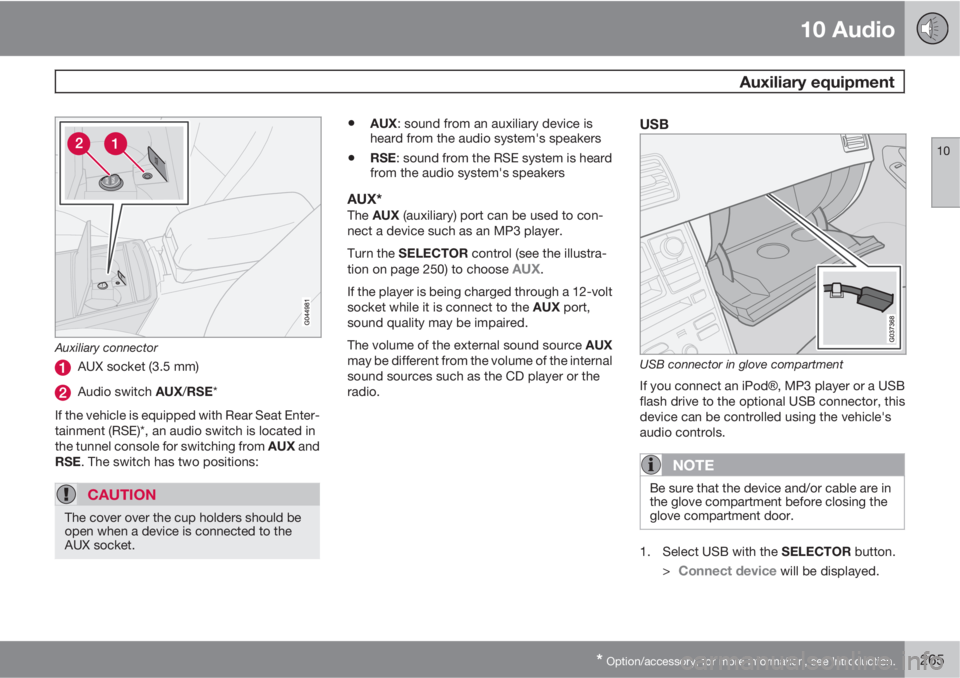
Auxiliary connector
AUX socket (3.5 mm)
Audio switch AUX/RSE*
If the vehicle is equipped with Rear Seat Enter-
tainment (RSE)*, an audio switch is located in
the tunnel console for switching from AUX and
RSE. The switch has two positions:
CAUTION
The cover over the cup holders should be
open when a device is connected to the
AUX socket.
•AUX: sound from an auxiliary device is
heard from the audio system's speakers
•RSE: sound from the RSE system is heard
from the audio system's speakers
AUX*The AUX (auxiliary) port can be used to con-
nect a device such as an MP3 player.
Turn the SELECTOR control (see the illustra-
tion on page 250) to choose
AUX.
If the player is being charged through a 12-volt
socket while it is connect to the AUX port,
sound quality may be impaired.
The volume of the external sound source AUX
may be different from the volume of the internal
sound sources such as the CD player or the
radio.
USB
USB connector in glove compartment
If you connect an iPodŸ, MP3 player or a USB
flash drive to the optional USB connector, this
device can be controlled using the vehicle's
audio controls.
NOTE
Be sure that the device and/or cable are in
the glove compartment before closing the
glove compartment door.
1.
Select USB with the SELECTOR button.
>
Connect device will be displayed.
Page 269 of 310
10 Audio
Auxiliary equipment
10
267
possible to change tracks from the phone
itself.
In order to listen streaming audio, BT must be
selected as a sound source (see page 253) and
a Bluetooth
Ÿ cell phone must be connected
(paired) with the audio system. See page 273
for more information.
NOTE
Any Bluetooth cell phones used must sup-
port Audio/Video Remote Control Profile
(AVRCP) and Advanced Audio Distribution
Profile (A2DP). The phone must use AVRCP
version 1.3 and A2DP 1.2. If older versions
of these standards are used, certain fea-
tures (e.g., scan or random) may not func-
tion.
Not all cell phones are fully compatible with
the vehicle's Bluetooth system. A list of
compatible phones is available at you Volvo
retailer or at www.volvocars.us.
Listening to streaming audioTurn SELECTOR to select BT as the sound
source.
The
/ buttons can be used to fast-
forward/back or change tracks:
•Press briefly to change tracks.
•Press and hold to go fast-forward/back.The buttons in the steering wheel keypad can
be used in the same way.
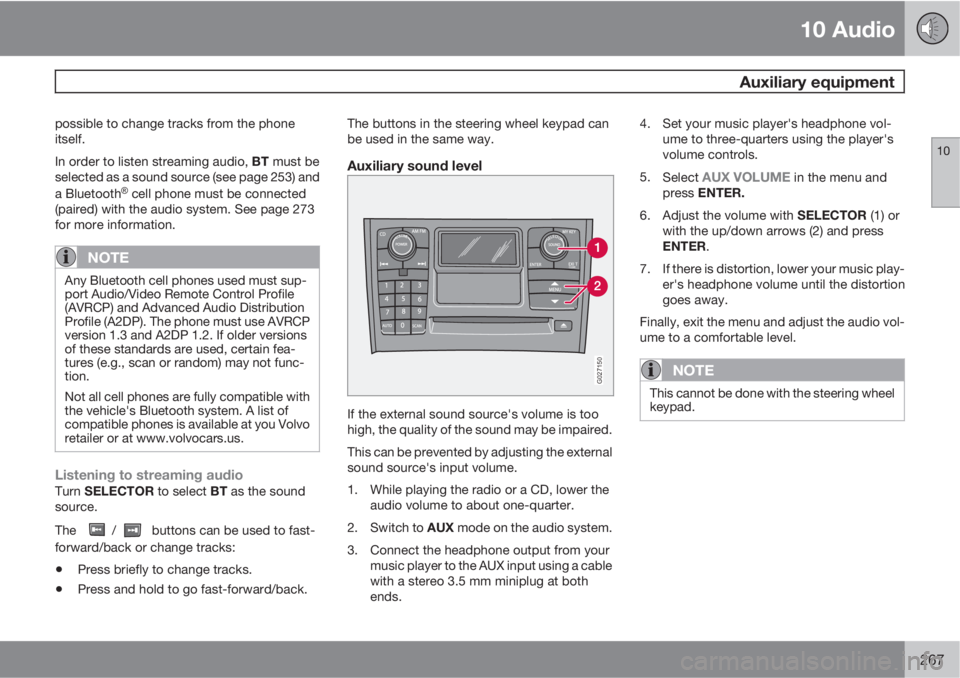
Auxiliary sound level
G027150
If the external sound source's volume is too
high, the quality of the sound may be impaired.
This can be prevented by adjusting the external
sound source's input volume.
1. While playing the radio or a CD, lower the
audio volume to about one-quarter.
2.
Switch to AUX mode on the audio system.
3. Connect the headphone output from your
music player to the AUX input using a cable
with a stereo 3.5 mm miniplug at both
ends.4. Set your music player's headphone vol-
ume to three-quarters using the player's
volume controls.
5.
Select
AUX VOLUME in the menu and
press ENTER.
6.
Adjust the volume with SELECTOR (1) or
with the up/down arrows (2) and press
ENTER.
7. If there is distortion, lower your music play-
er's headphone volume until the distortion
goes away.
Finally, exit the menu and adjust the audio vol-
ume to a comfortable level.
NOTE
This cannot be done with the steering wheel
keypad.
Page 273 of 310
10 Audio
Menu structure
10
271
FM Menu1. Radio Text
2. Audio Settings
1
1. Surround
2. Equalizer Fr
3. Equalizer Rr
4. Reset All
AM MenuSee Audio Settings in the FM Menu.
CD Menu1. Random
2. Disc Text
3. Audio Settings
See Audio Settings in the FM Menu.
AUX Menu (option)1. AUX input vol
2. Audio Settings
See Audio Settings in the FM Menu.
1Certain audio systems
Page 276 of 310
10 Audio
Bluetooth® hands-free connection
10
274
Making a call1.
Ensure that Phone is shown at the top of
the center console display and that the
symbol is visible (by pressing briefly on
PHONE on the center console).
2. Dial the desired phone number or use the
phone book (see page 275).
3.
Press ENTER.
End the call by pressing EXIT.
Disconnecting the cell phoneThe cell phone is automatically disconnected
from the audio system if it is moved out of
range. For more information about connec-
tions, see page 273.
The cell phone can be manually disconnected
from the hands-free system by pressing
PHONE. The hands-free system is also deac-
tivated when the ignition is switched off.
When the cell phone is disconnected from the
hands-free system, a call in progress can be
continued using the cell phone’s own speaker
and microphone.
NOTE
Certain cell phones may require confirma-
tion from the phone’s keypad when a call is
transferred from hands-free to the cell
phone.
Handling calls
Incoming calls–
Press ENTER to answer a call, even if the
audio system is currently in e.g., CD or FM
mode.
–
Press EXIT to reject a call.
Automatic answerThis function means that incoming calls will be
answered automatically. Activate or deactivate
the function in the menu system under PHONE
MENU
CALL OPTIONSAuto. answer.
Call settingsWhile a call is in progress, press MENU or
ENTER on the center console to access the
following functions:
•Mute microphone: mute the audio sys-
tem’s microphone.
•Transf call to cell: transfer the call from
hands-free to the cell phone.
•Phone book: this feature enables you to
search for a stored telephone number.
NOTE
•On certain cell phones, the connection
is broken when the mute function is
used, which is normal. If this happens,
the hands-free system will prompt you
to reconnect.
•A new call cannot be initiated while
another call is in progress.
Sound settings
Call volumeCall volume can be adjusted while a call is in
progress using the buttons in the steering
wheel keypad.
Audio system volumeWhen PHONE is displayed, volume for the
audio system can be adjusted in the normal
way with the audio system's VOLUME control.
In order to adjust volume during a phone call,
the audio system must be switched to one of
the other modes (FM, CD, etc).
Audio system sound can be automatically
muted when a phone call is received in PHONE
MENU
PHONE SETTINGSSOUNDS
AND VOLUME
Mute radio
and adjust the volume with the
/ keys on
the center console.
Page 279 of 310
10 Audio
Bluetooth® hands-free connection
10
277
5.1.2. Ring signals
5.1.3. Mute radio
5.2. Synchronize phone book
Page 280 of 310
10 Audio
Rear Seat Entertainment – Dual Screen (RSE)*
10
278* Option/accessory, for more information, see Introduction.
Introduction
The RSE system can be used at the same time
as the vehicle’s audio system.
When the rear seat passengers play a DVD,
connect an external device to the RSE AUX
connectors, etc., and listen to the audio
through the cordless headphones, the driver
and front seat passenger can still use the vehi-
cle's audio system to listen to the radio, a CD,
music stored on an MP3 player, etc.
Please also refer to the Quick Guide provided
with the RSE system for additional information.
Electrical current - ignition keyThe RSE system can be activated with the igni-
tion in position I or II (see page 145 for infor-
mation on the ignition positions), or when the
engine is running. While the engine is being
started, a film or music that is currently being
played will pause momentarily and resume
playing when the engine has started.
When the RSE system has been used once
when the ignition is switched off, it will be then
be blocked for further use. RSE can be restar-
ted by turning the ignition key to position I.
NOTE
Using RSE for more than approximately
10 minutes with the engine switched off may
drain the vehicle’s battery and make it diffi-
cult or impossible to start the engine.
If this occurs, a message will be displayed
on the RSE system’s screens.
Music
Listening to a music CD1. Insert a CD into the RSE player’s slot with
the disc’s label facing upward.
> The CD will begin to play automatically.
2. Switch on the cordless headphones and
select CH A for the left screen or CH B for
the right screen.
> This will direct the sound to the head-
phones.
3. Adjust the headphone volume by using the
thumb wheel on the headphones.
To listen through the vehicle’s audio sys-
tem speakers, press MODE on the audio
system control panel and select
No new
ph. found. ENTER to retry. EXIT to
cancel.
. Press on the RSE remote to
route the sound through the speakers.
Selecting a folder on the CD1. Insert the CD in the player.
2.
Press
.
3. Use the navigation buttons (the arrow keys
surrounding the OK button on the RSE
remote control) to highlight a folder and/or
a specific track.
4.
Press
to select a sub-folder.
Playback alternativesThe CD can be played in several different ways.
Use the navigation buttons to select one of the
alternatives.
With the dialogue box displayed:
1. Press the right navigation button to access
the menu to the right..
2. Use the navigation keys to select one of the
alternatives.
3.
Confirm your choice by pressing
.
Changing tracks on the CD–Change tracks on the CD by pressing
or . Hold the respective buttons
down for fast forward or reverse.
Pause1. Pause and restart the CD by pressing
.
2.
Stop the CD by pressing
.
Page 300 of 310
11 Specifications
Overview of information and warning symbols
11
298
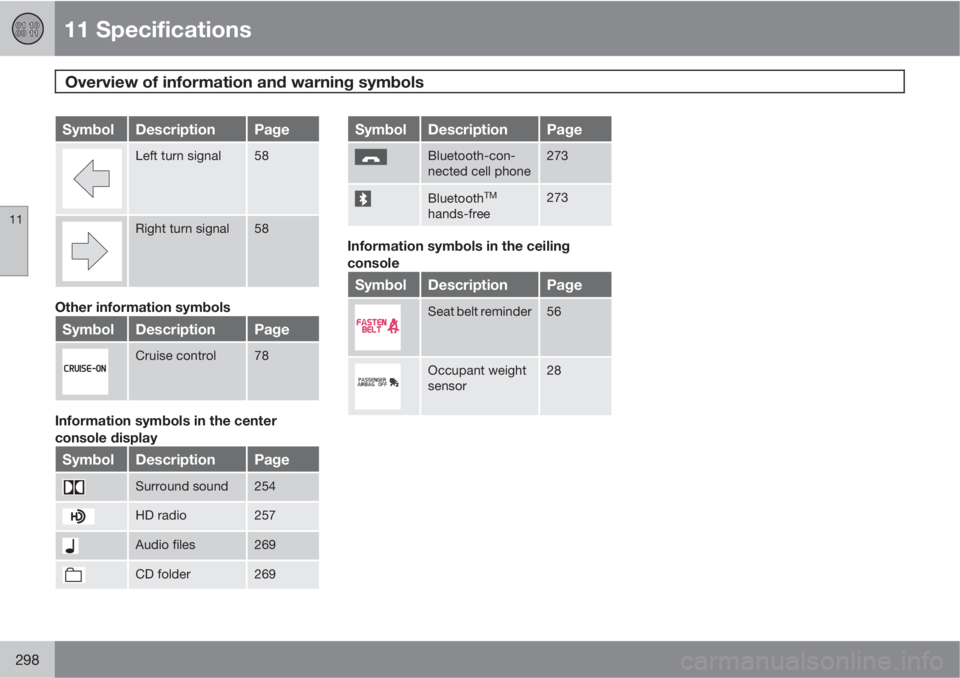
SymbolDescriptionPage
Left turn signal58
Right turn signal58
Other information symbols
SymbolDescriptionPage
Cruise control78
Information symbols in the center
console display
SymbolDescriptionPage
Surround sound254
HD radio257
Audio files269
CD folder269
SymbolDescriptionPage
Bluetooth-con-
nected cell phone273
BluetoothTM
hands-free
273
Information symbols in the ceiling
console
SymbolDescriptionPage
Seat belt reminder56
Occupant weight
sensor28