wheel VOLVO XC90 2013 Owner´s Manual
[x] Cancel search | Manufacturer: VOLVO, Model Year: 2013, Model line: XC90, Model: VOLVO XC90 2013Pages: 310, PDF Size: 8.62 MB
Page 132 of 310
05 Locks and alarm
Locking and unlocking
05
130
G029646
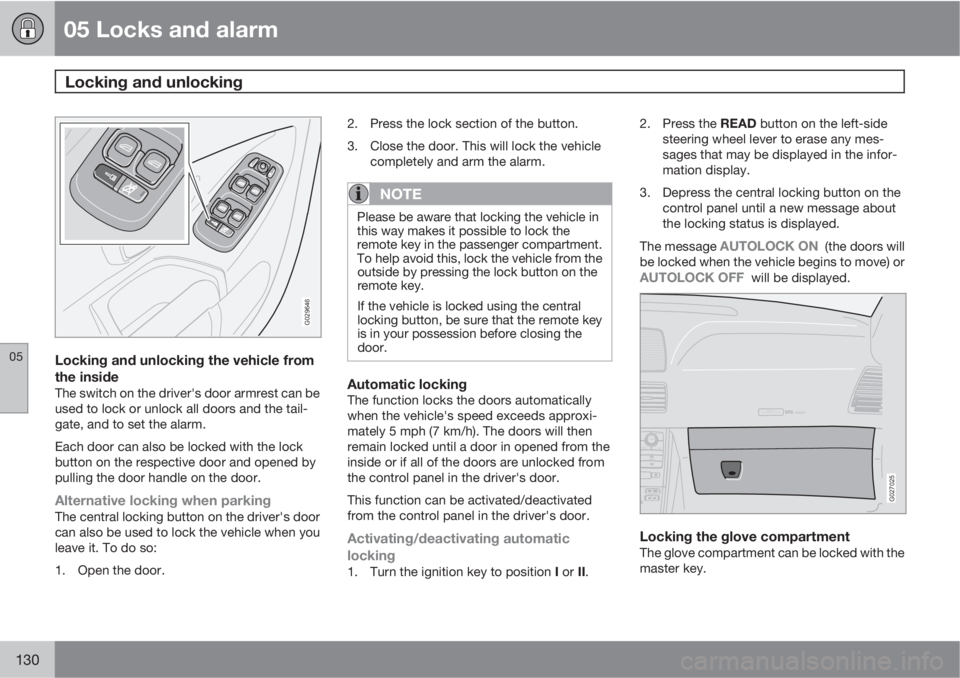
Locking and unlocking the vehicle from
the inside
The switch on the driver's door armrest can be
used to lock or unlock all doors and the tail-
gate, and to set the alarm.
Each door can also be locked with the lock
button on the respective door and opened by
pulling the door handle on the door.
Alternative locking when parkingThe central locking button on the driver's door
can also be used to lock the vehicle when you
leave it. To do so:
1. Open the door.2. Press the lock section of the button.
3. Close the door. This will lock the vehicle
completely and arm the alarm.
NOTE
Please be aware that locking the vehicle in
this way makes it possible to lock the
remote key in the passenger compartment.
To help avoid this, lock the vehicle from the
outside by pressing the lock button on the
remote key.
If the vehicle is locked using the central
locking button, be sure that the remote key
is in your possession before closing the
door.
Automatic lockingThe function locks the doors automatically
when the vehicle's speed exceeds approxi-
mately 5 mph (7 km/h). The doors will then
remain locked until a door in opened from the
inside or if all of the doors are unlocked from
the control panel in the driver's door.
This function can be activated/deactivated
from the control panel in the driver's door.
Activating/deactivating automatic
locking
1.
Turn the ignition key to position I or II.2.
Press the READ button on the left-side
steering wheel lever to erase any mes-
sages that may be displayed in the infor-
mation display.
3. Depress the central locking button on the
control panel until a new message about
the locking status is displayed.
The message
AUTOLOCK ON (the doors will
be locked when the vehicle begins to move) or
AUTOLOCK OFF will be displayed.
ATTENTIONPakjdskdl ioiuip kjöpp opoodidåuswi
CSOUND
MENU
80
ENTERLSEEEXITMY KEYRTO
AIRBAG
G027025
Locking the glove compartmentThe glove compartment can be locked with the
master key.
Page 138 of 310
136* Option/accessory, for more information, see Introduction.
General information............................................................................... 138
Fuel requirements................................................................................. 139
Refueling............................................................................................... 141
Starting the vehicle............................................................................... 143
Ignition switch and steering wheel lock................................................ 145
Economical driving................................................................................ 146
Difficult driving conditions..................................................................... 147
Automatic transmission........................................................................ 148
Jump starting........................................................................................ 151
All Wheel Drive*..................................................................................... 152
Brake system........................................................................................ 153
Parking brake........................................................................................ 156
Stability system..................................................................................... 157
Front/rear park assist*........................................................................... 159
Towing.................................................................................................. 161
Towing a trailer...................................................................................... 163
Detachable trailer hitch......................................................................... 166
Load carriers (accessory)...................................................................... 167
Cold weather precautions..................................................................... 168
Before a long distance trip.................................................................... 169
Blind Spot Information System*............................................................ 170
Page 142 of 310
06 Starting and driving
Fuel requirements
06
140
Gasoline containing alcohol and ethers,
"Oxygenated fuels"
Some fuel suppliers sell gasoline containing
"oxygenates" which are usually alcohols or
ethers. In some areas, state or local laws
require that the service pump be marked indi-
cating use of alcohols or ethers. However,
there are areas in which the pumps are
unmarked. If you are not sure whether there is
alcohol or ethers in the gasoline you buy, check
with the service station operator. To meet sea-
sonal air quality standards, some areas require
the use of "oxygenated" fuel.
Volvo allows the use of the following "oxygen-
ated" fuels; however, the octane ratings listed
on page 139 must still be met.
Alcohol – EthanolFuels containing up to 10% ethanol by volume
may be used. Ethanol may also be referred to
as Ethyl alcohol, or "Gasohol".
Ethers – MTBE: Fuels containing up to
15% MTBE may be used.
MethanolDo not use gasolines containing methanol
(methyl alcohol, wood alcohol). This practice
can result in vehicle performance deterioration
and can damage critical parts in the fuel sys-
tem. Such damage may not be covered under
the New Vehicle Limited Warranty.
Weight distribution affects handlingAt the specified curb weight your vehicle has a
tendency to understeer, which means that the
steering wheel has to be turned more than
might seem appropriate for the curvature of a
bend.
This ensures good stability and reduces the
risk of rear wheel skid. Remember that these
properties can alter with the vehicle load.
The heavier the load in the cargo area, the less
the tendency to understeer.
Handling, roadholdingVehicle load, tire design and inflation pressure
all affect vehicle handling. Therefore, check
that the tires are inflated to the recommended
pressure according to the vehicle load. See
"Tire pressure" section.
Loads should be distributed so that capacity
weight or maximum permissible axle loads are
not exceeded.
Conserving electrical currentKeep the following in mind to help minimize
battery drain:
•When the engine is not running, avoid turn-
ing the ignition key to position II (see
page 145). Many electrical systems (the
audio system, the optional infotainment/
navigation systems, power windows, etc)
will function with the ignition key in positionI. This position reduces drain on the bat-
tery.
•Please keep in mind that using systems,
accessories, etc that consume a great deal
of current when the engine is not running
could result in the battery being completely
drained. Driving or having the engine run-
ning for approximately 15 minutes will help
keep the battery charged.
NOTE
A warning message will be displayed in the
text window in the instrument panel when
the battery charge is low.
Page 145 of 310
06 Starting and driving
Starting the vehicle
06
143 Starting the engine
WARNING
Before starting, check that the seat, steering
wheel and mirrors are adjusted properly.
Make sure the brake pedal can be
depressed completely. Adjust the seat if
necessary, see page 104.
1. Fasten the seat belt.
2. Apply the parking brake (hand brake) if not
already set. The gear selector is locked in
the P position (SHIFTLOCK).
3. Without touching the accelerator pedal,
turn the ignition key
1 to the starting posi-
tion. Allow the starter to operate for up to
10 seconds. Release the key as soon as
the engine starts
2. If the engine fails to
start, repeat this step.
CAUTION
If the engine does not start after the third try,
wait for approximately 3 minutes before try-
ing to start it again to give the battery time
to recover its starting capacity.
WARNING
•Never use more than one floor mat at a
time on the driver's floor. An extra mat
on the driver's floor can cause the
accelerator and/or brake pedal to
catch. Check that the movement of
these pedals is not impeded.
•Volvo's floor mats are specially manu-
factured for your car. They must be
firmly secured in the clips on the floor so
that they cannot slide and become trap-
ped under the pedals on the driver's
side.
NOTE
•If the key blade section of the remote is
not fully folded out when starting the
vehicle, the immobilizer function may
make it impossible to start the engine.
•After a cold start, idle speed may be
noticeably higher than normal for a
short period. This is done to help bring
components in the emission control
system to their normal operating tem-
perature as quickly as possible, which
enables them to control emissions and
help reduce the vehicle's impact on the
environment.
•To release the gear selector from the P
(Park) position, the engine must be run-
ning (or the ignition key must be in posi-
tion II) and the brake pedal must be
depressed.
•Select the desired gear. The gear
engages after a very slight delay which
is especially noticeable when selecting
R.
1If two of the keys to your vehicle are close together, e.g. on the same key ring when you try to start the vehicle, this could cause interference in the immobilizer system and result in the vehicle not
starting. If this should occur, remove one of the keys from the key ring before trying to start the vehicle again.
2On vehicles equipped with the autostart feature, release the key immediately. See also page 145.
Page 147 of 310
06 Starting and driving
Ignition switch and steering wheel lock
06
145 Ignition switch and steering wheel lock
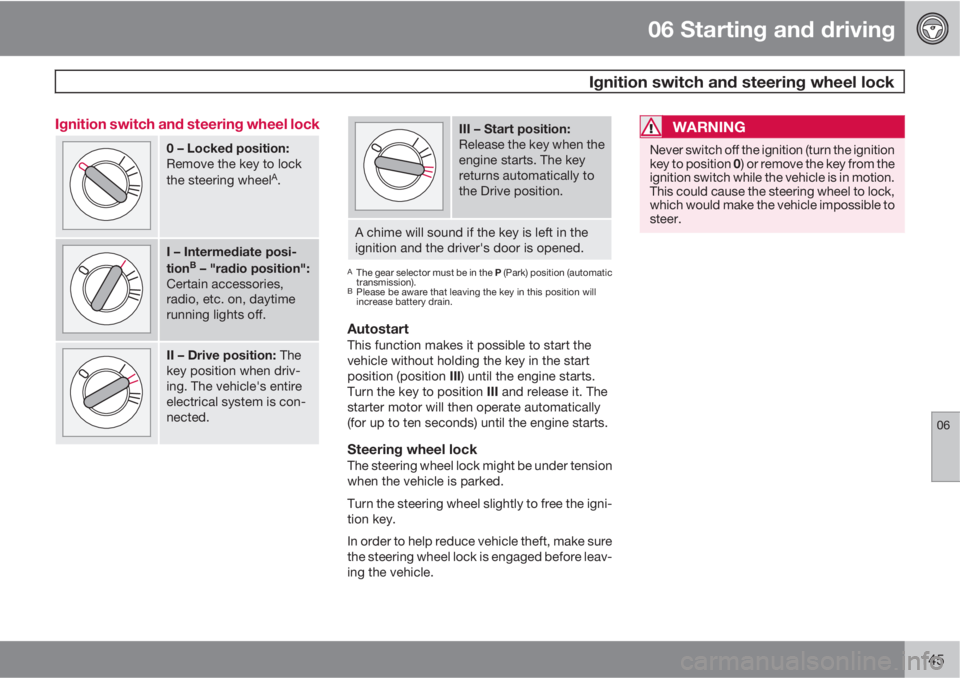
0 – Locked position:
Remove the key to lock
the steering wheel
A.
I – Intermediate posi-
tionB – "radio position":
Certain accessories,
radio, etc. on, daytime
running lights off.
II – Drive position: The
key position when driv-
ing. The vehicle's entire
electrical system is con-
nected.
III – Start position:
Release the key when the
engine starts. The key
returns automatically to
the Drive position.
A chime will sound if the key is left in the
ignition and the driver's door is opened.
AThe gear selector must be in the P (Park) position (automatic
transmission).
BPlease be aware that leaving the key in this position will
increase battery drain.
AutostartThis function makes it possible to start the
vehicle without holding the key in the start
position (position III) until the engine starts.
Turn the key to position III and release it. The
starter motor will then operate automatically
(for up to ten seconds) until the engine starts.
Steering wheel lockThe steering wheel lock might be under tension
when the vehicle is parked.
Turn the steering wheel slightly to free the igni-
tion key.
In order to help reduce vehicle theft, make sure
the steering wheel lock is engaged before leav-
ing the vehicle.
WARNING
Never switch off the ignition (turn the ignition
key to position 0) or remove the key from the
ignition switch while the vehicle is in motion.
This could cause the steering wheel to lock,
which would make the vehicle impossible to
steer.
Page 154 of 310
06 Starting and driving
All Wheel Drive*
06
152* Option/accessory, for more information, see Introduction.
All Wheel Drive (AWD) – general
information
Your Volvo can be equipped with an electron-
ically controlled All Wheel Drive system*, which
means that power is distributed automatically
between the front and rear wheels. Under nor-
mal driving conditions, most of the engine's
power is directed to the front wheels. However,
if there is any tendency for the front wheels to
spin, an electronically controlled coupling dis-
tributes power to the wheels that have the best
traction.
Tire dimensionsVolvo recommends that you always drive on
tires of the same brand, size, construction
(radial), tread pattern, load-, speed-, traction-,
temperature-, and treadwear rating. Never
drive on mixed tires, except for brief periods
when the temporary spare tire is in use.
Always use properly inflated tires of correct
dimensions. Tire size and inflation pressures
are shown on the tire inflation pressure plac-
ards, located on the driver's side B-pillar (the
structural member at the side of the vehicle, at
the rear of the driver's door opening), or on the
inside of the fuel filler door on Canadian mod-
els.
Temporary SpareThe temporary spare tire is for temporary, low-
speed, short-distance use only. Replace it with
a full-sized tire as soon as possible. Do not
drive on the temporary spare at speeds above
50 m.p.h. (80 km/h).
NOTE
Never install snow chains on a temporary
spare.
Page 155 of 310
06 Starting and driving
Brake system
06
* Option/accessory, for more information, see Introduction.153 BRAKE Brake circuit malfunction
The brake system is a hydraulic system con-
sisting of two master cylinders and two sepa-
rate brake circuits. If a problem should occur in
one of these circuits, it is still possible to stop
the vehicle with the other brake circuit.
If the brake pedal must be depressed farther
than normal and requires greater foot pressure,
the stopping distance will be longer.
A warning light in the instrument panel will light
up to warn the driver that a fault has occurred.
If this light comes on while driving or braking,
stop immediately and check the brake fluid
level in the reservoir.
NOTE
Press the brake pedal hard and maintain
pressure on the pedal – do not pump the
brakes.
WARNING
If the fluid level is below the MIN mark in the
reservoir or if a BRAKE FAILURE STOP
SAFELY message is displayed in the text
window: DO NOT DRIVE. Have the vehicle
towed to a trained and qualified Volvo serv-
ice technician and have the brake system
inspected.
NOTE
When the vehicle is at a standstill and the
engine is idling, e.g. at a traffic light and the
brake pedal is depressed, the pedal may go
down slightly. This is a normal function of
the power-assisted brake system.
Brake pad inspectionOn vehicles equipped with a jack*, the condi-
tion of the brake pads can be checked by rais-
ing the vehicle (see page 195 for information
about using the jack and removing a wheel)
and performing a visual inspection of the brake
pads.
WARNING
•If the vehicle has been driven immedi-
ately prior to a brake pad inspection, the
wheel hub, brake components, etc., will
be very hot. Allow time for these com-
ponents to cool before carrying out the
inspection.
•Apply the parking brake and put the
gear selector in the Park (P) position.
•Block the wheels standing on the
ground, use rigid wooden blocks or
large stones.
WARNING
•Use the jack intended for the vehicle
when changing a tire. For any other job,
use stands to support the vehicle.
•The jack should be kept well-greased
and clean, and should not be damaged.
•Be sure the jack is on a firm, level, non-
slippery surface.
•No objects should be placed between
the base of jack and the ground, or
between the jack and the attachment
bar on the vehicle.
•The jack must correctly engage the jack
attachment.
•Never allow any part of your body to be
extended under a vehicle supported by
a jack.
Power brakes function only when the
engine is running
The power brakes utilize vacuum pressure
which is only created when the engine is run-
ning. Never let the vehicle roll to a stop with the
engine switched off.
If the power brakes are not working, consider-
ably higher pressure will be required on the
brake pedal to compensate for the lack of
power assistance. This can happen for exam-
ple when towing your vehicle or if the engine is
Page 158 of 310
06 Starting and driving
Parking brake
06
156
G026992
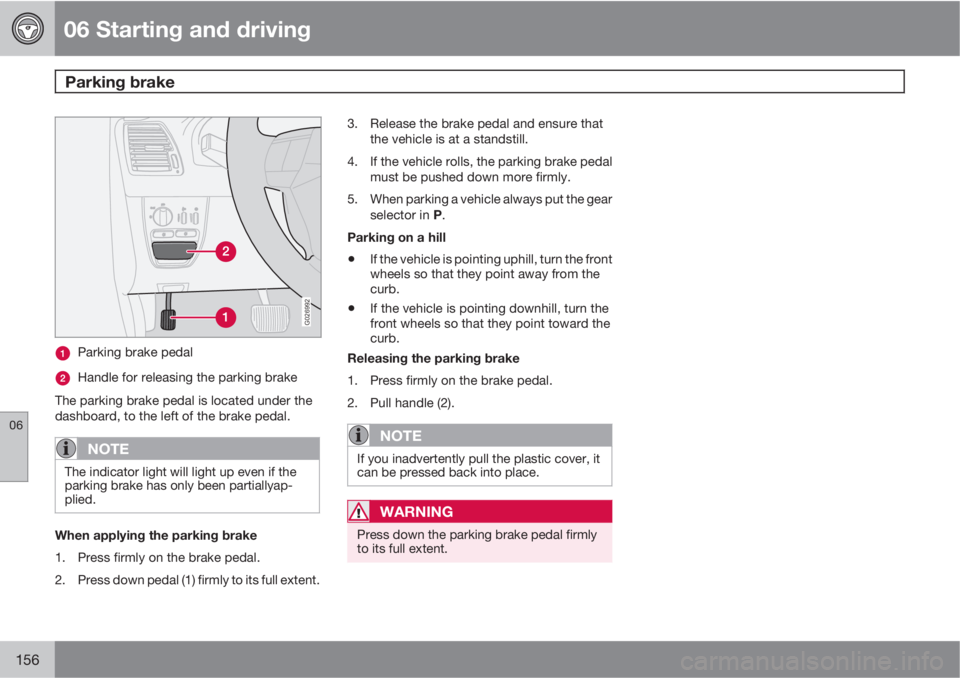
Parking brake pedal
Handle for releasing the parking brake
The parking brake pedal is located under the
dashboard, to the left of the brake pedal.
NOTE
The indicator light will light up even if the
parking brake has only been partiallyap-
plied.
When applying the parking brake
1. Press firmly on the brake pedal.
2. Press down pedal (1) firmly to its full extent.3. Release the brake pedal and ensure that
the vehicle is at a standstill.
4. If the vehicle rolls, the parking brake pedal
must be pushed down more firmly.
5. When parking a vehicle always put the gear
selector in P.
Parking on a hill
•If the vehicle is pointing uphill, turn the front
wheels so that they point away from the
curb.
•If the vehicle is pointing downhill, turn the
front wheels so that they point toward the
curb.
Releasing the parking brake
1. Press firmly on the brake pedal.
2. Pull handle (2).
NOTE
If you inadvertently pull the plastic cover, it
can be pressed back into place.
WARNING
Press down the parking brake pedal firmly
to its full extent.
Page 159 of 310
06 Starting and driving
Stability system
06
157 Dynamic Stability Traction Control
(DSTC)
The stability system consists of a number of
functions designed help reduce wheel spin,
counteract skidding, and to generally help
improve directional stability.
NOTE
A pulsating sound will be audible when the
system is actively operating and is normal.
Traction control (TC)This function is designed to help reduce wheel
spin by transferring power from a drive wheel
that begins to lose traction to the wheel on the
opposite side of the vehicle (on the same axle).
TC is most active at low speeds.
This is one of DSTC's permanent functions and
cannot be switched off.
Spin control (SC)The spin control function is designed to help
prevent the drive wheels from spinning while
the vehicle is accelerating.
Under certain circumstances, such as when
driving with snow chains, or driving in deep
snow or loose sand, it may be advisable to
temporarily switch off this function for maxi-
mum tractive force.
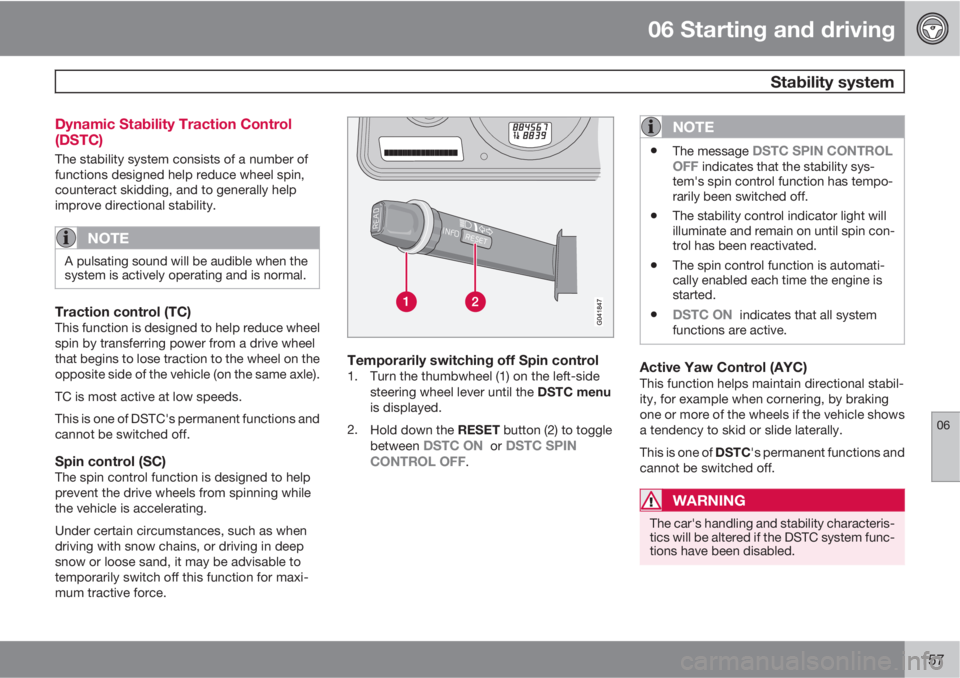
Temporarily switching off Spin control1. Turn the thumbwheel (1) on the left-side
steering wheel lever until the DSTC menu
is displayed.
2.
Hold down the RESET button (2) to toggle
between
DSTC ON or DSTC SPIN
CONTROL OFF.
NOTE
•The message DSTC SPIN CONTROL
OFF indicates that the stability sys-
tem's spin control function has tempo-
rarily been switched off.
•The stability control indicator light will
illuminate and remain on until spin con-
trol has been reactivated.
•The spin control function is automati-
cally enabled each time the engine is
started.
•DSTC ON indicates that all system
functions are active.
Active Yaw Control (AYC)This function helps maintain directional stabil-
ity, for example when cornering, by braking
one or more of the wheels if the vehicle shows
a tendency to skid or slide laterally.
This is one of DSTC's permanent functions and
cannot be switched off.
WARNING
The car's handling and stability characteris-
tics will be altered if the DSTC system func-
tions have been disabled.
Page 160 of 310
06 Starting and driving
Stability system
06
158
DSTC-related messages in the text
window
•TRACTION CONTROL TEMPORARILY
OFF : The system has been temporarily
switched off due to high brake temperature
and will automatically switch on again
when the brakes have cooled.
•ANTI-SKID SERVICE REQUIRED: The
system has been automatically disen-
gaged due to a fault. A trained and qualified
Volvo service technician should check the
system.
Symbols in the instrument panel
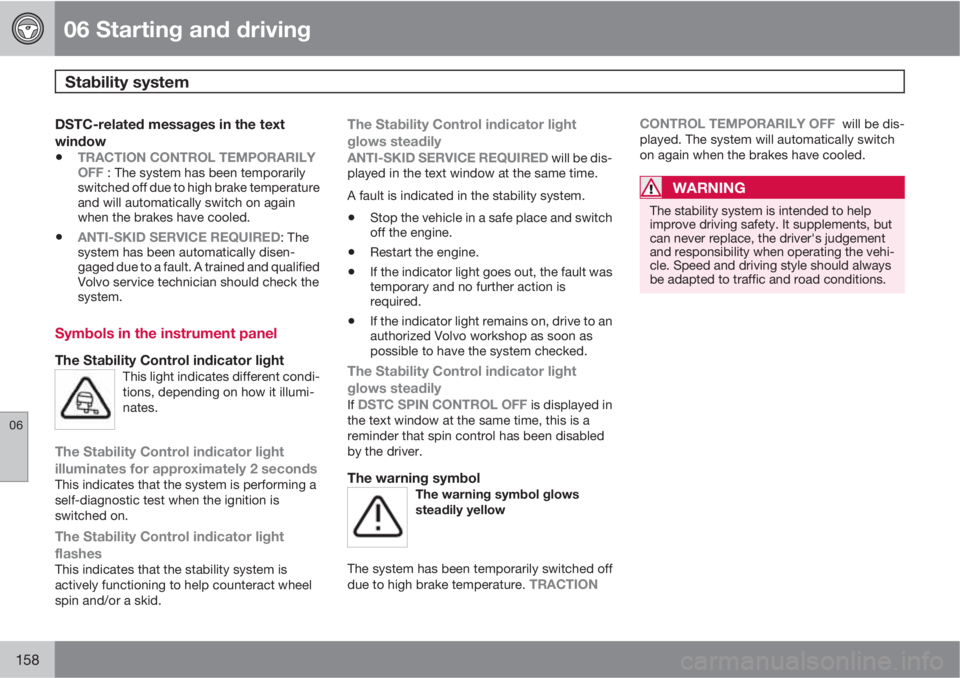
The Stability Control indicator lightThis light indicates different condi-
tions, depending on how it illumi-
nates.
The Stability Control indicator light
illuminates for approximately 2 seconds
This indicates that the system is performing a
self-diagnostic test when the ignition is
switched on.
The Stability Control indicator light
flashes
This indicates that the stability system is
actively functioning to help counteract wheel
spin and/or a skid.
The Stability Control indicator light
glows steadily
ANTI-SKID SERVICE REQUIRED will be dis-
played in the text window at the same time.
A fault is indicated in the stability system.
•Stop the vehicle in a safe place and switch
off the engine.
•Restart the engine.
•If the indicator light goes out, the fault was
temporary and no further action is
required.
•If the indicator light remains on, drive to an
authorized Volvo workshop as soon as
possible to have the system checked.
The Stability Control indicator light
glows steadily
If DSTC SPIN CONTROL OFF is displayed in
the text window at the same time, this is a
reminder that spin control has been disabled
by the driver.
The warning symbolThe warning symbol glows
steadily yellow
The system has been temporarily switched off
due to high brake temperature. TRACTIONCONTROL TEMPORARILY OFF
will be dis-
played. The system will automatically switch
on again when the brakes have cooled.
WARNING
The stability system is intended to help
improve driving safety. It supplements, but
can never replace, the driver's judgement
and responsibility when operating the vehi-
cle. Speed and driving style should always
be adapted to traffic and road conditions.