parking brake VOLVO XC90 2013 Owner´s Manual
[x] Cancel search | Manufacturer: VOLVO, Model Year: 2013, Model line: XC90, Model: VOLVO XC90 2013Pages: 310, PDF Size: 8.62 MB
Page 6 of 310
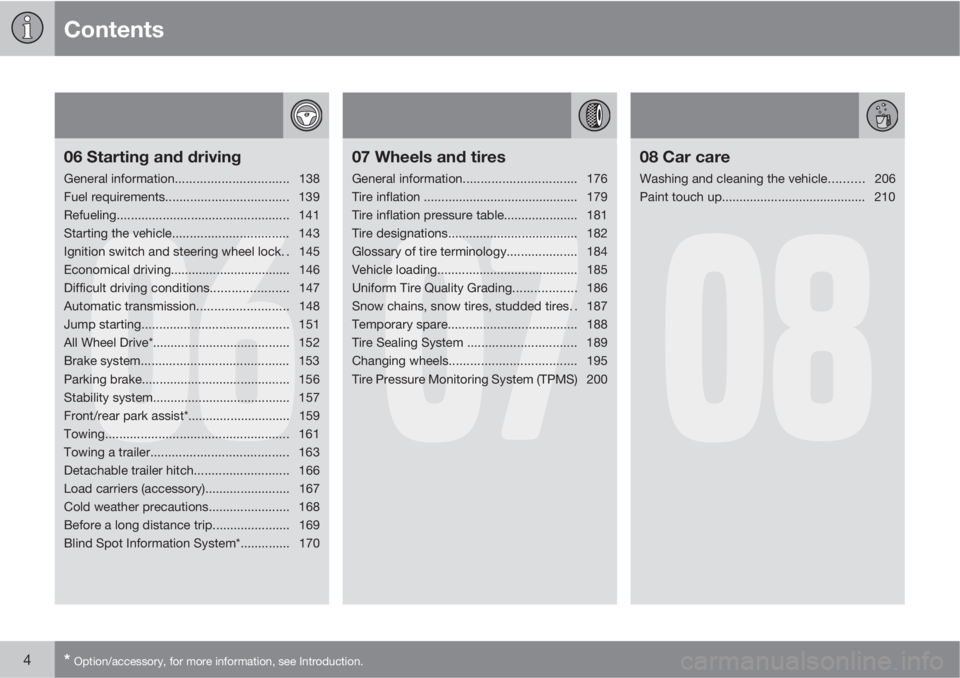
Contents
4* Option/accessory, for more information, see Introduction.
06
06 Starting and driving
General information................................138
Fuel requirements................................... 139
Refueling................................................. 141
Starting the vehicle................................. 143
Ignition switch and steering wheel lock. . 145
Economical driving.................................. 146
Difficult driving conditions...................... 147
Automatic transmission..........................148
Jump starting.......................................... 151
All Wheel Drive*....................................... 152
Brake system.......................................... 153
Parking brake.......................................... 156
Stability system....................................... 157
Front/rear park assist*............................. 159
Towing.................................................... 161
Towing a trailer....................................... 163
Detachable trailer hitch........................... 166
Load carriers (accessory)........................ 167
Cold weather precautions....................... 168
Before a long distance trip...................... 169
Blind Spot Information System*.............. 170
07
07 Wheels and tires
General information................................176
Tire inflation ............................................ 179
Tire inflation pressure table..................... 181
Tire designations..................................... 182
Glossary of tire terminology.................... 184
Vehicle loading........................................ 185
Uniform Tire Quality Grading.................. 186
Snow chains, snow tires, studded tires. . 187
Temporary spare..................................... 188
Tire Sealing System ............................... 189
Changing wheels....................................195
Tire Pressure Monitoring System (TPMS) 200
08
08 Car care
Washing and cleaning the vehicle.......... 206
Paint touch up......................................... 210
Page 59 of 310
02 Instruments and controls
Instrument overview
02
* Option/accessory, for more information, see Introduction.57
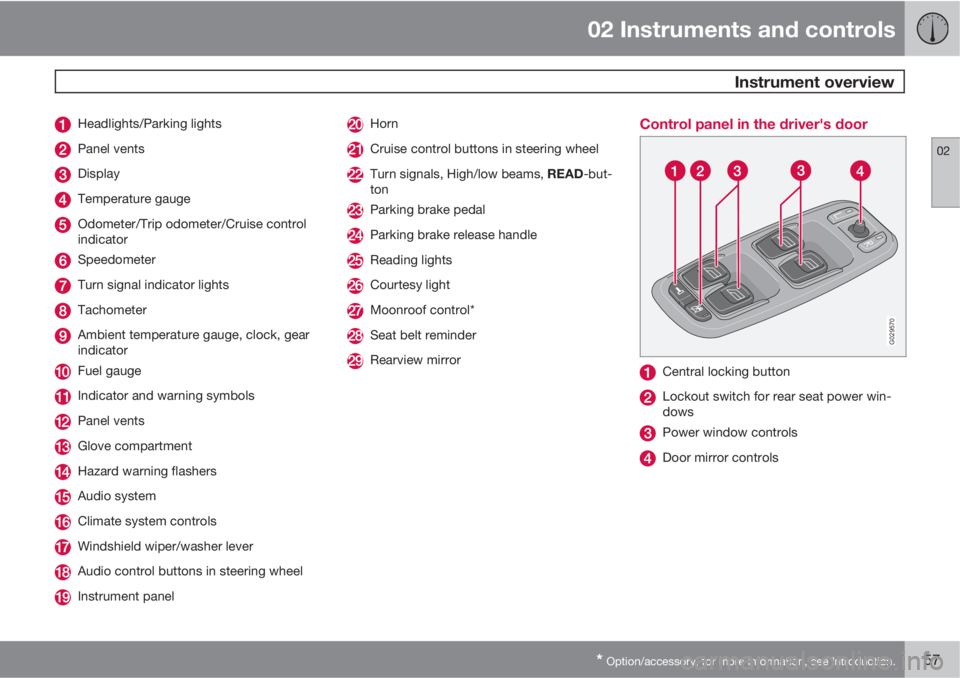
Headlights/Parking lights
Panel vents
Display
Temperature gauge
Odometer/Trip odometer/Cruise control
indicator
Speedometer
Turn signal indicator lights
Tachometer
Ambient temperature gauge, clock, gear
indicator
Fuel gauge
Indicator and warning symbols
Panel vents
Glove compartment
Hazard warning flashers
Audio system
Climate system controls
Windshield wiper/washer lever
Audio control buttons in steering wheel
Instrument panel
Horn
Cruise control buttons in steering wheel
Turn signals, High/low beams, READ-but-
ton
Parking brake pedal
Parking brake release handle
Reading lights
Courtesy light
Moonroof control*
Seat belt reminder
Rearview mirror
Control panel in the driver's door
G029570
Central locking button
Lockout switch for rear seat power win-
dows
Power window controls
Door mirror controls
Page 61 of 310
02 Instruments and controls
Instrument panel
02
59
Gear and driving mode indicator – The cur-
rently selected driving mode is displayed
here. If you use the Geartronic function on
the automatic transmission, the currently
selected gear will be displayed.
Ambient temperature gauge – This display
indicates the air temperature outside your
vehicle. A "snowflake" symbol in the text
window is displayed when the temperature
is in the range of 23 – 36 °F (–5 – +2 °C).
Please note that this symbol does not indi-
cate a fault with your vehicle. At low
speeds or when the vehicle is not moving,
the temperature readings may be slightly
higher than the actual ambient tempera-
ture.
Clock/set button – Turn the button to set
the clock.
Fuel gauge – see page 290 for fuel tank
volume. When the warning light in the
gauge comes on, the vehicle should be
refueled as soon as possible. The trip com-
puter section (see page 76) provides
more information on fuel level and con-
sumption.
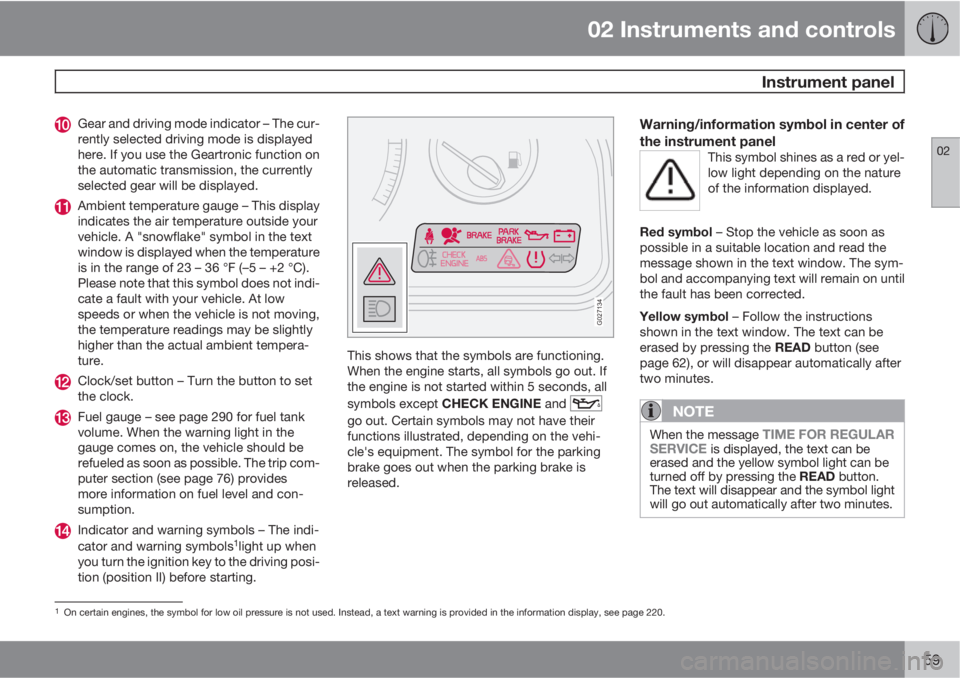
Indicator and warning symbols – The indi-
cator and warning symbols1light up when
you turn the ignition key to the driving posi-
tion (position II) before starting.
G027134
This shows that the symbols are functioning.
When the engine starts, all symbols go out. If
the engine is not started within 5 seconds, all
symbols except CHECK ENGINE and
go out. Certain symbols may not have their
functions illustrated, depending on the vehi-
cle's equipment. The symbol for the parking
brake goes out when the parking brake is
released.
Warning/information symbol in center of
the instrument panel
This symbol shines as a red or yel-
low light depending on the nature
of the information displayed.
Red symbol – Stop the vehicle as soon as
possible in a suitable location and read the
message shown in the text window. The sym-
bol and accompanying text will remain on until
the fault has been corrected.
Yellow symbol – Follow the instructions
shown in the text window. The text can be
erased by pressing the READ button (see
page 62), or will disappear automatically after
two minutes.
NOTE
When the message TIME FOR REGULAR
SERVICE is displayed, the text can be
erased and the yellow symbol light can be
turned off by pressing the READ button.
The text will disappear and the symbol light
will go out automatically after two minutes.
1On certain engines, the symbol for low oil pressure is not used. Instead, a text warning is provided in the information display, see page 220.
Page 62 of 310
02 Instruments and controls
Instrument panel
02
60
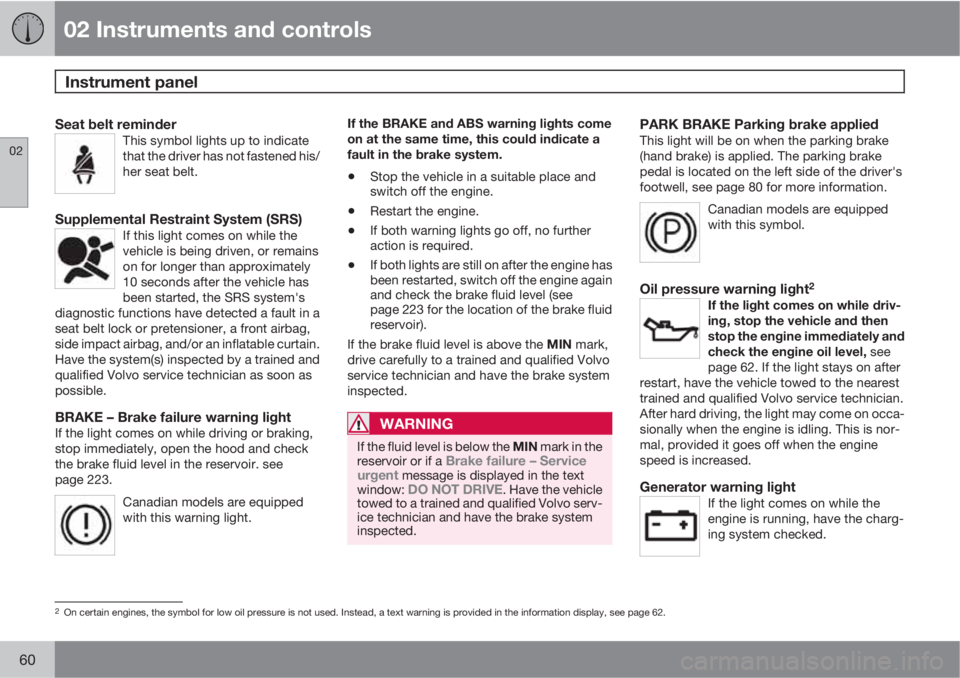
Seat belt reminderThis symbol lights up to indicate
that the driver has not fastened his/
her seat belt.
Supplemental Restraint System (SRS)If this light comes on while the
vehicle is being driven, or remains
on for longer than approximately
10 seconds after the vehicle has
been started, the SRS system's
diagnostic functions have detected a fault in a
seat belt lock or pretensioner, a front airbag,
side impact airbag, and/or an inflatable curtain.
Have the system(s) inspected by a trained and
qualified Volvo service technician as soon as
possible.
BRAKE – Brake failure warning lightIf the light comes on while driving or braking,
stop immediately, open the hood and check
the brake fluid level in the reservoir. see
page 223.
Canadian models are equipped
with this warning light.
If the BRAKE and ABS warning lights come
on at the same time, this could indicate a
fault in the brake system.
•Stop the vehicle in a suitable place and
switch off the engine.
•Restart the engine.
•If both warning lights go off, no further
action is required.
•If both lights are still on after the engine has
been restarted, switch off the engine again
and check the brake fluid level (see
page 223 for the location of the brake fluid
reservoir).
If the brake fluid level is above the MIN mark,
drive carefully to a trained and qualified Volvo
service technician and have the brake system
inspected.
WARNING
If the fluid level is below the MIN mark in the
reservoir or if a Brake failure – Service
urgent message is displayed in the text
window: DO NOT DRIVE. Have the vehicle
towed to a trained and qualified Volvo serv-
ice technician and have the brake system
inspected.
PARK BRAKE Parking brake appliedThis light will be on when the parking brake
(hand brake) is applied. The parking brake
pedal is located on the left side of the driver's
footwell, see page 80 for more information.
Canadian models are equipped
with this symbol.
Oil pressure warning light2
If the light comes on while driv-
ing, stop the vehicle and then
stop the engine immediately and
check the engine oil level, see
page 62. If the light stays on after
restart, have the vehicle towed to the nearest
trained and qualified Volvo service technician.
After hard driving, the light may come on occa-
sionally when the engine is idling. This is nor-
mal, provided it goes off when the engine
speed is increased.
Generator warning lightIf the light comes on while the
engine is running, have the charg-
ing system checked.
2On certain engines, the symbol for low oil pressure is not used. Instead, a text warning is provided in the information display, see page 62.
Page 112 of 310
04 Interior
Rear seats
04
110
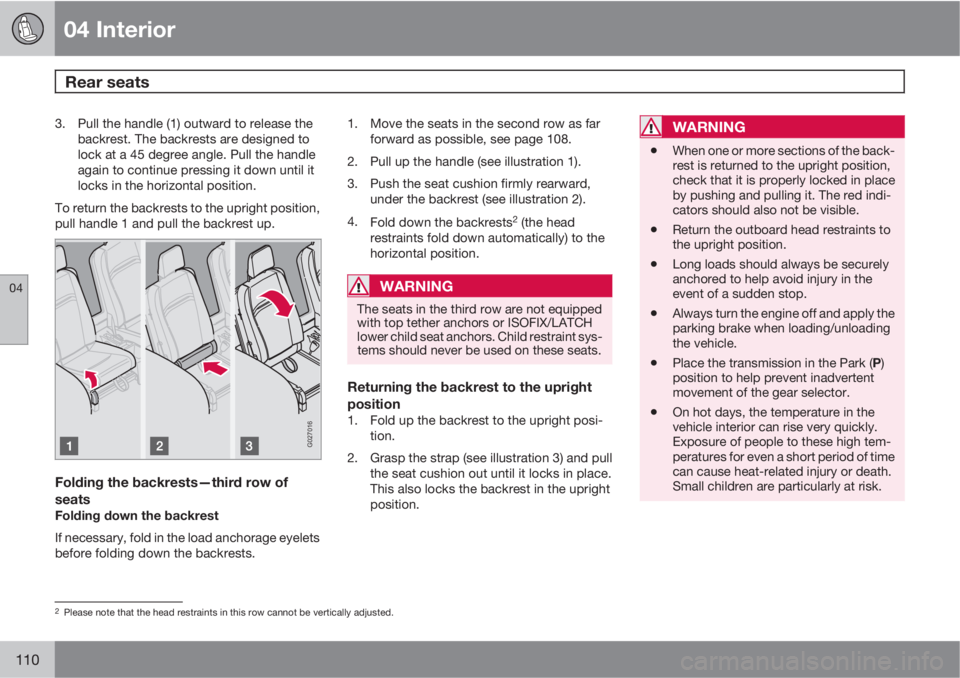
3. Pull the handle (1) outward to release the
backrest. The backrests are designed to
lock at a 45 degree angle. Pull the handle
again to continue pressing it down until it
locks in the horizontal position.
To return the backrests to the upright position,
pull handle 1 and pull the backrest up.
G027016
Folding the backrests—third row of
seats
Folding down the backrest
If necessary, fold in the load anchorage eyelets
before folding down the backrests.1. Move the seats in the second row as far
forward as possible, see page 108.
2. Pull up the handle (see illustration 1).
3. Push the seat cushion firmly rearward,
under the backrest (see illustration 2).
4.
Fold down the backrests
2 (the head
restraints fold down automatically) to the
horizontal position.
WARNING
The seats in the third row are not equipped
with top tether anchors or ISOFIX/LATCH
lower child seat anchors. Child restraint sys-
tems should never be used on these seats.
Returning the backrest to the upright
position
1. Fold up the backrest to the upright posi-
tion.
2. Grasp the strap (see illustration 3) and pull
the seat cushion out until it locks in place.
This also locks the backrest in the upright
position.
WARNING
•When one or more sections of the back-
rest is returned to the upright position,
check that it is properly locked in place
by pushing and pulling it. The red indi-
cators should also not be visible.
•Return the outboard head restraints to
the upright position.
•Long loads should always be securely
anchored to help avoid injury in the
event of a sudden stop.
•Always turn the engine off and apply the
parking brake when loading/unloading
the vehicle.
•Place the transmission in the Park (P)
position to help prevent inadvertent
movement of the gear selector.
•On hot days, the temperature in the
vehicle interior can rise very quickly.
Exposure of people to these high tem-
peratures for even a short period of time
can cause heat-related injury or death.
Small children are particularly at risk.
2Please note that the head restraints in this row cannot be vertically adjusted.
Page 138 of 310
136* Option/accessory, for more information, see Introduction.
General information............................................................................... 138
Fuel requirements................................................................................. 139
Refueling............................................................................................... 141
Starting the vehicle............................................................................... 143
Ignition switch and steering wheel lock................................................ 145
Economical driving................................................................................ 146
Difficult driving conditions..................................................................... 147
Automatic transmission........................................................................ 148
Jump starting........................................................................................ 151
All Wheel Drive*..................................................................................... 152
Brake system........................................................................................ 153
Parking brake........................................................................................ 156
Stability system..................................................................................... 157
Front/rear park assist*........................................................................... 159
Towing.................................................................................................. 161
Towing a trailer...................................................................................... 163
Detachable trailer hitch......................................................................... 166
Load carriers (accessory)...................................................................... 167
Cold weather precautions..................................................................... 168
Before a long distance trip.................................................................... 169
Blind Spot Information System*............................................................ 170
Page 145 of 310
06 Starting and driving
Starting the vehicle
06
143 Starting the engine
WARNING
Before starting, check that the seat, steering
wheel and mirrors are adjusted properly.
Make sure the brake pedal can be
depressed completely. Adjust the seat if
necessary, see page 104.
1. Fasten the seat belt.
2. Apply the parking brake (hand brake) if not
already set. The gear selector is locked in
the P position (SHIFTLOCK).
3. Without touching the accelerator pedal,
turn the ignition key
1 to the starting posi-
tion. Allow the starter to operate for up to
10 seconds. Release the key as soon as
the engine starts
2. If the engine fails to
start, repeat this step.
CAUTION
If the engine does not start after the third try,
wait for approximately 3 minutes before try-
ing to start it again to give the battery time
to recover its starting capacity.
WARNING
•Never use more than one floor mat at a
time on the driver's floor. An extra mat
on the driver's floor can cause the
accelerator and/or brake pedal to
catch. Check that the movement of
these pedals is not impeded.
•Volvo's floor mats are specially manu-
factured for your car. They must be
firmly secured in the clips on the floor so
that they cannot slide and become trap-
ped under the pedals on the driver's
side.
NOTE
•If the key blade section of the remote is
not fully folded out when starting the
vehicle, the immobilizer function may
make it impossible to start the engine.
•After a cold start, idle speed may be
noticeably higher than normal for a
short period. This is done to help bring
components in the emission control
system to their normal operating tem-
perature as quickly as possible, which
enables them to control emissions and
help reduce the vehicle's impact on the
environment.
•To release the gear selector from the P
(Park) position, the engine must be run-
ning (or the ignition key must be in posi-
tion II) and the brake pedal must be
depressed.
•Select the desired gear. The gear
engages after a very slight delay which
is especially noticeable when selecting
R.
1If two of the keys to your vehicle are close together, e.g. on the same key ring when you try to start the vehicle, this could cause interference in the immobilizer system and result in the vehicle not
starting. If this should occur, remove one of the keys from the key ring before trying to start the vehicle again.
2On vehicles equipped with the autostart feature, release the key immediately. See also page 145.
Page 146 of 310
06 Starting and driving
Starting the vehicle
06
144
NOTE
Your vehicle is equipped with a KEYLOCK
system. When the engine is switched off,
the gear selector must be in the P position
before the key can be removed from the
ignition switch.
When starting in cold weather, the trans-
mission may shift up at slightly higher
engine speeds than normal until the auto-
matic transmission fluid reaches normal
operating temperature.
NOTE
Do not race a cold engine immediately after
starting. Oil flow may not reach some lubri-
cation points fast enough to prevent engine
damage.
WARNING
Always place the gear selector in Park and
apply the parking brake before leaving the
vehicle. Never leave the vehicle unattended
with the engine running.
•Always open garage doors fully before
starting the engine inside a garage to
ensure adequate ventilation. The
exhaust gases contain carbon monox-
ide, which is invisible and odorless but
very poisonous.
CAUTION
Automatic transmission
•The engine should be idling when you
move the gear selector. Never acceler-
ate until after you feel the transmission
engage! Accelerating immediately after
selecting a gear will cause harsh
engagement and premature transmis-
sion wear.
•Selecting P or N when idling at a stand-
still for prolonged periods of time will
help prevent overheating of the auto-
matic transmission fluid.
Page 150 of 310
06 Starting and driving
Automatic transmission
06
148
G026990
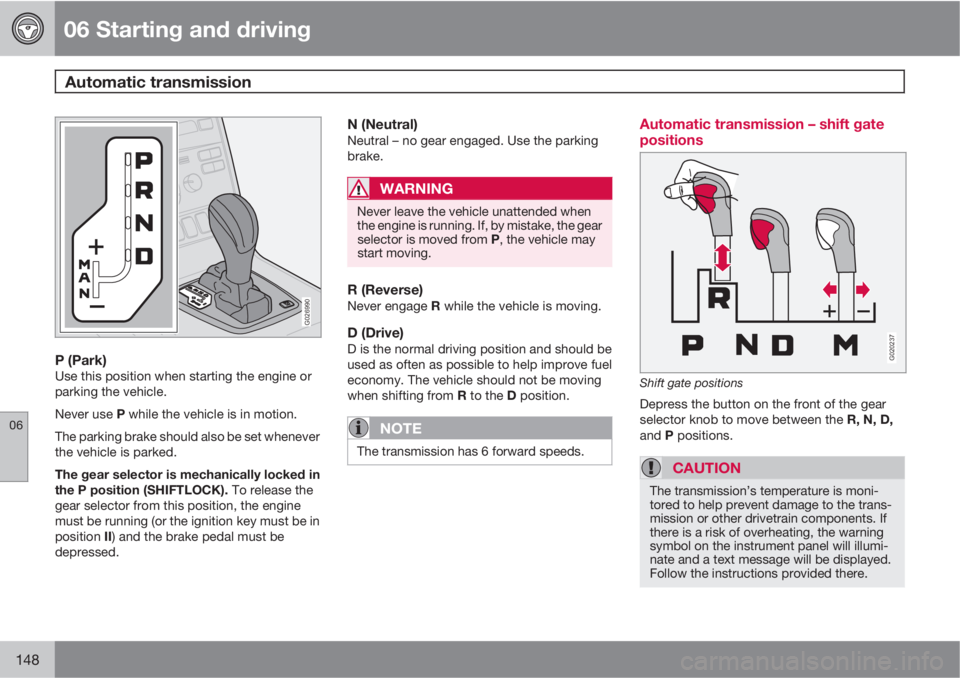
P (Park)Use this position when starting the engine or
parking the vehicle.
Never use P while the vehicle is in motion.
The parking brake should also be set whenever
the vehicle is parked.
The gear selector is mechanically locked in
the P position (SHIFTLOCK). To release the
gear selector from this position, the engine
must be running (or the ignition key must be in
position II) and the brake pedal must be
depressed.
N (Neutral)Neutral – no gear engaged. Use the parking
brake.
WARNING
Never leave the vehicle unattended when
the engine is running. If, by mistake, the gear
selector is moved from P, the vehicle may
start moving.
R (Reverse)Never engage R while the vehicle is moving.
D (Drive)D is the normal driving position and should be
used as often as possible to help improve fuel
economy. The vehicle should not be moving
when shifting from R to the D position.
NOTE
The transmission has 6 forward speeds.
Automatic transmission – shift gate
positions
G020237
Shift gate positions
Depress the button on the front of the gear
selector knob to move between the R, N, D,
and P positions.
CAUTION
The transmission’s temperature is moni-
tored to help prevent damage to the trans-
mission or other drivetrain components. If
there is a risk of overheating, the warning
symbol on the instrument panel will illumi-
nate and a text message will be displayed.
Follow the instructions provided there.
Page 155 of 310
06 Starting and driving
Brake system
06
* Option/accessory, for more information, see Introduction.153 BRAKE Brake circuit malfunction
The brake system is a hydraulic system con-
sisting of two master cylinders and two sepa-
rate brake circuits. If a problem should occur in
one of these circuits, it is still possible to stop
the vehicle with the other brake circuit.
If the brake pedal must be depressed farther
than normal and requires greater foot pressure,
the stopping distance will be longer.
A warning light in the instrument panel will light
up to warn the driver that a fault has occurred.
If this light comes on while driving or braking,
stop immediately and check the brake fluid
level in the reservoir.
NOTE
Press the brake pedal hard and maintain
pressure on the pedal – do not pump the
brakes.
WARNING
If the fluid level is below the MIN mark in the
reservoir or if a BRAKE FAILURE STOP
SAFELY message is displayed in the text
window: DO NOT DRIVE. Have the vehicle
towed to a trained and qualified Volvo serv-
ice technician and have the brake system
inspected.
NOTE
When the vehicle is at a standstill and the
engine is idling, e.g. at a traffic light and the
brake pedal is depressed, the pedal may go
down slightly. This is a normal function of
the power-assisted brake system.
Brake pad inspectionOn vehicles equipped with a jack*, the condi-
tion of the brake pads can be checked by rais-
ing the vehicle (see page 195 for information
about using the jack and removing a wheel)
and performing a visual inspection of the brake
pads.
WARNING
•If the vehicle has been driven immedi-
ately prior to a brake pad inspection, the
wheel hub, brake components, etc., will
be very hot. Allow time for these com-
ponents to cool before carrying out the
inspection.
•Apply the parking brake and put the
gear selector in the Park (P) position.
•Block the wheels standing on the
ground, use rigid wooden blocks or
large stones.
WARNING
•Use the jack intended for the vehicle
when changing a tire. For any other job,
use stands to support the vehicle.
•The jack should be kept well-greased
and clean, and should not be damaged.
•Be sure the jack is on a firm, level, non-
slippery surface.
•No objects should be placed between
the base of jack and the ground, or
between the jack and the attachment
bar on the vehicle.
•The jack must correctly engage the jack
attachment.
•Never allow any part of your body to be
extended under a vehicle supported by
a jack.
Power brakes function only when the
engine is running
The power brakes utilize vacuum pressure
which is only created when the engine is run-
ning. Never let the vehicle roll to a stop with the
engine switched off.
If the power brakes are not working, consider-
ably higher pressure will be required on the
brake pedal to compensate for the lack of
power assistance. This can happen for exam-
ple when towing your vehicle or if the engine is