sport mode VOLVO XC90 2013 Owner´s Manual
[x] Cancel search | Manufacturer: VOLVO, Model Year: 2013, Model line: XC90, Model: VOLVO XC90 2013Pages: 310, PDF Size: 8.62 MB
Page 178 of 310
07 Wheels and tires
General information
07
176
Introduction
Your vehicle is equipped with tires according
to the vehicle's tire information placard on the
B-pillar (the structural member at the side of
the vehicle, at the rear of the driver's door
opening).
CAUTION
Some Volvo models are equipped with an
Ultra High Performance tire and wheel com-
bination designed to provide maximum dry
pavement performance with consideration
for hydroplaning resistance. They may be
more susceptible to road hazard damage
and, depending on driving conditions, may
achieve a tread life of less than 20,000 miles
(30,000 km). Even if this vehicle is equipped
with Volvo’s advanced AWD or DSTC sys-
tem, these tires are not designed for winter
driving, and should be replaced with winter
tires when weather conditions dictate.
The tires have good road holding characteris-
tics and offer good handling on dry and wet
surfaces. It should be noted however that the
tires have been developed to give these fea-
tures on snow/ice-free surfaces.
Most models are equipped with "all-season"
tires, which provide a somewhat higher degree
of road holding on slippery surfaces than tires
without the "all-season" rating. However, foroptimum road holding on icy or snow-covered
roads, we recommend suitable winter tires on
all four wheels.
When replacing tires, be sure that the new tires
are the same size designation, type (radial) and
preferably from the same manufacturer, on all
four wheels. Otherwise there is a risk of altering
the car's roadholding and handling characte-
ristics.
New Tires
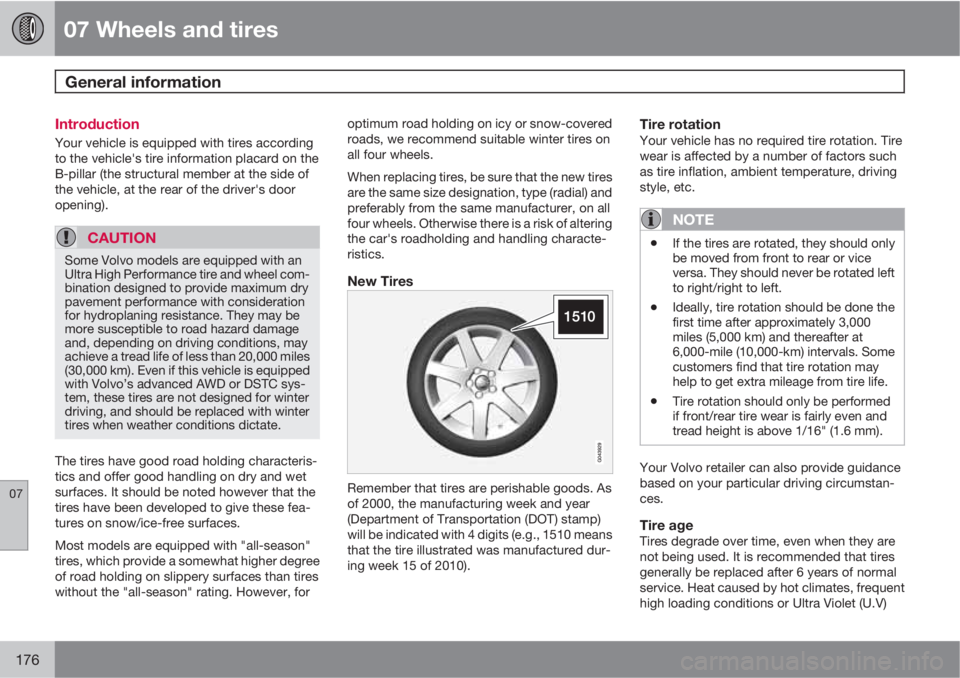
Remember that tires are perishable goods. As
of 2000, the manufacturing week and year
(Department of Transportation (DOT) stamp)
will be indicated with 4 digits (e.g., 1510 means
that the tire illustrated was manufactured dur-
ing week 15 of 2010).
Tire rotationYour vehicle has no required tire rotation. Tire
wear is affected by a number of factors such
as tire inflation, ambient temperature, driving
style, etc.
NOTE
•If the tires are rotated, they should only
be moved from front to rear or vice
versa. They should never be rotated left
to right/right to left.
•Ideally, tire rotation should be done the
first time after approximately 3,000
miles (5,000 km) and thereafter at
6,000-mile (10,000-km) intervals. Some
customers find that tire rotation may
help to get extra mileage from tire life.
•Tire rotation should only be performed
if front/rear tire wear is fairly even and
tread height is above 1/16" (1.6 mm).
Your Volvo retailer can also provide guidance
based on your particular driving circumstan-
ces.
Tire ageTires degrade over time, even when they are
not being used. It is recommended that tires
generally be replaced after 6 years of normal
service. Heat caused by hot climates, frequent
high loading conditions or Ultra Violet (U.V)
Page 203 of 310
07 Wheels and tires
Tire Pressure Monitoring System (TPMS)
07
201
ensure that the replacement or alternate tires
and wheels allow the TPMS to continue to
function properly.
NOTE
TPMS indicates low tire pressure but does
not replace normal tire maintenance. For
information on correct tire pressure, please
refer to the tire inflation pressure table in this
chapter or consult your Volvo retailer.
Erasing warning messagesWhen a low tire pressure warning message has
been displayed, and the tire pressure warning
light has come on:
1. Use a tire pressure gauge to check the
inflation pressure of all four tires.
2. Re-inflate the tire(s) to the correct pressure
(consult the tire pressure placard or the
table see page 181).
3. Drive the vehicle for several minutes at a
speed of 20 mph (30 km/h) or faster.
> This will erase the warning text and the
warning light will go out.
WARNING
Incorrect inflation pressure could lead to tire
failure, resulting in a loss of control of the
vehicle.
Changing wheels with TPMSPlease note the following when changing or
replacing the factory installed TPMS wheels/
tires on the vehicle:
•Only the factory-mounted wheels are
equipped with TPMS sensors in the valves.
•If the vehicle is equipped with a temporary
spare tire, this tire does not have a TPMS
sensor.
•If wheels without TPMS sensors are moun-
ted on the vehicle, TIRE PRESS SYST.
SERVICE REQUIRED will be displayed
each time the vehicle is driven above
25 mph (40 km/h) for 10 minutes or more.
•Once TPMS sensors are properly installed,
the warning message should not reappear.
•Volvo recommends that TPMS sensors be
fitted on all wheels used on the vehicle.
Volvo does not recommend moving sen-
sors back and forth between sets of
wheels.
NOTE
If a tire is changed or if the TPMS sensor is
moved to another wheel, the sensor’s valve
and valve core should be replaced.
CAUTION
When inflating tires with TPMS valves, press
the pump's mouthpiece straight onto the
valve to help avoid bending or otherwise
damaging the valve.
Recalibrating TPMS (Canadian models
only)
In certain cases, it may be necessary to reca-
librate TPMS to conform to Volvo's recom-
mended tire inflation pressures (see the infla-
tion pressure table on page 181), for example,
if higher inflation pressure is necessary when
transporting heavy loads, etc.
To recalibrate:
1. Switch off the engine.
2. Inflate the tires to the desired pressure and
turn the ignition key to position I or II (see
page 145 for additional information).
3. Turn the thumb wheel on the left-side
steering wheel lever until
Tire pressure
Calibration appears in the display.
4.
Press and hold the Reset button on the
left-side steering wheel lever until
TIRE
PRESSURE CALIBRATED is displayed.
Page 263 of 310
10 Audio
SiriusXM
E
E satellite radio
10
261 Listening to satellite radio
The SiriusXM
E satellite system consists of a
number of high elevation satellites in geosyn-
chronous orbit.
NOTE
•The digital signals from the SiriusXM
E
satellites are line-of-sight, which means
that physical obstructions such as
bridges, tunnels, etc, may temporarily
interfere with signal reception.
•Avoid any obstructions, such as metal-
lic objects transported on roof racks or
in a ski box, or other antennas that may
impede signals from the SiriusXM
E
satellites.
Selecting SiriusXM
E radio mode1.
Press Power to switch on the audio sys-
tem (see page 250 for information on the
standard radio functions).
2.
Turn the SELECTOR dial until Sirius 1 or 2
is displayed.
Activating SiriusXM
E radio1. Tune to a satellite channel that has no
audio, which means that the channel is
unsubscribed and the text "
Call 888-539-
SIRIUS TO SUBSCRIBE" is displayed(see also "Selecting a channel" in the right
column).
2.
Call SiriusXM
E at 1-888-539-SIRIUS
(7474).
3.
When asked for the SiriusXM
E ID number
press AUTO to display this number. It is
also possible to retrieve the SiriusXM
E ID
from the MENU.
4.
"
UPDATING SUBSCRIPTION" will be
displayed while the subscription is being
updated, after which the display will return
to the normal view.
SiriusXM
E ID
The SiriusXM
E ID is required when contacting
the SiriusXM
E Call Center. It is used to acti-
vate your account and when making any
account transactions. The SiriusXM
E ID is
sometimes referred to as the Electronic Serial
Number (ESN).
This function displays the 12-digit Sir-
iusXM
EID.
Selecting a channel category1.
Select SiriusXM
E radio mode as descri-
bed above.
2.
Press ENTER.3. Use the up/down arrow keys to scroll
through the list of categories.
4.
Press ENTER to select a category.
5.
Use the
and buttons to select
a channel in the currently chosen category.
NOTE
The category "All" is default, which enables
you to scroll through the entire list of avail-
able satellite channels.
The channel categories are automatically
updated several times a year. This takes
approximately two minutes and will inter-
rupt normal broadcasting. A message will
be displayed while updating is in progress.
Information on channel or feature updates is
available at www.sirius.com.
Selecting a channelThere are two ways of tuning in a channel:
•By pressing and holding the and
buttons to start the scroll function.
The scrolling function begins slowly and
increases speed after approximately
5 seconds. Release the button to listen to
the currently displayed channel.
•Through direct channel entry
Page 287 of 310
11 Specifications
Label information
11
285
Model plate: includes e.g., Vehicle Identi-
fication Number (VIN), codes for color and
upholstery, etc. The model plate is located
on the rear side of the B-pillar (the pillar
between the front and rear passenger
doors) and the rear passenger's door must
be open in order to see it.
Federal Motor Vehicle Safety Standards
(FMVSS) specifications (USA) and Min-
istry of Transport (CMVSS) standards
(Canada): Your Volvo is designed to meet
all applicable safety standards, as evi-
denced by the certification label on the
driver's side B-pillar (the structural mem-
ber at the side of the vehicle, at the rear of
the driver's door opening). For further infor-
mation regarding these regulations, please
consult your Volvo retailer.
Tire inflation pressures: This label indi-
cates the correct inflation pressures for the
tires that were on the vehicle when it left
the factory. Canadian models have the
upper decal; U.S. models have the lower
one.
Vehicle Identification Number (VIN): The
VIN plate is located on the top center of the
dashboard at the base of the windshield.
The VIN is also stamped on the right hand
door pillar.
Vehicle Emission Control Information:
Your Volvo is designed to meet all appli-
cable emission standards, as evidenced by
the certification label on the underside of
the hood. For further information regarding
these regulations, please consult your
Volvo retailer.