audio VOLVO XC90 2014 Owner´s Manual
[x] Cancel search | Manufacturer: VOLVO, Model Year: 2014, Model line: XC90, Model: VOLVO XC90 2014Pages: 308, PDF Size: 13.31 MB
Page 252 of 308
250
Audio system overview......................................................................... 252
Audio system controls.......................................................................... 253
Radio functions.....................................................................................258SiriusXM™ satellite radio...................................................................... 263
Auxiliary equipment............................................................................... 267
CD player/changer................................................................................ 270
Menu structure......................................................................................273 Bluetooth ®
hands-free connection....................................................... 274
Page 254 of 308
10 Audio
Audio system overview
10
252* Option/accessory, for more information, see Introduction.
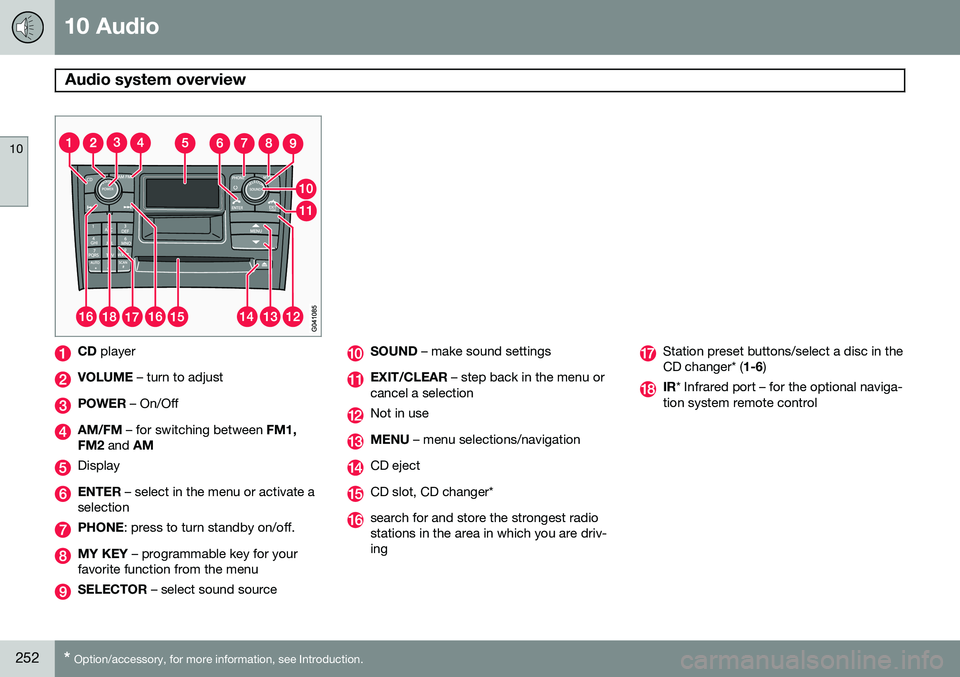
CD player
VOLUME – turn to adjust
POWER – On/Off
AM/FM – for switching between FM1,
FM2 and AM
Display
ENTER – select in the menu or activate a
selection
PHONE : press to turn standby on/off.
MY KEY – programmable key for your
favorite function from the menu
SELECTOR – select sound source
SOUND – make sound settings
EXIT/CLEAR – step back in the menu or
cancel a selection
Not in use
MENU – menu selections/navigation
CD eject
CD slot, CD changer*
search for and store the strongest radio stations in the area in which you are driv-ing
Station preset buttons/select a disc in the CD changer* ( 1-6)
IR* Infrared port – for the optional naviga-
tion system remote control
Page 255 of 308
10 Audio
Audio system controls
10
}}
253
Steering wheel keypad
G027135
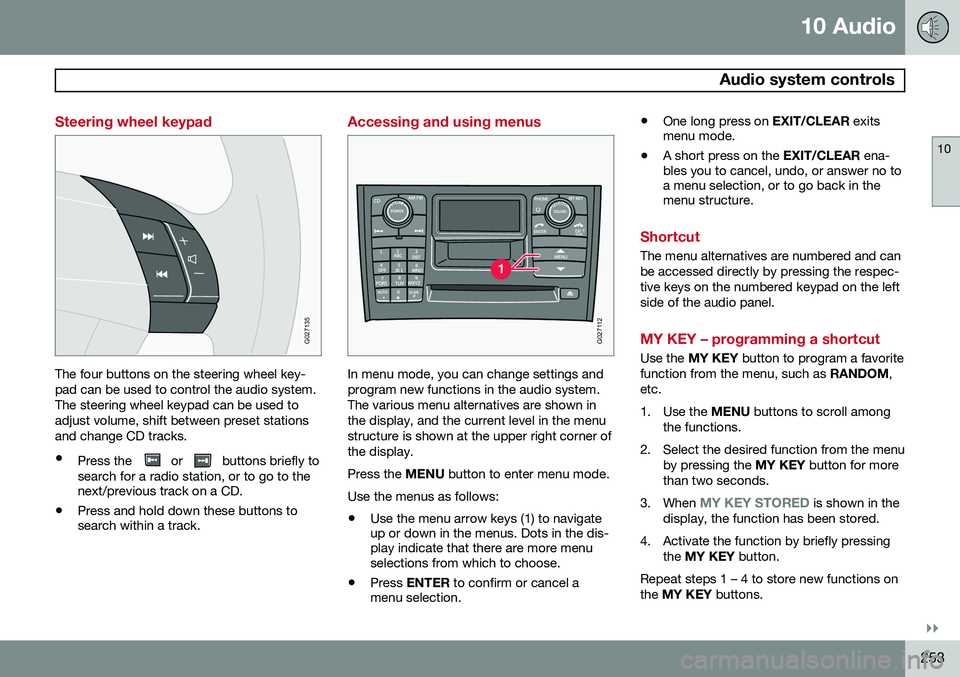
The four buttons on the steering wheel key- pad can be used to control the audio system.The steering wheel keypad can be used toadjust volume, shift between preset stationsand change CD tracks.
• Press the
or buttons briefly to
search for a radio station, or to go to the next/previous track on a CD.
• Press and hold down these buttons tosearch within a track.
Accessing and using menus
G027112
In menu mode, you can change settings and program new functions in the audio system.The various menu alternatives are shown inthe display, and the current level in the menustructure is shown at the upper right corner ofthe display. Press the
MENU button to enter menu mode.
Use the menus as follows:
• Use the menu arrow keys (1) to navigate up or down in the menus. Dots in the dis-play indicate that there are more menuselections from which to choose.
• Press
ENTER to confirm or cancel a
menu selection. •
One long press on
EXIT/CLEAR exits
menu mode.
• A short press on the
EXIT/CLEAR ena-
bles you to cancel, undo, or answer no toa menu selection, or to go back in themenu structure.
Shortcut
The menu alternatives are numbered and can be accessed directly by pressing the respec-tive keys on the numbered keypad on the leftside of the audio panel.
MY KEY – programming a shortcut
Use the MY KEY button to program a favorite
function from the menu, such as RANDOM,
etc.
1. Use the MENU buttons to scroll among
the functions.
2. Select the desired function from the menu by pressing the MY KEY button for more
than two seconds.
3. When
MY KEY STORED is shown in the
display, the function has been stored.
4. Activate the function by briefly pressing the MY KEY button.
Repeat steps 1 – 4 to store new functions on the MY KEY buttons.
Page 256 of 308
10 Audio
Audio system controls
10
254* Option/accessory, for more information, see Introduction.
NOTE
The MY KEY buttons can only be pro-
grammed for one shortcut function at a time.
Rear headphone connectors and controls *
G026982
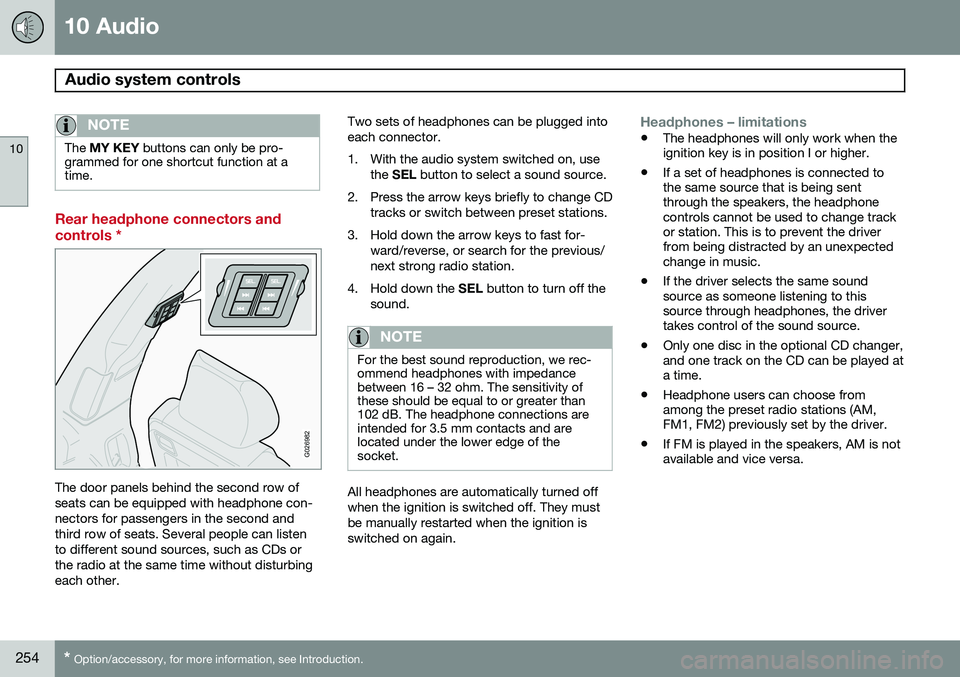
The door panels behind the second row of seats can be equipped with headphone con-nectors for passengers in the second andthird row of seats. Several people can listento different sound sources, such as CDs orthe radio at the same time without disturbingeach other. Two sets of headphones can be plugged intoeach connector.
1. With the audio system switched on, use
the SEL button to select a sound source.
2. Press the arrow keys briefly to change CD tracks or switch between preset stations.
3. Hold down the arrow keys to fast for- ward/reverse, or search for the previous/ next strong radio station.
4. Hold down the SEL button to turn off the
sound.
NOTE
For the best sound reproduction, we rec- ommend headphones with impedancebetween 16 – 32 ohm. The sensitivity ofthese should be equal to or greater than102 dB. The headphone connections areintended for 3.5 mm contacts and arelocated under the lower edge of thesocket.
All headphones are automatically turned off when the ignition is switched off. They mustbe manually restarted when the ignition isswitched on again.
Headphones – limitations
• The headphones will only work when the ignition key is in position I or higher.
• If a set of headphones is connected tothe same source that is being sentthrough the speakers, the headphonecontrols cannot be used to change trackor station. This is to prevent the driverfrom being distracted by an unexpectedchange in music.
• If the driver selects the same soundsource as someone listening to thissource through headphones, the drivertakes control of the sound source.
• Only one disc in the optional CD changer,and one track on the CD can be played ata time.
• Headphone users can choose fromamong the preset radio stations (AM,FM1, FM2) previously set by the driver.
• If FM is played in the speakers, AM is notavailable and vice versa.
Page 257 of 308
10 Audio
Audio system controls
10
* Option/accessory, for more information, see Introduction.255
On/Off button
G027146
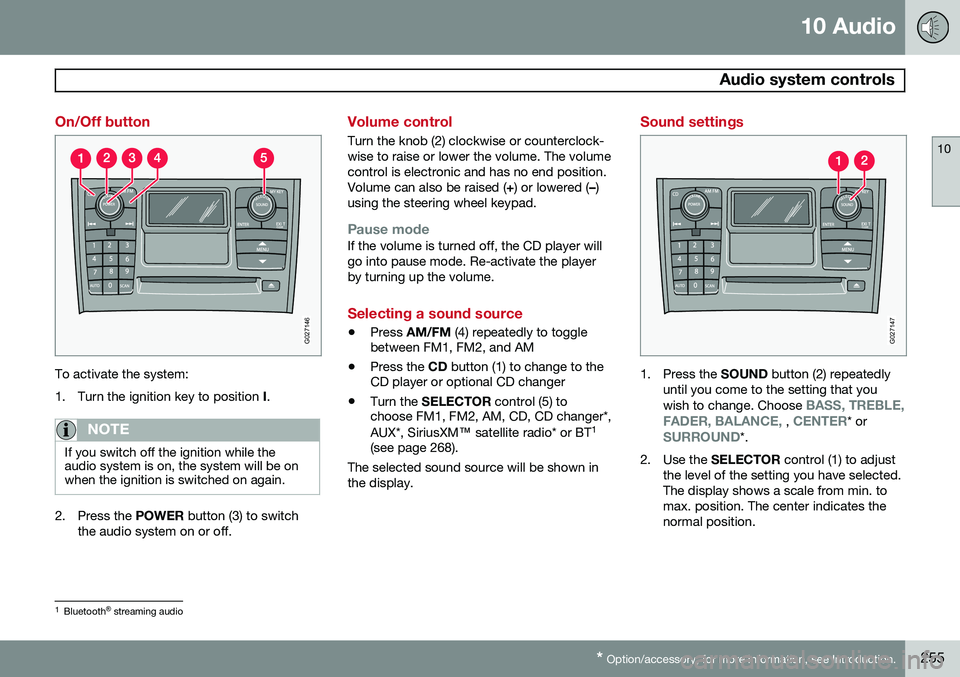
To activate the system:
1. Turn the ignition key to position I.
NOTE
If you switch off the ignition while the audio system is on, the system will be onwhen the ignition is switched on again.
2. Press the POWER button (3) to switch
the audio system on or off.
Volume control
Turn the knob (2) clockwise or counterclock- wise to raise or lower the volume. The volumecontrol is electronic and has no end position.Volume can also be raised ( +) or lowered ( –)
using the steering wheel keypad.
Pause modeIf the volume is turned off, the CD player will go into pause mode. Re-activate the playerby turning up the volume.
Selecting a sound source
• Press
AM/FM (4) repeatedly to toggle
between FM1, FM2, and AM
• Press the
CD button (1) to change to the
CD player or optional CD changer
• Turn the
SELECTOR control (5) to
choose FM1, FM2, AM, CD, CD changer*, AUX*, SiriusXM ™ satellite radio* or BT 1
(see page 268).
The selected sound source will be shown in the display.
Sound settings
G027147
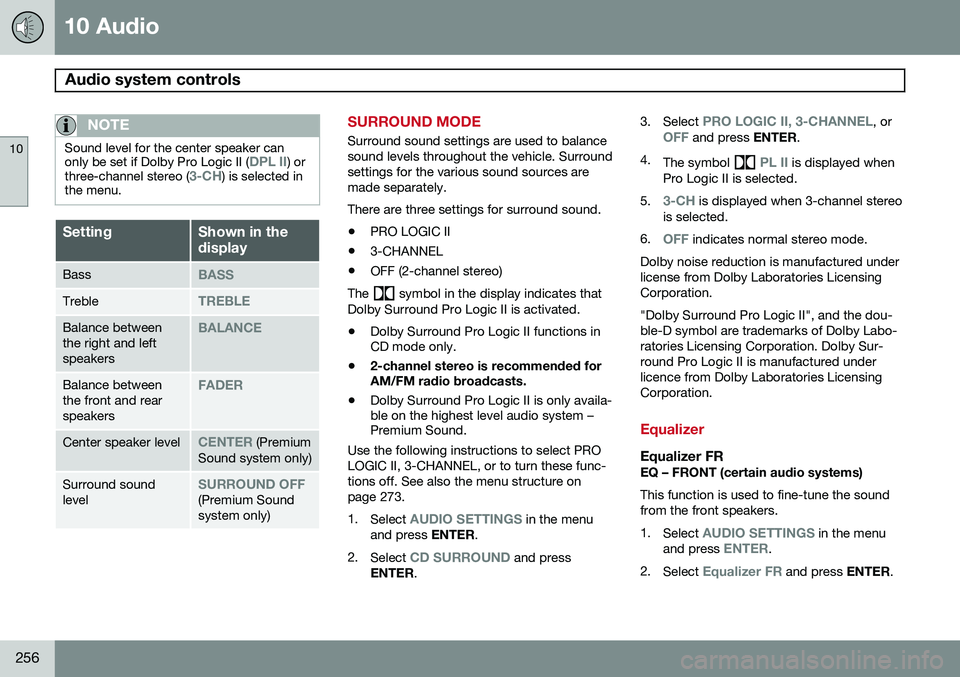
1. Press the SOUND button (2) repeatedly
until you come to the setting that you wish to change. Choose
BASS, TREBLE,
FADER, BALANCE, , CENTER* orSURROUND*.
2. Use the SELECTOR control (1) to adjust
the level of the setting you have selected. The display shows a scale from min. tomax. position. The center indicates thenormal position.
1 Bluetooth ®
streaming audio
Page 258 of 308
10 Audio
Audio system controls
10
256
NOTE
Sound level for the center speaker can only be set if Dolby Pro Logic II (DPL II) or
three-channel stereo (3-CH) is selected in
the menu.
SettingShown in the display
BassBASS
TrebleTREBLE
Balance between the right and leftspeakersBALANCE
Balance between the front and rearspeakersFADER
Center speaker levelCENTER (Premium
Sound system only)
Surround sound levelSURROUND OFF(Premium Sound system only)
SURROUND MODE
Surround sound settings are used to balance sound levels throughout the vehicle. Surroundsettings for the various sound sources aremade separately. There are three settings for surround sound. • PRO LOGIC II
• 3-CHANNEL
• OFF (2-channel stereo)
The
symbol in the display indicates that
Dolby Surround Pro Logic II is activated.
• Dolby Surround Pro Logic II functions in CD mode only.
• 2-channel stereo is recommended forAM/FM radio broadcasts.
• Dolby Surround Pro Logic II is only availa-ble on the highest level audio system –Premium Sound.
Use the following instructions to select PRO LOGIC II, 3-CHANNEL, or to turn these func-tions off. See also the menu structure onpage 273. 1. Select
AUDIO SETTINGS in the menu
and press ENTER.
2. Select
CD SURROUND and press
ENTER . 3.
Select
PRO LOGIC II, 3-CHANNEL, orOFF and press ENTER.
4. The symbol
PL II is displayed when
Pro Logic II is selected.
5.
3-CH is displayed when 3-channel stereo
is selected.
6.
OFF indicates normal stereo mode.
Dolby noise reduction is manufactured under license from Dolby Laboratories LicensingCorporation. "Dolby Surround Pro Logic II", and the dou- ble-D symbol are trademarks of Dolby Labo-ratories Licensing Corporation. Dolby Sur-round Pro Logic II is manufactured underlicence from Dolby Laboratories LicensingCorporation.
Equalizer
Equalizer FREQ – FRONT (certain audio systems) This function is used to fine-tune the sound from the front speakers. 1. Select
AUDIO SETTINGS in the menu
and press ENTER.
2. Select
Equalizer FR and press ENTER.
Page 259 of 308
10 Audio
Audio system controls
10
257
3. Use the menu selection buttons to set the
level or use the SELECTOR control.
4. Press ENTER to select the next fre-
quency. You can select five frequencies.
5. Press ENTER until you come to the menu
mode to save the changes you have made.
Equalizer RREQ – REAR (certain audio systems) This function is used to fine-tune the sound from the rear speakers. 1. Select
AUDIO SETTINGS in the menu
and press ENTER.
2. Select
EQ- REAR and press ENTER.
3. Use the menu selection buttons to set the level or use the SELECTOR control.
4. Press ENTER to select the next fre-
quency. You can select five frequencies
5. Press ENTER until you come to the menu
mode to save the changes you have made.
Optimal sound reproductionThe audio system is calibrated for optimalsound reproduction through the use of digitalsignal processing. This calibration takes intoaccount the speakers, amplifier, cabin acous-tics, the seating position of the listener, etc., for each combination of vehicle and audiosystem. There is also dynamic calibration thattakes into account the setting of the volumecontrol, radio reception, and the vehicle'sspeed. The sound settings described in this manual, such as
BASS, TREBLE, andEQUALIZER are only intended to enable the
user to adapt sound reproduction to his/her personal preferences.
Page 260 of 308
10 Audio
Radio functions
10
258
Station search
G027148
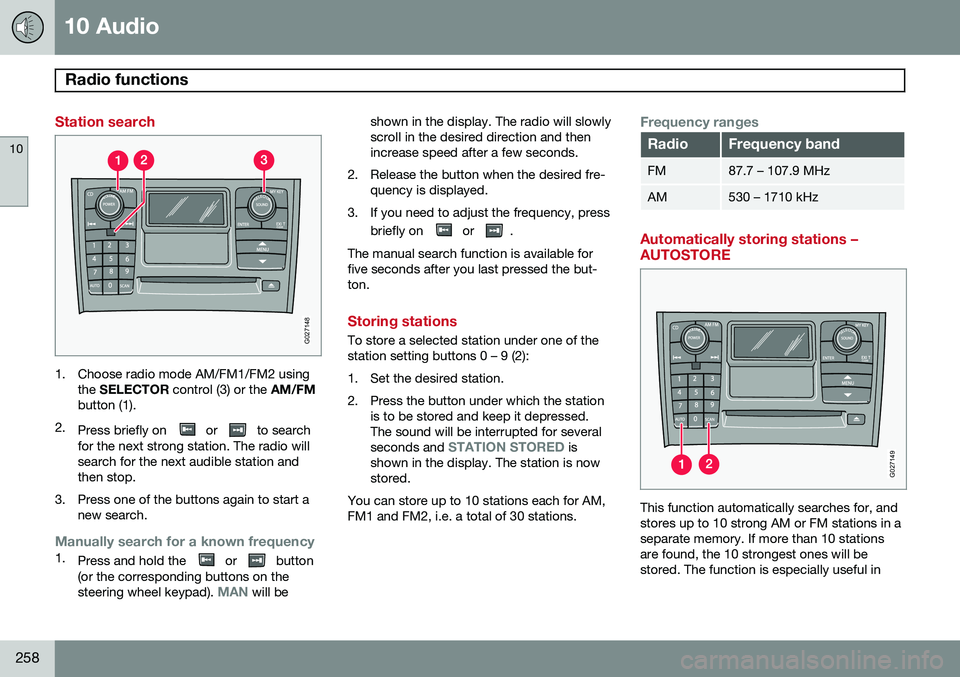
1. Choose radio mode AM/FM1/FM2 usingthe SELECTOR control (3) or the AM/FM
button (1).
2. Press briefly on
or to search
for the next strong station. The radio will search for the next audible station andthen stop.
3. Press one of the buttons again to start a new search.
Manually search for a known frequency1.Press and hold the or button
(or the corresponding buttons on the steering wheel keypad).
MAN will be shown in the display. The radio will slowly scroll in the desired direction and thenincrease speed after a few seconds.
2. Release the button when the desired fre- quency is displayed.
3. If you need to adjust the frequency, press briefly on
or .
The manual search function is available for five seconds after you last pressed the but-ton.
Storing stations
To store a selected station under one of the station setting buttons 0 – 9 (2):
1. Set the desired station.
2. Press the button under which the station is to be stored and keep it depressed. The sound will be interrupted for several seconds and
STATION STORED is
shown in the display. The station is now stored.
You can store up to 10 stations each for AM,FM1 and FM2, i.e. a total of 30 stations.
Frequency ranges
RadioFrequency band
FM87.7 – 107.9 MHz
AM530 – 1710 kHz
Automatically storing stations – AUTOSTORE
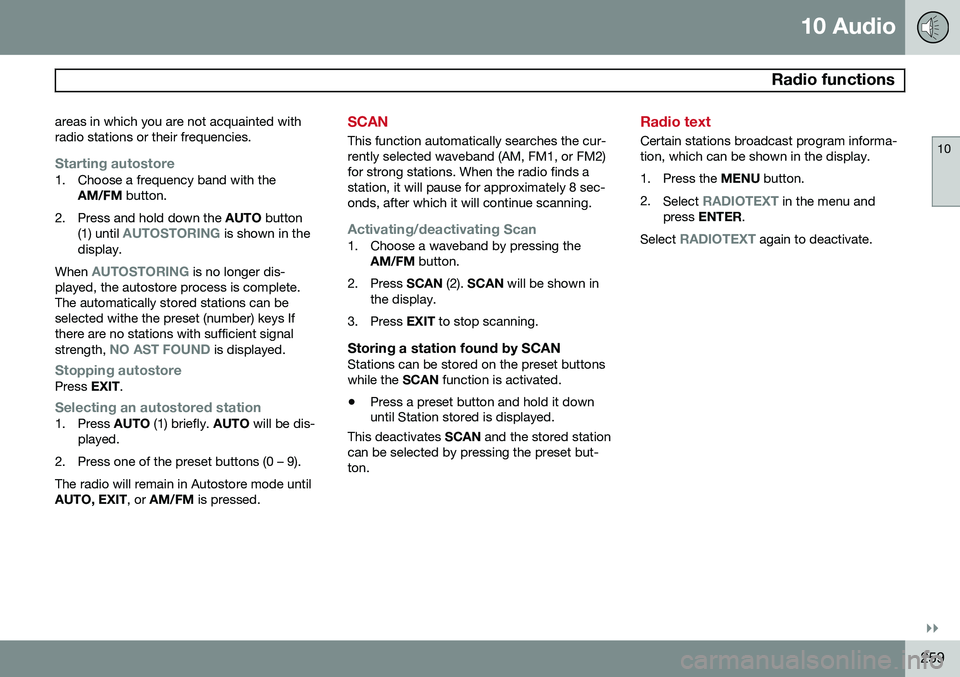
G027149
This function automatically searches for, and stores up to 10 strong AM or FM stations in aseparate memory. If more than 10 stationsare found, the 10 strongest ones will bestored. The function is especially useful in
Page 261 of 308
10 Audio
Radio functions
10
}}
259
areas in which you are not acquainted with radio stations or their frequencies.
Starting autostore1. Choose a frequency band with the
AM/FM button.
2. Press and hold down the AUTO button
(1) until
AUTOSTORING is shown in the
display.
When
AUTOSTORING is no longer dis-
played, the autostore process is complete. The automatically stored stations can beselected withe the preset (number) keys Ifthere are no stations with sufficient signal strength,
NO AST FOUND is displayed.
Stopping autostorePress EXIT.
Selecting an autostored station1. Press AUTO (1) briefly. AUTO will be dis-
played.
2. Press one of the preset buttons (0 – 9). The radio will remain in Autostore mode until AUTO, EXIT , or AM/FM is pressed.
SCAN
This function automatically searches the cur- rently selected waveband (AM, FM1, or FM2)for strong stations. When the radio finds astation, it will pause for approximately 8 sec-onds, after which it will continue scanning.
Activating/deactivating Scan1. Choose a waveband by pressing the
AM/FM button.
2. Press SCAN (2). SCAN will be shown in
the display.
3. Press EXIT to stop scanning.
Storing a station found by SCANStations can be stored on the preset buttons while the SCAN function is activated.
• Press a preset button and hold it down until Station stored is displayed.
This deactivates SCAN and the stored station
can be selected by pressing the preset but- ton.
Radio text
Certain stations broadcast program informa- tion, which can be shown in the display.
1. Press the MENU button.
2. Select
RADIOTEXT in the menu and
press ENTER .
Select
RADIOTEXT again to deactivate.
Page 262 of 308
10 Audio
Radio functions
10
260
HD Radio™reception (U.S.
models only) 1
Introduction
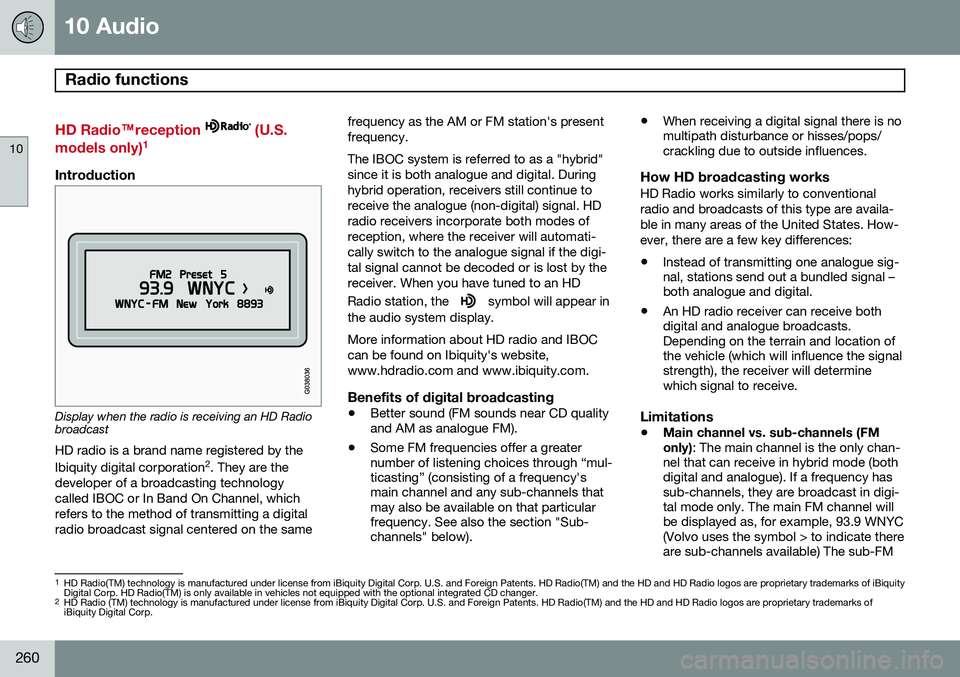
Display when the radio is receiving an HD Radio broadcast HD radio is a brand name registered by the Ibiquity digital corporation
2
. They are the
developer of a broadcasting technology called IBOC or In Band On Channel, whichrefers to the method of transmitting a digitalradio broadcast signal centered on the same frequency as the AM or FM station's presentfrequency. The IBOC system is referred to as a "hybrid" since it is both analogue and digital. Duringhybrid operation, receivers still continue toreceive the analogue (non-digital) signal. HDradio receivers incorporate both modes ofreception, where the receiver will automati-cally switch to the analogue signal if the digi-tal signal cannot be decoded or is lost by thereceiver. When you have tuned to an HD Radio station, the
symbol will appear in
the audio system display. More information about HD radio and IBOC can be found on Ibiquity's website,www.hdradio.com and www.ibiquity.com.
Benefits of digital broadcasting
• Better sound (FM sounds near CD quality and AM as analogue FM).
• Some FM frequencies offer a greaternumber of listening choices through “mul-ticasting” (consisting of a frequency'smain channel and any sub-channels thatmay also be available on that particularfrequency. See also the section "Sub-channels" below). •
When receiving a digital signal there is nomultipath disturbance or hisses/pops/crackling due to outside influences.
How HD broadcasting worksHD Radio works similarly to conventional radio and broadcasts of this type are availa-ble in many areas of the United States. How-ever, there are a few key differences:
• Instead of transmitting one analogue sig- nal, stations send out a bundled signal –both analogue and digital.
• An HD radio receiver can receive bothdigital and analogue broadcasts.Depending on the terrain and location ofthe vehicle (which will influence the signalstrength), the receiver will determinewhich signal to receive.
Limitations
• Main channel vs. sub-channels (FM only)
: The main channel is the only chan-
nel that can receive in hybrid mode (both digital and analogue). If a frequency hassub-channels, they are broadcast in digi-tal mode only. The main FM channel willbe displayed as, for example, 93.9 WNYC(Volvo uses the symbol > to indicate thereare sub-channels available) The sub-FM
1 HD Radio(TM) technology is manufactured under license from iBiquity Digital Corp. U.S. and Foreign Patents. HD Radio(TM) and the HD and HD Radio logos are proprietary trademarks of iBiquity Digital Corp. HD Radio(TM) is only available in vehicles not equipped with the optional integrated CD changer.
2 HD Radio (TM) technology is manufactured under license from iBiquity Digital Corp. U.S. and Foreign Patents. HD Radio(TM) and the HD and HD Radio logos are proprietary trademarks ofiBiquity Digital Corp.