steering wheel VOLVO XC90 2014 Owner´s Manual
[x] Cancel search | Manufacturer: VOLVO, Model Year: 2014, Model line: XC90, Model: VOLVO XC90 2014Pages: 308, PDF Size: 13.31 MB
Page 246 of 308
09 Maintenance and servicing
Fuses 09
244* Option/accessory, for more information, see Introduction.
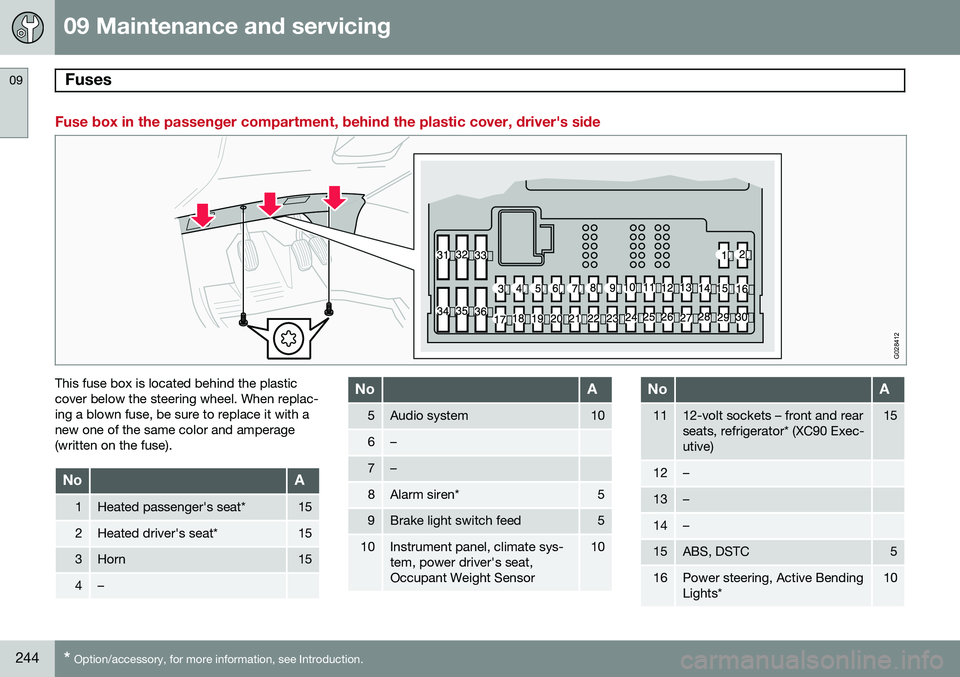
Fuse box in the passenger compartment, behind the plastic cover, driver's side
G028412
This fuse box is located behind the plastic cover below the steering wheel. When replac-ing a blown fuse, be sure to replace it with anew one of the same color and amperage(written on the fuse).
NoA
1Heated passenger's seat*15
2Heated driver's seat*15
3Horn15
4–
NoA
5Audio system10
6–
7–
8Alarm siren*5
9Brake light switch feed5
10Instrument panel, climate sys- tem, power driver's seat,Occupant Weight Sensor10
NoA
1112-volt sockets – front and rear seats, refrigerator* (XC90 Exec-utive)15
12–
13–
14–
15ABS, DSTC5
16Power steering, Active Bending Lights*10
Page 255 of 308
10 Audio
Audio system controls
10
}}
253
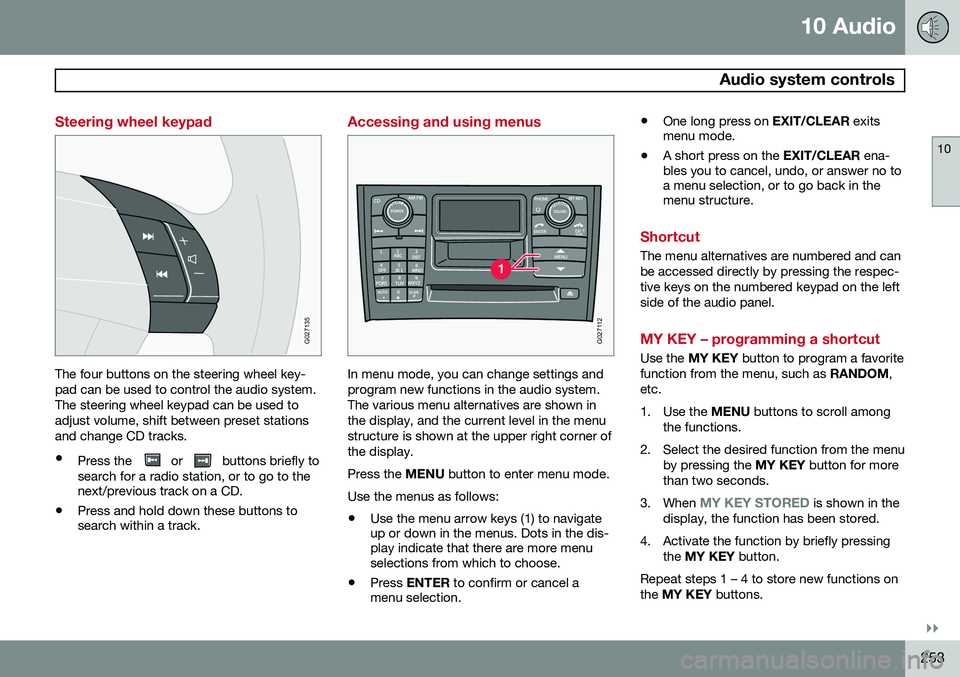
Steering wheel keypad
G027135
The four buttons on the steering wheel key- pad can be used to control the audio system.The steering wheel keypad can be used toadjust volume, shift between preset stationsand change CD tracks.
• Press the
or buttons briefly to
search for a radio station, or to go to the next/previous track on a CD.
• Press and hold down these buttons tosearch within a track.
Accessing and using menus
G027112
In menu mode, you can change settings and program new functions in the audio system.The various menu alternatives are shown inthe display, and the current level in the menustructure is shown at the upper right corner ofthe display. Press the
MENU button to enter menu mode.
Use the menus as follows:
• Use the menu arrow keys (1) to navigate up or down in the menus. Dots in the dis-play indicate that there are more menuselections from which to choose.
• Press
ENTER to confirm or cancel a
menu selection. •
One long press on
EXIT/CLEAR exits
menu mode.
• A short press on the
EXIT/CLEAR ena-
bles you to cancel, undo, or answer no toa menu selection, or to go back in themenu structure.
Shortcut
The menu alternatives are numbered and can be accessed directly by pressing the respec-tive keys on the numbered keypad on the leftside of the audio panel.
MY KEY – programming a shortcut
Use the MY KEY button to program a favorite
function from the menu, such as RANDOM,
etc.
1. Use the MENU buttons to scroll among
the functions.
2. Select the desired function from the menu by pressing the MY KEY button for more
than two seconds.
3. When
MY KEY STORED is shown in the
display, the function has been stored.
4. Activate the function by briefly pressing the MY KEY button.
Repeat steps 1 – 4 to store new functions on the MY KEY buttons.
Page 257 of 308
10 Audio
Audio system controls
10
* Option/accessory, for more information, see Introduction.255
On/Off button
G027146
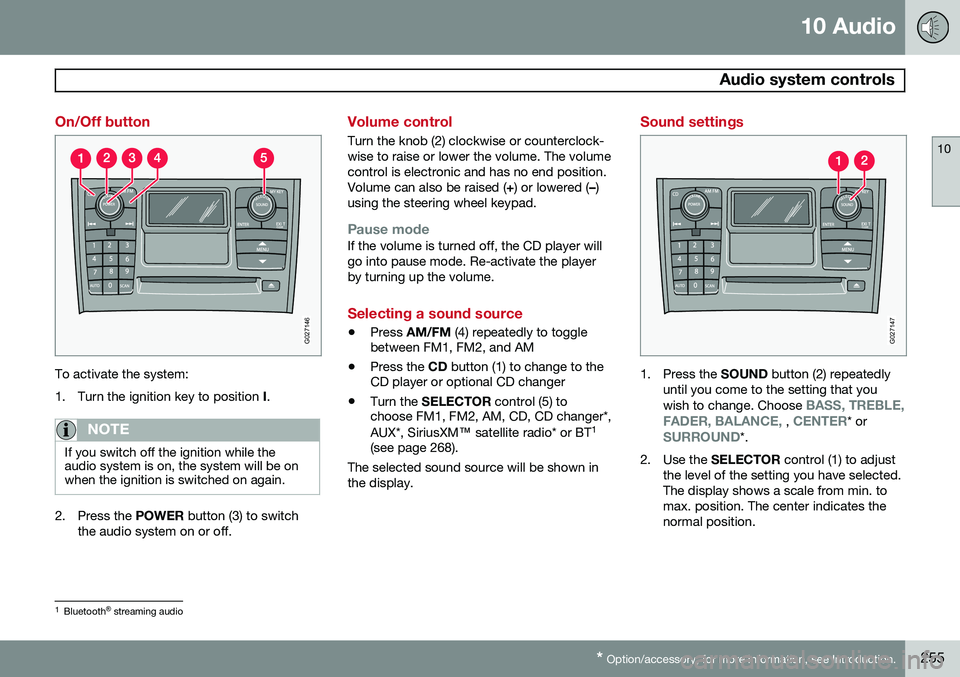
To activate the system:
1. Turn the ignition key to position I.
NOTE
If you switch off the ignition while the audio system is on, the system will be onwhen the ignition is switched on again.
2. Press the POWER button (3) to switch
the audio system on or off.
Volume control
Turn the knob (2) clockwise or counterclock- wise to raise or lower the volume. The volumecontrol is electronic and has no end position.Volume can also be raised ( +) or lowered ( –)
using the steering wheel keypad.
Pause modeIf the volume is turned off, the CD player will go into pause mode. Re-activate the playerby turning up the volume.
Selecting a sound source
• Press
AM/FM (4) repeatedly to toggle
between FM1, FM2, and AM
• Press the
CD button (1) to change to the
CD player or optional CD changer
• Turn the
SELECTOR control (5) to
choose FM1, FM2, AM, CD, CD changer*, AUX*, SiriusXM ™ satellite radio* or BT 1
(see page 268).
The selected sound source will be shown in the display.
Sound settings
G027147
1. Press the SOUND button (2) repeatedly
until you come to the setting that you wish to change. Choose
BASS, TREBLE,
FADER, BALANCE, , CENTER* orSURROUND*.
2. Use the SELECTOR control (1) to adjust
the level of the setting you have selected. The display shows a scale from min. tomax. position. The center indicates thenormal position.
1 Bluetooth ®
streaming audio
Page 260 of 308
10 Audio
Radio functions
10
258
Station search
G027148
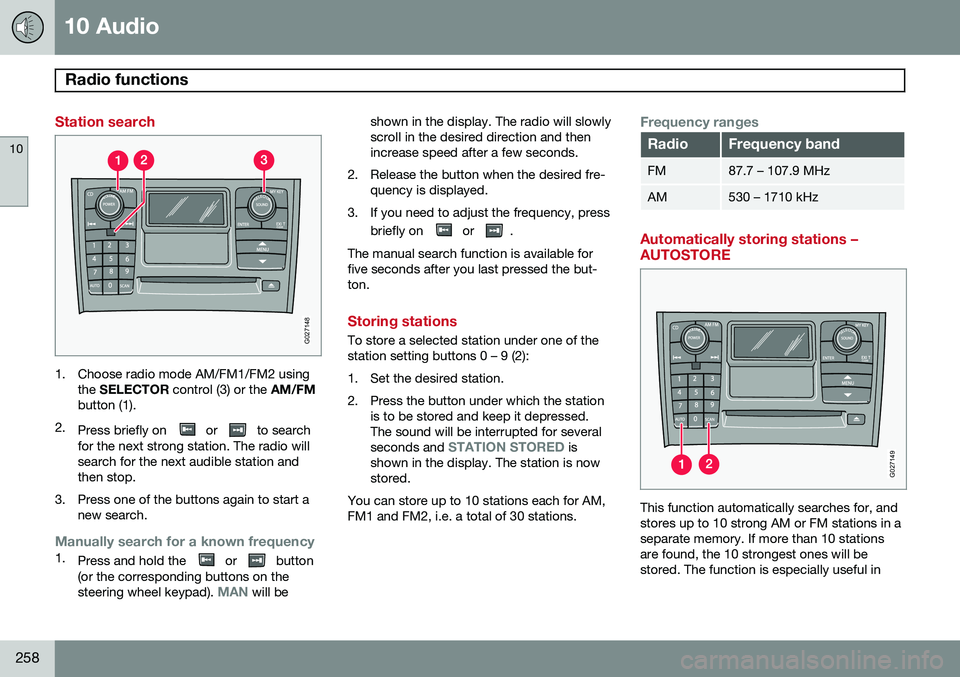
1. Choose radio mode AM/FM1/FM2 usingthe SELECTOR control (3) or the AM/FM
button (1).
2. Press briefly on
or to search
for the next strong station. The radio will search for the next audible station andthen stop.
3. Press one of the buttons again to start a new search.
Manually search for a known frequency1.Press and hold the or button
(or the corresponding buttons on the steering wheel keypad).
MAN will be shown in the display. The radio will slowly scroll in the desired direction and thenincrease speed after a few seconds.
2. Release the button when the desired fre- quency is displayed.
3. If you need to adjust the frequency, press briefly on
or .
The manual search function is available for five seconds after you last pressed the but-ton.
Storing stations
To store a selected station under one of the station setting buttons 0 – 9 (2):
1. Set the desired station.
2. Press the button under which the station is to be stored and keep it depressed. The sound will be interrupted for several seconds and
STATION STORED is
shown in the display. The station is now stored.
You can store up to 10 stations each for AM,FM1 and FM2, i.e. a total of 30 stations.
Frequency ranges
RadioFrequency band
FM87.7 – 107.9 MHz
AM530 – 1710 kHz
Automatically storing stations – AUTOSTORE
G027149
This function automatically searches for, and stores up to 10 strong AM or FM stations in aseparate memory. If more than 10 stationsare found, the 10 strongest ones will bestored. The function is especially useful in
Page 264 of 308
10 Audio
Radio functions
10
262
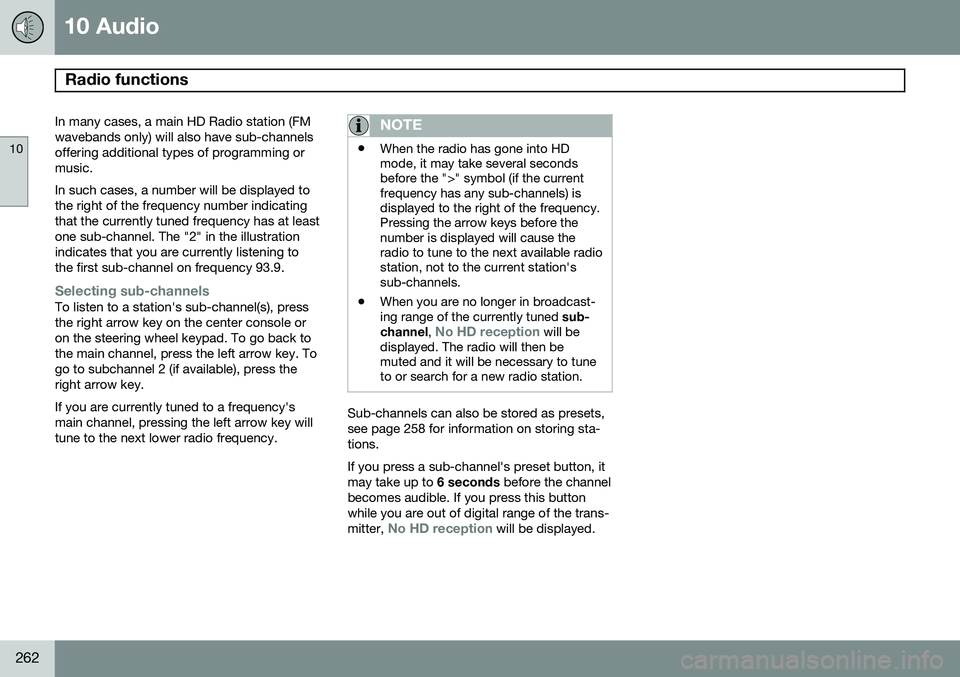
In many cases, a main HD Radio station (FM wavebands only) will also have sub-channelsoffering additional types of programming ormusic. In such cases, a number will be displayed to the right of the frequency number indicatingthat the currently tuned frequency has at leastone sub-channel. The "2" in the illustrationindicates that you are currently listening tothe first sub-channel on frequency 93.9.
Selecting sub-channelsTo listen to a station's sub-channel(s), press the right arrow key on the center console oron the steering wheel keypad. To go back tothe main channel, press the left arrow key. Togo to subchannel 2 (if available), press theright arrow key. If you are currently tuned to a frequency's main channel, pressing the left arrow key willtune to the next lower radio frequency.
NOTE
•When the radio has gone into HD mode, it may take several secondsbefore the ">" symbol (if the currentfrequency has any sub-channels) isdisplayed to the right of the frequency.Pressing the arrow keys before thenumber is displayed will cause theradio to tune to the next available radiostation, not to the current station'ssub-channels.
• When you are no longer in broadcast-ing range of the currently tuned
sub-
channel ,
No HD reception will be
displayed. The radio will then be muted and it will be necessary to tuneto or search for a new radio station.
Sub-channels can also be stored as presets, see page 258 for information on storing sta-tions. If you press a sub-channel's preset button, it may take up to 6 seconds before the channel
becomes audible. If you press this buttonwhile you are out of digital range of the trans- mitter,
No HD reception will be displayed.
Page 270 of 308
10 Audio
Auxiliary equipment
10
268
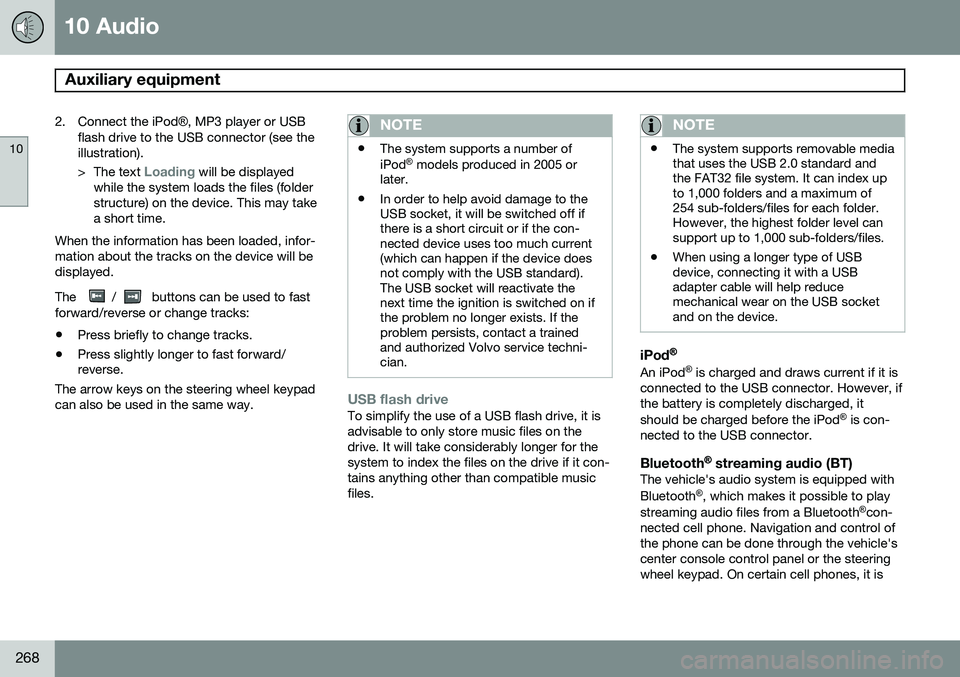
2. Connect the iPod®, MP3 player or USB
flash drive to the USB connector (see the illustration). > The text
Loading will be displayed
while the system loads the files (folder structure) on the device. This may takea short time.
When the information has been loaded, infor-mation about the tracks on the device will bedisplayed. The
/ buttons can be used to fast
forward/reverse or change tracks:
• Press briefly to change tracks.
• Press slightly longer to fast forward/ reverse.
The arrow keys on the steering wheel keypad can also be used in the same way.
NOTE
• The system supports a number of iPod ®
models produced in 2005 or
later.
• In order to help avoid damage to the USB socket, it will be switched off ifthere is a short circuit or if the con-nected device uses too much current(which can happen if the device doesnot comply with the USB standard).The USB socket will reactivate thenext time the ignition is switched on ifthe problem no longer exists. If theproblem persists, contact a trainedand authorized Volvo service techni-cian.
USB flash driveTo simplify the use of a USB flash drive, it is advisable to only store music files on thedrive. It will take considerably longer for thesystem to index the files on the drive if it con-tains anything other than compatible musicfiles.
NOTE
• The system supports removable media that uses the USB 2.0 standard andthe FAT32 file system. It can index upto 1,000 folders and a maximum of254 sub-folders/files for each folder.However, the highest folder level cansupport up to 1,000 sub-folders/files.
• When using a longer type of USBdevice, connecting it with a USBadapter cable will help reducemechanical wear on the USB socketand on the device.
iPod®
An iPod ®
is charged and draws current if it is
connected to the USB connector. However, if the battery is completely discharged, it should be charged before the iPod ®
is con-
nected to the USB connector.
Bluetooth ®
streaming audio (BT)The vehicle's audio system is equipped withBluetooth ®
, which makes it possible to play
streaming audio files from a Bluetooth ®
con-
nected cell phone. Navigation and control of the phone can be done through the vehicle'scenter console control panel or the steeringwheel keypad. On certain cell phones, it is
Page 271 of 308
10 Audio
Auxiliary equipment
10
269
also possible to change tracks from the phone itself. In order to listen streaming audio,
BT must be
selected as a sound source (see page 255) and a Bluetooth ®
cell phone must be con-
nected (paired) with the audio system. See page 275 for more information.
NOTE
Any Bluetooth cell phones used must sup- port Audio/Video Remote Control Profile(AVRCP) and Advanced Audio DistributionProfile (A2DP). The phone must useAVRCP version 1.3 and A2DP 1.2. If olderversions of these standards are used, cer-tain features (e.g., scan or random) maynot function. Not all cell phones are fully compatible with the vehicle's Bluetooth system. A listof compatible phones is available at youVolvo retailer or at www.volvocars.us.
Listening to streaming audioTurn SELECTOR to select BT as the sound
source. The
/ buttons can be used to fast-
forward/back or change tracks: • Press briefly to change tracks.
• Press and hold to go fast-forward/back. The buttons in the steering wheel keypad can be used in the same way.
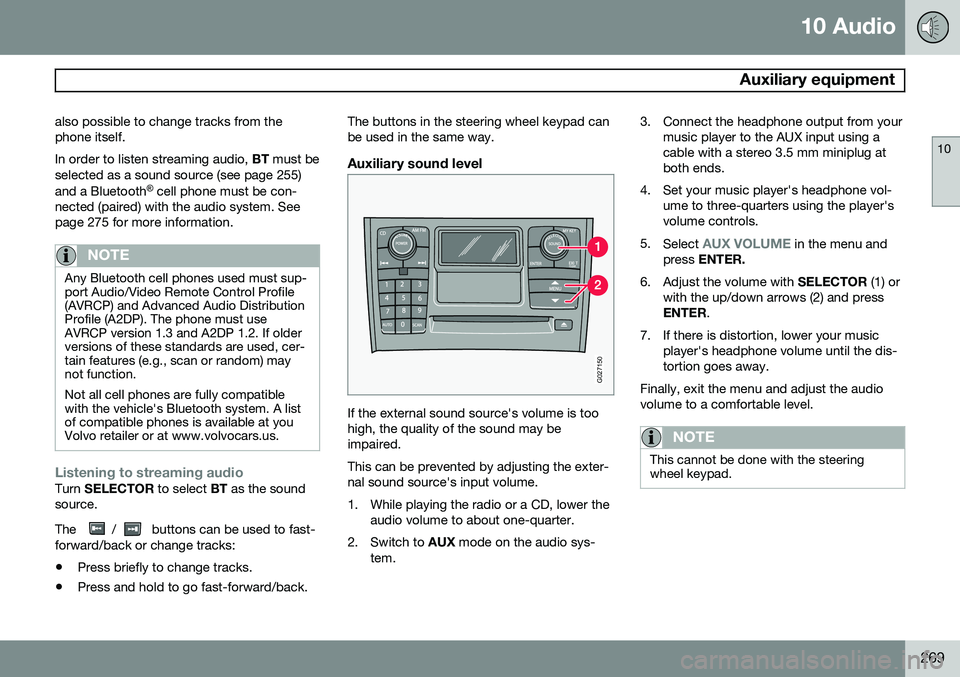
Auxiliary sound level
G027150
If the external sound source's volume is too high, the quality of the sound may beimpaired. This can be prevented by adjusting the exter- nal sound source's input volume.
1. While playing the radio or a CD, lower the
audio volume to about one-quarter.
2. Switch to AUX mode on the audio sys-
tem. 3. Connect the headphone output from your
music player to the AUX input using a cable with a stereo 3.5 mm miniplug atboth ends.
4. Set your music player's headphone vol- ume to three-quarters using the player'svolume controls.
5. Select
AUX VOLUME in the menu and
press ENTER.
6. Adjust the volume with SELECTOR (1) or
with the up/down arrows (2) and press ENTER .
7. If there is distortion, lower your music player's headphone volume until the dis-tortion goes away.
Finally, exit the menu and adjust the audiovolume to a comfortable level.
NOTE
This cannot be done with the steering wheel keypad.
Page 273 of 308
10 Audio
CD player/changer
10
271
Navigating the disc and playing tracksIf a disc with audio files is in the CD player, press ENTER to display a list of folders on
the disc. Use the up and down arrows to move among the folders on the disc. Audio files have the
symbol and folders containing these
files have the
symbol.
Press ENTER to play a selected folder or a
file. When the music file has been played, the player will continue to play the rest of the filesin the current folder. When all of the files inthe folder have been played, the player willautomatically go to the next folder and playthe files in it.
NOTE
Press or if the entire name of
the current track does not fit in the display.
Changing tracks
CD player/CD changer1. Briefly press or to go to the
next/previous track or file. The steering wheel keypad can be used in the same way.
2. Press and hold down
or to
search within a track/file. The search con- tinues as long as the buttons aredepressed. The steering wheel keypadcan be used in the same way.
SCANThis function plays the first ten seconds of each track or file 1
.
1. Press SCAN to begin scanning the tracks
or files on the currently selected CD.
2. Press EXIT/CLEAR or SCAN to interrupt
the scan function and listen to an entire track or file.
Random play
CD playerThis function plays the tracks or files on a CD in random order (shuffle).
If a normal music CD is being playedSelect RANDOM in the menu and press
ENTER .
If a CD with mp3 or wma files is being
played
Select DISC or FOLDER in the menu and
press ENTER .
CD changerThis function offers two alternatives for play- ing the tracks on the disc(s) in the CDchanger in random order (shuffle). •
SINGLE DISC (random order on the cur-
rently selected disc)
•
ALL DISCS (random order on all of the
CDs in the changer)
If a normal music CD is being played
• Select RANDOM in the menu and press
ENTER .
• Select
SINGLE DISC or ALL DISCS and
press ENTER .
NOTE
Press to play the next randomly selected track. This can only be done on the cur-rently selected disc.
If a CD with mp3 or wma files is being played
Select SINGLE DISC or FOLDER In the
menu and press ENTER.
This function is deactivated when a new disc is selected.
1 CD changer: SCAN only functions on the currently selected disc.
Page 276 of 308
10 Audio
Bluetooth®
hands-free connection
10
274
Introduction
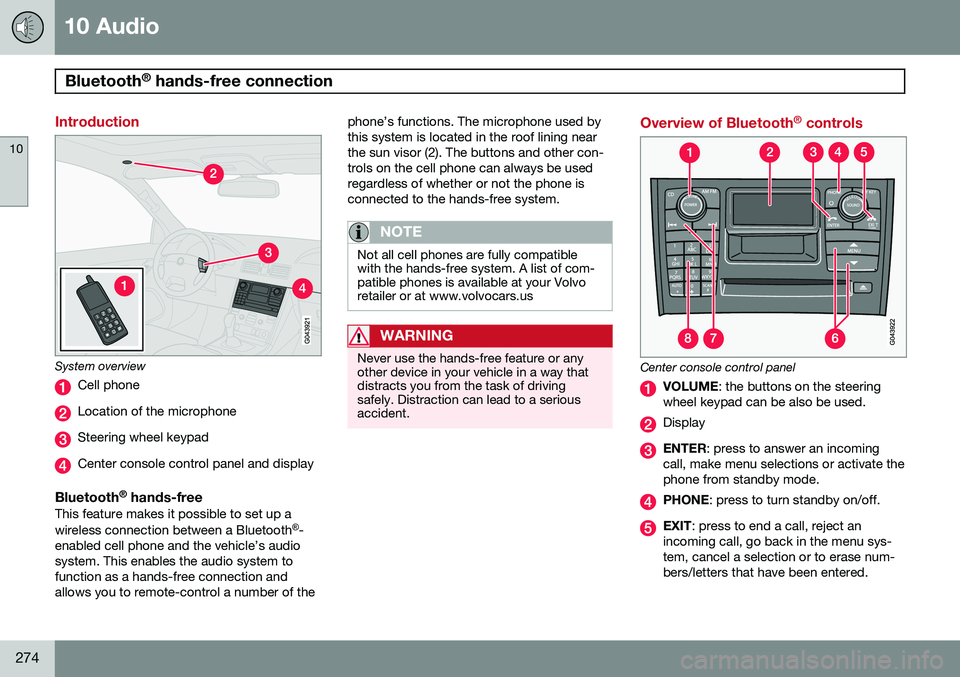
System overview
Cell phone
Location of the microphone
Steering wheel keypad
Center console control panel and display
Bluetooth ®
hands-freeThis feature makes it possible to set up a wireless connection between a Bluetooth ®
-
enabled cell phone and the vehicle’s audio system. This enables the audio system tofunction as a hands-free connection andallows you to remote-control a number of the phone’s functions. The microphone used bythis system is located in the roof lining nearthe sun visor (2). The buttons and other con-trols on the cell phone can always be usedregardless of whether or not the phone isconnected to the hands-free system.
NOTE
Not all cell phones are fully compatible with the hands-free system. A list of com-patible phones is available at your Volvoretailer or at www.volvocars.us
WARNING
Never use the hands-free feature or any other device in your vehicle in a way thatdistracts you from the task of drivingsafely. Distraction can lead to a seriousaccident.
Overview of Bluetooth
®
controls
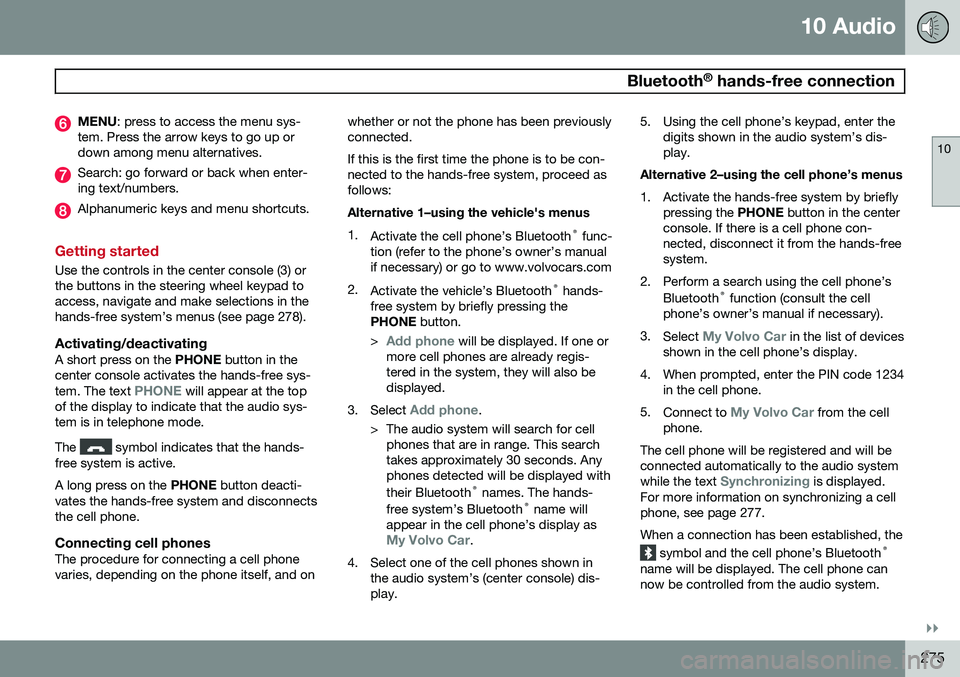
Center console control panel
VOLUME : the buttons on the steering
wheel keypad can be also be used.
Display
ENTER : press to answer an incoming
call, make menu selections or activate the phone from standby mode.
PHONE : press to turn standby on/off.
EXIT: press to end a call, reject an
incoming call, go back in the menu sys- tem, cancel a selection or to erase num-bers/letters that have been entered.
Page 277 of 308
10 Audio
Bluetooth®
hands-free connection
10
}}
275
MENU : press to access the menu sys-
tem. Press the arrow keys to go up or down among menu alternatives.
Search: go forward or back when enter- ing text/numbers.
Alphanumeric keys and menu shortcuts.
Getting started
Use the controls in the center console (3) or the buttons in the steering wheel keypad toaccess, navigate and make selections in thehands-free system’s menus (see page 278).
Activating/deactivatingA short press on the PHONE button in the
center console activates the hands-free sys- tem. The text
PHONE will appear at the top
of the display to indicate that the audio sys- tem is in telephone mode. The
symbol indicates that the hands-
free system is active. A long press on the PHONE button deacti-
vates the hands-free system and disconnects the cell phone.
Connecting cell phonesThe procedure for connecting a cell phonevaries, depending on the phone itself, and on whether or not the phone has been previouslyconnected. If this is the first time the phone is to be con- nected to the hands-free system, proceed asfollows: Alternative 1–using the vehicle's menus 1.
Activate the cell phone’s Bluetooth ®
func-
tion (refer to the phone’s owner’s manual if necessary) or go to www.volvocars.com
2. Activate the vehicle’s Bluetooth ®
hands-
free system by briefly pressing thePHONE button.
>
Add phone will be displayed. If one or
more cell phones are already regis- tered in the system, they will also bedisplayed.
3. Select
Add phone.
> The audio system will search for cell phones that are in range. This search takes approximately 30 seconds. Anyphones detected will be displayed with their Bluetooth ®
names. The hands-
free system’s Bluetooth ®
name will
appear in the cell phone’s display as
My Volvo Car.
4. Select one of the cell phones shown in the audio system’s (center console) dis- play. 5. Using the cell phone’s keypad, enter the
digits shown in the audio system’s dis-play.
Alternative 2–using the cell phone’s menus
1. Activate the hands-free system by briefly pressing the PHONE button in the center
console. If there is a cell phone con- nected, disconnect it from the hands-freesystem.
2. Perform a search using the cell phone’s Bluetooth ®
function (consult the cell
phone’s owner’s manual if necessary).
3. Select
My Volvo Car in the list of devices
shown in the cell phone’s display.
4. When prompted, enter the PIN code 1234 in the cell phone.
5. Connect to
My Volvo Car from the cell
phone.
The cell phone will be registered and will be connected automatically to the audio system while the text
Synchronizing is displayed.
For more information on synchronizing a cell phone, see page 277. When a connection has been established, the
symbol and the cell phone’s Bluetooth ®
name will be displayed. The cell phone can now be controlled from the audio system.