light VOLVO XC90 2014 Owner´s Manual
[x] Cancel search | Manufacturer: VOLVO, Model Year: 2014, Model line: XC90, Model: VOLVO XC90 2014Pages: 308, PDF Size: 13.31 MB
Page 147 of 308
06 Starting and driving
Ignition switch and steering wheel lock
06
145
Ignition switch and steering wheel lock
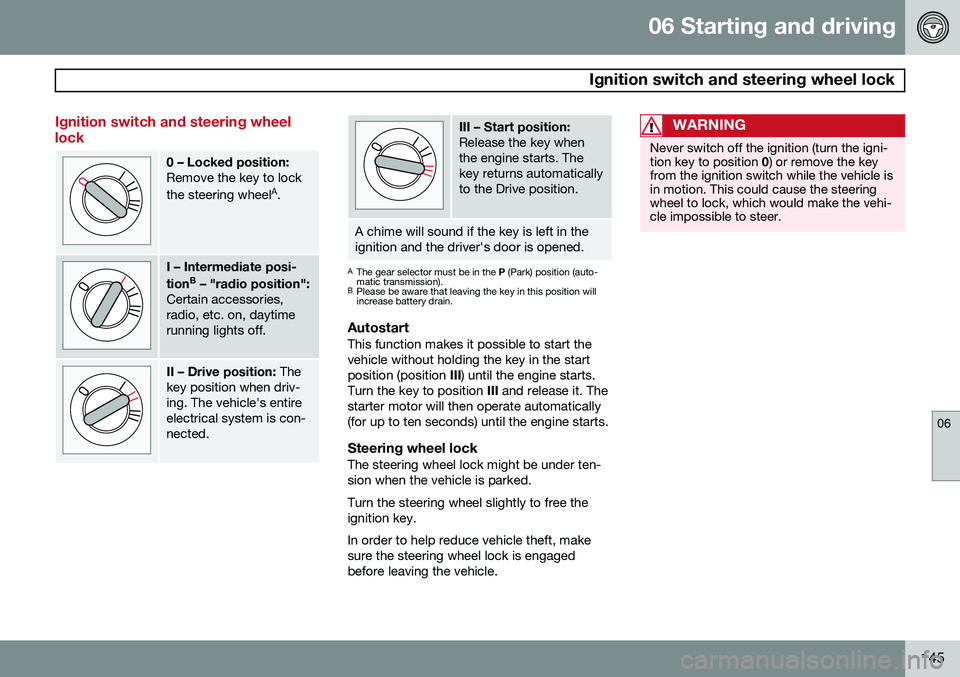
0 – Locked position: Remove the key to lock the steering wheelA
.
I – Intermediate posi- tion B
– "radio position":
Certain accessories, radio, etc. on, daytimerunning lights off.
II – Drive position: The
key position when driv- ing. The vehicle's entireelectrical system is con-nected.
III – Start position: Release the key when the engine starts. Thekey returns automaticallyto the Drive position.
A chime will sound if the key is left in the ignition and the driver's door is opened.
A The gear selector must be in the P (Park) position (auto-
matic transmission).
B Please be aware that leaving the key in this position will increase battery drain.
AutostartThis function makes it possible to start the vehicle without holding the key in the startposition (position III) until the engine starts.
Turn the key to position III and release it. The
starter motor will then operate automatically(for up to ten seconds) until the engine starts.
Steering wheel lockThe steering wheel lock might be under ten-sion when the vehicle is parked. Turn the steering wheel slightly to free the ignition key. In order to help reduce vehicle theft, make sure the steering wheel lock is engagedbefore leaving the vehicle.
WARNING
Never switch off the ignition (turn the igni- tion key to position 0) or remove the key
from the ignition switch while the vehicle isin motion. This could cause the steeringwheel to lock, which would make the vehi-cle impossible to steer.
Page 148 of 308
06 Starting and driving
Economical driving
06
146
Economical driving conserves natural resources
Better driving economy may be obtained by thinking ahead, avoiding rapid starts andstops and adjusting the speed of your vehicleto immediate traffic conditions. Observe thefollowing rules:
• Bring the engine to normal operating tem- perature as soon as possible by drivingwith a light foot on the accelerator pedalfor the first few minutes of operation. Acold engine uses more fuel and is subjectto increased wear.
• Whenever possible, avoid using the vehi-cle for driving short distances. This doesnot allow the engine to reach normaloperating temperature.
• Drive carefully and avoid rapid accelera-tion and hard braking.
• Use the transmission's
D (Drive) position
as often as possible and avoid using"kickdown" to help improve fuel econ-omy.
• Do not exceed posted speed limits.
• Avoid carrying unnecessary items (extraload) in the vehicle.
• Maintain correct tire pressure. Check tirepressure regularly (when tires are cold).
• Remove snow tires when threat of snowor ice has ended. •
Note that roof racks, ski racks, etc,increase air resistance and also fuel con-sumption.
• At highway driving speeds, fuel consump-tion will be lower with the air conditioningon and the windows closed than with theair conditioning off and the windowsopen.
• Using the onboard trip computer's fuelconsumption modes can help you learnhow to drive more economically.
Other factors that decrease gas mileage are: • Dirty air cleaner
• Dirty engine oil and clogged oil filter
• Dragging brakes
• Incorrect front end alignment.
Some of the above mentioned items and oth- ers are checked at the standard MaintenanceService intervals.
CAUTION
Drive slowly and carefully if going through standing water (i.e. flooded roadways,etc.). Damage to the engine could result ifexcess water is drawn in through the airintake system. Never drive the vehicle inwater deeper than 18 inches (48 cm).
Page 149 of 308
06 Starting and driving
Difficult driving conditions
06
147
Driving on rough/unpaved surfaces
The Volvo XC90 is designed primarily for on- road driving, and it has excellent handlingcharacteristics on very rough or unpavedroads. When driving on poorly maintained or unpaved roads, please keep the following inmind:
• Reduce speed on rough surfaces to mini- mize possible damage to the vehicle'sunderbody.
• When driving on soft surfaces such as drysand or snow, try to avoid stopping if atall possible.
WARNING
•Avoid driving diagonally across steep inclines as this could increase the riskof a roll-over. Try to drive straight upor down the slope.
• If the road is very steep, avoid turningthe vehicle around to help avoid therisk of rolling over. Back the vehicle upor down the incline instead.
NOTE
Avoid driving on steep inclines if the fuel tank is nearly empty. If the flow of fuel tothe engine is interrupted due to the vehi-cle's angle of inclination, this could resultin damage to the three-way catalytic con-verter. We recommend keeping the fueltank at least half full when driving on steepinclines.
Driving through water
The vehicle can be driven through water up to a depth of approximately 16 inches (40 cm),at a maximum speed of 6 mph (10 km/h). Take particular care when driving through flowing water. Clean the electrical connections for trailer wir- ing after driving in mud or water. When driving through water, maintain low speed and do not stop in the water.
WARNING
• Avoid driving through standing or rushing water. Doing so can be dan-gerous and it may also be difficult todetermine the actual depth of thewater.
• If water cannot be avoided, after driv-ing through the water, press lightly onthe brake pedal to ensure that thebrakes are functioning normally. Wateror mud can make the brake liningsslippery, resulting in delayed brakingeffect.
Page 152 of 308
06 Starting and driving
Automatic transmission
06
150
KickdownAutomatic shift to a lower gear (kickdown) is achieved by depressing the accelerator pedalfully and briskly. An upshift will occur whenapproaching the top speed for a particulargear or by releasing the accelerator pedalslightly. Kickdown can be used for maximum acceler- ation or when passing at highway speeds.
NOTE
The gear selector must be in the D (Drive)
position for kickdown to function.
Manual shifting – Geartronic
You can move the gear selector freely between the MAN (Manual) and D (Drive)
positions to select forward gears while driv-ing. Gears 3, 4, 5, and 6 have a "lock-up"function which reduces engine speed andhelps save fuel.
NOTE
Reverse, Neutral, and Park cannot be selected in Geartronic mode.
• A "lock-up" feature 1
reduces engine
speed and help saves fuel.
The currently selected gear will be displayed in the instrument panel (see page 58). • To access the
MAN shifting position from
D , move the gear selector to the left to
MAN .
• To return to the
D positions from MAN,
move the gear selector to the right.
While driving
If you select the MAN position while driving,
the gear that was being used in the D posi-
tion will also initially be selected in MAN posi-
tion. • Move the gear selector forward (toward "
+ ") to shift to a higher gear or rearward
(toward " – ") to shift to a lower gear.
• If you hold the gear selector toward "
–",
the transmission will downshift one gearand will utilize the braking power of theengine. If the current speed is too high forusing a lower gear, the downshift will notoccur until the speed has decreasedenough to allow the lower gear to beused.
• If you slow down to a very low speed, thetransmission will automatically shift down. •
When starting in the
MAN position, 3rd
gear is the highest gear that may beselected.
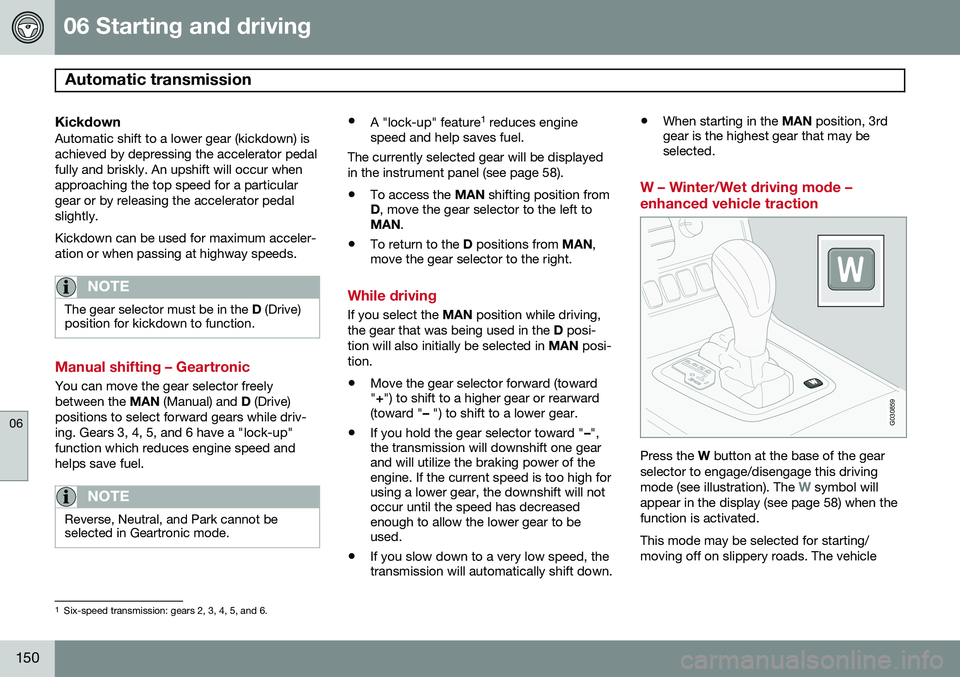
W – Winter/Wet driving mode – enhanced vehicle traction
G030859
Press the W button at the base of the gear
selector to engage/disengage this driving mode (see illustration). The
W symbol will
appear in the display (see page 58) when the function is activated. This mode may be selected for starting/ moving off on slippery roads. The vehicle
1 Six-speed transmission: gears 2, 3, 4, 5, and 6.
Page 156 of 308
06 Starting and driving
Brake system
06
154* Option/accessory, for more information, see Introduction.
BRAKE Brake circuit malfunction
The brake system is a hydraulic system con- sisting of two master cylinders and two sepa-rate brake circuits. If a problem should occurin one of these circuits, it is still possible tostop the vehicle with the other brake circuit. If the brake pedal must be depressed farther than normal and requires greater foot pres-sure, the stopping distance will be longer. A warning light in the instrument panel will light up to warn the driver that a fault hasoccurred. If this light comes on while driving or braking, stop immediately and check the brake fluidlevel in the reservoir.
NOTE
Press the brake pedal hard and maintain pressure on the pedal – do not pump thebrakes.
WARNING
If the fluid level is below the MIN mark in
the reservoir or if a BRAKE FAILURE
STOP SAFELY message is displayed in
the text window: DO NOT DRIVE. Have
the vehicle towed to a trained and qualified Volvo service technician and have thebrake system inspected.
NOTE
When the vehicle is at a standstill and the engine is idling, e.g. at a traffic light andthe brake pedal is depressed, the pedalmay go down slightly. This is a normalfunction of the power-assisted brake sys-tem.
Brake pad inspectionOn vehicles equipped with a jack*, the condi- tion of the brake pads can be checked byraising the vehicle (see page 198 for informa-tion about using the jack and removing awheel) and performing a visual inspection ofthe brake pads.
WARNING
• If the vehicle has been driven immedi- ately prior to a brake pad inspection,the wheel hub, brake components,etc., will be very hot. Allow time forthese components to cool before car-rying out the inspection.
• Apply the parking brake and put thegear selector in the Park (
P) position.
• Block the wheels standing on theground, use rigid wooden blocks orlarge stones.
Page 157 of 308
06 Starting and driving
Brake system
06
155
WARNING
•Use the jack intended for the vehicle when changing a tire. For any otherjob, use stands to support the vehicle.
• The jack should be kept well-greasedand clean, and should not be dam-aged.
• Be sure the jack is on a firm, level,non-slippery surface.
• No objects should be placed betweenthe base of jack and the ground, orbetween the jack and the attachmentbar on the vehicle.
• The jack must correctly engage thejack attachment.
• Never allow any part of your body tobe extended under a vehicle suppor-ted by a jack.
Power brakes function only when the engine is running
The power brakes utilize vacuum pressure which is only created when the engine is run-ning. Never let the vehicle roll to a stop withthe engine switched off. If the power brakes are not working, consid- erably higher pressure will be required on thebrake pedal to compensate for the lack ofpower assistance. This can happen for exam- ple when towing your vehicle or if the engineis switched off when the vehicle is rolling. Thebrake pedal feels harder than usual.
Water on brake discs and brake pads
affects braking
Driving in rain and slush or passing throughan automatic car wash can cause water tocollect on the brake discs and pads. This willcause a delay in braking effect when thepedal is depressed. To avoid such a delaywhen the brakes are needed, depress thepedal occasionally when driving through rain,slush etc. This will remove the water from thebrakes. Check that brake application feelsnormal. This should also be done after wash-ing or starting in very damp or cold weather.
Severe strain on the brake systemThe brakes will be subject to severe strainwhen driving in mountains or hilly areas, orwhen towing a trailer. Vehicle speed is usuallyslower, which means that the cooling of thebrakes is less efficient than when driving onlevel roads. To reduce the strain on thebrakes, shift into a lower gear and let theengine help with the braking. Do not forgetthat, if you are towing a trailer, the brakes willbe subjected to a greater than normal load.
Anti-lock brakes (ABS)If the ABS warning lamp lights up there is a
malfunction in the ABS system (the standardbraking system will however function) and thevehicle should be driven cautiously to atrained and qualified Volvo service technicianfor inspection. The Anti-lock Braking System(ABS) helps to improve vehicle control (stop-ping and steering) during severe braking con-ditions by limiting brake lockup. When thesystem "senses" impending lockup, brakingpressure is automatically modulated in orderto help prevent lockup, which could lead to askid. The system performs a self-diagnostic test when the engine is started and when thevehicle first reaches a speed of approxi- mately 12 mph (20 km/h). The brake pedal
will pulsate several times and a sound may be audible from the ABS control module. This isnormal. To obtain optimal effect from the ABS sys- tem, constant pressure should be kept on thebrake pedal. Do not pump the brake pedal. The switching of the ABS modulator will be audible and the brake pedal will pulsate dur-ing braking. Please be aware that ABS doesnot increase the absolute braking potential ofthe vehicle. While control will be enhanced,ABS will not shorten stopping distances onslippery surfaces.
Page 158 of 308
06 Starting and driving
Brake system
06
156
ABS with EBD (Electronic Brake Force
Distribution)
EBD is an integrated part of the ABS system. EBD regulates the hydraulic pressure to therear brakes to help provide optimal brakingcapacity. The brake pedal will pulsate duringbraking, which is normal. If the BRAKE and ABS warning lights come on at the same time, this could indicate afault in the brake system.
1. Stop the vehicle in a suitable place and switch off the engine.
2. Restart the engine.
• If both warning lights go off, no further action is required.
• If both lights are still on after the enginehas been restarted, switch off the engineagain and check the brake fluid level (seepage 225 for the location of the brakefluid reservoir).
WARNING
If the fluid level is below the
MIN mark in
the reservoir or if a Brake failure –
Service urgent message is displayed in
the text window: DO NOT DRIVE. Have the vehicle towed to a trained and qualifiedVolvo service technician and have thebrake system inspected.
• If the brake fluid level is above the
MIN
mark, drive carefully to a trained and qualified Volvo service technician andhave the brake system inspected.
Emergency Brake Assistance (EBA)The EBA function is designed to provide full brake effect immediately in the event of sud-den, hard braking. The system is activated bythe speed with which you depress the brakepedal.
NOTE
• When the EBA system is activated, the brake pedal will go down and pressurein the brake system immediatelyincreases to the maximum level. Youmust maintain full pressure on thebrake pedal in order to utilize the sys-tem completely. There will be no brak-ing effect if the pedal is released. EBAis automatically deactivated when thebrake pedal is released.
• When the vehicle has been parked forsome time, the brake pedal may sinkmore than usual when the engine isstarted. This is normal and the pedalwill return to its usual position when itis released.
Page 159 of 308
06 Starting and driving
Parking brake
06
157
G026992
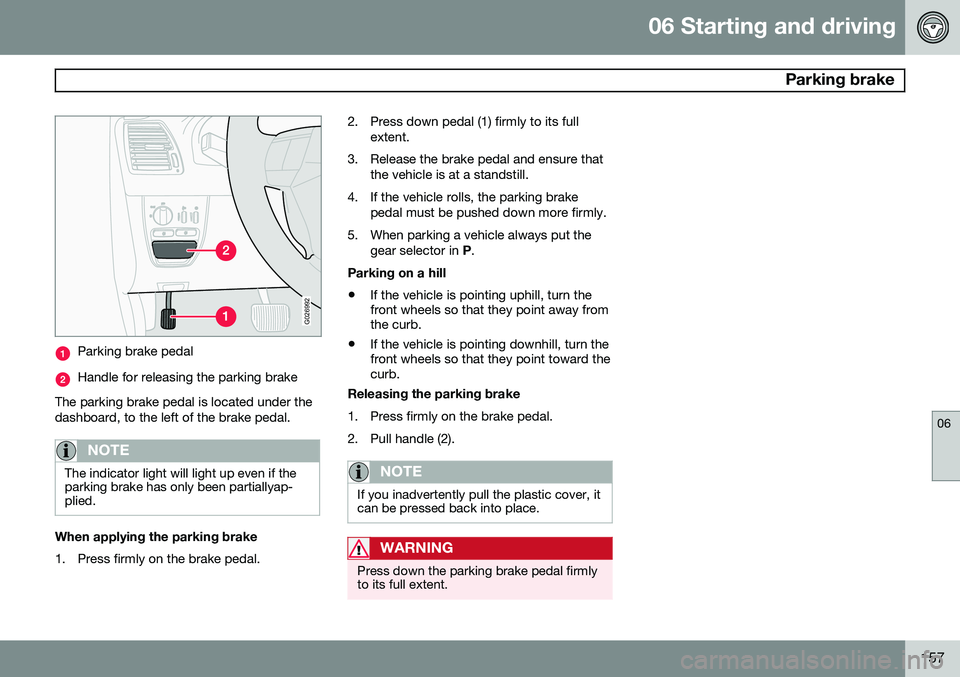
Parking brake pedal
Handle for releasing the parking brake
The parking brake pedal is located under the dashboard, to the left of the brake pedal.
NOTE
The indicator light will light up even if the parking brake has only been partiallyap-plied.
When applying the parking brake
1. Press firmly on the brake pedal. 2. Press down pedal (1) firmly to its full
extent.
3. Release the brake pedal and ensure that the vehicle is at a standstill.
4. If the vehicle rolls, the parking brake pedal must be pushed down more firmly.
5. When parking a vehicle always put the gear selector in P.
Parking on a hill • If the vehicle is pointing uphill, turn the front wheels so that they point away fromthe curb.
• If the vehicle is pointing downhill, turn thefront wheels so that they point toward thecurb.
Releasing the parking brake
1. Press firmly on the brake pedal.
2. Pull handle (2).
NOTE
If you inadvertently pull the plastic cover, it can be pressed back into place.
WARNING
Press down the parking brake pedal firmly to its full extent.
Page 160 of 308
06 Starting and driving
Stability system
06
158
Dynamic Stability Traction Control (DSTC)
The stability system consists of a number of functions designed help reduce wheel spin,counteract skidding, and to generally helpimprove directional stability.
NOTE
A pulsating sound will be audible when the system is actively operating and is normal.
Traction control (TC)This function is designed to help reduce wheel spin by transferring power from a drivewheel that begins to lose traction to thewheel on the opposite side of the vehicle (onthe same axle). TC is most active at low speeds.This is one of DSTC's permanent functions and cannot be switched off.
Spin control (SC)The spin control function is designed to helpprevent the drive wheels from spinning whilethe vehicle is accelerating. Under certain circumstances, such as when driving with snow chains, or driving in deepsnow or loose sand, it may be advisable totemporarily switch off this function for maxi-mum tractive force.
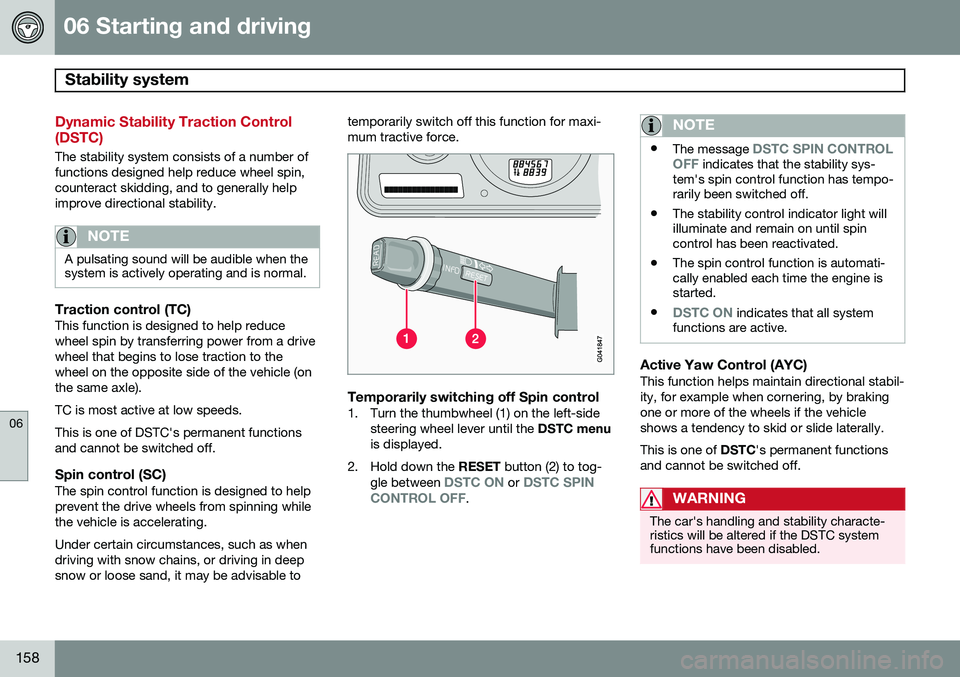
Temporarily switching off Spin control1. Turn the thumbwheel (1) on the left-side
steering wheel lever until the DSTC menu
is displayed.
2. Hold down the RESET button (2) to tog-
gle between
DSTC ON or DSTC SPIN
CONTROL OFF.
NOTE
• The message DSTC SPIN CONTROL
OFF indicates that the stability sys-
tem's spin control function has tempo- rarily been switched off.
• The stability control indicator light willilluminate and remain on until spincontrol has been reactivated.
• The spin control function is automati-cally enabled each time the engine isstarted.
•
DSTC ON indicates that all system
functions are active.
Active Yaw Control (AYC)This function helps maintain directional stabil- ity, for example when cornering, by brakingone or more of the wheels if the vehicleshows a tendency to skid or slide laterally. This is one of DSTC's permanent functions
and cannot be switched off.
WARNING
The car's handling and stability characte- ristics will be altered if the DSTC systemfunctions have been disabled.
Page 161 of 308
06 Starting and driving
Stability system
06
159
DSTC-related messages in the text window
•TRACTION CONTROL TEMPORARILY OFF : The system has been temporarily
switched off due to high brake tempera- ture and will automatically switch onagain when the brakes have cooled.
•
ANTI-SKID SERVICE REQUIRED: The
system has been automatically disen- gaged due to a fault. A trained and quali-fied Volvo service technician shouldcheck the system.
Symbols in the instrument panel
The Stability Control indicator lightThis light indicates different con- ditions, depending on how it illu-minates.
The Stability Control indicator light illuminates for approximately 2 seconds
This indicates that the system is performing a self-diagnostic test when the ignition isswitched on.
The Stability Control indicator light
flashes
This indicates that the stability system is actively functioning to help counteract wheelspin and/or a skid.
The Stability Control indicator light glows steadily
ANTI-SKID SERVICE REQUIRED will be
displayed in the text window at the same time. A fault is indicated in the stability system.
• Stop the vehicle in a safe place and switch off the engine.
• Restart the engine.
• If the indicator light goes out, the faultwas temporary and no further action isrequired.
• If the indicator light remains on, drive toan authorized Volvo workshop as soon aspossible to have the system checked.
The Stability Control indicator light
glows steadily
If DSTC SPIN CONTROL OFF is displayed
in the text window at the same time, this is a reminder that spin control has been disabledby the driver.
The warning symbolThe warning symbol glowssteadily yellow
The system has been temporarily switched off due to high brake temperature.
TRACTION CONTROL TEMPORARILY OFF will be displayed. The system will auto-
matically switch on again when the brakes have cooled.
WARNING
The stability system is intended to help improve driving safety. It supplements, butcan never replace, the driver's judgementand responsibility when operating the vehi-cle. Speed and driving style should alwaysbe adapted to traffic and road conditions.