bluetooth VOLVO XC90 2014 Owner´s Manual
[x] Cancel search | Manufacturer: VOLVO, Model Year: 2014, Model line: XC90, Model: VOLVO XC90 2014Pages: 308, PDF Size: 13.31 MB
Page 7 of 308
Contents
5
09
09 Maintenance and servicing
Volvo service........................................... 216
Maintaining your vehicle......................... 217
Working on your vehicle......................... 219
Engine compartment............................... 221
Engine oil................................................ 222
Fluids...................................................... 224
Wiper blades........................................... 226
Battery..................................................... 227
Replacing bulbs...................................... 230
Fuses...................................................... 238
10
10 Audio
Audio system overview........................... 252
Audio system controls............................ 253
Radio functions....................................... 258SiriusXM™ satellite radio........................ 263
Auxiliary equipment................................ 267
CD player/changer.................................. 270
Menu structure........................................ 273 Bluetooth ®
hands-free connection......... 274
11
11 Specifications
Label information.................................... 282
Dimensions ............................................ 284
Weights .................................................. 286
Fluids...................................................... 288
Suspension............................................. 289
Engine oil................................................ 290
Engine specifications.............................. 291
Electrical system..................................... 292
Three-way catalytic converter................. 293Overview of information and warning
symbols .................................................. 294
Volvo programs....................................... 296
Page 245 of 308
09 Maintenance and servicing
Fuses09
}}
* Option/accessory, for more information, see Introduction.243
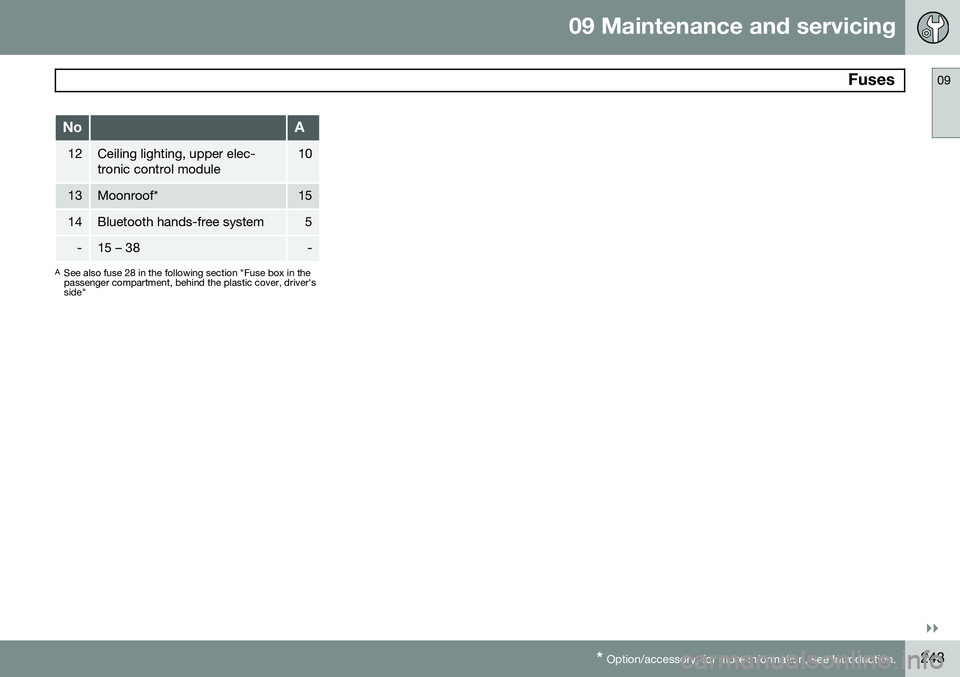
NoA
12Ceiling lighting, upper elec- tronic control module10
13Moonroof*15
14Bluetooth hands-free system5
-15 – 38-
A
See also fuse 28 in the following section "Fuse box in the passenger compartment, behind the plastic cover, driver'sside"
Page 252 of 308
250
Audio system overview......................................................................... 252
Audio system controls.......................................................................... 253
Radio functions.....................................................................................258SiriusXM™ satellite radio...................................................................... 263
Auxiliary equipment............................................................................... 267
CD player/changer................................................................................ 270
Menu structure......................................................................................273 Bluetooth ®
hands-free connection....................................................... 274
Page 257 of 308
10 Audio
Audio system controls
10
* Option/accessory, for more information, see Introduction.255
On/Off button
G027146
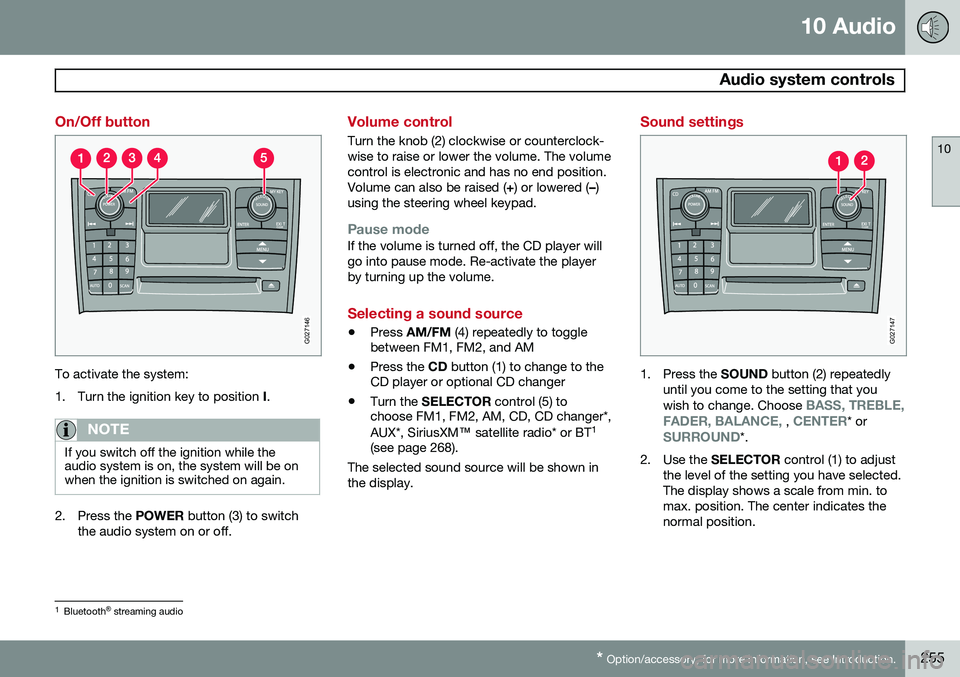
To activate the system:
1. Turn the ignition key to position I.
NOTE
If you switch off the ignition while the audio system is on, the system will be onwhen the ignition is switched on again.
2. Press the POWER button (3) to switch
the audio system on or off.
Volume control
Turn the knob (2) clockwise or counterclock- wise to raise or lower the volume. The volumecontrol is electronic and has no end position.Volume can also be raised ( +) or lowered ( –)
using the steering wheel keypad.
Pause modeIf the volume is turned off, the CD player will go into pause mode. Re-activate the playerby turning up the volume.
Selecting a sound source
• Press
AM/FM (4) repeatedly to toggle
between FM1, FM2, and AM
• Press the
CD button (1) to change to the
CD player or optional CD changer
• Turn the
SELECTOR control (5) to
choose FM1, FM2, AM, CD, CD changer*, AUX*, SiriusXM ™ satellite radio* or BT 1
(see page 268).
The selected sound source will be shown in the display.
Sound settings
G027147
1. Press the SOUND button (2) repeatedly
until you come to the setting that you wish to change. Choose
BASS, TREBLE,
FADER, BALANCE, , CENTER* orSURROUND*.
2. Use the SELECTOR control (1) to adjust
the level of the setting you have selected. The display shows a scale from min. tomax. position. The center indicates thenormal position.
1 Bluetooth ®
streaming audio
Page 270 of 308
10 Audio
Auxiliary equipment
10
268
2. Connect the iPod®, MP3 player or USB
flash drive to the USB connector (see the illustration). > The text
Loading will be displayed
while the system loads the files (folder structure) on the device. This may takea short time.
When the information has been loaded, infor-mation about the tracks on the device will bedisplayed. The
/ buttons can be used to fast
forward/reverse or change tracks:
• Press briefly to change tracks.
• Press slightly longer to fast forward/ reverse.
The arrow keys on the steering wheel keypad can also be used in the same way.
NOTE
• The system supports a number of iPod ®
models produced in 2005 or
later.
• In order to help avoid damage to the USB socket, it will be switched off ifthere is a short circuit or if the con-nected device uses too much current(which can happen if the device doesnot comply with the USB standard).The USB socket will reactivate thenext time the ignition is switched on ifthe problem no longer exists. If theproblem persists, contact a trainedand authorized Volvo service techni-cian.
USB flash driveTo simplify the use of a USB flash drive, it is advisable to only store music files on thedrive. It will take considerably longer for thesystem to index the files on the drive if it con-tains anything other than compatible musicfiles.
NOTE
• The system supports removable media that uses the USB 2.0 standard andthe FAT32 file system. It can index upto 1,000 folders and a maximum of254 sub-folders/files for each folder.However, the highest folder level cansupport up to 1,000 sub-folders/files.
• When using a longer type of USBdevice, connecting it with a USBadapter cable will help reducemechanical wear on the USB socketand on the device.
iPod®
An iPod ®
is charged and draws current if it is
connected to the USB connector. However, if the battery is completely discharged, it should be charged before the iPod ®
is con-
nected to the USB connector.
Bluetooth ®
streaming audio (BT)The vehicle's audio system is equipped withBluetooth ®
, which makes it possible to play
streaming audio files from a Bluetooth ®
con-
nected cell phone. Navigation and control of the phone can be done through the vehicle'scenter console control panel or the steeringwheel keypad. On certain cell phones, it is
Page 271 of 308
10 Audio
Auxiliary equipment
10
269
also possible to change tracks from the phone itself. In order to listen streaming audio,
BT must be
selected as a sound source (see page 255) and a Bluetooth ®
cell phone must be con-
nected (paired) with the audio system. See page 275 for more information.
NOTE
Any Bluetooth cell phones used must sup- port Audio/Video Remote Control Profile(AVRCP) and Advanced Audio DistributionProfile (A2DP). The phone must useAVRCP version 1.3 and A2DP 1.2. If olderversions of these standards are used, cer-tain features (e.g., scan or random) maynot function. Not all cell phones are fully compatible with the vehicle's Bluetooth system. A listof compatible phones is available at youVolvo retailer or at www.volvocars.us.
Listening to streaming audioTurn SELECTOR to select BT as the sound
source. The
/ buttons can be used to fast-
forward/back or change tracks: • Press briefly to change tracks.
• Press and hold to go fast-forward/back. The buttons in the steering wheel keypad can be used in the same way.
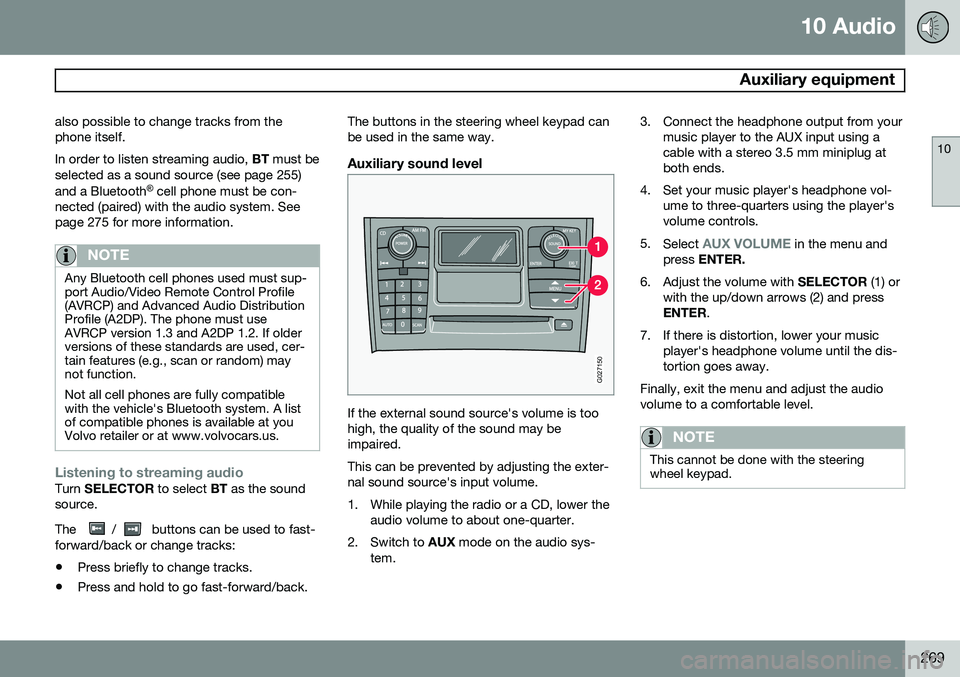
Auxiliary sound level
G027150
If the external sound source's volume is too high, the quality of the sound may beimpaired. This can be prevented by adjusting the exter- nal sound source's input volume.
1. While playing the radio or a CD, lower the
audio volume to about one-quarter.
2. Switch to AUX mode on the audio sys-
tem. 3. Connect the headphone output from your
music player to the AUX input using a cable with a stereo 3.5 mm miniplug atboth ends.
4. Set your music player's headphone vol- ume to three-quarters using the player'svolume controls.
5. Select
AUX VOLUME in the menu and
press ENTER.
6. Adjust the volume with SELECTOR (1) or
with the up/down arrows (2) and press ENTER .
7. If there is distortion, lower your music player's headphone volume until the dis-tortion goes away.
Finally, exit the menu and adjust the audiovolume to a comfortable level.
NOTE
This cannot be done with the steering wheel keypad.
Page 276 of 308
10 Audio
Bluetooth®
hands-free connection
10
274
Introduction
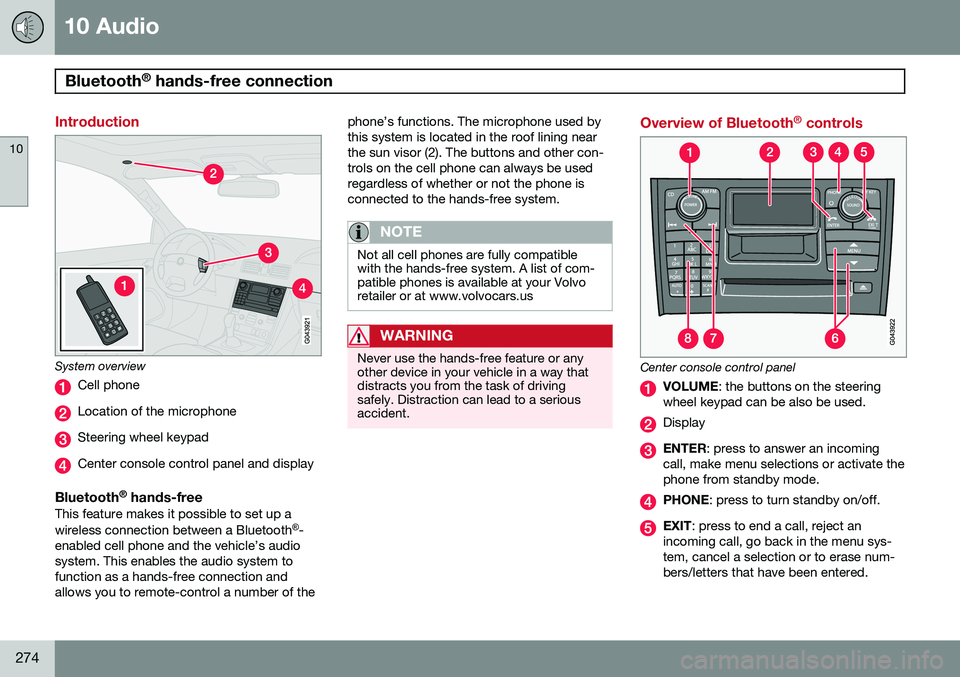
System overview
Cell phone
Location of the microphone
Steering wheel keypad
Center console control panel and display
Bluetooth ®
hands-freeThis feature makes it possible to set up a wireless connection between a Bluetooth ®
-
enabled cell phone and the vehicle’s audio system. This enables the audio system tofunction as a hands-free connection andallows you to remote-control a number of the phone’s functions. The microphone used bythis system is located in the roof lining nearthe sun visor (2). The buttons and other con-trols on the cell phone can always be usedregardless of whether or not the phone isconnected to the hands-free system.
NOTE
Not all cell phones are fully compatible with the hands-free system. A list of com-patible phones is available at your Volvoretailer or at www.volvocars.us
WARNING
Never use the hands-free feature or any other device in your vehicle in a way thatdistracts you from the task of drivingsafely. Distraction can lead to a seriousaccident.
Overview of Bluetooth
®
controls
Center console control panel
VOLUME : the buttons on the steering
wheel keypad can be also be used.
Display
ENTER : press to answer an incoming
call, make menu selections or activate the phone from standby mode.
PHONE : press to turn standby on/off.
EXIT: press to end a call, reject an
incoming call, go back in the menu sys- tem, cancel a selection or to erase num-bers/letters that have been entered.
Page 277 of 308
10 Audio
Bluetooth®
hands-free connection
10
}}
275
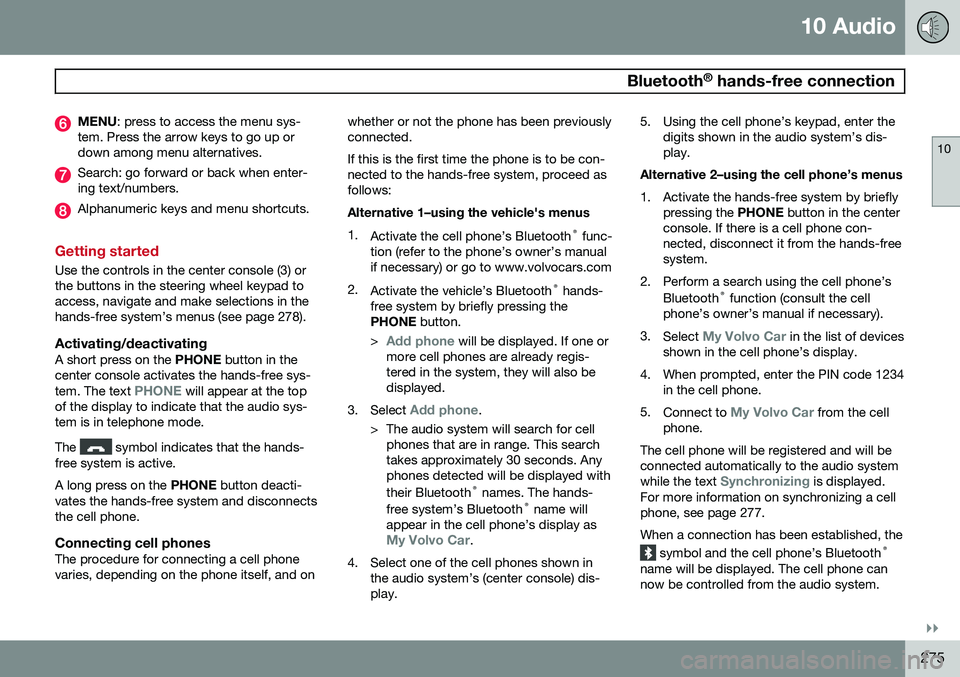
MENU : press to access the menu sys-
tem. Press the arrow keys to go up or down among menu alternatives.
Search: go forward or back when enter- ing text/numbers.
Alphanumeric keys and menu shortcuts.
Getting started
Use the controls in the center console (3) or the buttons in the steering wheel keypad toaccess, navigate and make selections in thehands-free system’s menus (see page 278).
Activating/deactivatingA short press on the PHONE button in the
center console activates the hands-free sys- tem. The text
PHONE will appear at the top
of the display to indicate that the audio sys- tem is in telephone mode. The
symbol indicates that the hands-
free system is active. A long press on the PHONE button deacti-
vates the hands-free system and disconnects the cell phone.
Connecting cell phonesThe procedure for connecting a cell phonevaries, depending on the phone itself, and on whether or not the phone has been previouslyconnected. If this is the first time the phone is to be con- nected to the hands-free system, proceed asfollows: Alternative 1–using the vehicle's menus 1.
Activate the cell phone’s Bluetooth ®
func-
tion (refer to the phone’s owner’s manual if necessary) or go to www.volvocars.com
2. Activate the vehicle’s Bluetooth ®
hands-
free system by briefly pressing thePHONE button.
>
Add phone will be displayed. If one or
more cell phones are already regis- tered in the system, they will also bedisplayed.
3. Select
Add phone.
> The audio system will search for cell phones that are in range. This search takes approximately 30 seconds. Anyphones detected will be displayed with their Bluetooth ®
names. The hands-
free system’s Bluetooth ®
name will
appear in the cell phone’s display as
My Volvo Car.
4. Select one of the cell phones shown in the audio system’s (center console) dis- play. 5. Using the cell phone’s keypad, enter the
digits shown in the audio system’s dis-play.
Alternative 2–using the cell phone’s menus
1. Activate the hands-free system by briefly pressing the PHONE button in the center
console. If there is a cell phone con- nected, disconnect it from the hands-freesystem.
2. Perform a search using the cell phone’s Bluetooth ®
function (consult the cell
phone’s owner’s manual if necessary).
3. Select
My Volvo Car in the list of devices
shown in the cell phone’s display.
4. When prompted, enter the PIN code 1234 in the cell phone.
5. Connect to
My Volvo Car from the cell
phone.
The cell phone will be registered and will be connected automatically to the audio system while the text
Synchronizing is displayed.
For more information on synchronizing a cell phone, see page 277. When a connection has been established, the
symbol and the cell phone’s Bluetooth ®
name will be displayed. The cell phone can now be controlled from the audio system.
Page 278 of 308
10 Audio
Bluetooth®
hands-free connection
10
276
Making a call1. Ensure that Phone is shown at the top of
the center console display and that the
symbol is visible (by pressing briefly
on PHONE on the center console).
2. Dial the desired phone number or use the phone book (see page 277).
3. Press ENTER.
End the call by pressing EXIT.
Disconnecting the cell phoneThe cell phone is automatically disconnected from the audio system if it is moved out ofrange. For more information about connec-tions, see page 275. The cell phone can be manually disconnected from the hands-free system by pressingPHONE. The hands-free system is also deac-
tivated when the ignition is switched off. When the cell phone is disconnected from the hands-free system, a call in progress can becontinued using the cell phone’s own speakerand microphone.
NOTE
Certain cell phones may require confirma- tion from the phone’s keypad when a callis transferred from hands-free to the cellphone.
Handling calls
Incoming calls–Press ENTER to answer a call, even if the
audio system is currently in e.g., CD or FM mode.
–Press EXIT to reject a call.
Automatic answerThis function means that incoming calls will be answered automatically. Activate or deac-tivate the function in the menu system under
PHONE MENUCALL OPTIONSAuto.
answer.
Call settingsWhile a call is in progress, press MENU or
ENTER on the center console to access the
following functions:
•
Mute microphone: mute the audio sys-
tem’s microphone.
•
Transf call to cell: transfer the call from
hands-free to the cell phone.
•
Phone book: this feature enables you to
search for a stored telephone number.
NOTE
• On certain cell phones, the connection is broken when the mute function isused, which is normal. If this happens,the hands-free system will prompt youto reconnect.
• A new call cannot be initiated whileanother call is in progress.
Sound settings
Call volumeCall volume can be adjusted while a call is in progress using the buttons in the steeringwheel keypad.
Audio system volumeWhen
PHONE is displayed, volume for the
audio system can be adjusted in the normalway with the audio system's VOLUME con-
trol. In order to adjust volume during a phonecall, the audio system must be switched toone of the other modes (FM, CD, etc). Audio system sound can be automatically muted when a phone call is received in
PHONE MENUPHONE SETTINGS
SOUNDS AND VOLUMEMute radio
and adjust the volume with the / keys
on the center console.
Page 279 of 308
10 Audio
Bluetooth®
hands-free connection
10
277
Ringing volume
Go to PHONE MENUPHONE SETTINGS
SOUNDS AND VOLUMERing volume
and adjust the volume with the / keys
on the center console.
Ringing tonesThe hands-free system’s integrated ringing tones can be selected in
PHONE MENU
PHONE SETTINGSSOUNDS AND
VOLUME
Ring signalsRing signal 1,
etc.
NOTE
The connected cell phone’s ring tone may not be switched off when one of thehands-free system's ringing tones is used.
If you prefer to use the connected cell phone’s ring tone 1
, go to
PHONE MENU
PHONE SETTINGSSOUNDS AND
VOLUME
Ring signalsUse cell phone
signal
More information about registering and connecting cell phones
A maximum of 5 cell phones can be regis- tered in the hands-free system. Registrationonly needs to be done once for each phone.After registration, the cell phones can then befound in the list of registered phones. Onlyone cell phone can be connected to hands-free at a time. Phones can be unregistered in
PHONE MENUBLUETOOTHRemove
phone.
Automatic connectionWhen the hands-free system is active and the most recently connected cell phone is withinrange, it is detected automatically. When theaudio system searches for the most recentlyconnected phone, this phone’s name appearsin the display. To manually connect a differentcell phone, press EXIT.
Manual connectionTo connect a phone other than the one thatwas most recently connected or to switchbetween cell phones that are already regis-tered in the hands-free system: Put the audio system in telephone mode (
Phone) and follow the instructions in the dis-
play or change the connected cell by going into the menu system under
PHONE MENU
BLUETOOTHChange phoneAdd
phone.
Phone book
In order to use the hands-free system’s phone book (list of contacts), PHONE must
be displayed at the top of the center console display and the
symbol must be visible.
The audio system stores a copy of the phone book of each registered cell phone. Thephone book is automatically copied each timea phone is connected. This function can be activated in
PHONE SETTINGSSync ph
book. Searches for contacts are only made in
the phone book of the currently connected cell phone.
NOTE
If a particular cell phone does not support copying of the phone book, List is emptywill be displayed when copying has been completed.
If the phone book contains information about someone who is trying to call you, this infor-mation will be shown in the display.
1 Not supported by all cell phones.