light VOLVO XC90 2015 Owners Manual
[x] Cancel search | Manufacturer: VOLVO, Model Year: 2015, Model line: XC90, Model: VOLVO XC90 2015Pages: 570, PDF Size: 12.44 MB
Page 288 of 570
DRIVER SUPPORT
* Option/accessory, for more information, see Introduction.
286
ASL symbolA road sign symbol (next to the stored speed in the center of the speedome-ter) can be displayed in three differentcolors as explained in the following
table:
Road sign sym-
bol's colorExplanation
Green/yellowASL is active
GrayASL is in standby mode
Amber/orangeASL is temporarily in standby mode (e.g., becausea speed limit sign could notbe read)
LimitationsAdjusting a set speed is done first when the vehi- cle passes a speed limit sign. If a speed limit signcannot be read (e.g., because it is twisted, dam-aged, faded, dirty, covered by snow, etc.) ASL willgo into standby mode because the system willnot have "seen" the speed posted on the sign(SL will activate). The driver will have to react andadapt the vehicle's speed. ASL will reactivatewhen the vehicle passes a speed limit sign thatthe system can read.
Related information
• Speed limiter (SL)
* (p. 283)
• Activating/deactivating the Automatic Speed Limiter (ASL)
* (p. 286)
• Changing tolerance for the Automatic Speed Limiter (p. 287)
• Starting and activating the Speed Limiter (SL)
* (p. 284)
• Deactivating/reactivating the Speed Limiter
*
(p. 288)
• Road Sign Information (RSI)
* (p. 290)
Activating/deactivating the Automatic Speed Limiter (ASL) *
ASL is activated/deactivated in the center display's Functionview.
Activating1.
If SL is not activated, tap the Speed Sign
Assist
button 1
in the center display's Func-
tion view.
> ASL will go into standby mode and a green indicator light in the button will illu- minate. A road sign symbol will be dis-played in center of the speedometer.
2. Press the
button on the left-side steer-
ing wheel keypad.
> ASL will be activated with the vehicle's current speed.
1If this button is tapped while SL is activated, ASL will immediately begin reading road signs.
Page 294 of 570

DRIVER SUPPORT
* Option/accessory, for more information, see Introduction.
292
Park Assist *
The Park Assist system is designed to assist you
when driving into parking spaces, garages, etc. An audible signal and symbols in the instrumentpanel and center display indicate the distance tothe object.
Display view showing object zones and sensor sectors
The center display shows an overview of the vehi- cle in relation to objects that have been detected. The highlighted sector shows which of the sen- sors has detected the object. The closer the vehi-cle symbol is to the highlighted sector, the closerthe actual object is to your vehicle. The Park Assist system uses an intermittent tone that pulses faster as you come closer to anobject. Sound from the infotainment system willbe temporarily turned down. The tone becomes constant when you are withinapproximately 1 ft (30 cm) of an object and theactive sensor fields will be completely filled in. Ifthere are objects within this distance both behindand in front of the vehicle, the tone alternatesbetween front and rear speakers. While an audible signal is being given, its volume level can be raised/lowered using the
>II control
in the center console.
WARNING
Park Assist is an information system, NOT a safety system. This system is designed to bea supplementary aid when parking the vehicle.It is not, however, intended to replace the driv-er's attention and judgement.
Rear park assist
The system's rear sensors are activated automat- ically when the engine is started and are active ifthe vehicle rolls rearward with the gear selector in N or if R has been selected.
The distance monitored behind the vehicle is approximately 5 ft (1.5 m). The audible signalcomes from the rear speakers. The rear sensors will be deactivated automatically when towing a trailer if Volvo genuine trailer wir-ing is used. If a non-Volvo trailer hitch is beingused, it may be necessary to switch off the sys-tem manually.
Side park assist
The system's side sensors are activated automat- ically when the engine is started and are active atspeeds below approximately 6 mph (10 km/h).
Page 295 of 570

DRIVER SUPPORT
* Option/accessory, for more information, see Introduction.293
The distance monitored along the sides of the vehicle is approximately 1 ft (0.3 m). The audiblesignal comes from the side speakers.
Front park assist
The system's front sensors are activated auto- matically when the engine is started and areactive at speeds below approximately 6 mph(10 km/h). The distance monitored in front of the vehicle is approximately 2.5 ft (0.8 m). The audible signalcomes from the front speakers. Front Park Assist is deactivated if the driver presses the brake pedal or if the gear selector is put in
P.
When installing auxiliary headlights, be sure that they do not obstruct the front sensors. Otherwise,these lights could trigger a Park Assist warning.
Related information
• Activating/deactivating Park Assist (p. 293)
• Park Assist limitations (p. 294)
• Park assist symbols and messages (p. 295)
Activating/deactivating Park Assist
The Park Assist system can be turned on or off.
On/OffPark Assist's front and side sensors are activated automatically when the engine is started. Therear sensors activate if the vehicle rolls rearward in N or if P is selected.
This function can be activated/ deactivated in the center dis-play's Function view.
–Tap the Park Assist button.
> Green indicator: the function is active. Gray indicator: the function is deactivated.
Related information
• Park Assist
* (p. 292)
• Park Assist limitations (p. 294)
• Park assist symbols and messages (p. 295)
Page 303 of 570
DRIVER SUPPORT
* Option/accessory, for more information, see Introduction.301
•
With
360° view selected, objects/obstacles
may not be detected at the edges of the indi- vidual cameras' fields of vision.
• A crossed-out camera icon means that thecamera is not functioning properly.
Ambient lightingThe camera images are adjusted automatically to the ambient light, which means the image mayvary slightly in terms of light and quality. Poorambient lighting may reduce the quality of theimage.
Maintenance
• Keep the camera's lens free of dirt, ice and snow. This is particularly important in poorambient lighting conditions.
• Remove dirt, ice and snow carefully to avoidscratching the lenses.
• Clean the lens regularly with warm water anda suitable car washing detergent.
Related information
•
Park Assist Camera (PAC)
* (p. 296)
Park Assist Pilot (PAP) *
Park Assist Pilot (PAP) helps the driver drive into and leave parking spaces.
Park Assist Pilot (PAP) provides assistance when parking by measuring the parking space andturning the steering wheel to guide the vehicleinto the space. Information about the actions required by the driver is provided in the center display in the formof symbols, images and text.
NOTE
The driver's task is to follow the instructions, select a gear ( D or R), regulate the vehicle's
speed, apply the brakes when necessary and stop.
Types of parking
Parallel parking
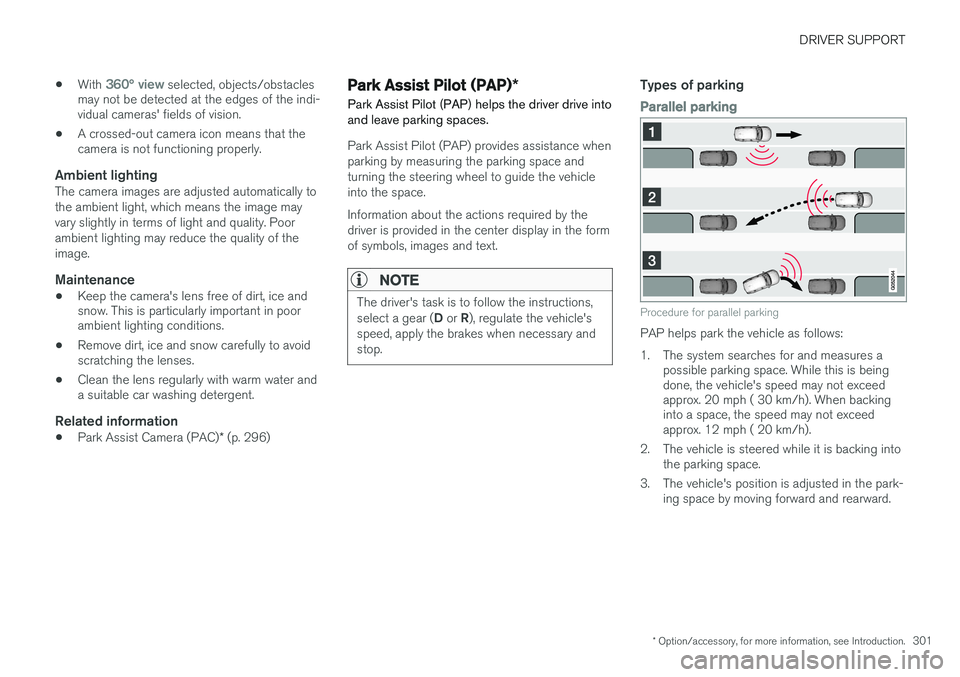
Procedure for parallel parking
PAP helps park the vehicle as follows:
1. The system searches for and measures a possible parking space. While this is being done, the vehicle's speed may not exceedapprox. 20 mph ( 30 km/h). When backinginto a space, the speed may not exceedapprox. 12 mph ( 20 km/h).
2. The vehicle is steered while it is backing into the parking space.
3. The vehicle's position is adjusted in the park- ing space by moving forward and rearward.
Page 306 of 570

DRIVER SUPPORT
304When the vehicle is backing up, PAP will steer it into the parking space. Do as follows:
1. Check that the area behind the vehicle is
clear and put the gear selector in R.
2. Back up slowly without moving the steering wheel. The vehicle's speed must be below approximately 4 mph 7 km/h.
3. Keep an eye on the instrument panel and be prepared to stop the vehicle when you areinstructed by PAP to do so.
NOTE
• Release the wheel while PAP is steering the vehicle.
• The steering wheel must be able to turnfreely.
• For PAP to function optimally, wait untilthe steering wheel is no longer turningbefore beginning the next phase of theparking procedure.
3: Adjusting the vehicle's position
Parallel
Perpendicular
After the vehicle has backed into the parking space, its position in the space has to be adjusted by driving slightly forward and backingup. 1.
Put the gear selector in D, wait until the
steering wheel has turned and drive forward slowly.
2. Stop the vehicle when you are instructed by PAP to do so.
3. Put the gear selector in R, back up slowly
and stop when you are instructed by PAP todo so.
When the parking procedure is finished (this will be indicated by a text message and a graphicimage), PAP switches off automatically. If neces-sary, the driver may need to make minor adjust-ments to ensure that the vehicle is parked cor-rectly.
CAUTION
The warning distance is shorter when PAP is using the sensors than when Park Assist isusing them.
Leaving a parking spaceThis function can only be used for a vehicle that has been par-allel parked and is activated inthe center display's Functionview. 1. Tap the
Park out button in
the center display's Function view.
Page 307 of 570
DRIVER SUPPORT
* Option/accessory, for more information, see Introduction.305
2. Follow the instructions provided. The proce- dure is the same as when parking the vehicle. The steering wheel may turn back slightly when the function is completed and the driver mayhave to turn the back before leaving the parkingspace. If PAP determines that the driver can leave the parking space without assistance, the functionwill deactivate before the vehicle is completelyout of the space.
Related information
•
Park Assist Pilot (PAP)
* (p. 301)
• Park Assist Pilot (PAP)
* limitations (p. 305)
• Park Assist Pilot (PAP)
* symbols and mes-
sages (p. 307)
Park Assist Pilot (PAP) * limitations
The PAP function may be limited in certain situa- tions.
The PAP parking sequence is cancelledA parking sequence will be cancelled:
• if the vehicle is driven too fast (above approx. 4 mph (7 km/h)
• if the driver taps
Cancel in the center display
• if the driver touches the steering wheel
• if the anti-lock brakes or Electronic Stability Control are activated (e.g., if a wheel beginsto spin or lose traction)
In such cases, a text message will explain why the parking sequence was cancelled.
NOTE
• PAP will not function correctly if its sen- sors are obstructed by dirt, snow, etc.
• In certain situations, PAP may not be ableto measure a parking space. This couldbe due to external sources of sound (e.g.,a vehicle's horn, tires on wet asphalt,pneumatic brakes, noise from a motorcy-cle's exhaust, etc.) emitting ultrasoundusing approximately the same frequen-cies as PAP.
Points to keep in mindPAP is a parking aid only and the driver should always be prepared to take control and cancel aparking sequence. This can be due to one ormore of the following factors:
• PAP's function is based on the way that the vehicles are parked behind and in front ofyour parking space. If they are, for example,parked too close to the curb, there is a riskthat your vehicle's tires or wheel rims couldbe damaged by the curb during the parkingprocedure.
• PAP is intended to provide parking assis-tance on straight streets, not sections ofstreet with curved or irregular curbs. Be surethat your vehicle is parallel to the curb whenPAP measures the parking space.
• PAP may not be able to provide parkingassistance on narrow streets due to lack ofspace to maneuver the vehicle. In situationslike this, it may help to drive as close to theside of the road as possible where the park-ing space is located.
• Use only approved tires with the correct infla-tion pressure because this affects PAP'scapacity to provide parking assistance.Changing to a different approved tire sizemay affect PAP's parameters. Consult atrained and qualified Volvo service technician.
• Heavy rain or snow may inhibit PAP'scapacity to correctly measure a parkingspace.
Page 310 of 570

DRIVER SUPPORT
* Option/accessory, for more information, see Introduction.
308
Adjustable steering force *
Steering force increases with the speed of the vehicle to give the driver an enhanced sense ofcontrol and stability. At low speed the vehicle iseasier to steer in order to facilitate parking, etc.
Changing the steering force level1.
Tap Settings in the center display's Top
view.
2. Tap
My CarDrive ModeSteering
force.
3. Select
Low, Medium or High to set the
desired level.
NOTE
• This steering force level menu function cannot be accessed when the vehicle isin motion.
• In certain situations, the power steeringfunction may become too hot and mustbe temporarily cooled. During cooling,power steering effect will be reduced andmore force may be necessary to turn thesteering wheel and a message will bedisplayed in the instrument panel.
Related information
•
Driver support systems (p. 240)
Electronic Stability Control (ESC)
Electronic Stability Control (ESC) helps reduce wheel spin, counteract skidding and to generallyhelp improve directional stability.
A pulsating sound will be audi- ble when the system is activelyoperating and is normal. Accel-eration may also be slightlyslower than normal.
WARNING
ESC is a supplementary aid and cannot deal with all situations or road conditions. The driver is always responsible for operating the vehicle in a safe manner in accordancewith current traffic regulations.
ESC consists of the following functions: • Traction control
• Spin control
• Active Yaw Control
• Engine Drag Control
• Trailer Stability Assist
Traction controlThis function is designed to help reduce wheel spin by transferring power from a drive wheel that begins to lose traction to the wheel on the oppo-site side of the vehicle (on the same axle).
Spin controlThis function is designed to help prevent thedrive wheels from spinning while the vehicle isaccelerating.
Active Yaw ControlAt low speeds, this function helps maintain direc-tional stability by braking one or more of thewheels if the vehicle shows a tendency to skid orslide laterally.
Engine Drag Control EDCEDC helps keep the engine running if the wheelsshow a tendency to lock, e.g., when shifting downin the manual shifting mode or while using theengine's braking function on a slippery surface. Ifthe wheels were to lock, the vehicle wouldbecome more difficult to steer.
Trailer Stability Assist
*7TSA helps stabilize a vehicle that is towing atrailer when the vehicle and trailer have begun tosway. This system is automatically deactivated if the driver selects
Sport mode.
Related information
•Detachable trailer hitch (p. 353)
• Driving with a trailer (p. 351)
7
This function is included if the vehicle is equipped with a Volvo original trailer hitch.
Page 311 of 570
DRIVER SUPPORT
309
•
Trailer Stability Assist (TSA) (p. 354)
• Electronic Stability Control (ESC) sport mode (p. 309)
• Electronic Stability Control (ESC) symbolsand messages (p. 310)
Electronic Stability Control (ESC) sport mode
ESC is always activated and cannot be switched off.
However, the driver can select Sport mode,
which offers more active driving characteristics. In Sport mode, the engine management system
monitors movement of the accelerator pedal and steering wheel for sportier driving and allowsmore lateral movement of the rear wheels beforeESC is triggered. Under certain circumstances, such as when driv- ing with snow chains, or driving in deep snow orloose sand, it may be advisable to temporarily use Sport mode for maximum tractive force.
If the driver releases pressure on the accelerator pedal, ETC will also activate to help stabilize thevehicle.
Activating/deactivating Sport modeIn the center display's Function view, tap ESC Sport Mode.
The green indicator light in the button will illuminate to showthat the function has been acti-vated or gray when the functionis deactivated.
When Sport mode is activated, this
symbol will illuminate in the instrument panel. It will remain on until the driverdeactivates the function. ETC will also
return to normal mode when the engine is restar-ted.
Related information
• Electronic Stability Control (ESC) (p. 308)
Page 316 of 570
DRIVER SUPPORT
* Option/accessory, for more information, see Introduction.
314
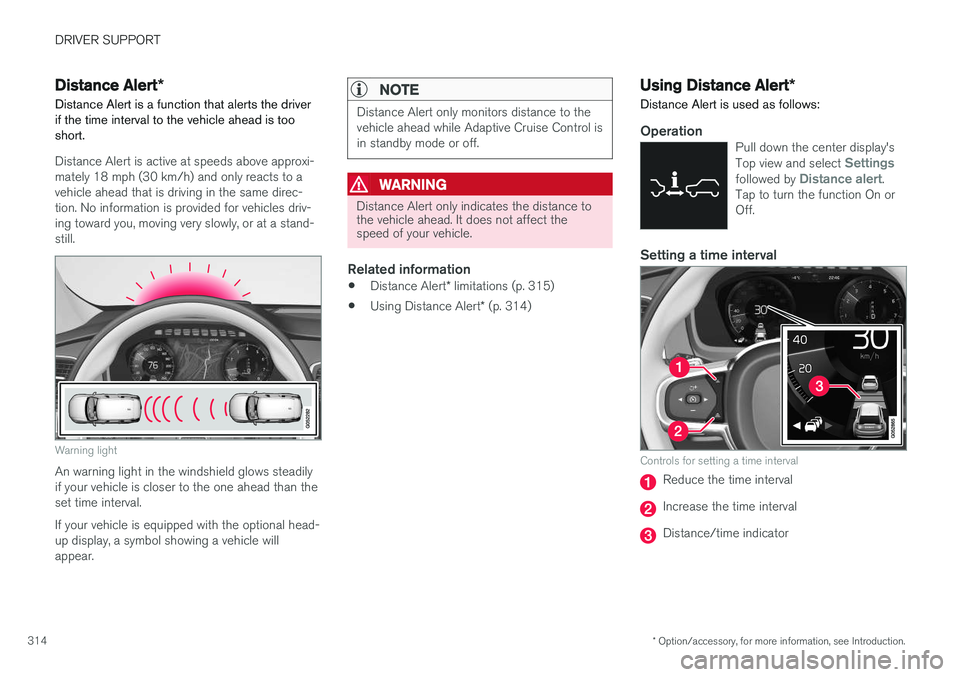
Distance Alert *
Distance Alert is a function that alerts the driver if the time interval to the vehicle ahead is too short.
Distance Alert is active at speeds above approxi- mately 18 mph (30 km/h) and only reacts to avehicle ahead that is driving in the same direc-tion. No information is provided for vehicles driv-ing toward you, moving very slowly, or at a stand-still.
Warning light
An warning light in the windshield glows steadily if your vehicle is closer to the one ahead than theset time interval. If your vehicle is equipped with the optional head- up display, a symbol showing a vehicle willappear.
NOTE
Distance Alert only monitors distance to the vehicle ahead while Adaptive Cruise Control isin standby mode or off.
WARNING
Distance Alert only indicates the distance to the vehicle ahead. It does not affect thespeed of your vehicle.
Related information
• Distance Alert
* limitations (p. 315)
• Using Distance Alert
* (p. 314)
Using Distance Alert *
Distance Alert is used as follows:
OperationPull down the center display's Top view and select Settingsfollowed by Distance alert.
Tap to turn the function On or Off.
Setting a time interval
Controls for setting a time interval
Reduce the time interval
Increase the time interval
Distance/time indicator
Page 317 of 570

DRIVER SUPPORT
* Option/accessory, for more information, see Introduction.315
Different time intervals to the vehicle ahead can be selectedand are shown in the instru-ment panel as 1–5 horizontalbars. The greater the number ofbars, the longer the time inter-val.
One bar between the vehicles represents a timeinterval of approximately 1 second; 5 bars isapproximately 3 seconds. The same symbol appears if Adaptive Cruise Control is activated.
NOTE
• The greater the vehicles' speed, the greater the
distance between them for a
set time interval.
• The set time interval is also used by Adaptive Cruise Control
*.
• Only use time intervals permitted by local traffic regulations.
Related information
•
Distance Alert
* (p. 314)
Distance Alert * limitations
Distance Alert uses the same radar sensor as Adaptive Cruise Control * and has several limita-
tions.
WARNING
• The radar sensor has a limited field of vision. In some situations it may detect avehicle later than expected or not detectother vehicles at all.
• The radar sensor cannot cover all drivingsituations and traffic, weather and roadconditions.
• The driver is responsible for maintaining asafe distance and speed and must inter-vene if the various driver support systemsdo not maintain a suitable speed or suita-ble distance to the vehicle ahead.
• Maintenance of radar sensor componentsmay only be performed by a trained andqualified Volvo technician.
• Strong sunlight, reflections from the roadsurface, strong lighting contrasts or usingsunglasses may make the warning light inthe windshield difficult to see.
For additional information, see also the article "Radar sensor limitations."
Related information
• Radar sensor limitations (p. 245)
• Distance Alert
* (p. 314)
Blind Spot Information (BLIS) *
Blind Spot Information is a system designed to alert the driver to the presence of other vehiclesmoving in the same direction as your vehicle onroads with several lanes.
Blind Spot Information is a driving aid intended to:
• detect other vehicles in your door mirrors' "blind area"
• detect vehicles that are about to pass yourvehicle or are approaching your vehiclequickly from behind in the left and/or rightlanes
WARNING
•
Blind Spot Information is an information system, NOT a warning or safety systemand does not function in all situations.
• Blind Spot Information does not eliminatethe need for you to visually confirm theconditions around you, and the need foryou to turn your head and shoulders tomake sure that you can safely changelanes or back up.
• As the driver, you have full responsibilityfor changing lanes/backing up in a safemanner.