lock VOLVO XC90 2015 Owners Manual
[x] Cancel search | Manufacturer: VOLVO, Model Year: 2015, Model line: XC90, Model: VOLVO XC90 2015Pages: 570, PDF Size: 12.44 MB
Page 479 of 570

WHEELS AND TIRES
* Option/accessory, for more information, see Introduction.477
WARNING
Current legislation prohibits the use of the "Temporary Spare" tire other than as a tem-porary replacement for a punctured tire. Itmust be replaced as soon as possible by astandard tire. Road holding and handling maybe affected with the "Temporary Spare" inuse. Do not exceed 50 mph (80 km/h).
CAUTION
The vehicle must not be driven with wheels of different dimensions or with a spare tire otherthan the one that came with the vehicle. Theuse of different size wheels can seriouslydamage your car's transmission.
CAUTION
The vehicle must never be driven with more than one temporary spare wheel.
The spare tire is located under the floor of the cargo compartment. A retaining bolt holds thespare tire and foam block containing tools inplace.
Accessing the spare tire1. Lift the rear edge of the cargo compartment
floor.
2. Unscrew the retaining bolt.
3. Lift out the foam block holding the tools. 4. Lift out the spare tire.
Related information
•
Changing tires (p. 475)
• Removing a wheel (p. 478)
• Wheel bolts (p. 477)
• Checking tire inflation pressure (p. 473)
Wheel bolts
The wheel bolts hold the wheel in place.
CAUTION
Wheel bolts should be tightened to 103 ft. lbs. (140 Nm). Over-tightening could damagethe threads.
Only use wheels/rims that have been tested and approved by Volvo and are included in Volvo'sproduct range. Use a torque wrench to checkthat the wheel bolts are tightened correctly.
Locking wheel bolts *A tool for removing locking wheel bolts can befound in the foam block under the cargo com-partment floor.
Related information
•Changing tires (p. 475)
• Installing a wheel (p. 479)
Page 480 of 570

WHEELS AND TIRES
* Option/accessory, for more information, see Introduction.
478
Removing a wheel
Wheel changes should always be carried out correctly.
1. Turn on the hazard warning flashers if the wheel change has to be done near passing traffic.
2. Apply the parking brake and put the gear selector in P.
CAUTION
Models with suspension and level con- trol *:
Turn this function off before raising the vehi- cle. To do so, go to
SettingsVehicleDisable Suspension & Leveling Control in
the center display's Top view.
WARNING
• The jack must correctly engage the jack attachment.
• Be sure the jack is on a firm, level, non-slippery surface.
• Never allow any part of your body to beextended under a vehicle supported by ajack.
• Use the jack intended for the vehicle whenchanging a tire. For any other job, usestands to support the vehicle.
• Apply the parking brake and put the gear selector in the Park (
P) position.
• Block the wheels standing on the ground, use rigid wooden blocks or large stones.
• The jack should be kept well-greased andclean, and should not be damaged.
• No objects should be placed between thebase of jack and the ground, or betweenthe jack and the attachment bar on thevehicle.
NOTE
The jack provided with your vehicle is intended to be used only in temporary situa-tions such as changing wheels in the event ofa flat tire. Only the jack that came with yourparticular model should be used to lift thevehicle. If the vehicle needs to be lifted morefrequently or for a prolonged period, using agarage jack or hoist is recommended. Alwaysfollow this device
Page 481 of 570

WHEELS AND TIRES
479
5.
Lug wrench and towing eyelet
Screw the towing eyelet into the lug wrench as shown in the illustration.
CAUTION
The towing eyelet must be screwed into the lug wrench as far as possible.
6. With the vehicle still on the ground, use the
lug wrench/towing eyelet to loosen the wheel bolts ½ – 1 turn by exerting downward(counterclockwise) pressure. 7. When hoisting the vehicle, it is essential that
the jack (or garage lift arms) are positionedcorrectly on the underside of the vehicle.There are two jack attachment points oneach side of the vehicle and there is a groovein the plastic cover at each attachment point.Position the jack under the attachment pointto be used on a level, firm, non-slippery sur-face and crank it up until it is correctlyaligned and seated in the attachment point.The pin on the jack's head must be posi-tioned in the hole in the attachment point.
8. Raise the vehicle until the wheel to bechanged is lifted off the ground. Remove the wheel bolts.
Related information
• Wheel bolts (p. 477)
• Installing a wheel (p. 479)
• Jack (p. 476)
Installing a wheel
It is important to install wheels properly.
1. Clean the contact surfaces on the wheel and hub.
2. Lift the wheel and place it on the hub.
3. Install the wheel bolts and tighten hand-tight. Using the lug wrench, tighten crosswise until all bolts are snug.
4. Lower the vehicle to the ground and alter- nately tighten the bolts crosswise to103 ft. lbs. (140 Nm).
5. Press the plastic covers onto the wheel bolts.
Page 514 of 570
MAINTENANCE AND SERVICING
512
Removing the rectangular headlight cover
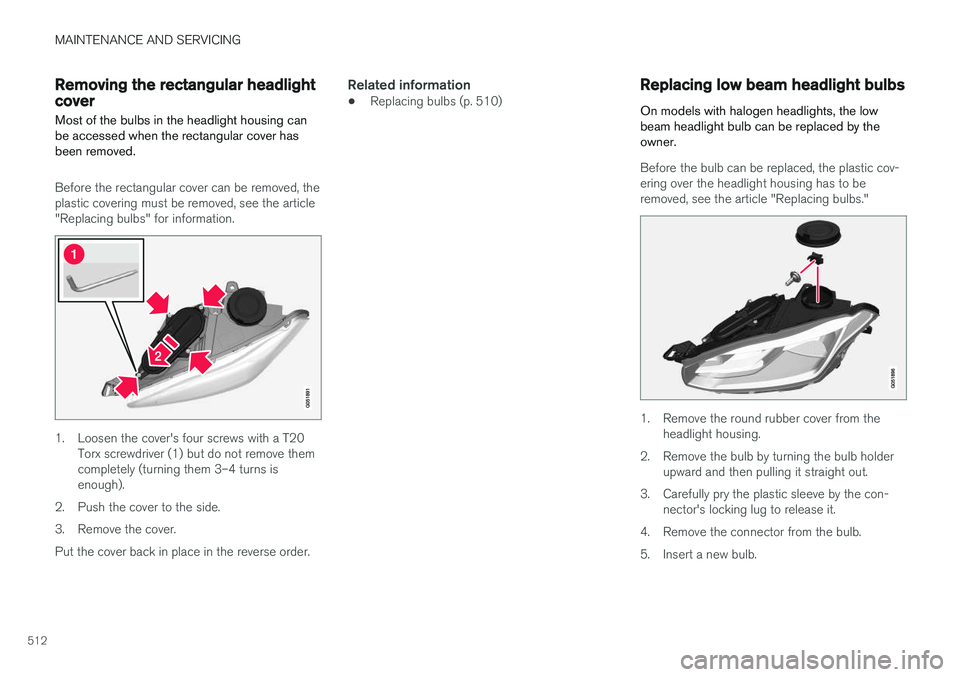
Most of the bulbs in the headlight housing can be accessed when the rectangular cover hasbeen removed.
Before the rectangular cover can be removed, the plastic covering must be removed, see the article"Replacing bulbs" for information.
1. Loosen the cover's four screws with a T20 Torx screwdriver (1) but do not remove them completely (turning them 3–4 turns isenough).
2. Push the cover to the side.
3. Remove the cover.Put the cover back in place in the reverse order.
Related information
• Replacing bulbs (p. 510)
Replacing low beam headlight bulbs
On models with halogen headlights, the low beam headlight bulb can be replaced by theowner.
Before the bulb can be replaced, the plastic cov- ering over the headlight housing has to be removed, see the article "Replacing bulbs."
1. Remove the round rubber cover from the headlight housing.
2. Remove the bulb by turning the bulb holder upward and then pulling it straight out.
3. Carefully pry the plastic sleeve by the con- nector's locking lug to release it.
4. Remove the connector from the bulb.
5. Insert a new bulb.
Page 515 of 570
MAINTENANCE AND SERVICING
513
6. Insert the bulb in the socket and turn down-
ward. It can only be inserted in one way.
7. Put the rubber cover back into place.
Related information
• Replacing bulbs (p. 510)
• Bulb specifications (p. 515)
Replacing High Beam headlight bulbs
On models with halogen headlights, the High Beam headlight bulb can be replaced by theowner.
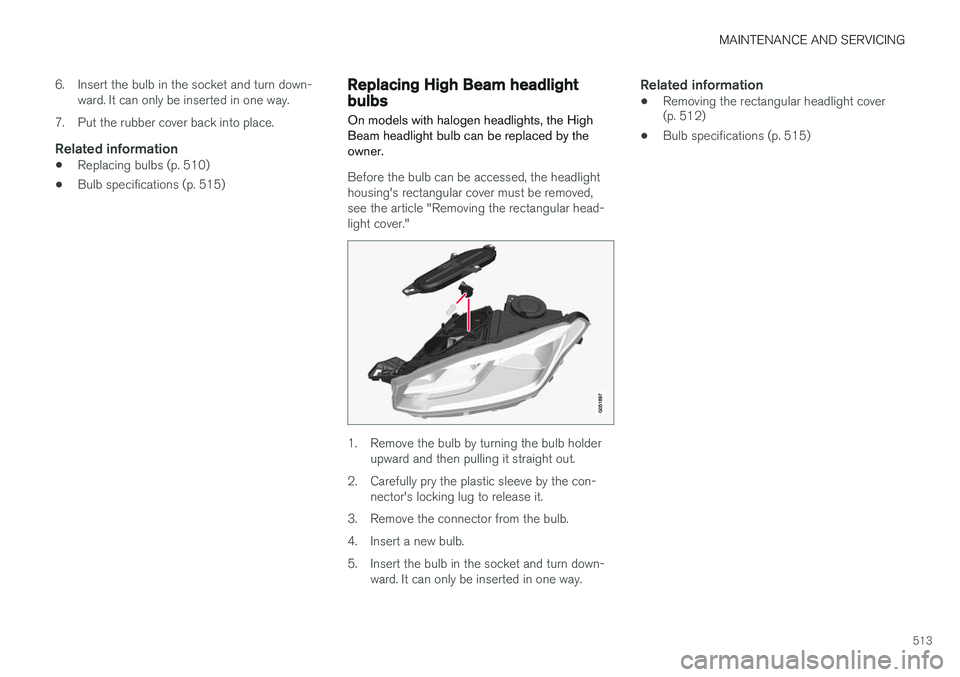
Before the bulb can be accessed, the headlight housing's rectangular cover must be removed,see the article "Removing the rectangular head-light cover."
1. Remove the bulb by turning the bulb holder upward and then pulling it straight out.
2. Carefully pry the plastic sleeve by the con- nector's locking lug to release it.
3. Remove the connector from the bulb.
4. Insert a new bulb.
5. Insert the bulb in the socket and turn down- ward. It can only be inserted in one way.
Related information
• Removing the rectangular headlight cover (p. 512)
• Bulb specifications (p. 515)
Page 520 of 570
MAINTENANCE AND SERVICING
518
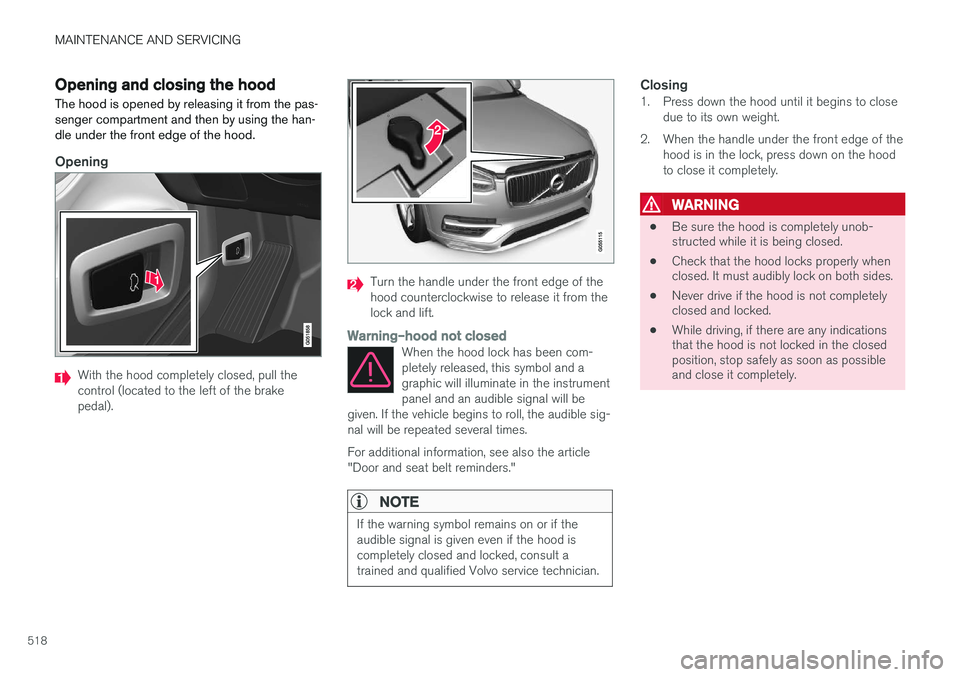
Opening and closing the hood The hood is opened by releasing it from the pas- senger compartment and then by using the han-dle under the front edge of the hood.
Opening
With the hood completely closed, pull the control (located to the left of the brakepedal).
Turn the handle under the front edge of the hood counterclockwise to release it from thelock and lift.
Warning
Page 527 of 570
MAINTENANCE AND SERVICING
525
Related information
•Opening and closing the hood (p. 518)
• Engine compartment overview (p. 519)
Cleaning the exterior
The vehicle should be washed at regular inter- vals since dirt, dust, insects and tar spotsadhere to the paint and may cause damage. Tohelp prevent corrosion, it is particularly importantto wash the car frequently in the wintertime.
Hand washingThe following points should be kept in mind when washing and cleaning the car: • Avoid washing your car in direct sunlight. Doing so may cause detergents and wax todry out and become abrasive. To avoidscratching, use lukewarm water to soften thedirt before you wash with a soft sponge, andplenty of sudsy water.
• Bird droppings
: Remove from paintwork as
soon as possible. Otherwise the finish maybe permanently damaged.
• A car washing detergent can be used tofacilitate the softening of dirt and oil.
• Dry the car with a clean chamois andremember to clean the drain holes in thedoors and rocker panels.
• Tar spots can be removed with tar removerafter the car has been washed.
• A stiff-bristle brush and lukewarm soapywater can be used to clean the wiper blades.Frequent cleaning of the windshield andwiper blades improves visibility considerablyand also helps prolong the service life of thewiper blades. •
Wash off the dirt from the underside (wheelhousings, fenders, etc).
• In areas of high industrial fallout, more fre-quent washing is recommended.
CAUTION
• During high pressure washing, the spray mouthpiece must never be closer to thevehicle than 13" (30 cm). Do not sprayinto the locks.
• Dirt, snow, etc., on the headlights canreduce lighting capacity considerably.Clean the headlights regularly, for exam-ple when refueling.
Special laminated panoramic roof cau-
tions:
• Always close the laminated panoramicroof and sun shade before washing yourvehicle.
• Never use abrasive cleaning agents onthe laminated panoramic roof.
• Never use wax on the rubber sealsaround the laminated panoramic roof.
NOTE
When washing the car, remember to remove dirt from the drain holes in the doors and sills.
Page 558 of 570
556Brake assist system 333
Brake lights 143, 334Brakes
auto-hold 332
Brake system Brake pad inspection 331
fluid 541
general information 330, 332, 333
Bulbs 514 replacing 510
specifications 515
C
Cameradriver support systems 240
limitations 241
Camera, Park Assist 296, 298, 300
Capacity weight 471, 539
Cargo area, steel grid 211
Cargo area cover 213Cargo compartment fuses 508
raising/lowering the level 207
Cargo net 209
Cargo space 200
Car wash 525
Catalytic converter 349CD, USB, iPod, AUX, Bluetooth, Recents, Library, Shuffle, Similar, Change device, Pri-mary Audio Default Language, Subtitle, Pri-mary Subtitle Default Language, Video, DivX ® VOD 395
CD player 394 Cell phone hands-free 387
Pairing 387
Cell phone voice control 121 Center display changing settings 31
cleaning 529
keyboard 32
navigating in 39
overview 29
screen in the center console 46
symbols in the status bar 44
Chains 473
Changing a wheel 475Child restraints recalls and registration 65
Child restraint systems 65 booster cushions 71
convertible seats 69
infant seats 67ISOFIX/LATCH anchors 72
top tether anchors 74
Child safety 63 booster cushions 71
child restraint systems 65, 73
convertible seats 69
infant seats 67
Child safety locks 218 Child seats lower attachment points 73
City safety 273, 278City Safety crossing traffic 277
detecting objects 275
limitations 278
rear collision warning 277
symbols and messages 282
troubleshooting 280
City Safety, On/Off 275 Cleaning exterior 525
interior 527
Clean Zone Interior Package 178
Climate system 180 air distribution 194, 195, 196
air filter 179
air vents 194
auto mode 179
Page 559 of 570

557
blower 183
center display controls 180
Electronic Climate Control 180
introduction 176, 180
passenger compartment filter 178
rear controls 180, 182
recirculation 186
refrigerant 541
service 495
setting the temperature 184
voice commands 122
Clock 116
Cold weather driving 342
Collision warning system 274
Compass in rearview mirror 136 calibrate 137
Connected service booking 491
Convertible seats 69
Coolant 542
copyright 462
Corrosion protection 529
Courtesy lighting 146
Crash event data 26
Crash mode 81, 82
Cross Traffic Alert 318, 319, 320, 322
Cruise control 248, 249, 250, 251 adaptive 252, 254, 255, 257, 258, 259 , 268 , 269 , 270 , 271 , 272
Curb weight 471, 539
D
Daytime running lights 138, 140 Defroster rear window and mirrors 187
Destination save 441
Detachable key blade 227, 237
Digital owner's manual 52, 53
Dimensions 537
Disconnecting the front passenger
Page 562 of 570
560
L
Labelslist of 536
location of 535
Laminated panoramic roof 101, 102 Lane Departure Warning settings 325
Lane Departure Warning (LDW) 323, 327
Lane Keeping Aid 323, 325, 327 settings 325
LATCH anchors 72
Leather care 527Licence copyright 460
Lighting panel 138
Load anchoring eyelets 212
Loading the vehicle 200, 207, 471
Locking 231, 232
Locks and alarm 216
Low beam bulb, replacing 512
Low beams 139, 140
Low Speed Control 371
M
Maintenance 488 hoisting the vehicle 516
performed by the owner 488
Malfunction indicator light 126
Manual front seat adjustment 160Map buttons and information 428
Information cards 446
Map updates computer with USB flash drive 458
MapCare 456
Remote 457
Media player 393 compatible file formats 400
Media player (infotainment system) 395 Menus instrument panel 149, 151, 152, 153
Mirrors defroster 187
power door 100
retractable 100
Mirrors, rearview mirror 105
Modem 407Motor oil checking 520, 521
MP3 files 400
Multifunctional front seats 163, 164, 165
MY CAR 106
N
Navigationinstrument panel 448
Quick guidance 432
Sensus Navigation 432
Navigation displays controls 433
Navigation system features 429
voice commands 124, 433
Net cargo 209
O
Occupant safety 56
Occupant weight sensor 78
Octane recommendations 347
Odometer 92Oilchecking 520, 521