child lock VOLVO XC90 2015 User Guide
[x] Cancel search | Manufacturer: VOLVO, Model Year: 2015, Model line: XC90, Model: VOLVO XC90 2015Pages: 570, PDF Size: 12.44 MB
Page 106 of 570
INSTRUMENTS AND CONTROLS
* Option/accessory, for more information, see Introduction.
104
Power windows
All power windows can be operated using the control panel in the driver's door. The controlpanels in the other doors only operate the win-dow in the respective doors.
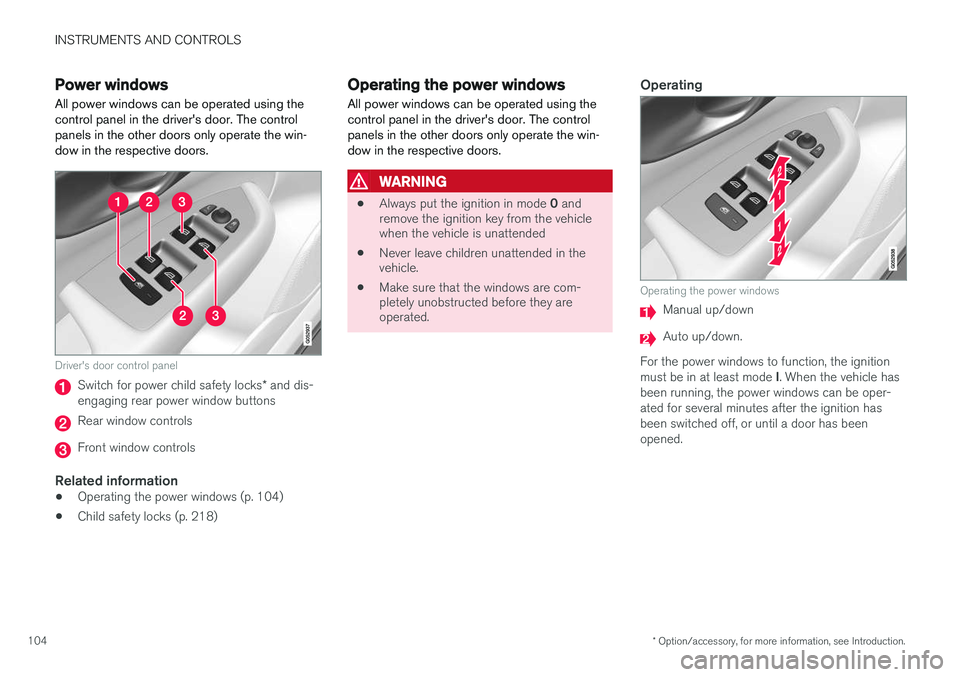
Driver's door control panel
Switch for power child safety locks * and dis-
engaging rear power window buttons
Rear window controls
Front window controls
Related information
• Operating the power windows (p. 104)
• Child safety locks (p. 218)
Operating the power windows
All power windows can be operated using the control panel in the driver's door. The controlpanels in the other doors only operate the win-dow in the respective doors.
WARNING
• Always put the ignition in mode
0 and
remove the ignition key from the vehicle when the vehicle is unattended
• Never leave children unattended in thevehicle.
• Make sure that the windows are com-pletely unobstructed before they areoperated.
Operating
Operating the power windows
Manual up/down
Auto up/down.
For the power windows to function, the ignition must be in at least mode I. When the vehicle has
been running, the power windows can be oper- ated for several minutes after the ignition hasbeen switched off, or until a door has beenopened.
Page 107 of 570
INSTRUMENTS AND CONTROLS
105
NOTE
•Movement of the windows will stop if they are obstructed in any way. If this happenstwice in succession, the automatic func-tion will not work for several minutes andthe window can be closed by holding thebutton up.
• To reduce buffeting wind noise if the rearwindows are opened, also open the frontwindows slightly.
Manual up/down
–Move one of the controls up/down slightly.
> The power windows move up/down as
long as the control is held in position.
Auto up/down
–Move one of the controls up/down as far as possible and release it.
> The window will open or close completely.
ResettingIf the battery has been disconnected, the auto open function must be reset so that it will workproperly
1. Gently raise the front section of the button to close the window and hold it for one second.
2. Release the button briefly.
3. Raise the front section of the button again for one second.
Related information
• Child safety locks (p. 218)
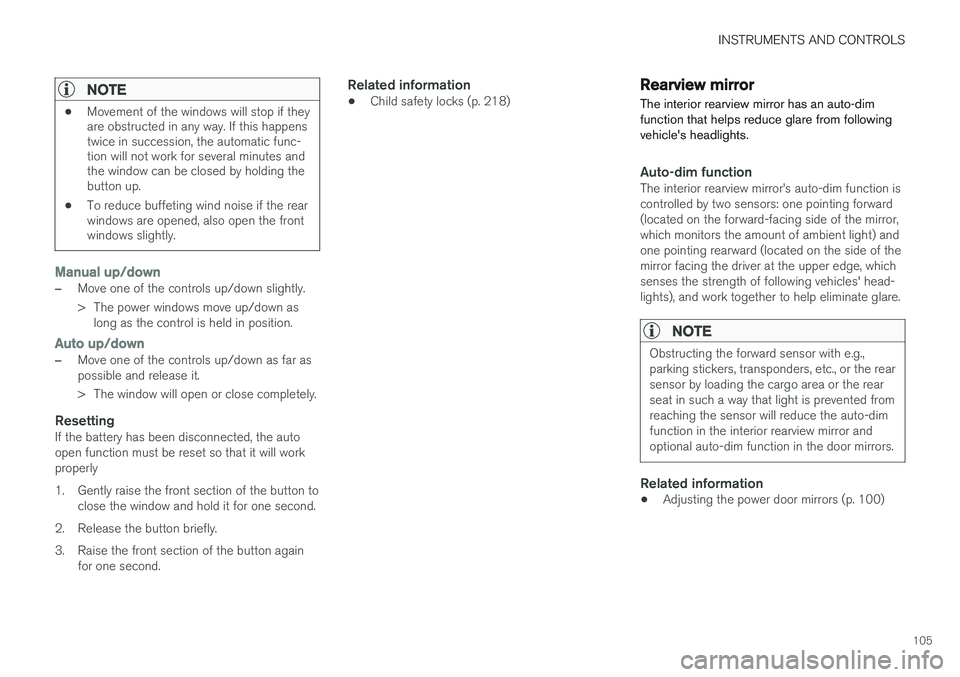
Rearview mirror The interior rearview mirror has an auto-dim function that helps reduce glare from followingvehicle's headlights.
Auto-dim functionThe interior rearview mirror
Page 218 of 570

LOCKS AND ALARM
* Option/accessory, for more information, see Introduction.
216
Locks and remote keys
The vehicle can be locked and unlocked in vari- ous ways and there are several types of remotekeys that can be used. These keys can also belinked to a driver profile, which contains vehicle-related settings that have been stored.
Locking/unlocking/opening/closingThe vehicle can be locked/unlocked from the passenger compartment, using the buttons onthe remote key or by using the optional PassiveEntry system where it is only necessary to have akey in your possession to lock or unlock thedoors. On models equipped with a power tailgate *, the
tailgate can be opened/closed by moving your foot under a sensor * beneath the rear bumper.
If for any reason a remote key does not function properly, it may be necessary to replace its bat-teries but the vehicle can always be locked orunlocked manually using the remote key'sdetachable key blade.
Remote keyThe remote key does not have to be physicallyhandled in order to start the engine because thevehicle is equipped with the standard PassiveStart system (the key only needs to be in thefront part of the passenger compartment). If thevehicle is equipped with the optional PassiveEntry system that enables keyless entry and start, the key can be anywhere in the vehicle when theengine is started. Models with Passive Entry
* also have an extra,
smaller key without buttons called a Key Tag. A special restricted Red Key makes it possible to limit some of the vehicle's functionality, such asby setting a maximum speed or limiting the maxi-mum volume from the infotainment system'sspeakers. The various keys can also be linked to driver pro- files, which make it possible to store differentpersonal preferences (settings) in the vehicle. Additional keys can be ordered from a Volvo retailer.
Related information
• Immobilizer (p. 221)
• Alarm (p. 216)
• Child safety locks (p. 218)
• Remote key (p. 224)
• Restricted key
* (p. 226)
• Foot movement tailgate operation
* (p. 228)
• Locking/unlocking from inside the vehicle (p. 231)
• Locking/unlocking from outside the vehicle(p. 232)
• Locking/unlocking the tailgate (p. 233)
• Starting the engine (p. 356)
Alarm
The alarm system provides a warning if an attempt is made to break into the vehicle.
The following conditions will trigger the alarm:
• a door/hood/tailgate are opened
• the battery is disconnected
• the alarm siren is disconnected
If a problem is detected in the alarm system, a message will be displayed in the instrumentpanel. Do not attempt to repair any of the components in the alarm system yourself; this could affect theinsurance policy on the vehicle. Contact a trainedand qualified Volvo service technician.
NOTE
One of the alarm sensors, which is sensitive to metallic objects, is located under the tunnelconsole cup holders. Avoid leaving coins,keys, etc., in the cup holders because theymay inadvertently trigger the alarm.
Page 220 of 570
LOCKS AND ALARM
* Option/accessory, for more information, see Introduction.
218
Automatically arming/disarming the alarm
Automatically arming the alarm helps prevent inadvertently leaving the vehicle without alarmprotection.
If the vehicle has been unlocked with the remote key (and the alarm has been disarmed) but nodoor or the tailgate has been opened within2 minutes, the vehicle will automatically relockand the alarm will re-arm. In certain markets, the alarm will be re-armed automatically after a slight delay after the driver'sdoor has been opened and closed without beinglocked.
Related information
• Alarm (p. 216)
• Deactivating the alarm without a functioning remote key (p. 218)
Deactivating the alarm without a functioning remote key
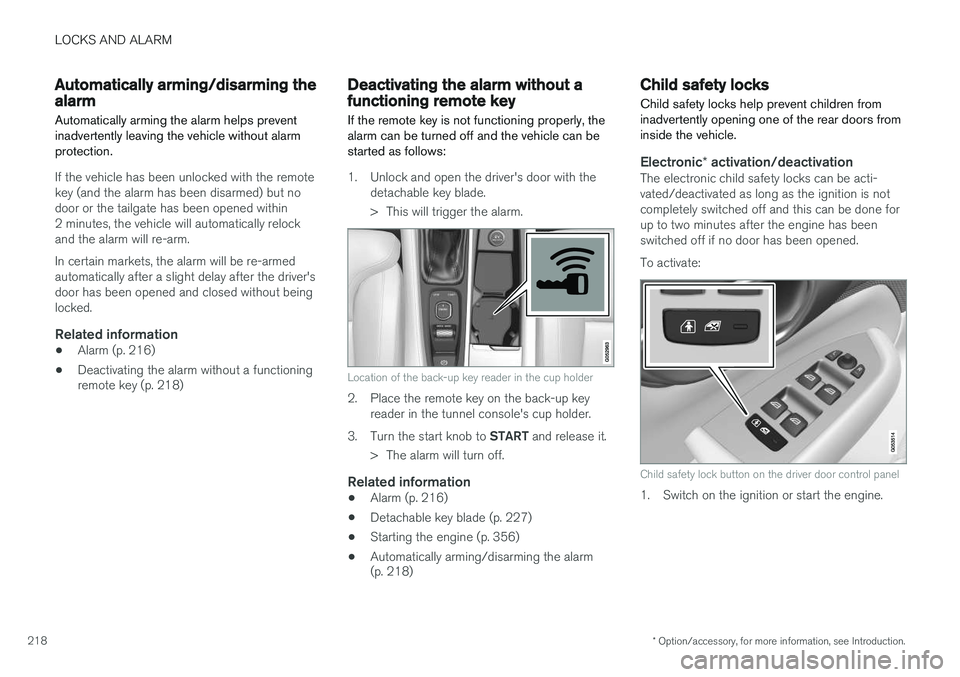
If the remote key is not functioning properly, the alarm can be turned off and the vehicle can bestarted as follows:
1. Unlock and open the driver's door with the detachable key blade.
> This will trigger the alarm.
Location of the back-up key reader in the cup holder
2. Place the remote key on the back-up keyreader in the tunnel console's cup holder.
3. Turn the start knob to START and release it.
> The alarm will turn off.
Related information
• Alarm (p. 216)
• Detachable key blade (p. 227)
• Starting the engine (p. 356)
• Automatically arming/disarming the alarm (p. 218)
Child safety locks
Child safety locks help prevent children from inadvertently opening one of the rear doors frominside the vehicle.
Electronic * activation/deactivationThe electronic child safety locks can be acti- vated/deactivated as long as the ignition is notcompletely switched off and this can be done forup to two minutes after the engine has beenswitched off if no door has been opened. To activate:
Child safety lock button on the driver door control panel
1. Switch on the ignition or start the engine.
Page 221 of 570
LOCKS AND ALARM
219
2. Press the button on the driver's door control
panel. >
Rear child lock Activated will be dis-
played in the instrument panel and the indicator light in the button will illuminateto show that the child safety locking func-tion is activated.
While the child safety locks are activated:
• the rear door windows can only be opened from the driver door control panel
• the rear doors cannot be opened from theinside
To deactivate:
–Press the button in the driver door control panel. >
Rear child lock Deactivated will be dis-
played in the instrument panel and the indicator light in the button will go out toshow that the child safety locking functionis deactivated.
When the ignition is switched off, the current set-ting for the child safety locks will be stored. If thelocks were activated at that time, they will con-tinue to be activated when the ignition isswitched on again.
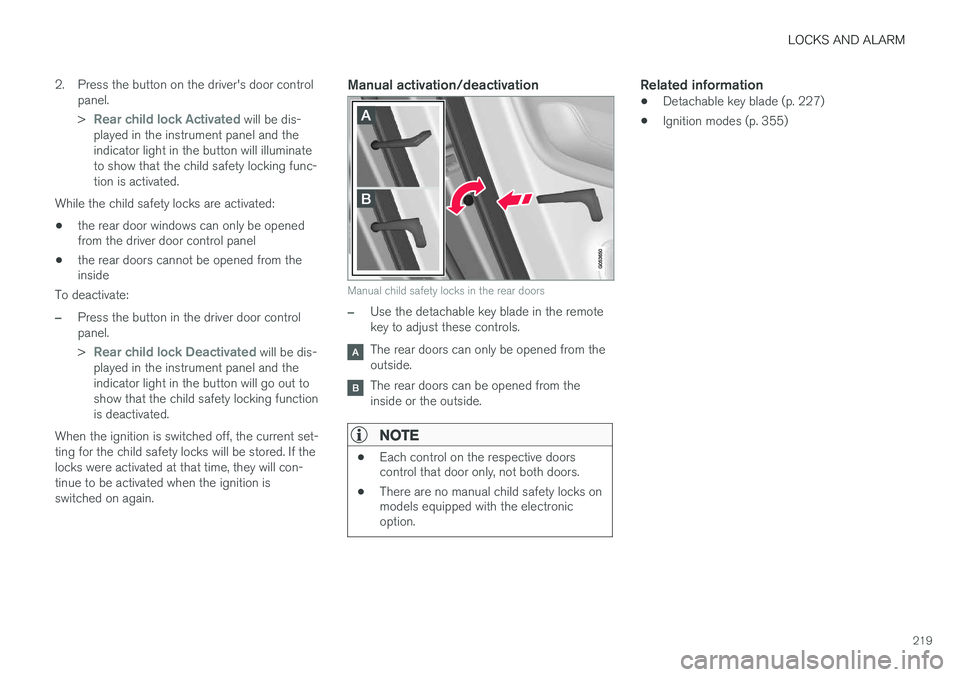
Manual activation/deactivation
Manual child safety locks in the rear doors
–Use the detachable key blade in the remote key to adjust these controls.
The rear doors can only be opened from the outside.
The rear doors can be opened from the inside or the outside.
NOTE
• Each control on the respective doors control that door only, not both doors.
• There are no manual child safety locks onmodels equipped with the electronicoption.
Related information
• Detachable key blade (p. 227)
• Ignition modes (p. 355)
Page 227 of 570
LOCKS AND ALARM
* Option/accessory, for more information, see Introduction.225
Avoid keeping the remote key closer than approx. 4-6 in. (10-15 cm) from a cell phone or metallicobject. If interference persists, unlock the vehicle with the detachable key blade and place the remotekey in the backup key reader in the tunnel con-sole cup holder to disarm the alarm.
WARNING
Always remove the remote key from the pas- senger compartment when leaving the vehicle and ensure that the ignition in mode
0, espe-
cially if there are children in the vehicle.
Ordering new keysTwo remote keys are provided with the vehicle (a Key Tag is also included for vehicles equippedwith the optional Passive Entry system). Addi-tional keys (a total of 12) can be ordered andused with the vehicle. A new driver profile will beadded to each new key (including the Key Tag).
Loss of a remote keyIf a remote key is lost, the others should be takenwith the vehicle to a Volvo retailer. As an anti-theft measure, the code of the lost remote keymust be erased from the system. The number ofregistered keys for the vehicle can be found inthe center display's Top view.
NOTE
Additional or duplicate remote control keys can be obtained from any authorized Volvoretailer. You can also obtain additional or duplicate remote control keys from certain independentrepair facilities and locksmiths that are quali-fied to make remote control keys. Each keymust be programmed to work with your vehi-cle. A list of independent repair facilities and/or locksmiths known to Volvo that can cut andcode replacement keys can be found: • on the Volvo website, www.volvocars.com/us
• by calling Volvo Customer Care at1-800-458-1552.
Key TagIn addition to the two remote keys provided, a smaller third key, called a Key Tag, is also provi-ded for vehicles equipped with the optionalPassive Entry system. This key functions in the same way as a standard remote key but does not have a detachable keyblade and its battery cannot be replaced; a newKey Tag has to be ordered.
The remote key's buttons
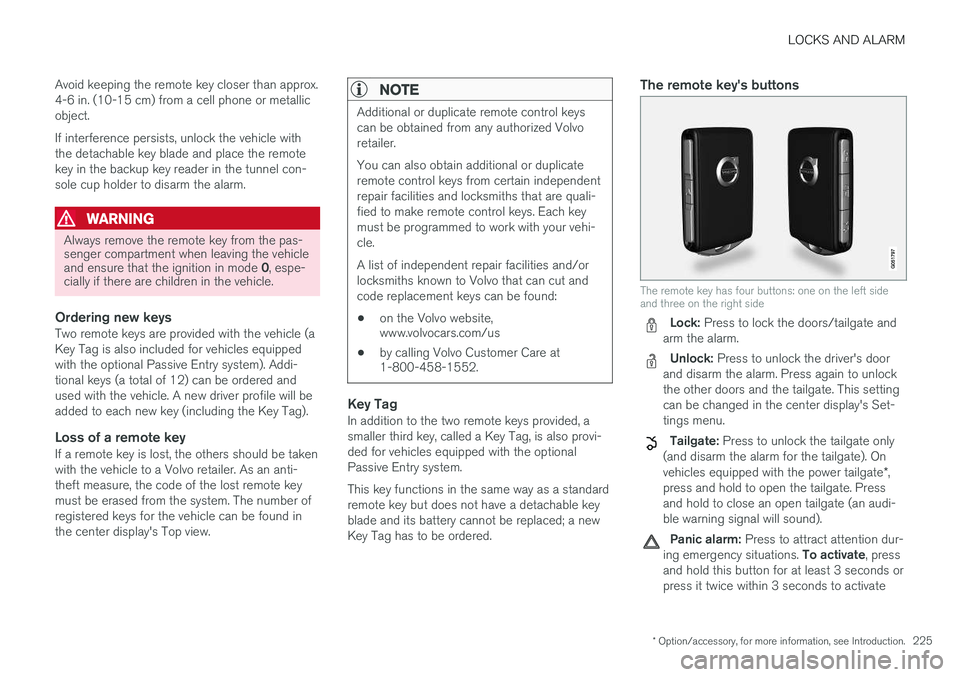
The remote key has four buttons: one on the left side and three on the right side
Lock: Press to lock the doors/tailgate and
arm the alarm.
Unlock: Press to unlock the driver's door
and disarm the alarm. Press again to unlock the other doors and the tailgate. This settingcan be changed in the center display's Set-tings menu.
Tailgate: Press to unlock the tailgate only
(and disarm the alarm for the tailgate). On vehicles equipped with the power tailgate *,
press and hold to open the tailgate. Press and hold to close an open tailgate (an audi-ble warning signal will sound).
Panic alarm: Press to attract attention dur-
ing emergency situations. To activate, press
and hold this button for at least 3 seconds or press it twice within 3 seconds to activate
Page 229 of 570
LOCKS AND ALARM
* Option/accessory, for more information, see Introduction.227
play's Top view:
SettingsSystemDriver
Profile
Red key.
Several of the vehicle's safety function cannot be turned off the by a restricted key user. The restrictions are designed to help reduce the risk of an accident and they cannot be changedby a restricted key user. These settings cannotbe changed by the Red Key's user.
Possible settingsThe following settings can be made for a restric-ted key:
Speed Limiter * (On/Off)
• Setting interval: 30-160 mph (50-250 km/h)
• Default setting: 75 mph (120 km/h)
• Increments: 5 mph (10 km/h)
• See the article "Speed limiter" for additional information.
Speed reminder (On/Off):
•Setting interval: 0-160 mph (0-250 km/h
• Default settings: 30, 45 and 55 mph (50, 70 and 90 km/h.)
• Increments: 1 mph (1 km/h)
• Max. number of reminders: 6
Reduced max. volume (on/off)
•Default settings: On
Adaptive cruise control
* (On/Off)
• Initial setting: On at the longest interval
• See the article "Adaptive cruise control" for additional information
Safety functionsThe following safety functions will always be active for a restricted key user:
• Blind Spot Information (BLIS)
*
• Lane Departure Warning/Lane Keeping Aid (LDW/LKA)
*
• Distance Alert
*
• City Safety
*
• Driver Alert Control (DAC)
*
• Road Sign Information
*
Related information
•Remote key (p. 224)
• Driver profiles (p. 112)
• Adaptive Cruise Control (ACC)
* (p. 252)
• Speed limiter (SL)
* (p. 283)
• Blind Spot Information (BLIS)
* (p. 315)
• Driving lane assistance (p. 323)
• Distance Alert
* (p. 314)
• City Safety
™ (p. 273)
• Driver Alert Control (DAC) (p. 312)
• Road Sign Information (RSI)
* (p. 290)
Detachable key blade Your vehicle's remote key contains a detachable key blade that can be used to unlock the driver'sdoor, etc. A Volvo retailer can provide you with the key blade's unique code.
Using the detachable key bladeThe remote key's detachable key blade can be used to:
• Unlock the driver's door if the central locking system cannot be activated using the remotekey
• Lock all doors
• Activate/deactivate the mechanical childsafety locks in the rear doors
The Key Tag 6
does not have a detachable key
blade.
6 Models with the optional Passive Entry system only.
Page 230 of 570

LOCKS AND ALARM
* Option/accessory, for more information, see Introduction.
228
Detaching the key blade
Hold the remote key with the front side
(with the Volvo symbol) toward you and move the button on lower edge of the key near thekey ring to the right. Slide the front coverslightly upward.
The cover will loosen and can be
removed from the key.
Remove the key blade.
After use, press the key blade back into
its position in the key, put the cover back on the key and slide it into position.
> A click indicates that the cover is correctly in place.
Related information
• Locking/unlocking with the detachable key blade (p. 237)
• Child safety locks (p. 218)
Foot movement tailgate operation
*
The foot movement sensor * makes it easy and
convenient to open or close the tailgate without using your hands. 7
Foot movement sensor under the rear bumper
8
NOTE
One of the remote keys must be in your pos- session when you are behind the vehicle inorder to activate the foot movement sensor,even if the tailgate is already unlocked. This isdone to help prevent the sensor from inadver-tently opening the tailgate, for example, in acar wash.
7
Models equipped with the optional power tailgate only.
8 If the vehicle is equipped with a skid plate *, the sensor is located farther to the left under the bumper.
Page 233 of 570
LOCKS AND ALARM
* Option/accessory, for more information, see Introduction.231
Locking/unlocking from inside the vehicle The lock buttons on either of the front doors can be used to lock or unlock all doors and the tail-gate at the same time. The rear doors can be locked using their respective lock buttons*.
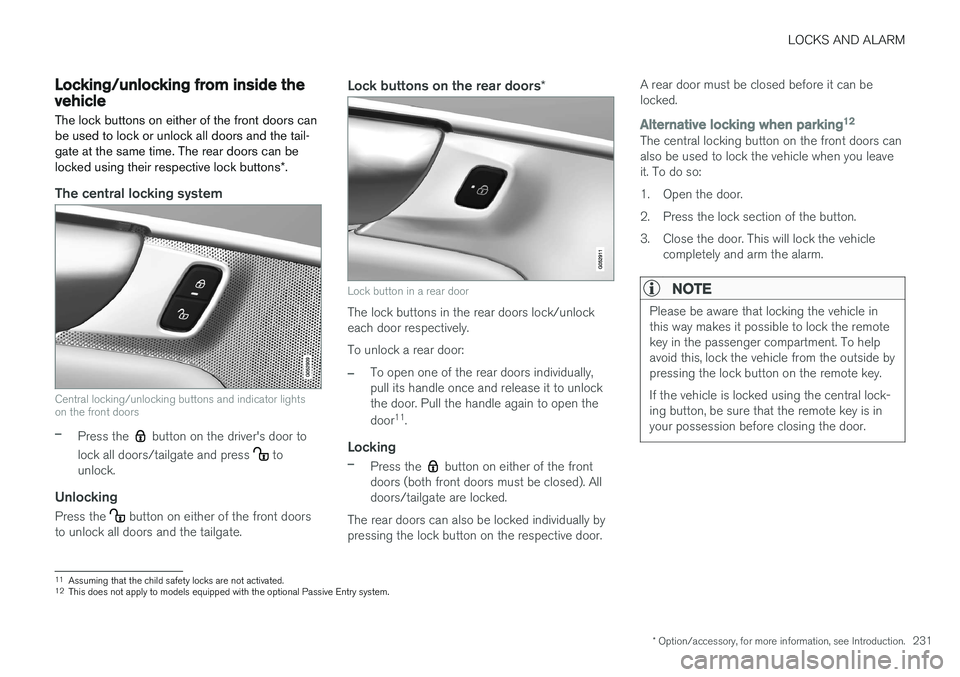
The central locking system
Central locking/unlocking buttons and indicator lights on the front doors
–Press the button on the driver's door to
lock all doors/tailgate and press
to
unlock.
Unlocking
Press the button on either of the front doors
to unlock all doors and the tailgate.
Lock buttons on the rear doors *
Lock button in a rear door
The lock buttons in the rear doors lock/unlock each door respectively. To unlock a rear door:
–To open one of the rear doors individually, pull its handle once and release it to unlockthe door. Pull the handle again to open the door11
.
Locking
–Press the button on either of the front
doors (both front doors must be closed). All doors/tailgate are locked.
The rear doors can also be locked individually bypressing the lock button on the respective door. A rear door must be closed before it can belocked.
Alternative locking when parking
12The central locking button on the front doors can also be used to lock the vehicle when you leaveit. To do so:
1. Open the door.
2. Press the lock section of the button.
3. Close the door. This will lock the vehicle
completely and arm the alarm.
NOTE
Please be aware that locking the vehicle in this way makes it possible to lock the remotekey in the passenger compartment. To helpavoid this, lock the vehicle from the outside bypressing the lock button on the remote key. If the vehicle is locked using the central lock- ing button, be sure that the remote key is inyour possession before closing the door.
11Assuming that the child safety locks are not activated.12
This does not apply to models equipped with the optional Passive Entry system.
Page 234 of 570

LOCKS AND ALARM
* Option/accessory, for more information, see Introduction.
232
Automatic lockingAll of the doors/tailgate can be locked automati- cally when the vehicle begins to move. To acti-vate/deactivate this setting: 1.
Tap
Settings in the center display's Top
view.
2. Tap
My CarLocking
3. Select Auto Door Locking
>Doors and tailgate lock when the vehicle moves will be displayed and the
doors and tailgate will lock automatically when the vehicle begins to move.
Related information
• Locking/unlocking from outside the vehicle (p. 232)
• Child safety locks (p. 218)
Locking/unlocking from outside the vehicle The buttons on the remote key can be used to lock or unlock all doors and the tailgate at thesame time. This can also be done without press-ing the remote key buttons on models equippedwith the optional keyless Passive Entry system. The power tailgate
* can also be opened/closed
by moving your foot under a sensor beneath therear bumper *.
The lock/unlock settings can be changed in the center display's Top view. Go to:
SettingsMy CarRemote Unlockand select Unlock All Doors or Driver Door
Only.
In order to lock the vehicle, the driver's door must be closed. If the tailgate or any of the other doorsare open, they will be locked and the alarm will bearmed when they are closed.
NOTE
Be sure the remote key is outside of the vehi- cle before the other doors/tailgate are closedto help avoid locking the remote inside thevehicle.
If the locks repeatedly do not react when the unlock button is pressed, it may be necessary toreplace the battery in the remote. In this case, the driver's door can be unlocked with the detacha-ble key blade.
Keyless Passive Entry
*If the vehicle is equipped with this system, it isonly necessary to have a remote key in your pos-session to operate the central locking system. Models with Passive Entry have an indentation on the outside of the handle for locking the vehicleand a pressure-sensitive area on the inside of thehandle for unlocking. The tailgate has a rubber-ized button used only for locking/unlocking.
Outer indentation for locking, the pressure sensitive area on the inside of the handle is for unlocking