climate control VOLVO XC90 2015 User Guide
[x] Cancel search | Manufacturer: VOLVO, Model Year: 2015, Model line: XC90, Model: VOLVO XC90 2015Pages: 570, PDF Size: 12.44 MB
Page 124 of 570
INSTRUMENTS AND CONTROLS
* Option/accessory, for more information, see Introduction.
122
Voice control for radio and media
The following voice commands can be used for the radio or an external multimedia device.
• "
Media and radio ": initiates a dialog for
media and radio, and displays possible com- mands.
• "
Play "-"[artist] ": plays music by the selected
artist.
• "
Play "-"[song title] ": plays the selected
song.
• "
Play "-"[song title] "-"from "-"[album] ":
plays the selected song from the selectedalbum.
• "
Play "-"[radio station] ": starts the selected
radio station.
• "
Tune "-"[frequency] ": tunes to the selected
frequency on the current waveband. If nowaveband has been selected, FM is thedefault.
• "
Tune "-"[frequency] "-"[waveband] ": tunes
to the selected station on the selected wave-band.
• "
Radio ": starts FM radio.
• "
Radio FM ": starts FM radio.
• "
Radio AM " : starts AM radio.
• "
SiriusXM "*: starts satellite radio
• "
CD ": starts playback from a CD.
• "
USB ": starts playback from a USB flash
drive. •
"
iPod ": starts playback from an iPod.
• "
Bluetooth ": starts playback from a Blue-
tooth-connected device.
• Similar music
": starts playback from a USB
flash drive with music similar to the type cur-rently playing.
Related information
• Voice control (p. 120)
• Using voice commands (p. 121)
• Voice control settings (p. 125)
Climate system voice commands Voice commands can be used to control the cli- mate system to e.g., change the temperature, activate seat heating
* or change blower (fan)
speed.
Page 125 of 570
INSTRUMENTS AND CONTROLS
* Option/accessory, for more information, see Introduction.123
–Tap and say one of the following com-
mands:
• "
Climate": starts a command dialog and
provides examples of commands that can be used.
• "
Set temperature to X degrees": sets
the desired temperature.
• "
Raise temperature"/"Lower
temperature": raises/lowers the tem-
perature.
• "
Sync temperature": synchronizes the
temperature in all of the vehicle's climate zones with the one set for the driver'sside.
• "
Air on feet"/"Air on body": opens the
desired air vent.
• "
Air on feet off"/"Air on body off":
closes the desired air vent.
• "
Set fan to max"/"Turn off fan":
changes the blower speed to Max/Off.
• "
Raise fan speed"/"Lower fan speed":
raises/lowers the blower speed.
• "
Turn on auto": activates automatic cli-
mate control.
• "
Air condition on"/"Air condition off":
activates/deactivates the air conditioning.
• "
Recirculation on"/"Recirculation off":
activates/deactivates recirculation. •
"
Turn on defroster"/"Turn off
defroster": activates/deactivates window
and door mirror defrosting.
• "
Turn on max defroster"/"Turn off
max defroster": activates/deactivates
max defroster.
• "
Turn on electric defroster"/"Turn off
electric defroster": activates/deacti-
vates the electrically heated windshield *.
• "
Turn on rear defroster"/"Turn off rear
defroster": activates/deactivates the
electrically heated rear window and door mirrors.
• "
Turn steering wheel heat on"/"Turn
steering wheel heat off": activates/
deactivates the electrically heated steer- ing wheel *.
• "
Raise steering wheel heat"/"Lower
steering wheel heat": raises/lowers the
heating level for the electrically heated steering wheel *.
• "
Turn on seat heat"/"Turn off seat
heat": activates/deactivates the electri-
cally heated seats *.
• "
Raise seat heat"/"Lower seat heat":
raises/lowers the heating level for the electrically heated seats *.
• "
Turn on seat ventilation"/"Turn off
seat ventilation": activates/deactivates
seat ventilation *. •
"
Raise seat ventilation"/"Lower seat
ventilation": raises/lowers the level for
seat ventilation *.
Related information
• Climate system controls (p. 180)
Page 139 of 570
INSTRUMENTS AND CONTROLS
* Option/accessory, for more information, see Introduction.137
Calibrating the compass
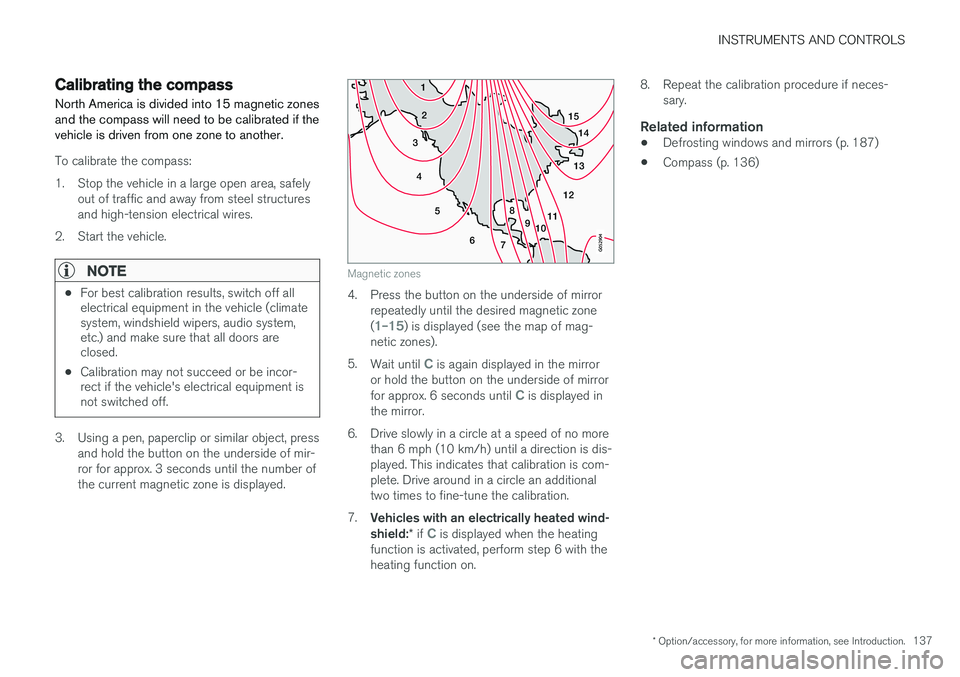
North America is divided into 15 magnetic zones and the compass will need to be calibrated if thevehicle is driven from one zone to another.
To calibrate the compass:
1. Stop the vehicle in a large open area, safely out of traffic and away from steel structures and high-tension electrical wires.
2. Start the vehicle.
NOTE
• For best calibration results, switch off all electrical equipment in the vehicle (climatesystem, windshield wipers, audio system,etc.) and make sure that all doors areclosed.
• Calibration may not succeed or be incor-rect if the vehicle's electrical equipment isnot switched off.
3. Using a pen, paperclip or similar object, press
and hold the button on the underside of mir- ror for approx. 3 seconds until the number ofthe current magnetic zone is displayed.
15
14
13
12
11
9
8
7
6
5
4
3
2
1
10
Magnetic zones
4. Press the button on the underside of mirrorrepeatedly until the desired magnetic zone (
1
Page 178 of 570

CLIMATE
* Option/accessory, for more information, see Introduction.
176
Climate control system
The vehicle is equipped with Electronic Climate Control (ECC) that cools, heats, dehumidifiesand filters the air in the passenger compartment.
2-zone climate system
2-zone system climate zones
The 2-zone climate system makes it possible to set the left- and right-side temperatures sepa-rately. All climate system settings are made from the center display and the buttons in the center con-sole.
4-zone climate system *
4-zone system climate zones
The 4-zone climate system makes it possible to set the left- and right-side temperatures sepa-rately for the front and rears seats. All climate system settings are made from the center display and the buttons in the center con-sole. Settings for the rear seats can also bemade from the climate system panel on the rearside of the tunnel console.
Related information
•Climate system sensors (p. 177)
• Perceived temperature (p. 176)
• Climate system controls (p. 180)
• Air quality (p. 177)
• Air distribution (p. 194)
• Air conditioning refrigerant (p. 541)
Perceived temperature
The climate system regulates passenger com- partment temperature based on the perceivedtemperature, not on the actual one.
The selected passenger compartment tempera- ture is based on a physical perception relating tothe current ambient temperature, air flow, humid-ity, sunlight in the passenger compartment, etc. The system's sunlight sensor monitors the side of the car where sunlight is entering the passengercompartment. This means that the actual tem-perature may differ between the right and leftsides of the compartment, even if the tempera-ture setting is the same for both sides.
Related information
• Climate system sensors (p. 177)
• Climate control system (p. 176)
Page 179 of 570

CLIMATE
* Option/accessory, for more information, see Introduction.177
Climate system sensors The climate system's sensors help regulate the passenger compartment temperature, humiditylevel, etc.
Location of the sensors
Humidity sensor: in the rearview mirror con- sole.
Ambient temperature sensor: in the pas- senger's side door mirror.
Passenger compartment temperature sen- sor: near the center console buttons.
Sunlight sensor: on the upper side of the dashboard.
NOTE
Do not cover or block the sensors with cloth- ing or other objects.
Related information
•Climate control system (p. 176)
• Perceived temperature (p. 176)
Air quality
The materials used in the passenger compart- ment have been selected and designed to bepleasant and comfortable, even for people withasthma or other types of allergies.
Materials in the passenger compartmentThe materials used have been developed to help minimize the amount of dust and make the cabineasier to keep clean. All floor mats can be easily removed for cleaning. Use car cleaning products recommended byVolvo. Only use cleaning agents and car care products recommended by Volvo. Clean regularly and fol-low the instructions included with the car careproduct.
Air filtering systemsIn addition to the passenger compartment filter, the Clean Zone Interior Package * and the Interior
Air Quality System * contribute to a cleaner pas-
senger compartment environment.
Related information
• Passenger compartment air filter (p. 179)
• Interior Air Quality System (IAQS)
* (p. 178)
• Clean Zone Interior Package (CZIP)
*
(p. 178)
• Cleaning the interior (p. 527)
Page 181 of 570
CLIMATE
* Option/accessory, for more information, see Introduction.179
Passenger compartment air filter
All air entering the passenger compartment through the climate system air intake is filtered.
Filter replacementThe filter must be replaced according to the serv- ice schedule for your vehicle. When driving in e.g.,dusty or industrial areas, the filer may need to bereplaced more often. Consult your Volvo retailer.
Related information
• Air quality (p. 177)
• Clean Zone Interior Package (CZIP)
*
(p. 178)
• Interior Air Quality System (IAQS)
* (p. 178)
• Volvo's service program (p. 488)
Automatic climate control The Auto feature automatically controls a num- ber of climate system functions.
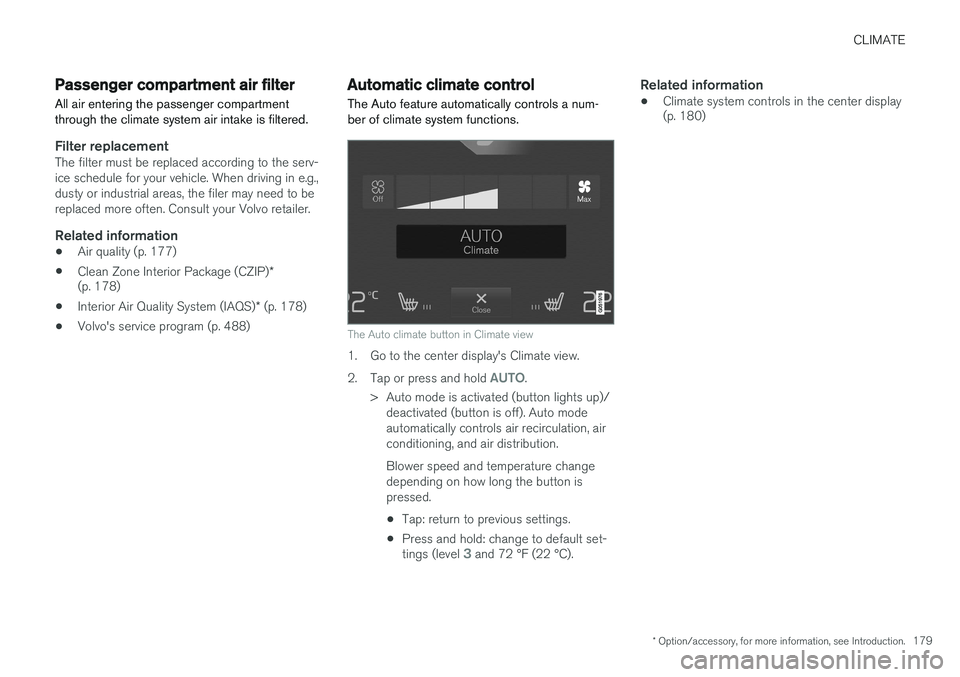
The Auto climate button in Climate view
1. Go to the center display's Climate view. 2.
Tap or press and hold
AUTO.
> Auto mode is activated (button lights up)/ deactivated (button is off). Auto mode automatically controls air recirculation, airconditioning, and air distribution. Blower speed and temperature change depending on how long the button ispressed.
• Tap: return to previous settings.
• Press and hold: change to default set- tings (level
3 and 72 °F (22 °C).
Related information
• Climate system controls in the center display (p. 180)
Page 182 of 570
CLIMATE
* Option/accessory, for more information, see Introduction.
180
Climate system controls
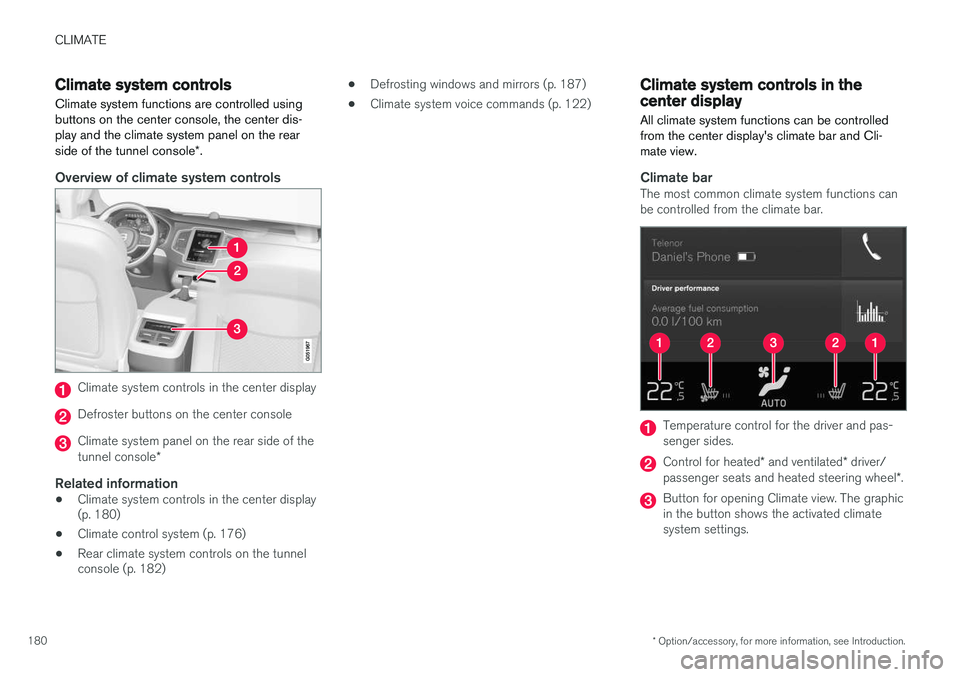
Climate system functions are controlled using buttons on the center console, the center dis-play and the climate system panel on the rear side of the tunnel console *.
Overview of climate system controls
Climate system controls in the center display
Defroster buttons on the center console
Climate system panel on the rear side of the tunnel console *
Related information
•Climate system controls in the center display (p. 180)
• Climate control system (p. 176)
• Rear climate system controls on the tunnelconsole (p. 182) •
Defrosting windows and mirrors (p. 187)
• Climate system voice commands (p. 122)
Climate system controls in the center display
All climate system functions can be controlled from the center display's climate bar and Cli-mate view.
Climate barThe most common climate system functions can be controlled from the climate bar.
Temperature control for the driver and pas- senger sides.
Control for heated * and ventilated * driver/
passenger seats and heated steering wheel *.
Button for opening Climate view. The graphic in the button shows the activated climatesystem settings.
Page 183 of 570
CLIMATE
* Option/accessory, for more information, see Introduction.181
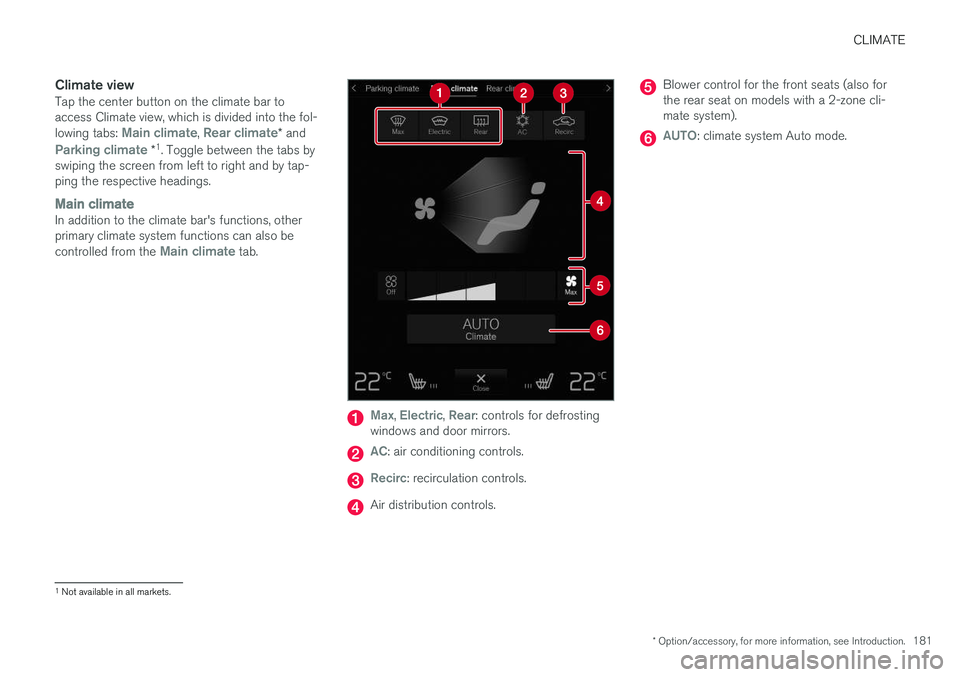
Climate viewTap the center button on the climate bar to access Climate view, which is divided into the fol- lowing tabs:
Main climate, Rear climate* and
Parking climate *1
. Toggle between the tabs by
swiping the screen from left to right and by tap- ping the respective headings.
Main climateIn addition to the climate bar's functions, other primary climate system functions can also be controlled from the
Main climate tab.
Max, Electric, Rear: controls for defrosting
windows and door mirrors.
AC: air conditioning controls.
Recirc: recirculation controls.
Air distribution controls.
Blower control for the front seats (also for the rear seat on models with a 2-zone cli-mate system).
AUTO: climate system Auto mode.
1 Not available in all markets.
Page 184 of 570
CLIMATE
* Option/accessory, for more information, see Introduction.
182
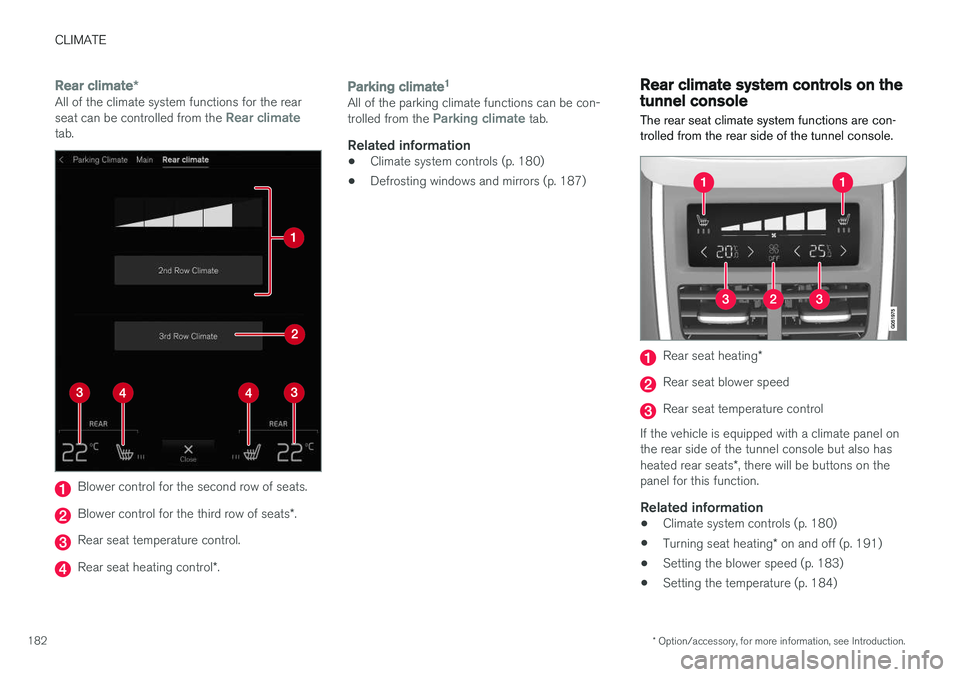
Rear climate *All of the climate system functions for the rear seat can be controlled from the Rear climatetab.
Blower control for the second row of seats.
Blower control for the third row of seats *.
Rear seat temperature control.
Rear seat heating control *.
Parking climate 1All of the parking climate functions can be con- trolled from the Parking climate tab.
Related information
•
Climate system controls (p. 180)
• Defrosting windows and mirrors (p. 187)
Rear climate system controls on the tunnel console
The rear seat climate system functions are con- trolled from the rear side of the tunnel console.
Rear seat heating *
Rear seat blower speed
Rear seat temperature control
If the vehicle is equipped with a climate panel on the rear side of the tunnel console but also has heated rear seats *, there will be buttons on the
panel for this function.
Related information
• Climate system controls (p. 180)
• Turning seat heating
* on and off (p. 191)
• Setting the blower speed (p. 183)
• Setting the temperature (p. 184)
Page 185 of 570
CLIMATE
* Option/accessory, for more information, see Introduction.183
Setting the blower speed The blower can be set to seven different speeds. In models with the 4-zone climate system*,
blower speed can be set separately for the front and rear seats.
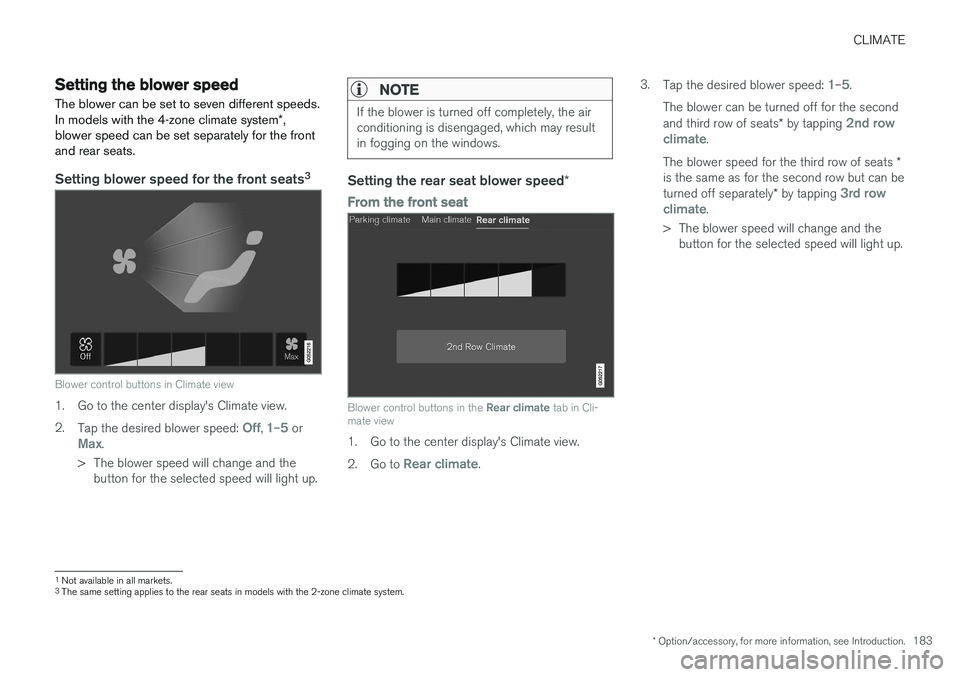
Setting blower speed for the front seats 3
Blower control buttons in Climate view
1. Go to the center display's Climate view. 2.
Tap the desired blower speed:
Off, 1–5 orMax.
> The blower speed will change and the button for the selected speed will light up.
NOTE
If the blower is turned off completely, the air conditioning is disengaged, which may resultin fogging on the windows.
Setting the rear seat blower speed *
From the front seat
Blower control buttons in the Rear climate tab in Cli-
mate view
1. Go to the center display's Climate view. 2. Go to
Rear climate. 3.
Tap the desired blower speed:
1–5.
The blower can be turned off for the second and third row of seats * by tapping
2nd row
climate.
The blower speed for the third row of seats *
is the same as for the second row but can be turned off separately * by tapping
3rd row
climate.
> The blower speed will change and the button for the selected speed will light up.
1Not available in all markets.
3 The same setting applies to the rear seats in models with the 2-zone climate system.