transmission VOLVO XC90 2015 User Guide
[x] Cancel search | Manufacturer: VOLVO, Model Year: 2015, Model line: XC90, Model: VOLVO XC90 2015Pages: 570, PDF Size: 12.44 MB
Page 365 of 570
STARTING AND DRIVING
* Option/accessory, for more information, see Introduction.363
a short distance
(in heavy traffic, etc.) or
when driving down hills .
To help keep fuel consumption as low as possi- ble, Eco Coast should not be used in traffic situa-tions where the brakes have to be used fre-quently.
Activating Eco CoastEco Coast is activated when the accelerator pedal is released completely if:
• Eco is activated
• The gear selector is in
D
• The vehicle's speed is between approxi- mately 25–85 mph (40–140 km/h). Alwaysobserve posted speed limits
• The gradient of a down-slope is less thanapproximately 6%
COASTING will appear in the instrument panel
when Eco Coast is being used.
LimitationsEco Coast is not available if:
• The engine and/or transmission have not reached their normal operating temperature
• Cruise control is activated
• The gear selector is moved from
D to " +/-"
for manual shifting
• The vehicle's speed is not within the25–85 mph (40–140 km/h) range
• The gradient of a down-slope is more thanapproximately 6% •
The steering wheel paddles
* are used for
manual shifting
Deactivating and turning off Eco CoastIn certain situations, it may be advisable to switch off the Eco Coast function, such as:
• When driving down steep hills, in order to uti- lize engine braking
• Prior to passing another vehicle, in order todo so as safely as possible
Deactivating Eco Coast (and reactivating engine braking) can be done in the following ways: • Move the gear selector to the manual "
+/
Page 368 of 570
STARTING AND DRIVING
366•
the road's incline is very steep.
• the hood is opened.
• the transmission has not reached its normal operating temperature.
• driving at high altitude and the engine hasnot reached its normal operating tempera-ture.
• the gear selector is in the manual shiftingposition.
• the ABS brakes have activated.
• hard braking (even if the ABS brakes havenot activated).
• many starts during a short time period havetriggered the starter motor's overheating pro-tection.
• a trailer's electrical system is connected tothe vehicle's electrical system.
The engine does not auto-startIn certain situations or conditions, the engine may not auto-start
after an auto-stop, such as:
• if the driver is not wearing a seat belt
• the gear selector is in the
P position and the
driver's door is open. The engine must be started normally.
The engine auto-starts while the brake
pedal is depressed
In the following situations, the engine will auto-
start even though the brake pedal is depressed: •
condensation forms on the inside of the win-dows.
• the climate system cannot keep the desiredsettings in the passenger compartment.
• electrical current consumption is temporarilyhigh or the main battery's charge is belowthe minimum level.
• the brake pedal is pumped repeatedly.
• the hood is opened.
• the vehicle begins to move or increasesspeed slightly (if the engine auto-stoppedbefore the vehicle was at a standstill).
• the driver's seat belt is unbuckled while the gear selector is in the
D or N positions.
• the gear selector is moved from
D to R or ±.
• the driver's door is opened with the gearselector in
D: an audible signal and a text
message will inform the driver that the igni- tion is on.
WARNING
Do not open the hood if the engine has auto- stopped. The engine could suddenly auto-start. Before opening the hood:
• Switch off the ignition by turning the start knob in the tunnel console toward
STOP.
• Be aware that if the engine has been run- ning, components in the engine compart-ment will be very hot.
Related information
• Using the Start/Stop function (p. 364)
Page 369 of 570
STARTING AND DRIVING
* Option/accessory, for more information, see Introduction.367
Automatic transmission
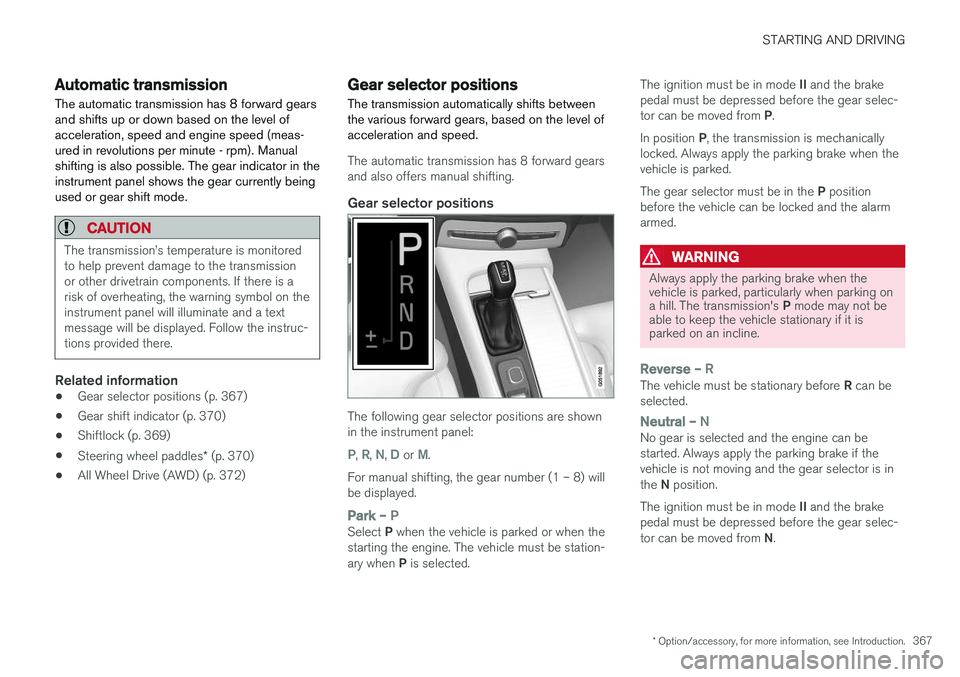
The automatic transmission has 8 forward gears and shifts up or down based on the level ofacceleration, speed and engine speed (meas-ured in revolutions per minute - rpm). Manualshifting is also possible. The gear indicator in theinstrument panel shows the gear currently beingused or gear shift mode.
CAUTION
The transmission
Page 371 of 570
STARTING AND DRIVING
369
Shiftlock The automatic transmission's shiftlock feature helps prevent inadvertently moving the gearselector between different positions.
There are two different types of shiftlock: mechanical and automatic.
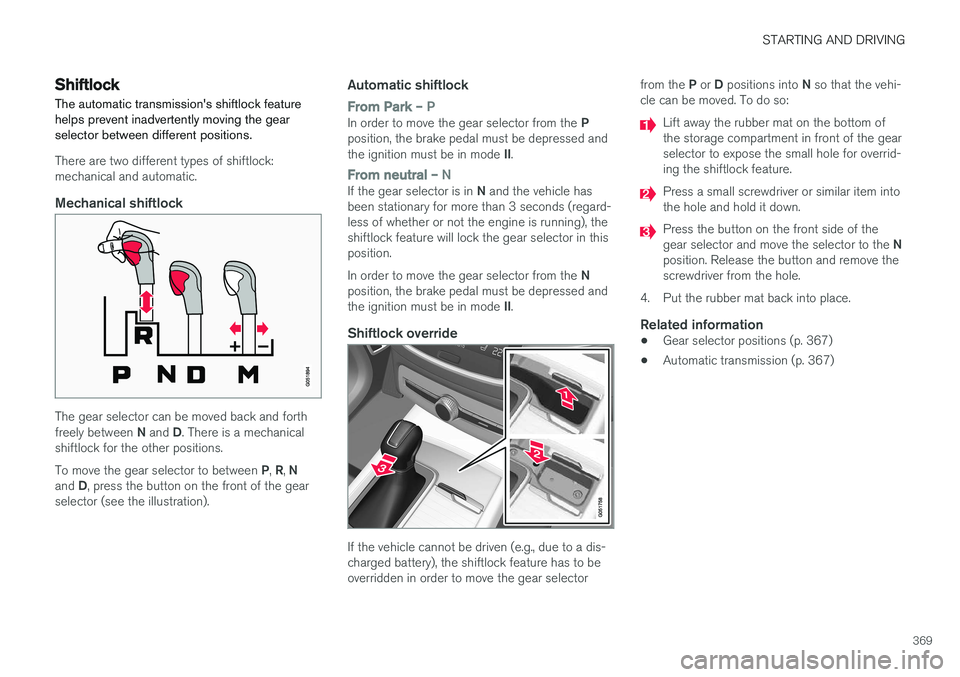
Mechanical shiftlock
The gear selector can be moved back and forth freely between N and D. There is a mechanical
shiftlock for the other positions. To move the gear selector to between P, R , N
and D, press the button on the front of the gear
selector (see the illustration).
Automatic shiftlock
From Park
Page 407 of 570
INFOTAINMENT
405
3.
Select
Install to start downloading the app. It
will remain in the list and a new download can be initiated if necessary.
> Download status will be indicated while it is in progress. A message will be displayed if a download cannot be started immediately. The appwill remain in the list and a new downloadcan be initiated if necessary.
Cancelling (aborting) a download
–Tap Abort to cancel a download that is cur-
rently underway.
Only a download can be cancelled. If the installa-
tion phase has begun, it cannot be interrupted.
Updating appsIf an app is being used while an update is in pro- gress, it will be restarted to complete the update.
Update (install) all1. Open the Remote update service app.
2. Select
Install all.
> The update will begin.
Updating certain apps1. Open the Remote update service app.
2. Select
Application updates to open a list
of available updates.
3. Find the desired app and select
Install.
> The update will begin.
Uninstalling an appAn app being used must be closed before it can be uninstalled. 1. Open the
Remote update service app.
2. Select
Application updates to open a list
of apps that have been installed.
3. Find the desired app and select
Uninstall to
begin uninstalling the app.
> When the app has been uninstalled, it will be removed from the list.
Related information
• Internet connected vehicle (p. 401)
• Media player (p. 393)
• System updates (p. 490)
Internet connection troubleshooting The following are factors that may affect the vehicle's Internet connection.
The amount of data being transmitted depends on the services or apps that are currently in use.For example, streaming audio requires a greatdeal of data to be transmitted, which requires agood connection and a strong signal.
Cell phone to the vehicleConnection speed may vary depending on thelocation of the cell phone in the vehicle. Move thephone closer to the center display to increasesignal strength. Be sure that there are noobstructing/screening objects between thephone and the screen.
Cell phone to the network operatorThe speed of the mobile network may varydepending on coverage/reception in the vehicle'slocation. Reception is generally poorer in tunnels,in mountainous areas, in deep valleys or indoors.Connection speed may also depend on the typeof subscription that you have with the serviceprovider. Contact your service provider in the event of data transmission problems.
Related information
• Internet connected vehicle (p. 401)
• Connecting to the Internet (p. 402)
Page 479 of 570

WHEELS AND TIRES
* Option/accessory, for more information, see Introduction.477
WARNING
Current legislation prohibits the use of the "Temporary Spare" tire other than as a tem-porary replacement for a punctured tire. Itmust be replaced as soon as possible by astandard tire. Road holding and handling maybe affected with the "Temporary Spare" inuse. Do not exceed 50 mph (80 km/h).
CAUTION
The vehicle must not be driven with wheels of different dimensions or with a spare tire otherthan the one that came with the vehicle. Theuse of different size wheels can seriouslydamage your car's transmission.
CAUTION
The vehicle must never be driven with more than one temporary spare wheel.
The spare tire is located under the floor of the cargo compartment. A retaining bolt holds thespare tire and foam block containing tools inplace.
Accessing the spare tire1. Lift the rear edge of the cargo compartment
floor.
2. Unscrew the retaining bolt.
3. Lift out the foam block holding the tools. 4. Lift out the spare tire.
Related information
•
Changing tires (p. 475)
• Removing a wheel (p. 478)
• Wheel bolts (p. 477)
• Checking tire inflation pressure (p. 473)
Wheel bolts
The wheel bolts hold the wheel in place.
CAUTION
Wheel bolts should be tightened to 103 ft. lbs. (140 Nm). Over-tightening could damagethe threads.
Only use wheels/rims that have been tested and approved by Volvo and are included in Volvo'sproduct range. Use a torque wrench to checkthat the wheel bolts are tightened correctly.
Locking wheel bolts *A tool for removing locking wheel bolts can befound in the foam block under the cargo com-partment floor.
Related information
•Changing tires (p. 475)
• Installing a wheel (p. 479)
Page 495 of 570
MAINTENANCE AND SERVICING
493
9. One day prior to your appointment, you will
receive a reminder via email and a message will appear on the center display.
10. On the day of your appointment, a reminder will appear again on the center display.
Viewing your appointments on the center display
When the vehicle has received information about an appointment, a message will appear on thecenter display.
–Tap the message to see the appointment details.
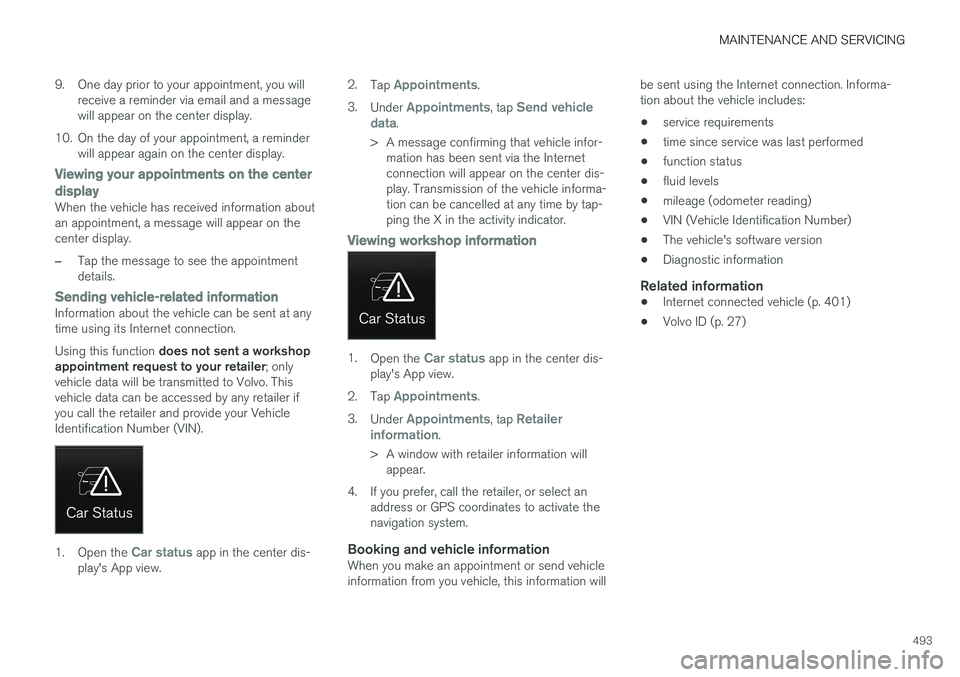
Sending vehicle-related informationInformation about the vehicle can be sent at any time using its Internet connection. Using this function does not sent a workshop
appointment request to your retailer ; only
vehicle data will be transmitted to Volvo. This vehicle data can be accessed by any retailer ifyou call the retailer and provide your VehicleIdentification Number (VIN).
1. Open the Car status app in the center dis-
play's App view. 2.
Tap
Appointments.
3. Under
Appointments, tap Send vehicle
data.
> A message confirming that vehicle infor- mation has been sent via the Internet connection will appear on the center dis-play. Transmission of the vehicle informa-tion can be cancelled at any time by tap-ping the X in the activity indicator.
Viewing workshop information
1. Open the Car status app in the center dis-
play's App view.
2. Tap
Appointments.
3. Under
Appointments, tap Retailer
information.
> A window with retailer information will appear.
4. If you prefer, call the retailer, or select an address or GPS coordinates to activate the navigation system.
Booking and vehicle informationWhen you make an appointment or send vehicleinformation from you vehicle, this information will be sent using the Internet connection. Informa-tion about the vehicle includes:
• service requirements
• time since service was last performed
• function status
• fluid levels
• mileage (odometer reading)
• VIN (Vehicle Identification Number)
• The vehicle's software version
• Diagnostic information
Related information
•Internet connected vehicle (p. 401)
• Volvo ID (p. 27)
Page 505 of 570

MAINTENANCE AND SERVICING
* Option/accessory, for more information, see Introduction.503
FunctionA
––
Horn20
Alarm siren*5
Brake system control module (valves, parking brake)40
Windshield wipers30
Tailgate window washer25
Heated windshield *, passenger
side40
––
Brake system control module (ABS pump)40
––
Heated windshield *, passenger
sideShunt
Feed when ignition is switched on to: engine control module,transmission components, elec-trical power steering, centralelectrical module; Brake system control module5
FunctionA
––
Passenger side headlight7.5
––
––
Battery connections control module5
Air bags; Occupant Weight Sen- sor (OWS)5
Driver side headlight7.5
Accelerator pedal sensor5
Transmission control module15
Engine control module5
––
––
––
––
Engine control module; Turbo- charger valve20
FunctionA
Solenoids; Valves; Engine cool- ing system thermostat10
Vacuum regulators; Coolant fan relay winding; Valve7.5
Spoiler shutter control module; Radiator shutter control module;Fuel leakage detection5
––
Heated oxygen sensors (front and rear)15
Oil pump solenoid; A/C mag- netic coupling; heated oxygensensor (center)15
Crankcase ventilation heater7,5
Engine control module20
Ignition coil; Spark plugs15
--
––
--
--
--
Page 548 of 570
SPECIFICATIONS
546
Transmission fluid specification and volume
Under normal driving conditions the transmission fluid does not need to be changed during itsservice life. However, it may be necessary underadverse driving conditions.
Transmission: TG-81SC Specification: Transmission fluid AW-1
Page 566 of 570
564Trailer towing 351, 354
trailer hitch 353
Transmission gear shift indicator 370
general description 367
Hill Start Assist 335
oil 546
shifting with steering wheel paddles 370
shiftlock override 369
Tread wear indicator 471
Trip computer 92, 94 reset 92
Trip odometers 92
Trips, long distance 339
Trip statistics 94Troubleshooting Sensus Navigation 462
Turn signals 148 changing bulbs 514
U
Uniform Tire Quality Grading 472
Unlocking the tailgate 233
Unlocking the vehicle 231, 232
USB/AUX connection 393, 397
User profile 112
V
Vehicle Event Data 26
Vehicle information 14
Vehicle loading 207, 471
Vehicle maintenance 488
performed by the owner 488
Vehicle status 491
Vehicle weights 539Voice control cell phones 121
giving commands 121
introduction 120
multimedia devices 122
radio 122
settings 125
Volvo and the environment 15
Volvo ID 27
Volvo maintenance 488Volvo On Call areas of availability 422
convenience services 416
personal information 420
PIN code 418
remote door unlock 426
safety services 424, 425
security services 425
using 414
Volvo On Call Roadside Assistance 14
Volvo On Call with Sensus Connect 414, 415
Volvo programs 14
W
Warning flashers, hazard 144
Warning lights 134
Warning system, collision 274
Warranties 488
Washer fluid 524Washers headlight 156
windshield 154
Water, driving through 340
Waxing 531Weights trailer 351
Wheels changing 475, 478
storing 467
Whiplash Protection System 89
Wi-Fi 406, 407