flat tire VOLVO XC90 2015 Owner's Manual
[x] Cancel search | Manufacturer: VOLVO, Model Year: 2015, Model line: XC90, Model: VOLVO XC90 2015Pages: 570, PDF Size: 12.44 MB
Page 479 of 570

WHEELS AND TIRES
* Option/accessory, for more information, see Introduction.477
WARNING
Current legislation prohibits the use of the "Temporary Spare" tire other than as a tem-porary replacement for a punctured tire. Itmust be replaced as soon as possible by astandard tire. Road holding and handling maybe affected with the "Temporary Spare" inuse. Do not exceed 50 mph (80 km/h).
CAUTION
The vehicle must not be driven with wheels of different dimensions or with a spare tire otherthan the one that came with the vehicle. Theuse of different size wheels can seriouslydamage your car's transmission.
CAUTION
The vehicle must never be driven with more than one temporary spare wheel.
The spare tire is located under the floor of the cargo compartment. A retaining bolt holds thespare tire and foam block containing tools inplace.
Accessing the spare tire1. Lift the rear edge of the cargo compartment
floor.
2. Unscrew the retaining bolt.
3. Lift out the foam block holding the tools. 4. Lift out the spare tire.
Related information
•
Changing tires (p. 475)
• Removing a wheel (p. 478)
• Wheel bolts (p. 477)
• Checking tire inflation pressure (p. 473)
Wheel bolts
The wheel bolts hold the wheel in place.
CAUTION
Wheel bolts should be tightened to 103 ft. lbs. (140 Nm). Over-tightening could damagethe threads.
Only use wheels/rims that have been tested and approved by Volvo and are included in Volvo'sproduct range. Use a torque wrench to checkthat the wheel bolts are tightened correctly.
Locking wheel bolts *A tool for removing locking wheel bolts can befound in the foam block under the cargo com-partment floor.
Related information
•Changing tires (p. 475)
• Installing a wheel (p. 479)
Page 480 of 570

WHEELS AND TIRES
* Option/accessory, for more information, see Introduction.
478
Removing a wheel
Wheel changes should always be carried out correctly.
1. Turn on the hazard warning flashers if the wheel change has to be done near passing traffic.
2. Apply the parking brake and put the gear selector in P.
CAUTION
Models with suspension and level con- trol *:
Turn this function off before raising the vehi- cle. To do so, go to
SettingsVehicleDisable Suspension & Leveling Control in
the center display's Top view.
WARNING
• The jack must correctly engage the jack attachment.
• Be sure the jack is on a firm, level, non-slippery surface.
• Never allow any part of your body to beextended under a vehicle supported by ajack.
• Use the jack intended for the vehicle whenchanging a tire. For any other job, usestands to support the vehicle.
• Apply the parking brake and put the gear selector in the Park (
P) position.
• Block the wheels standing on the ground, use rigid wooden blocks or large stones.
• The jack should be kept well-greased andclean, and should not be damaged.
• No objects should be placed between thebase of jack and the ground, or betweenthe jack and the attachment bar on thevehicle.
NOTE
The jack provided with your vehicle is intended to be used only in temporary situa-tions such as changing wheels in the event ofa flat tire. Only the jack that came with yourparticular model should be used to lift thevehicle. If the vehicle needs to be lifted morefrequently or for a prolonged period, using agarage jack or hoist is recommended. Alwaysfollow this device
Page 482 of 570

WHEELS AND TIRES
480
CAUTION
•After inflating the tires, always reinstall the valve cap to help avoid damage to thevalve from dirt, gravel, etc.
• Use plastic valve caps only. Metal capscould corrode and become difficult toremove.
Related information
• Wheel bolts (p. 477)
• Jack (p. 476)
Tire Pressure Monitoring System (TPMS) TPMS provides a warning if inflation pressure in one or more tires is too low. It also uses a sym-bol (called a telltale) that will flash for60 seconds and then glow steadily if there is asystem malfunction.
TPMS uses sensors mounted in the tire valves to check inflation pressure levels. When the vehicleis moving at a speed of approximately 20 mph(30 km/h) or faster, these sensors transmit infla-tion pressure data to a receiver located in thevehicle. If inflation pressure is too low, an indica-tor symbol will illuminate in the instrument paneland a text message will be displayed.
SymbolExplanation
The symbol illuminates to indicate low tire inflation pressure. If a malfunction occurs in the sys- tem, the tire pressure warning sym-bol will flash for approximately1 minute and then remain illumi-nated.
Each tire, including the spare (if provided), should be checked monthly when cold and inflated tothe inflation pressure recommended by the vehi-cle manufacturer on the vehicle placard or tireinflation pressure label. (If your vehicle has tires of a different size than the size indicated on thevehicle placard or tire inflation pressure label, youshould determine the proper tire inflation pres-sure for those tires.) As an added safety feature, your vehicle has been equipped with a tire pressure monitoringsystem (TPMS) that illuminates a low tire pres-sure telltale when one or more of your tires issignificantly under-inflated. Accordingly, when thelow tire pressure telltale illuminates, you shouldstop and check your tires as soon as possible,and inflate them to the proper pressure. Driving on a significantly under-inflated tire cau- ses the tire to overheat and can lead to tire fail-ure. Under-inflation also reduces fuel efficiencyand tire tread life, and may affect the vehicle'shandling and stopping ability. Please note thatthe TPMS is not a substitute for proper tire main-tenance, and it is the driver's responsibility tomaintain correct tire pressure, even if under-infla-tion has not reached the level to trigger illumina-tion of the TPMS low tire pressure telltale. Your vehicle has also been equipped with a TPMS malfunction indicator to indicate when thesystem is not operating properly. The TPMS mal-function indicator is combined with the low tirepressure telltale. When the system detects a malfunction, the tell- tale will flash for approximately one minute andthen remain continuously illuminated. Thissequence will continue upon subsequent vehicle
Page 483 of 570

WHEELS AND TIRES
481
start-ups as long as the malfunction exists. When the malfunction indicator is illuminated, the sys-tem may not be able to detect or signal low tirepressure as intended. TPMS malfunctions may occur for a variety of reasons, including the installation of replacementor alternate tires or wheels on the vehicle thatprevent the TPMS from functioning properly.Always check the TPMS malfunction telltale afterreplacing one or more tires or wheels on yourvehicle to ensure that the replacement or alter-nate tires and wheels allow the TPMS to con-tinue to function properly.
Messages in the instrument panelWhen the TPMS symbol illuminates, the following text messages may also be displayed:
•
Tire pressure low: the tire(s) affected will
also be specified.
•
Tire needs air now: the tire(s) affected will
also be specified.
•
Tire pressure system Service required.
If TPMS cannot determine which tire(s) have low inflation pressure, general messages may be dis-played, such as:
•
Tire pressure low Check tires
•Tire needs air now Check tires
TPMS sensors can be installed on the valve hole area, on the factory-installed wheels as well as onoptional ones. If a spare wheel or other wheel without a TPMS sensor is used, a fault message will appear in theinstrument panel after driving for a few minutes. After changing wheels, always check that the new wheels have TPMS sensors to avoid a sys-tem malfunction warning. TPMS does not replace the need for regular tire inspection and maintenance.
RecommendationsTPMS sensors should be mounted on all wheelsused with the vehicle, including winter wheels.
NOTE
• If you change to tires with a different dimension than the factory-installed ones,the TPMS system must be reconfiguredfor these tires. This must be done by atrained and qualified Volvo service techni-cian.
• If a tire is changed, or if the TPMS sensoris moved to another wheel, the rubbervalve and valve core should be replaced.
• When installing TPMS sensors, the vehi-cle must be parked for at least15 minutes with the ignition off. If thevehicle is driven within 15 minutes, aTPMS error message will be displayed.
WARNING
Incorrect inflation pressure could lead to tire failure, resulting in a loss of control of thevehicle.
Turning TPMS off 4TPMS can be turned off in the center display's Top view.
1. Park the vehicle and turn off the engine.2.
Activate ignition mode I.
4
Certain markets only.
Page 484 of 570
WHEELS AND TIRES
4823.
Select
SettingsMy CarIntelliSafe
Tire Pressure Monitor in the Top view
and deselect (tap) the button.
> The function will remain off until it is reac- tivated.
Related information
• Checking inflation pressure (p. 482)
• Reinflating tires equipped with the Tire Pressure Monitoring System (TPMS)(p. 483)
• Tire Pressure Monitoring System type appro-val (p. 484)
• Ignition modes (p. 355)
Checking inflation pressure The Tire Pressure Monitoring System makes it possible to view the current inflation pressure ofall four tires.
Checking inflation pressure
Open the Car status app in
the center display's Application view. Tap
Status to see the
current inflation pressure of all four tires.
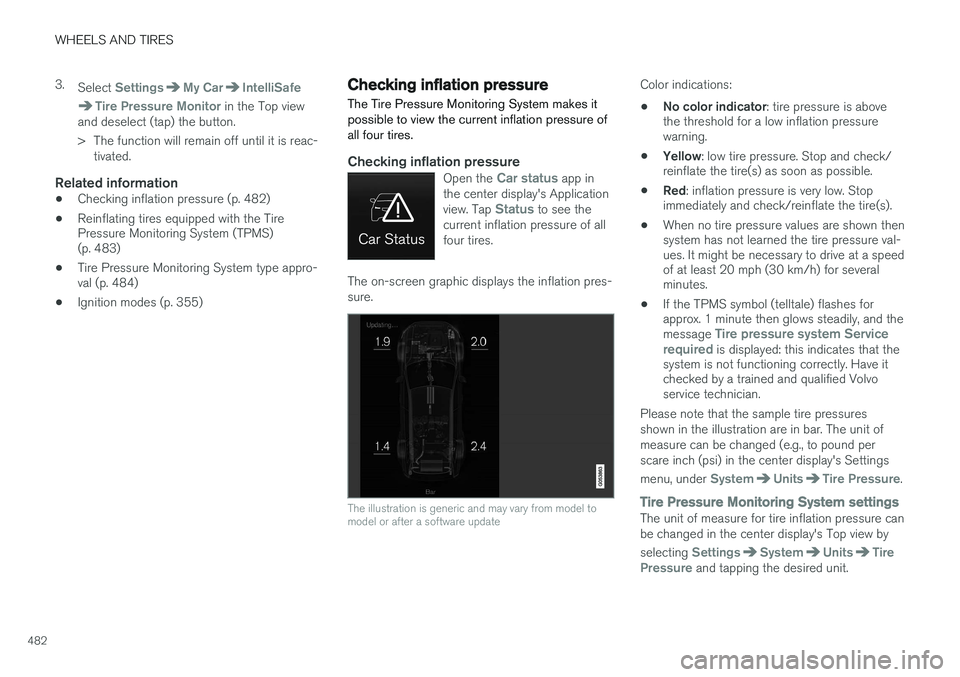
The on-screen graphic displays the inflation pres- sure.
The illustration is generic and may vary from model to model or after a software update
Color indications:
• No color indicator
: tire pressure is above
the threshold for a low inflation pressure warning.
• Yellow
: low tire pressure. Stop and check/
reinflate the tire(s) as soon as possible.
• Red
: inflation pressure is very low. Stop
immediately and check/reinflate the tire(s).
• When no tire pressure values are shown thensystem has not learned the tire pressure val-ues. It might be necessary to drive at a speedof at least 20 mph (30 km/h) for severalminutes.
• If the TPMS symbol (telltale) flashes forapprox. 1 minute then glows steadily, and the message
Tire pressure system Service
required is displayed: this indicates that the
system is not functioning correctly. Have it checked by a trained and qualified Volvoservice technician.
Please note that the sample tire pressures shown in the illustration are in bar. The unit ofmeasure can be changed (e.g., to pound perscare inch (psi) in the center display's Settings menu, under
SystemUnitsTire Pressure.
Tire Pressure Monitoring System settingsThe unit of measure for tire inflation pressure can be changed in the center display's Top view by selecting
SettingsSystemUnitsTire
Pressure and tapping the desired unit.
Page 485 of 570

WHEELS AND TIRES
483
Related information
•Calibrating the Tire Pressure Monitoring System (TPMS) (p. 484)
• Reinflating tires equipped with the TirePressure Monitoring System (TPMS)(p. 483)
• Tire Pressure Monitoring System (TPMS)(p. 480)
Reinflating tires equipped with the Tire Pressure Monitoring System(TPMS) When low tire pressure has been detected, a message will be displayed in the instrumentpanel and the Tire Pressure Monitoring Systemsymbol will illuminate.
SymbolExplanation
Check and reinflate the tire(s) when the TPMS symbol illuminatesand a message is displayed.
1. Use a tire pressure gauge to check the infla-
tion pressure of the under-inflated tire(s).
2. Re-inflate the tire(s) to the correct pressure (consult the tire pressure placard located on the driver's side B-pillar (the structural mem-ber at the side of the vehicle, at the rear ofthe driver's door opening).
3. In some cases, it may be necessary to drive the vehicle for several minutes at a speed ofat least 20 mph (30 km/h) to erase theTPMS telltale warning and the text message.Please be aware that the TPMS telltalewarning will not go out until the low tire pres-sure has been corrected.
NOTE
To help avoid incorrect tire inflation pressure, if possible only inflate the tires when they arecold. The tires are considered to be coldwhen they have the same temperature as thesurrounding (ambient) air. This temperature isnormally reached after the vehicle has beenparked for at least 3 hours. After driving a dis-tance of approximately 1 mile (1.6 km), thetires are considered to be warm.
CAUTION
When inflating tires with TPMS sensors, press the pump's mouthpiece straight onto thevalve to help avoid bending or otherwise dam-aging the valve.
CAUTION
• After inflating the tires, always reinstall the valve cap to help avoid damage to thevalve from dirt, gravel, etc.
• Use plastic valve caps only. Metal capscould corrode and become difficult toremove.
Page 486 of 570

WHEELS AND TIRES
484
WARNING
•Incorrect inflation pressure could lead to tire failure, resulting in a loss of control ofthe vehicle.
• Tire monitoring systems cannot indicatesudden tire damage caused by externalfactors (e.g., a blowout) in advance.
Related information
•
Tire Pressure Monitoring System (TPMS)(p. 480)
• Checking inflation pressure (p. 482)
Calibrating the Tire Pressure Monitoring System (TPMS) 6
In certain situations, a text pertaining to calibra- tion requirements may appear in the center dis-play. This text is generic and does not apply
to North American models .Tire Pressure Monitoring System type approval
NOTE
USA FCC ID: MRXVHSS4 Canada IC:2546A-VHSS4 M :VHSS4This device complies with part 15 of the FCC rules and with licence exempt RSS standardsof Industry Canada. Operation is subject to the following condi- tions: (1) This device may not cause harmful inter- ference, and (2) this device must accept any interference received, including interference that maycause undesired operation.
6
Certain markets only.
Page 493 of 570
MAINTENANCE AND SERVICING
491
Remote updates With the vehicle connected to the Internet, updates for a number of the vehicle's systemscan be downloaded from the center display.
The Remote updates app is
started from the center dis- play's App view and makes itpossible to:
• search for and update system software
• update the Sensus Navigation maps
• download, update and uninstall apps
Related information
•Downloading, updating and uninstalling apps (p. 404)
• System updates (p. 490)
• Map updates with MapCare (p. 456)
Vehicle status
The vehicle's general status can be displayed in the center display along with the possibility to book service 1
The Car status app is started
in the center display's App view and has three tabs:
•Messages: stored messages
•
Status: tire pressure and engine oil level
•
Appointments: booking service or repairs 1
Related information
•
Using the center display (p. 46)
• Booking service and repairs (p. 491)
• Checking inflation pressure (p. 482)
• Checking and refilling engine oil (p. 521)
Booking service and repairs Connected Service Booking (CSB) makes it possible to use the vehicle's Internet connectionto set up a time for service, maintenance and/orrepairs.
The information is handled through the Car
status app, which can be opened from the cen-
ter display's App view. Information about your vehicle is sent to your retailer, who will contact you to make a workshopappointment. The system will also send areminder as the appointment approaches and theSensus Navigation system will provide directionsto the workshop if necessary. This feature makes it convenient to book a work- shop appointment directly from your vehicle.Vehicle-related information is sent to yourretailer, who prepares your visit to the workshop.The retailer will send you an email with a link tothe Volvo On-Line Service Scheduler where youcan book a workshop appointment at a conven-ient time. Information about your retailer is alsoavailable in the vehicle so that you can contactthe retailer/workshop at any time.
1 Certain markets only.
Page 519 of 570
MAINTENANCE AND SERVICING
517
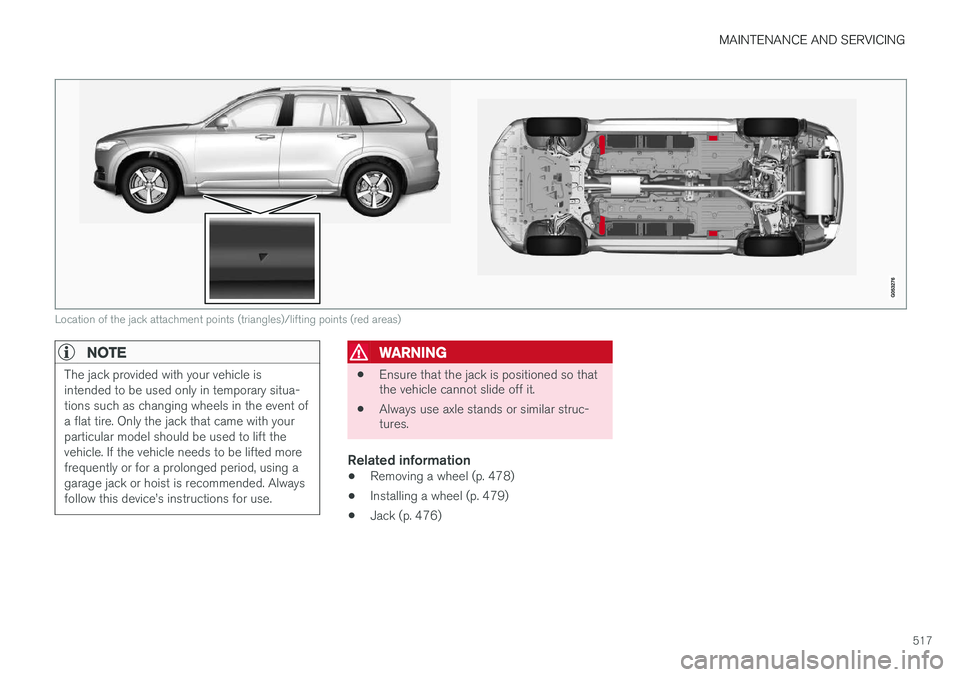
Location of the jack attachment points (triangles)/lifting points (red areas)
NOTE
The jack provided with your vehicle is intended to be used only in temporary situa-tions such as changing wheels in the event ofa flat tire. Only the jack that came with yourparticular model should be used to lift thevehicle. If the vehicle needs to be lifted morefrequently or for a prolonged period, using agarage jack or hoist is recommended. Alwaysfollow this device
Page 536 of 570
SPECIFICATIONS
534
Label information
The labels in your vehicle provide information such as the chassis number, paint code, tireinflation pressure, etc.